2020 AUDI A5 roof
[x] Cancel search: roofPage 4 of 302

Table of contents
About this Owner's Manual......
SUMIMALY: ; « ss6% : osen ss sean cs poe s
QC CCeS Skis: si esis a 6 ores os ewe
Cockpit... 2... ee eee eee eee
Indicator lights overview...........0.
Display and operation............
Instrument cluster...............
Instrument cluster overview...........
Operating. ecco ws swacemn o © aero o erm 9
Adjusting the display.................
Coolant temperature display...........
Tachometer’. series s ewie so sie ¥ & overs
Odometer............ 0. cee eee eee eee
Outside temperature display...........
Engine oil temperature indicator.......
Boost indicator...............0--000-
Vehicle TuNCtiONnS ¢ ssc. ss sees ge eeew ge
Touch display.....................
General touch display operation........
Multi Media Interface................
Head-up display..................
DeSériptlonis ss wees « x wees so eee + ee
Voice recognition system........
Generalinformation.................
Operating’ « esses ss assur wx aeuew sv ewe &
External voice operation..............
Global FuUNCtiONS:. icc: 6 6 ese. 6 6 ces
Additional function buttons...........
Starting and driving.............
Personalization..................
Opening and closing.............
Central locking........-.....00-e eee
Child safety lock.............00.-0 08
Power Wind OwWSics «seus ys sms 5 4 wee
Panoramic glass roof.................
Valet parking...............00 eee eee
Garage door opener..........--..0005
NOD
OO
13
16
16 18
20
23
24 24 24
25
26
26
27 27 27 30 30
34
36
40
Al 42 43
Power tapi... «cones 0 6 soma ye eas ao ee 47
Automatic power top............-.05. 47
Wine GeRect6r « sews « 2 mean
Lights and Vision................. 54
Exterior lighting « ssscs< <2 coos 2 eeeme + aes 54
Tmterior UQhting)ecoo 6. secre» «scones 6 + euniece 58
VISION... ke eee eee 60
Windshield wipers................... 61
Digital compass............... 000 eee 64
Sitting correctly and safely...... 66
Correct passenger seating position...... 66
Front seatS 1.2... . 0. e eee eee ee eee 66
Steering WHEEL sw: s x newes 4 « eeu ee ane 70
Head restraintstr «+ cscs x a asteine vo owen © 71
Safety belts......... 0.0.0 e eee eee 72
Memory function's + asx «wees « eee a 75
Airbag system sian «+ suc oo sewn « 5 wees 76
Child
safety seats.............2..000- 81
Stowing and using............... 88
POWERSOUNGES serene = © vienna 9 1 anecene a enewane 88
Cup holders...........-..00 0.000 eee 88
Storage areas and compartments....... 88
Luggage compartment............... 89
Roof rack... ee eee eee eee 93
Warrmitanma colada: sé ccc 6 sonia 6 6 avs 95
Climate control system............... 95
3-zone deluxe automatic climate control. 96
Steering wheel heating............... 99
Fluids in the A/C system.............. 99
IMIR. 5 scscess 5 ames 3 & mam 8 BIW & oH 100
Starting the vehicle...............0.. 100
WHeNMOFIVING a + s eens + ¢ cates ¢ o eee Te: 101
Drive SYSTEM Mises so sce so oem oo cee 9 BU 106
Start/Stop system.............0 ee eee 107
Brakes... 2.2.0.0... cece eee ee eee 109
Electromechanical parking brake....... 110
Special driving situations.............. 112
Driving dynamic.................. 114
Audi driverselectis « ase «+ cana 2 0 marine a ove 114
Suspension..............0 0.00.0 000. 114
Steering « sce ss coun se sees gz eee ge ee 115
Page 26 of 302

Voice recognition system
Voice recognition system
General information
Applies to: vehicles with voice recognition system
You can operate many functions in the vehicle
easily using voice commands.
Using the voice recognition system optimally
> Speak clearly and distinctly at a normal volume.
Speak louder when driving faster.
> Emphasize the words in the commands evenly
and do not leave long pauses.
> Close the doors, the windows, and the sunroof*
to reduce background noise. Make sure that
passengers are not speaking when you are giv-
ing a voice command.
> Do not direct the vents toward the hands-free
microphone, which is in the roof headliner near
the front interior lights.
> Only the driver should speak to the system, be-
cause the handsfree microphone is aimed to-
ward this seating position.
ZA\ WARNING
— Direct your full attention to driving. As the
driver, you have complete responsibility for
safety in traffic. Only use the functions in
such a way that you always maintain com-
plete control over your vehicle in all traffic
situations.
— Do not use the voice recognition system in
emergencies because your voice may change
in stressful situations. The system may take
longer to dial the number or may not be
able to dial it at all. Dial the emergency
number manually.
G) Tips
There are no voice guidance* prompts when a
dialog is active.
24
Operating
Applies to: vehicles with voice recognition system
See
Dat)
Where is a
Connect
Diala
coy
Es
ea
cog
Fig. 20 Center display: voice recognition system
Switching the voice recognition system on or
off
Requirement: the ignition and the MMI must be
switched on. A system language supported by
the voice recognition system must be set. There
must be no phone calls in progress and the park-
ing aid must not be active.
> To switch the voice recognition system on,
briefly press the «€ button on the multifunction
steering wheel, or depending on the context,
press ¢ in the center display.
> To switch the voice recognition system off,
press and hold the « button on the multifunc-
tion steering wheel, or say or press Cancel (4).
Using the voice recognition system
In the voice recognition system menu, possible
commands or help settings are displayed for the
current dialog @).
> Say the desired command after the signal tone.
> To receive additional help for the current dia-
log, say or press Help (2).
> To pause voice recognition, say or press Pause
@. To reactivate voice recognition, press (@)
again or briefly press the «€ button on the mul-
tifunction steering wheel.
> Applies to: MMI: Select on the home screen:
SETTINGS > General > Speech dialog system >
Allow commands during voice output. If the
function is switched on, you can simply say a
new command during a prompt.
Activating the online recognizer
Applies to: vehicles with online recognizer
You can activate the online recognizer for addi-
tional functions and to improve the results of >
Page 33 of 302

Opening and closing
8W7012721BA
@) Note Tati ma Reciee lela aate Rest)
The following applies when locking the vehi- You can adjust the central locking system to your
cle: preferences. The settings depend on the vehicle
— If the vehicle key that was last used is de- equipment.
tected inside the passenger compartment,
then the vehicle cannot be locked from the
outside using the sensor. Take the vehicle
key with you and lock the vehicle again. Oth-
erwise, the vehicle will not be protected Door unlocking
against unauthorized access.
— If you try to lock the vehicle using the but-
ton on the vehicle key while the front pas-
senger's or rear door is open, and you acci-
dentally place the key inside the passenger
compartment and close the door, the vehi-
cle will lock at first. But if the keyless sys-
tem detects a vehicle key inside the vehicle
after it locks, then the vehicle will unlock
again. The turn signals will flash several
times to indicate this. If you do not open
the vehicle to remove the vehicle key within
a brief period, then the vehicle will lock au- The entire vehicle will always be locked when you
tomatically. This prevents the vehicle from press the f@ button.
being left unlocked for long periods of time.
The key will then be locked inside the vehi-
> Applies to: MMI: Select on the home screen:
VEHICLE > Settings & Service > Central lock-
ing.
—If you select All, all doors and the luggage
compartment lid will be unlocked when unlock-
ing the vehicle.
— If you select Driver's door, only the driver's
door will be unlocked. To unlock all doors and
the luggage compartment lid, press the & but-
ton on the vehicle key twice. In vehicles with a
convenience key*, only the driver's door will un-
lock when you pull the driver's door handle. If
you pull another door handle, the entire vehicle
will be unlocked.
Long press to open windows
cle. You can select if all windows and the panoramic
— If the luggage compartment lid closes and glass roof* should open using the vehicle key
the system detects that the last vehicle key > page 42, Convenience opening and closing. If
that was used is inside the luggage com- you press and hold the & button on the vehicle
partment, then the luggage compartment key, all of the windows and the panoramic glass
lid will open again. The turn signals will roof* will close.
flash several times to indicate this. The
. . Disable rear lid handle
doors will lock. Always take the vehicle key
with you, or unauthorized persons may be You can select if the luggage compartment lid
able to enter the vehicle. can open with the handle. If you activate this
function, the luggage compartment lid can only
@ Tips be opened with the <3 or 4s button on the vehi-
cle key or in the driver's door. In vehicles with a
convenience key*, you can still open the luggage
compartment lid using the handle if an author-
ized convenience key is detected > page 36.
— Do not leave valuables unattended in the ve-
hicle. A locked vehicle is not a safe!
—The LED in the driver's door rail blinks when
you lock the vehicle. If the LED turns on for
approximately 30 seconds after locking, Fold mirrors
there is a malfunction in the central locking
system. Have the problem corrected by an
authorized Audi dealer or authorized Audi
Service Facility.
You can select if the exterior mirrors automatical-
ly fold in when locking. >
31
Page 36 of 302

Opening and closing
@ Tips
The interior/towing protection monitoring on-
ly functions correctly when the windows and
the roof* are closed.
RAZ-0720
Fig. 26 Your vehicle key set
@ Vehicle key
You can unlock and lock your vehicle with the ve-
hicle key.
@ Mechanical key and release buttons for
the mechanical key
A mechanical key is integrated in the vehicle key.
To remove it, press the release button and re-
move the mechanical key.
Using the mechanical key, you can:
— Applies to: vehicles with lockable glove com-
partment: locking/unlocking the glove com-
partment.
— Manually unlock and lock the doors > page 32.
— Applies to: sedan with locking backrests: Lock-
ing and unlocking the backrest > page 91.
— Unlock the luggage compartment lid using the
emergency release > page 40.
@® Key fob with vehicle code
Applies to: vehicles with Audi connect vehicle control
Open the key tag and scratch to reveal the vehicle
code. You can unlock the Audi connect vehicle
control services* for your vehicle with this vehicle
code. For additional information, see
= page 178. If a key fob is lost, contact an au-
34
thorized Audi dealer or authorized Audi Service
Facility.
@ PANIC button
In an emergency, you can press the PANIC button
to trigger the alarm for the anti-theft alarm sys-
tem. The vehicle horn and emergency flashers
will turn on if you trigger the alarm.
PANIC —To trigger the alarm, press the but-
ton @) & fig. 26.
—To turn the alarm off, press the red
ton again.
PANIC but-
Lost key/replacing a key
If a vehicle key is lost, contact an authorized Audi
dealer or authorized Audi Service Facility. Have
this vehicle key deactivated. It is important to
bring all keys with you.
If a key is lost, you should report it to your insur-
ance company.
Electronic immobilizer
The immobilizer prevents unauthorized use of
the vehicle.
In some cases, it may not be possible to start the
vehicle if there is a vehicle key from a different
vehicle manufacturer on the key chain.
Data in the vehicle key
When driving, service and maintenance-relevant
data is continuously stored in your vehicle key. An
authorized Audi dealer or authorized Audi Service
Facility can read out this data and tell you about
the work your vehicle needs.
ZA\ WARNING
Follow the safety precautions > page 30.
@) Note
Protect the key against high temperatures
and direct sunlight.
@) For the sake of the environment
XX Do not dispose of vehicle keys in household
trash. They contain materials that can be re-
cycled. Contact an authorized Audi dealer or >
Page 43 of 302
8W7012721BA
Opening and closing
the driver's door @ that corresponds to that
rear door > fig. 35. The indicator light in the
button turns on/blinks.
> Make sure the child safety lock is working by
checking the function on the rear power win-
dow switch and door handle.
Vehicles with button
Applies to: vehicles with manual child safety lock
> To activate or deactivate the child safety lock
for the power window switch in the rear doors,
press the & button in the driver's door @)
> fig. 35. The indicator light in the button turns
on/blinks.
> To activate or deactivate the manual child safe-
ty lock for the rear door handle, open the re-
spective rear door and turn the key switch with
the mechanical key in the direction of the arrow
or opposite the direction of the arrow > fig. 36.
This will disable the function of the rear door
handle.
> Make sure the child safety lock is working by
checking the function on the rear power win-
dow switch and door handle.
Applies to: vehicles with power child safety locks:
It is not possible to operate the rear climate con-
trol system* when the child safety lock is activat-
ed. The SET REAR function allows you to adjust
all settings in the rear using the climate control
system controls in the cockpit.
Message in the instrument cluster display
@/8 Childproof catch: malfunction! Please
contact Service
There is a malfunction in the child safety lock.
Press the @/ & button again.
If the message stays on, drive immediately to an
authorized Audi dealer or authorized Audi Service
Facility to have the malfunction repaired.
Z\ WARNING
— Follow the safety precautions > page 30.
—A malfunction in the child safety lock could
allow
the rear doors to be opened from the
inside, which increases the risk of an acci-
dent.
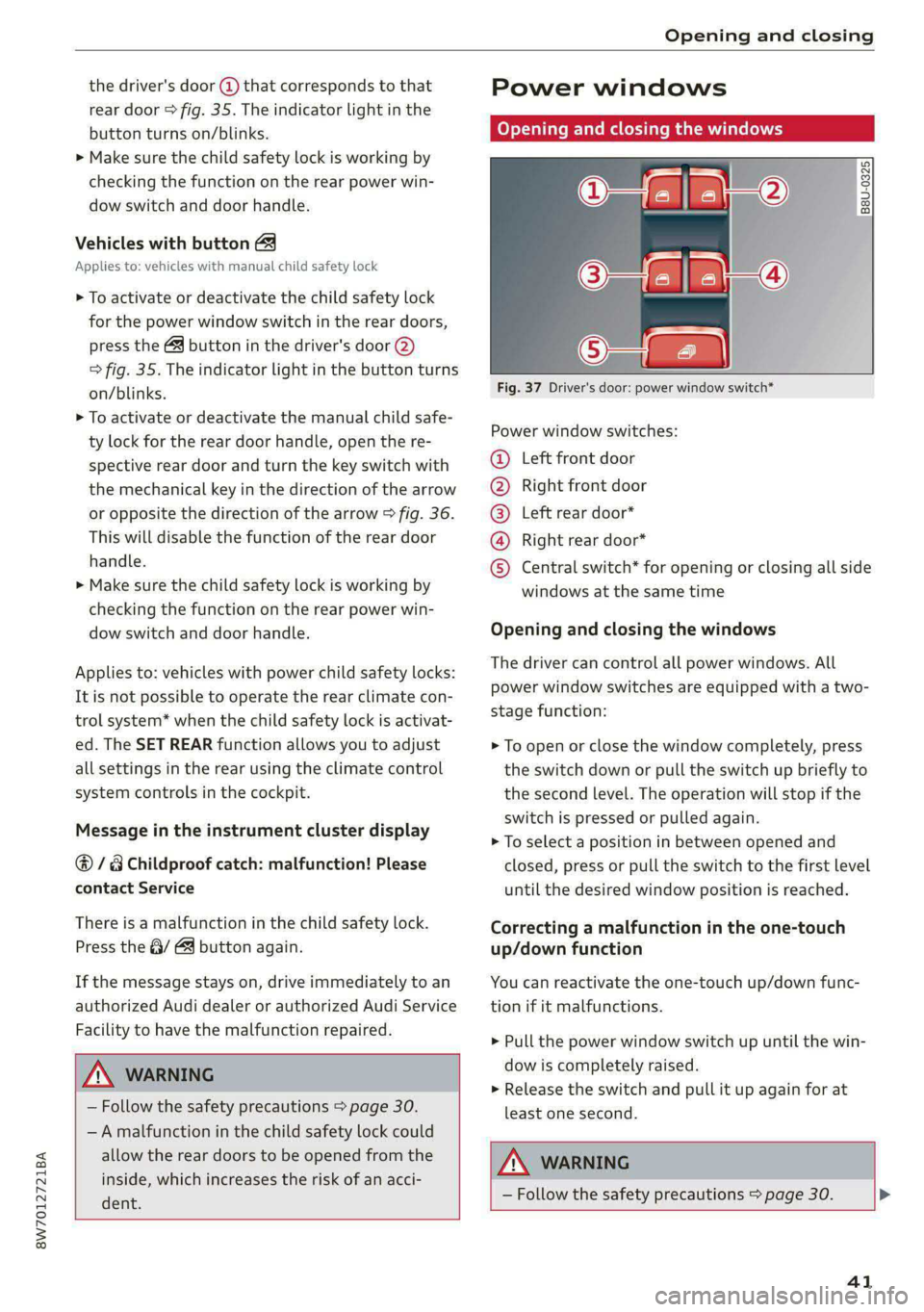
Power windows
Opening and closing the windows
2) a 2
g| 5 | a
Fig. 37 Driver's door: power window switch*
Power window switches:
Left front door
Right front door
Left rear door*
Right rear door*
©®OOO Central switch* for opening or closing all side
windows at the same time
Opening and closing the windows
The driver can control all power windows. All
power window switches are equipped with a two-
stage function:
> To open or close the window completely, press
the switch down or pull the switch up briefly to
the second level. The operation will stop if the
switch is pressed or pulled again.
> To select a position in between opened and
closed, press or pull the switch to the first level
until the desired window position is reached.
Correcting a malfunction in the one-touch
up/down function
You can reactivate the one-touch up/down func-
tion if it malfunctions.
> Pull the power window switch up until the win-
dow is completely raised.
> Release the switch and pull it up again for at
least one second.
ZA WARNING
— Follow the safety precautions > page 30. >
41
Page 44 of 302

Opening and closing
— Never close the windows carelessly or in an
uncontrolled manner, because this increases
the risk of injury.
Gi) Tips
— The windows will automatically open slight-
ly when you open the doors.
— If the window in the driver's or front pas-
senger's door is completely open, it will
raise slightly when the door is opened. The
window will lower again when you close the
door.
— You can still open and close the windows for
several minutes after turning the ignition
off. The power windows do not switch off
until the driver's door or front passenger's
door has been opened.
— The power windows are equipped with pinch
protection. The automatic window may stop
closing and will open all the way again even
if no obstacle is detected. Pull the power
window switch up until the window is com-
pletely raised.
Convenience opening and closing
Applies to: vehicles with convenience key
For power top* convenience opening/closing, re-
fer to the information in > page 48.
Convenience opening and closing the
windows and roof*
You can set in the MMI if all windows or the roof*
should open or close all at once > page 31, Set-
ting the central locking system.
> Press and hold the {@ or &@ button on the vehicle
key until all windows and the roof* have
reached the desired position > A\.
> Touch the sensor* on the door handle until all
of the windows and the roof* are closed. Do not
place your hand in the door handle when doing
this.
When all of the windows and the roof* are
closed, the turn signals will flash once.
42
AN WARNING
— Never close the windows or the roof* care-
lessly or in an uncontrolled manner, because
this increases the risk of injury.
— For security reasons, the windows and the
roof* can only be opened and closed with
the vehicle key at a maximum distance of
approximately 6.5 feet (2 m) away from the
vehicle. Always pay attention when using
the & button to close the windows and the
roof* so that no one is pinched. The closing
process will stop immediately when the fj
button is released.
Panoramic glass roof
Operating the panoramic glass roof and
roof sunshade
Applies to: vehicles with panoramic glass roof and roof sun-
shade
Fig. 38 Headliner: panoramic glass roof and sunshade*
buttons
The control buttons are equipped with a two-
stage function.
Operating the roof sunshade
> Opening and closing the sunshade: push the
switch in the headliner @) briefly toward the
rear or forward to the second level.
> Partially opening the sunshade: press the
switch to the first level until the sunshade
reaches the desired position.
Operating the roof
> Tilting the roof: press the 4> switch in the
headliner briefly upward to the second level (@).
> Closing the tilted roof: pull the > switch
downward briefly to the second level.
Page 45 of 302

8W7012721BA
Opening and closing
> Opening the roof: slide the 2S switch back
briefly twice in a row to the second level (2).
> Closing the roof: push the 2S switch forward
briefly to the second level.
> Opening or closing partially: slide the 2>
switch to the first level and hold it there until
the roof reaches the desired position.
Quick opening
You can also open the roof and roof sunshade in
one movement.
» Push the 2S switch back briefly to the second
level @) twice in a row.
Roof emergency closing
If an object is detected when closing, the roof
will open again automatically. In this case, you
can then close it with the power emergency clos-
ing function.
> Within five seconds after the sunroof opens au-
tomatically, pull the applicable button until the
roof is closed.
ZA WARNING
To reduce the risk of injury, always pay atten-
tion when closing the roof. Always switch the
ignition off and take the key with you when
leaving the vehicle.
@) Note
Always close the roof when you leave the vehi-
cle and when there is precipitation to reduce
the risk of damage to the interior equipment,
particularly the electronic equipment.
@ Tips
— Interior airflow: wind inside the vehicle can
be reduced by the roof sunshade when the
panoramic glass roof is all the way open.
When the sunshade is all the way open,
close it approximately 4 in (10 cm) until the
wind inside the vehicle subsides.
— After switching off the ignition, the roof and
sunshades can still be operated for several
)_ This function is not available in all countries.
minutes as long as neither of the front
doors have been opened.
—It is not possible to open the roof when
temperatures are too low.
Valet parking
Applies to: vehicles with valet parking function
The valet parking function can protect the lug-
gage compartment from unauthorized access.
The [VALET] button for valet parking is in the
glove compartment.
You can switch the valet parking function on, for
example when someone else is parking your vehi-
cle )). The vehicle can be driven, locked, and un-
locked using the vehicle key, but access to the
luggage compartment is blocked.
> Remove the mechanical key > page 34.
> Press the [VALET] button in the glove compart-
ment. The LED in the button turns on if the
function is switched on.
> Lock the glove compartment with the mechani-
cal key.
> Applies to: vehicles with lockable pass-through
and lockable rear seat backrests: To secure the
luggage compartment from the vehicle interior,
lock the pass-through and the rear seat backr-
ests using the mechanical key > page 92,
=> page 91.
> Give your vehicle key to the service personnel
who are parking your vehicle and keep the me-
chanical key.
The following buttons are deactivated when the
valet parking function is switched on:
— <3 button in the driver's door
— As button on the vehicle key
— Handle in the luggage compartment lid
If the valet parking function is switched on, a
message will appear every time the ignition is
switched on.
43
Page 49 of 302

8W7012721BA
Power top
Power top
Automatic power top
General information
Applies to: vehicles with power top
The power top opens and closes automatically.
When open, the power top is stored completely
in the power top compartment. The power top
can be opened or closed at speeds up to 30 mph
(50 km/h). The power top will not open when the
temperature is below -5 °F (-15 °C).
Under normal conditions, the power top is wind-
and waterproof. In rare cases, small droplets of
water may form under extreme weather condi-
tions such as torrential or prolonged rain. That is
normal and no cause for concern.
Follow the care instructions to keep the power
top free of leaks and to maintain its appearance
= page 254, Care and cleaning. Also observe the
following:
— Open and stow the power top only when it is
clean and dry. Stowing the power top when it is
damp can create imprints in it, and mildew and
other damage can result if it is left stowed
while damp for long periods of time.
— To prevent scratching or damaging the power
top, do not use any sharp-edged objects to re-
move ice and snow. The rear window may be
cleared with a standard ice scraper.
— Do not leave the power top open for several
weeks or the creases in it may become discol-
ored.
— Do not open the power top when the tempera-
ture is below 32 °F (0 °C). The fabric in the
power top loses elasticity in sub-zero tempera-
tures.
Opening and closing power top
Applies to: vehicles with power top
e 8
a
2
= e a
Fig. 39 Center console: power top switch
Requirement: the luggage compartment lid must
be closed.
Opening and closing the power top
> Switch the ignition on.
> To open the power top, pull and hold the switch
@ during the entire process.
> To close the power top, pull and hold the switch
@ during the entire process.
Opening and closing the power top
(automatic operation)
It is not necessary to hold the switch.
Requirement: the speed must be between 4 mph
(6 km/h) and 30 mph (50 km/h). There must be
no passengers or objects on the rear bench seat.
> Switch the ignition on.
> To open the power top completely, pull the
switch @ briefly.
> To close the power top completely, pull the
switch @) briefly.
The status of the power top is shown in the in-
strument cluster display when operating the
power top switch.
You can close the power top when the wind de-
flector is installed > page 50.
A message will appear in the instrument cluster
if the power top cannot be opened or closed.
ZX WARNING |
—When operating the power top, make sure
the function is not affected by wind or other |>
47