2019 VOLVO XC90 TWIN ENGINE brakes
[x] Cancel search: brakesPage 356 of 697

DRIVER SUPPORT
354Rear Collision Warning
The Rear Collision Warning (
RCW) function can
help the driver avoid rear-end collisions from
vehicles approaching from behind.
RCW is automatically activated each time the
engine is started.
RCW can warn the driver of a potential collision
with vehicles approaching from behind by rapidly
flashing the turn signals.
If, at a speed below 30 km/h (20 mph), the RCW
function detects that the car is in danger of being
hit from behind, the seatbelt tensioners may ten-
sion the front seatbelts and activate the Whiplash
Protection System safety system.
Immediately before a collision from behind, RCW
may also activate the foot brake in order to
reduce the forward acceleration of the car during
the collision. However, the brakes will only be
applied if your vehicle is stationary. The brakes
will be immediately released if the accelerator
pedal is depressed.
Related information
Rear Collision Warning limitations (p. 354)
Whiplash Protection System (p. 46) Rear Collision Warning limitations
In some situations, it may be difficult for RCW to
warn the driver of a collision risk.
This may be the case if: the vehicle approaching from the rear is
detected at a late stage
the vehicle approaching from the rear
changes lanes at a late stage
the vehicle approaching from the rear is mov-
ing at a speed above 80 km/h (50 mph)
a trailer, bicycle holder or similar is con-
nected to the vehicle's electrical system - the
RCW function will then be automatically
deactivated.
NOTE In certain markets RCW does not warn with
the direction indicators due to local traffic
regulations – in such cases, that part of the
function is deactivated.
NOTE The warning with direction indicators for Rear
Collision Warning is deactivated if the colli-
sion warning distance in the City Safety func-
tion is set to the lowest level "
Late".
The seat belt tensioning and braking func-
tions remain active.
Related information
Rear Collision Warning (p. 354)
Page 383 of 697

DRIVER SUPPORT
}}
381
Run-Off Mitigation with steering
assistance
This sub-function is intended to help reduce the
risk of the vehicle inadvertently running off the
road by actively steering the vehicle back onto
the road.
The function is active at speeds between
65-140 km/h (40-87 mph) on roads with clearly
visible traffic lane markings/lines.
The system uses a camera to monitor the edges
of the road and the painted side marker lines. If
the vehicle is about to cross the edge of the road,
the function will attempt to steer the vehicle back
onto the road. If this is not sufficient to keep the
vehicle on the road, the brakes will also be
applied.
However, the function will not provide either
steering assistance or braking if the turn signal is
used. The function will also not be activated if it
detects that the driver is actively operating the
vehicle.
After the system has automatically intervened,
this text message will appear in the instrument
panel: Collision avoidance assistance –
Automatic intervention
WARNING
The "Steering assistance at risk of run-
off" subfunction is supplementary driver
support intended to help improve driving
safety – it cannot handle all situations in
all traffic, weather and road conditions.
The function cannot detect barriers, rails
or similar obstacles at the side of the
road.
"Steering assistance at risk of run-off" is
not a substitute for the driver's attention
and judgment. The driver is always
responsible for ensuring the vehicle is
driven in a safe manner, at the appropri-
ate speed, with an appropriate distance to
other vehicles, and in accordance with
current traffic rules and regulations.
Related information
Steering assistance at risk of collision
(p. 380) Run-Off Mitigation with steering
assistance levels
This function has two activation levels for inter-
vention:
Steering assistance only
Steering assistance with braking
Steering assistance only Intervention with steering assistance.
Page 395 of 697

DRIVER SUPPORT
* Option/accessory.393
Park Assist limitations
Park Assist may not be able to detect all condi-
tions in all situations and functionality may there-
fore be limited in certain cases.
The driver should be aware of the following limi-
tations for Park Assist:
WARNING Be extra cautious when
reversing if this symbol is
shown when a trailer, bike
carrier or similar is attached
and electrically connected
to the vehicle.
The symbol indicates that
the rear parking assist sensors are deacti-
vated and will not warn of any obstacles.
CAUTION Objects such as chains, thin and glossy poles
or low obstacles may end up in the "signal
shadow" and then go temporarily undetected
by the sensors – the pulsating tone may then
unexpectedly stop instead of becoming a
constant tone as expected.
The sensors cannot detect high objects, such
as protruding ramps.
In such situations, pay extra attention and
maneuver/drive the vehicle very slowly or
stop the current parking maneuver –
there may be a high risk of damage to
the vehicle or other objects since infor-
mation from the sensors is not always
reliable in such situations.
CAUTION In some circumstances, the Park Assist Sys-
tem may produce false warnings due to exter-
nal sound sources with the same ultrasonic
frequencies as those the system works with.
Examples of such sources are horns, wet tires
on asphalt, pneumatic brakes, exhaust noise
from motorcycles, etc.
NOTE When a trailer hitch is configured with the
vehicle electrical system, the trailer hitch pro-
trusion is included when the function meas-
ures the distance to objects behind the vehi-
cle.
Related information
Park Assist* (p. 390)
Page 408 of 697

DRIVER SUPPORT
* Option/accessory.
406 Park Assist Pilot*
Park Assist Pilot (
PAP 122
) helps the driver pull
into and out of parking spaces.
PAP first checks whether there
is sufficient space and then
steers the car into the space.
The center display uses sym-
bols, graphics and messages to
inform the driver of what steps
need to be taken and when.
WARNING
The PAP function is supplementary driver
support intended to facilitate driving and
help make it safer – it cannot handle all
situations in all traffic, weather and road
conditions.
Pay particular attention to people and
animals near the vehicle.
PAP is not a substitute for the driver's
attention and judgment. The driver is
always responsible for ensuring the vehi-
cle is driven in a safe manner, at the
appropriate speed, with an appropriate
distance to other vehicles, and in accord-
ance with current traffic rules and regula-
tions.
NOTE The PAP function measures the space and
steers the vehicle – the driver's role is to:
keep close watch of the area around the
vehicle
follow the instructions on the center dis-
play
change gears (reverse/forward) – a
"ping" sound indicates when the driver
should change gears
regulate and maintain a safe speed
apply the brakes and stop.
Related information
Types of parking with Park Assist Pilot
(p. 406)
Parking with Park Assist Pilot (p. 408)
Leaving a parking space with Park Assist
Pilot (p. 410)
Park Assist Pilot* limitations (p. 411)
Recommended maintenance for Park Assist
Pilot (p. 413)
Park Assist Pilot* messages (p. 414) Types of parking with Park Assist
Pilot
Park Assist Pilot (PAP 123
) can be used for the
following types of parking. 122
Park Assist Pilot
123 Park Assist Pilot
Page 410 of 697

DRIVER SUPPORT
408Parking with Park Assist Pilot
Park Assist Pilot (PAP 124
) helps the driver park
using three different steps. The function can also
help the driver pull out of a parking space.
NOTE The PAP function measures the space and
steers the vehicle – the driver's role is to:
keep close watch of the area around the
vehicle
follow the instructions on the center dis-
play
change gears (reverse/forward) – a
"ping" sound indicates when the driver
should change gears
regulate and maintain a safe speed
apply the brakes and stop. Information about the actions required by the
driver are provided in the center display using
symbols, graphics and/or text.
PAP can be activated if the following criteria have
been met after the engine is started:
No trailer is hitched to the vehicle
Your vehicle's speed is lower than 30 km/h
(20 mph).
NOTE The distance between the vehicle and parking
spots should be 0.5-1.5 meters (1.6-5.0 ft)
when PAP is looking for parking.
ParkingPAP parks the vehicle using the following steps:
1. The system searches for and measures
potential parking spaces.
2. The vehicle is steered while it is backing into the parking space.
3. The vehicle is positioned in the parking space (the driver may be prompted to shift
gears).
Searching for and measuring potential
parking spots
The function can be activated
in the center display's Function
view.
It can also be accessed from
the camera views. Parallel parking overview.
Perpendicular parking overview.
To do so: 124
Park Assist Pilot
Page 414 of 697

||DRIVER SUPPORT
412
The parking sequence is cancelledA parking sequence will be cancelled if:
the driver moves the steering wheel
the vehicle's speed exceeds 7 km/h (4 mph)
the driver taps
Cancel in the center display
when the anti-lock brakes or the Electronic
stability control are engaged - e.g. when a
wheel loses grip on a slippery road
when the power steering works at reduced
power - e.g. during cooling due to overheat-
ing (see section "Speed-dependent steering
force").
A message in the center display will explain why
the parking sequence was cancelled.
CAUTION Under certain circumstances, PAP may not be
able to find parking spaces – one reason may
be that the sensors are disrupted by external
sound sources that emit the same ultrasonic
frequencies that the system works with.
Examples of such sources include horns, wet
tires on asphalt, pneumatic brakes, exhaust
noise from motorcycles, etc.
NOTE Dirt, ice and snow covering the sensors
reduce their function and can make measure-
ment impossible.
Driver responsibilityThe driver should keep in mind that PAP is a
parking aid ‒ not an infallible fully automatic sys-
tem. The driver must always be prepared to take
control and cancel a parking sequence if neces-
sary.
There are a number of things to keep in mind
when parking, including:
The driver is always responsible for determin-
ing if the space suggested by PAP is suita-
ble for parking.
Do not use PAP when using snow chains or
a temporary spare tire.
Do not use PAP if there are any objects pro-
truding from the vehicle.
Heavy rain or snowfall may inhibit PAP's abil-
ity to accurately measure a parking space.
While searching and measuring the parking
space, PAP may be unable to detect objects
located far into the space.
PAP may not suggest parking spaces on
narrow streets if it does not detect sufficient
space for maneuvering the vehicle.
Use approved tires 126
inflated to the correct
tire pressure because this affects PAP's abil-
ity to provide parking assistance.
PAP's function is based on the way the vehi-
cles are parked behind and in front of your
parking space. If they are, for example,
parked too close to the curb, there is a risk
that your vehicle's tires or wheel rims could
be damaged by the curb during the parking
procedure.
Perpendicular parking spaces may not be
detected or may be suggested unnecessarily
if a parked vehicle is sticking out more than
other parked vehicles.
PAP is intended to provide parking assis-
tance on straight streets, not sections of
street with sharp curves or bends. Always
make sure that your vehicle is parallel to rel-
evant parking spaces when PAP is measur-
ing the parking space.
CAUTION Switching to another approved wheel and/or
tire dimension could change the tire circum-
ference, which would then require the PAP
system to be updated. Consult a workshop –
an authorized Volvo workshop is recom-
mended.
126
"Approved tires" refers to tires of the same type and make as the vehicl\
e's original, factory-installed tires.
Page 418 of 697
HYBRID INFORMATION
416General information about Twin
Engine
Twin Engine vehicles are driven just like any
other vehicle, but certain functions differ from a
vehicle powered exclusively by gasoline. The
electric motor powers the vehicle primarily at low
speeds; the gasoline engine is used at higher
speeds or during more active driving.
The instrument panel displays Twin Engine-spe-
cific information - charging information, selected
drive mode, distance to discharged battery and
hybrid battery charge level.
Different drive modes can be selected while driv-
ing, e.g. electric power only or, if more power is
needed, a combination of electric and gasoline
power. The vehicle calculates the optimal combi-
nation of driveability, driving experience, environ-
mental impact and fuel economy for the selected
drive mode.
In order to function optimally, the hybrid battery
(and its electrical drive systems) and the gasoline
engine (and its drive systems) must be at the
correct operating temperature. Battery capacity
can be considerably reduced if the battery is too
cold or too hot. Preconditioning prepares the
vehicle's drive systems and passenger compart-
ment before driving to help reduce both wear and
energy consumption. It also helps increase the
hybrid battery's range.
The hybrid battery which powers the electric
motor is recharged using the charging cable. It can also be recharged during light braking and
through engine braking in gear position B. The
combustion engine can also help recharge the
hybrid battery.
Important
No electrical current
Keep in mind that if there is no electrical current
to the vehicle, i.e. the ignition is switched off or
the start battery is discharged, certain functions
such as brakes, power steering, etc. will not work.
WARNING If the vehicle does not have electrical current
and both the electric motor and the gasoline
engine are switched off, the brakes cannot be
used to stop the vehicle.
Towing not permitted
Never tow a Twin Engine vehicle behind another
vehicle, as this could damage the electric motor.
Exterior engine noise
WARNING
Please be aware that there is no sound from
the engine when the vehicle is being powered
by the electric motor and it may be difficult to
detect by children, pedestrians, cyclists and
animals. This is especially true at low speeds.
High-voltage electrical current
WARNING A number of electrical components in Twin
Engine Plug-in Hybrid vehicles use high-volt-
age current and can be extremely dangerous
if handled incorrectly. These components and
any orange wiring in the vehicle may only be
handled by trained and qualified Volvo service
technicians.
Do not touch anything that is not clearly descri-
bed in this Owner's Manual.
Related information
Charging the hybrid battery (p. 417)
Hybrid gauge (p. 87)
Drive modes (p. 454)
Starting and stopping preconditioning
(p. 233)
Hybrid battery (p. 631)
Factors affecting electric motor range
(p. 469)
Page 420 of 697
||HYBRID INFORMATION
418
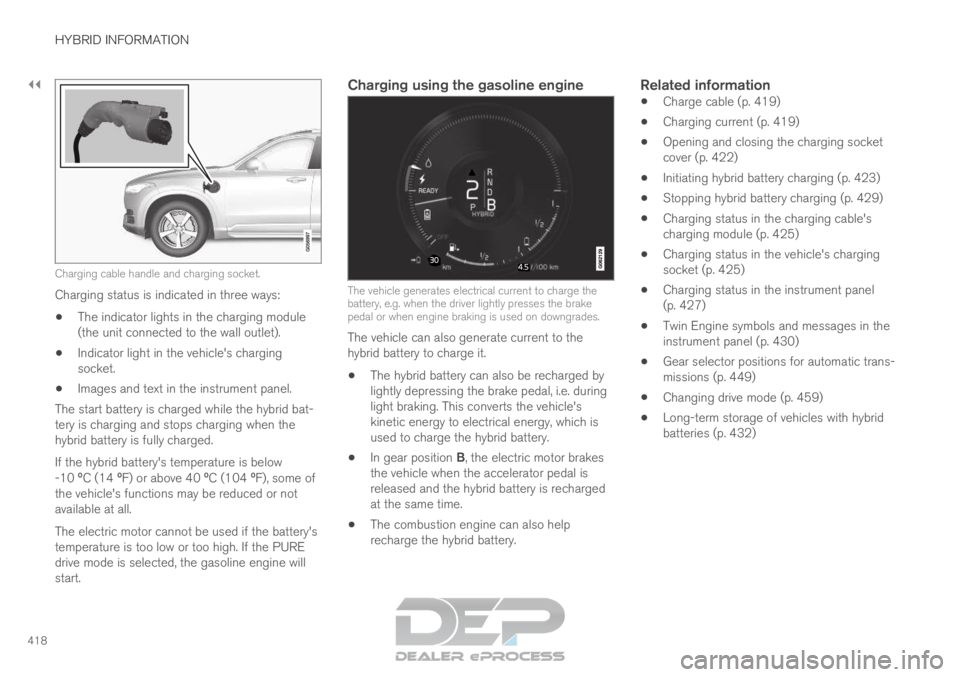
Charging cable handle and charging socket.
Charging status is indicated in three ways:
The indicator lights in the charging module
(the unit connected to the wall outlet).
Indicator light in the vehicle's charging
socket.
Images and text in the instrument panel.
The start battery is charged while the hybrid bat-
tery is charging and stops charging when the
hybrid battery is fully charged.
If the hybrid battery's temperature is below
-10 ºC (14 ºF) or above 40 ºC (104 ºF), some of
the vehicle's functions may be reduced or not
available at all.
The electric motor cannot be used if the battery's
temperature is too low or too high. If the PURE
drive mode is selected, the gasoline engine will
start.
Charging using the gasoline engine The vehicle generates electrical current to charge the
battery, e.g. when the driver lightly presses the brake
pedal or when engine braking is used on downgrades.
The vehicle can also generate current to the
hybrid battery to charge it.
The hybrid battery can also be recharged by
lightly depressing the brake pedal, i.e. during
light braking. This converts the vehicle's
kinetic energy to electrical energy, which is
used to charge the hybrid battery.
In gear position B, the electric motor brakes
the vehicle when the accelerator pedal is
released and the hybrid battery is recharged
at the same time.
The combustion engine can also help
recharge the hybrid battery.Related information
Charge cable (p. 419)
Charging current (p. 419)
Opening and closing the charging socket
cover (p. 422)
Initiating hybrid battery charging (p. 423)
Stopping hybrid battery charging (p. 429)
Charging status in the charging cable's
charging module (p. 425)
Charging status in the vehicle's charging
socket (p. 425)
Charging status in the instrument panel
(p. 427)
Twin Engine symbols and messages in the
instrument panel (p. 430)
Gear selector positions for automatic trans-
missions (p. 449)
Changing drive mode (p. 459)
Long-term storage of vehicles with hybrid
batteries (p. 432)