2019 VOLVO XC90 TWIN ENGINE lock
[x] Cancel search: lockPage 476 of 697

STARTING AND DRIVING
474Opening/closing the fuel filler door
A button on the instrument panel is used to
unlock the fuel filler door.
An arrow next to the fuel pump
symbol in the instrument panel
indicates the side of the vehicle
on which the fuel filler door is
located. 1. Press the button on the dashboard.
>
Pressure equalization in the fuel tank cau-
ses a slight delay before the fuel filler
door opens. Fuel tank Fuel lid is
opening will be displayed in the instru-
ment panel, followed by Fuel tank Ready for refueling.
NOTE Refueling must be done within approximately
seven minutes of opening the fuel filler door.
After this time, the valve opened by pushing
the button for opening the fuel filler door will
close and it will no longer be possible to
refuel without the pump's nozzle switching off.
If the valve is closed before refueling is com-
plete - press the button again and wait until
the driver display shows the message
Fuel
tank Ready for refueling. 2. After refueling, press the fuel filler door
lightly to close it.
Related information
Refueling (p. 475)
Page 477 of 697

STARTING AND DRIVING
}}
475
Refueling
The fuel tank is equipped with a fuel filling sys-
tem without a cover.
Refueling the vehicle at a service
station Refueling is done as follows.
1.
Turn off the engine and open the fuel filler
door.
NOTE Refueling must be done within approximately
seven minutes of opening the fuel filler door.
After this time, the valve opened by pushing
the button for opening the fuel filler door will
close and it will no longer be possible to
refuel without the pump's nozzle switching off.
If the valve is closed before refueling is com-
plete - press the button again and wait until
the driver display shows the message
Fuel
tank Ready for refueling. 2. Select a fuel approved for use in the vehicle.
For more information on approved fuels, see
the section on “Fuel”.
3.
Insert the pump's nozzle into the fuel filler
pipe's opening. There are two flaps just
inside the fuel filler pipe and the pump's noz-
zle must push both of these flaps open
before fuel can be added. 4. Avoid overfilling the tank. Do not press the
handle on the filler nozzle again after it has
initially stopped pumping.
> The fuel tank is now filled.
NOTE An over-full tank may overflow in hot weather.
CAUTION
Avoid spilling gasoline during refueling. In
addition to causing damage to the environ-
ment, gasolines containing alcohol can cause
damage to painted surfaces, which may not
be covered under the New Vehicle Limited
Warranty.
Refueling from a fuel containerWhen filling from a fuel container, use the funnel
provided in a foam block under the floor hatch in
the cargo compartment.
1. Open the fuel filler door.
2. Insert the funnel into the fuel filler pipe's
opening. There are two flaps just inside the
fuel filler pipe and the tube section of the
funnel must push both of these flaps open
before fuel can be added.
Page 483 of 697

STARTING AND DRIVING
}}
481
Jump starting using another battery
If the start battery is discharged, current from
another battery can be used to start the vehicle. Jumper cable connecting points.
CAUTION
The charging point of the vehicle is only
intended for jump starting the vehicle in ques-
tion. The charging point is not intended for
jump-starting another vehicle. Using the
charging point to start another vehicle could
cause a fuse to blow, which would cause the
charging point to stop working.
If a fuse has blown, 12 V Battery Fuse failure
Service required will be displayed in the instru-
ment panel. Volvo recommends contacting an
authorized Volvo workshop. To avoid short circuits or other damage, the fol-
lowing steps are recommended when jump star-
ting the battery:
1.
Put the ignition in mode 0.
2.
Make sure the auxiliary battery (the battery
used to jump start the discharged battery)
has a voltage of 12 volts.
3. If the auxiliary battery is in another vehicle, turn off that vehicle's engine and make sure
that the vehicles are not touching each other.
4. Clamp the red jumper cable onto the auxiliary battery's positive (+) terminal (1).
CAUTION Connect the jump cable carefully to prevent
short circuits with other components in the
engine compartment.
5. Fold back the cover over your vehicle's posi-
tive (+) jump start terminal (2).
6.
Clamp the other end of the red jumper cable
to your vehicle's positive (+) jump start termi-
nal (2).
7. Clamp the black jumper cable onto the auxili- ary battery's negative (-) terminal (3).
8. Clamp the other end of the black jumper cable to your vehicle's negative (-) ground
point (4). 9. Make sure the jumper cables are securely
attached to help prevent sparks while jump
starting.
10. Start the engine of the assisting vehicle and let it run for a few minutes at a higher idling
speed than normal, about 1500 rpm.
11. Start your vehicle's engine. If the engine does not start, allow an additional 10
minutes of charging time and then try to start
the engine again.
NOTE When the engine is started under normal
conditions, the vehicle's electrical drive motor
is prioritized – the gasoline engine remains
off. This means that the electric motor has
"started" and the vehicle is ready to be driven
once the start knob has been turned clock-
wise. Start of the electric motor is indicated
by the indicator lights on the instrument panel
going out and its preselected theme illuminat-
ing.
CAUTION
Do not touch the connections between the
cable and the vehicle during the start attempt.
Risk of sparking.
Page 484 of 697

||STARTING AND DRIVING
* Option/accessory.
482 12. Remove the jumper cables in the reverse
order ‒ first the black cables and then the
red cables.
Make sure that none of the clamps of the
black jumper cables come into contact with
either vehicle's positive (+) jump start termi-
nals or either of the red jumper cable's con-
nected clamps.
WARNING PROPOSITION 65 WARNING! Battery posts,
terminals, and related accessories contain
lead and lead compounds, chemicals known
to the state of California to cause cancer and
reproductive harm. Wash hands after han-
dling.
WARNING
Batteries generate hydrogen gas, which
is flammable and explosive.
Do not connect the jumper cable to any
part of the fuel system or to any moving
parts. Avoid touching hot manifolds.
Battery fluid contains sulfuric acid. Do not
allow battery fluid to contact eyes, skin,
fabrics or painted surfaces.
If contact occurs, flush the affected area
immediately with water. Obtain medical
help immediately if eyes are affected.
Never expose the battery to open flame
or electric spark. Do not smoke near the
battery. Failure to follow the instructions
for jump starting can lead to injury.
NOTE The vehicle cannot be started if the hybrid
battery is discharged.
Related information
Starting the vehicle (p. 434)
Ignition modes (p. 437)
Adjusting the steering wheel (p. 201)
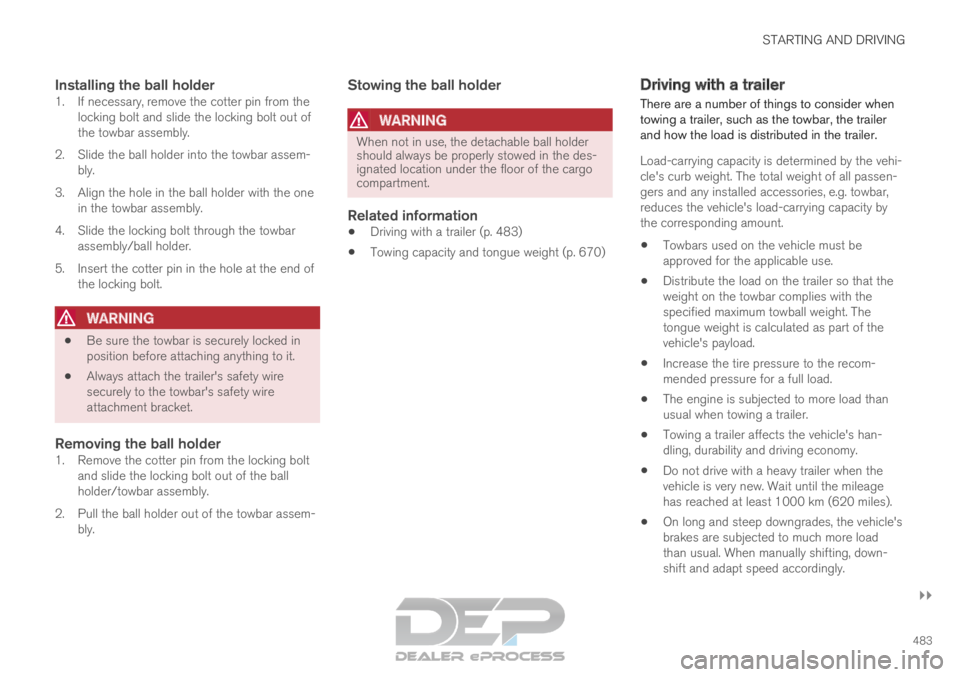
Selecting ignition mode (p. 438) Detachable towbar*
Volvo recommends the use of Volvo towbars
that are specially designed for the vehicle.
NOTE The optional detachable trailer hitch may not
be available in all markets or on all models.
Consult your Volvo retailer.
Ball holder
Cotter pin
Towbar assembly
Locking bolt
Safety wire attachment bracket
Page 485 of 697
STARTING AND DRIVING
}}
483
Installing the ball holder1. If necessary, remove the cotter pin from the locking bolt and slide the locking bolt out of
the towbar assembly.
2. Slide the ball holder into the towbar assem- bly.
3. Align the hole in the ball holder with the one in the towbar assembly.
4. Slide the locking bolt through the towbar assembly/ball holder.
5. Insert the cotter pin in the hole at the end of the locking bolt.
WARNING
Be sure the towbar is securely locked in
position before attaching anything to it.
Always attach the trailer's safety wire
securely to the towbar's safety wire
attachment bracket.
Removing the ball holder1. Remove the cotter pin from the locking bolt
and slide the locking bolt out of the ball
holder/towbar assembly.
2. Pull the ball holder out of the towbar assem- bly.
Stowing the ball holder
WARNING When not in use, the detachable ball holder
should always be properly stowed in the des-
ignated location under the floor of the cargo
compartment.
Related information
Driving with a trailer (p. 483)
Towing capacity and tongue weight (p. 670) Driving with a trailer
There are a number of things to consider when
towing a trailer, such as the towbar, the trailer
and how the load is distributed in the trailer.
Load-carrying capacity is determined by the vehi-
cle's curb weight. The total weight of all passen-
gers and any installed accessories, e.g. towbar,
reduces the vehicle's load-carrying capacity by
the corresponding amount.
Towbars used on the vehicle must be
approved for the applicable use.
Distribute the load on the trailer so that the
weight on the towbar complies with the
specified maximum towball weight. The
tongue weight is calculated as part of the
vehicle's payload.
Increase the tire pressure to the recom-
mended pressure for a full load.
The engine is subjected to more load than
usual when towing a trailer.
Towing a trailer affects the vehicle's han-
dling, durability and driving economy.
Do not drive with a heavy trailer when the
vehicle is very new. Wait until the mileage
has reached at least 1000 km (620 miles).
On long and steep downgrades, the vehicle's
brakes are subjected to much more load
than usual. When manually shifting, down-
shift and adapt speed accordingly.
Page 487 of 697

STARTING AND DRIVING
}}
* Option/accessory. 485
The automatic transmission selects the optimal
gear for the current load and engine speed.
Steep inclines
Do not lock the automatic transmission into a
higher gear than what the engine can handle ‒ it
is not always preferable to drive in high gears at
low rpm.
Parking on a hill
1. Depress the brake pedal.
2. Apply the parking brake.
3. Put the gear selector in P.
4. Release the brake pedal.
Put chocks behind the wheels when the vehicle
is parked on a hill with a trailer attached.
Starting on a hill
1. Depress the brake pedal.
2. Put the gear selector in D.
3. Release the parking brake.
4. Release the brake pedal and start driving.
Related information
Trailer Stability Assist* (p. 485)
Checking trailer lights (p. 486)
Towing capacity and tongue weight (p. 670)
Overheating of engine and transmission
(p. 479) Trailer Stability Assist*
Trailer Stability Assist (TSA 8
) is a function
designed to help stabilize a vehicle that is tow-
ing a trailer when the vehicle and trailer have
begun to sway. The function is part of the Elec-
tronic Stability Control system ESC 9
.
Reasons for swayingA vehicle towing a trailer may begin to sway for
various reasons. Normally this only occurs at high
speeds. However, if the trailer is overloaded or
unevenly distributed, e.g. too far back, there is a
risk of swaying even at low speeds.
Swaying may be caused by factors such as:
The vehicle and trailer are hit by a sudden,
strong crosswind.
The vehicle and trailer are traveling on an
uneven road or over a bump.
Sudden movements of the steering wheel.
Once swaying has begun, it can be difficult or
impossible to stop it. This makes the vehicle and
trailer difficult to control and there is a risk of
swerving into oncoming traffic or driving off the
road.
Trailer Stability Assist functionTrailer Stability Assist continuously monitors the
vehicle's movements, particularly lateral move- ments. If swaying is detected, the brakes are
applied individually on the front wheels, which has
a stabilizing effect on the vehicle and trailer. This
is often enough to enable the driver to regain
control of the vehicle.
If the Trailer Stability Assist function's first
attempt is not adequate to stop the swaying
motion, the brakes are applied on all wheels and
engine power is temporarily reduced. As the
swaying motion begins to decrease and the vehi-
cle and trailer have once again become stable,
TSA stops regulating the brakes/engine power
and the driver regains control of the vehicle.
NOTE
Trailer Stability Assist is deactivated if the
driver selects the sport mode by deactivating
ESC in the center display's menu system. Trailer Stability Assist may not intervene if the
driver tries to compensate for the swaying motion
by moving the steering wheel rapidly, because
the system will then not be able to determine if it
is the trailer or the driver causing the swaying.
8
Trailer Stability Assist
9 Electronic Stability Control
Page 490 of 697

STARTING AND DRIVING
* Option/accessory.
488 Attaching and removing the towing
eyelet
Use the towing eyelet to tow another vehicle.
Screw the towing eyelet securely into place in
the threaded outlet behind the cover on the
right-hand side of the rear bumper.
NOTE If the vehicle is equipped with a towbar, there
is no rear attachment for the towing eye.
Attaching the towing eyelet
Take out the towing eyelet, which is stored in
a foam block under the floor in the cargo
compartment. Remove the cover - press the marker with
your finger while prying open the opposite
side/corner open with a coin or similar.
>
The cover turns along its center line and
can then be removed. 3. Screw in the towing eyelet until it reaches its
stop. Fasten the eyelet securing by, for example,
inserting a lug wrench* through it and using
this as a lever.
CAUTION It is important that the towing eye is screwed
in securely as far as possible.
Removing the towing eyelet
–
Unscrew the towing eyelet after use and
return it to its storage location in the foam
block.
Replace the cover on the bumper.
Related information
Towing using a towline (p. 487)
Recovery (p. 489)
Tool kit (p. 574)
Page 548 of 697

||AUDIO, MEDIA AND INTERNET
* Option/accessory.
546 2. Tap
Communication Vehicle Wi-Fi
Hotspot .
3. Tap Network name to assign a name to the
hotspot.
4. Tap Password and create a password. This
password can then be used to connect other
devices to this hotspot.
5. Tap Frequency band and select a fre-
quency for the hotspot to use to transmit
data. Please note that selecting a frequency
is not possible on all markets.
6.
Activate/deactivate by tapping to check/
uncheck the Vehicle Wi-Fi Hotspot box.
7.
If Wi-Fi is being used to connect to the Inter-
net, confirm the change of connections.
> It is now possible for external devices to connect to the vehicle's Wi-Fi hotspot.
NOTE Activation of Wi-Fi hotspot can cause addi-
tional charges from your network operator.
Contact your network operator about data
traffic costs.
The connection status is shown by a symbol in
the center display's status bar. Tap
Connected devices to see a list of cur-
rently connected devices.
Related information
Symbols in the center display status bar
(p. 124)
Internet-connected vehicle* (p. 541)
No or poor Internet connection (p. 546) No or poor Internet connection
Factors affecting the Internet connection.
The amount of data transmitted depends on the
services or apps currently in use in the vehicle.
Streaming music, for example, involves the trans-
mission of a large amount of data, and this
requires a good connection and a strong signal.
Phone to vehicleInternet connection speed may vary depending
on the location of the cellular phone in the vehi-
cle. Move the phone closer to the center display
to increase signal strength. Make sure that noth-
ing is between the phone and center display that
could be blocking the signal.
Phone to network operatorThe speed of the mobile network varies depend-
ing on the coverage in the vehicle's current loca-
tion. Coverage may be poorer in e.g. tunnels,
mountainous areas, deep valleys or indoors. Con-
nection speed is also dependent on the subscrip-
tion you have with your service provider.
NOTE If you experience any problems with data traf-
fic, contact your network service provider.
13
This does not apply when the vehicle is connected to the Internet via Wi\
-Fi.