2019 VOLVO XC90 TWIN ENGINE lock
[x] Cancel search: lockPage 440 of 697

STARTING AND DRIVING
438Selecting ignition mode
The vehicle's ignition can be put in various
modes (levels) to make different functions availa-
ble.
Selecting an ignition mode Start knob in the tunnel console.
Ignition mode 0 - Unlock the vehicle and
keep the remote key in the passenger com-
partment.
NOTE To set level I or II without engine start – do
not depress the brake pedal (or clutch pedal
for vehicles with manual transmission) when
selecting this ignition mode.
Ignition mode I - Turn the start knob clock-
wise and release it. The control will automati-
cally return to the original position.
Ignition mode II - Turn the start knob clock-
wise and hold it there for approx. 5 seconds.
Release the knob, which will automatically
return to its original position.
Back to ignition mode 0 - To return to igni-
tion mode 0 from mode I and II, turn the start
knob clockwise and release it. The control
will automatically return to the original posi-
tion.
Related information
Starting the vehicle (p. 434)
Switching off the vehicle (p. 436)
Ignition modes (p. 437)
Adjusting the steering wheel (p. 201)
Jump starting using another battery (p. 481) Brake functions
The vehicle's brakes are used to reduce speed
or prevent the vehicle from rolling.
In addition to the wheel brakes and parking
brakes, the vehicle is also equipped with a num-
ber of automatic brake assist functions. These
systems help the driver by e.g. keeping the vehi-
cle stationary when the brake pedal is not
depressed (e.g. at a traffic light or intersection),
when starting up a hill or when driving down a hill.
Depending on how the vehicle is equipped, the
following brake assist functions may be included:
Auto-hold brakes (Auto Hold)
Hill Start Assist (Hill Start Assist)
Braking assist after a collision
City Safety
Hill Descent Control (Hill Descent Control)
Related information
Brakes (p. 439)
Parking brake (p. 442)
Auto-hold brakes (p. 446)
Braking assist after a collision (p. 447)
Hill Start Assist (p. 447)
City Safety™ (p. 341)
Hill Descent Control (p. 466)
Page 441 of 697
STARTING AND DRIVING
}}
439
Brakes
The brake pedal is used to apply the vehicle's
regular brakes, which are part of the brake sys-
tem.
The vehicle is equipped with two brake circuits. If
one brake circuit is damaged, the brake pedal will
go down further when depressed. More pressure
will then be required from the driver for normal
braking effect.
WARNING
The power brakes only work when the electric
motor or combustion engine is running.
If the brake pedal is used when the engine is
switched off, greater pressure must be applied to
brake the vehicle.
In very hilly areas or when driving with a heavy
load, gear position B can be used to augment the
brakes with engine braking.
Use the Off Road drive mode to increase the
engine braking effect when driving on steep
downgrades at low speeds.
Anti-lock brakesThe vehicle is equipped with an Anti-lock Braking
System (ABS), which helps prevent the wheels
from locking and helps maintain steering control
when braking. Vibrations may be felt from the brake pedal when ABS is operating, which is nor-
mal.
After the vehicle is started, a brief test of the
ABS system is automatically performed when the
driver releases the brake pedal. An additional
automatic test of the system may be performed
when the vehicle is traveling at a low speed. Dur-
ing the test, the brake pedal may feel as though it
is pulsating.
Light braking charges the hybrid batteryWhen the brakes are applied lightly, the electric
motor braking function is used. This converts the
vehicle's kinetic energy into electrical energy,
which is used to charge the hybrid battery. When
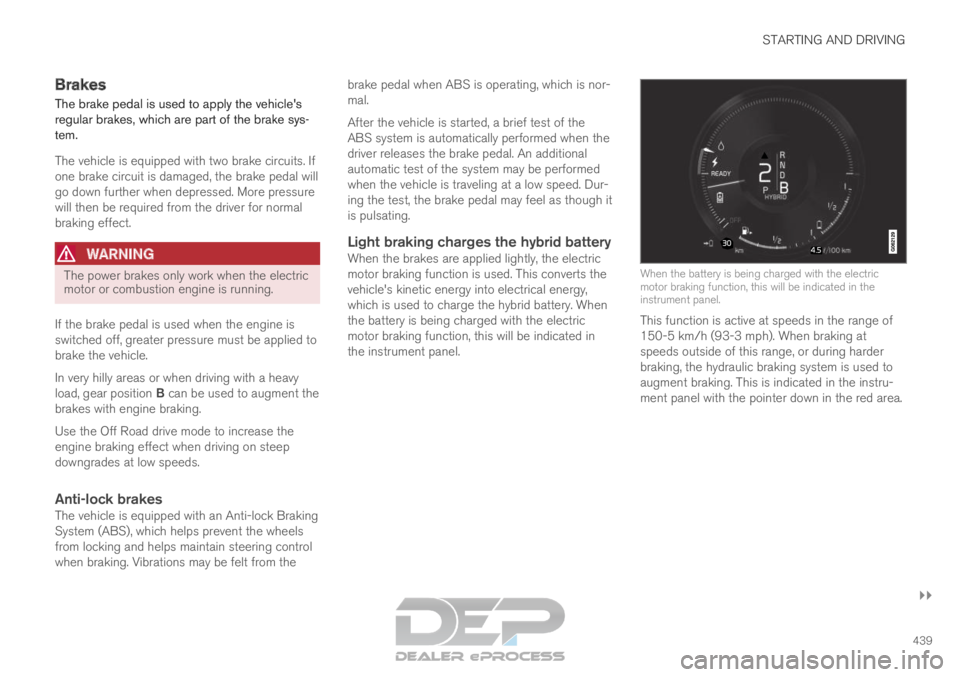
the battery is being charged with the electric
motor braking function, this will be indicated in
the instrument panel.
When the battery is being charged with the electric
motor braking function, this will be indicated in the
instrument panel.
This function is active at speeds in the range of
150-5 km/h (93-3 mph). When braking at
speeds outside of this range, or during harder
braking, the hydraulic braking system is used to
augment braking. This is indicated in the instru-
ment panel with the pointer down in the red area.
Page 444 of 697
STARTING AND DRIVING
442Maintenance of the brake system
Regularly check the brake system components
for wear.
To keep the vehicle as safe and reliable as possi-
ble, follow the Volvo service schedule specified in
the Warranty and Maintenance Records Informa-
tion booklet. New and replaced brake pads and
brake discs do not provide optimal braking effect
until they are "broken in" by driving a few hun-
dred kilometers (miles). Compensate for the
reduced braking effect by applying greater pres-
sure to the brake pedal. Volvo recommends only
using brake pads approved for your Volvo.
CAUTION The brake system's components should be
regularly checked for wear.
Contact a workshop for advice on how to do
this or let a workshop perform the inspection
- an authorized Volvo workshop is recom-
mended.
Related information
Brakes (p. 439) Parking brake
The parking brake helps keep the vehicle sta-
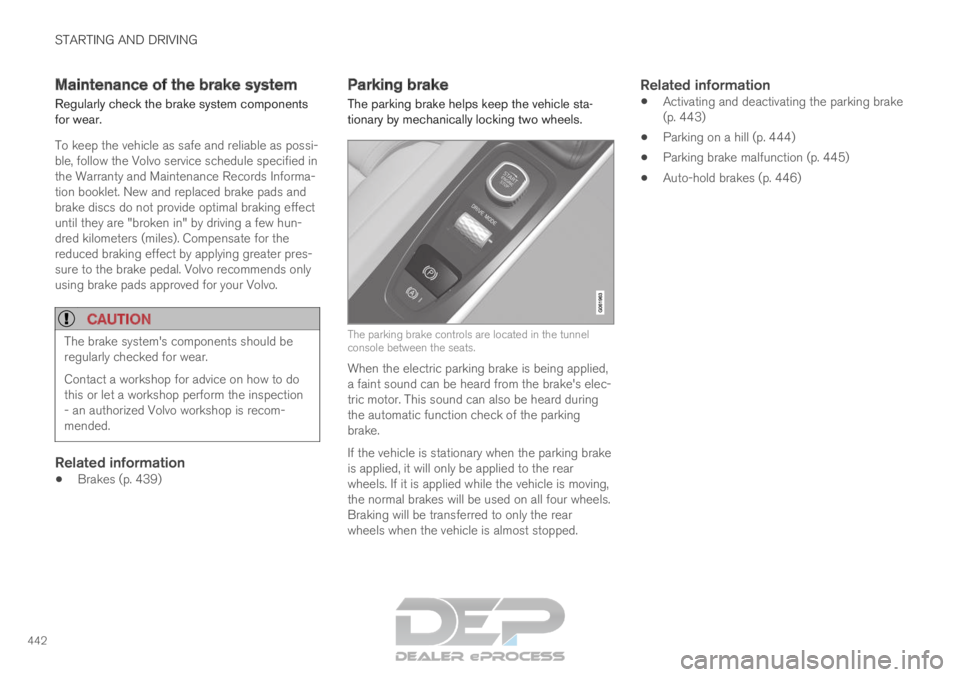
tionary by mechanically locking two wheels.
The parking brake controls are located in the tunnel
console between the seats.
When the electric parking brake is being applied,
a faint sound can be heard from the brake's elec-
tric motor. This sound can also be heard during
the automatic function check of the parking
brake.
If the vehicle is stationary when the parking brake
is applied, it will only be applied to the rear
wheels. If it is applied while the vehicle is moving,
the normal brakes will be used on all four wheels.
Braking will be transferred to only the rear
wheels when the vehicle is almost stopped.
Related information
Activating and deactivating the parking brake
(p. 443)
Parking on a hill (p. 444)
Parking brake malfunction (p. 445)
Auto-hold brakes (p. 446)
Page 451 of 697
STARTING AND DRIVING
}}
449
Gear selector positions for
automatic transmissions
In vehicles with an automatic transmission, the
system selects the optimal gear for the current
driving conditions. The transmission also has a
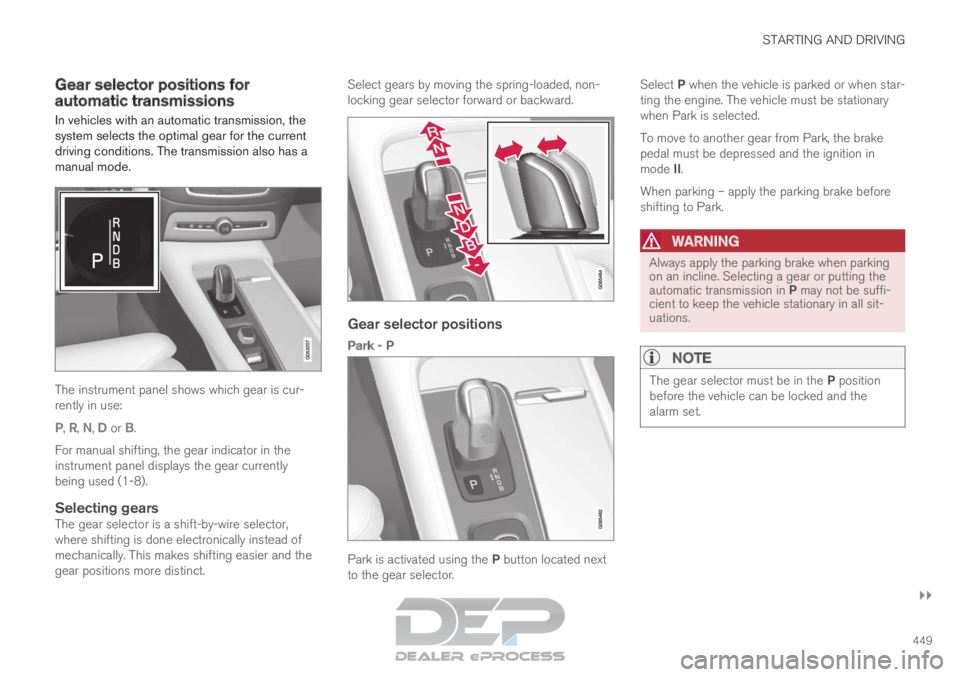
manual mode.
The instrument panel shows which gear is cur-
rently in use:
P
, R, N, D or B.
For manual shifting, the gear indicator in the
instrument panel displays the gear currently
being used (1-8).
Selecting gearsThe gear selector is a shift-by-wire selector,
where shifting is done electronically instead of
mechanically. This makes shifting easier and the
gear positions more distinct. Select gears by moving the spring-loaded, non-
locking gear selector forward or backward.
Gear selector positions
Park - P
Park is activated using the P button located next
to the gear selector. Select P when the vehicle is parked or when star-
ting the engine. The vehicle must be stationary
when Park is selected.
To move to another gear from Park, the brake
pedal must be depressed and the ignition in
mode II.
When parking – apply the parking brake before
shifting to Park.
WARNING Always apply the parking brake when parking
on an incline. Selecting a gear or putting the
automatic transmission in P may not be suffi-
cient to keep the vehicle stationary in all sit-
uations.
NOTE The gear selector must be in the P position
before the vehicle can be locked and the
alarm set.
Page 452 of 697

||STARTING AND DRIVING
* Option/accessory.
450 Help functions
The system will automatically shift to P:
if the ignition is switched off while D or R is
selected.
if the driver unbuckles the seat belt and
opens the driver's door while the vehicle is
running with the gear selector in a gear other
than P.
To park a vehicle with an unbuckled seat belt and
open door – end P mode by shifting to R or D
again.
The system will not automatically shift to P if the
ignition is switched off while the gear selector is
in the neutral position (N). This is to make it pos-
sible to wash the vehicle in an automatic car
wash in which the vehicle is pulled forward on
rolling wheels.
Reverse - R
Select R when backing up. The vehicle must be
stationary when Reverse is selected.
Neutral - N
No gear is selected and the engine can be
started. Apply the parking brake if the vehicle is
stationary with the gear selector in N.
To move the gear selector from Neutral to
another gear, the brake pedal must be depressed
and the ignition in mode II.
D drive mode
D is the normal driving gear position. The trans-
mission shifts up or down automatically depend- ing on acceleration and speed. The vehicle must
be stationary when the gear selector is moved
from R to D.
Brake - B
B can be selected at any time during a drive. In B
mode, the engine braking function is activated
when the accelerator pedal is released, which
helps charge the hybrid battery. This offers addi-
tional opportunities to recharge the hybrid bat-
tery, since the battery is charged even when the
brake pedal is not depressed. B mode in the instrument panel.
From B mode, it is possible to manually shift to
lower gears. The currently selected gear (1-8) will
be displayed in the instrument panel.
Pull the gear selector backward once to shift
down one gear.
Pull the gear selector backward again to shift
down to lower gears. To shift manually to a higher gear, the vehicle
must be equipped with steering wheel paddles*.
Push the gear selector forward to return to D
mode.
For smooth shifting and engine performance, the
transmission will shift down automatically if the
vehicle's speed becomes too low for the selected
gear.
Related information
Shiftlock (p. 452)
Using the steering wheel paddles* to shift
(p. 451)
The kickdown function (p. 452)
Page 454 of 697

STARTING AND DRIVING
452Shiftlock
The automatic transmission's shiftlock function
helps prevent inadvertently moving the gear
selector between different positions.
Automatic shiftlockThe automatic shiftlock has a separate safety
system.
From Park - P
To move to another gear from P (Park), the brake
pedal must be depressed and the ignition in
mode II.
From Neutral - N
If the gear selector is in N and the vehicle has
been stationary for at least 3 seconds (with or
without the engine running), the gear selector will
be locked in that position.
To move the gear selector from N to another
gear, the brake pedal must be depressed and the
ignition in mode II.
Messages in the instrument panelIf the gear selector is locked in position, a mes-
sage will appear in the instrument panel, e.g.
Gear lever Press brake pedal to activate
gear lever.
There is no mechanical shiftlock function.
Related information
Gear selector positions for automatic trans-
missions (p. 449) The kickdown function
Kickdown is used when maximum acceleration is
needed, e.g. when passing.
When the accelerator pedal is depressed all the
way to the floor (past the normal full accelerator
position), the transmission will automatically
engage kickdown, i.e. immediately shift down to a
lower gear.
If the accelerator pedal is released from the kick-
down position, the transmission will automatically
shift up again.
Safety function
The transmission control module is equipped with
a downshift protection feature to help prevent the
engine from overheating.
In some conditions, the transmission will prevent
downshifting/kickdown if this would lead to such
high engine speed (rpm) that the engine could
be damaged. If the driver still attempts downshift-
ing or kickdown at a high rpm, nothing will hap-
pen and the original gear will remain selected.
With kickdown, the vehicle can downshift one or
more steps at a time depending on the engine
speed. The vehicle upshifts when the engine rea-
ches its maximum rpm to prevent engine dam-
age.
Related information
Gear selector positions for automatic trans-
missions (p. 449) All Wheel Drive (AWD)
All-wheel drive, All Wheel Drive (AWD), also
called four-wheel drive, means that power is dis-
tributed to all four wheels, which improves trac-
tion.
The electric motor that powers the rear wheels
enables electronic all-wheel drive functionality.
All-wheel drive reacts differently depending on
which drive mode is selected.
Related information
Drive modes (p. 454)
Low Speed Control (p. 464)
Transmission (p. 448)
Page 459 of 697

STARTING AND DRIVING
}}
457
This drive mode is optimized for maximum control
when driving at low speeds on very poor roads or
difficult terrain. It raises the chassis
3
, reduces
driveline throttle response, and locks the vehicle
in all-wheel drive. The Hill Descent Control func-
tion facilitates controlled driving on steep down-
grades.
NOTE This drive mode is not designed to be used
for normal street driving.
NOTE
Due to the increased ground clearance, if the
OFF ROAD mode was selected when the
engine was switched off, the suspension will
lower when the engine is restarted.
CAUTION
Do not use the OFF ROAD drive mode when
towing a trailer without an electrical connec-
tion. This could result in damage to the pneu-
matic suspension system's bellows.
AWD
Improves the vehicle's traction and handling
by increasing all-wheel drive. This drive mode locks the vehicle in all-wheel
drive. An optimal distribution between front and
rear axle torque helps provide the best possible
control, stability and traction, e.g. on slippery
roads or when towing a heavy trailer or another
vehicle. The AWD drive mode is always available
regardless of the hybrid battery's charge status.
Both the combustion engine and the electric
motor are engaged to enable all-wheel drive,
which results in higher fuel consumption.
In the other drive modes, the vehicle automati-
cally adapts the need for all-wheel drive accord-
ing to the road surface, and can activate the elec-
tric motor or start the combustion engine as nee-
ded.
POWER
Power mode is designed to provide sportier
driving characteristics and a faster accelera-
tion response.
This drive mode maximizes the combined power
from the combustion engine and the electric
motor by providing power to both the front and
rear wheels. Gear shifting will be faster and more
distinct and the transmission will prioritize gears
with a higher traction force. Steering response is
faster, suspension is stiffer and ground clearance
is lower 3
to help reduce body roll when cornering. Both the combustion engine and the electric
motor are engaged to enable all-wheel drive,
which results in higher fuel consumption.
This drive mode is optimized for maximum per-
formance and throttle response. It changes the
throttle response, gear shifting program and
turbo boost system. Chassis settings and steer-
ing and brake response are also optimized. The
Power drive mode is always available regardless
of the hybrid battery's charge status.
3
For vehicles with pneumatic suspension.
Page 475 of 697

STARTING AND DRIVING
473
Slippery driving conditionsFor optimal traction and roadholding, Volvo rec-
ommends using snow tires on all wheels when-
ever there is a risk of snow or ice on the road.
NOTECertain countries require use of winter tires
by law. Not all countries permit the use of
studded tires.
Practice driving on slippery surfaces under con-
trolled conditions to learn how the vehicle reacts.
Related information
Snow tires (p. 581)
Snow chains (p. 581)
Braking on salted roads (p. 441)
Braking on wet roads (p. 441)
Filling washer fluid (p. 662)
Start battery (p. 627)
Replacing windshield wiper blades (p. 660)
Changing rear window wipers (p. 659)
Refilling coolant (p. 625) Driving through standing water
Driving the vehicle through a deep pool of stand-
ing water on a water-covered roadway is called
fording. This must be done with great caution.
To prevent damage to the vehicle when driving
through water (e.g. on flooded roads):
Do not drive in water higher than the floor of
the vehicle. If possible, check the depth of
the water at its deepest point before driving
through it. Be particularly careful when driv-
ing through flowing water.
Always select the
Off Road drive mode
before driving in water to ensure the gasoline
engine is running.
Do not drive faster than walking speed.
Do not stop the vehicle in the water. Drive
carefully forward or back the vehicle out of
the water.
Remember that waves created by passing
vehicles could cause the water level to rise
above the vehicle's floor level.
Avoid driving through salt water to help avoid
the risk of corrosion.
CAUTION Parts of the vehicle (e.g. engine, transmission,
driveline, electrical components, etc.) can be
damaged if the vehicle is driven through water
higher than its floor level. Damage to any
components caused by flooding, vapor lock or
insufficient oil is not covered under warranty.
If the engine stalls while the vehicle is in
water, do not attempt to restart it. Have the
vehicle towed on the bed of a tow truck to a
workshop - an authorized Volvo workshop is
recommended.
CAUTION
Because it can be difficult to determine the
water depth, avoid driving through standing or
running water.
When you have passed the water, press lightly on
the brake pedal and check that the brakes are
functioning properly. Water, mud, slush, etc. can
make the brake linings slippery, resulting in
delayed braking effect.
If the vehicle is equipped with a trailer coupling
contact, clean the contact after driving in water or
mud.
Related information
Recovery (p. 489)
Low Speed Control (p. 464)