2019 VOLVO XC60 TWIN ENGINE trailer
[x] Cancel search: trailerPage 485 of 695

STARTING AND DRIVING
483
Disabling the automatic check
The automatic light check can be disabled in thecenter display.
1.Tap Settings in the Top view.
2.Tap My CarLights and Lighting.
3.Deselect Automatic Trailer Lamp Check.
Manual check
If the automatic check has been disabled, thecheck can be started manually.
1.Tap Settings in the Top view.
2.Tap My CarLights and Lighting.
3.Select Manual Trailer Lamp Check.
>The light check will begin. Get out of thevehicle to perform the check.
Related information
Driving with a trailer (p. 479)
Towing using a towline
This section refers to one vehicle being towedbehind another using a towline.
Twin Engine vehicles may not be towed behindanother vehicle due to the risk of damage to theelectric motor. The vehicle must be lifted onto atow truck and transported with all four wheels onthe bed or lifting platform of the truck (no wheelsmay touch the road).
Towing another vehicle
Towing another vehicle requires a lot of power -use the AWD drive mode. This helps charge thehybrid battery and improve the vehicle's drivingand roadholding characteristics.
Before towing another vehicle, check applicablespeed limit regulations.
Jump starting
Do not tow the vehicle to start the engine. Use anauxiliary battery if the start battery's charge levelis so low that the engine cannot be started.
CAUTION
Attempts to tow-start the vehicle could causedamage to the electrical drive motor andthree-way catalytic converter.
Related information
Attaching and removing the towing eyelet(p. 484)
Hazard warning flashers (p. 161)
Recovery (p. 485)
Jump starting using another battery (p. 477)
Selecting ignition mode (p. 434)
Page 586 of 695

||
WHEELS AND TIRES
584
Related information
Recommended tire pressure (p. 565)
Using the tire sealing system (p. 579)
Tire sealing system (p. 578)
Determining the vehicle's permittedweight
Properly loading your vehicle will provide maxi-mum return of vehicle design performance.
Weight designations
Before loading your vehicle, familiarize yourselfwith the following terms for determining yourvehicle's weight ratings, with or without a trailer,from the vehicle's Federal/Canadian Motor Vehi-cle Safety Standards (FMVSS/CMVSS) label, andthe vehicle's tire information placard:
Curb weight
The weight of the vehicle including a full tank offuel and all standard equipment. It does notinclude passengers, cargo, or optional equipment.
Capacity weight
All weight added to the curb weight, includingcargo and optional equipment. When towing, tow-bar weight is also part of cargo weight.
Permissible axle weight
The maximum allowable weight that can be car-ried by a single axle (front or rear). These num-bers are shown on the Federal/Canadian MotorVehicle Safety Standards (FMVSS/CMVSS) label.The total load on each axle must never exceed itsmaximum permissible weight.
Gross vehicle weight (GVW)
The vehicle's curb weight + cargo + passengers.
Steps for Determining Correct Load
Limit
1. Locate the statement "the combined weightof occupants and cargo should never exceedXXX kg or XXX lbs." on your vehicle's plac-ard.
2. Determine the combined weight of the driverand passengers that will be riding in yourvehicle.
3. Subtract the combined weight of the driverand passengers from XXX kg or XXX lbs.
4. The resulting figure equals the availableamount of cargo and luggage load capacity.For example, if the "XXX" amount equals1400 lbs. and there will be five 150 lb. pas-sengers in your vehicle, the amount of availa-ble cargo and luggage load capacity is 650lbs. (1400 - 750 (5 × 150) = 650 lbs.)
5. Determine the combined weight of luggageand cargo being loaded on the vehicle. Thatweight may not safely exceed the availablecargo and luggage load capacity calculatedin Step 4.
6. If your vehicle will be towing a trailer, loadfrom your trailer will be transferred to yourvehicle. Consult this manual to determinehow this reduces the available cargo and lug-gage load capacity of your vehicle.
Page 598 of 695

||
LOADING, STORAGE AND PASSENGER COMPARTMENT
* Option/accessory.596
Extra cargo space
The rear seat backrests can be folded down toincrease cargo compartment space and simplifyloading. If the rear seat backrests are foldeddown, make sure that no objects loaded into thevehicle prevent the WHIPS system for the frontseats from functioning correctly.
The ski hatch in the rear seat can be folded downto carry skis or other long, thin objects.
Raising/lowering the rear end of the
vehicle *
The rear end of the vehicle can be lowered orraised for easier loading or to facilitate attachinga trailer*.
The controls for raising/lowering are located atthe rear edge of the cargo compartment's rightside panel.
Controls for raising/lowering the rear end of the vehicle.
The controls consist of two buttons ‒ one buttonfor lowering and one button for raising the rearend. Press and hold the relevant button until thedesired height is reached.
The rear end of the vehicle cannot be raisedhigher than its normal height.
The rear end will return to the normal heightwhen the vehicle begins driving.
NOTE
It is not possible to adjust the height of thevehicle's rear when one or more of the doorsor the hood is open. This does not apply tothe tailgate.
WARNING
Make sure that no people, animals or objectsare found under the vehicle when it is low-ered. This could endanger life and causedamage to the vehicle or objects.
Related information
Load anchoring eyelets (p. 598)
Folding down the rear seat backrests(p. 193)
Rear seat ski hatch (p. 598)
Roof loads and load carriers (p. 596)
Leveling control* and suspension (p. 457)
Weights (p. 667)
Roof loads and load carriers
Volvo-developed load carriers are recommendedfor carrying loads on the roof of the vehicle.
Volvo load carriers are specially designed to helpprevent damage to your vehicle and help ensuremaximum safety while driving. Volvo load carriersare available from authorized Volvo retailers.
Carefully follow the installation instructions provi-ded with the load carriers.
Distribute the load evenly throughout theload carriers. Place heavier cargo at the bot-tom of the load.
Check periodically to ensure that the loadcarriers and load are properly secured.Secure the load firmly using tie straps orsimilar.
If the load is longer than the vehicle, such asa canoe or kayak, attach the towing eyelet inits front outlet and secure the tie straps in it.
The vehicle's wind resistance and fuel con-sumption increase with the size of the load.
Drive smoothly. Avoid rapid acceleration, hardbraking and fast cornering.
WARNING
The vehicle's center of gravity and drivingcharacteristics are altered by roof loads.
Follow the vehicle's specifications regardingweights and maximum permitted load.
Page 670 of 695
SPECIFICATIONS
* Option/accessory.668
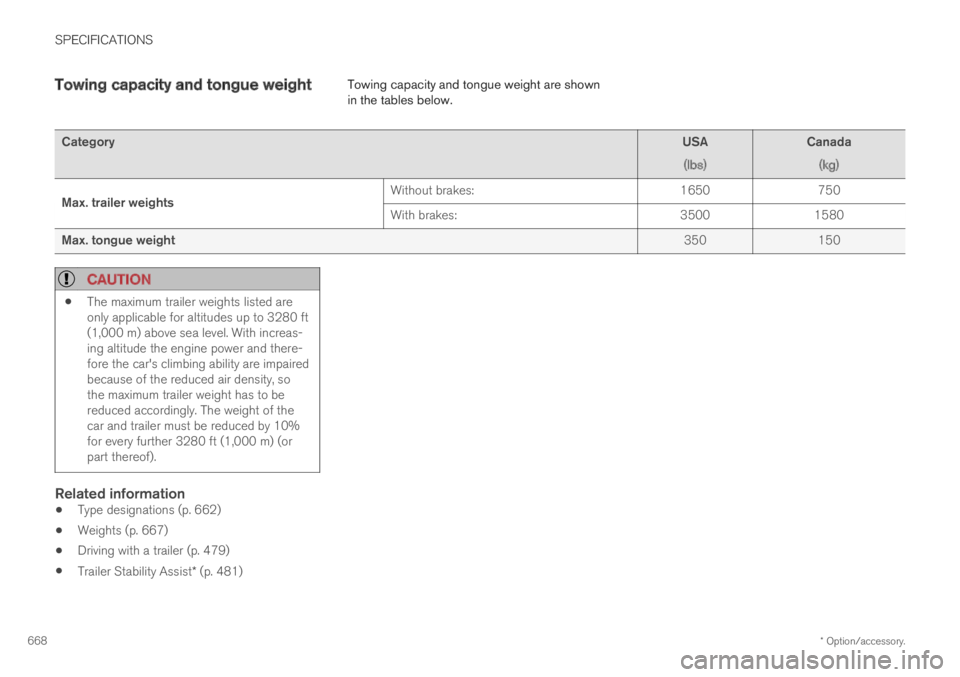
Towing capacity and tongue weightTowing capacity and tongue weight are shownin the tables below.
CategoryUSA
(lbs)
Canada
(kg)
Max. trailer weightsWithout brakes:1650750
With brakes:35001580
Max. tongue weight350150
CAUTION
The maximum trailer weights listed areonly applicable for altitudes up to 3280 ft(1,000 m) above sea level. With increas-ing altitude the engine power and there-fore the car's climbing ability are impairedbecause of the reduced air density, sothe maximum trailer weight has to bereduced accordingly. The weight of thecar and trailer must be reduced by 10%for every further 3280 ft (1,000 m) (orpart thereof).
Related information
Type designations (p. 662)
Weights (p. 667)
Driving with a trailer (p. 479)
Trailer Stability Assist* (p. 481)
Page 677 of 695

INDEX
675
1, 2, 3 ...
4WD448
A
ABS
anti-lock brakes435
AC (Air conditioning) 224
ACC - Adaptive Cruise Control 294, 297,
298, 299, 300, 301, 303, 304, 305, 306,
307, 308
Accessories and extra equipment 35
installation 36
Accessory installation warning 36, 37
Active Bending Lights 159
Adapting driving characteristics 272, 450
Adaptive Cruise Control 294, 297, 298,
299, 300, 301, 303, 304, 305, 306, 307, 308
change cruise control functionality 307
function 294
manage speed 298, 299
pass 303, 304
radar sensor 326
set time interval 300, 301
troubleshooting 306
Adjusting the steering wheel 198
Airbag52
activation/deactivation56
driver's side53
passenger side53, 56
Air bag, see Airbag52
Air conditioning224
Air conditioning, fluid
volume and grade672
Air distribution205
air vents205, 207
changing206
defrosting218
recirculation217
table showing options209
Air quality202, 204
allergy and asthma204
passenger compartment filter 205
Air recirculation217
Alarm267
deactivating268
Allergy and asthma-inducing substances 204
All Wheel Drive, AWD448
All Wheel Drive (AWD)448
All Wheel Drive (four-wheel drive) 448
Android Auto526, 528
Antenna
location256
Apple CarPlay523, 525
Approach lighting161
Apps494
Assistance at risk of collision 375, 376,
377, 378, 379, 380, 381, 382, 384
Audio and media492
Audio system
HD digital radio504
SiriusXM® Satellite radio 504, 505, 507
Auto-climate216
Auto hold442
Auto-hold brakes442
activate and deactivate442
after collision443
Automatic car wash651
Automatic high beam157
Automatic locking260
Automatic relocking240, 253
Automatic Speed Limiter 281, 283, 284, 285
Automatic transmission445
kickdown448
oil671
Trailer479
Auxiliary heater232
INDEX
Page 680 of 695

INDEX
678
Coolant, filling 623
Cooling system
overheating 475
Corner Traction Control 273
Corrosion protection 654
Covering
cargo compartment 600
Crash, see Collision 42
Crash event data 33
Cross Traffic Alert – CTA 355, 356, 357, 358
Cruise control 285, 286
manage speed 286, 287
temporary deactivation 288, 289
turn off 290
CTA – Cross Traffic Alert 355, 356, 357, 358
Curb weight 667
Customer Privacy Policy 35
CZIP (Clean Zone Interior Package) 204
D
Data
recording33
transferring between vehicle and work-
shop610
Data sharing544
Daytime running lights154
Decals
location662
Defrosting218
Detection of cyclist339
Dimensions665
Dipstick, electronic622
Direction of rotation558
Display
driver information84
Display lighting163
Distance Alert290, 291, 292
limitations293
DivX®519
Door mirrors169, 170
compass489
dimming170
outer169, 170
power folding170
resetting170
store position186, 187
Driveline
transmission444
Drive mode450
changing455
Driver Alert Control365
operation366, 367
Driver Alert Control limitations367
Driver performance92, 93
Driver profile136
edit137, 138, 139
select137
Driver support system272
Drive systems449
Driving
cooling system475
with a trailer479
Driving economy463
Driving through standing water469
driving with a trailer
towball load668
towing capacity668
E
Economical driving463
Electrical outlet590
use592
Electrical system 625
Electric drive motor
specifications 669
Page 683 of 695

INDEX
681
Inflatable Curtain 60
Inflating tires 583
Inflation pressure
adjusting 564
Checking 563
decal 565
recommended 565
Inflation pressure monitoring 565
action 569
Status 568
Inflation pressure table 673
Information display 84, 86
Infotainment (Audio and media) 492
Instrument cluster 84
settings 86
Instrument illumination 163
Instrument lighting 163
Instrument panel 84
App menu 103, 104
hybrid-related symbols and messages 426
messages 105
settings 86
Instruments and controls 82
Instruments overview
left-hand drive vehicle 82
Integrated booster cushion75
folding down78
folding up77
IntelliSafe
driver support28
Interior Air Quality System204
Intermittent wiping176
Internet, see Internet-connected vehicle 537
Internet-connected vehicle537
book service and repair613
No connection or poor connection 542
send car data614
system updates611
iPod®, connecting520
ISOFIX/LATCH anchors74
J
Jack571
Jump-start477
K
Key237
Keyboard126, 129
change language129
Keyless
locking/unlocking253
settings255
touch-sensitive surfaces252
Key tag237
L
Labels
location662
Laminated glass 166
Lamps
changing 624
Trailer 482
Lane Keeping Aid
operation 370
Lane Keeping Aid (LKA) 367, 369, 370,
371, 372, 374
Language 132
Leather upholstery, cleaning instructions 646
Leveling control 457
settings 460
License agreement 98, 545
Lifting tools 571
Light control 152, 163
Page 689 of 695

INDEX
687
Temperature
adjusting 222, 223
perceived 201
Temperature monitoring 418
Temporary spare
spare tire 575
Temporary tire sealing system
execution, checking 579
Inflating tires 583
location 578
overview 578
sealing compound 578
Terms and conditions
services 35
users 544
Tire dimensions 560, 570
Tire pressure monitoring
calibrating 567
Tires 556
direction of rotation 558
glossary of terms 559
inflation pressure table 673
mounting 574
pressure 673
removal 572
rotation 557
specifications 560, 673
storage 556
tire pressure monitoring 565
tire sealing578
Tread depth577
tread wear indicator 559
winter tires 577
Tire sealing system 579
Tire tread 559
Tools 570
Top tether anchors (child restraint sys-
tems)72
Top view 132
Total airing function 237
Towbar 478
removable, attaching, installing, mount-
ing 478
removable, removing, detaching 478
Towing 483
Towing capacity and towball load 668
Towing eyelet 484
TPMS - Tire Pressure Monitoring System 565
Traction control 273
Traffic information 500
Trailer 481
driving with a trailer 479
Lamps 482
swaying 481
Trailer Stability Assist481
trailer481
Trailer stabilizer 274
Trailer towing
trailer hitch 478
Transmission 444
automatic 445
Transmission fluid
grade 671
Travel Link 508
Fuel 512
Notifications 511
Sports 513
weather 510
Tread depth 559, 577
Tread wear indicator 559
Trip computer 89, 91
Trip odometer 89
Trip odometer resetting 92
Trip statistics 92
Troubleshooting
Adaptive Cruise Control 306
Troubleshooting the camera sensor 332, 335
TSA - Trailer Stability Assist 274, 481
Tunnel detection 155
Turn off engine 432