2019 VOLVO XC60 TWIN ENGINE climate settings
[x] Cancel search: climate settingsPage 214 of 695

CLIMATE CONTROL
* Option/accessory.212
Climate system controls
The climate system functions are controlled fromphysical buttons on the center console, the cen-ter display, and the climate panel on the rearside of the tunnel console*.
Physical buttons in the center console
Button for heated windshield* and maxdefroster.
Button for heated rear window and door mir-rors.
Climate bar in the center display
The most common climate system functions canbe controlled from the climate bar.
Temperature control for the driver and pas-senger sides.
Control for heated* and ventilated* driver andpassenger seats, and heated steeringwheel*.
Button for opening Climate view. The graphicin the button shows activated climate systemsettings.
Climate view in the center display
Tap the center button on the climate bar to openClimate view.
Depending on equipment level, Climate view maybe divided into several tabs. Toggle between thetabs by swiping the screen to the left/right or bytapping the desired heading.
Main climate
In addition to the functions in the climate bar,other main climate system functions can be con-trolled from the Main climate tab.
Max, Electric, Rear - Controls for defrostingwindows and door mirrors.
AC - Air conditioning controls.
Recirc - Air recirculation controls.
Air distribution controls.
Page 216 of 695

||
CLIMATE CONTROL
* Option/accessory.214
Related information
Climate system controls (p. 212)
Activating and deactivating the heated frontseat* (p. 214)
Activating and deactivating the
heated front seat*
The seats can be heated for added comfort forthe driver and passengers in cold weather.
Seat heating can be set to automatically activatewhen the engine is started. When set to automat-ically activate, heating will be turned on at lowambient temperatures.
1.Tap Settings in the Top view in the centerdisplay.
2.Tap Climate.
3.Select Auto Driver Seat Heating Leveland Auto Passenger Seat Heating Levelto activate/deactivate automatic start ofheated driver's and passenger seat.
4.Select Low, Medium or High to select levelafter the function has been activated.
Related information
Climate system controls (p. 212)
Activating and deactivating power frontseats* (p. 213)
Activating and deactivating the
heated rear seats*
The seats can be heated for added comfort forthe driver and passengers in cold weather.
Activating and deactivating the heated
rear seats from the rear seat
Buttons for seat heating on the rear side of the tunnelconsole.
–Press repeatedly on the left or right seatheating buttons on the rear side of the tun-nel console to select one of four levels: Off,High, Medium or Low.
>The level is changed and the indicatorlights in the button display the level.
Related information
Climate system controls (p. 212)
Page 218 of 695

||
CLIMATE CONTROL
* Option/accessory.216
Related information
Climate system controls (p. 212)
Activating and deactivating automatic steer-ing wheel heating* (p. 216)
Activating and deactivating
automatic steering wheel heating*
The steering wheel can be heated for addedcomfort in cold weather.
Steering wheel heating can be set to automati-cally activate when the engine is started. Whenset to automatically activate, heating will beturned on at low ambient temperatures.
1.Tap Settings in the Top view in the centerdisplay.
2.Tap Climate.
3.Select Auto Steering Wheel HeatingLevel to activate/deactivate automatic startof heated steering wheel.
4.Select Low, Medium or High to select levelafter the function has been activated.
Related information
Activating and deactivating the heated steer-ing wheel* (p. 215)
Activating auto climate control
If auto climate control is activated, several cli-mate system functions are controlled automati-cally.
Auto climate button in Climate view.
1. Open Climate view in the center display.
2.Tap or press and hold AUTO.
Tap - air recirculation, air conditioning andair distribution are controlled automati-cally.
Press and hold - air recirculation, air con-ditioning and air distribution are controlledautomatically. Temperature and blowerspeed are changed to standard settings:22 °C (72 °F) and speed 3.
>Auto climate mode is activated and thebutton lights up.
Page 220 of 695

CLIMATE CONTROL
* Option/accessory.218
Activating and deactivating therecirculation timer setting
The climate system's recirculation function helpsshut out smog, smoke, exhaust fumes, etc. byreusing the air in the passenger compartment.
When the recirculation timer is activated, air recir-culation will switch off automatically after 20minutes.
1.Tap Settings in the Top view in the centerdisplay.
2.Tap Climate.
3.Tap Recirculation Timer to activate/deacti-vate the recirculation timer.
Related information
Activating and deactivating recirculation(p. 217)
Activating and deactivating maxdefroster
Max defroster is used to quickly remove conden-sation and ice from windows.
Activating and deactivating max
defroster from the center console
A button in the center console offers quickaccess to the max defroster.
On vehicles with heated windshields*, the maxdefroster can only be activated separately fromClimate view in the center display.
Button in center console.
Vehicles without a heated windshield:
–Tap the button.
>The max defroster is activated/deacti-vated and the button lights up/goes out.
Vehicles with a heated windshield:
–Press the button repeatedly to switchbetween the three levels:
Activated windshield heating
Activated windshield heating and maxdefroster
Deactivated.
>The heated windshield and max defrosterare activated/deactivated and the buttonlights up/goes out.
NOTE
The max defroster starts after a slight delay toavoid a brief increase in blower speed if theheated windshield function has been deacti-vated by pressing the button twice in quicksuccession.
Page 222 of 695

||
CLIMATE CONTROL
* Option/accessory.220
Activating and deactivating windshield
heating from the center display
Windshield heating button in Climate view.
1. Open Climate view in the center display.
2.Tap Electric.
>Windshield heating is activated/deacti-vated and the button lights up/goes out.
NOTE
Triangular areas at the far sides of the wind-shield are not heated and will take slightlylonger to defrost/de-ice.
NOTE
The heated windshield may affect the per-formance of transponders and other commu-nication equipment.
Related information
Climate system controls (p. 212)
Activating and deactivating automatic wind-shield heating* (p. 220)
Activating and deactivating
automatic windshield heating*
Windshield heating is used to quickly removecondensation and ice from the windshield.
Windshield heating can be set to automaticallyactivate when the engine is started. With auto-matic start activated, heating will be activatedwhen there is a risk of ice or condensation on thewindows or mirrors. Heating is automaticallyswitched off when the window or door mirror issufficiently warm and the condensation or ice isgone.
1.Tap Settings in the Top view in the centerdisplay.
2.Tap Climate.
3.Select Auto Front Defroster to activate/deactivate automatic windshield heating.
Related information
Activating and deactivating the heated wind-shield* (p. 219)
Page 223 of 695
CLIMATE CONTROL
221
Activating and deactivating theheated rear window and doormirrors
The heated rear window and door mirrors areused to quickly remove condensation and icefrom the glass.
Activating and deactivating the heated
rear window and door mirrors from the
center console
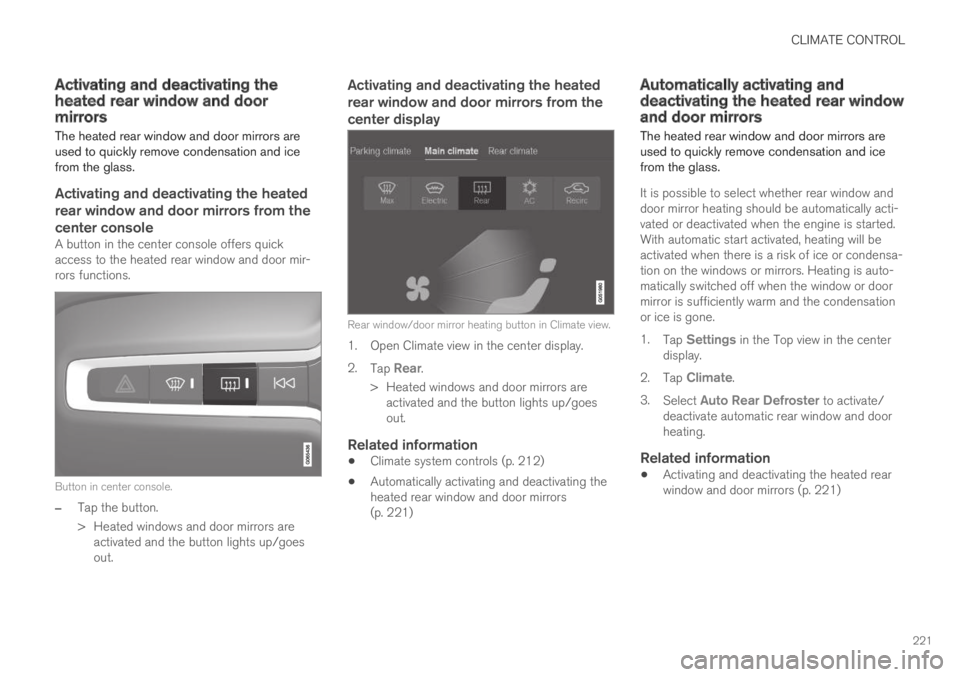
A button in the center console offers quickaccess to the heated rear window and door mir-rors functions.
Button in center console.
–Tap the button.
>Heated windows and door mirrors areactivated and the button lights up/goesout.
Activating and deactivating the heated
rear window and door mirrors from the
center display
Rear window/door mirror heating button in Climate view.
1. Open Climate view in the center display.
2.Tap Rear.
>Heated windows and door mirrors areactivated and the button lights up/goesout.
Related information
Climate system controls (p. 212)
Automatically activating and deactivating theheated rear window and door mirrors(p. 221)
Automatically activating anddeactivating the heated rear windowand door mirrors
The heated rear window and door mirrors areused to quickly remove condensation and icefrom the glass.
It is possible to select whether rear window anddoor mirror heating should be automatically acti-vated or deactivated when the engine is started.With automatic start activated, heating will beactivated when there is a risk of ice or condensa-tion on the windows or mirrors. Heating is auto-matically switched off when the window or doormirror is sufficiently warm and the condensationor ice is gone.
1.Tap Settings in the Top view in the centerdisplay.
2.Tap Climate.
3.Select Auto Rear Defroster to activate/deactivate automatic rear window and doorheating.
Related information
Activating and deactivating the heated rearwindow and door mirrors (p. 221)
Page 228 of 695
CLIMATE CONTROL
* Option/accessory.226
Starting and stoppingpreconditioning
Preconditioning heats or cools the passengercompartment before driving. Preconditioningcan be started in the center display or from acellular phone.
Starting and stopping from the vehicle
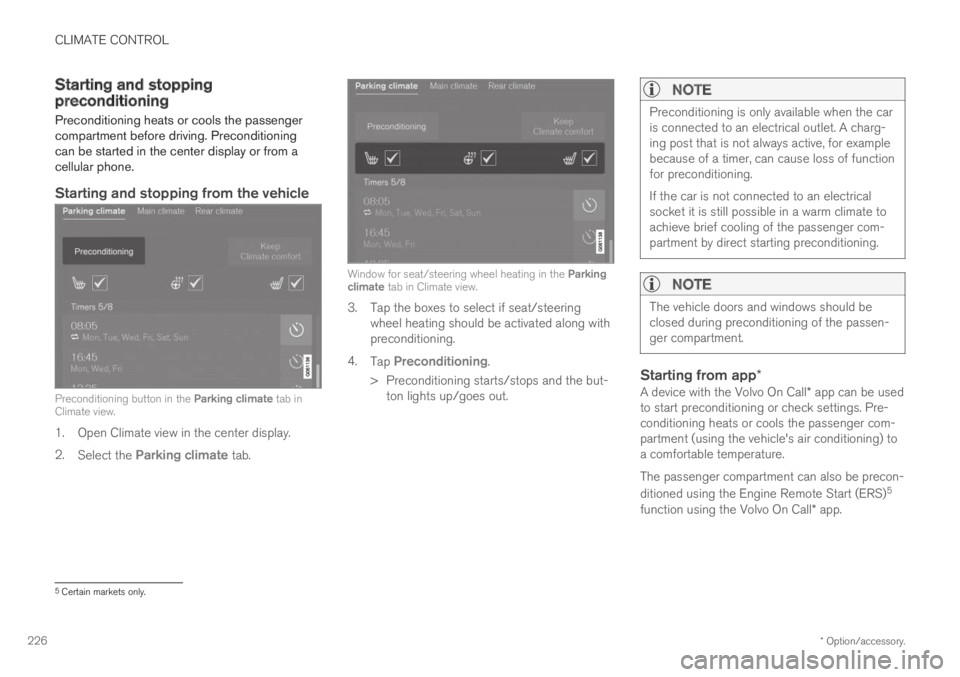
Preconditioning button in the Parking climate tab inClimate view.
1. Open Climate view in the center display.
2.Select the Parking climate tab.
Window for seat/steering wheel heating in the Parkingclimate tab in Climate view.
3. Tap the boxes to select if seat/steeringwheel heating should be activated along withpreconditioning.
4.Tap Preconditioning.
>Preconditioning starts/stops and the but-ton lights up/goes out.
NOTE
Preconditioning is only available when the caris connected to an electrical outlet. A charg-ing post that is not always active, for examplebecause of a timer, can cause loss of functionfor preconditioning.
If the car is not connected to an electricalsocket it is still possible in a warm climate toachieve brief cooling of the passenger com-partment by direct starting preconditioning.
NOTE
The vehicle doors and windows should beclosed during preconditioning of the passen-ger compartment.
Starting from app *
A device with the Volvo On Call* app can be usedto start preconditioning or check settings. Pre-conditioning heats or cools the passenger com-partment (using the vehicle's air conditioning) toa comfortable temperature.
The passenger compartment can also be precon-
ditioned using the Engine Remote Start (ERS)5
function using the Volvo On Call* app.
5Certain markets only.
Page 229 of 695

CLIMATE CONTROL
}}
227
Related information
Parking climate (p. 224)
Preconditioning (p. 225)
Preconditioning timer (p. 227)
Preconditioning timer
The timer can be set to finish preconditioning ata predetermined time.
The timer can store up to 8 preset times for:
A time on a particular date
A time on one or more days of the week, withor without the repeat function.
NOTE
Preconditioning is only available when the caris connected to an electrical outlet. A charg-ing post that is not always active, for examplebecause of a timer, can cause loss of functionfor preconditioning.
If the car is not connected to an electricalsocket it is still possible in a warm climate toachieve brief cooling of the passenger com-partment by direct starting preconditioning.
Related information
Preconditioning (p. 225)
Adding and editing timer settings for precon-ditioning (p. 227)
Activating and deactivating preconditioningtimer (p. 228)
Deleting preconditioning timer settings(p. 229)
Adding and editing timer settingsfor preconditioning
The preconditioning timer can store up to 8 pre-set timer settings.
Adding a timer setting
Button for adding a timer setting in the Parking climatetab in Climate view.
1. Open Climate view in the center display.
2.Select the Parking climate tab.
3.Tap Add timer.
>A pop-up window will appear.
NOTE
It is not possible to add a time setting if thereare already 8 settings for the timer. Delete atime setting to be able to add a new one.