Page 379 of 695

DRIVER SUPPORT
* Option/accessory.377
Steering assistance with braking
Intervention with steering assistance and braking.
Braking intervention assists in situations wheresteering assistance alone is not sufficient. Brak-ing force is automatically adapted according tothe situation at the moment the vehicle begins torun off the road.
Related information
Steering assistance at risk of collision(p. 375)
Activating/deactivating Run-OffMitigation with steering assistance
The driver can choose to have this function Onor Off.
Use this button in the centerdisplay's Function view to turnthe function On and Off.
NOTE
When the Collision avoidance assistancefunction is deactivated, all subfunctions of thefollowing are deactivated:
Steering assistance at risk of run-off
Steering assistance at risk of head-oncollision
Steering assistance during collision risksfrom behind*
Although it is possible to deactivate the func-tion, the driver is advised to keep it activatedsince it can help improve driving safety inmost cases.
Related information
Steering assistance at risk of collision(p. 375)
Run-Off Mitigation with steering assistance(p. 376)
Page 380 of 695

DRIVER SUPPORT
378
Limitations of Run-Off Mitigationwith steering assistance
In certain demanding driving conditions, thefunction may not be able to properly assist thedriver. In these situations, it is recommendedthat it is turned off.
Examples of such situations include:
road work
winter driving conditions
narrow roads
poor road surfaces
a very sporty driving style
bad weather with reduced visibility
roads with indistinct or no lane markings
sharp edges or lines other than the lane'sside markings
when the power steering works at reducedpower, e.g. during cooling due to overheating(see section “Speed-dependent steeringforce”).
NOTE
The function uses the vehicle's combinedcamera and radar unit, which has certain gen-eral limitations; see sections "Camera limita-tions" and "Radar sensor limitations".
Related information
Steering assistance at risk of collision(p. 375)
Speed-dependent steering wheel resistance(p. 272)
Camera limitations (p. 332)
Radar sensor limitations (p. 327)
Steering assistance during collisionrisks from oncoming traffic
This sub-function can help assist a distracteddriver who has not noticed that the vehicle isveering into oncoming traffic.
The function provides assistance by swerving your vehi-cle back into your own lane.
Oncoming vehicles
Own vehicle
The function is active at speeds between60-140 km/h (37-87 mph) on roads with clearlyvisible traffic lane markings/lines.
If your vehicle is starting to veer from your ownlane and a vehicle is approaching from the oppo-site direction, this function can help the driversteer the vehicle back into its own lane.
Page 381 of 695

DRIVER SUPPORT
}}
* Option/accessory.379
However, the function will not provide steeringassistance if the turn signal is used. The functionwill also not be activated if it detects that thedriver is actively operating the vehicle.
After the system has automatically intervened,this text message will appear in the instrumentpanel:
Collision avoidance assistance –Automatic intervention
WARNING
The "Steering assistance at risk of head-on collision" subfunction is supplemen-tary driver support intended to improvedriving safety – it cannot handle all situa-tions in all traffic, weather and road condi-tions.
Pilot Assist is only activated if there is ahigh risk of collision – you must thereforenever wait for the function to intervene.
The function is not a substitute for thedriver's attention and judgment. The driveris always responsible for ensuring thevehicle is driven in a safe manner, at theappropriate speed, with an appropriatedistance to other vehicles, and in accord-ance with current traffic rules and regula-tions.
Related information
Steering assistance at risk of collision(p. 375)
Activating/deactivating Steering assistanceduring collision risks with oncoming vehicles(p. 379)
Limitations of steering assistance during col-lision risks from oncoming traffic (p. 380)
Activating/deactivating Steeringassistance during collision riskswith oncoming vehicles
The driver can choose to have this function Onor Off.
Use this button in the centerdisplay's Function view to turnthe function On and Off.
NOTE
When the Collision avoidance assistancefunction is deactivated, all subfunctions of thefollowing are deactivated:
Steering assistance at risk of run-off
Steering assistance at risk of head-oncollision
Steering assistance during collision risksfrom behind*
Although it is possible to deactivate the func-tion, the driver is advised to keep it activatedsince it can help improve driving safety inmost cases.
Page 382 of 695

||
DRIVER SUPPORT
380
Related information
Steering assistance at risk of collision(p. 375)
Steering assistance during collision risksfrom oncoming traffic (p. 378)
Limitations of steering assistanceduring collision risks fromoncoming traffic
The function may have limited functionality incertain situations and not intervene, e.g.:
for smaller vehicles such as motorcycles
on roads that do not have clear lane mark-ings
if more than half of your vehicle has movedinto the adjacent lane
outside the speed range 60-140 km/h(37-87 mph)
when the power steering works at reducedpower - e.g. during cooling due to overheat-ing (see section "Speed-dependent steeringforce").
Functionality may also be reduced in other situa-tions, such as:
road work
winter driving conditions
narrow roads
poor road surfaces
a very sporty driving style
bad weather with reduced visibility.
In these demanding driving conditions, the func-tion may not be able to properly assist the driver.
In these situations, it is recommended that it isturned off.
NOTE
The function uses the vehicle's combinedcamera and radar unit, which has certain gen-eral limitations; see sections "Camera limita-tions" and "Radar sensor limitations".
Related information
Steering assistance at risk of collision(p. 375)
Steering assistance during collision risksfrom oncoming traffic (p. 378)
Speed-dependent steering wheel resistance(p. 272)
Camera limitations (p. 332)
Radar sensor limitations (p. 327)
Page 383 of 695
DRIVER SUPPORT
* Option/accessory.381
Steering assistance during collision
risks from behind*
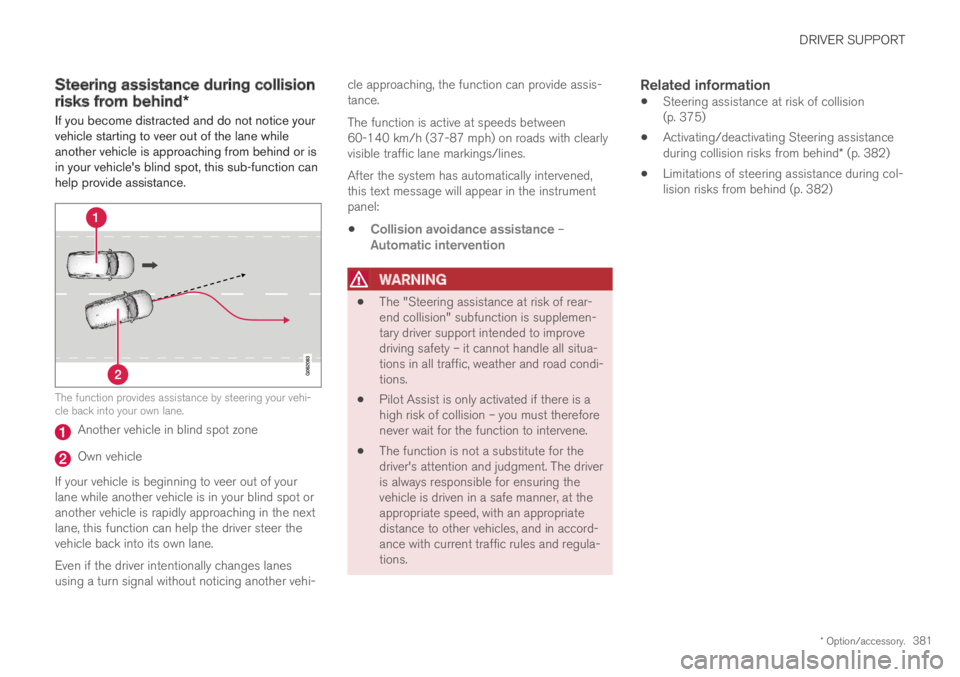
If you become distracted and do not notice yourvehicle starting to veer out of the lane whileanother vehicle is approaching from behind or isin your vehicle's blind spot, this sub-function canhelp provide assistance.
The function provides assistance by steering your vehi-cle back into your own lane.
Another vehicle in blind spot zone
Own vehicle
If your vehicle is beginning to veer out of yourlane while another vehicle is in your blind spot oranother vehicle is rapidly approaching in the nextlane, this function can help the driver steer thevehicle back into its own lane.
Even if the driver intentionally changes lanesusing a turn signal without noticing another vehi-
cle approaching, the function can provide assis-tance.
The function is active at speeds between60-140 km/h (37-87 mph) on roads with clearlyvisible traffic lane markings/lines.
After the system has automatically intervened,this text message will appear in the instrumentpanel:
Collision avoidance assistance –Automatic intervention
WARNING
The "Steering assistance at risk of rear-end collision" subfunction is supplemen-tary driver support intended to improvedriving safety – it cannot handle all situa-tions in all traffic, weather and road condi-tions.
Pilot Assist is only activated if there is ahigh risk of collision – you must thereforenever wait for the function to intervene.
The function is not a substitute for thedriver's attention and judgment. The driveris always responsible for ensuring thevehicle is driven in a safe manner, at theappropriate speed, with an appropriatedistance to other vehicles, and in accord-ance with current traffic rules and regula-tions.
Related information
Steering assistance at risk of collision(p. 375)
Activating/deactivating Steering assistanceduring collision risks from behind* (p. 382)
Limitations of steering assistance during col-lision risks from behind (p. 382)
Page 384 of 695

DRIVER SUPPORT
* Option/accessory.382
Activating/deactivating Steeringassistance during collision risks
from behind*
The driver can choose to have this function Onor Off.
Use this button in the centerdisplay's Function view to turnthe function On and Off.
NOTE
When the Collision avoidance assistancefunction is deactivated, all subfunctions of thefollowing are deactivated:
Steering assistance at risk of run-off
Steering assistance at risk of head-oncollision
Steering assistance during collision risksfrom behind*
Although it is possible to deactivate the func-tion, the driver is advised to keep it activatedsince it can help improve driving safety inmost cases.
Related information
Steering assistance at risk of collision(p. 375)
Steering assistance during collision risksfrom behind* (p. 381)
Limitations of steering assistanceduring collision risks from behind
The function may have limited functionality incertain situations and not intervene, e.g.:
for smaller vehicles such as motorcycles
if more than half of your vehicle has movedinto the adjacent lane
on roads/lanes with indistinct or no side lanemarkings
outside the speed range 60-140 km/h(37-87 mph)
when the power steering works at reducedpower - e.g. during cooling due to overheat-ing (see section "Speed-dependent steeringforce").
Functionality may also be reduced in other situa-tions, such as:
road work
winter driving conditions
narrow roads
poor road surfaces
a very sporty driving style
bad weather with reduced visibility.
In these demanding driving conditions, the func-tion may not be able to properly assist the driver.In these situations, it is recommended that it isturned off.
Page 385 of 695
DRIVER SUPPORT
* Option/accessory.383
NOTE
The function uses the vehicle's combinedcamera and radar unit, which has certain gen-eral limitations; see sections "Camera limita-tions" and "Radar sensor limitations".
In addition to the camera and radar sensor, thefunction also uses the vehicle's rearward-facingradar, which has certain general limitations thedriver should be aware of. See additional informa-tion in the section "BLIS limitations".
Related information
Steering assistance at risk of collision(p. 375)
Steering assistance during collision risksfrom behind* (p. 381)
Speed-dependent steering wheel resistance(p. 272)
Camera limitations (p. 332)
Radar sensor limitations (p. 327)
BLIS limitations (p. 352)
Page 386 of 695
DRIVER SUPPORT
384
Symbols and messages for steeringassistance during collision risks
A number of symbols and messages related tothe function may be displayed in the instrumentpanel.Some examples of symbols and messages are shown in the table below.
SymbolMessageMeaning
Collision avoidance assistance
Automatic intervention
When the function is activated, a message will appear to alert the driver.
Windscreen sensor
Sensor blocked, see Owner's manual
The camera's ability to detect the lane in front of the vehicle is reduced.
A text message can be erased by briefly pressing
the button in the center of the right-sidesteering wheel keypad.
If the message persists: Contact a workshop ‒ anauthorized Volvo workshop is recommended.
Related information
Steering assistance at risk of collision(p. 375)

