2019 VOLVO XC60 TWIN ENGINE ESP
[x] Cancel search: ESPPage 567 of 695
WHEELS AND TIRES
}}
* Option/accessory.565
Recommended tire pressure
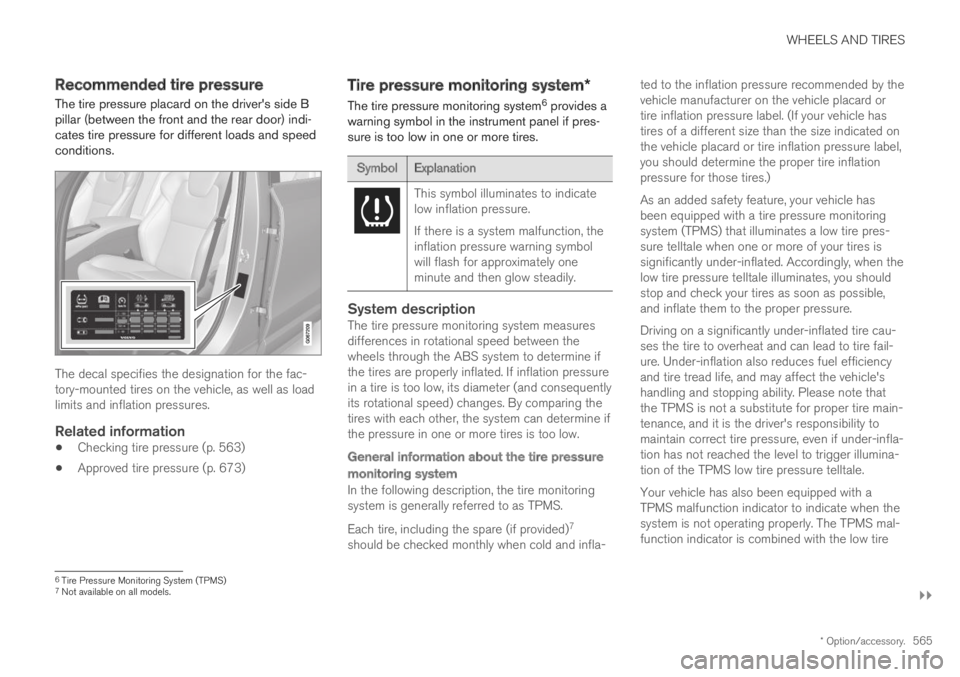
The tire pressure placard on the driver's side Bpillar (between the front and the rear door) indi-cates tire pressure for different loads and speedconditions.
The decal specifies the designation for the fac-tory-mounted tires on the vehicle, as well as loadlimits and inflation pressures.
Related information
Checking tire pressure (p. 563)
Approved tire pressure (p. 673)
Tire pressure monitoring system*
The tire pressure monitoring system6 provides awarning symbol in the instrument panel if pres-sure is too low in one or more tires.
SymbolExplanation
This symbol illuminates to indicatelow inflation pressure.
If there is a system malfunction, theinflation pressure warning symbolwill flash for approximately oneminute and then glow steadily.
System description
The tire pressure monitoring system measuresdifferences in rotational speed between thewheels through the ABS system to determine ifthe tires are properly inflated. If inflation pressurein a tire is too low, its diameter (and consequentlyits rotational speed) changes. By comparing thetires with each other, the system can determine ifthe pressure in one or more tires is too low.
General information about the tire pressure
monitoring system
In the following description, the tire monitoringsystem is generally referred to as TPMS.
Each tire, including the spare (if provided)7
should be checked monthly when cold and infla-
ted to the inflation pressure recommended by thevehicle manufacturer on the vehicle placard ortire inflation pressure label. (If your vehicle hastires of a different size than the size indicated onthe vehicle placard or tire inflation pressure label,you should determine the proper tire inflationpressure for those tires.)
As an added safety feature, your vehicle hasbeen equipped with a tire pressure monitoringsystem (TPMS) that illuminates a low tire pres-sure telltale when one or more of your tires issignificantly under-inflated. Accordingly, when thelow tire pressure telltale illuminates, you shouldstop and check your tires as soon as possible,and inflate them to the proper pressure.
Driving on a significantly under-inflated tire cau-ses the tire to overheat and can lead to tire fail-ure. Under-inflation also reduces fuel efficiencyand tire tread life, and may affect the vehicle'shandling and stopping ability. Please note thatthe TPMS is not a substitute for proper tire main-tenance, and it is the driver's responsibility tomaintain correct tire pressure, even if under-infla-tion has not reached the level to trigger illumina-tion of the TPMS low tire pressure telltale.
Your vehicle has also been equipped with aTPMS malfunction indicator to indicate when thesystem is not operating properly. The TPMS mal-function indicator is combined with the low tire
6Tire Pressure Monitoring System (TPMS)7Not available on all models.
Page 578 of 695

||
WHEELS AND TIRES
576
WARNING
The vehicle must never be driven withmore than one "Temporary Spare" tiremounted.
Driving with a spare wheel may alter thedriving characteristics of the vehicle.Replace the spare wheel with a normalwheel as soon as possible.
The spare wheel is smaller than the nor-mal wheel, which affects the vehicle'sground clearance. Watch for high curbsand do not wash the vehicle in an auto-matic car wash when a spare wheel ismounted.
Follow the manufacturer's recommendedtire inflation pressure for the spare wheel.
On all-wheel drive vehicles, the drive onthe rear axle can be disconnected.
If the spare wheel is mounted on thefront axle, snow chains must not be used.
The spare wheel must not be repaired.
CAUTION
The vehicle must not be driven with wheels ofdifferent dimensions or with a spare tire otherthan the one that came with the vehicle. Theuse of different size wheels can seriouslydamage your vehicle's transmission.
Related information
When changing wheels (p. 570)
Recommended tire pressure (p. 565)
Accessing the spare wheel
Follow these instructions regarding handling thespare wheel.
The spare wheel is stored in a bag and should besecured with two straps onto the floor of thetrunk/cargo compartment when the vehicle isbeing driven. The straps should be strappeddown crosswise over the wheel, attached to theload anchoring eyelets and pulled taut.
Wheel changing tools are located under thecargo compartment floor.
Related information
Spare wheel (p. 575)
Page 579 of 695

WHEELS AND TIRES
}}
577
Snow tires
Snow tires are designed for winter driving.
Volvo recommends snow tires with specificdimensions. The tire dimensions vary dependingon engine type. When driving with snow tires, thecorrect type of tires must be mounted on all fourwheels.
NOTE
Contact a Volvo dealer for advice on the bestchoice of rims and tires.
Tips for changing snow tires
When switching between regular tires and snowtires, mark the tires according to which side theywere mounted on, e.g. L for left and R for right.
Studded tires
Studded tires should be broken in by driving500–1000 km (300–600 miles) slowly and gen-tly to help the studs settle properly in the tires.This gives the tire, and especially the studs, alonger service life.
NOTE
Regulations regarding the use of studdedtires vary from country to country.
Tread depth
Road conditions with ice, slush and low tempera-tures place considerably higher demands on tiresthan summer conditions. Volvo therefore recom-mends not driving on snow tires that have a treaddepth of less than 4 mm (0.15 inch).
Related information
When changing wheels (p. 570)
Winter driving (p. 468)
Tread wear indicator (p. 559)
Snow chains
Using snow chains and/or snow tires can helpimprove traction in winter driving conditions.
WARNING
Use Volvo genuine snow chains or equivalentsnow chains that are suitable for the vehiclemodel and the tire and wheel sizes. Only one-sided snow chains are permitted.
If uncertain about snow chains, Volvo recom-mends contacting an authorized Volvo work-shop. Use of the wrong snow chains couldcause serious damage to the vehicle andresult in an accident.
Page 582 of 695

||
WHEELS AND TIRES
580
Sealing compound bottle
Switch
Connecting
NOTE
Do not break the seal of the bottle beforeuse. The seal is broken automatically whenthe bottle is screwed into place.
WARNING
Please keep the following points in mindwhen using the tire sealing system:
The sealing compound bottle (no. 8 in theillustration) contains 1) rubber latex, natu-ral and 2) ethanediol. These substancesare harmful if swallowed.
The contents of this bottle may causeallergic skin reactions or otherwise bepotentially harmful to the respiratory tract,the skin, the central nervous system, andthe eyes.
Precautions:
Keep out of reach of children.
Do not ingest the contents.
Avoid prolonged or repeated contact withthe skin. Remove any clothing that hascome into contact with sealant.
Wash thoroughly after handling.
First aid:
Skin: Wash affected areas of the skinwith soap and water. Get medical atten-tion if symptoms occur.
Eyes: Flush with plenty of water for least15 minutes, occasionally lifting the upperand lower eyelids. Get medical attention ifsymptoms occur.
Inhalation: Move the exposed person tofresh air. If irritation persists, get medicalattention.
Ingestion: Do NOT induce vomitingunless directed to do so by medical per-sonnel. Get medical attention.
Disposal: Dispose of this material and itscontainer at a hazardous or special wastecollection point.
WARNING
Do not remove the bottle while the tiresealing system is being used.
Do not remove the hose while the tiresealing system is being used.
1.Turn on the vehicle's hazard warning flashersif the tire sealing system is to be used in anarea with traffic.
If the puncture was caused by a nail or simi-lar object, do not remove it. It will help sealthe hole.
2. Peel off the speed limit sticker from the sideof the compressor. Affix the decal to a clearlyvisible location on the windshield to remindthe driver not to exceed this speed limit. Donot drive faster than 80 km/h (50 mph) whileusing a tire that has been temporarilyrepaired with the tire sealing system.
Page 601 of 695
LOADING, STORAGE AND PASSENGER COMPARTMENT
}}
599
Then put the other end piece in the recess inthe side panel on the opposite side.
Make sure the front flap is pointed downwardbehind the backrest before the cassette isput into place.
Push the end piece down on both sides, oneat a time.
>When a click is heard and the red markson each end piece are no longer visible,the cover is in place. Check that it issecure.
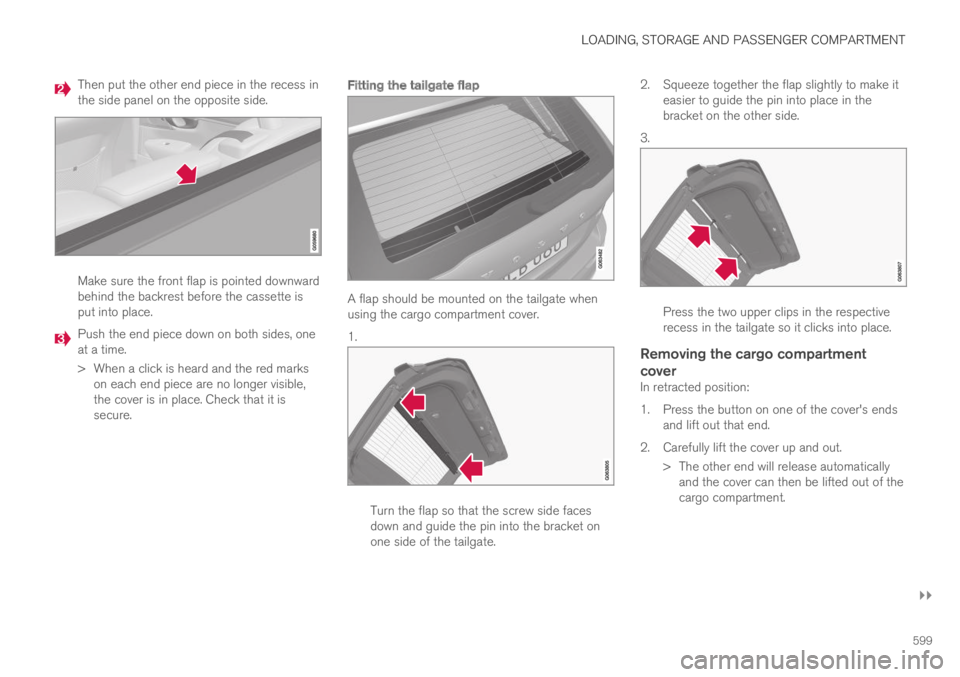
Fitting the tailgate flap
A flap should be mounted on the tailgate whenusing the cargo compartment cover.
1.
Turn the flap so that the screw side facesdown and guide the pin into the bracket onone side of the tailgate.
2.Squeeze together the flap slightly to make iteasier to guide the pin into place in thebracket on the other side.
3.
Press the two upper clips in the respectiverecess in the tailgate so it clicks into place.
Removing the cargo compartment
cover
In retracted position:
1. Press the button on one of the cover's endsand lift out that end.
2. Carefully lift the cover up and out.
> The other end will release automaticallyand the cover can then be lifted out of thecargo compartment.
Page 606 of 695
||
LOADING, STORAGE AND PASSENGER COMPARTMENT
604
WARNING
Objects in the cargo compartment mustalways be securely anchored, even with a cor-rectly installed cargo net.
Installing the cargo net
WARNING
All of the cargo net's upper consoles, hooksand straps must be securely mounted andattached before the net is used.
Never use the net if it is damaged.
NOTE
With front mounting, the cargo net is mosteasily installed via a rear door.
1. Fold out the cargo net and make sure thatthe upper rod folds out and locks into posi-tion.
2.Insert one of the net's hooks into the front orrear ceiling mounting point with the straplock facing you.
3. Insert the net's other upper hook into theceiling mounting point on the opposite side.
The telescopic spring-loaded hooks makemounting easier.
Make sure that the net's hooks are pushedforward as far as possible into their respec-tive mounting points.
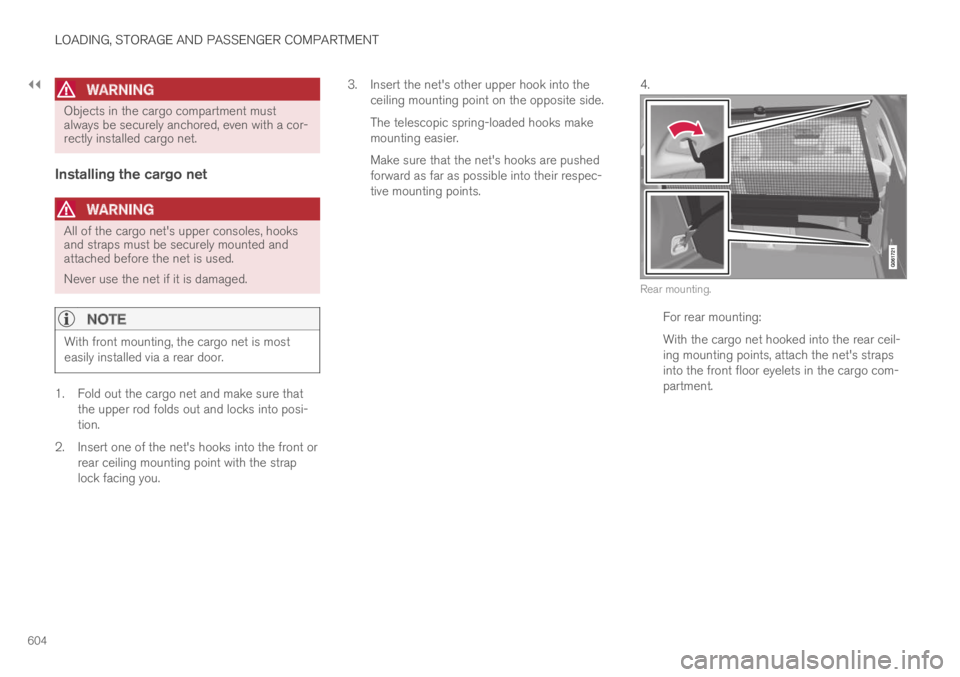
4.
Rear mounting.
For rear mounting:
With the cargo net hooked into the rear ceil-ing mounting points, attach the net's strapsinto the front floor eyelets in the cargo com-partment.
Page 616 of 695

||
MAINTENANCE AND SERVICE
* Option/accessory.614
7.Tap Send appointment request.
>You will receive an appointment sugges-
tion by email within a couple of days7.
You will also receive the same messagevia email and when you log in towww.volvocars.com.
On some markets, the message in theinstrument panel indicating that the vehi-cle requires service will go out once theappointment request has been sent.
8.Tap Cancel request if you would like tocancel your request.
The appointment request contains informationabout your vehicle that helps the workshop planfor your visit.
The retailer will send you a digital appointmentsuggestion. Information about your retailer is alsoavailable in the vehicle so that you can contactyour workshop at any time.
Accepting an appointment suggestion
When the vehicle has received an appointmentsuggestion, a message will be displayed at thetop of the center display.
1. Tap the message.
2. To accept the suggested appointment, tapAccept. Otherwise, tap Send newproposal or Decline.
For some markets, the system reminds you whenan appointment time is approaching and the navi-
gation system8 can also guide you to the work-shop at the appointed time.
Related information
Vehicle status (p. 612)
Sending vehicle information to the workshop(p. 614)
Navigating in the center display's views(p. 115)
Volvo ID (p. 26)
Internet-connected vehicle* (p. 537)
Sending vehicle information to the
workshop9
Vehicle-related information can be sent at anytime from the vehicle, e.g. if you schedule a visitto a workshop and would like to assist yourworkshop by providing additional basic informa-tion. Sending vehicle information is not the sameas scheduling service.
1.Open the Car Status app from App view inthe center display.
2.Tap Appointments.
3.Tap Send vehicle data.
>A message confirming that vehicle-relatedinformation has been sent will appear atthe top of the center display. You cancancel data transmission by tapping thecheckbox in the activity indicator.
Information is sent via the vehicle's Inter-
net connection10.
7Timespan may vary depending on market.8For vehicles with Sensus Navigation*.9Certain markets only.10There may be a charge for transmitting data over the Internet, depending on your service plan.
Page 632 of 695

MAINTENANCE AND SERVICE
630
Battery symbols
There are warning symbols and information onthe batteries.
Wear protective goggles.
See the Owner's Manual foradditional information.
Keep batteries away fromchildren.
Batteries contain corrosiveacid.
Avoid smoking, openflames, and/or sparks.
Risk of explosion.
Recycle properly.
NOTE
A used start battery contains lead and mustbe recycled in an environmentally responsiblemanner.
Related information
Start battery (p. 625)
Hybrid battery (p. 629)
Fuses and fuseboxes
All electrical functions and components are pro-tected by a number of fuses in order to protectthe vehicle's electrical system from damage byshort circuiting or overloading.
WARNING
Never use a foreign object or a fuse with ahigher amperage than that specified toreplace a fuse. This could cause significantdamage to the electrical system and possiblylead to a fire.
WARNING
Orange wiring may only be handled by quali-fied personnel.
WARNING
Several components in the vehicle work withhigh voltage that can be hazardous in case ofan incorrect procedure.
Do not touch anything that is not clearlydescribed in this Owner's Manual.
If any electrical component or function is notresponding, the component may have blown afuse due to temporary overload. If the same fuseblows repeatedly, there may be a problem withthe component. Volvo recommends contacting anauthorized Volvo workshop to have the compo-nent checked.