2019 VOLVO S90 TWIN ENGINE lane assist
[x] Cancel search: lane assistPage 326 of 669

||
DRIVER SUPPORT
* Option/accessory.324
The previous illustration59 shows that Pilot Assistis set to maintain a speed of 110 km/h (68 mph)and that there is no target vehicle ahead to fol-low.
Pilot Assist will provide steering assistancebecause it can detect the lane's side markinglines.
Related information
Pilot Assist (p. 308)
Radar sensor
The radar sensor is used by several driver sup-port systems to detect other vehicles.
Note: This illustration is general and details may varydepending on model.
The radar sensor is used by the following func-tions:
Distance Alert*
Adaptive Cruise Control*
Lane Keeping Aid
Pilot Assist*
City Safety
Any modifications to the radar sensor may makeits use illegal.
Related information
Radar sensor limitations (p. 325)
Recommended maintenance for the radarsensor (p. 328)
Radar sensor type approval (p. 328)
59Note: This illustration is general and details may vary depending on model.
Page 328 of 669
||
DRIVER SUPPORT
326
CauseAction
Water or snow is spraying/swirling up and blocking the radar signals orthe camera's range of visibility.No action. Very wet or snow-covered roads may sometimes prevent the cam-era/radar sensor from functioning.
There is dirt between the inside of the windshield and the camera/radarsensor.Consult a workshop to have the area of the windshield on the inside of the cam-era's casing cleaned. An authorized Volvo workshop is recommended.
NOTE
Keep the windshield in front of the cameraand radar unit clean.
Vehicle speed
The radar sensor's ability to detect a vehicleahead is significantly reduced if:
the speed of the vehicle ahead differs greatlyfrom your vehicle's speed
Limited field of vision
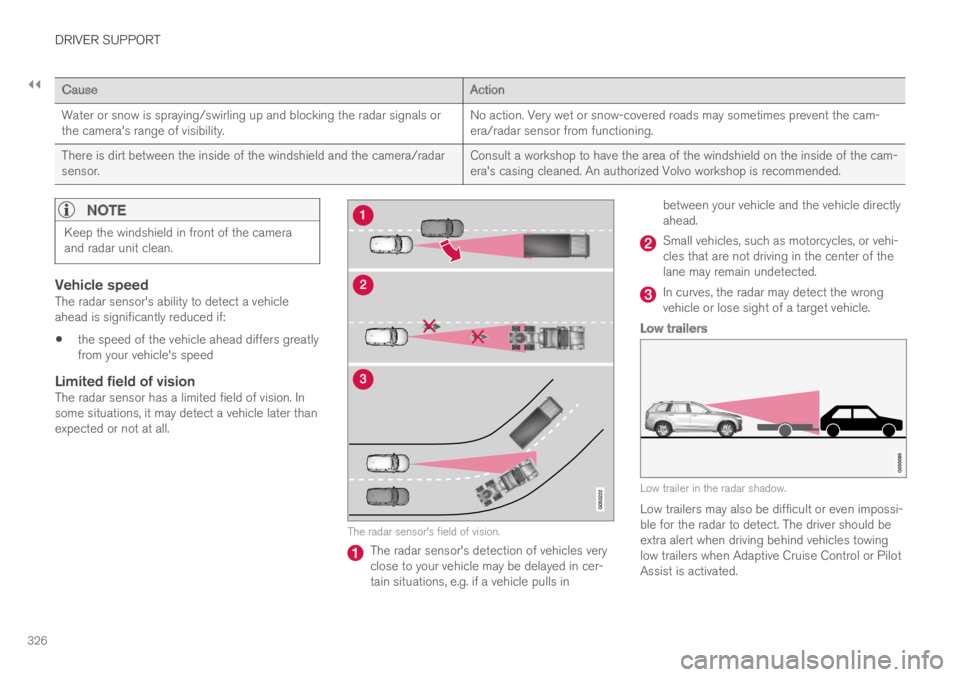
The radar sensor has a limited field of vision. Insome situations, it may detect a vehicle later thanexpected or not at all.
The radar sensor's field of vision.
The radar sensor's detection of vehicles veryclose to your vehicle may be delayed in cer-tain situations, e.g. if a vehicle pulls in
between your vehicle and the vehicle directlyahead.
Small vehicles, such as motorcycles, or vehi-cles that are not driving in the center of thelane may remain undetected.
In curves, the radar may detect the wrongvehicle or lose sight of a target vehicle.
Low trailers
Low trailer in the radar shadow.
Low trailers may also be difficult or even impossi-ble for the radar to detect. The driver should beextra alert when driving behind vehicles towinglow trailers when Adaptive Cruise Control or PilotAssist is activated.
Page 331 of 669

DRIVER SUPPORT
* Option/accessory.329
Camera
The camera is used by several driver supportsystems to e.g. detect lane marker lines or roadsigns.
Note: This illustration is general and details may varydepending on model.
The camera is used by the following functions:
Adaptive Cruise Control*
Pilot Assist*
Lane Keeping Aid*
Steering assistance at risk of collision
City Safety
Driver Alert Control*
Road Sign Information*
Active high beams*
Related information
Camera limitations (p. 330)
Recommended maintenance for the camera/radar sensor (p. 333)
Page 343 of 669

DRIVER SUPPORT
341
City Safety and delayed evasivemaneuvers
City Safety can assist the driver by automaticallybraking the vehicle when it is not possible toavoid a collision by steering alone.
City Safety assists the driver by periodicallyattempting to predict possible "escape routes" tothe sides of the vehicle in the event a slow-mov-ing or stationary vehicle were to be detected at alate stage.
Your vehicle (1) cannot detect any potential escaperoutes for veering away from the vehicle ahead (2) andmay therefore apply the brakes at an earlier stage.
Own vehicle
Slow-moving/stationary vehicles
City Safety will not intervene to automaticallyapply the brakes if it is possible for the driver toavoid a collision by steering the vehicle.
However, if City Safety determines that an eva-sive maneuver would not be possible due to traf-fic in the adjacent lane(s), the function can assistthe driver by automatically starting to apply thebrakes at an earlier stage.
WARNING
The possibility of City Safety predicting acertain situation is supplementary driversupport intended to improve driving safety– it cannot handle all situations in all traf-fic, weather and road conditions.
City Safety is not a substitute for the driv-er's attention and judgment. The driver isalways responsible for ensuring the vehi-cle is driven in a safe manner, at theappropriate speed, with an appropriatedistance to other vehicles, and in accord-ance with current traffic rules and regula-tions.
Limitations of City Safety during evasive
maneuvers
NOTE
The function uses the vehicle's combinedcamera and radar unit, which has certain gen-eral limitations; see sections "Camera limita-tions" and "Radar sensor limitations".
Related information
City Safety™ (p. 333)
Camera limitations (p. 330)
Radar sensor limitations (p. 325)
Page 349 of 669

DRIVER SUPPORT
}}
* Option/accessory.347
BLIS*
The BLIS69 function is designed to help provideassistance in heavy traffic with several lanesmoving in the same direction by helping thedriver to detect the presence of vehicles in the"blind spot" area behind and to the side of thevehicle.
BLIS is a driver support system designed to alertthe driver of:
vehicles in your "blind spot"
vehicles approaching rapidly in adjacentlanes.Location of BLIS indicator light.70
Indicator light
The BLIS button in the center display's Func-tion view is used to activate/deactivate thefunction.
BLIS overview
Blind spot zone
Rapidly approaching vehicle zone.
The BLIS function is active at speedsabove 10 km/h (6 mph).
The system is designed to react to:
vehicles passing your vehicle
vehicles that are rapidly approaching yourvehicle from behind.
When BLIS detects a vehicle in zone 1 or a rap-idly approaching vehicle in zone 2, an indicatorlight will illuminate in the relevant rearview mirrorand glow steadily. If the driver then uses the turnsignal on the side in which the warning has been
69Blind Spot Information Systems70Note: This illustration is general and details may vary depending on model.
Page 366 of 669

DRIVER SUPPORT
* Option/accessory.364
Selecting guidance to a rest area ifthe Driver Alert Control warning hasbeen given
The Rest Stop Guidance function can beswitched on or off.
In vehicles equipped with Sensus Navigation*, thedriver can activate a guide that can automaticallysuggest a suitable rest stop if the DAC warningis given.
To select Rest Stop Guidance:
1.Tap Settings in the center display's Topview.
2.Select My CarIntelliSafeDriver AlertControl.
3.Select/deselect Rest Stop Guidance toactivate/deactivate the function.
Related information
Driver Alert Control (p. 362)
Driver Alert Control limitations
Driver Alert Control (DAC) functionality may bereduced in certain situations.
In certain situations, the system may provide awarning even if it has not detected a change indriving behavior, e.g.:
in strong crosswinds
on grooved road surfaces.
WARNING
In certain cases, driving behavior might not beaffected despite the driver's fatigue – whenusing the Pilot Assist function – resulting inthe driver not getting a warning from DAC.
It is therefore very important to always stopand take a break at the slightest sign of fati-gue, regardless of whether the DAC functionhas issued a warning or not.
NOTE
The function uses the vehicle's camera unit,which has some general limitations – see thesection "Camera unit limitations".
Related information
Driver Alert Control (p. 362)
Camera limitations (p. 330)
Lane Keeping Aid
Lane Keeping Aid (LKA99) is designed toactively steer the vehicle on freeways, highwaysand other major roads to help the driver reducethe risk of the vehicle unintentionally veering outof the lane.
Lake Keeping Assistance steers the vehicle backinto the lane and/or alerts the driver using vibra-tions in the steering wheel.
Lane Keeping Aid is active at speeds between65-200 km/h (40-125 mph) on roads withclearly visible traffic lane marker lines.
On narrow roads, the function may be unavailableand go into standby mode. The function willbecome available again when the road becomessufficiently wide.
A camera monitors the road/traffic lane's marker lines.
99Lane Keeping Aid
Page 367 of 669

DRIVER SUPPORT
}}
365
Lane Keeping Aid steers the vehicle back into its lane.
Lane Keeping Aid alerts the driver using vibrations in thesteering wheel100.
Depending on the settings used, Lane KeepingAid functions in different ways:
With Assist101 activated: When the vehicleapproaches a lane marker line, LKA willactively steer the vehicle back into the laneusing light pressure on the steering wheel.
With Warning101 activated: If the vehicle isabout to move over a lane marker line, thedriver will be alerted by vibrations in thesteering wheel.
NOTE
When the direction indicator is activated, theLane Keeping Aid does not provide any warn-ing or intervene with steering.
WARNING
The Lane Keeping Aid function is supple-mentary driver support intended to helpimprove driving safety – it cannot handleall situations in all traffic, weather androad conditions.
The function is not a substitute for thedriver's attention and judgment. The driveris always responsible for ensuring thevehicle is driven in a safe manner, at theappropriate speed, with an appropriatedistance to other vehicles, and in accord-ance with current traffic rules and regula-tions.
100The steering wheel vibrations vary. The more time the vehicle is over the lane marker line, the longer the vibrations.101See "LKA assistance options" under "Activating/deactivating Lane Keeping Aid".
Page 368 of 669

||
DRIVER SUPPORT
366
Lane Keeping Aid does not intervene
Lane Keeping Aid does not intervene in sharp insidecurves.
In certain cases, such as when a turn signal isused or when "straightening out" an inside curve,Lane Keeping Aid will not provide steering assis-tance or alerts.
Related information
Steering assistance with Lane Keeping Aid(p. 366)
Lane Keeping Aid limitations (p. 368)
Activating/deactivating Lane Keeping Aid(p. 367)
Selecting type of assistance for Lane Keep-ing Aid (p. 367)
Lane Keeping Aid symbols and messages(p. 369)
Lane Keeping Aid symbols in the instrumentpanel (p. 371)Steering assistance with LaneKeeping Aid
Lane Keeping Aid (LKA102) only functions if thedriver's hands are on the steering wheel.
This symbol on the instrumentpanel indicates that LKA isactivated and continuouslymonitoring that the driver'shands are on the steeringwheel.
1. If the driver's hands are not on the steeringwheel, an audible signal will be given and amessage will instruct the driver to activelysteer the vehicle:
Lane Keeping Aid – Apply steering
2. If LKA detects that the driver is not activelysteering the vehicle, the message will berepeated along with a longer audible signal.
3. If the driver still does not begin actively steer-ing the vehicle, a short audible signal will begiven in a different tone, LKA will be deacti-
102Lane Keeping Aid