2019 VOLVO S60 TWIN ENGINE seats
[x] Cancel search: seatsPage 78 of 645

SAFETY
76
Detailed information for child seatmanufacturers
The table provides detailed information for childseat manufacturers on what locations in the vehi-cle are suitable for what types of child seats.
Seat positions in left-hand drive cars.
Seat positions in right-hand drive cars.
Seat positionA12 (with deactivated air-bag, only rear-facing
child seats)B, C
2 (with activated airbag,only forward-facing child
seats)B, C
34D5
Seat position suitable for universal category restraints that are attachedusing the vehicle's seatbelt (Yes/No).NoYesEYesEYesNo Yes
Seat position for i-Size (Yes/No)No NoNoYes No Yes
Seat position lateral fixture (L1/L2/No)No NoNoNo No No
Largest suitable rearward-facing fixture (R1/R2/R3/No)NoR3FNoR3 No R3
Page 79 of 645

SAFETY
77
Seat positionA12 (with deactivated air-bag, only rear-facing
child seats)B, C
2 (with activated airbag,only forward-facing child
seats)B, C
34D5
Largest suitable forward-facing fixture (F1/F2/F2x/F3/No)No NoF3F3 No F3
Largest suitable booster fixture (B2/B3/No)No NoB3B3 No B3
AIn accordance with illustration.BThe seat cushion extension must always be retracted for the installation of child seats.CChild seats with support legs can be used here.DChild seats with support legs cannot be used here.EAdjust the seat backrest to a more upright position.FWorks for the installation of ISOFIX child seats that are semi-universally approved (IL) if the vehicle is equipped with the ISOFIX console accessory (the accessory range varies depending on market). There areno upper tether anchors for child seats here.
Page 83 of 645

DISPLAYS AND VOICE CONTROL
* Option/accessory.81
Memory for power front seat settings*, doormirrors and head-up display*
Central locking
Power windows, door mirrors, electric childsafety locks*
Controls for front seat
Related information
Manual front seats (p. 180)
Adjusting the power* front seats (p. 181)
Adjusting the steering wheel (p. 193)
Lighting control and panel (p. 150)
Starting the vehicle (p. 392)
Instrument panel (p. 82)
Center display overview (p. 107)
Transmission (p. 406)
Page 90 of 645

||
DISPLAYS AND VOICE CONTROL
88
Distance to empty tank
The trip computer calculates the dis-tance that can be driven on the fuelremaining in the tank.
This calculation is based on average fuel con-sumption during the last 30 km (20 miles) andthe amount of fuel remaining in the tank.
When the gauge displays "----", there is notenough fuel remaining to calculate the remainingmileage. Refuel as soon as possible.
NOTE
This may vary if your driving style changes.
An economical driving style will generallyincrease how far you can drive on a certainamount of fuel.
Distance to discharged battery
This gauge shows the approximate dis-tance that can be driven with theremaining current in the hybrid battery.
This calculation is based on average consump-tion with a normally loaded vehicle in normal driv-ing conditions, and takes into account whetherthe air conditioning is on or off. Changing drivemodes from Hybrid to Pure may increase thecalculated distance because Pure mode hasreduced climate control settings (ECO Climate).
When the gauge displays "----", there is littlecharge remaining in the battery and electricmotor range cannot be reliably calculated.
NOTE
This may vary if your driving style changes.
An economical driving style will generallyincrease how far you can drive on a certainamount of fuel.
Starting values for fully charged hybrid
battery
Because it is difficult to predict driving style andother factors that affect the range of electricmotors, Volvo uses a starting value when thevehicle is fully charged. This starting value pro-vides an "up to" amount instead of a predictionon the range of the electric current in the motor.The difference in starting value between Hybridand Pure is because the vehicle is permitted touse more current from the hybrid battery in Puremode, and because the vehicle switches to ECOClimate.
Mileage when using electric motor
To achieve the longest possible mileage whenusing the electric motor, the driver of an electricvehicle also needs to think about conservingelectricity. The more electricity consumers(stereo, heated windows/mirrors/seats, very cold
air from climate control system, etc.) that areactive, the shorter the potential mileage.
NOTE
In addition to high electrical consumption inthe passenger compartment, rapid accelera-tion, sudden braking, high speeds, heavyloads, low ambient temperatures and drivingup hills can reduce possible driving distance.
Tourist - alternative speedometer
The alternative digital speedometer makes it eas-ier to drive in countries where speed limit signsare shown in a different measurement unit thanthe one shown in the vehicle's gauges.
When used, the digital speed is displayed in theopposite unit to that shown in the analog speed-ometer. If mph is used in the analog speedome-ter, the equivalent speed in km/h will be shownin the digital speedometer.
Related information
Displaying trip data in the instrument panel(p. 89)
Resetting the trip odometer (p. 90)
Displaying trip statistics in the center display(p. 90)
Instrument panel (p. 82)
Changing system units of measurement(p. 130)
Page 136 of 645
||
DISPLAYS AND VOICE CONTROL
* Option/accessory.134
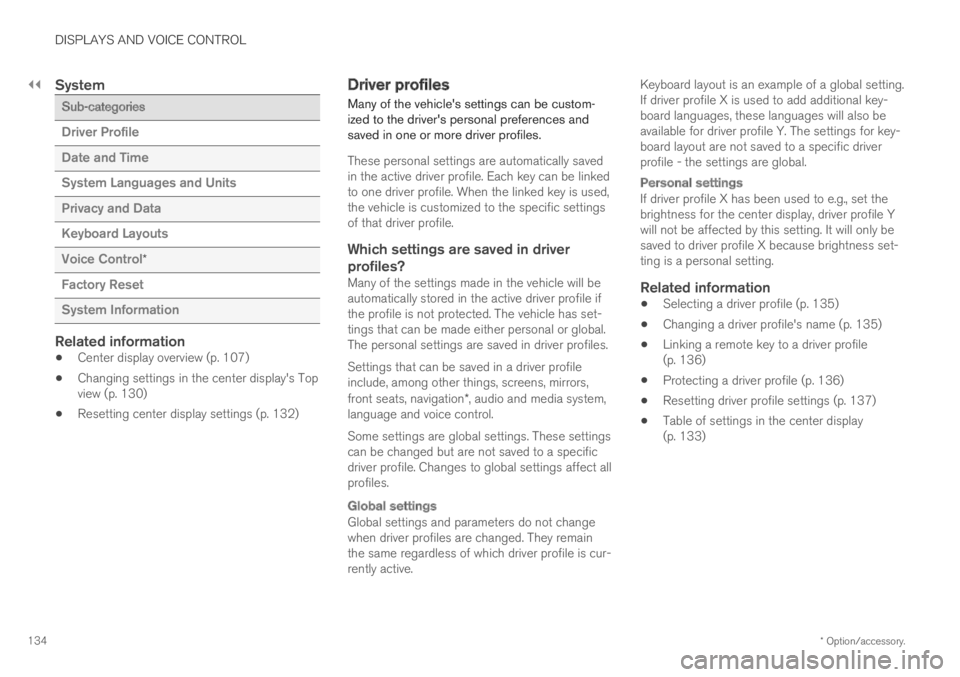
System
Sub-categories
Driver Profile
Date and Time
System Languages and Units
Privacy and Data
Keyboard Layouts
Voice Control*
Factory Reset
System Information
Related information
Center display overview (p. 107)
Changing settings in the center display's Topview (p. 130)
Resetting center display settings (p. 132)
Driver profiles
Many of the vehicle's settings can be custom-ized to the driver's personal preferences andsaved in one or more driver profiles.
These personal settings are automatically savedin the active driver profile. Each key can be linkedto one driver profile. When the linked key is used,the vehicle is customized to the specific settingsof that driver profile.
Which settings are saved in driver
profiles?
Many of the settings made in the vehicle will beautomatically stored in the active driver profile ifthe profile is not protected. The vehicle has set-tings that can be made either personal or global.The personal settings are saved in driver profiles.
Settings that can be saved in a driver profileinclude, among other things, screens, mirrors,front seats, navigation*, audio and media system,language and voice control.
Some settings are global settings. These settingscan be changed but are not saved to a specificdriver profile. Changes to global settings affect allprofiles.
Global settings
Global settings and parameters do not changewhen driver profiles are changed. They remainthe same regardless of which driver profile is cur-rently active.
Keyboard layout is an example of a global setting.If driver profile X is used to add additional key-board languages, these languages will also beavailable for driver profile Y. The settings for key-board layout are not saved to a specific driverprofile - the settings are global.
Personal settings
If driver profile X has been used to e.g., set thebrightness for the center display, driver profile Ywill not be affected by this setting. It will only besaved to driver profile X because brightness set-ting is a personal setting.
Related information
Selecting a driver profile (p. 135)
Changing a driver profile's name (p. 135)
Linking a remote key to a driver profile(p. 136)
Protecting a driver profile (p. 136)
Resetting driver profile settings (p. 137)
Table of settings in the center display(p. 133)
Page 145 of 645

DISPLAYS AND VOICE CONTROL
}}
* Option/accessory.143
Calibrating the horizontal position
If the windshield or display unit has beenreplaced, the head-up display's horizontal posi-tion may need to be calibrated. Calibration meansthat the projected image is rotated clockwise orcounterclockwise.
1.Tap Settings in the center display's Topview.
2.Select My CarDisplaysHead-Up
Display OptionsHead-Up DisplayCalibration.
3.Calibrate the horizontal position of the imageusing the right-side steering wheel keypad.
Rotate counterclockwise
Rotate clockwise
Confirm
Related information
Head-up display* (p. 140)
Activating and deactivating the head-up dis-play* (p. 141)
Driver profiles (p. 134)
Storing positions for seats, mirrors and head-up display* (p. 182)
Voice control15
The driver can use voice commands to controlcertain functions in the media player, aBluetooth-connected phone, the climate systemand the Volvo navigation system*.
Voice commands offer extra convenience andhelp minimize distractions so drivers can concen-trate on driving and keep their attention on theroad and traffic situation.
WARNING
The driver is always responsible for ensuringthat the vehicle is operated in a safe mannerand that all applicable traffic regulations arefollowed.
Voice control microphone
Voice control is carried out as a dialog, with spo-ken commands from the user and verbal respon-
Page 170 of 645

WINDOWS, GLASS AND MIRRORS
* Option/accessory.168
Rearview/door mirrors
The rearview mirror and door mirrors can beused to improve the driver's visibility behind thevehicle.
Rearview mirror
The rearview mirror can be adjusted manually.The rearview mirror can be equipped with Home-Link*, auto-dim* and compass*.
Door mirrors
WARNING
The door mirror on the passenger side iscurved to improve visibility. Objects in the mir-ror may appear farther away than they actuallyare.
The joystick in the drivers' door control panel isused to adjust the position of the door mirrors.There are also several automatic settings thatcan also be connected to the memory functionbuttons for the power seat*.
Related information
HomeLink®* (p. 440)
Compass* (p. 443)
Adjusting the rearview mirror dimming func-tion (p. 168)
Adjusting the door mirrors (p. 169)
Storing positions for seats, mirrors and head-up display* (p. 182)
Activating and deactivating the heated rearwindow and door mirrors (p. 213)
Adjusting the rearview mirrordimming function
Bright light entering the vehicle from behind, e.g.from the headlights of following vehicles, couldreflect in the rearview mirror and door mirrorsand cause a glare. Use the dimming functionwhen light from behind is distracting.
Auto-dim
If bright light enters the vehicle from behind, thedoor mirrors will automatically dim. Auto-dim isalways active when the engine is running, exceptwhen reverse gear is engaged.
NOTE
Adjustments to the sensitivity level will not benoticeable immediately but will instead takeeffect after a short period of time.
The sensitivity level for dimming will affect boththe rearview mirror and door mirrors.
To change the dimming sensitivity level:
1.Tap Settings in the Top view in the centerdisplay.
2.Tap My CarMirrors and Convenience.
3.Under Rearview Mirror Auto Dimming,select Normal, Dark or Light.
The rearview mirror instead has two sensors -one pointing forward and one pointing rearward -
Page 171 of 645

WINDOWS, GLASS AND MIRRORS
}}
* Option/accessory.169
which work together to identify and eliminateglare. The forward-pointing sensor monitorsambient light, while the rearward-pointing sensormonitors light from the headlights of followingvehicles.
For the door mirrors to be equipped with auto-dim, the rearview mirror must also be equippedwith auto-dim.
NOTE
If the sensors are obstructed by e.g. a parkingpermit, transponder, sunshade or objects onthe seats or parcel shelf in a way that pre-vents light from reaching the sensors, theauto-dim function in the rearview and doormirrors will be reduced.
Related information
Rearview/door mirrors (p. 168)
Adjusting the door mirrors (p. 169)
Adjusting the door mirrors
To improve visibility to the rear, the door mirrorsneed to be adjusted to the driver's height andseating position. There are several automaticsettings that can also be connected to the mem-ory function buttons for the power seat*.
Controls used for door mirrors
Door mirror controls.
The joystick in the drivers' door control panel isused to adjust the position of the door mirrors.The ignition must be in at least mode I.
1.Press the L button for the left door mirror orR for the right door mirror. The button willlight up.
2.Adjust the position using the joystick locatedbetween the buttons.
3.Press the L or R button again. The light inthe button will go out.
Automatically folding door mirrors *
The door mirrors can be automatically foldedwhen driving or parking in tight spaces.
1.Press the L and R buttons at the same time.
2. Release the buttons after about 1 second.The mirrors will automatically stop when theyare completely folded in.
Open the mirrors by pressing L and R at thesame time. The mirrors will automatically stopwhen they are completely open.
Resetting the mirrors' position
A mirror that has been moved out of positionmanually (e.g. hit or bumped into) must be electri-cally returned to its normal position for automaticfolding* to function properly.
1.Fold in the mirrors by pressing the L and Rbuttons at the same time.
2.Open them again by pressing the L and Rbuttons at the same time.
3. Repeat the above procedure as needed.
The mirrors are now reset to their original posi-tions.