2019 VOLVO S60 TWIN ENGINE parking brake
[x] Cancel search: parking brakePage 329 of 645

DRIVER SUPPORT
* Option/accessory.327
In a diagonal parking space, CTA may be completely"blind" on one side of your vehicle.
CTA's blind zone.
CTA's field of vision.
However, as you back your vehicle slowly out of aparking space, CTA's field of vision changes inrelation to the obstructing vehicle/object and itsblind zone is reduced.
Examples of further limitations
The auto brake sub-function only detectsvehicles in motion and may therefore not
"see" and brake for e.g. stationary obstacles,a cyclists or a pedestrian.
Dirt, ice and snow covering the sensors mayreduce functionality and prevent the systemfrom providing warnings.
CTA is automatically deactivated if a trailer,bicycle holder or similar is connected to thevehicle's electrical system.
For CTA to function optimally, bicycle hold-ers, luggage racks or similar should not bemounted on the vehicle's towbar.
NOTE
The function uses the vehicle's camera andradar sensor, which has certain general limita-tions.
Related information
Cross Traffic Alert* (p. 325)
Camera/radar sensor limitations (p. 300)
63Cross Traffic Alert64Warning for crossing traffic when the vehicle is backing up.65Cross Traffic Alert
Page 353 of 645

DRIVER SUPPORT
}}
* Option/accessory.351
Related information
Driver support systems (p. 260)
Park Assist front, rear and sides* (p. 351)
Activating/deactivating Park Assist* (p. 352)
Park Assist symbols and messages (p. 354)
Camera/radar sensor limitations (p. 300)
Park Assist front, rear and sides*
Park Assist behaves differently depending onwhich part of the vehicle is approaching anobstacle.
Front camera
The warning signal has a continuous tone when theobstacle is less than approx. 30 cm (1 ft) from the vehi-cle.
The Parking Assist system's front sensors areautomatically activated when the engine isstarted. They are active at speeds below 10 km/h(6 mph).
The distance monitored extends approx. 80 cm(2.5 ft) in front of the vehicle.
NOTE
The Parking Assist system is deactivatedwhen the parking brake is used or when P isselected on vehicles with automatic transmis-sion.
CAUTION
When installing auxiliary lights: Make surethese do not obscure the sensors – the auxili-ary lights could be perceived as an obstacle.
Back
The warning signal has a continuous tone when theobstacle is less than approx. 30 cm (1 ft) from the vehi-cle.
The rear sensors will be activated if the vehiclebegins rolling backward or if reverse gear isengaged.
Page 355 of 645

DRIVER SUPPORT
* Option/accessory.353
Park Assist limitations
Park Assist may not be able to detect all condi-tions in all situations and functionality may there-fore be limited in certain cases.
The driver should be aware of the following limi-tations for Park Assist:
WARNING
Be extra cautious whenreversing if this symbol isshown when a trailer, bikecarrier or similar is attachedand electrically connectedto the vehicle.
The symbol indicates thatthe rear parking assist sensors are deacti-vated and will not warn of any obstacles.
CAUTION
Objects such as chains, thin and glossy polesor low obstacles may end up in the "signalshadow" and then go temporarily undetectedby the sensors – the pulsating tone may thenunexpectedly stop instead of becoming aconstant tone as expected.
The sensors cannot detect high objects, suchas protruding ramps.
In such situations, pay extra attention andmaneuver/drive the vehicle very slowly orstop the current parking maneuver –there may be a high risk of damage tothe vehicle or other objects since infor-mation from the sensors is not alwaysreliable in such situations.
CAUTION
In some circumstances, the Park Assist Sys-tem may produce false warnings due to exter-nal sound sources with the same ultrasonicfrequencies as those the system works with.
Examples of such sources are horns, wet tireson asphalt, pneumatic brakes, exhaust noisefrom motorcycles, etc.
NOTE
When a trailer hitch is configured with thevehicle electrical system, the trailer hitch pro-trusion is included when the function meas-ures the distance to objects behind the vehi-cle.
Related information
Park Assist* (p. 350)
Page 366 of 645
DRIVER SUPPORT
* Option/accessory.364
Park Assist Pilot*
Park Assist Pilot (PAP91) can help the drivermaneuver the vehicle when parking. The functioncan also assist with steering when pulling outfrom a parallel parking space.
The function first checkswhether there is sufficientspace and then helps the driversteer the vehicle into the space.
The center display uses sym-bols, graphics and messages toinform the driver of what steps need to be takenand when.
WARNING
The parking sensors have dead/blindspots where objects cannot be detected.
Pay particular attention to people andanimals near the vehicle.
Bear in mind that the front end of thevehicle may swing out towards oncomingtraffic during the parking maneuver.
WARNING
The function is supplementary driver sup-port intended to facilitate driving and helpmake it safer – it cannot handle all situa-tions in all traffic, weather and road condi-tions.
The driver is advised to read all sectionsin the Owner's Manual about this functionto learn of its limitations, which the drivermust be aware of before using the func-tion.
Driver support functions are not a substi-tute for the driver's attention and judg-ment. The driver is always responsible forensuring the vehicle is driven in a safemanner, at the appropriate speed, with anappropriate distance to other vehicles,and in accordance with current trafficrules and regulations.
NOTE
The PAP function measures the space andsteers the vehicle – the driver's role is to:
keep close watch of the area around thevehicle
follow the instructions on the center dis-play
change gears (reverse/forward) – a"ping" sound indicates when the drivershould change gears
regulate and maintain a safe speed
apply the brakes and stop.
Related information
Driver support systems (p. 260)
Types of parking with Park Assist Pilot*(p. 365)
Parking with Park Assist Pilot* (p. 366)
Leaving a parallel parking space with ParkAssist Pilot* (p. 368)
Park Assist Pilot* limitations (p. 369)
Camera/radar sensor limitations (p. 300)
Park Assist Pilot* messages (p. 372)
91Park Assist Pilot
Page 368 of 645
DRIVER SUPPORT
* Option/accessory.366
Parking with Park Assist Pilot*
Park Assist Pilot (PAP93) helps the driver parkusing three different steps. The function can alsohelp the driver pull out of a parking space.
The function measures the space and steers thevehicle. The driver's role is to:
keep close watch of the area around thevehicle
follow the instructions on the center display
change gears (reverse/forward) – a chimingsound indicates when the driver needs tochange gears
regulating and maintaining a safe speed
applying the brakes and stopping the vehicle.
Information about the actions required by thedriver are provided in the center display usingsymbols, graphics and/or text.
The function can be activated if the following cri-teria have been met after the engine is started:
No trailer is hitched to the vehicle
Your vehicle's speed is lower than 30 km/h(20 mph).
NOTE
The distance between the vehicle and parkingspots should be 0.5–1.5 meters (1.6–5.0 ft)when the function is looking for parking.
Parking
The function helps park the vehicle using the fol-lowing steps:
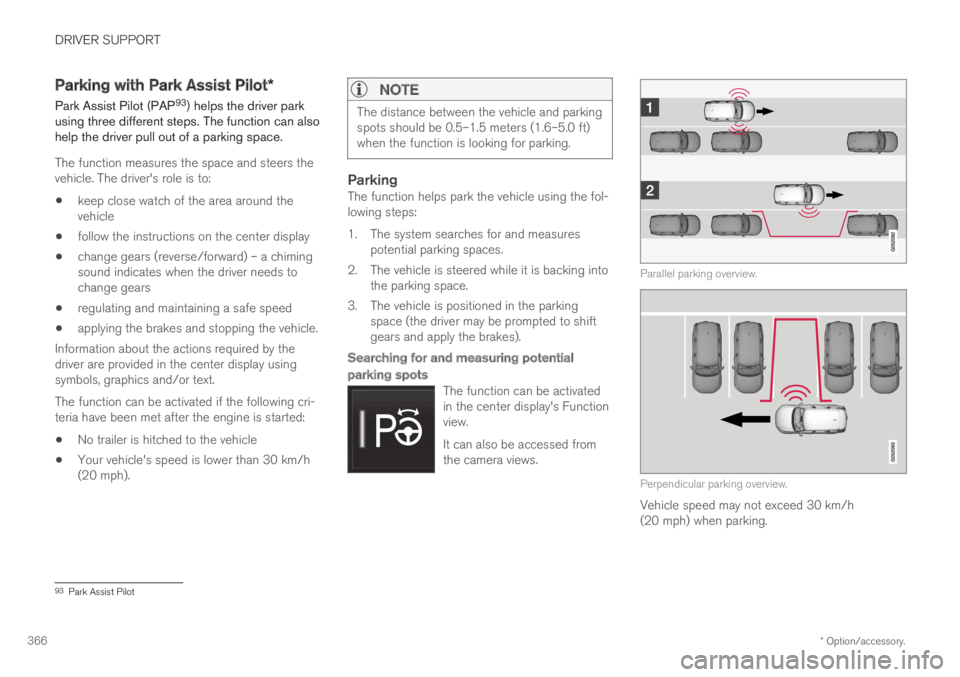
1. The system searches for and measurespotential parking spaces.
2. The vehicle is steered while it is backing intothe parking space.
3. The vehicle is positioned in the parkingspace (the driver may be prompted to shiftgears and apply the brakes).
Searching for and measuring potential
parking spots
The function can be activatedin the center display's Functionview.
It can also be accessed fromthe camera views.
Parallel parking overview.
Perpendicular parking overview.
Vehicle speed may not exceed 30 km/h(20 mph) when parking.
93Park Assist Pilot
Page 370 of 645

||
DRIVER SUPPORT
* Option/accessory.368
Positioning the vehicle in the parking space
Parallel parking overview.
Perpendicular parking overview.
To do so:
1.Move the gear selector to the gear instructedby the system. Wait until the steering wheelturns and then drive slowly forward.
2. Be prepared to stop the vehicle wheninstructed to do so by a graphic and mes-sage in the center display.
3. Engage reverse gear and back up slowly.
4. Be prepared to apply the brakes wheninstructed to do so by a graphic and mes-sage in the center display.
The function will switch off automatically and agraphic and message will appear to indicate thatparking has been completed. Adjustments canalways be made be the driver afterward. Only thedriver can determine when the vehicle is correctlyparked.
CAUTION
The warning distance is shorter when the
sensors are used by Park Assist Pilot (PAP94)compared to when they are used by the Park-ing Assist system.
Related information
Park Assist Pilot* (p. 364)
Leaving a parallel parking space
with Park Assist Pilot*
The Park Out function can help the driver to pullout of a parking space when the vehicle is paral-lel-parked.
NOTE
Leaving a parking space with the Park Outfunction should only be used in connectionwith parallel parking – it does not work forperpendicular parking.
The Park Out function is acti-vated in the center display'sFunction view or in Cameraview.
To do so:
1.Tap Park Out in Function view or in Cameraview.
2.Move the gear selector to the suitable posi-tion (e.g. D or R) for the direction in whichyou will be pulling out of the parking space.
94Park Assist Pilot
Page 372 of 645

||
DRIVER SUPPORT
370
The driver should be aware of the following limi-tations for Park Assist Pilot:
The parking sequence is cancelled
A parking sequence will be cancelled if:
The driver moves the steering wheel
The vehicle's speed exceeds 7 km/h(4 mph)
The driver taps Cancel in the center display
When the anti-lock brakes or the Electronicstability control are engaged - e.g. when awheel loses grip on a slippery road
When speed-dependent power steeringwheel resistance is working at reducedpower – e.g. during cooling due to overheat-ing.
A message in the center display will explain whythe parking sequence was cancelled.
CAUTION
Under certain circumstances, the functionmay not be able to find parking spaces – onereason may be that the sensors are disruptedby external sound sources that emit the sameultrasonic frequencies that the system workswith.
Examples of such sources include horns, wettires on asphalt, pneumatic brakes, exhaustnoise from motorcycles, etc.
NOTE
Dirt, ice and snow covering the sensorsreduce their function and can make measure-ment impossible.
Driver responsibility
The driver should keep in mind that the functionis a parking aid ‒ not an infallible fully automaticsystem. The driver must always be prepared totake control and cancel a parking sequence ifnecessary.
There are a number of things to keep in mindwhen parking, including:
The driver is always responsible for determin-ing if the space suggested by the function issuitable for parking.
Do not use the function when using snowchains or a temporary spare tire.
Do not use the function if there are anyobjects protruding from the vehicle.
Heavy rain or snowfall may inhibit PAP's abil-ity to accurately measure a parking space.
While searching and measuring the parkingspace, the function may be unable to detectobjects located far into the space.
PAP may not suggest parking spaces onnarrow streets if it does not detect sufficientspace for maneuvering the vehicle.
Use approved tires96 inflated to the correcttire pressure because this affects the func-tion's ability to provide parking assistance.
The function is based on the way the vehi-cles are parked behind and in front of yourparking space. If they are, for example,parked too close to the curb, there is a riskthat your vehicle's tires or wheel rims couldbe damaged by the curb during the parkingprocedure.
96"Approved tires" refers to tires of the same type and make as the vehicle's original, factory-installed tires.
Page 395 of 645

STARTING AND DRIVING
}}
393
In some situations, such as in cold weather or ifthe hybrid battery's charge level is too low, thegasoline engine will start instead.
The vehicle should not be started with the charg-ing cable connected. However, if the cable can-not be pulled out or if the vehicle incorrectlydetects a cable that is not connected, the vehiclecan be started using an override procedure:
1.Press the brake pedal and turn the startknob clockwise.
2.Charge cable Remove before start willappear in the instrument panel.
3.Turn the start knob clockwise again.
4.Removed? Turn and hold start knob 7swill appear. Turn the knob clockwise and holdit for 7 seconds to start the vehicle.
Location of the backup reader in the tunnel console.
If the Vehicle key not found message is shownin the instrument panel at start, place the remotekey at the backup reader and then make a newstart attempt.
NOTE
When the remote key is placed in the backupreader, make sure that no other vehicle keys,metal objects or electronic devices (e.g. cellu-lar phones, tablets, laptops or chargers) are inthe backup reader. Multiple vehicle keys closeto each other in the backup reader can dis-rupt their functionality.
If Vehicle start System check, wait is dis-played in the instrument panel while attemptingto start the vehicle, wait until the message disap-pears and try again to start the vehicle.
CAUTION
If the engine has not responded after 3attempts – wait for 3 minutes before startinga new attempt. Starting capability increases ifthe starter battery is given time to recover.
NOTE
The vehicle cannot be started if the hybridbattery is discharged.
WARNING
Never remove the remote control key fromthe vehicle while driving.
WARNING
Always remove the remote key from thepassenger compartment when you leavethe vehicle and make sure the ignition isin mode 0.
Always put the gear selector in P andapply the parking brake before leavingthe vehicle. Never leave the vehicle unsu-pervised while the engine is running.
Always open the garage door fully andmake sure that ventilation is very goodbefore starting the engine in a garage.The exhaust fumes produced by the vehi-cle contain carbon monoxide, which isinvisible and odorless but very toxic.
NOTE
With a cold start, idling speed may be consid-erably higher than normal for certain enginetypes. This is done to get the emissions sys-tem up to normal operating temperature asquickly as possible, which minimizes exhaustemissions and protects the environment.