2019 VOLKSWAGEN TRANSPORTER stop
[x] Cancel search: stopPage 3 of 486
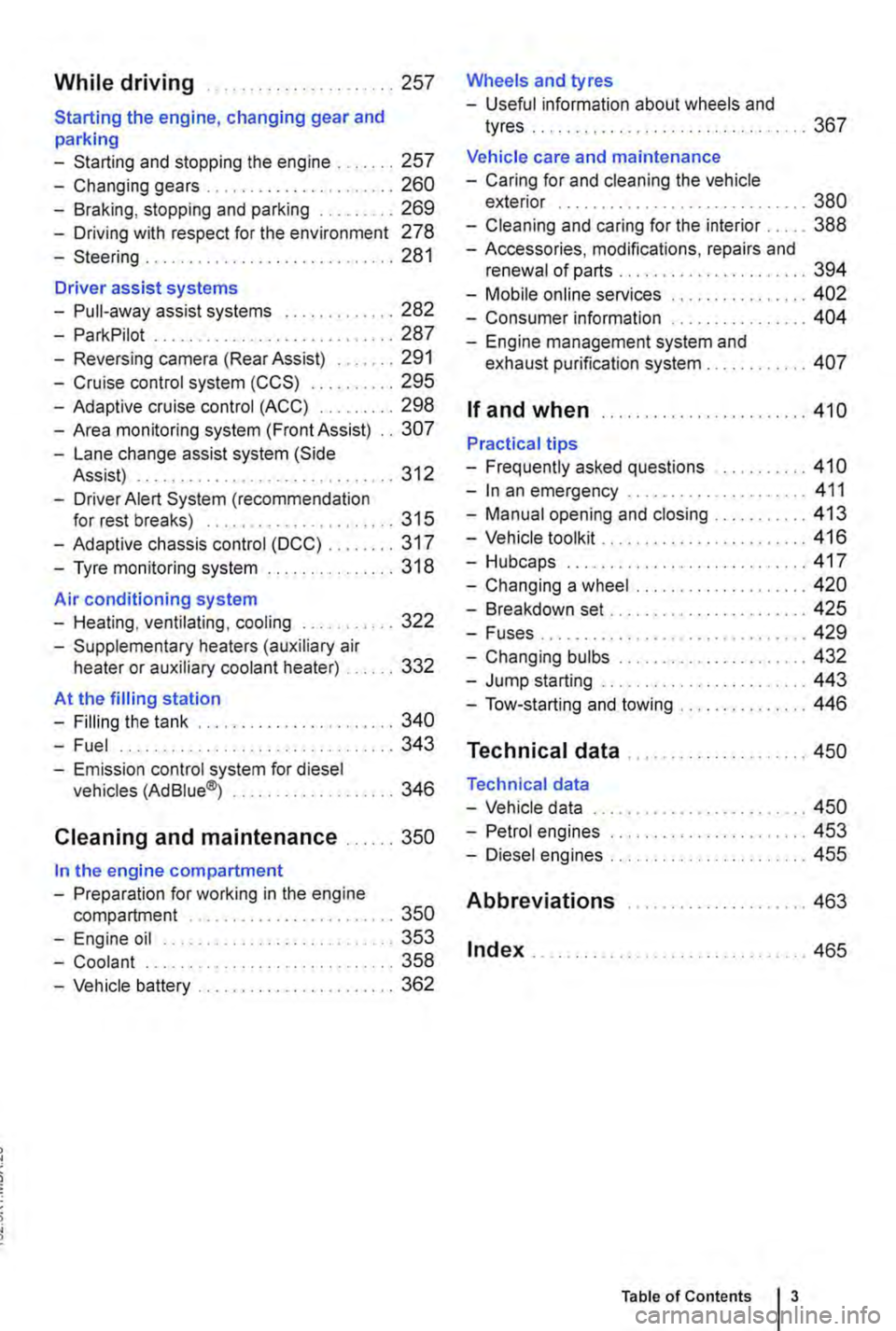
While driving .. ...... 257
Starting the engine, changing gear and parking
-Starting and stopping the engine .. 257
-Changing gears . . . . . . . . . .......... 260
-Braking, stopping and parking ......... 269
-Driving with respect for the environment 278
-Steering ........... 281
Driver assist systems
-Pull-away assist systems .... 282
-ParkPilot ............................ 287
-Reversing camera (Rear Assist) ....... 291
-Cruise control system (CCS) . . . . . ... 295
-Adaptive cruise control (ACC) ......... 298
-Area monitoring system (Front Assist) .. 307
-Lane change assist system (Side Assist) . .. . . .. .. . . . . . . . . .......... 312
-Driver Alert System (recommendation for rest breaks) . . . . . . . . . . ......... 315
-Adaptive chassis control (DCC) ........ 317
-Tyre monitoring system . . . . . . . ....... 318
Air conditioning system
-Heating, ventilating, cooling ........... 322
-Supplementary heaters (auxiliary air heater or auxiliary coolant heater) .... 332
At the filling station
-Filling the tank ....................... 340
-Fuel . . . . . . . . . . . . . . . . ........ 343
-Emission control system for diesel vehicles (AdBiue®j ................... 346
Cleaning and maintenance ...... 350
In the engine compartment
-Preparation for working in the engine compartment . . . . . . . . . . . . . . . . 350
-Engine oil ........................... 353
-Coolant ..................... 358
-Vehicle battery ....................... 362
Wheels and tyres
-Useful information about wheels and
tyres . . . . . . . . . . . . . . ..... 367
Vehicle care and maintenance
-Caring for and cleaning the vehicle exterior . . . . . . . . . . . . . . . . . . . ... 380
-Cleaning and caring for the interior ..... 388
-Accessories, modifications, repairs and renewal of parts . . . . . . . .... 394
-Mobile online services .. 402
-Consumer information 404
-Engine management system and exhaust purification system . . . .. 407
If and when ........................ 410
Practical tips
-Frequently asked questions ........... 410
-In an emergency ..................... 411
-Manual opening and closing . . . . . . . . . 413
-Vehicle toolkit . . ............... 416
-Hubcaps.. . .................... 417
-Changing a wheel .................... 420
-Breakdown set ....................... 425
-Fuses................ . . 429
-Changing bulbs . . . . . . . . .....•.... 432
-Jump starting . . . . . . .......... 443
-Tow-starting and towing . . . 446
Technical data ...
Technical data
-Vehicle data
-Petrol engines
-Diesel engines ..
Abbreviations
Index .......... .
... 450
... 450
......... 453
455
..... " ... 463
.. 465
Table of Contents 3
Page 12 of 486
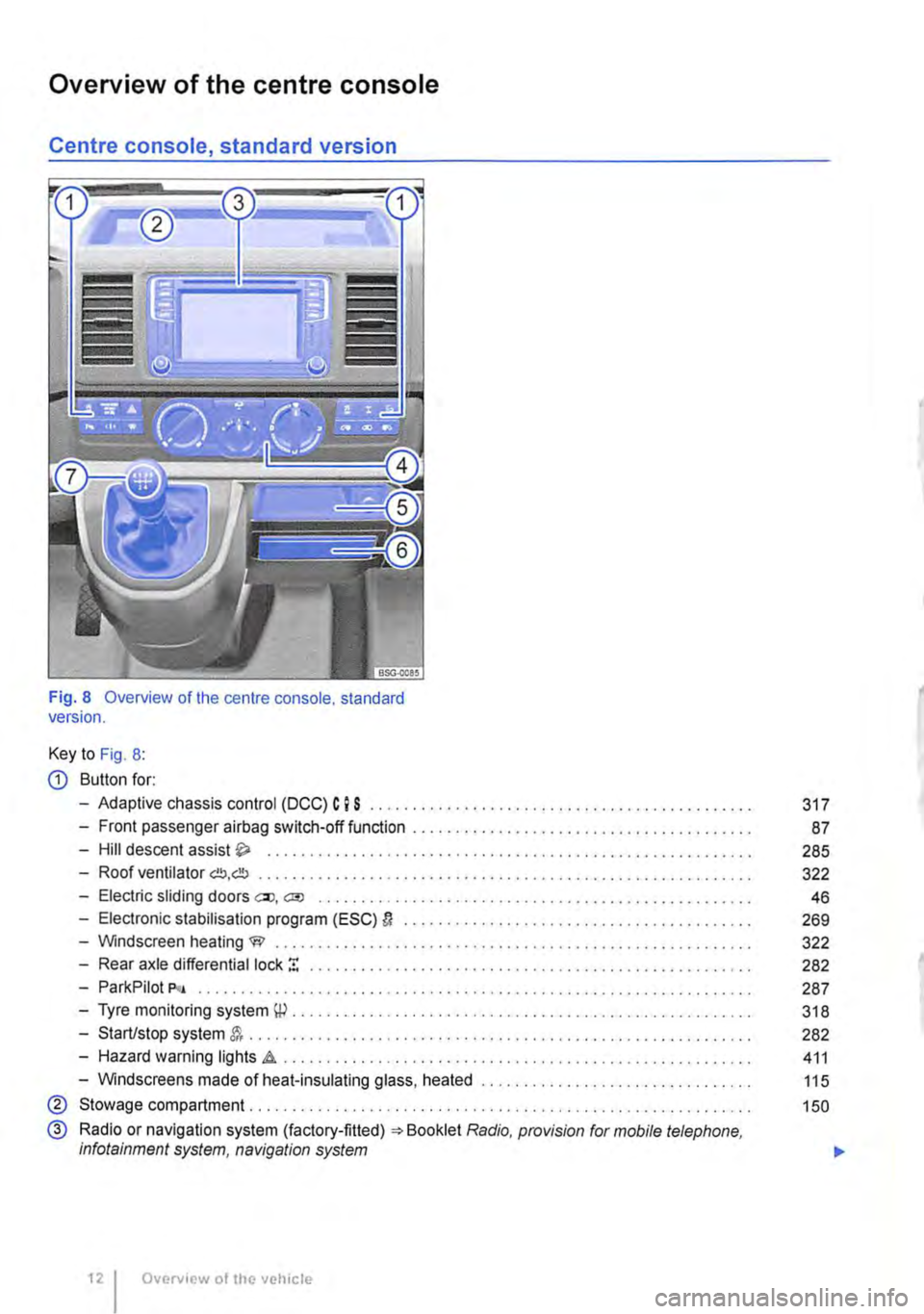
Overview of the centre console
Centre console, standard version
Fig. 8 Overview of the centre console. standard version.
Key to Fig. 8:
CD Button for:
-Adaptive chassis control (DCC) C I S .......................................... .
-Front passenger airbag switch-off function ................•.......................
-Hill descent assist .................................•.......................
-Roof ventilator G!!J,db ......................................................... .
-Electric sliding doors ell, a;o ............................................••....•
-Electronic stabilisation program (ESC) D ........................................ .
-Windscreen heating W ..................•...................................
-Rear axle differential lock ! ................................................. .
-ParkPilot P<• .....................•..••••.............••..............•••••.
-Tyre monitoring system \P . . . . . . . . . . . . . . . . . . . . . . . . ........................ .
-Start/stop system . . . . . . . . . . . . . . . . . . . . . . . . ............................... .
-Hazard warning lights .a . . . . . . . . . . . . . . . . . . . ............................ .
-Windscreens made of heat-insulating glass, heated ............................... .
® Stowage compartment. . . . . . . . . . . . . . . . ............... .
@ Radio or navigation system (factory-fitted) =:-Booklet Radio, provision for mobile telephone, infotainment system, navigation system
Overview of the vehicle
317
87
285
322
46
269
322
282
287
318
282
411
115
150
...
Page 14 of 486
-Start/stop system &. ........................ . 282
-Hazard warning lights d1.. . . . . . . . . . . . . . . . . . . . . • • . . . . . . . . . . . 411
-Windscreens made of heat-insulating glass, heated . . . . . . . . . . . . . . . . . . . . . . . . . . . . . . . . 115
@ Stowage compartment........... . . . . . . . . . . . . . . . . . . . . . . . . . . . . 150
@ Radio or navigation system (factory-fitted) Radio, provision for mobile telephone, infotainment system, navigation system
@) Controls for:
-Heating and fresh air system
-Climatic ............ .
-Climatronic . . . . . . . . . . . . . ....•............
® Stowage compartment . . . . ........................ .
-Mobile telephone interface "comfort version" Radio, provision for mobile tele-phone, infotainment system, navigation system
® Stowage compartment with
-12-volt socket
-Ashtray with cigarette lighter
-Drink holder ................................................. .
Q) Cooled bottle holder .....
® Gear lever for:
-Manual gearbox ...... .
-DSG® dual clutch gearbox .................................................... .
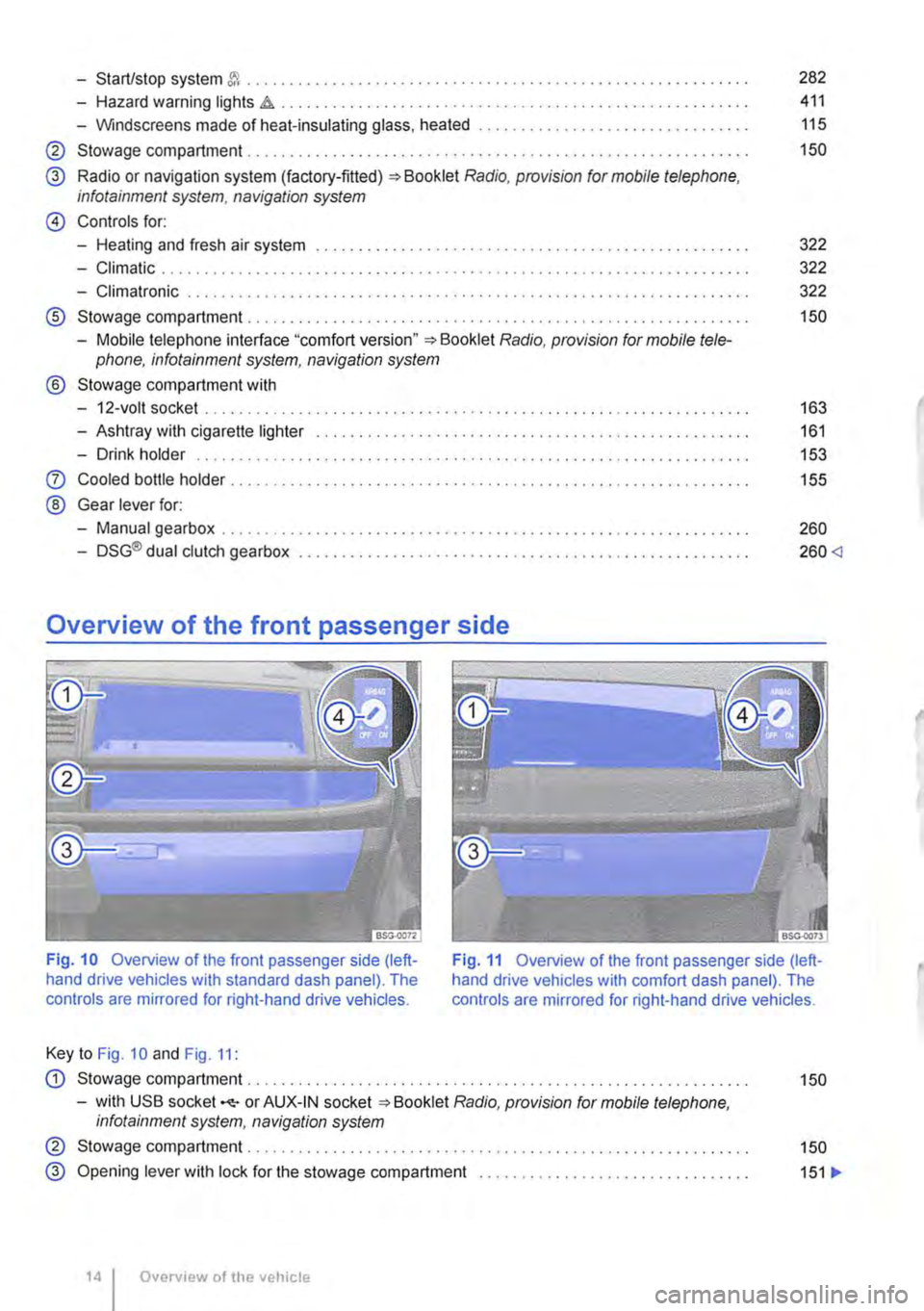
Overview of the front passenger side
322
322
322
150
163
161
153
155
260
260
Fig. 11 Overview of the front passenger side (left-hand drive vehicles with comfort dash panel). The controls are mirrored for right-hand drive vehicles.
Key to Fig. 10 and Fig. 11:
CD Stowage compartment. . . . . . . . . . . . . . . . . . . . . . . . . . 150
-with USB socket -<1:-or AUX-IN socket Radio, provision for mobile telephone. infotainment system, navigation system
@ Stowage compartment . . . . . . . . . . . . . . . . . . . . . . . . . . . . . . . . . . . . . . . . . . . 150
@ Opening lever with lock for the stowage compartment . . . . . . . . . . . . . . . . . . . . . . . . . . . . . . . . 151 .,.
Overv1ew of the vehicle
Page 18 of 486
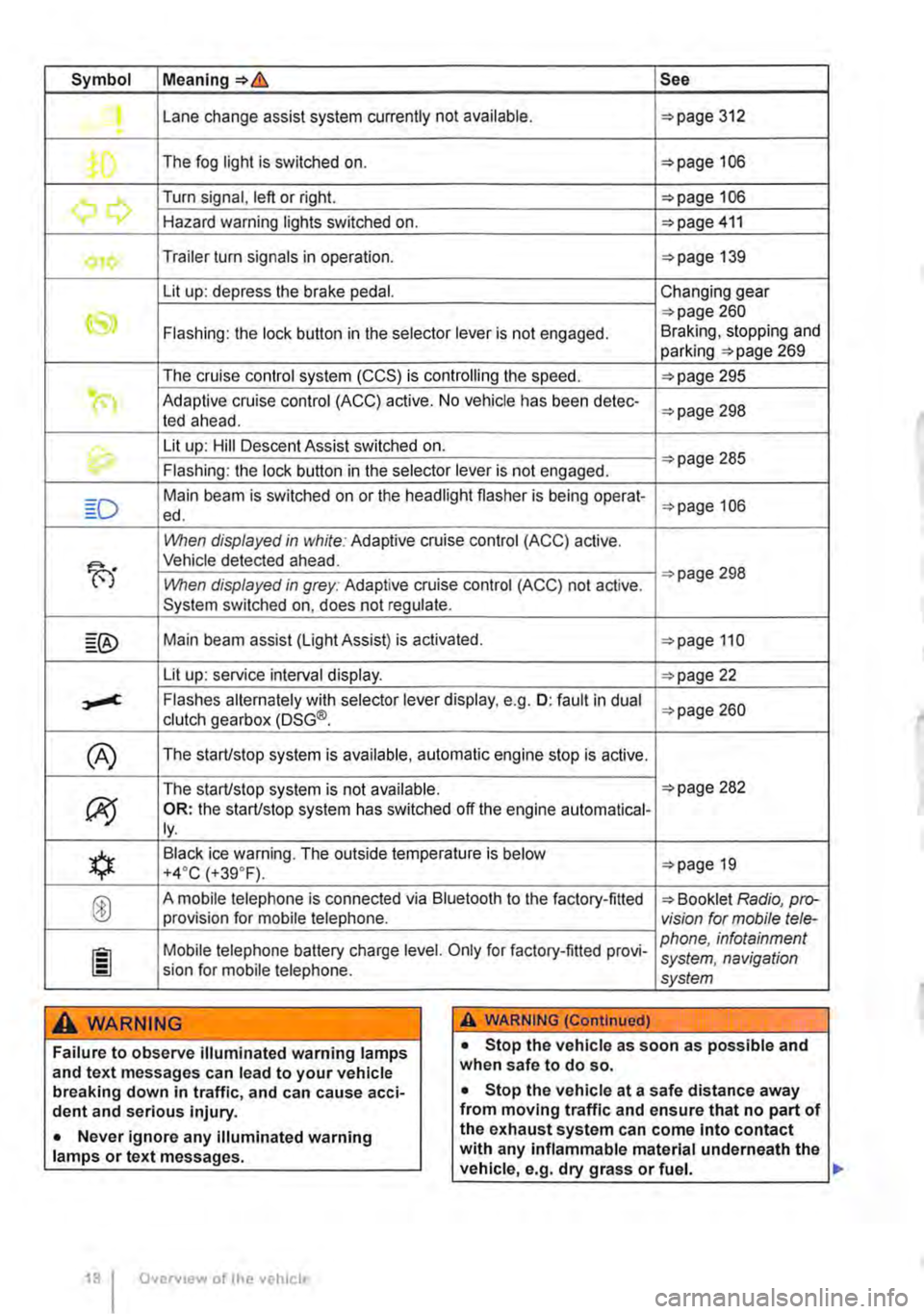
Symbol Meaning=>& See
Lane change assist system currently not available. =>page 312 .
The fog light is switched on. =>page 106
.......,,...., Turn signal, left or right. =>page 106 r., Hazard warning lights switched on. =>page 411
Trailer turn signals in operation. =>page 139
Lit up: depress the brake pedal. Changing gear
CS» =>page 260 Flashing: the lock button in the selector lever is not engaged. Braking, stopping and parking =>page 269
The cruise control system (CCS) is controlling the speed. =>page 295
(") Adaptive cruise control (ACC) active. No vehicle has been detec-ted ahead. =>page 298
th. Lit up: Hill Descent Assist switched on. =>page 285 Flashing: the lock button in the selector lever is not engaged.
Main beam is switched on or the headlight flasher is being opera!-=>page 106 ed.
When displayed in white: Adaptive cruise control (ACC) active.
B'
Vehicle detected ahead.
When displayed in grey: Adaptive cruise control (ACC) not active. =>page 298
System switched on, does not regulate.
Main beam assist (Light Assist) is activated. =>page 110
Lit up: service interval display. =>page 22
,....c. Flashes alternately with selector lever display, e.g. 0: fault in dual clutch gearbox (DSG®. =>page 260
(A) The starUstop system is available, automatic engine stop is active.
The starUstop system is not available. =>page 282
(J9 OR: the starUstop system has switched off the engine automatical-ly.
*
Black ice warning. The outside temperature is below =>page 19 +4·c (+39.F).
® A mobile telephone is connected via Bluetooth to the factory-fitted => Booklet Radio, pro-provision for mobile telephone. vision for mobile tele-
Mobile telephone battery charge level. Only for factory-fitted provi-phone, infotainment system, navigation sion for mobile telephone. system
A WARNING A WARNING (Continued)
Failure to observe illuminated warning lamps and text messages can lead to your vehicle breaking down in traffic, and can cause acci-dent and serious injury.
• Never ignore any illuminated warning lamps or text messages.
Overv1ew of the vehicle
• Stop the vehicle as soon as possible and when safe to do so.
• Stop the vehicle at a safe distance away from moving traffic and ensure that no part of the exhaust system can come Into contact with any inflammable material underneath the vehicle, e.g. dry grass or fuel. ll>
Page 21 of 486

Displays
r-T'n First read and observe the introductory L-J,:.,U information and safety warnings & on page 19.
The types of information displayed in the instru-ment cluster=:. Fig. 14@ vary according to the ve-hicle's equipment level:
• Warning and information messages
• Mileage displays
• Time
• Outside temperature
• Compass display
• Selector lever positions =:.page 260
• Gear-change indicator =>page 260
• Multifunction display (MFD) and menus for vari-ous settings =>page 24
Type of message Symbol Explanation colour
• Service interval display =:.page 22
• Second speed (Settings menu =>page 24)
• Fuel gauge =:.page 340
• Start/stop system status display =:.page 22
Warning and information messages
The system runs a check on certain components and functions in the vehicle when the ignition is switched on or while the vehicle is in motion. Func-tional faults are indicated by red and yellow sym· bols with warning and text messages in the instru-ment cluster display (warning and indicator lamps =>page 16). An acoustic warning is also given in certain cases. Different instrument cluster designs will have different displays.
Priority 1 warning message. Red
The symbol flashes or lights up (sometimes together with a signal tone). te Do not drive onl Danger=:.&,! Check the fault and correct the cause. Seek expert assistance if neces-sary.
Priority 2 warning message. Yellow
The symbol flashes or lights up (sometimes together with a signal tone). Your vehicle could be damaged or break down if there is a fault or if service fluids are running low Check the fault as soon as possible. Seek expert assistance if necessa-ry.
Information mes-sage. Information about various procedures within the vehicle.
Mileage displays
The odomelerregisters the total distance travelled by the car.
The trip recorder(trip) shows the distance travel-led since the trip recorder was last reset. The last digit of the trip recorder indicates distances of 100 metres or tenths of a mile.
Outside temperature display
If the outside temperature falls below +4 ·c (+39.F), the temperature display also shows a "snowflake symbol"{(-. This symbol flashes and then remains constantly lit until the outside temper-ature rises above +6•c (+43.F)
If the vehicle is stationary, the supplementary heat-ing system (=>page 332) is on or the vehicle is travelling at very low speeds, the temperature dis-played may be slightly higher than the actual out-side temperature due to heat radiated from the en-gine.
The measuring range lies between -4o•c (·40.F) and +so•c (+122°F).
Compass display
When the ignition and navigation system are switched on, the instrument cluster display shows the current direction of travel.
Selector lever position
The gear selected is displayed on the side of the selector lever and on the display in the instrument cluster. The display may also show which gear has been selected if the lever is in D or 5, or in Tiptron-ic mode.
Gear-change indicator
While the vehicle is in motion, the instrument clus-ter may show which gear should be selected to re-duce fuel consumption =>page 260. .-
Instrument cluster 21
Page 22 of 486
Second speed display (m ph or km/h)
In addition to the tachometer display, the speed can also be displayed in another unit of measure-ment (m ph or km/h) in the instrument cluster dis-play while you are driving. To do this select the menu option A 1 t. speed di s. in the Settings menu =>page 24.
Vehicles without menu display on the instrument cluster:
• Start the engine.
• Press the Ice: 1 e)j button three times. The odom-eter in the instrument cluster display flashes.
• Press the button !o.o 1 SErl once. The vehicle speed in "km/h" or "mph" is shown briefly in the dis-play instead of the odometer.
• This activates the second speed display. lt can be deactivated in the same manner.
lt is not possible to switch off the second speedom-eter display in those countries where the law stipu-lates that the display cannot be deactivated.
StarUstop system status display
The instrument cluster display shows information about the current status =>page 282.
A wARNING
Failure to observe illuminated warning lamps and text messages can lead to your vehicle breaking down In traffic, and can cause acci-dent and serious injury.
• Never Ignore any illuminated warning lamps or text messages.
• Stop the vehicle as soon as possible and when safe to do so.
Service interval display
)'"""'"('n First read and observe the introductory L-W.I information and safety warnings & on page 19.
The service display is shown on the instrument cluster=> Fig. 14 @.
Service schedules at Volkswagen Commercial Ve-hicles are divided into two categories, oil change service and inspections. The service interval dis-play provides information on the next service which
Overview of the vehicle
A WARNING (Continued)
• Any broken-down vehicle poses an In-creased accident risk both for you and for other road users. If the situation requires, switch on the hazard warning lights and set up the warning triangle as a warning to other road users.
• Stop the vehicle at a safe distance away from moving traffic and ensure that no part of the exhaust system can come Into contact with any inflammable material underneath the vehicle, e.g. dry grass or fuel.
A WARNING
Streets and bridges can also be iced over at outside temperatures above freezing.
• The snowflake symbol indicates that there is a risk of black Ice.
• There may be black Ice on the roads even when outside temperatures are above +4•c (+39°F), even when no snowflake symbol is displayed.
• You should never rely solely on the out-side temperature display I
CD
Failure to observe illuminated indicator lamps and text messages can lead to your vehicle be-ing damaged.
m Differenl instrument clusters are available, L!J which means that the versions and displays may vary. In displays without warning or informa-tion texts, faults are indicated exclusively by the in-dicator lamps.
m If several warning reports are detected, the L!J symbols will appear for several seconds, one after another. The symbols will continue to appear until the faults are rectified.
The service appointment currently displayed can be found at Vehicles without text messages on the top right of the instrument cluster display:
• 1: inspection.
• 2: oil change service. ..
Page 34 of 486

Checklist (Continued)
..( Fasten your seat belt correctly before set-ting off and keep it properly fastened throughout the journey. This also applies to all passengers 79 .
..!
..!
..!
..!
..!
Each vehicle occupant must sit in a seat of their own and must have their own seat belt.
Never drive if your driving ability is impaired, e.g. by medication, alcohol or drugs.
Do not allow yourself to be distracted from the traffic, e.g. by passengers, telephone calls, opening menus and making adjust-ments to settings .
Always adapt your speed and driving style to suit visibility, weather, road and traffic conditions.
Observe traffic regulations and speed limits.
Driving abroad
r-f'n First read and observe the introductory l.-J=.U information and safety warnings.& on page 33.
Checklist
In some countries, special safety standards and emissions-related regulations apply that the vehi-cle may not comply with. Volkswagen Commercial Vehicles recommends that you visit your Volkswa-gen Commercial Vehicles dealer before travelling abroad to find out about any legal requirements and the following points concerning your destina-tion:
..( Does the vehicle need any technical modifi-cations for driving abroad, e.g. masking or switching the headlights over?
..( Are the necessary tools, diagnostic equip-ment and spare parts available for service and repair work?
..( Are there any Volkswagen Commercial Ve-hicles dealerships in the country of destina-tion?
..( For petrol engines: is unleaded petrol with the correct octane number available?
34 Before the journey
..( When travelling long distances, stop and take a break regularly-at least every 2 hours.
..( Secure animals in the vehicle using a sys-tem that is suitable for their weight and size.
A WARNING
Always observe current traffic regulations and speed limits, and think ahead when driv-Ing. Correct interpretation of a driving situa-tion can make the difference between reach-Ing your destination safely and having an ac-cident with serious Injuries.
W Regular servicing of your vehicle not only W maintains its value, it also ensures that your vehicle remains roadworthy and in perfect working order. Servicing work should therefore be carried out in accordance with the service schedule. Some work may have to be carried out before the due date of the next service if the vehicle is subjected to severe operating conditions. Severe operating conditions are, for example, regular stop and go driving, regular driving with a trailer and driving in areas with high levels of dust. Additional informa-tion is available from your Volkswagen Commercial Vehicles dealership or qualified workshop.
..( Are the correct engine oil 353 and other service fluids in accordance with the specifications of Volkswagen Commercial Vehicles available in the destination coun-try?
..( Will the factory-fitted navigation system work with the navigation data available in the destination country?
..( Are special tyres necessary for travelling in the destination country?
CD
Volkswagen Commercial Vehicles is not re-sponsible for any vehicle damage which Is caused by low-quality fuel, inadequate servic-ing work or lack of availability of Genuine Parts.
Page 35 of 486

Driving through water on roads
r"f"'n First read and observe the introductory l-J,::.U information and safety warnings & on page 33.
Please follow these rules to help prevent damage to your vehicle when driving through water, for ex-ample if the road is flooded:
• Check the depth of the water before driving through it. The water level must be no higher than the lower edge of the vehicle body
• Do not drive faster than walking speed.
• Never stop the vehicle, reverse or switch off the engine while in water.
• Oncoming vehicles will create waves that could increase the water level for your vehicle to such an extent that it is not safe to drive through the water.
• Always switch off the start/stop system manual-ly when driving through water.
A wARNING
After driving through water, mud, slush etc., the brakes may react slowly and the braking distance will be increased as the brake discs and pads will be wet, or possibly iced up in winter.
• You can "dry and de-ice" the brakes by performing careful braking manoeuvres. Make sure that you do not endanger any oth-er road users or violate any legal regulations when doing so.
• Avoid abrupt and sudden braking ma-noeuvres directly after driving through water.
CD
• If you drive through water, parts of the vehi-cle, such as the engine, drive train, running gear and vehicle electrics, could sustain severe damage.
• Never drive through salt water as salt can cause corrosion. Rinse all components that have been exposed to salt water immediately with fresh water. <1
Before setting off 35