2019 VOLKSWAGEN T-ROC air sensor
[x] Cancel search: air sensorPage 3 of 502
Rear view
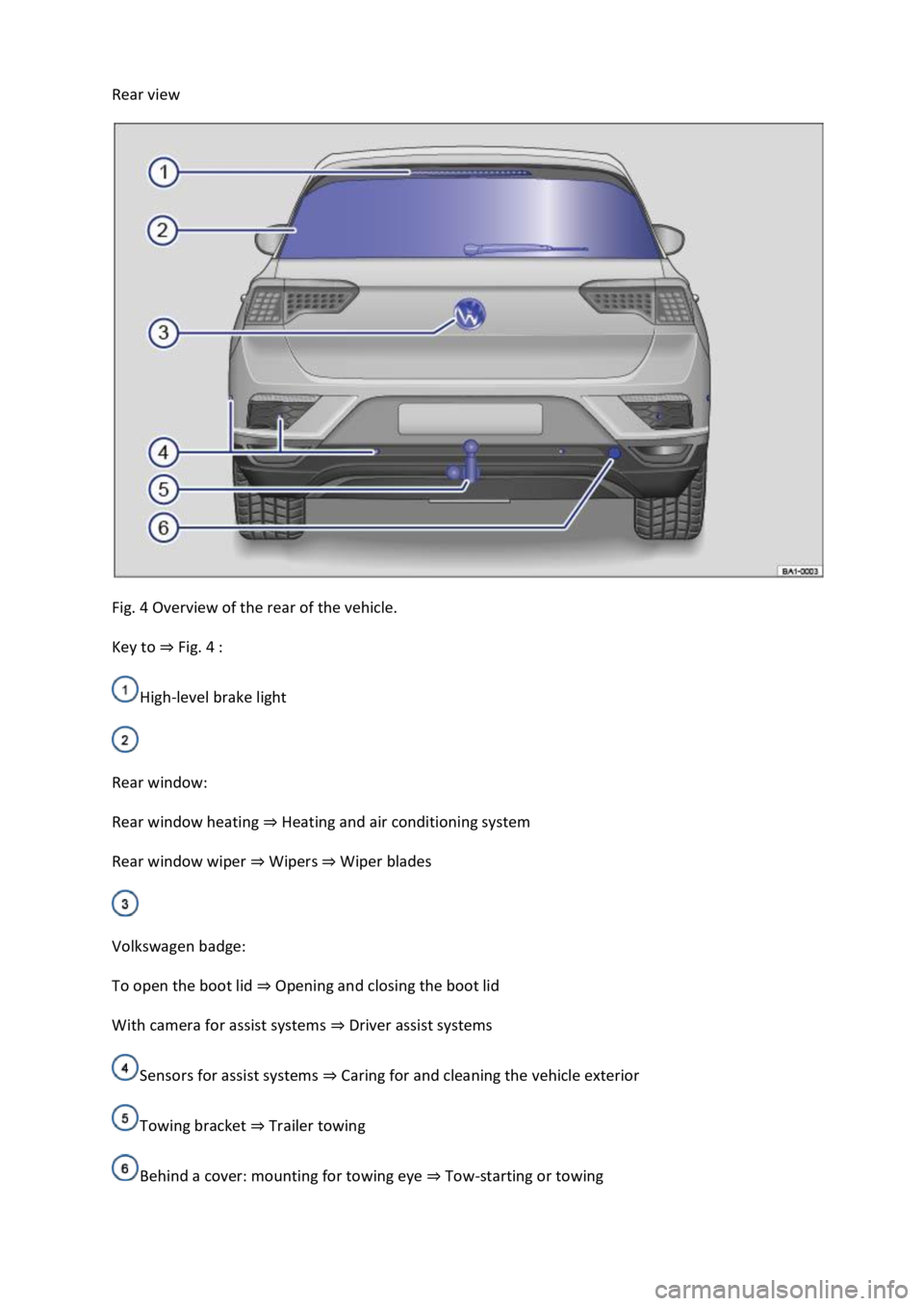
Fig. 4 Overview of the rear of the vehicle.
Key to Fig. 4
High-level brake light
Rear window:
Rear window heating Heating and air conditioning system
Rear window wiper WipersWiper blades
Volkswagen badge:
To open the boot lid Opening and closing the boot lid
With camera for assist systems Driver assist systems
Sensors for assist systems Caring for and cleaning the vehicle exterior
Towing bracket Trailer towing
Behind a cover: mounting for towing eye Tow-starting or towing
Page 71 of 502

vehicle occupants during frontal and side collisions by reducing their
movement in the direction of the collision.
Each triggered airbag is filled by a gas generator. This causes the airbag covers to break open and the
airbags inflate forcefully to cover their deployment zones within milliseconds. Once a vehicle
occupant wearing a seat belt starts to sink into the inflated airbag, the gas inside the airbag starts to
escape to cushion the occupant and slow down their movement. This reduces the risk of severe and
fatal injuries. A triggered airbag will not always prevent other injuries from occurring, such as
swelling, bruising, burning and grazing. Deployment of an airbag can also result in frictional heat.
The most important factors for triggering the airbag are the type of accident, the angle of impact,
the vehicle speed and the type of object with which the vehicle collides. Therefore, visible damage
to the vehicle does not always mean that the airbag should have been triggered.
The triggering of the airbag system depends on the vehicle deceleration rate caused by the collision
and registered by the electronic control unit. If this rate is below the reference value programmed
into the control unit, the airbags will not be triggered, even though the vehicle may be badly
damaged as a result of the collision. Vehicle damage, repair costs or even the lack of vehicle damage
in an accident is not necessarily an indication of whether an airbag should inflate or not. It is not
possible to define a range of vehicle speeds and reference values, since the circumstances will vary
considerably between one collision and another. It is therefore impossible to cover every possible
kind and angle of impact that would trigger the airbags. Important factors in the triggering of the
airbag include, for example, the nature (hard or soft) of the object that the vehicle hits, the angle of
impact as well as vehicle speed.
Airbags serve only as a supplement to the three-point seat belt in some accident situations when the
vehicle's deceleration is sufficient to trigger the airbags. Airbags can be triggered only once and only
in certain situations. The seat belts are always there to provide protection in situations when the
airbags are not triggered or have already been triggered. For example, if the vehicle collides with a
further vehicle following the initial collision, or is hit by another vehicle.
The airbag system is part of the vehicle's overall passive safety concept. The airbag system can work
effectively only when the occupants are wearing their seat belts correctly and have assumed a
proper sitting position Sitting position
Components of the vehicle safety concept
The following vehicle safety equipment makes up the vehicle's safety concept to reduce the risk of
severe and fatal injuries. Depending on the vehicle equipment level, some of the equipment may not
be fitted in your vehicle or may not be available in some countries.
Optimised seat belts for all seats.
Front airbags for driver and front passenger.
Airbag indicator lamp .
Control units and sensors.
Adjustable steering column.
If applicable, mounting points for the top tether for child seats.
Page 102 of 502

Go to a qualified workshop. Volkswagen recommends using a Volkswagen dealership for this
purpose.
Turn signals do not flash
If the turn signals do not flash as confirmation when the vehicle is locked:
At least one of the doors or the boot lid is not closed.
OR: convenience closing is in progress and not all windows and the glass roof have been closed.
Vehicle locks itself automatically
The vehicle will lock itself again automatically after approx. 45 seconds if one of the following
conditions applies:
The vehicle has been unlocked but not opened.
The ignition has not been switched on.
The boot lid has not been opened.
The vehicle has been unlocked using the lock cylinder.
The vehicle has been locked using the central locking button in the vehicle interior.
Response when locking the vehicle with a second vehicle key
Keyless Access: the vehicle key located inside the vehicle will be blocked from starting the engine if
the vehicle has been locked from the outside using a second vehicle key. Press the button on the
vehicle key in the vehicle interior to enable it to start the engine Starting and stopping the
engine
Locking the vehicle after airbags have been triggered
The entire vehicle is unlocked if the airbags are activated in an accident. Depending on the extent of
the damage, the vehicle can be locked as follows after an accident:
Switch the ignition off and then back on again.
Automatic deactivation of the sensors
The vehicle is not unlocked or locked for an extended period.
A sensor has been triggered an excessive number of times.
Reactivating the sensors:
Unlock the vehicle with the button in the vehicle key.
NOTICE
Page 142 of 502

Interval wipe for the windscreen or rain/light sensor mode. The interval wipe for the
windscreen depends on the speed of the vehicle. The wipers will wipe more frequently as the vehicle
moves faster.
Slow wipe.
Fast wipe.
x Flick wipe brief wiping. Push down and hold the lever for longer to wipe more quickly.
Pulling the lever activates the wash and wipe system for cleaning the windscreen. Climatronic
will switch to air recirculation mode for approximately 30 seconds to prevent the smell of the
washer fluid from entering the vehicle interior.
Switch for interval settings (vehicles without a rain/light sensor) or adjusting the
sensitivity of the rain/light sensor.
Interval wipe for the rear window. The wiper will wipe the window approximately every
six seconds.
Pushing the lever activates the wash and wipe system for cleaning the rear window.
WARNING
Without an adequate amount of anti-freeze, the washer fluid can freeze on the windscreen and
obscure your view.
In winter temperatures, use the windscreen washer system only when adequate anti-freeze has
been added to the washer fluid.
Never use the windscreen washer system at winter temperatures before the windscreen has been
heated by the ventilation system. The anti-freeze mixture may otherwise freeze on the windscreen
and restrict vision.
WARNING
Worn or dirty wiper blades reduce visibility and increase the risk of accidents and serious injuries.
Always change wiper blades if they are damaged or worn and no longer clean the windows properly
Wiper blades
NOTICE
Page 145 of 502

The wipers do not wipe.
The indicator lamp lights up yellow.
Switch the ignition off and on.
If the problem persists, go to a qualified workshop.
Changes in the activation behaviour of the rain/light sensor
Possible causes for faults and misinterpretations relating to the sensitive surface of the rain/light
sensor
Damaged wiper blades: a film of water or smears caused by damaged wiper blades can increase the
time the wipers are switched on, can shorten the length of the intervals between wipes or cause the
wipers to run quickly and continuously.
Insects: insects hitting the windscreen can cause the wipers to be activated.
Salt deposits: in winter, salt deposits can cause the wipers to continue to wipe the windscreen when
it is almost dry.
Dirt: dry dust, wax, windscreen coatings (lotus effect), or detergent deposits (from an automatic car
wash) can cause the rain/light sensor to become less sensitive and react too slowly, or prevent it
from reacting at all. Clean the sensitive surface of the rain/light sensor Caring for and cleaning the
vehicle exteriorat regular intervals and inspect the wiper blades for damage.
Crack in the windscreen: a wipe cycle will be triggered if the rain/light sensor is on when the
windscreen is impacted by a stone. The rain/light sensor will then register the impairment of the
sensitive surfaces and adjust accordingly. Depending on the size of the stone impact, the activation
behaviour of the rain/light sensor may be changed.
We recommend that you use an alcohol-based glass cleaner to remove wax and polish.
The wipers will try to wipe away any obstacles that are on the window. The wiper will stop moving if
the obstacle continues to block its path. Remove the obstacle and switch the wiper back on again.
Mirrors
Introduction
This chapter contains information on the followingsubjects:
Interior mirror
Exterior mirrors
You can use the exterior mirrors and the interior mirror to observe traffic behind you and adjust
your driving style accordingly.
Page 238 of 502
adar sensor is exposed to environmental conditions that impair sensor functioning, the
system may detect this only after a certain time. For this reason, possible functional restrictions may
be displayed only after a delay at the start of the journey and when driving
Objects that cannot be detected
Persons.
Animals.
Stationary vehicles.
Crossing or oncoming vehicles.
Other stationary obstacles.
If a stationary vehicle is hidden behind a vehicle that has been detected by the adaptive cruise
control and this vehicle turns off the road or changes lane, the ACC will not react to the stationary
vehicle Fig. 120.
Bends
The radar sensor always measures straight ahead. For this reason, vehicles may be incorrectly
detected or vehicles driving ahead not detected in tight bends Fig. 119.
Vehicles outside the sensor range
Vehicles that are driving outside the sensor range in close proximity to your vehicle, e.g. motorbikes
Fig. 119.
Vehicles that change into your lane directly in front of your vehicle Fig. 120.
Vehicles with bodies or attachments that project beyond the vehicle.
WARNING
If you use ACC in the above situations, this can result in accidents and serious injuries as well as
violation of legal regulations.
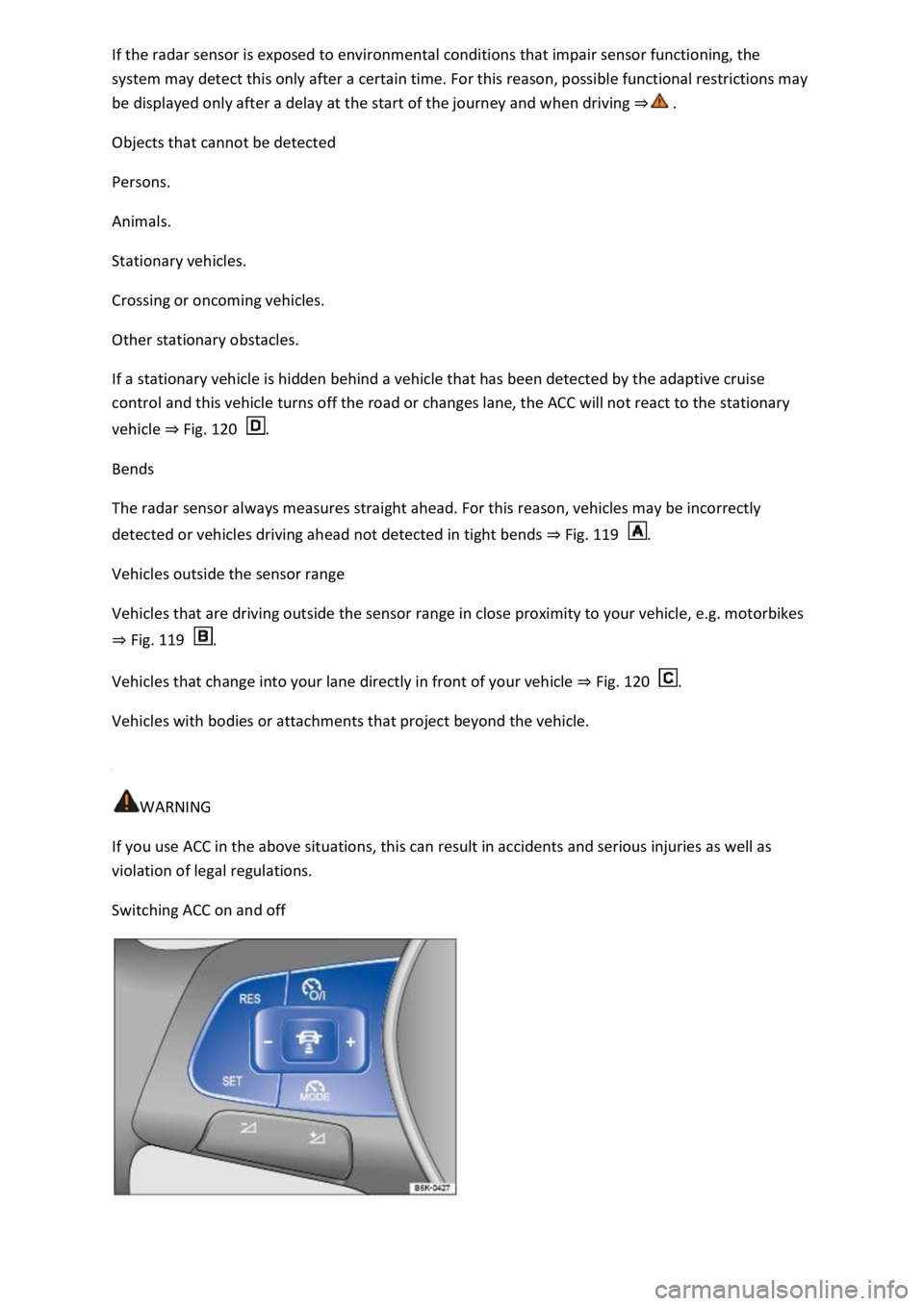
Switching ACC on and off
Page 241 of 502

If you do not maintain the minimum distance to a vehicle in front and the difference in speed
between the vehicle in front and your own vehicle is so great that the braking action of the ACC is
insufficient, you are in danger of colliding with the vehicle in front. The braking distance is also
longer in rain and winter road conditions.
ACC may not be able to detect all driving situations correctly.
Always be prepared to brake the vehicle yourself.
Speed and distance control are overridden when you press the accelerator. ACC does not brake
automatically in this case.
Observe any country-specific regulations relating to the minimum distance.
Always set a larger distance in wet or snowy conditions or when visibility is poor.
Some settings can be stored in the user accounts of the personalisation function and therefore
change automatically when the user account changes Personalisation
Troubleshooting
First read and observe the introductoryinformation and safety warnings
ACC not available.
The indicator lamp lights up yellow.
The radar sensor is dirty. Clean the radar sensor Vehicle care
The visibility of the radar sensor is impaired due to the weather conditions, e.g. snow, or due to
detergent deposits or coatings. Clean the radar sensor Vehicle care
The visibility of the radar sensor is impaired by add-on parts, the trim frames of number plate
holders or stickers. Keep the area around the radar sensor free.
The radar sensor has been displaced or damaged, e.g. due to damage to the front of the vehicle.
Check whether damage is visible Repairs and technical modifications
Fault or malfunction. Switch off and restart the engine.
Structural modifications have been made to the front of the vehicle.
The genuine Volkswagen badge is not used.
If the problem persists, go to a qualified workshop.
ACC does not function as expected.
The radar sensor is dirty. Clean the radar sensor Vehicle care
The system limits are not met Limits of ACC
Page 243 of 502

Radar sensor
Front Assist detects driving situations by means of the radar sensor at the front of the vehicle
Front view m.
Functions included in the system
The City Emergency Braking System and Pedestrian Monitoring (depending on vehicle equipment)
are part of Front Assist and are automatically active when Front Assist is switched on.
WARNING
The intelligent technology used in Front Assist cannot overcome the laws of physics, and functions
only within the limits of the system. Never let the extra convenience afforded by Front Assist tempt
you into taking safety risks when driving. The driver is always responsible for braking in time.
If Front Assist issues a warning, brake your vehicle immediately depending on the traffic situation or
avoid the obstacle.
Adapt your speed and distance from the vehicles ahead to suit visibility, weather, road and traffic
conditions.
Front Assist cannot prevent accidents and serious injuries on its own.
Front Assist can issue unnecessary warnings and carry out unwanted braking interventions in certain
complex driving situations, e.g. at traffic islands.
Front Assist can issue unnecessary warnings and carry out unwanted braking interventions when its
function is impaired, e.g. if the radar sensor is dirty or its position has been changed.
Front Assist without Pedestrian Monitoring does not react to persons. In addition, the system does
not react to animals or to vehicles that are crossing or approaching in the same lane.
If you are unsure whether your vehicle possesses Pedestrian Monitoring, please enquire about this
at a qualified workshop before starting your journey.
Be prepared to take over control of the vehicle yourself at all times.
Warning levels and braking intervention
First read and observe the introductoryinformation and safety warnings
Distance warning
The system detects when safety is endangered by driving too close to the vehicle in front. The
warning lamp lights up. Increase the distance.
Speed range: around 65 km/h (40 mph) to 250 km/h (155 mph).
Advance warning