Page 29 of 456
29
2
Supra Owner's Manual2-1. QUICK REFERENCE
QUICK REFERENCE
enter the control number your-
self.
• Compare the control number
shown on the Control Display
with the control number in the
device display.
Confirm the control number in the
device and on the Control Display.
• Enter the same control number
on the device and via Toyota
Supra Command then confirm.
The device is connected and dis-
played in the device list.
Incoming calls can be accepted in
different ways.
• Via Toyota Supra Command:
"Accept"
• Press the button on the
steering wheel.
• Via the selection list in the instru-
ment cluster:
Select using the knurled wheel on the
steering wheel: "Accept"
Via Toyota Supra Command:
1"Communication"
2"Dial number"
3Enter the numbers.
4Select the symbol. The call is
made using the mobile tele-phone assigned to the tele-
phone function.
To establish the connection via the
additional telephone:
1Press the button.
2"Call via"
CarPlay makes it possible to oper-
ate certain functions of a compati-
ble Apple iPhone by Siri voice
operation and using Toyota Supra
Command.
• Compatible iPhone.
iPhone 5 or later with iOS 7.1 or later.
• Corresponding mobile radio con-
tract.
• Bluetooth, WiFi and Siri voice
operation are activated on the
iPhone.
Via Toyota Supra Command:
1"My Vehicle"
2"System settings"
3"Mobile devices"
4"Settings"
5Set the following setting:
"Bluetooth"
Telephony
Accepting a call
Dialling a number
Apple CarPlay preparation
Principle
Operating requirements
Switching on Bluetooth and Car-
Play
Page 34 of 456
34
Supra Owner's Manual2-1. QUICK REFERENCE
■Activating/deactivating
To activate: press the lever up once
from its home position, arrow 1.
To deactivate: press the lever back
into the home position.
■To adjust the sensitivity
Turn the knurled wheel on the wiper
lever.Pull the wiper lever.
Rain sensor
To clean the windscreen
Air conditioning
ButtonFunction
Temperature.
Recirculated-air mode.
Maximum cooling.
AUTO program.
Air distribution, manual.
Switching off.
Defrost and defog the
windshield.
Rear window defroster.
Page 35 of 456
35
2
Supra Owner's Manual2-1. QUICK REFERENCE
QUICK REFERENCE
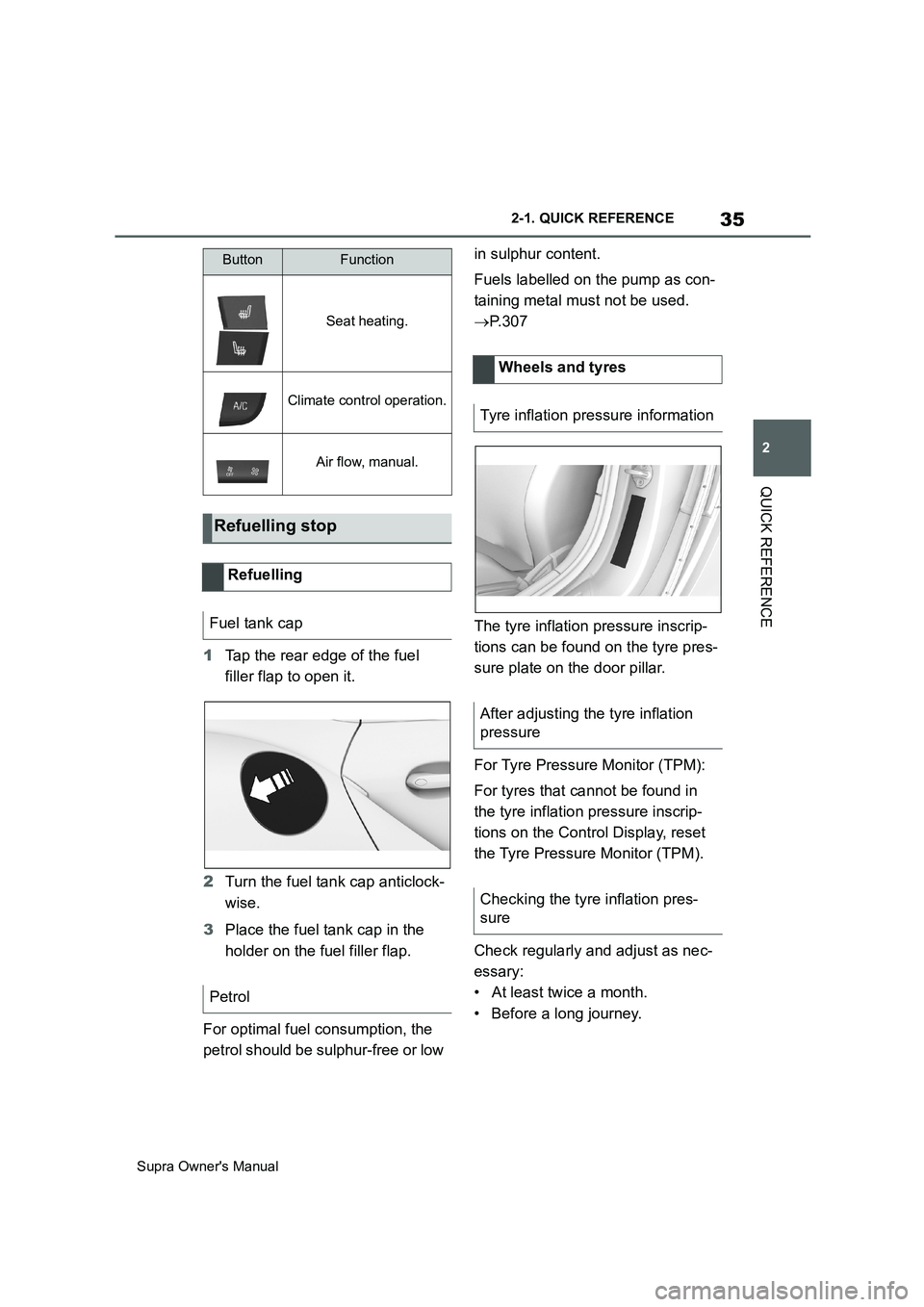
1Tap the rear edge of the fuel
filler flap to open it.
2Turn the fuel tank cap anticlock-
wise.
3Place the fuel tank cap in the
holder on the fuel filler flap.
For optimal fuel consumption, the
petrol should be sulphur-free or low in sulphur content.
Fuels labelled on the pump as con-
taining metal must not be used.
P. 3 0 7
The tyre inflation pressure inscrip-
tions can be found on the tyre pres-
sure plate on the door pillar.
For Tyre Pressure Monitor (TPM):
For tyres that cannot be found in
the tyre inflation pressure inscrip-
tions on the Control Display, reset
the Tyre Pressure Monitor (TPM).
Check regularly and adjust as nec-
essary:
• At least twice a month.
• Before a long journey.
Seat heating.
Climate control operation.
Air flow, manual.
Refuelling stop
Refuelling
Fuel tank cap
Petrol
ButtonFunction
Wheels and tyres
Tyre inflation pressure information
After adjusting the tyre inflation
pressure
Checking the tyre inflation pres-
sure
Page 39 of 456
3
39
Supra Owner's Manual
3
CONTROLS
CONTROLS
.3-1. CONTROLS
Driving area ........................40
Vehicle operating state .......44
Toyota Supra Command .....47
Voice control system...........58
General settings .................61
Opening and closing ...........74
Seats, mirrors and steering
wheel ................................95
Carrying children safely ....108
Driving ..............................134
Displays ............................151
Lights ................................171
Safety ...............................179
Driving Stability Control Sys-
tems ................................215
Driver Assistance Systems
.......................................220
Driving comfort .................248
Climate .............................249
Interior equipment.............257
Storage compartments .....259
Boot ..................................261
Page 40 of 456
40
Supra Owner's Manual3-1. CONTROLS
3-1.CONTROLS
This chapter describes all standard, country-specific and special equipment
available for the model series. It may therefore describe equipment and
functions which are not installed in your vehicle, for example on account of
the optional equipment selected or the country specification. This also
applies to safety-relevant functions and systems. Please comply with the
relevant laws and regulations when using the corresponding functions and
systems.
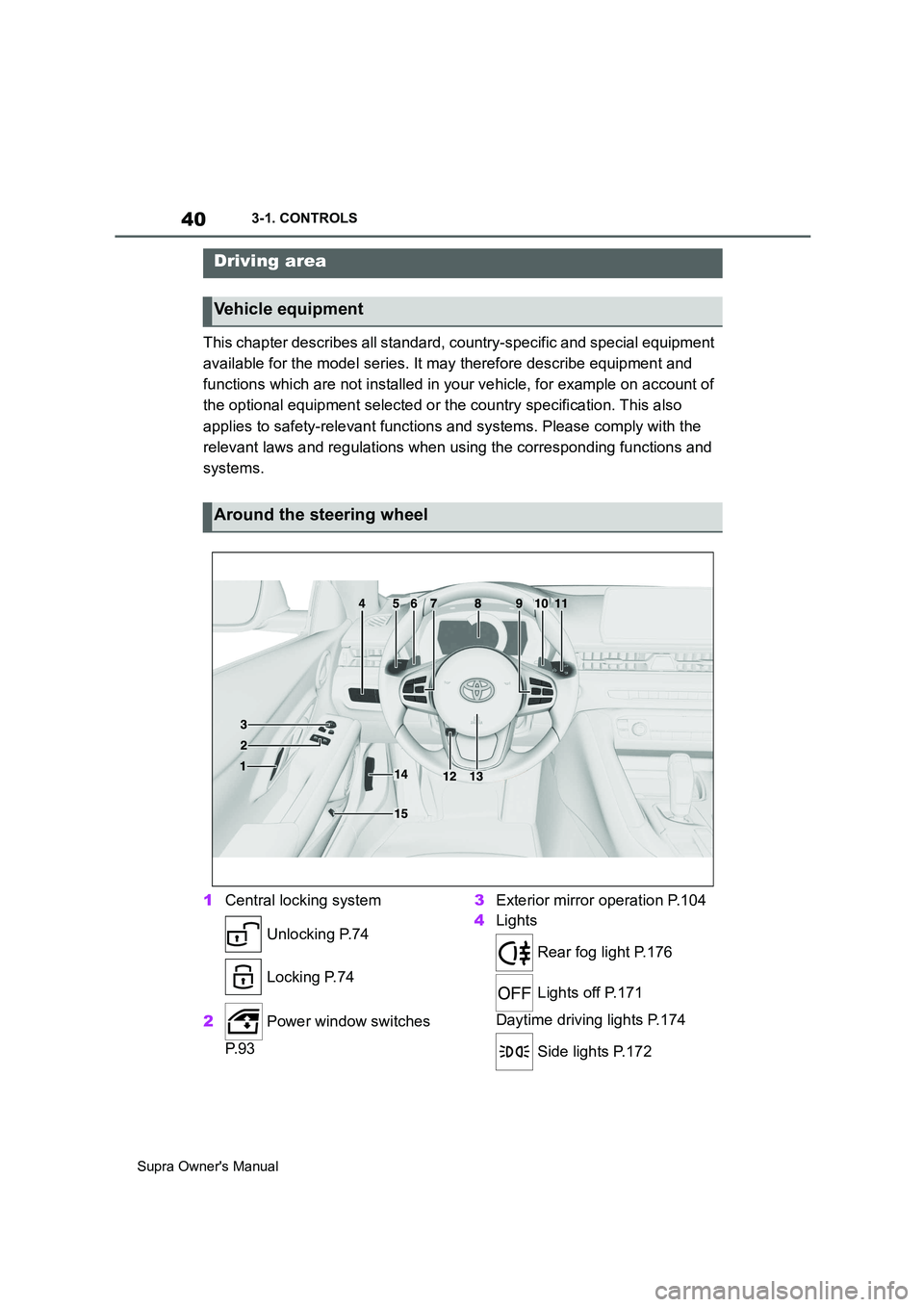
1Central locking system
Unlocking P.74
Locking P.74
2 Power window switches
P. 9 33Exterior mirror operation P.104
4Lights
Rear fog light P.176
Lights off P.171
Daytime driving lights P.174
Side lights P.172
Driving area
Vehicle equipment
Around the steering wheel
Page 41 of 456
41
3
Supra Owner's Manual3-1. CONTROLS
CONTROLS
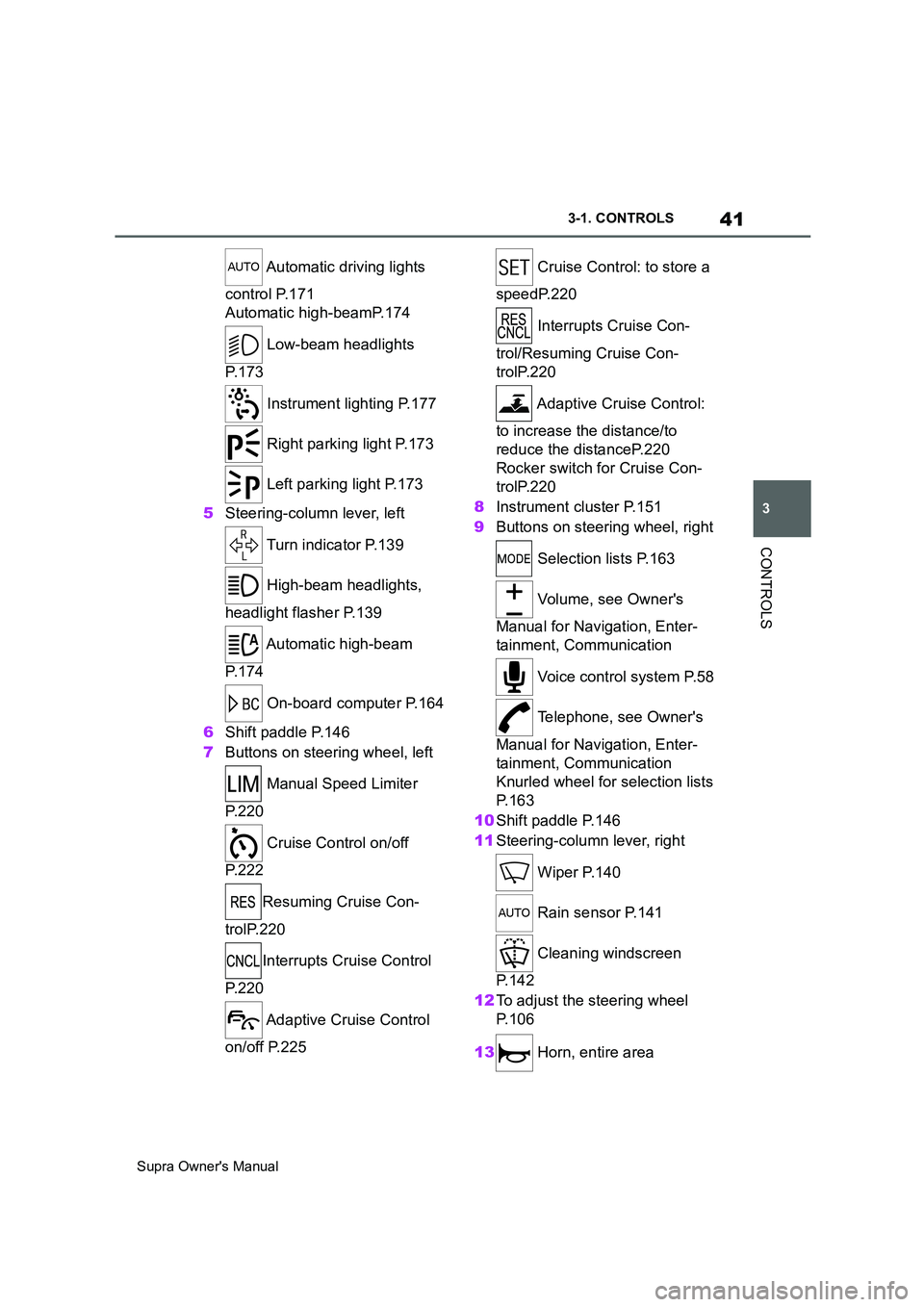
Automatic driving lights
control P.171
Automatic high-beamP.174
Low-beam headlights
P. 1 7 3
Instrument lighting P.177
Right parking light P.173
Left parking light P.173
5Steering-column lever, left
Turn indicator P.139
High-beam headlights,
headlight flasher P.139
Automatic high-beam
P. 1 7 4
On-board computer P.164
6Shift paddle P.146
7Buttons on steering wheel, left
Manual Speed Limiter
P. 2 2 0
Cruise Control on/off
P. 2 2 2
Resuming Cruise Con-
trolP.220
Interrupts Cruise Control
P. 2 2 0
Adaptive Cruise Control
on/off P.225 Cruise Control: to store a
speedP.220
Interrupts Cruise Con-
trol/Resuming Cruise Con-
trolP.220
Adaptive Cruise Control:
to increase the distance/to
reduce the distanceP.220
Rocker switch for Cruise Con-
trolP.220
8Instrument cluster P.151
9Buttons on steering wheel, right
Selection lists P.163
Volume, see Owner's
Manual for Navigation, Enter-
tainment, Communication
Voice control system P.58
Telephone, see Owner's
Manual for Navigation, Enter-
tainment, Communication
Knurled wheel for selection lists
P. 1 6 3
10Shift paddle P.146
11Steering-column lever, right
Wiper P.140
Rain sensor P.141
Cleaning windscreen
P. 1 4 2
12To adjust the steering wheel
P. 1 0 6
13 Horn, entire area
Page 44 of 456
44
Supra Owner's Manual3-1. CONTROLS
This chapter describes all standard,
country-specific and special equip-
ment available for the model series.
It may therefore describe equip-
ment and functions which are not
installed in your vehicle, for exam-
ple on account of the optional
equipment selected or the country
specification. This also applies to
safety-relevant functions and sys-
tems. Please comply with the rele-
vant laws and regulations when
using the corresponding functions
and systems.
Depending on the situation, the
vehicle is in one of the three states:
• Idle state.
• Standby state.
• Drive-ready state.
When the vehicle is in idle state, it
is switched off. All electrical con-
sumers are deactivated.
The vehicle is in idle state before
you open it from outside and once you have left the vehicle and locked
it.
Vehicle operating state
Vehicle equipment
General
Idle state
Principle
General
Safety notes
WARNING
An unsecured vehicle can start mov-
ing and rolling away. There is a dan-
ger of accidents. Before leaving the
vehicle, secure it to prevent it from
rolling away.
Observe the following to ensure that
the vehicle is secured against rolling
away:
• Apply the parking brake.
• Turn the front wheels towards the
kerb on upward or downward gradi-
ents.
• Additionally secure the vehicle on
upward or downward gradients, for
example with a chock.
WARNING
Unsupervised children or pets in the
vehicle can set the vehicle in motion
and endanger themselves or other
road users, for example by the follow-
ing actions:
• Pressing the start/stop button.
• Release the parking brake.
• Opening and closing doors or win-
dows.
• Engaging selector lever position N.
• Operating vehicle equipment.
There is a risk of accidents or injury.
Do not leave children or pets unsu-
pervised in the vehicle. When leaving
the vehicle, take the remote control
with you and lock the vehicle.
Page 46 of 456
46
Supra Owner's Manual3-1. CONTROLS
be operated when drive-ready state
is switched on.
1Depress the brake pedal.
2Press the start/stop button.
The starting process is activated
automatically for a short time and
stops as soon as the engine starts.
Most of the indicator and warning
lamps in the instrument cluster are
illuminated for different lengths of
time.
Depending on the engine version,
full drive power may only be availa-
ble approx. 30 seconds after start-
ing the engine. In this case, the
vehicle will not accelerate in the
usual way.
When drive-ready state is switched
on, the revolution counter shows
the current engine speed. Safety notes
WARNING
A blocked exhaust pipe or inadequate
ventilation can allow harmful exhaust
fumes to enter the vehicle. The
exhaust fumes contain pollutants
which are colourless and odourless.
In enclosed spaces, the exhaust
fumes can also build up outside the
vehicle. There is a danger of fatal
injury. Keep the exhaust pipe clear
and ensure sufficient ventilation.
WARNING
An unsecured vehicle can start mov-
ing and rolling away. There is a dan-
ger of accidents. Before leaving the
vehicle, secure it to prevent it from
rolling away.
Observe the following to ensure that
the vehicle is secured against rolling
away:
• Apply the parking brake.
• Turn the front wheels towards the
kerb on upward or downward gradi-
ents.
• Additionally secure the vehicle on
upward or downward gradients, for
example with a chock.
NOTICE
Repeated start attempts or starting
several times in quick succession
means that fuel is not burned or is
inadequately burned. The catalytic
converter can overheat. There is a
danger of damage to property. Avoid
repeatedly starting in quick succes-
sion.
Switching on drive-ready
state
Principle
Drive-ready state is
switched on using
the start/stop button:
Automatic transmission
Petrol engine
Display in the instrument
cluster