Page 177 of 532

1772-1. Driving procedures
2
When driving WARNING■ When starting the engine
Always start the engine while sitting in the driver's seat. Do not depress the
accelerator pedal while starting the engine under any circumsta nces.
Doing so may cause an accident resulting in death or serious in jury.
■ Caution when driving
Do not turn the engine switch to the “LOCK” position while driving. If, in an
emergency, you must turn the engine off while the vehicle is mo ving, turn the
engine switch only to the “ACC” position to stop the engine. An accident may
result if the engine is stopped while driving. ( P. 454)
NOTICE■ To prevent battery discharge
Do not leave the engine switch in the “ACC” or “ON” position fo r long periods
of time without the engine running.
■ When starting the engine
● Do not crank the engine for more than 10 seconds at a time. This may
overheat the starter and wiring system.
If the engine does not start, turn the engine switch to the “LOCK” position
and try to start the engine again after waiting for 10 seconds or more.
● Do not race a cold engine.
● If the engine becomes difficult to start or stalls frequently, have your vehi-
cle checked by your Toyota dealer immediately.
● Vehicles with an automatic transmission: Do not shift the shift lever while
the starter is operating.
Page 178 of 532
1782-1. Driving procedures
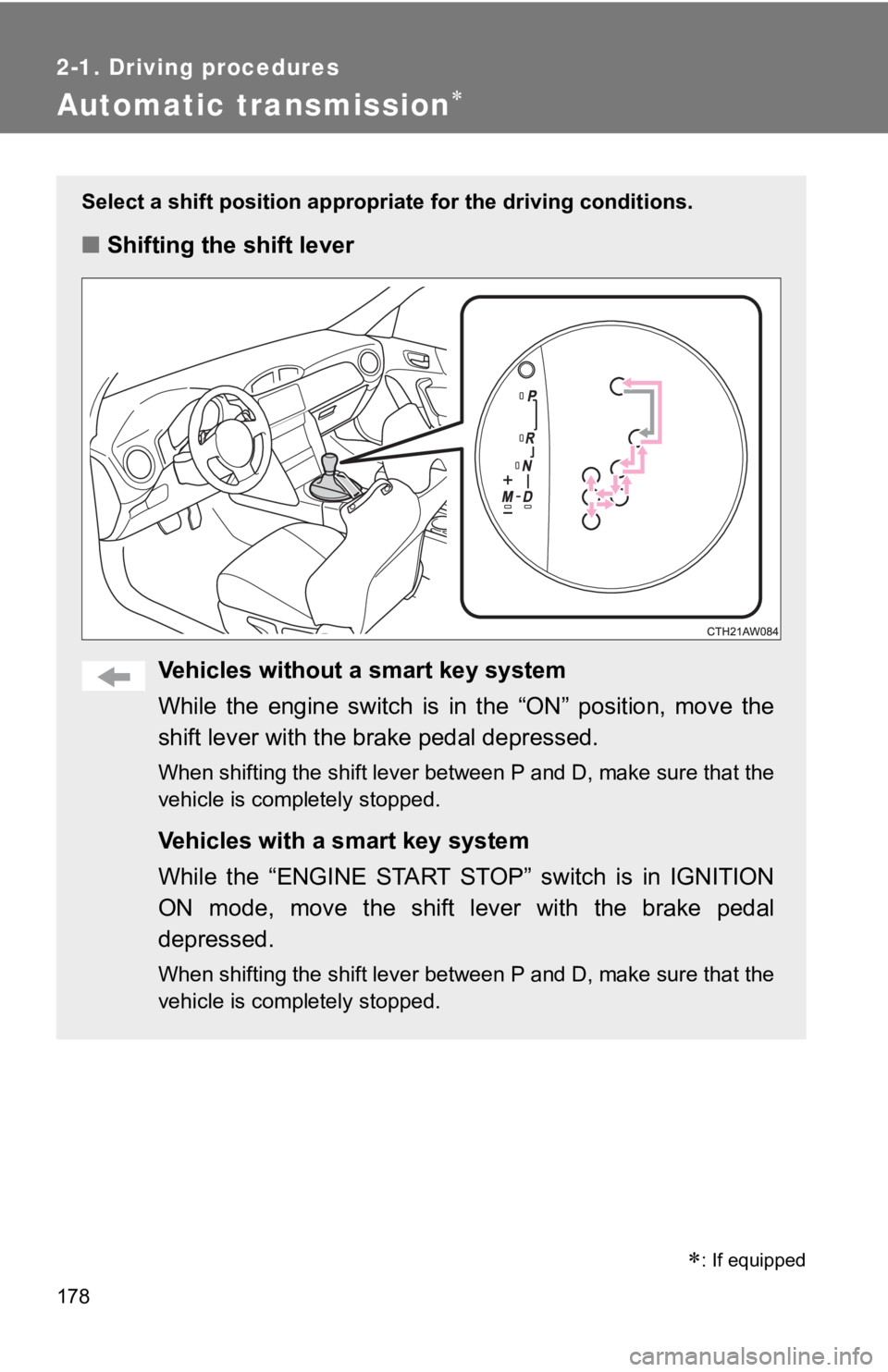
Automatic transmission Select a shift position appropriat e for the driving conditions.
■ Shifting the shift lever
Vehicles without a smart key system
While the engine switch is in the “ON” position, move the
shift lever with the brake pedal depressed. When shifting the shift lever between P and D, make sure that t he
vehicle is completely stopped.
Vehicles with a smart key system
While the “ENGINE START STOP” switch is in IGNITION
ON mode, move the shift lever with the brake pedal
depressed. When shifting the shift lever between P and D, make sure that t he
vehicle is completely stopped.
: If equipped
Page 183 of 532
1832-1. Driving procedures
2
When driving ■ Automatic gear selection when the vehicle is stopped
When the vehicle is idling at high rpm in order to warm up, and the vehicle is
on a slippery road, the transmission may automatically shift to 2 nd
gear for
stopping and starting off.
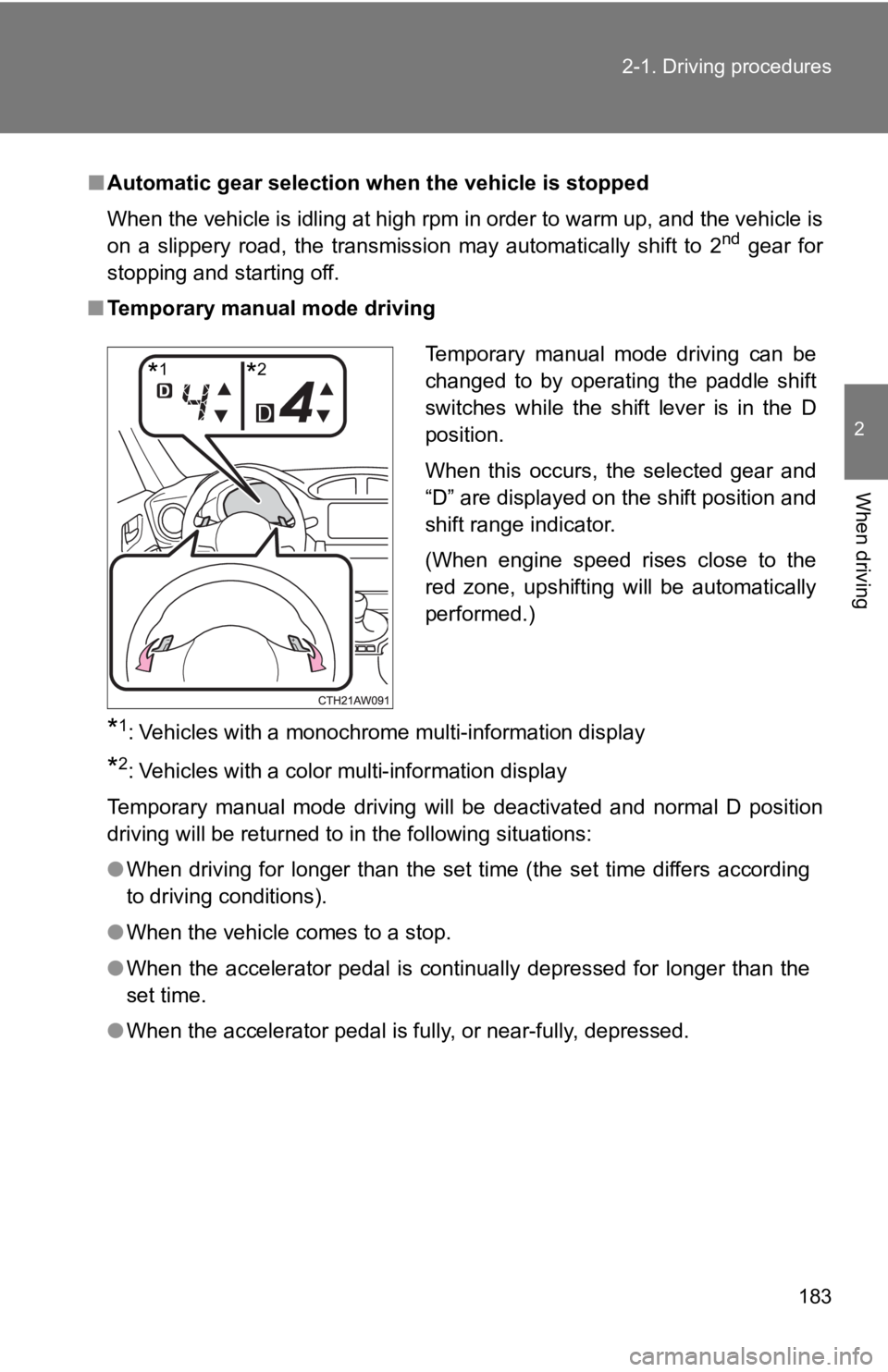
■ Temporary manual mode driving
* 1
: Vehicles with a monochrome multi-information display
* 2
: Vehicles with a color multi-information display
Temporary manual mode driving will be deactivated and normal D position
driving will be returned to in the following situations:
● When driving for longer than the set time (the set time differs according
to driving conditions).
● When the vehicle comes to a stop.
● When the accelerator pedal is continually depressed for longer than the
set time.
● When the accelerator pedal is fully, or near-fully, depressed. Temporary manual mode driving can be
changed to by operating the paddle shift
switches while the shift lever is in the D
position.
When this occurs, the selected gear and
“D” are displayed on the shift position and
shift range indicator.
(When engine speed rises close to the
red zone, upshifting will be automatically
performed.)
* 1
* 2
Page 196 of 532
1962-2. Instrument cluster
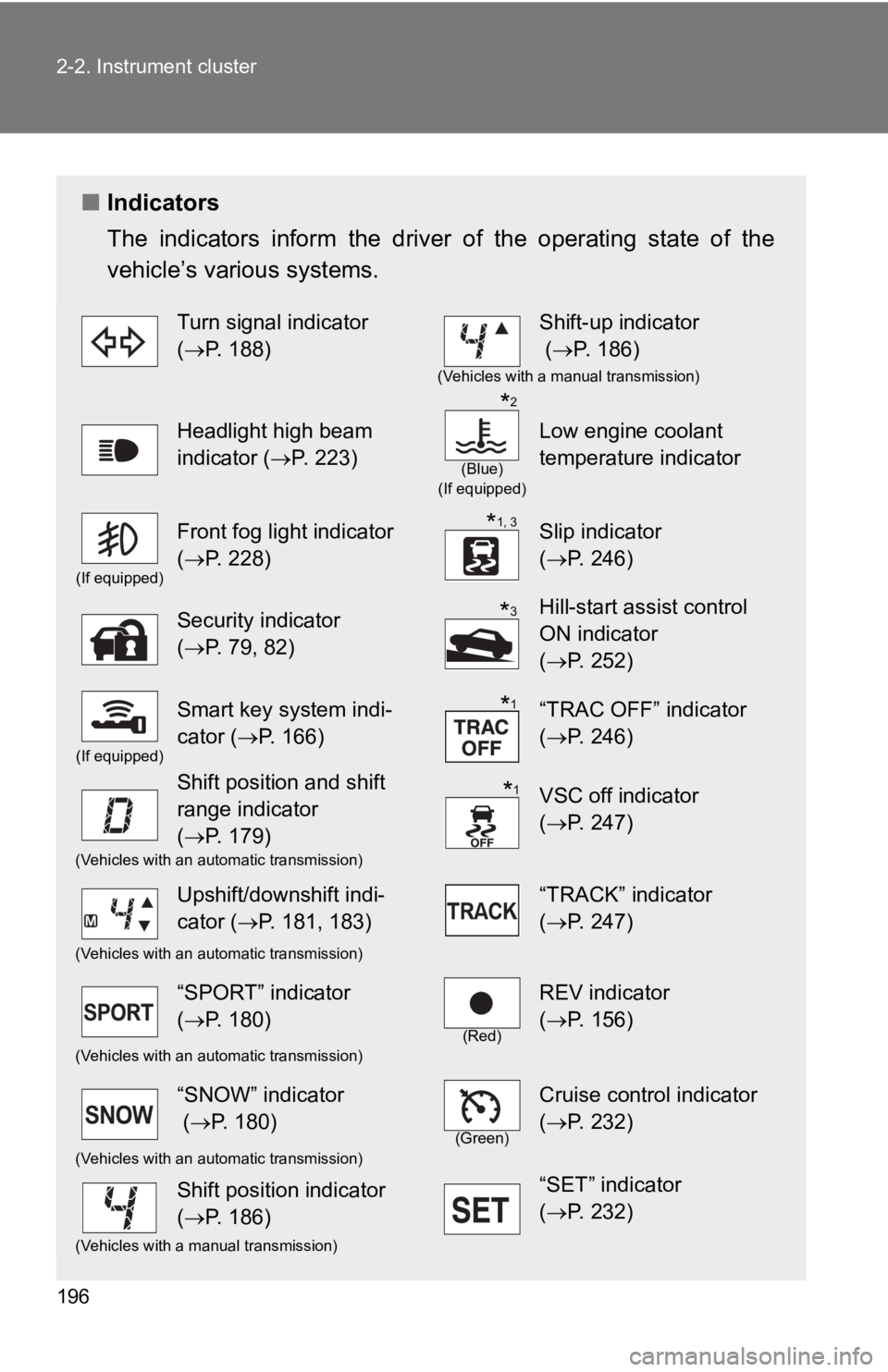
■ Indicators
The indicators inform the driv er of the operating state of the
vehicle’s various systems. Turn signal indicator
( P. 188) Shift-up indicator
( P. 186) (Vehicles with a manual transmission)
Headlight high beam
indicator ( P. 223) (Blue)
(If equipped)
Low engine coolant
temperature indicator(If equipped)
Front fog light indicator
( P. 228) Slip indicator
( P. 246)
Security indicator
( P. 79, 82) Hill-start assist control
ON indicator
( P. 252)(If equipped)
Smart key system indi-
cator ( P. 166) “TRAC OFF” indicator
( P. 246)
Shift position and shift
range indicator
( P. 179) VSC off indicator
( P. 247)(Vehicles with an automatic transmission)
Upshift/downshift indi-
cator ( P. 181, 183) “TRACK” indicator
( P. 247)(Vehicles with an automatic transmission)
“SPORT” indicator
( P. 180) (Red)
REV indicator
( P. 156)(Vehicles with an automatic transmission)
“SNOW” indicator
( P. 180) (Green)
Cruise control indicator
( P. 232)(Vehicles with an automatic transmission)
Shift position indicator
( P. 186) “SET” indicator
( P. 232)(Vehicles with a manual transmission) * 2
* 1, 3
* 3
* 1
* 1
Page 234 of 532
2342-4. Using other driving systems
■ Cruise control can be set when
Vehicles with an automatic transmission
● The shift lever is in D or M and the vehicle is in the 2 nd
gear or higher.
● Vehicle speed is above approximately 25 mph (40 km/h).
Vehicles with a manual transmission
● The vehicle is in the 2 nd
gear or higher.
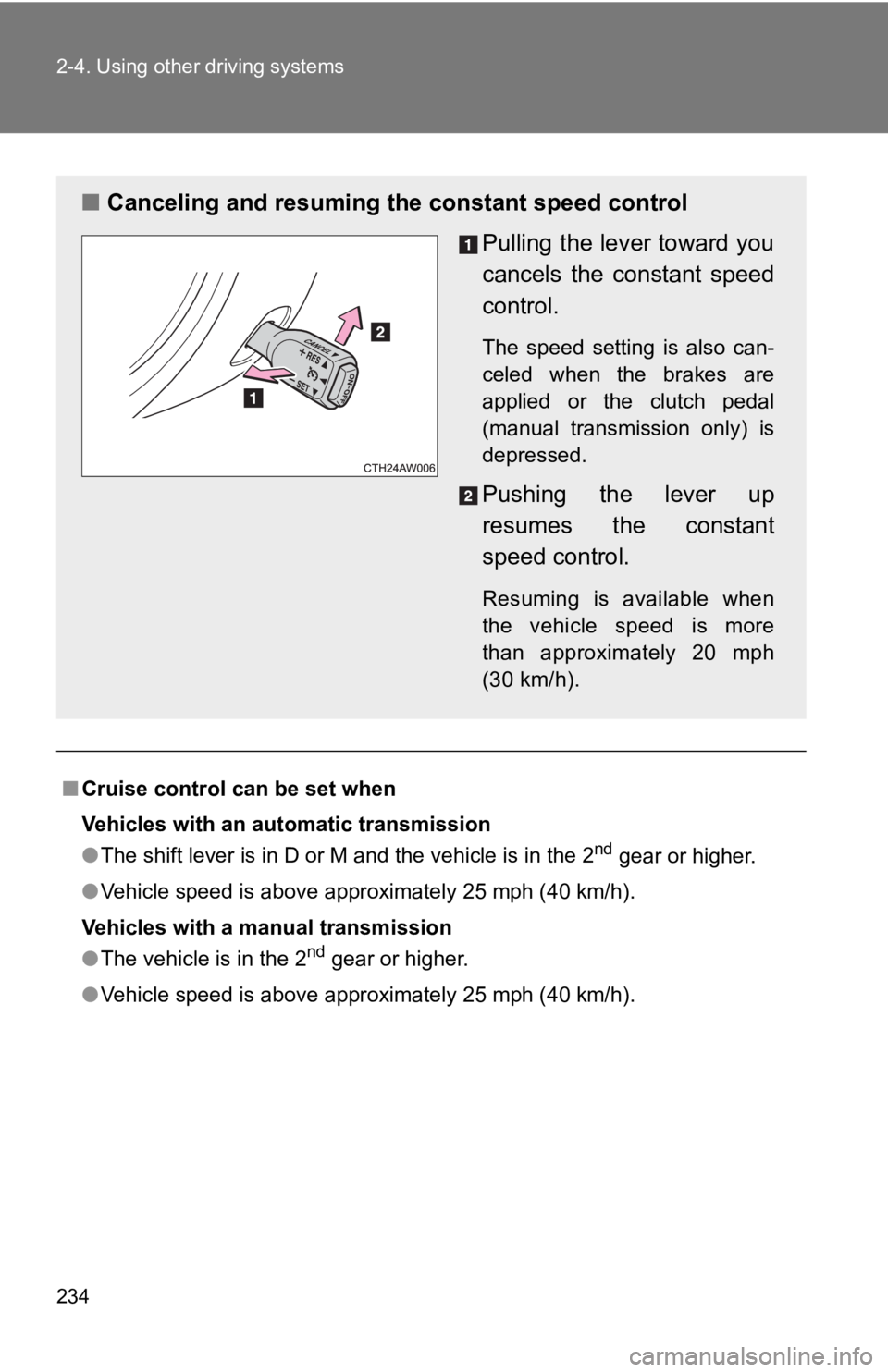
● Vehicle speed is above approximately 25 mph (40 km/h).■ Canceling and resuming the constant speed control
Pulling the lever toward you
cancels the c onstant speed
control. The speed setting is also can-
celed when the brakes are
applied or the clutch pedal
(manual transmission only) is
depressed.
Pushing the lever up
resumes the constant
speed control. Resuming is available when
the vehicle speed is more
than approximately 20 mph
(30 km/h).
Page 237 of 532
2372-4. Using other driving systems
2
When driving
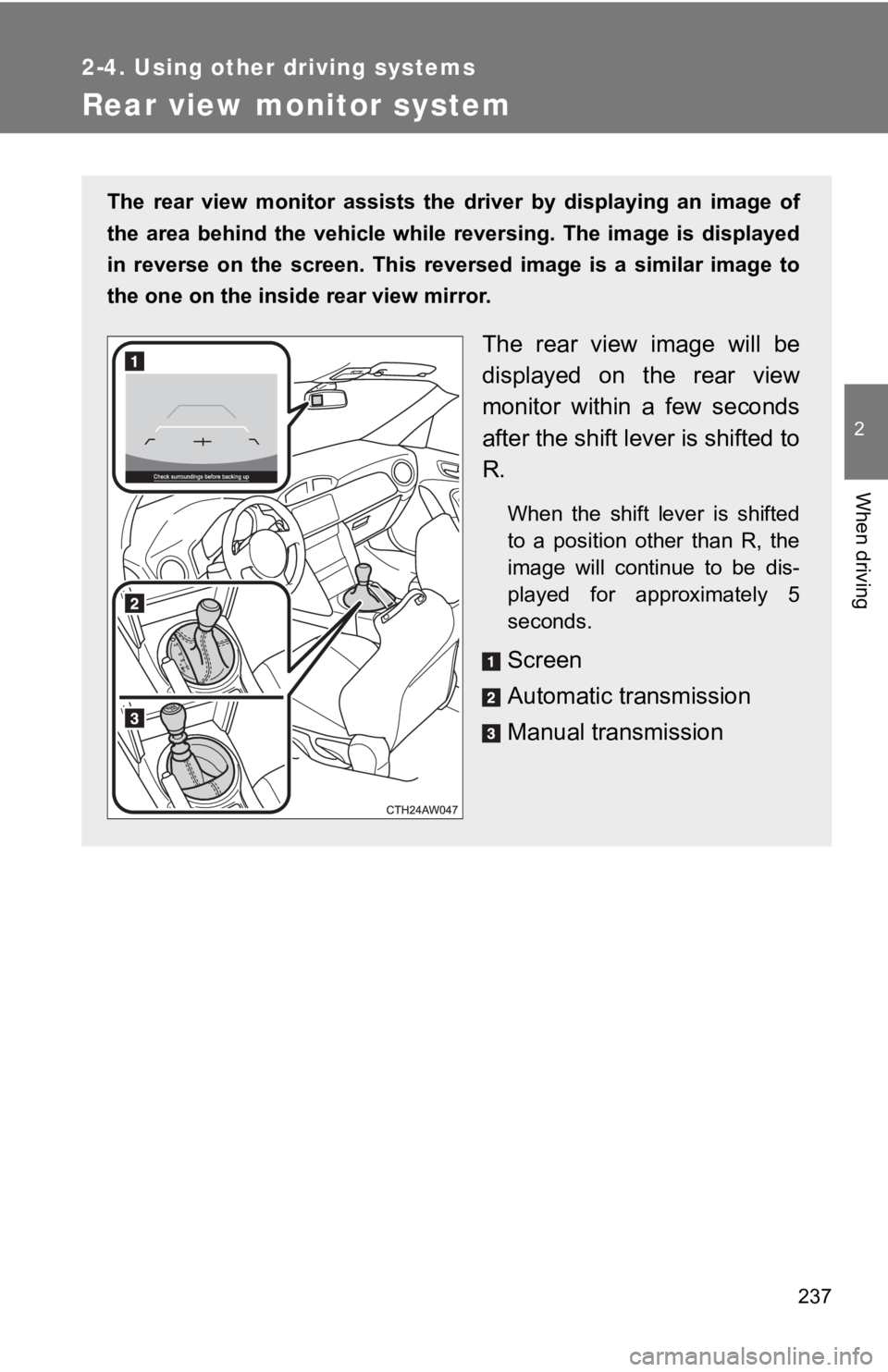
Rear view monitor system The rear view monitor assists the driver by displaying an image of
the area behind the vehicle while reversing. The image is displ ayed
in reverse on the screen. This reversed image is a similar imag e to
the one on the inside rear view mirror.
The rear view image will be
displayed on the rear view
monitor within a few seconds
after the shift lever is shifted to
R. When the shift lever is shifted
to a position other than R, the
image will continue to be dis-
played for approximately 5
seconds.
Screen
Automatic transmission
Manual transmission
Page 248 of 532
2482-4. Using other driving systems
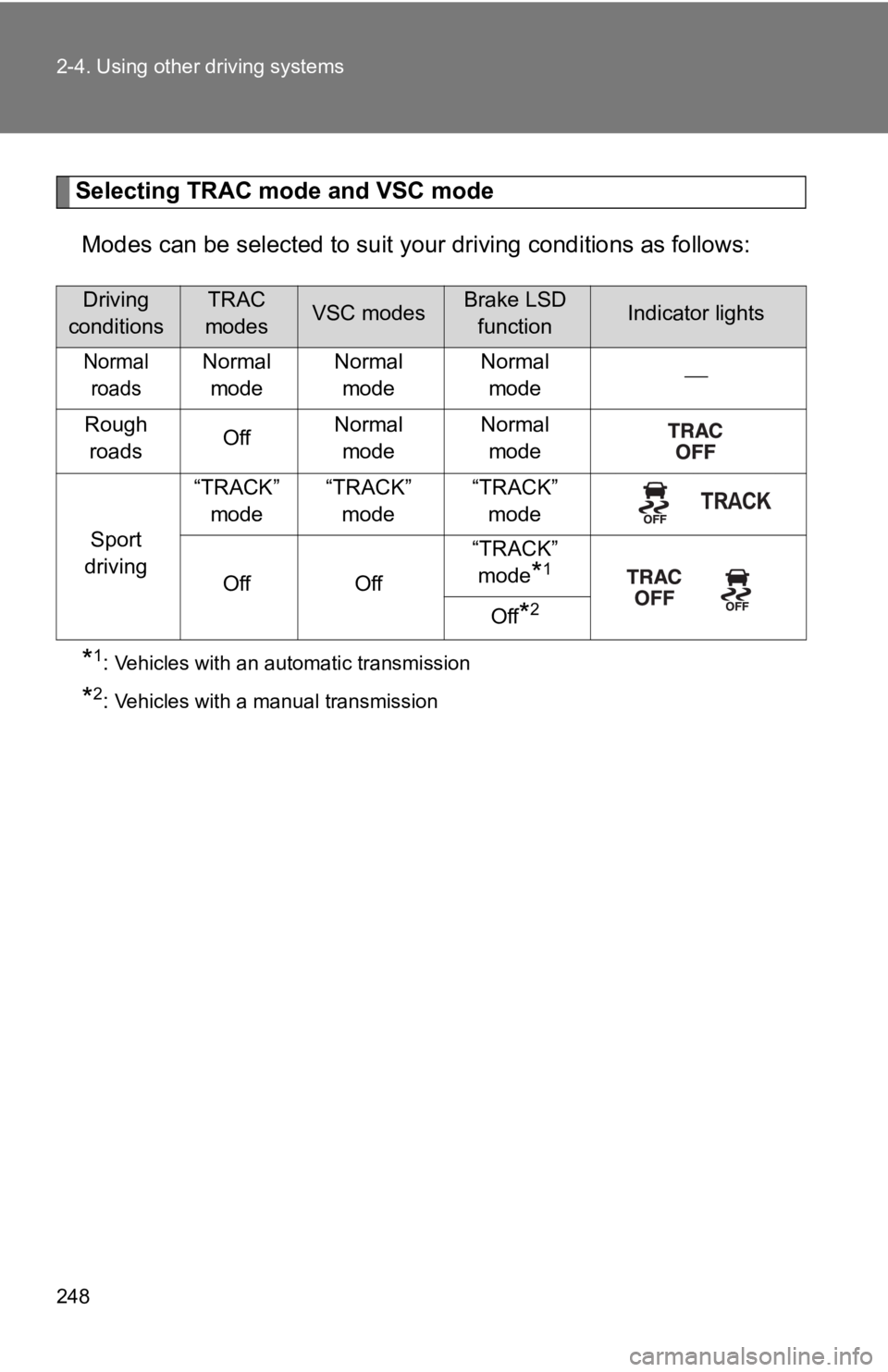
Selecting TRAC mode and VSC mode
Modes can be selected to suit y our driving conditions as follow s:
* 1
: Vehicles with an automatic transmission
* 2
: Vehicles with a manual transmissionDriving
conditions TRAC
modes VSC modes Brake LSD
function Indicator lights
Normal
roads Normal
mode Normal
mode Normal
mode
Rough
roads Off Normal
mode Normal
mode
Sport
driving “TRACK”
mode “TRACK”
mode “TRACK”
mode
Off Off “TRACK”
mode
* 1
Off
* 2
Page 254 of 532

2542-4. Using other driving systems
■ Operating conditions of hill-start assist control
When the following conditions are met, the hill-start assist co ntrol will oper-
ate:
● Vehicles with an automatic transmission: The shift lever is in D or M
(when starting off forward on while facing uphill) or in R (whe n starting off
backward while facing downhill).
● Vehicles with a manual transmission: The shift lever is in a po sition other
than R (when starting off forward while facing uphill) or in R (when start-
ing off backward while facing downhill).
● The vehicle is stopped.
● The accelerator pedal is not depressed.
● The parking brake is not engaged.
■ Hill-start assist control will not operate when
Hill-start assist control will not operate when any of the following conditions
are met:
● Vehicles with an automatic transmission: The shift lever is in a position
other than D or M (when facing uphill) or in a position other t han R (when
facing downhill).
● Vehicles with a manual transmission: The shift lever is in R (w hen facing
uphill) or in a position other than R (when facing downhill).
● Vehicles with an automatic transmission: The accelerator pedal is
depressed.
● The parking brake is applied.
● Vehicles with a manual transmission: The clutch is engaged.
● Approximately 2 seconds have elapsed since the brake pedal was
released.
● The hill-start assist control ON indicator is not illuminated.
● Vehicles without a smart key system: The engine switch is turne d to the
“ACC” or “LOCK” position.
● Vehicles with a smart key system: The “ENGINE START STOP” switc h is
turned to ACCESSORY mode or turned off.