Page 3 of 532

1
2
3
4
5
6
7
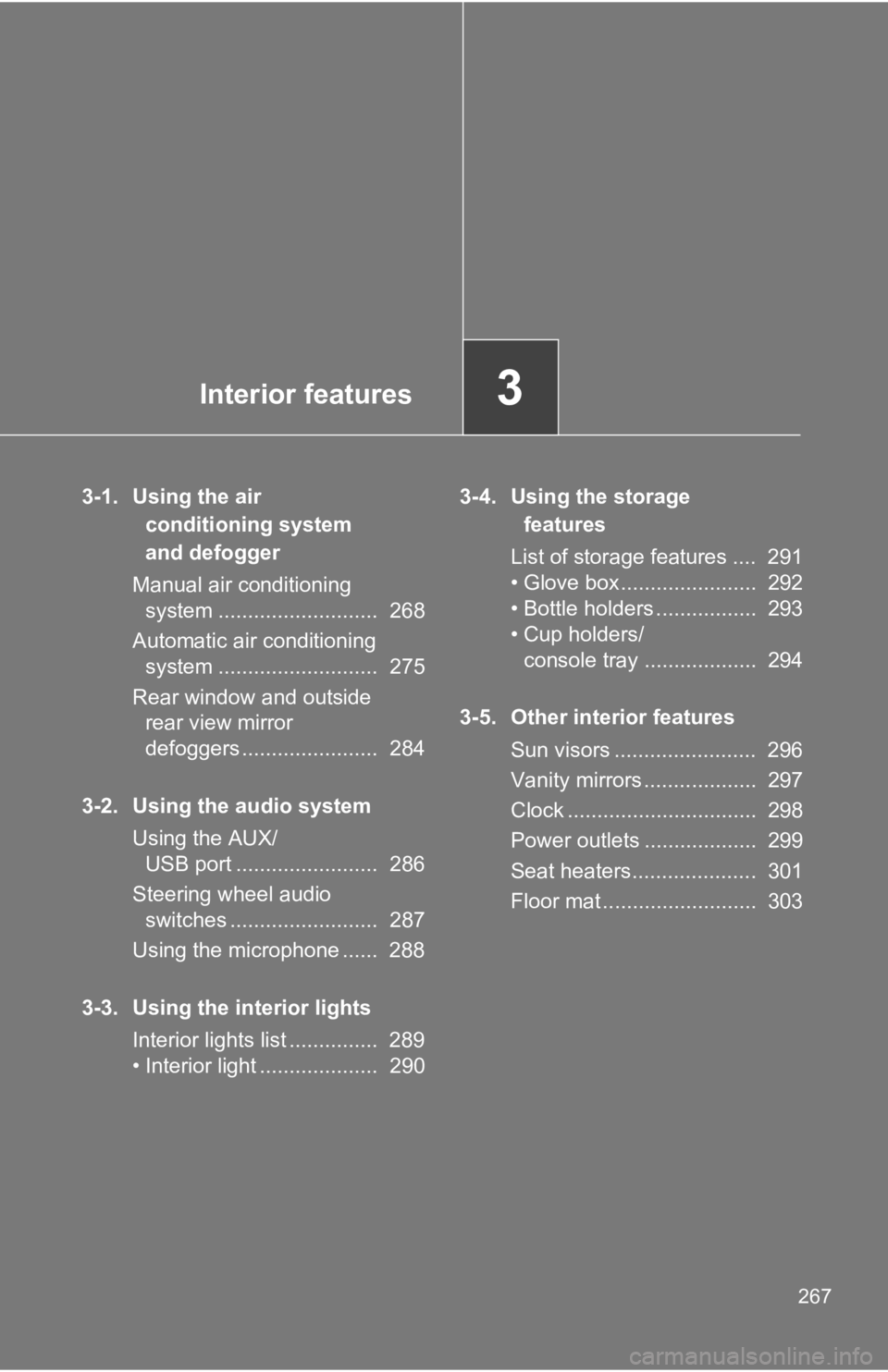
32-2. Instrument cluster
Gauges and meters ............ 191
Indicators and warning
lights ................................. 194
Multi-information display
(monochrome display) ...... 200
Multi-information display
(color display) ................... 207
2-3. Operating the lights
and windshield wipers
Headlight switch .................. 222
Fog light switch ................... 228
Windshield wipers and
washer .............................. 229
2-4. Using other driving
systems
Cruise control ...................... 232
Rear view monitor
system .............................. 237
Driving assist systems ........ 245
Hill-start assist control ......... 252
2-5. Driving information
Cargo and luggage ............. 256
Vehicle load limits ............... 260
Winter driving tips ............... 261
Trailer towing ...................... 265
Dinghy towing ..................... 266 3-1. Using the air conditioning
system and defogger
Manual air conditioning
system .............................. 268
Automatic air conditioning
system .............................. 275
Rear window and outside
rear view mirror
defoggers ......................... 284
3-2. Using the audio system
Using the AUX/USB port .... 286
Steering wheel audio
switches ........................... 287
Using the microphone ........ 288
3-3. Using the interior lights
Interior lights list ................. 289
• Interior light ...................... 290
3-4. Using the storage
features
List of storage features ....... 291
• Glove box ......................... 292
• Bottle holders ................... 293
• Cup holders/
console tray ...................... 2943
Interior features
Page 267 of 532
Interior features
3
2673-1. Using the air
conditioning system
and defogger
Manual air conditioning
system ........................... 268
Automatic air conditioning
system ........................... 275
Rear window and outside
rear view mirror
defoggers ....................... 284
3-2. Using the audio system
Using the AUX/
USB port ........................ 286
Steering wheel audio
switches ......................... 287
Using the microphone ...... 288
3-3. Using the interior lights
Interior lights list ............... 289
• Interior light .................... 290 3-4. Using the storage
features
List of storage features .... 291
• Glove box....................... 292
• Bottle holders ................. 293
• Cup holders/
console tray ................... 294
3-5. Other interior features
Sun visors ........................ 296
Vanity mirrors ................... 297
Clock ................................ 298
Power outlets ................... 299
Seat heaters..................... 301
Floor mat .......................... 303
Page 289 of 532
289 3
Interior features 3-3. Using the interior lights
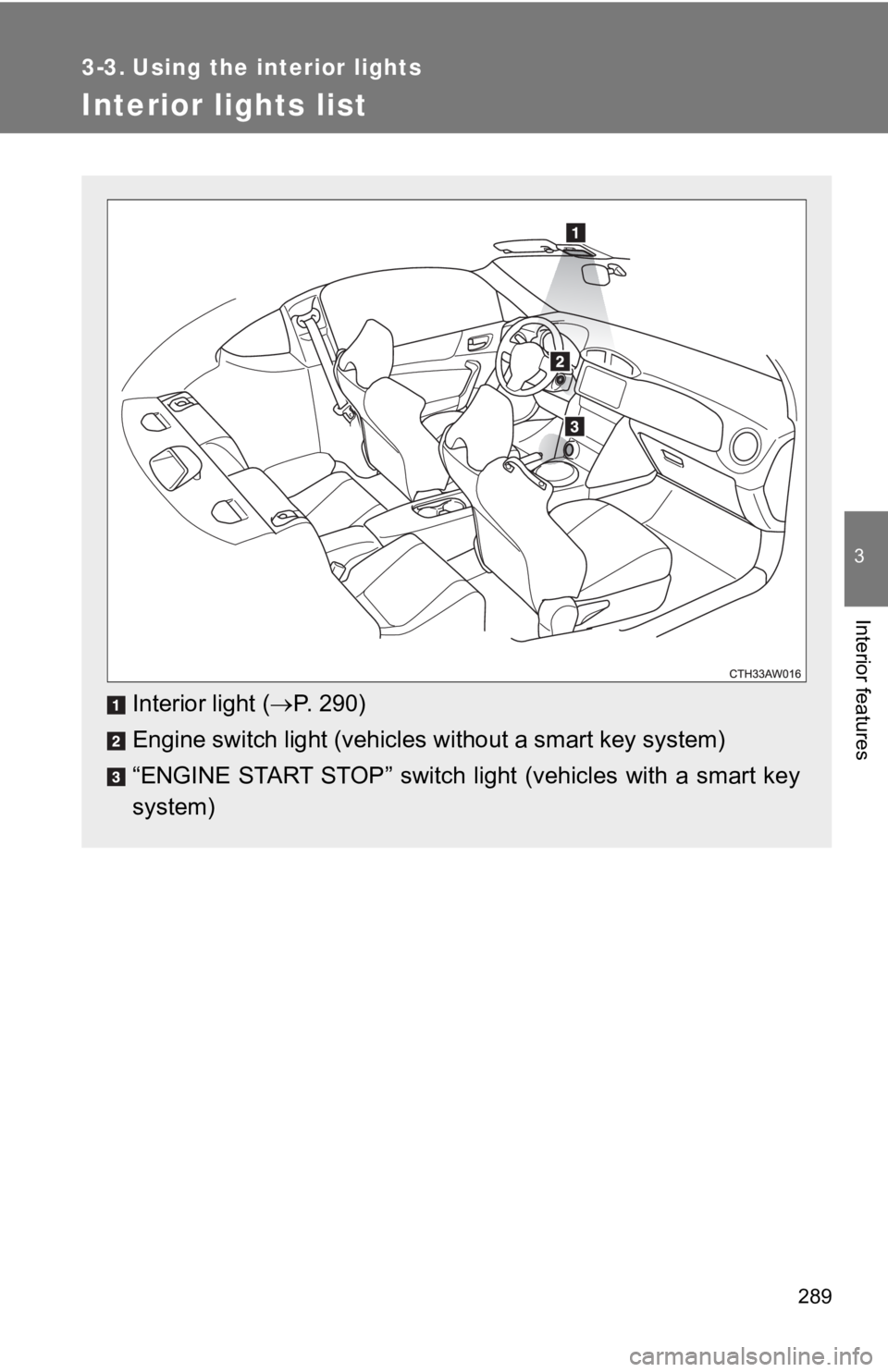
Interior lights list
Interior light ( P. 290)
Engine switch light (vehicles without a smart key system)
“ENGINE START STOP” switch light (vehicles with a smart key
system)
Page 290 of 532
2903-3. Using the interior lights
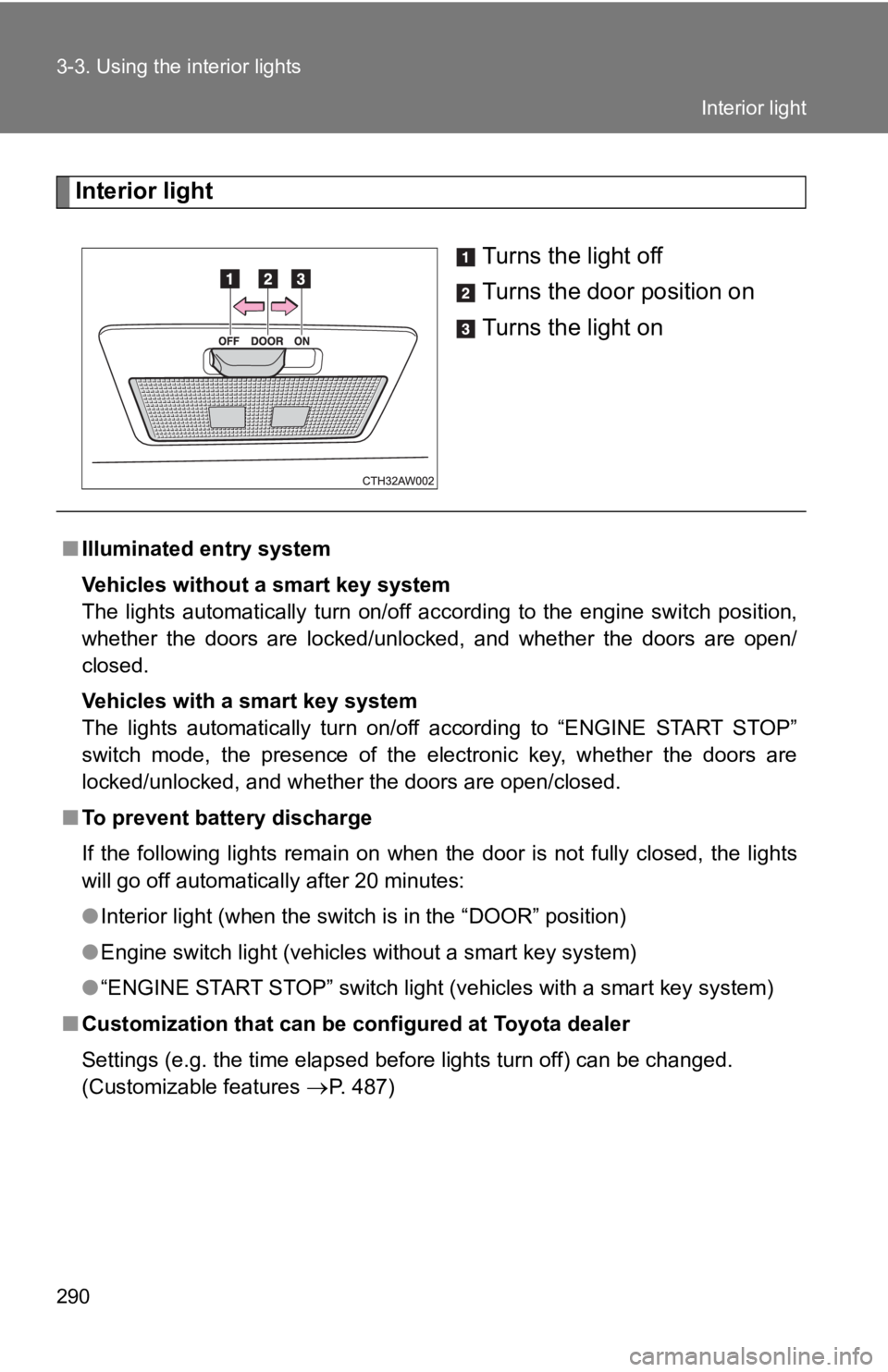
Interior light
Turns the light off
Turns the door position on
Turns the light on
■ Illuminated entry system
Vehicles without a smart key system
The lights automatically turn on/off according to the engine sw itch position,
whether the doors are locked/unlocked, and whether the doors ar e open/
closed.
Vehicles with a smart key system
The lights automatically turn on/off according to “ENGINE START STOP”
switch mode, the presence of the electronic key, whether the do ors are
locked/unlocked, and whether the doors are open/closed.
■ To prevent battery discharge
If the following lights remain on when the door is not fully cl osed, the lights
will go off automatically after 20 minutes:
● Interior light (when the switch is in the “DOOR” position)
● Engine switch light (vehicles without a smart key system)
● “ENGINE START STOP” switch light (vehicles with a smart key sys tem)
■ Customization that can be configured at Toyota dealer
Settings (e.g. the time elapsed before lights turn off) can be changed.
(Customizable features
P. 487) Interior light
Page 321 of 532
3214-2. Maintenance
4
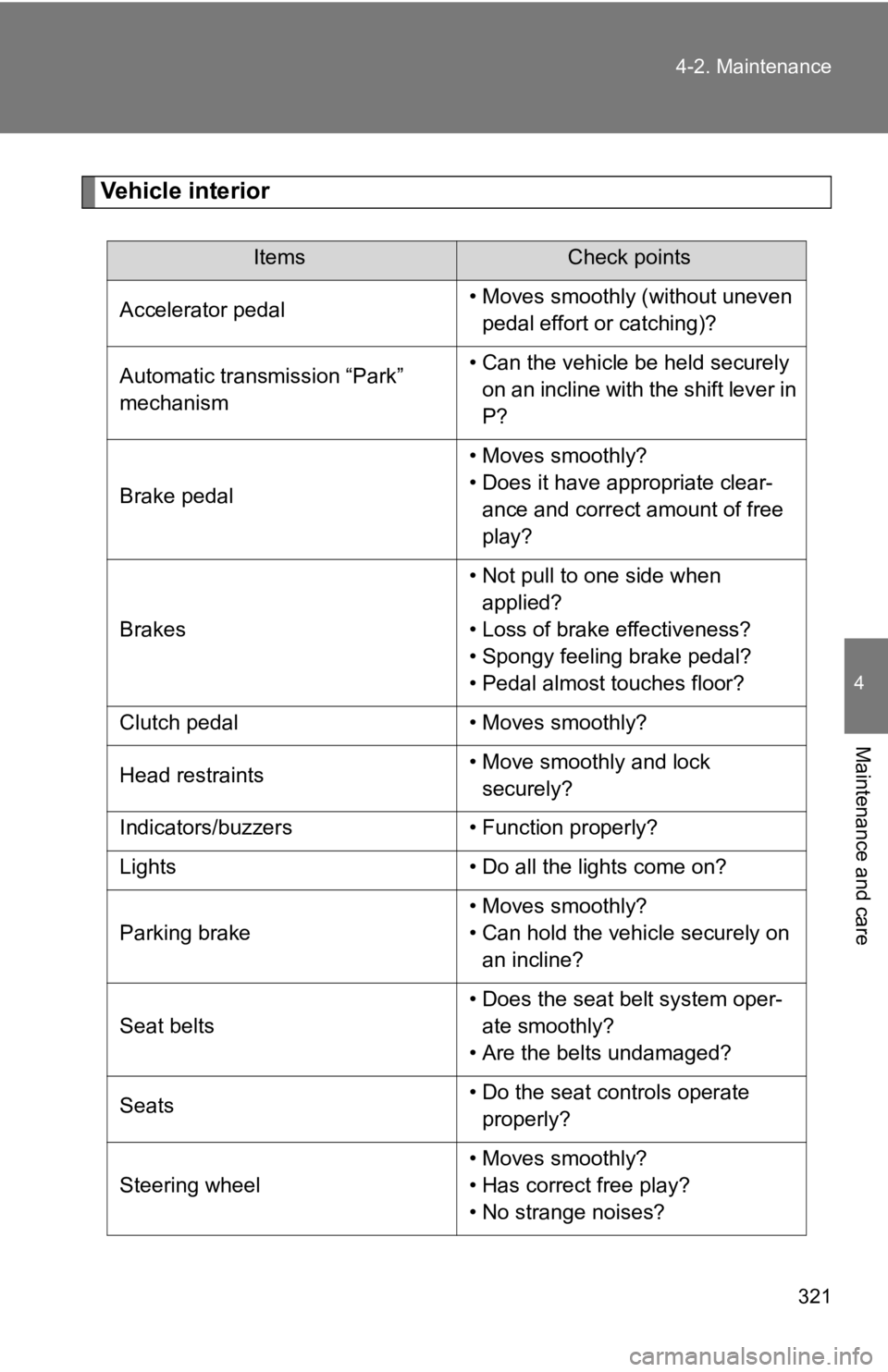
Maintenance and care Vehicle interior Items Check points
Accelerator pedal • Moves smoothly (without uneven
pedal effort or catching)?
Automatic transmission “Park”
mechanism • Can the vehicle be held securely
on an incline with the shift lever in
P?
Brake pedal • Moves smoothly?
• Does it have appropriate clear-
ance and correct amount of free
play?
Brakes • Not pull to one side when
applied?
• Loss of brake effectiveness?
• Spongy feeling brake pedal?
• Pedal almost touches floor?
Clutch pedal • Moves smoothly?
Head restraints • Move smoothly and lock
securely?
Indicators/buzzers • Function properly?
Lights • Do all the lights come on?
Parking brake • Moves smoothly?
• Can hold the vehicle securely on
an incline?
Seat belts • Does the seat belt system oper-
ate smoothly?
• Are the belts undamaged?
Seats • Do the seat controls operate
properly?
Steering wheel • Moves smoothly?
• Has correct free play?
• No strange noises?
Page 371 of 532
3714-3. Do-it-yourself maintenance
4
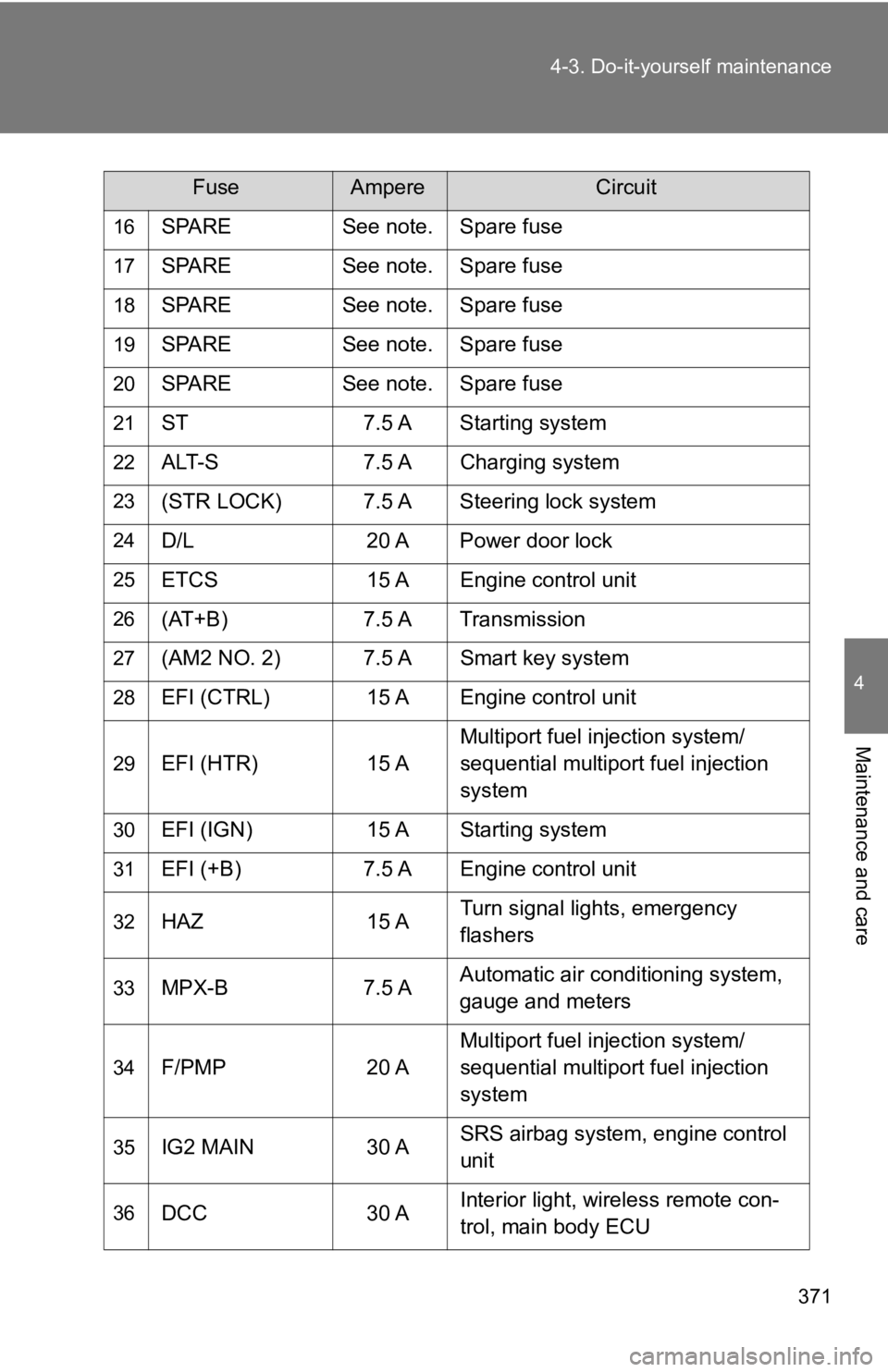
Maintenance and care 16
SPARE See note. Spare fuse17
SPARE See note. Spare fuse18
SPARE See note. Spare fuse19
SPARE See note. Spare fuse20
SPARE See note. Spare fuse21
ST 7.5 A Starting system22
ALT-S 7.5 A Charging system23
(STR LOCK) 7.5 A Steering lock system24
D/L 20 A Power door lock25
ETCS 15 A Engine control unit26
(AT+B) 7.5 A Transmission
27
(AM2 NO. 2) 7.5 A Smart key system
28
EFI (CTRL) 15 A Engine control unit
29
EFI (HTR) 15 A Multiport fuel injection system/
sequential multiport fuel injection
system
30
EFI (IGN) 15 A Starting system
31
EFI (+B) 7.5 A Engine control unit
32
HAZ 15 A Turn signal lights, emergency
flashers
33
MPX-B 7.5 A Automatic air conditioning system,
gauge and meters
34
F/PMP 20 A Multiport fuel injection system/
sequential multiport fuel injection
system
35
IG2 MAIN 30 A SRS airbag system, engine control
unit
36
DCC 30 A Interior light, wireless remote con-
trol, main body ECUFuse Ampere Circuit
Page 435 of 532
5
When trouble arises
4355-2. Steps to take in an emergency
If the engine will not star t If the engine will not start even t hough correct starting proce dures
are being followed ( P. 166, 175), consider each of the following
points.
■ The engine will not start even when the starter motor oper-
ates normally.
One of the following may be the cause of the problem.
● There may not be sufficient fuel in the vehicle’s tank.
Refuel the vehicle.
● The engine may be flooded.
Try to restart the engine once more following correct starting
procedures. ( P. 166, 175)
● There may be a malfunction in t he engine immobilizer system.
( P. 7 9 )
■ The starter motor turns over slowly, the interior lights and
headlights are dim, or the horn does not sound or sounds at
a low volume.
One of the following may be the cause of the problem.
● The battery may be discharged. ( P. 444)
● The battery terminal connections may be loose or corroded.
■ The starter motor does not turn over. (vehicles with a smart
key system)
The engine starting system may be malfunctioning due to an
electrical problem such as an open circuit or a blown fuse. How -
ever, an interim measure is a vailable to start the engine.
( P. 4 3 6 )
Page 436 of 532
4365-2. Steps to take in an emergency
Emergency start function (vehicles with a smart key system)
When the engine does not start, the following steps can be used as
an interim measure to start the engine if the “ENGINE START STO P”
switch is functioning normally:
Vehicles with an auto matic transmission
Set the parking brake.
Put the shift lever in P.
Set the “ENGINE START STOP” switch to ACCESSORY
mode.
Press and hold the “ENGINE START STOP” switch about 15
seconds while depressing the brake pedal firmly.
Even if the engine can be started using the above steps, the sy stem
may be malfunctioning. Have the vehicle checked by your Toyota
dealer.■ The starter motor does not turn over, the interior lights and
headlights do not turn on, o r the horn does not sound.
One of the following may be the cause of the problem.
● One or both of the battery ter minals may be disconnected.
● The battery may be discharged. ( P. 444)
● There may be a malfunction in the steering lock system. (vehi-
cles with a smart key system) Contact your Toyota dealer if the problem cannot be repaired, o r if
repair procedures are unknown.
STEP 1
STEP 2
STEP 3
STEP 4