Page 625 of 698
Safety & Driving Assistance
After pressing the “Safety & Driving Assistance” button on
the touchscreen, the following settings will be available:
Setting NameSelectable Options
Forward Collision Warn- ing — If Equipped Off
Warning Only Warning & Active Braking
NOTE:
Applies brakes to slow the vehicle in case of potential forward collision, or applies brakes and a warning.
Forward Collision Warning Sensitivity — If EquippedNear Med Far
NOTE:
Sets the distance in which a Forward Collision Warning occurs. Lane Sense Warning EarlyMed Late
NOTE:
Sets what distance the steering wheel provides feedback for potential lane departures. Lane Sense Strength LowMed High
ParkSense Sound Only Sound & Display
NOTE:
The Rear Park Assist system scans for objects behind the vehicle when the transmission gear selector is in REVERSE
and the vehicle speed is less than 7 mph (11 km/h).
10
MULTIMEDIA 623
Page 626 of 698
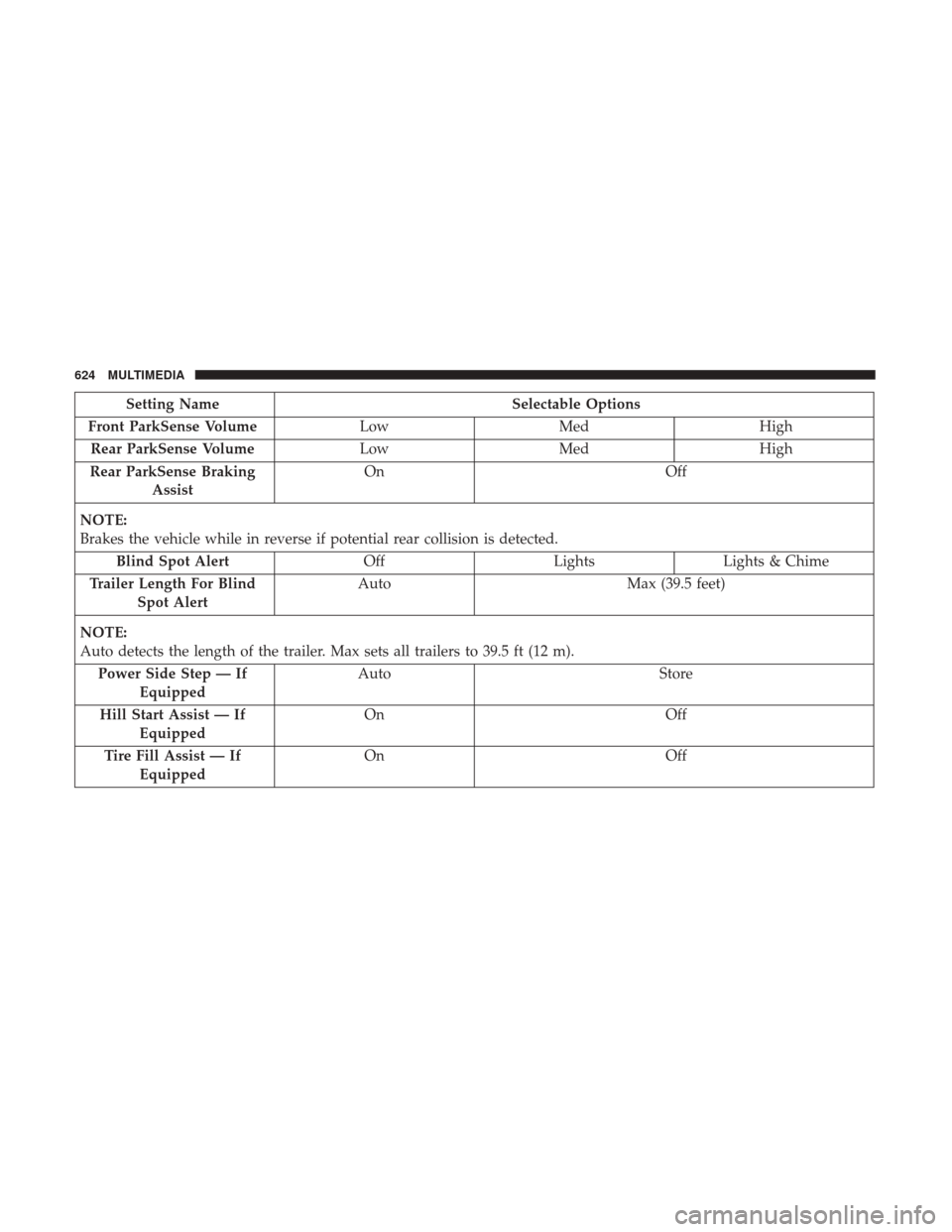
Setting NameSelectable Options
Front ParkSense Volume LowMed High
Rear ParkSense Volume LowMed High
Rear ParkSense Braking Assist On
Off
NOTE:
Brakes the vehicle while in reverse if potential rear collision is detected. Blind Spot Alert OffLightsLights & Chime
Trailer Length For Blind Spot Alert Auto
Max (39.5 feet)
NOTE:
Auto detects the length of the trailer. Max sets all trailers to 39.5 ft (12 m). Power Side Step — If Equipped Auto
Store
Hill Start Assist — If Equipped On
Off
Tire Fill Assist — If Equipped On
Off
624 MULTIMEDIA
Page 627 of 698
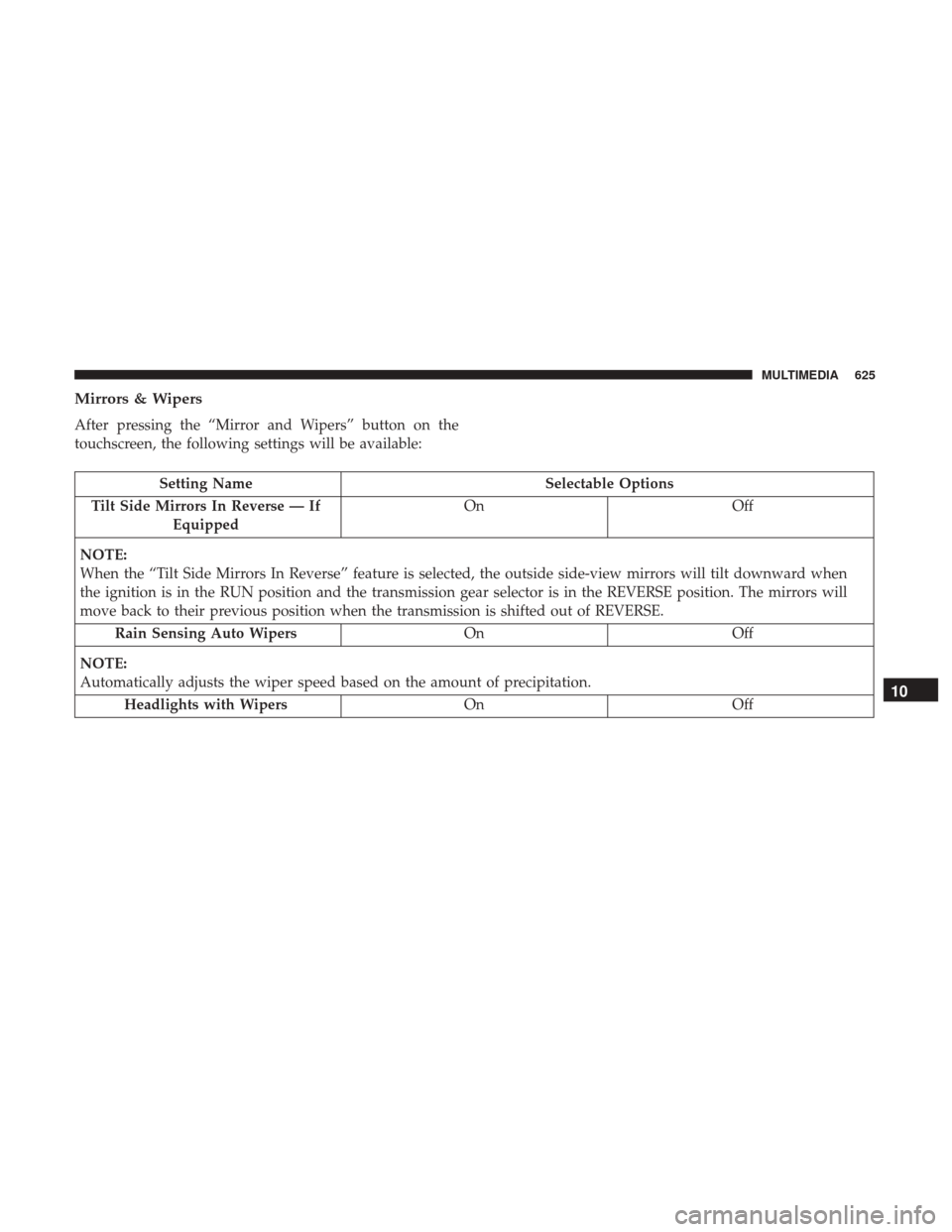
Mirrors & Wipers
After pressing the “Mirror and Wipers” button on the
touchscreen, the following settings will be available:
Setting NameSelectable Options
Tilt Side Mirrors In Reverse — If Equipped On
Off
NOTE:
When the “Tilt Side Mirrors In Reverse” feature is selected, the outside side-view mirrors will tilt downward when
the ignition is in the RUN position and the transmission gear selector is in the REVERSE position. The mirrors will
move back to their previous position when the transmission is shifted out of REVERSE. Rain Sensing Auto Wipers OnOff
NOTE:
Automatically adjusts the wiper speed based on the amount of precipitation. Headlights with Wipers OnOff
10
MULTIMEDIA 625
Page 629 of 698
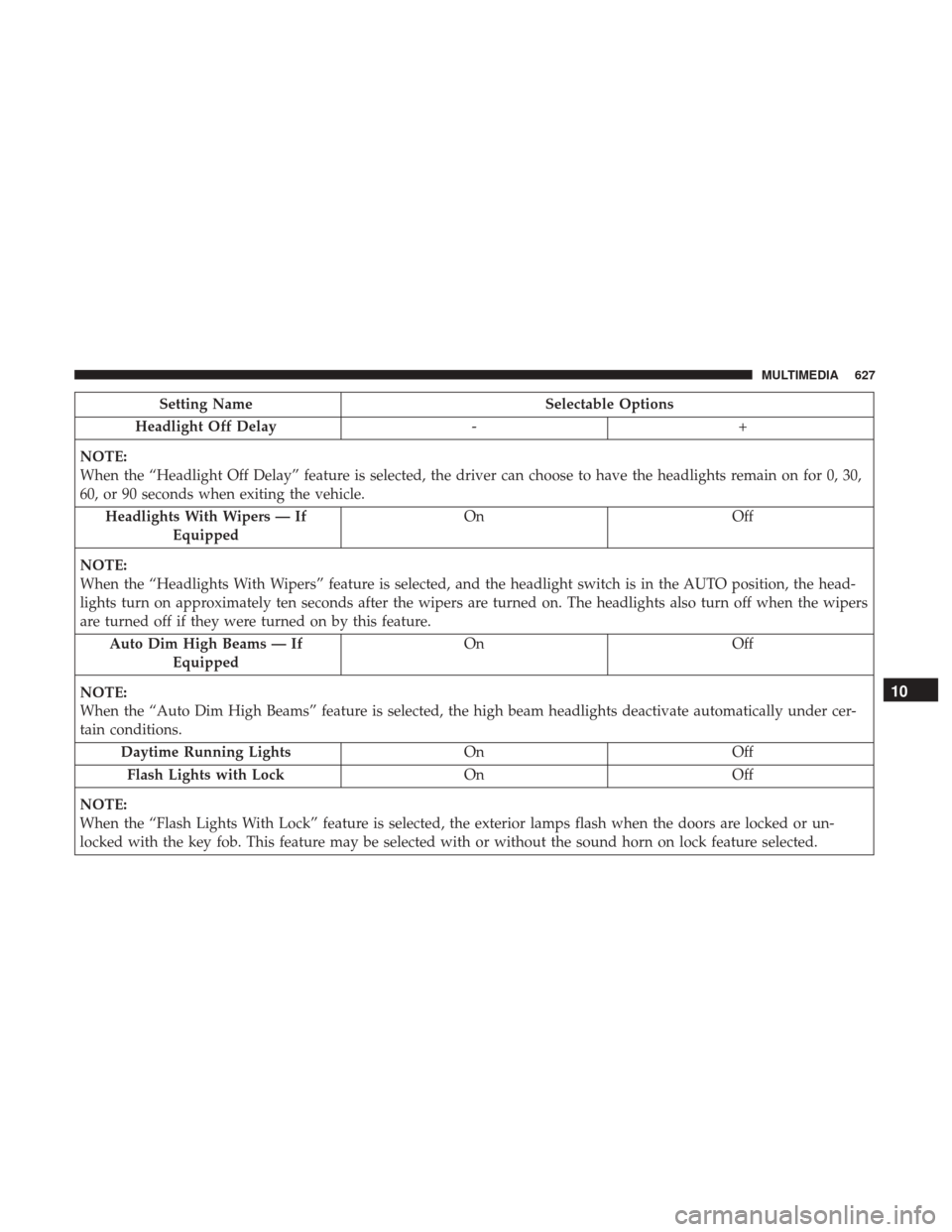
Setting NameSelectable Options
Headlight Off Delay -+
NOTE:
When the “Headlight Off Delay” feature is selected, the driver can choose to have the headlights remain on for 0, 30,
60, or 90 seconds when exiting the vehicle. Headlights With Wipers — If Equipped On
Off
NOTE:
When the “Headlights With Wipers” feature is selected, and the headlight switch is in the AUTO position, the head-
lights turn on approximately ten seconds after the wipers are turned on. The headlights also turn off when the wipers
are turned off if they were turned on by this feature. Auto Dim High Beams — If Equipped On
Off
NOTE:
When the “Auto Dim High Beams” feature is selected, the high beam headlights deactivate automatically under cer-
tain conditions. Daytime Running Lights OnOff
Flash Lights with Lock OnOff
NOTE:
When the “Flash Lights With Lock” feature is selected, the exterior lamps flash when the doors are locked or un-
locked with the key fob. This feature may be selected with or without the sound horn on lock feature selected.
10
MULTIMEDIA 627
Page 631 of 698

Setting NameSelectable Options
NOTE:
•When “1st Press Of Key Fob Unlocks: Driver Door” is selected, only the driver’s door unlocks on the first press of
the key fob unlock button. You must push the key fob unlock button twice to unlock the passenger’s doors.
•When “All Doors” is selected, all of the doors unlock on the first push of the key fob unlock button.
•If the vehicle is programmed “1st Press Of Key Fob Unlocks: All Doors”, all doors unlock no matter which Passive
Entry equipped door handle is grasped. If “1st Press Of Key Fob Unlocks: Driver Door” is programmed, only the
driver ’s door unlocks when the driver ’s door is grasped.
•With Passive Entry, if “1st Press Of Key Fob Unlocks: Driver Door” is programmed pushing the handle more than
once only resultsin the driver ’s door opening. If “Driver Door” is selected, once the driver ’s door is opened, the
interior door lock/unlock switch can be used to unlock all doors (or use key fob). Passive Entry — If Equipped On Off
NOTE:
The “Passive Entry” feature allows you to lock and unlock the vehicle’s door(s) without having to push the key fob
lock or unlock buttons. Personal Settings Linked To Key Fob — If Equipped On Off
NOTE:
•The “Personal Settings Linked To Key Fob” feature provides automatic driver seat positioning to enhance driver
mobility when entering and exiting the vehicle.
•The seats return to the memorized seat location (if “Personal Settings Linked To Key Fob” is set to on) when the
key fob is used to unlock the door.
10
MULTIMEDIA 629
Page 635 of 698
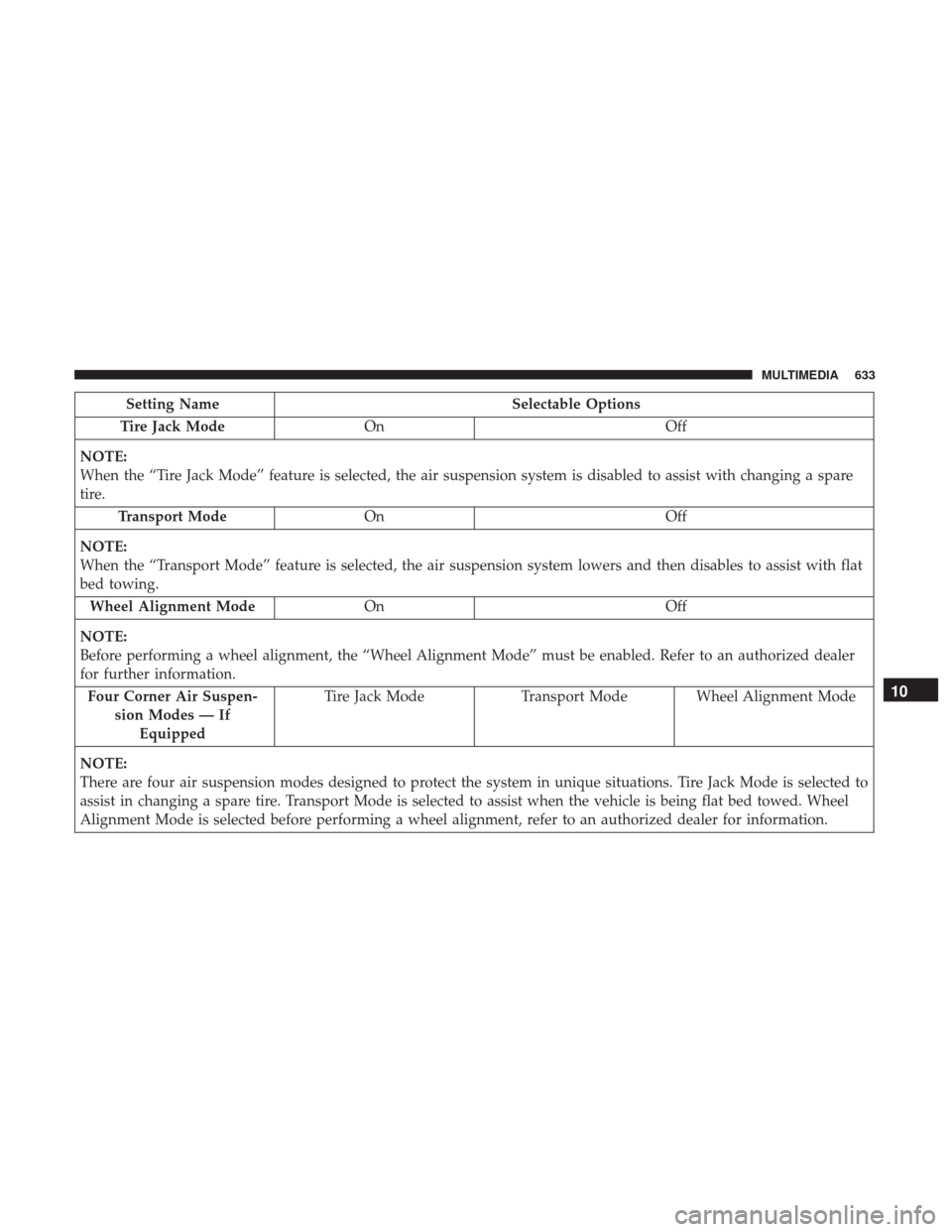
Setting NameSelectable Options
Tire Jack Mode On Off
NOTE:
When the “Tire Jack Mode” feature is selected, the air suspension system is disabled to assist with changing a spare
tire. Transport Mode On Off
NOTE:
When the “Transport Mode” feature is selected, the air suspension system lowers and then disables to assist with flat
bed towing. Wheel Alignment Mode On Off
NOTE:
Before performing a wheel alignment, the “Wheel Alignment Mode” must be enabled. Refer to an authorized dealer
for further information. Four Corner Air Suspen- sion Modes — IfEquipped Tire Jack Mode
Transport Mode Wheel Alignment Mode
NOTE:
There are four air suspension modes designed to protect the system in unique situations. Tire Jack Mode is selected to
assist in changing a spare tire. Transport Mode is selected to assist when the vehicle is being flat bed towed. Wheel
Alignment Mode is selected before performing a wheel alignment, refer to an authorized dealer for information.
10
MULTIMEDIA 633
Page 636 of 698
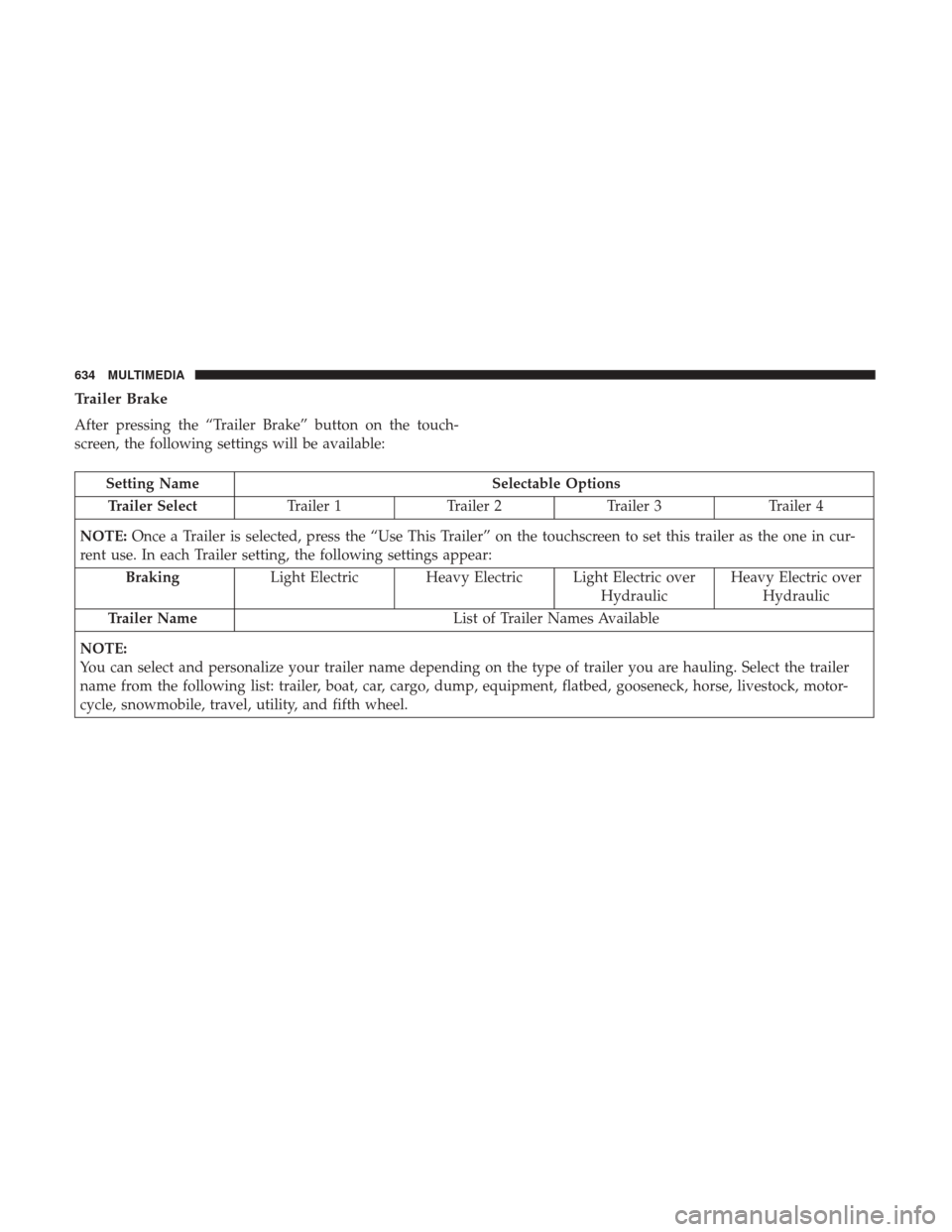
Trailer Brake
After pressing the “Trailer Brake” button on the touch-
screen, the following settings will be available:
Setting NameSelectable Options
Trailer Select Trailer 1Trailer 2Trailer 3 Trailer 4
NOTE: Once a Trailer is selected, press the “Use This Trailer” on the touchscreen to set this trailer as the one in cur-
rent use. In each Trailer setting, the following settings appear:
Braking Light Electric Heavy Electric Light Electric over
HydraulicHeavy Electric over
Hydraulic
Trailer Name List of Trailer Names Available
NOTE:
You can select and personalize your trailer name depending on the type of trailer you are hauling. Select the trailer
name from the following list: trailer, boat, car, cargo, dump, equipment, flatbed, gooseneck, horse, livestock, motor-
cycle, snowmobile, travel, utility, and fifth wheel.
634 MULTIMEDIA
Page 639 of 698
Setting NameSelectable Options
Paired Phones and Audio Devices List Of Paired Phones and Audio Sources
NOTE:
The “Paired Phones and Audio Sources” feature shows which phones and audio sources are paired to the Phone and
Audio Sources Settings system. For further information, refer to the Uconnect Owner ’s Manual Supplement. Smartphone Device Mirroring OnOff
Enable CarPlay Projections OnOff
Automatically Display Pop-Ups in Cluster On
Off
Set as Default Device OnOff
Projection Manager Smartphone Device Mirroring On Smartphone Device Mirroring Off
SiriusXM Setup — If Equipped
After pressing the “SiriusXM Setup” button on the touch-
screen, the following settings will be available:
Setting Name Selectable Options
Sirius All Access Choose a Subscription Package
Add Listener Add up to five profiles
NOTE:
The “Add Listener” feature allows you to add up to five different profiles for customizing personal music or satellite
radio choices.
10
MULTIMEDIA 637