Page 470 of 698
3. Placement of the jack is critical:
NOTE:Keep the jack and tools aligned with raising the
vehicle. When changing a front wheel, place the scissor jack under
the rear portion of the lower control arm as shown.
Access
the front jacking location from behind the front tire.
Jack / Extensions Placement
Front Jacking Location
468 IN CASE OF EMERGENCY
Page 511 of 698

•“Groove jumping� (belt does not maintain correct posi-
tion on pulley)
• Belt broken (note: identify and correct problem before
new belt is installed)
• Noise (objectionable squeal, squeak, or rumble is heard
or felt while drive belt is in operation)
NOTE: If your vehicle is equipped with Stop/Start belt
must be replaced with an OEM grade Mopar belt.
Some conditions can be caused by a faulty component such
as a belt pulley. Belt pulleys should be carefully inspected
for damage and proper alignment.
Belt replacement on some models requires the use of
special tools, we recommend having your vehicle serviced
at an authorized dealer.
Body Lubrication
Locks and all body pivot points, including such items as
seat tracks, door hinge pivot points and rollers, liftgate,
tailgate, decklid, sliding doors and hood hinges, should be
lubricated periodically with a lithium based grease, such as
Mopar Spray White Lube to assure quiet, easy operation
and to protect against rust and wear. Prior to the applica-
tion of any lubricant, the parts concerned should be wiped clean to remove dust and grit; after lubricating excess oil
and grease should be removed. Particular attention should
also be given to hood latching components to ensure
proper function. When performing other underhood ser-
vices, the hood latch, release mechanism and safety catch
should be cleaned and lubricated.
The external lock cylinders should be lubricated twice a
year, preferably in the Fall and Spring. Apply a small
amount of a high quality lubricant, such as Mopar Lock
Cylinder Lubricant directly into the lock cylinder.
Windshield Wiper Blades
Clean the rubber edges of the wiper blades and the
windshield periodically with a sponge or soft cloth and a
mild nonabrasive cleaner. This will remove accumulations
of salt or road film.
Operation of the wipers on dry glass for long periods may
cause deterioration of the wiper blades. Always use washer
fluid when using the wipers to remove salt or dirt from a
dry windshield.
Avoid using the wiper blades to remove frost or ice from
the windshield. Keep the blade rubber out of contact with
petroleum products such as engine oil, gasoline, etc.8
SERVICING AND MAINTENANCE 509
Page 587 of 698
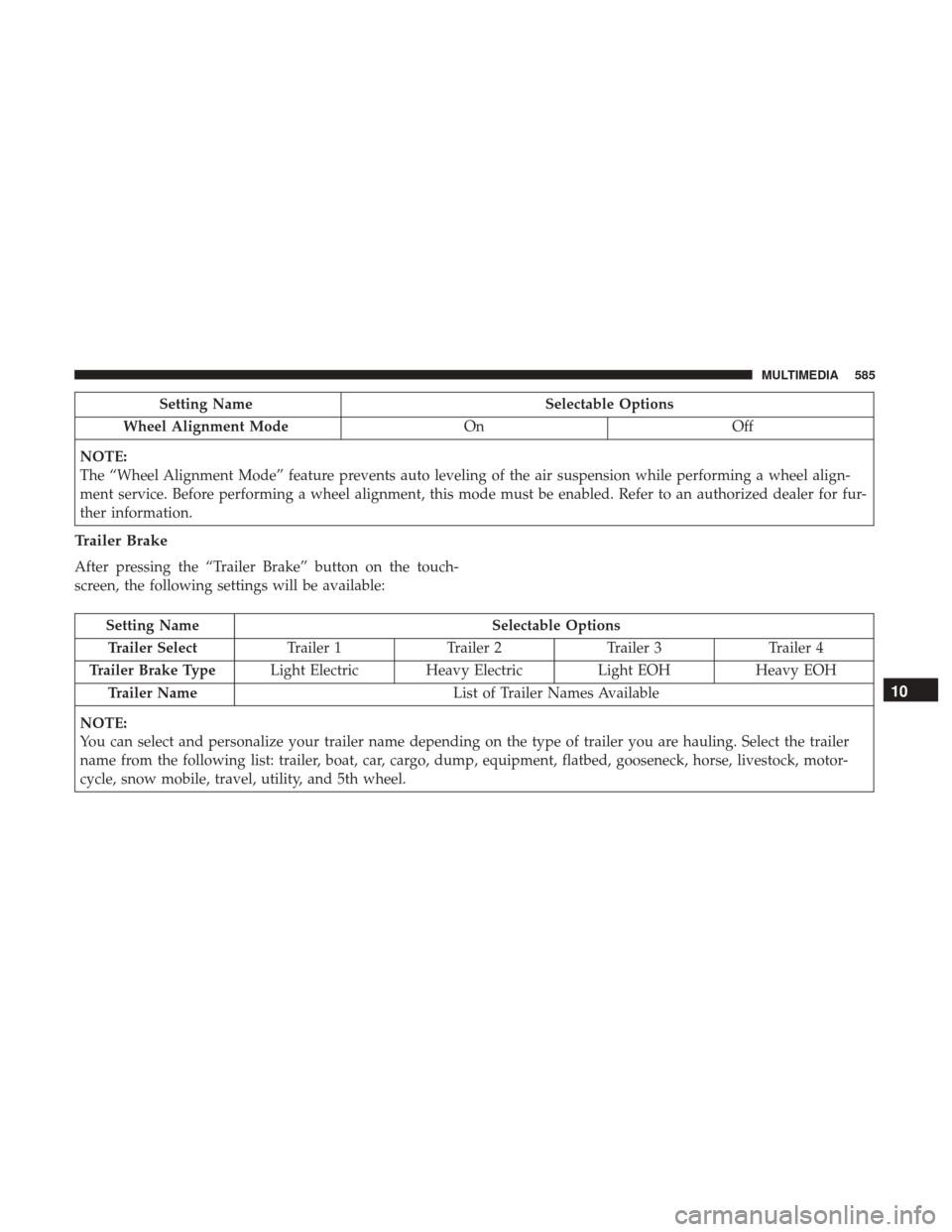
Setting NameSelectable Options
Wheel Alignment Mode OnOff
NOTE:
The “Wheel Alignment Mode” feature prevents auto leveling of the air suspension while performing a wheel align-
ment service. Before performing a wheel alignment, this mode must be enabled. Refer to an authorized dealer for fur-
ther information.
Trailer Brake
After pressing the “Trailer Brake” button on the touch-
screen, the following settings will be available:
Setting Name Selectable Options
Trailer Select Trailer 1Trailer 2Trailer 3 Trailer 4
Trailer Brake Type Light Electric Heavy Electric Light EOHHeavy EOH
Trailer Name List of Trailer Names Available
NOTE:
You can select and personalize your trailer name depending on the type of trailer you are hauling. Select the trailer
name from the following list: trailer, boat, car, cargo, dump, equipment, flatbed, gooseneck, horse, livestock, motor-
cycle, snow mobile, travel, utility, and 5th wheel.
10
MULTIMEDIA 585
Page 600 of 698
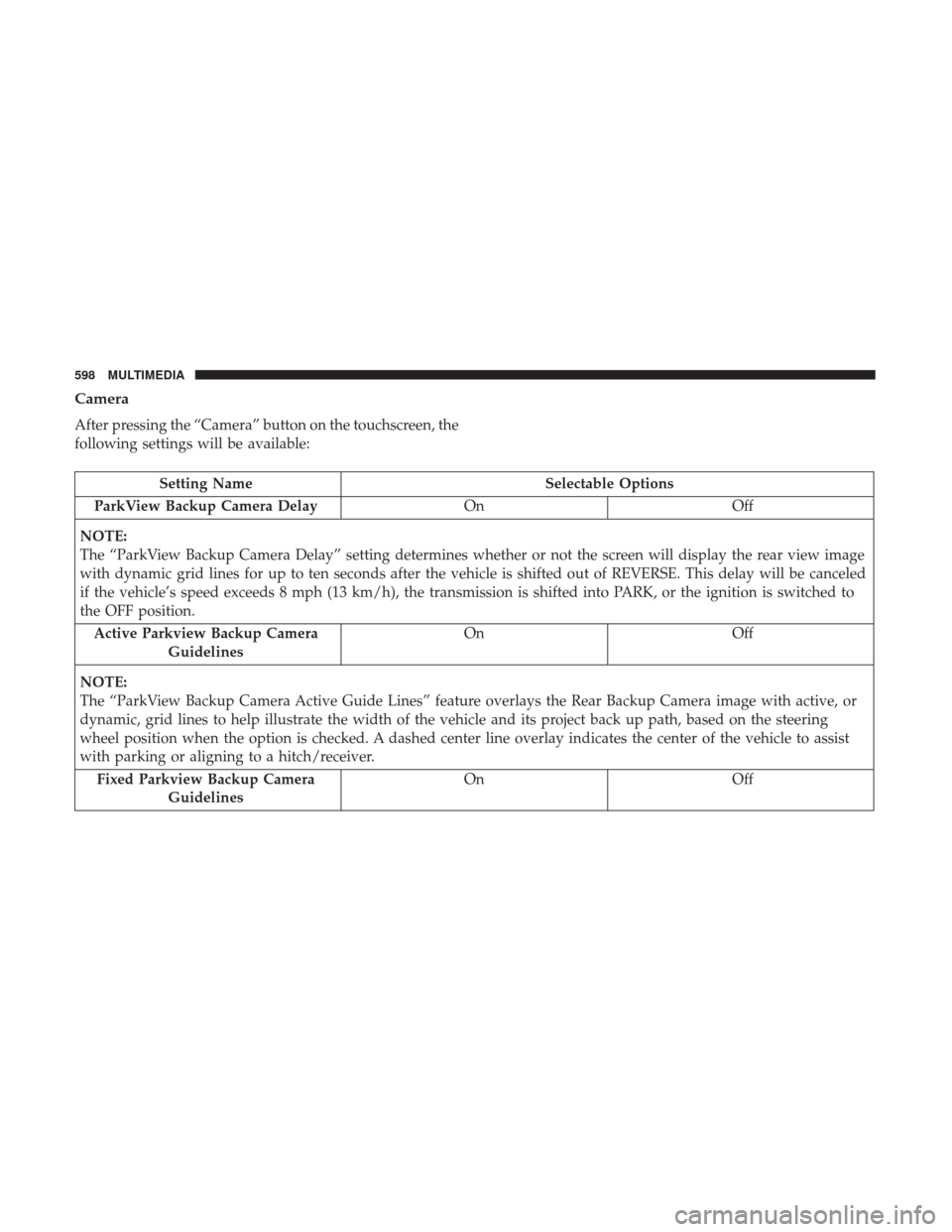
Camera
After pressing the “Camera” button on the touchscreen, the
following settings will be available:
Setting NameSelectable Options
ParkView Backup Camera Delay OnOff
NOTE:
The “ParkView Backup Camera Delay” setting determines whether or not the screen will display the rear view image
with dynamic grid lines for up to ten seconds after the vehicle is shifted out of REVERSE. This delay will be canceled
if the vehicle’s speed exceeds 8 mph (13 km/h), the transmission is shifted into PARK, or the ignition is switched to
the OFF position. Active Parkview Backup Camera Guidelines On
Off
NOTE:
The “ParkView Backup Camera Active Guide Lines” feature overlays the Rear Backup Camera image with active, or
dynamic, grid lines to help illustrate the width of the vehicle and its project back up path, based on the steering
wheel position when the option is checked. A dashed center line overlay indicates the center of the vehicle to assist
with parking or aligning to a hitch/receiver. Fixed Parkview Backup Camera Guidelines On
Off
598 MULTIMEDIA
Page 612 of 698
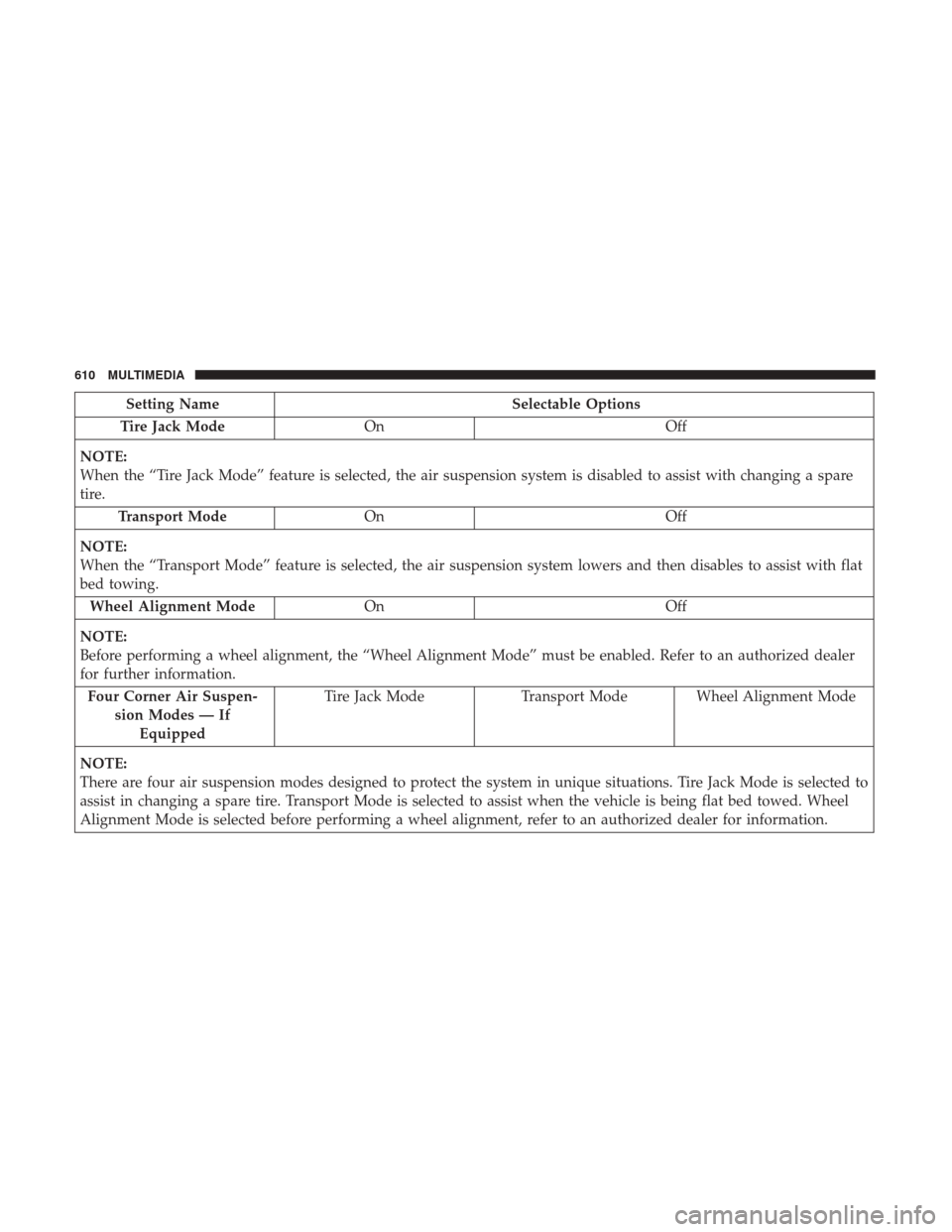
Setting NameSelectable Options
Tire Jack Mode On Off
NOTE:
When the “Tire Jack Mode” feature is selected, the air suspension system is disabled to assist with changing a spare
tire. Transport Mode On Off
NOTE:
When the “Transport Mode” feature is selected, the air suspension system lowers and then disables to assist with flat
bed towing. Wheel Alignment Mode On Off
NOTE:
Before performing a wheel alignment, the “Wheel Alignment Mode” must be enabled. Refer to an authorized dealer
for further information. Four Corner Air Suspen- sion Modes — IfEquipped Tire Jack Mode
Transport Mode Wheel Alignment Mode
NOTE:
There are four air suspension modes designed to protect the system in unique situations. Tire Jack Mode is selected to
assist in changing a spare tire. Transport Mode is selected to assist when the vehicle is being flat bed towed. Wheel
Alignment Mode is selected before performing a wheel alignment, refer to an authorized dealer for information.
610 MULTIMEDIA
Page 624 of 698

Camera
After pressing the “Camera” button on the touchscreen, the
following settings will be available:
Setting NameSelectable Options
Parkview Backup Camera Delay OnOff
NOTE:
The “ParkView Backup Camera Delay” setting determines whether or not the screen will display the rear view image with
dynamic grid lines for up to ten seconds after the vehicle is shifted out of REVERSE. This delay will be canceled if the vehi-
cle’s speed exceeds 8 mph (13 km/h), the transmission is shifted into PARK, or the ignition is switched to the OFF position.
Parkview Camera Delay On Off
NOTE:
The “Parkview Camera Delay” setting determines whether or not the screen will display the rear view image with dynamic
grid lines for up to ten seconds after the vehicle is shifted out of REVERSE. This delay will be canceled if the vehicle’s
speed exceeds 8 mph (13 km/h), the transmission is shifted into PARK, or the ignition is switched to the OFF position.
Active Backup Camera Guidelines On Off
NOTE:
The “Active Backup Camera Guidelines” feature overlays the Rear Backup Camera image with active, or dynamic,
grid lines to help illustrate the width of the vehicle and its project back up path, based on the steering wheel position
when the option is checked. A dashed center line overlay indicates the center of the vehicle to assist with parking or
aligning to a hitch/receiver. Fixed Backup Camera Guidelines OnOff
622 MULTIMEDIA
Page 635 of 698
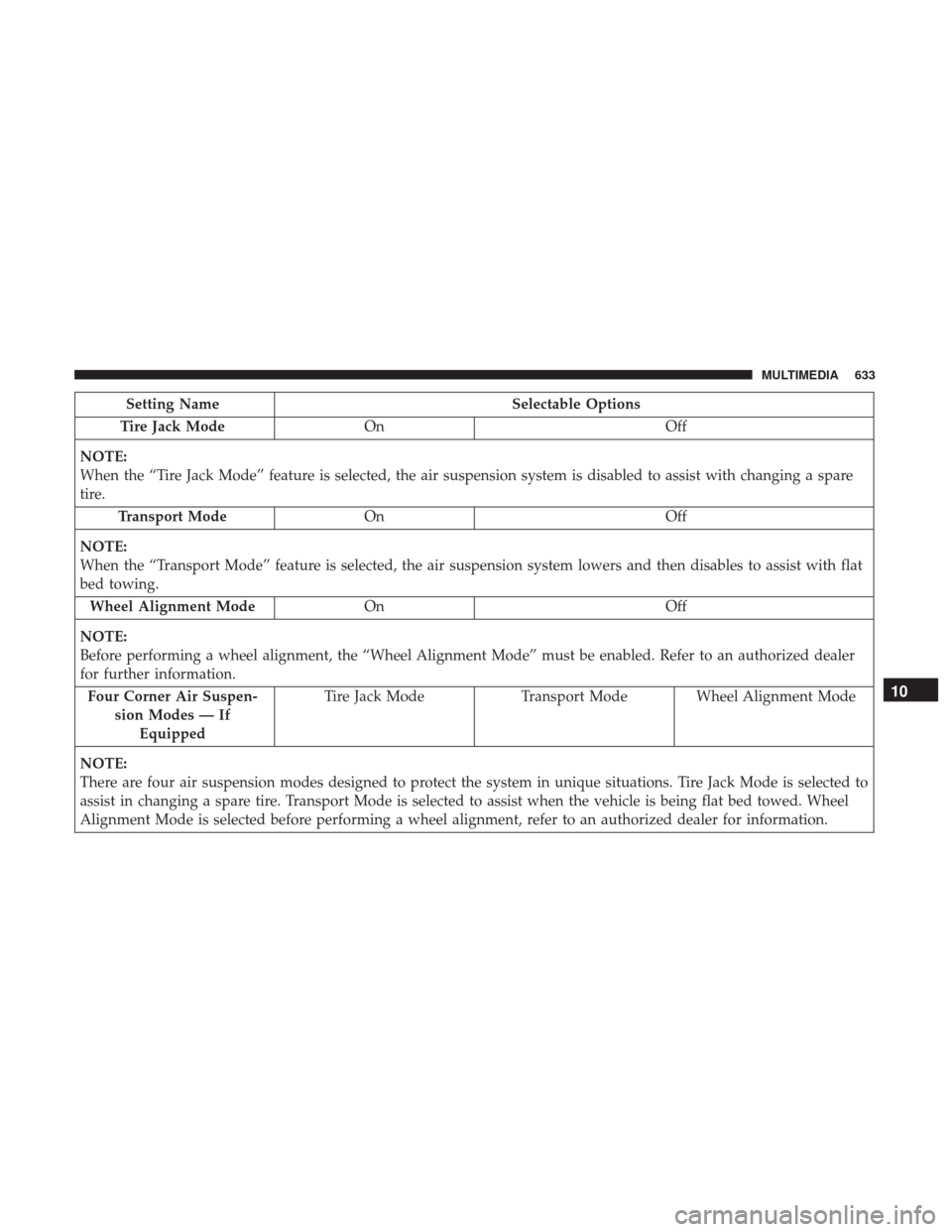
Setting NameSelectable Options
Tire Jack Mode On Off
NOTE:
When the “Tire Jack Mode” feature is selected, the air suspension system is disabled to assist with changing a spare
tire. Transport Mode On Off
NOTE:
When the “Transport Mode” feature is selected, the air suspension system lowers and then disables to assist with flat
bed towing. Wheel Alignment Mode On Off
NOTE:
Before performing a wheel alignment, the “Wheel Alignment Mode” must be enabled. Refer to an authorized dealer
for further information. Four Corner Air Suspen- sion Modes — IfEquipped Tire Jack Mode
Transport Mode Wheel Alignment Mode
NOTE:
There are four air suspension modes designed to protect the system in unique situations. Tire Jack Mode is selected to
assist in changing a spare tire. Transport Mode is selected to assist when the vehicle is being flat bed towed. Wheel
Alignment Mode is selected before performing a wheel alignment, refer to an authorized dealer for information.
10
MULTIMEDIA 633