2019 NISSAN LEAF lock
[x] Cancel search: lockPage 179 of 610

1. Vehicle information display (P. 2-28)— Clock (P. 2-13)
— Outside air temperature (P. 2-13)
— Li-ion battery available charge gauge
(P. 2-10)
— Driving range (P. 2-10)
— Odometer/twin trip odometer (P. 2-7)
— Indicator for timer (P. CH-44)
— Power meter (P. 2-9)
2. Warning and indicator lights (P. 2-15) — Turn signal/Hazard indicator light
(P. 2-53)
— READY to drive indicator light (P. 2-26)
— ECO mode indicator (P. 2-14)
3. Speedometer (P. 2-7)
METERS AND GAUGES
2-6Instruments and controls
Page 186 of 610

OUTSIDE AIR TEMPERATURE
The outside air temperature is displayed in
°F or °C.
The display may differ from the actual out-
side temperature displayed on various
signs or billboards.
CLOCK
Type A:
Adjust the clock on the setting screen of
the vehicle information display. For addi-
tional information, refer to “Settings” in this
section. If the power supply (12-volt battery)
is disconnected, the clock will not indicate
the correct time. Readjust the time.Type B:
This clock is synchronized with the clock
displayed on the center display. For addi-
tional information, refer to the separate
NissanConnect® Manual (for Leaf ).
Instruments and controls2-13
Page 188 of 610
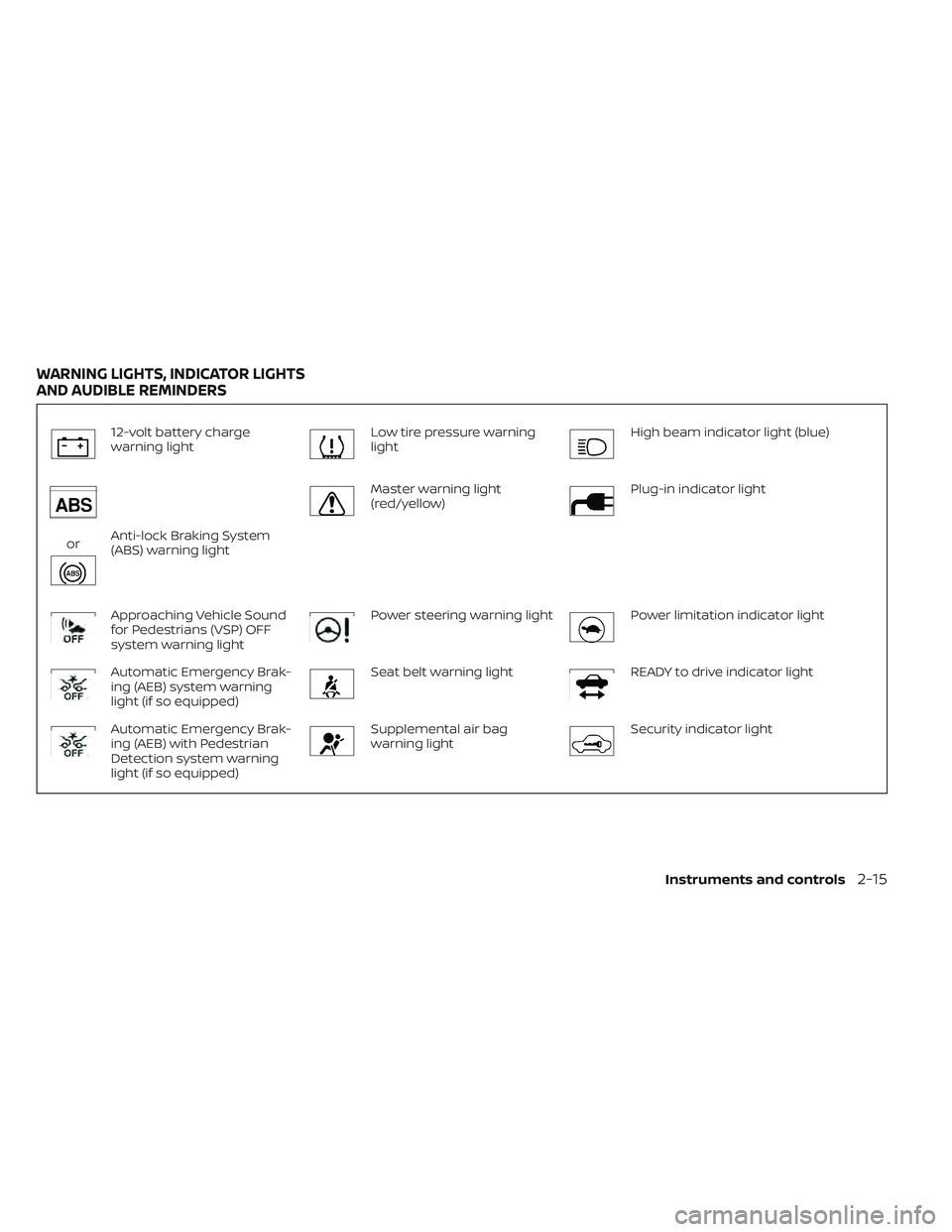
12-volt battery charge
warning lightLow tire pressure warning
lightHigh beam indicator light (blue)
orAnti-lock Braking System
(ABS) warning light
Master warning light
(red/yellow)Plug-in indicator light
Approaching Vehicle Sound
for Pedestrians (VSP) OFF
system warning lightPower steering warning lightPower limitation indicator light
Automatic Emergency Brak-
ing (AEB) system warning
light (if so equipped)Seat belt warning lightREADY to drive indicator light
Automatic Emergency Brak-
ing (AEB) with Pedestrian
Detection system warning
light (if so equipped)Supplemental air bag
warning lightSecurity indicator light
WARNING LIGHTS, INDICATOR LIGHTS
AND AUDIBLE REMINDERS
Instruments and controls2-15
Page 191 of 610
NOTE:
•If the vehicle does not go into the READY
to drive position (when the power switch
is pushed and the brake pedal is de-
pressed), jump-start the vehicle to place
the power switch in the READY to drive
position. For additional information, refer
to “Jump starting” in the “In case of emer-
gency ” section of this manual.
•Do not jump-start the vehicle if the con-
ditions below occur. Have the system
checked. It is recommended that you
visit a NISSAN certified LEAF dealer for
this service:
– If the 12-volt charge warning light turns off when the vehicle is in the
READY to drive mode, the 12-volt bat-
tery may be discharged or there may
be a malfunction in the 12-volt bat-
tery related system.
– If the 12-volt charge warning light continues to illuminate when the ve-
hicle is in the READY to drive mode,
there may be a malfunction in the
DC/DC converter. Have the system
checked. It is recommended that you
visit a NISSAN certified LEAF dealer
for this service.
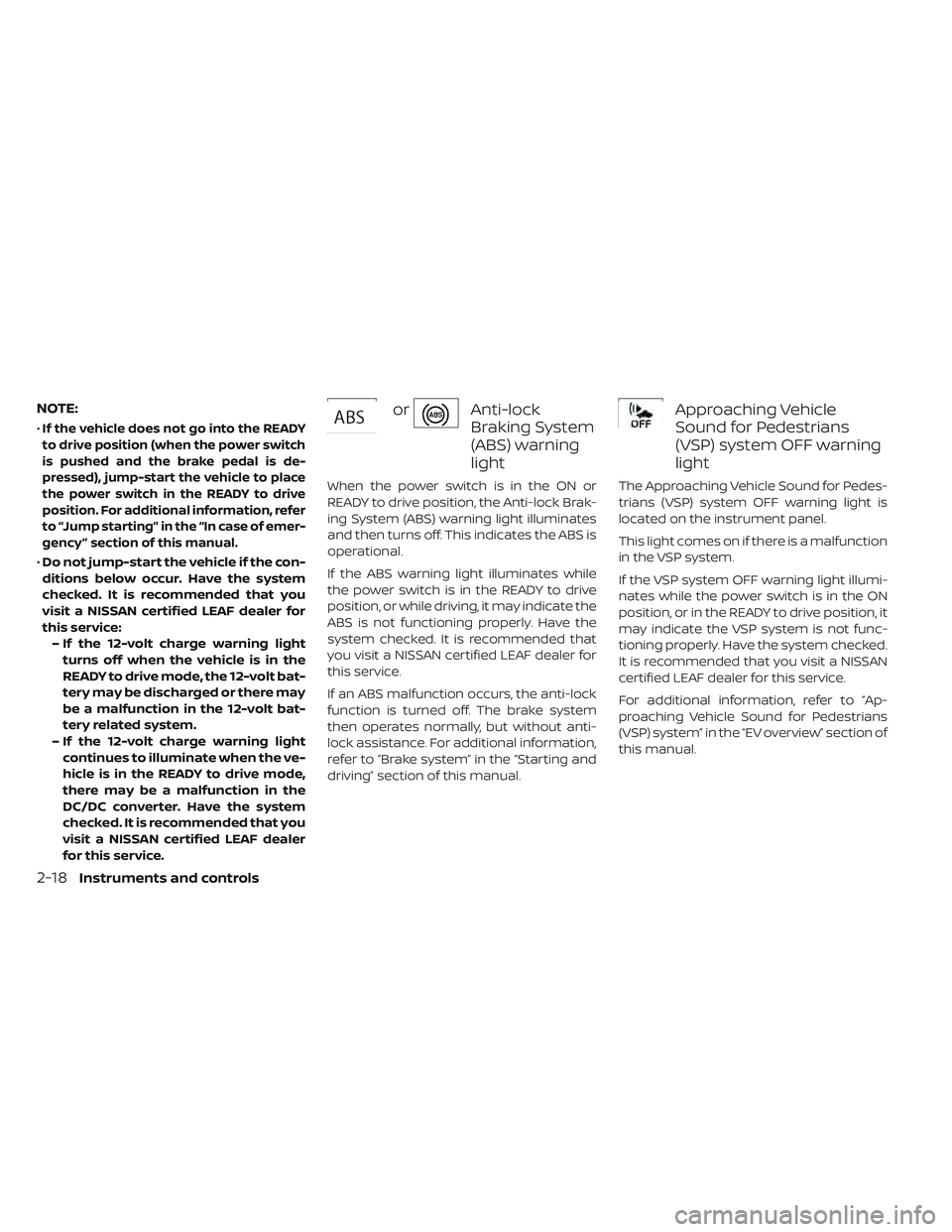
orAnti-lock
Braking System
(ABS) warning
light
When the power switch is in the ON or
READY to drive position, the Anti-lock Brak-
ing System (ABS) warning light illuminates
and then turns off. This indicates the ABS is
operational.
If the ABS warning light illuminates while
the power switch is in the READY to drive
position, or while driving, it may indicate the
ABS is not functioning properly. Have the
system checked. It is recommended that
you visit a NISSAN certified LEAF dealer for
this service.
If an ABS malfunction occurs, the anti-lock
function is turned off. The brake system
then operates normally, but without anti-
lock assistance. For additional information,
refer to “Brake system” in the “Starting and
driving” section of this manual.
Approaching Vehicle
Sound for Pedestrians
(VSP) system OFF warning
light
The Approaching Vehicle Sound for Pedes-
trians (VSP) system OFF warning light is
located on the instrument panel.
This light comes on if there is a malfunction
in the VSP system.
If the VSP system OFF warning light illumi-
nates while the power switch is in the ON
position, or in the READY to drive position, it
may indicate the VSP system is not func-
tioning properly. Have the system checked.
It is recommended that you visit a NISSAN
certified LEAF dealer for this service.
For additional information, refer to “Ap-
proaching Vehicle Sound for Pedestrians
(VSP) system” in the “EV overview” section of
this manual.
2-18Instruments and controls
Page 199 of 610

WARNING
Power limitation mode can result in re-
duced power and vehicle speed. The
reduced speed may be lower than
other traffic, which could increase the
chance of a collision. Be especially
careful when driving. If the vehicle can-
not maintain a safe driving speed, pull
to the side of the road in a safe area.
Charge the Li-ion battery if the charge
is low or allow the Li-ion battery to
cool.
NOTE:
You can reduce charging time and keep
the Li-ion battery temperature lower if
you:
• Charge more frequently in smaller
amounts, and
• Keep the battery at a higher level of
charge.
READY to drive indicator
light
The READY to drive indicator light illumi-
nates when the EV system is powered and
the vehicle may be driven. The READY to drive indicator light will turn
off in the following conditions.
• Certain EV system malfunctions.
• The READY to drive indicator light turns off
immediately before the Li-ion battery is
completely discharged. If the Li-ion bat-
tery becomes completely discharged, the
vehicle must be charged in order to be
driven. For additional information, refer to
“Low battery charge indicator” in this
section.
Security indicator light
This light blinks when the power switch is in
the ACC, OFF or LOCK position. This func-
tion indicates the security system
equipped on the vehicle is operational.
If the security system is malfunctioning,
this light will remain on while the power
switch is in the ON position. For additional
information, refer to “Security systems” in
this section.
Slip indicator light
This indicator will blink when the VDC sys-
tem or the traction control system is oper-
ating, thus alerting that the vehicle is near-
ing its traction limits. The road surface may
be slippery.
You may feel or hear the system working;
this is normal. The light will blink for a few
seconds af ter the VDC system stops limit-
ing wheel spin.
The indicator light also comes on when
you place the power switch in the ON posi-
tion.
The light will turn off af ter approximately
2 seconds if the system is operational. If the
light does not come on, have the system
checked. It is recommended that you visit a
NISSAN certified LEAF dealer for this ser-
vice.
Turn signal/hazard
indicator lights
This light flashes when the turn signal
switch lever or hazard switch is turned on.
2-26Instruments and controls
Page 200 of 610

Vehicle Dynamic Control
(VDC) OFF indicator light
This light illuminates when the Vehicle Dy-
namic Control (VDC) is turned off in the
vehicle information display. This indicates
that the VDC system is not operating. For
additional information, refer to “Vehicle Dy-
namic Control (VDC) system” in the “Start-
ing and driving” section of this manual.
AUDIBLE REMINDERS
Brake pad wear warning
The disc brake pads have audible wear
warnings. When a brake pad requires re-
placement, it will make a high pitched
scraping sound when the vehicle is in mo-
tion. This scraping sound will first occur
only when the brake pedal is depressed.
Af ter more wear of the brake pad, the
sound will always be heard even if the
brake pedal is not depressed. Have the
brakes checked as soon as possible if the
warning sound is heard.
Electric shif t control system
reminder chime
If an improper shif t operation is performed,
for safety reasons a chime will sound and
at the same time, depending on the condi-
tions, the operation will be canceled or the
shif t position will switch to the N (Neutral)
position.
For additional information, refer to “Driving
the vehicle” in the “Starting and driving” sec-
tion of this manual.
Key reminder chime
A chime will sound if the driver's side door is
opened while the power switch is pushed
to the ON or ACC position.
Make sure that the power switch is pushed
to the OFF position, and take the Intelligent
Key with you when leaving the vehicle.
Light reminder chime
The light reminder chime will sound when
the driver side door is opened with the light
switch in the
orposition, and
the power switch is in the ACC, OFF or LOCK
position. Turn the light switch off when you leave the
vehicle.
Parking brake reminder chime
(if so equipped)
A chime sounds if the parking brake is set
and the vehicle is driven. The chime will
stop if the parking brake is released or the
vehicle speed returns to zero.
Power switch reminder chime
The power switch reminder chime will
sound when the driver's door is opened
while the power switch is in the ON or
READY to drive position. Push the power
switch to the OFF position.
Seat belt warning chime
The seat belt warning chime will sound for
about 6 seconds unless the driver’s seat
belt is securely fastened.
12-volt battery charge warning
chime
If the 12-volt battery charge warning light
illuminates, the chime will sound when a
warning message is displayed in the ve-
hicle information display.
Instruments and controls2-27
Page 202 of 610

TheOK,buttons
also control audio and control panel func-
tions in some conditions. Most screens and
menus offer instruction prompts of the
steering switches to indicate how to con-
trol the vehicle information display. White
dots appear on the lef t side of the vehicle
information display when there is more
than one page of menu items. The OK,
andchange the audio source and the
buttons also control voice recognition
manual mode. For additional information,
refer to the separate NissanConnect®
Manual (for Leaf ).
STARTUP DISPLAY
With the vehicle in the ON position, the ve-
hicle information display may display the
following screens:
• Battery information
• Audio
• Navigation
• Energy Economy
• Safety Shield
• Warnings
• Settings
Warnings will only display if there are any
present. For additional information, refer to
“Vehicle information display warnings and
indicators” in this section.
To control which items display in the ve-
hicle information display, refer to “Meter
settings” in this section.
SETTINGS
The settings mode allows you to change
the information displayed in the vehicle in-
formation display as well as enable and
disable various vehicle features and sys-
tems. The settings include:
• VDC Setting
• Driver Assistance
• Customize Display
• Vehicle Settings
• EV Settings
• TPMS Settings
• Maintenance
• Clock
• Unit/Language
• Factory Reset
Instruments and controls2-29
Page 206 of 610

Vehicle Settings
The vehicle settings menu allows the user
to change the settings for the lights, locks
and wipers.
Menu ItemResult
Rear Door Alert (if so equipped) Displays the available Rear Door Alert options. For additional information, refer to
“Rear Door Alert” in this section.
Horn & Alert When selected, the alert is displayed and horn sounds.
Alert Only When selected, only the alert is displayed.
OFF When selected, no alert or horn will be active.
Lighting Displays the available lighting options.
Auto Room Lamp Allows user to turn the auto room lamp on or off
Light Sensitivity Allows user to change when the lights illuminate based on the brightness outside
the vehicle.
Light Off Delay Allows user to change the duration of time that the automatic headlights stay on
af ter the vehicle is shut off.
Locking Displays the available locking options.
Ext. Door Switch Allows user to turn the exterior door switch on or off. When turned on, the request
switch on the door is activated.
Selective Unlock Allows user to turn selective unlock on or off. When turned on, only the current door
is unlocked af ter the door unlock operation. When the door handle request switch
on the driver’s or front passenger’s side door is pushed to be unlocked, only the cor-
responding door is unlocked first. All the doors can be unlocked if the door unlock
operation is performed again within 5 seconds. When this item is turned off, all the
doors will be unlocked af ter the door unlock operation is performed once.
Wipers Displays the available wiper settings. For additional information, refer to “Wiper and
washer switch” in this section.
Speed Dependent Allows user to turn the speed dependent feature on or off.
Instruments and controls2-33