Page 93 of 610

3. Push thebutton until the
preferred mode of AUTO, LOCK or UN-
LOCK, is selected and then push the OK
button.
NOTE:
The charge connector lock can be acti-
vated when the shif t lever is in the P
(Park) position and the charge connector
is connected. The charge connector lock
will not be activated if the charge con-
nector is not properly connected.
AUTO mode
To select AUTO mode, push the up and
down switch until "AUTO" is selected and
then push the OK button. The indicator
light for "AUTO" will illuminate.
When AUTO mode is selected, the charge
connector is locked while charging is in
process. The charge connector will be un-
locked automatically when charging is
complete.
LOCK mode
To select the LOCK mode, push the up and
down switch until "LOCK" is selected and
then push the OK button. The indicator
light for "LOCK" will illuminate.
When LOCK mode is selected, the charge
connector will remain locked. The charge
connector will be unlocked when UNLOCK
mode is selected or temporary unlock op-
eration is performed.
UNLOCK mode
To select UNLOCK mode, push the up and
down switch until "UNLOCK" is selected
and then push the OK button. The indicator
light for "UNLOCK" will illuminate.
When UNLOCK mode is selected, the
charge connector will remain unlocked.
Temporary unlock mode:
When the charge connector lock system is
in the AUTO or LOCK mode, the charge
connector lock can be unlocked temporar-
ily by using the NISSAN Intelligent Key® or
the charge port lid switch.
Unlock operation using Intelligent
Key
1. Press the charge port lid opener button on the Intelligent Key for more than
1 second.
2. The charging status indicator light flashes three times and a beep sounds
three times. The charge connector lock
is unlocked for 30 seconds.
3. Af ter 30 seconds, the charge connector lock is locked.
CH-42Charging
Page 94 of 610
The charge connector lock can also be un-
locked for 30 seconds when unlocking a
door or the rear hatch (in this case, the
charging status indicator light does not
operate). If the lock is operated again within
30 seconds af ter unlocking the door/rear
hatch, the charge connector lock is locked
again.
Unlock operation using charge
port lid switch
1. Push the charge port lid switch.
2. The charging status indicator lightflashes three times and a beep sounds
three times. The charge connector lock
is unlocked for 30 seconds.
3. Af ter 30 seconds, the charge connector lock is locked.
NOTE:
•Depending on the charging station, the
lock mechanism established by local
standards may not be compatible with
your vehicle. It may not be possible for
the charge connector to lock to your ve-
hicle.
• When the power source is cut off while
charging in AUTO mode, the connector
will be continuously locked for 5 min-
utes, then it will be released.
• When timer charging is set with AUTO
mode, the connector will not lock until
charging is started.
• When the following system(s) are oper-
ated individually or the 12-volt battery
is being charged, the charging connec-
tor lock will not lock:
– Climate Ctrl. Timer
–
Remote climate control (if so equipped)
–Li-ion battery warmer (if so equipped)
ChargingCH-43
Page 95 of 610

If the charge connector cannot be
unlocked
1. Place power switch in the OFF position.
2. Open the hood.
3. Insert a flat head screwdriver or suitabletool into the screw that is located on the
front of the hood lock.
4. Turn it clockwise to release the charge connector lock.
5. Remove the charge connector.
CHARGING TIMER
Use charging timer to schedule when the
Li-ion battery charges. The vehicle auto-
matically begins charging at the scheduled
times when the charge connector is con-
nected to the vehicle. The timers do not
need to be reset each time the Li-ion bat-
tery needs charging.
The charging timer can save two timer set-
tings that include the charging start time
and end time. The charging timer can be
applied to the timer settings for each day
of the week (models with Navigation Sys-
tem).
The vehicle automatically begins charging
at the scheduled times when the charge
connector is connected to the vehicle. The
timers do not need to be reset each time
the Li-ion battery needs to be charged. 1. Push the
button to select “EV
settings” and then push the OK button.
2. Push the
button to select
“Charge Timer1” or “Charge Timer2” and
then push the OK button.
3. Push the
button to select
“Timer” and then push the OK button.
The indicator light will turn on when the
timer setting is turned on.
4. Push the
button until to select
“Start time” and then push the OK
button.
5. Push the
button to set “Hour”
and then push the OK button.
CHARGING METHODS
CH-44Charging
Page 96 of 610

6. Push thebutton to set “Min-
ute” and then push the OK button.
7. Push the
button to select “End
time” and then push the OK button.
8. Push the
button to set “Hour”
and then push the OK button.
9. Push the
button to set “Min-
ute” and then push the OK button.
10. Models with Navigation System: Push the
button to select the days
of the week you wish to activate the
charging timer and then push the OK
button. Push the Back button to return
to the previous display.
11. Af ter the setting is complete, place the power switch in the OFF position, and
then connect the charge connector to
the vehicle.
NOTE:
•Always place the power switch in the
OFF position af ter setting the charging
timers. When the power switch in the
ON position, the Li-ion battery will not
start charging.
• Charging stations that are used to per-
form normal charging may be equipped
with timer functions. If the charging
timer function and the vehicle timer are
both set, and the two timers are not set
to operate at the same time, it is pos-
sible that the charger will not start or
the battery will not be charged to the
level expected.
• The Li-ion battery may not charge to
the expected level using the charging
timer while the Li-ion battery warmer (if
so equipped) operates.
• Charging timer is performed according
to the current time setting of the clock
on the vehicle information display.
When setting the charging timer func-
tion, be sure to check that the current
time displayed is correct. •
To turn off the charging timer function,
select "Timer" on the charge timer dis-
play (vehicle information display) using
the
button and push the OK
button to turn off the indicator light.
The start and end time settings are not
deleted, even if the charging timer func-
tion is turned off.
• If the day of the week is not selected on
the timer charge setting screen, the
charging timer will not operate on that
day. The system will wait until the next
set charging time to perform charging
(models with Navigation System).
ChargingCH-45
Page 100 of 610
IMMEDIATE CHARGE
When a charging timer is not turned on,
charging automatically starts when a nor-
mal or trickle charge connector is con-
nected to the vehicle.
Use the immediate charge mode anytime
you want to start charging when a charg-
ing timer is turned on by performing the
following:
1. Place the power switch in the OFFposition.
2. Push the immediate charge switch.
3. Connect the normal or trickle chargecable when the charging status indica-
tor light changes to display immediate
charge mode. For additional informa-
tion, refer to “Charging status indicator
lights” in this section.
NOTE:
•You have 15 minutes to connect a nor-
mal or trickle charge connector to the
vehicle af ter the immediate charge
switch is pushed. If a charge connector
is not connected to the vehicle within
15 minutes, the vehicle automatically
returns to the previous setting.
• To cancel immediate charge mode push
the immediate charge switch again.
• If the charge cable is disconnected, the
Li-ion battery automatically switches to
charging timer. To perform an immedi-
ate charge again, push the immediate
charge switch and connect the charge
cable.
• If the charge cable is already connected,
push the immediate charge switch to
start performing an immediate charge.
ChargingCH-49
Page 102 of 610
CHARGING STATUS INDICATOR
LIGHTS
The charging status indicator lights (1) to (3)
display the charging status, and are visible
from both inside and outside the vehicle.When the normal charge connector lock
is unlocked
All of the indicator lights, (1) to (3), will flash
and a beep will sound three times when
the normal charge connector lock switch
on the Intelligent Key or the charge port lid
switch is pushed.
When the normal charge connector is
connected incorrectly
All of the indicator lights, (1) to (3), will flash
and a beep will sound three times within
30 seconds when the charge connector is
connected incorrectly to the normal
charge port.Ready for charging timer
If the charging timer is set, the indicator
lights illuminate in order from (1) to (3). The
indicator lights turn off af ter approximately
5 minutes.
CHARGING RELATED INDICATOR
LIGHTS
ChargingCH-51
Page 103 of 610
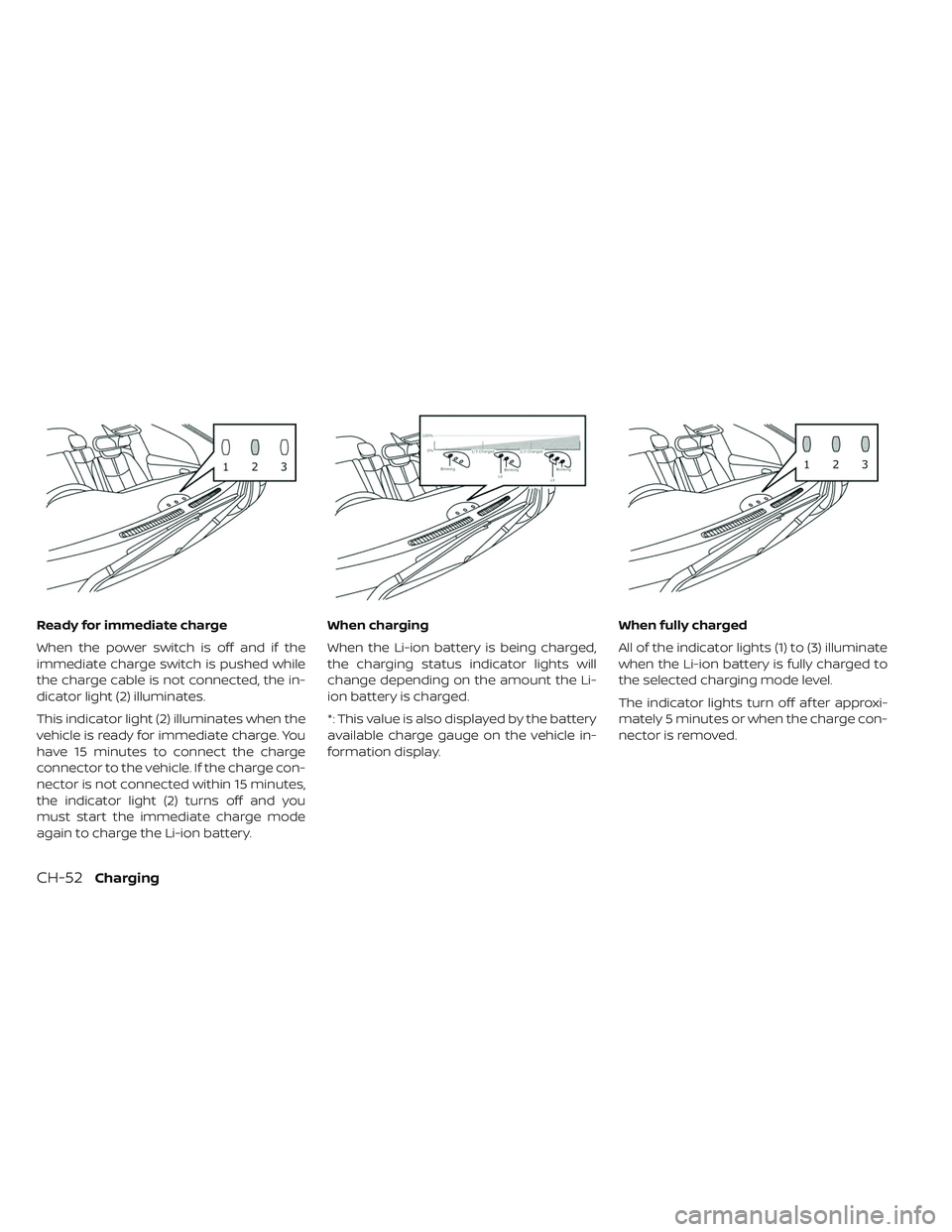
Ready for immediate charge
When the power switch is off and if the
immediate charge switch is pushed while
the charge cable is not connected, the in-
dicator light (2) illuminates.
This indicator light (2) illuminates when the
vehicle is ready for immediate charge. You
have 15 minutes to connect the charge
connector to the vehicle. If the charge con-
nector is not connected within 15 minutes,
the indicator light (2) turns off and you
must start the immediate charge mode
again to charge the Li-ion battery.When charging
When the Li-ion battery is being charged,
the charging status indicator lights will
change depending on the amount the Li-
ion battery is charged.
*: This value is also displayed by the battery
available charge gauge on the vehicle in-
formation display.
When fully charged
All of the indicator lights (1) to (3) illuminate
when the Li-ion battery is fully charged to
the selected charging mode level.
The indicator lights turn off af ter approxi-
mately 5 minutes or when the charge con-
nector is removed.
CH-52Charging
Page 104 of 610
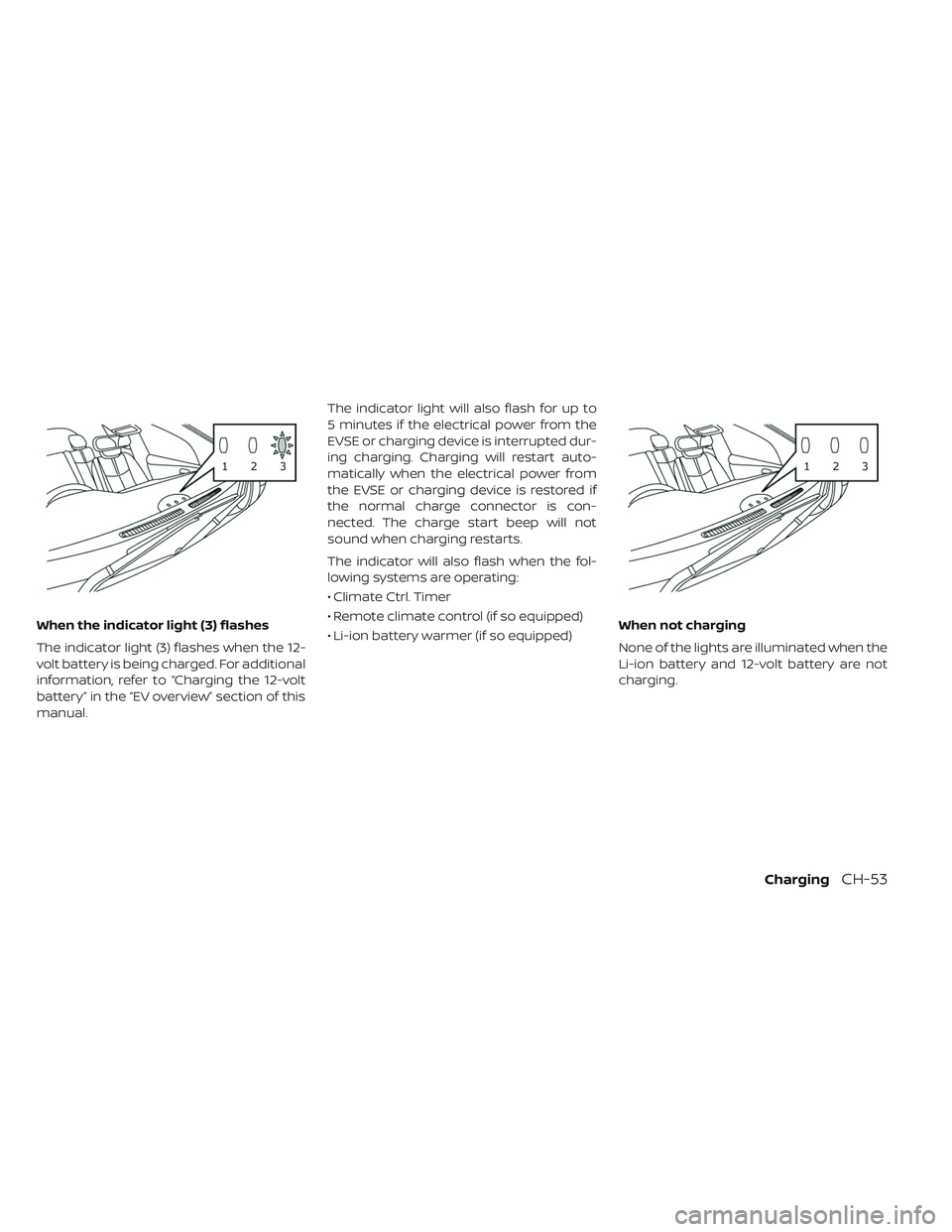
When the indicator light (3) flashes
The indicator light (3) flashes when the 12-
volt battery is being charged. For additional
information, refer to “Charging the 12-volt
battery” in the “EV overview” section of this
manual.The indicator light will also flash for up to
5 minutes if the electrical power from the
EVSE or charging device is interrupted dur-
ing charging. Charging will restart auto-
matically when the electrical power from
the EVSE or charging device is restored if
the normal charge connector is con-
nected. The charge start beep will not
sound when charging restarts.
The indicator will also flash when the fol-
lowing systems are operating:
• Climate Ctrl. Timer
• Remote climate control (if so equipped)
• Li-ion battery warmer (if so equipped)
When not charging
None of the lights are illuminated when the
Li-ion battery and 12-volt battery are not
charging.
ChargingCH-53