2019 MERCEDES-BENZ SPRINTER air condition
[x] Cancel search: air conditionPage 162 of 354

st
yle to suit the pr evailing road and weather con‐
ditions.
If yo u activate or deactivate the all-wheel drive in
a ve hicle with this option, ASR will be deactivated
fo rth e duration of the activation/deactivation
process.
Ve hicles without steering wheel but tons: if
ASR is malfunctioning, the00E5 indicator lamp
lights up while the engine is running and the
engine output may be reduced (/ page 23).
ASR impr oves traction, i.e. the transfer of po wer
from the tires tothero ad sur face, for a sus tained
period and, thereb y,also impr ovesth e driving
st ability of theve hicle. If the driving wheels start
to spin, ASR brakes individual drive wheels and
limits the engine torque. ASRthus significantly
assists you when pulling away and accelerating,
especially on wet or slippe ryroads.
If traction on thero ad sur face is not suf ficient,
eve n ASR will not allow youto pull away without
dif ficulty. The type of tires and totalwe ight of the
ve hicle as well as the gradient of thero ad also
play a crucial role.
If ASR inter venes, the00E5 warning lamp in the
instrument display flashes. Fu
nctions of ESP ®
(Electronic Stability Pro‐
gr am) &
WARNING Risk of skidding if ESP ®
is
malfunctioning
If ESP ®
is malfunctioning, ESP ®
cannot car ry
out vehicle stabilization. In addition, other
driving saf ety sy stems are switched off. #
Drive on carefull y. #
Have ESP ®
ch ecked at a qualified spe‐
cialist workshop. &
WARNING Risk of skidding if ESP ®
is
deactivated
If yo u deactivate ESP ®
, ESP ®
cannot car ryout
ve hicle stabilization. #
ESP ®
should only be deactivated in the
fo llowing situations. Do not opera
tetheve hicle on a roller dynamome‐
te r (e.g. for a per form ance test). If you ha veto
operate theve hicle on a roller dynamom eter, con‐
sult a qualified specialist workshop beforehand. If
yo u activate or deactivate the all-wheel drive in
a ve hicle with this option, ESP ®
will be deactiva‐
te dfo rth e duration of the activation/deactiva‐
tion process.
If ESP ®
is malfunctioning or deactivated, the
00E5 warning lamp lights up while the engine is
ru nning and the engine output may be reduced
(/ page 23).
% Only use wheels with
there commended tire
sizes. Only then will ESP ®
function properly. Ac
tivating/deactivating ESP ®
(Electronic Sta‐
bility Prog ram) Multimedia sy
stem:
4 © 5
Settings 5
Quick Access
5 ESP
% ESP®
can only be activated and deactivated
via quick access when at least one other
function is available in quick access. Other‐
wise, you can find ESP ®
in theAssistance
menu. #
Select ESP.
A prom ptappears. #
Select Onor00BB Off.
If th e00BB ESP®
OFF warning lamp lights up con‐
st antly in the instrument clus ter,ESP ®
is deacti‐
va ted.
Obser vethe information on warning lamps and
display messages which may appear in the instru‐
ment clus ter. Fu
nctions of ESP ®
Crosswind Assist Crosswind Assist does not
workif ESP ®
is deacti‐
va ted or disabled due toa malfunction.
Crosswind Assist does not react under thefo llow‐
ing conditions:
R The vehicle is subjected tosevere jolts and
vib rations, e.g. as a result of une ven su rfaces
or po tholes.
R The vehicle loses traction, e.g. on snow or ice
or when hydroplaning.
R The driver is per form ing sudden and lar ge
st eering mo vements.
Crosswind Assist is operational again as soon as
th e driving conditions return tonormal.
Crosswind Assi stdetects stro ng crosswind gu sts
th at can impair ability of your vehicle todrive 13 8
Driving and pa rking
Page 165 of 354

Canceling a brake application of
Active Brake
Assi st
Yo u can cancel a brake application of Active
Brake Assi stat any time by:
R Fully depressing the accelerator pedal or with
kickdown.
R Fully releasing the brake pedal (only during
situation-dependent braking assis tance).
Ac tive Brake Assi stmay cancel the brake applica‐
tion when one of thefo llowing conditions is fulfil‐
led:
R You maneuver toavo idthe obs tacle.
R Thereis no longer a risk of collision.
R An obs tacle is no longer de tected in front of
yo ur vehicle.
Sy stem limitations
The sy stem may be impaired or may not function
in thefo llowing situations:
R The sensors are af fected bysno w,rain, fog or
heavy spr ay.
R The sensors are dirty, fogged up, damaged or
co vered.
R The sensors are af fected byinter fere nce from
ot her radar sources, e.g. strongradar reflec‐
tions in parking garage s.
R If a loss of tire pressure or a defective tire has
been de tected and displa yed.
R Full sy stem per form ance is not available for a
fe w seconds af ter switching on the ignition or
af te r driving off.
The sy stem may not react cor rectly in thefo llow‐
ing situations:
R In complex traf fic situations, objects may not
al wa ys be clear lyde tected.
R Pedestrians or vehicles mo vequickly into the
de tection range of the sensors.
R Pedestrians are obscured by other objects.
R In bends with a nar rowradius. Setting
Active Brake Assi st Requ
irements:
R The ignition is switched on Multimedia sy
stem:
4 © 5
Settings 5
Assistance
5 Active Brake Assist
The following settings are available:
R Early
R Medium
R Late #
Select a setting.
The Medium setting is selec ted automatically
eve rytime the engine is star ted.
Deactivating Active Brake Assi st
% It is
recommended that Active Brake Assi stis
alw ays left activated. #
Select Off.
The dis tance warning function and autono‐
mous braking function are deactivated.
% When
Active Brake Assi stis deactivated, the
00D4 symbol appears inthest atus area of
th e multifunction displa y. Cruise control
Fu
nction of cruise control
Cruise cont rol accelerates and brakes theve hicle
automatically in order tomaintain a pr eviously
st ored speed.
If yo u accelerate toove rtake, forex ample, the
st ored speed is not dele ted. If youre mo veyour
fo ot from the accelerator pedal af terove rtaking,
cruise control will resume speed regulation back
to thestored speed.
Cruise contro l is operated using the cor respond‐
ing steering wheel buttons. You can store any
ro ad speed abo ve15 mp h (20 km/h).
If yo ufa ilto adapt your driving style, cruise con‐
trol can neither reduce therisk of an accident nor
ove rride the la wsof ph ysics. It cannot take into
account road, weather or traf fic conditions.
Cruise control is only an aid. You are responsible
fo rth e dis tance totheve hicle in front, forve hicle
speed, braking in good time and forst ay ing in
yo ur lane.
Displa ysinthe multifunction display
The status of cruise control and thestored speed
are shown in the multifunction displa y. Driving and pa
rking 141
Page 168 of 354

&
WARNING Risk of accident if de tection
function of Active Dis tance Assi st
DISTRONIC is impaired
Ac tive Dis tance Assi stDISTRONIC does not
re act or has a limited reaction:
R when driving on a dif fere nt lane or when
ch anging lanes
R topedestrians, animals, bicycles or sta‐
tionary vehicles, or unexpected obs tacles
R tocomplex traf fic conditions
R tooncoming vehicles and crossing traf fic
As a result, Active Dis tance Assi stDISTRONIC
may nei ther give warnings nor inter vene in
su ch situations. #
Always obser vethe tra ffic conditions
carefully and react according ly. Ac
tive Dis tance Assi stDISTRONIC may not de tect
nar row vehicles driving in front, e.g. mo torcyc les
and vehicles driving on a dif fere nt line.
Ope rating Active Di stance Assist DIST RONIC
Re quirements:
R The vehicle has been star ted.
R The parking brake has been released.
R ESP ®
is activated and is not inter vening.
R The transmission is in position 005B.
R The driver's and the front-passenger door are
closed.
R The seat occupancy recognition on the driv‐
er's seat has de tected that the driver has fas‐
te ned the seat belt.
R The check of thera dar sensor sy stem has
been successfully comple ted. Ac
tivating Active Di stance Assist DISTRO NIC #
Press button 1. #
Toactivate without a stored speed: press
rock er switch 3up (SET+) or down (SET-).
The cur rent speed is then sa ved and main‐
ta ined bytheve hicle.
or #
Toactivate with a stored speed: press
rock er switch 4up (RES).
% If
rock er switch 4is pressed up twice,
Ac tive Dis tance Assi stDISTRONIC is acti va‐
te d with the speed restriction displa yed in
th e instrument clus ter.
Ac cepting the displa yed speed limit when Dis‐
tance Assist DI STRO NIC is acti vated #
Press rocker switch 4up (RES).
The speed limit displa yed in the instrument
clus ter is adop ted as thestored speed. The
ve hicle adapts its speed tothat of theve hicle
in front, but only up tothestored speed.
Pulling away again with Active Di stance
Assist DIST RONIC #
Remo veyour foot from the brake pedal. #
Press rocker switch 4up (RES).
or #
Depress the accelerator pedal briefly with
fo rc e.
The functions of Active Dis tance Assi st
DISTRONIC continue tobe car ried out. 14 4
Driving and pa rking
Page 174 of 354

In trailer mode,
the guide lines are shown at
th e le vel of the trailer hitch.
Vi ew of trailer (if trailer hit chis installed) Vi
ew of trailer (if trailer hitch is ins talled)
1 Yellow guide line, locating aid
2 Red guide line at a dis tance of appr oximately
1. 0 in (0.3 m) from the ball head of the trailer
hitch
3 Ball head of the trailer hitch
Side view of the mir ror came ras
The sides of theve hicle can be seen in this vie w. 1
Lane indicating thero ute theve hicle will take
with thesteering wheel in its cur rent position
2 Yellow warning display of Parking Assist
PA RKTRONIC: obstacles at a dis tance of
appr oximately 3.3 ft(1.0 m) or less
3 Your vehicle from abo ve
4 Marker of the wheel contact points
5 Guide line of extern al vehicle dimensions
with outside mir rors folded out
If th e dis tance tothe object lessens, the color of
wa rning display 2changes.
Sy stem failure
If th ere is no operational readiness, thefo llowing
message appears in the multimedia sy stem: Sy
stem limitations
The 360° Camera will not function or will only
partially function in thefo llowing situations:
R The front doors are open.
R The side mir rors are folded in.
R There is heavy rain, snow or fog.
R The ambient light is poor, e.g. at night.
R The area is lit byfluorescent light (the displ ay
may flic ke r).
R Ifth ere is a sudden change in temp erature,
e.g. when driving into a heated garage in win‐
te r.
R The ambient temp erature is very high.
R The camera lens is obstructed, dirty or fogged
up.
R Cameras, or vehicle components in which the
came ras are ins talled, are damaged. In this
eve nt, ha vethe cameras, their positions and
th eir setting checked at a qualified specialist
wo rkshop.
Do not use the 360° Camera under such circum‐
st ances. You could otherwise injure others or col‐
lide with objects when parking theve hicle.
On vehicles with height-adjus table suspension or
if th eve hicle is car rying a heavy load, leaving the
st andard height can result in inaccuracies in the
guide lines and in the display of thege nerated
ima ges, depending on tech nical conditions.
The field of vision and other functions of the cam‐
era sy stem may be restricted due toadditional
attachments on theve hicle (e.g. loading tailgate).
% The contrast of
the display may be impaired
by abrupt direct sunlight or by other light
sources, e.g. when driving out of a garage . In
th is case, pay particular attention.
% Ha
ve the display repaired or replaced if, for
ex ample, pixel er rors considerably restrict its
use. 15 0
Driving and pa rking
Page 179 of 354
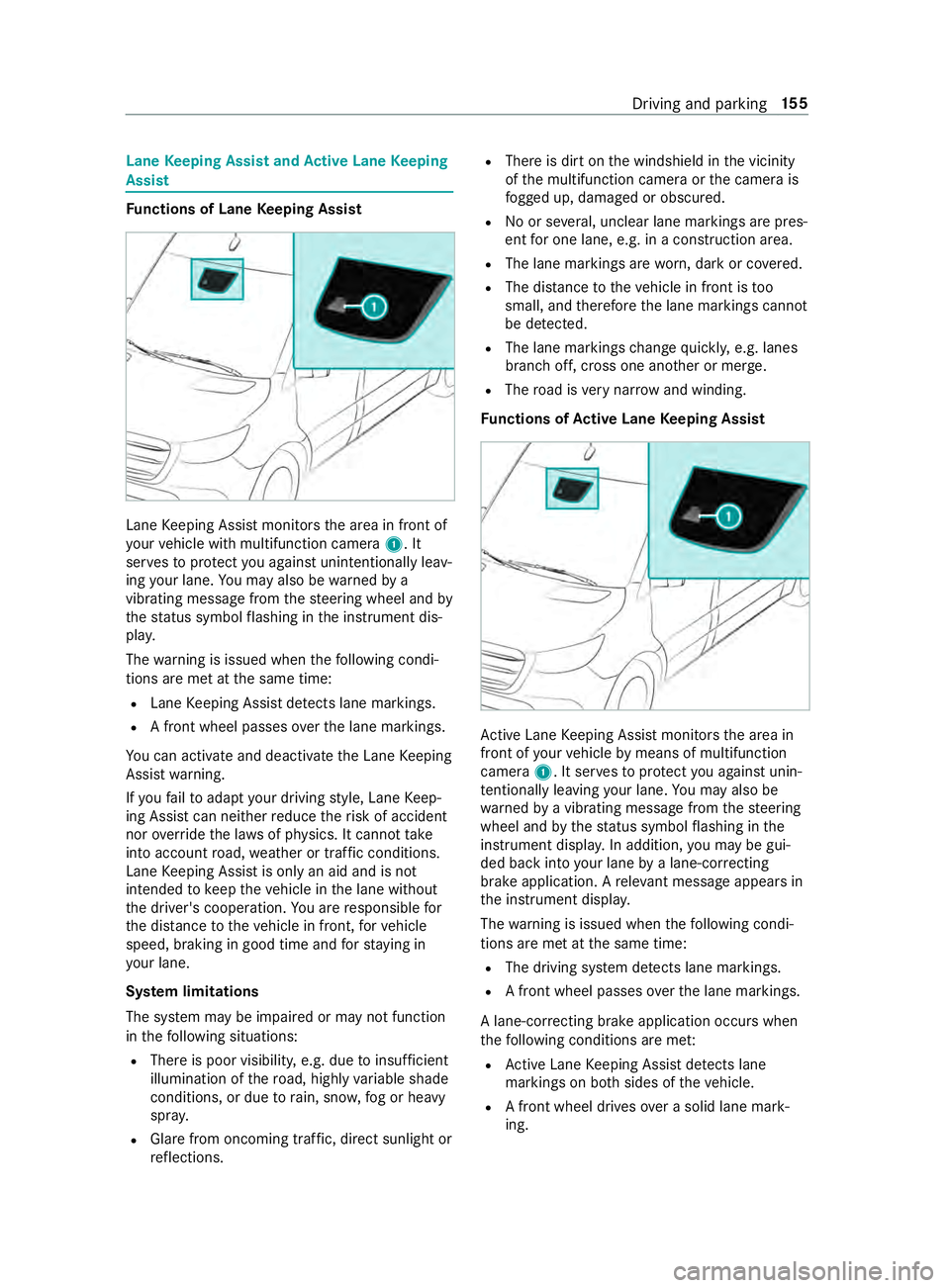
Lane
Keeping Assist and Active Lane Keeping
Assist Fu
nctions of Lane Keeping Assist Lane
Keeping Assist monitors the area in front of
yo ur vehicle with multifunction camera 1. It
ser vesto protect you against unin tentionally le av‐
ing your lane. You may also be warned by a
vibrating messa gefrom thesteering wheel and by
th est atus symbol flashing in the instrument dis‐
pla y.
The warning is issued when thefo llowing condi‐
tions are met at the same time:
R Lane Keeping Assist de tects lane markings.
R A front wheel passes overth e lane markings.
Yo u can activate and deactivate the Lane Keeping
Assist warning.
If yo ufa ilto adapt your driving style, Lane Keep‐
ing Assist can neither reduce therisk of accident
nor override the la wsof ph ysics. It cannot take
into account road, weather or traf fic conditions.
Lane Keeping Assist is only an aid and is not
intended tokeep theve hicle in the lane without
th e driver's cooperation. You are responsible for
th e dis tance totheve hicle in front, forve hicle
speed, braking in good time and forst ay ing in
yo ur lane.
Sy stem limitations
The sy stem may be impaired or may not function
in thefo llowing situations:
R There is poor visibilit y,e.g. due toinsuf ficient
illumination of thero ad, highly variable shade
conditions, or due torain, sno w,fog or heavy
spr ay.
R Glare from oncoming traf fic, direct sunlight or
re flections. R
There is dirt on the windshield in the vicinity
of the multifunction camera or the camera is
fo gged up, damaged or obscured.
R No or se veral, unclear lane markings are pres‐
ent for one lane, e.g. in a construction area.
R The lane markings are worn, dark or co vered.
R The dis tance totheve hicle in front is too
small, and therefore the lane markings cann ot
be de tected.
R The lane markings change quickl y,e.g. lanes
branch off, cross one ano ther or mer ge.
R The road is very nar row and winding.
Fu nctions of Active Lane Keeping Assist Ac
tive Lane Keeping Assist monitors the area in
front of your vehicle bymeans of multifunction
camera 1. It ser vesto protect you against unin‐
te ntionally le aving your lane. You may also be
wa rned bya vibrating message from thesteering
wheel and bythest atus symbol flashing in the
instrument displa y.In addition, you may be gui‐
ded back into your lane bya lane-cor recting
brake application. A releva nt messa geappears in
th e instrument displa y.
The warning is issued when thefo llowing condi‐
tions are met at the same time:
R The driving sy stem de tects lane markings.
R A front wheel passes overth e lane markings.
A lane-cor recting brake application occu rswhen
th efo llowing conditions are me t:
R Active Lane Keeping Assist de tects lane
markings on bo thsides of theve hicle.
R A front wheel drives over a solid lane mark‐
ing. Driving and parking
15 5
Page 180 of 354
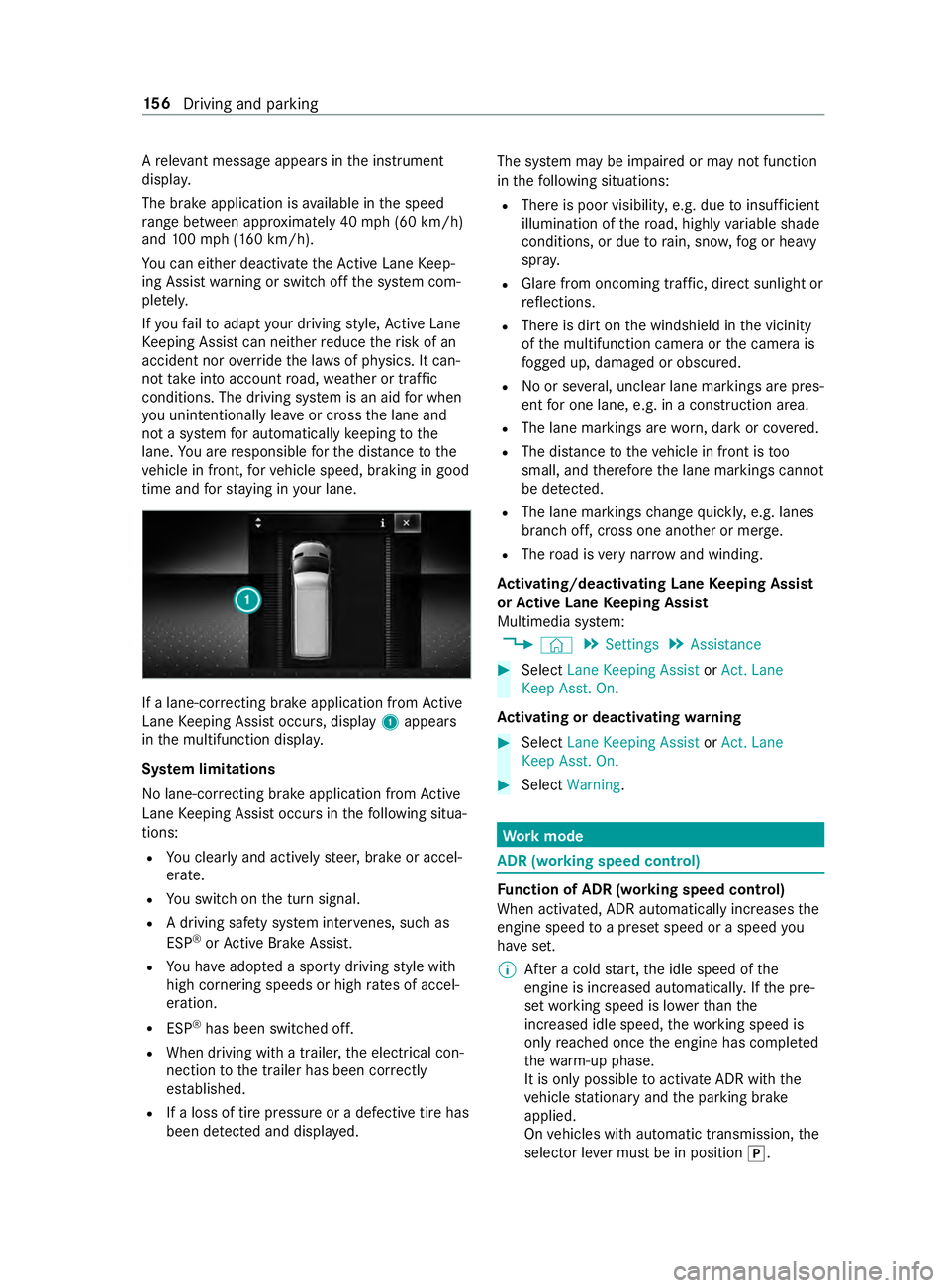
A
releva nt messa geappears in the instrument
displa y.
The brake application is available in the speed
ra nge between appr oximately 40 mph (60 km/h)
and 100mp h (160 km/h).
Yo u can either deactivate theAc tive Lane Keep‐
ing Assist warning or switch off the sy stem com‐
ple tely.
If yo ufa ilto adapt your driving style, Ac tive Lane
Ke eping Assist can neither reduce therisk of an
accident nor override the la wsof ph ysics. It can‐
not take into account road, weather or traf fic
conditions. The driving sy stem is an aid for when
yo u unin tentionally le aveor cross the lane and
not a sy stem for automatically keeping tothe
lane. You are responsible forth e dis tance tothe
ve hicle in front, forve hicle speed, braking in good
time and forst ay ing in your lane. If a lane-cor
recting brake application from Active
Lane Keeping Assist occurs, display 1appears
in the multifunction displa y.
Sy stem limitations
No lane-cor recting brake application from Active
Lane Keeping Assist occurs in thefo llowing situa‐
tions:
R You clearly and actively steer, brake or accel‐
erate.
R You swit chon the turn signal.
R A driving saf ety sy stem inter venes, su chas
ESP ®
or Active Brake Assi st.
R You ha veadop ted a sporty driving style with
high cornering speeds or high rates of accel‐
eration.
R ESP ®
has been switched off.
R When driving with a trailer, the electrical con‐
nection tothe trailer has been cor rectly
es tab lished.
R If a loss of tire pressure or a defective tire has
been de tected and displa yed. The sy
stem may be impaired or may not function
in thefo llowing situations:
R There is poor visibilit y,e.g. due toinsuf ficient
illumination of thero ad, highly variable shade
conditions, or due torain, sno w,fog or heavy
spr ay.
R Glare from oncoming traf fic, direct sunlight or
re flections.
R There is dirt on the windshield in the vicinity
of the multifunction camera or the camera is
fo gged up, damaged or obscured.
R No or se veral, unclear lane markings are pres‐
ent for one lane, e.g. in a construction area.
R The lane markings are worn, dark or co vered.
R The dis tance totheve hicle in front is too
small, and therefore the lane markings cann ot
be de tected.
R The lane markings change quickl y,e.g. lanes
branch off, cross one ano ther or mer ge.
R The road is very nar row and winding.
Ac tivating/deactivating Lane Keeping Assist
or Active Lane Keeping Assist
Multimedia sy stem:
4 © 5
Settings 5
Assistance #
Select Lane Keeping Assist orAct. Lane
Keep Asst. On.
Ac tivating or deactivating warning #
Select Lane Keeping Assist orAct. Lane
Keep Asst. On. #
Select Warning. Wo
rkmode ADR (working speed control)
Fu
nction of ADR (working speed control)
When activated, ADR automatically increases the
engine speed toa preset speed or a speed you
ha ve set.
% Af
ter a cold start, the idle speed of the
engine is increased automaticall y.Ifth e pre‐
set working speed is lo werth an the
inc reased idle speed, thewo rking speed is
only reached once the engine has comple ted
th ewa rm-up phase.
It is only possible toactivate ADR with the
ve hicle stationary and the parking brake
applied.
On vehicles with automatic transmission, the
selector le ver must be in position 005D. 15 6
Driving and pa rking
Page 183 of 354
R
The vehicle/trailer combination will ha vean
inc reased braking dis tance.
R The vehicle/trailer combination will be more
susceptible tocrosswind gu sts.
R The vehicle/trailer combination will requ ire
more sensitive steering.
R The vehicle/trailer combination will ha ve a
lar ger turning radius.
This may impair theve hicle's driving characteris‐
tics.
When driving with a vehicle/trailer combination,
alw ays adapt your speed tothe cur rent road and
we ather conditions. Drive carefull y.Ke ep a suf fi‐
cient safe dis tance.
Co mply withthe maximum speed of 49 mph
(80 km/h) or 62 mph (100 km/h), even in coun‐
tries in which higher speeds are permitted for
ve hicle/trailer combinations.
Comply with the legally prescribed maximum
speed forve hicle/trailer combinations in forc e in
th e count ry,st ate or Canadian pr ovince in ques‐
tion. Before driving, consult the trailer's vehicle
documents tosee the maximum permissible
speed foryo ur trailer.
At tach only an appr oved trailer hitch to yourvehi‐
cle. Use only a ball neck that has been appr oved
fo ryo ur vehicle. Further information about availa‐
bility and ins tallation of the trailer electrical sys‐
te m is available from any qualified specialist
wo rkshop.
The trailer hitch is one of the most impor tant
ve hicle parts forro ad saf ety. Comply with the
instructions on operating, maintaining and servic‐
ing in the manufacturer's operating instructions.
% Yo
ur vehicle's bumpers are not suitable for
ins talling de tach able trailer tow hit ches.
Do not attach any rented trailer tow hit ches or
any other de tach able trailer tow hit ches tothe
bumpers.
% When using a trailer,
remember that
PA RKTRONIC is available only toa limited
ex tent, if at all.
% The ball head height will
change depending
on theve hicle's load. In this case, use a
trailer with a height-adjus table dr awbar.
Driving no tes
The maximum permissible speed forve hicle/
trailer combinations depends on the type of
trailer. Before driving, consult the trailer's vehicle documents
tosee the maximum permissible
speed foryo ur trailer.
Yo ur vehicle will act dif fere ntly wi tha trailer rela‐
tive towithout a trailer, and will consume more
fuel. In the case of a long and steep descent, you
must select shift range 3,2or 1in good time.
% This also applies if
the cruise cont rol is
switched on.
Yo u will thereby make use of the engine's braking
ef fect and will not ha vetobrake as of tento con‐
trol the speed. This will take some of thest ra in
off the brake sy stem and pr event the brakes from
ove rheating and wearing tooqu ickl y.Ifyo u need
additional braking, depress the brake pedal inter‐
mittently rath er than continuousl y.
Driving tips
If th e trailer sw ays, remember thefo llowing
points:
R Do not accelerate under any circums tances.
R Do not counter steer.
R If necessar y,apply the brakes.
% Yo
u can pr eventthe trailer from sw aying and
rock ingbyretrofitting stabilizer bars or trailer
st ability programs. You can obtain fur ther
information from an authorized Mercedes-
Benz Center.
R Maintain a lar ger dis tance than when driving
without a trailer.
R Avoid braking abruptl y.If possible, brake gen‐
tly firs t of all so that the trailer closes up
behind your vehicle. Then, increase the brak‐
ing forc era pidl y.
R The values given forst art-off gradeability
re ferto sea le vel. When driving in moun tain‐
ous areas, no tethat engine output, and there‐
fo re start-off gradeability, will dec rease with
inc reasing altitude. Coupling/uncoupling a trailer
Coupling a trailer
* NO
TEDama getotheve hicle battery due
to full discharge Charging
the trailer battery using the po wer
supply of the trailer can damage theve hicle
batter y. #
Do not use theve hicle's po wer supply
to charge the trailer batter y. Driving and pa
rking 15 9
Page 185 of 354

R
Ifth e trailer has electronically cont rolled
brakes, pull away carefully wi th theve hicle/
trailer combination. Brake manually using the
brake controller and check whe ther the
brakes are functioning cor rectly.
R Secu rethe load on the trailer in line with the
re qu irements and rules for load-securing
me thods.
R When driving with a trailer, check at regular
inter vals that the load is secure and that the
lights and brakes are functioning cor rectl y.
R Bear in mind that the handling characteristics
are more uns table when towing a trailer than
when driving without a trailer. Avoid sudden
st eering mo vements.
R The vehicle/trailer combination is heavier,
accelerates more slowl y,has a reduced
climbing ability and an increased braking dis‐
ta nce. It is more susceptible toside winds
and requ ires careful steering.
R If possible, do not brake suddenl y,but rath er
moderately at firs t so that the trailer can acti‐
va te its brakes. Then inc rease the pressure on
th e brake pedal.
R Ifth e automatic transmission shifts between
ge ars on uphill or downhill gradients, restrict
th e shift range. Select shi ftrange 4, 3, 2 or 1.
A lo werge ar and reduced speed decrease the
ri sk of engine damage.
R When driving on a downhill gradient, shift to a
lo we rge ar to use the engine's braking ef fect.
Av oid cons tant braking, as this could cause
th eve hicle brakes and possibly also the
trailer brakes toove rheat.
R Ifth e coolant temp erature increases signifi‐
cantly when the air-conditioning sy stem is
switched on, switch the air-conditioning sys‐
te m off.
Coolant heat can also be dissipated by
switching the air flow and thete mp erature of
th e heater or air conditioning tothe maximum
le ve l. Open the windo wsif necessar y.
R When overtaking, pay particular attention to
th e increased overtaking di stance of your
ve hicle/trailer combination.
Due tothe length of your vehicle/trailer com‐
bination you will requ ire a longer stre tch of
ro ad before swit ching back tothe original
lane. Pe
rm issible trailer loads and trailer dr awbar
nose weights We
ight information &
WARNING Risk of accident due to
unbraked trailer with excessively high
gross weight
If yo uto w a trailer without a separate func‐
tional braking sy stem and a gross trailer
we ight (G TW) of more than 1635 lbs (750 kg),
th en theve hicle brake sy stem may overheat.
This increases the braking dis tance and the
brake sy stem may evenfa il. #
Always use a trailer with a separate
functional braking sy stem when towing
a trailer with a gross trailerweight
(G TW ) of more than 1635 lbs (750 kg). *
NO
TEDama getothe drive train, trans‐
mission or trailer tow hit chdue toexc ess
gross combination weight The permissible
gross combinationweight is
exc eeded.
The drive train, the transmission or the trailer
to w hit chmay be dama ged. #
Comply with the permissible gross com‐
bination weight. Fo
rve hicles with a permissible gross vehicle
we ight of 11030 lbs (5003 kg),th e permissible
gross combination weight is less than the sum of
th e permissible gross vehicle weight plus the per‐
missible trailer load. If either theve hicle or the
trailer is fully laden, the permitted gross vehicle
we ight or the permitted trailer load values are
re duced accordingly. In this case, you may on ly
partially load the trailer or theve hicle.
The gross trailer weight (G TW) is calculated by
adding thewe ight of the trailer tothewe ight of
th e load and equipment. If the trailer is equipped
with a separate braking sy stem, then the maxi‐
mum gross trailer weight is 5000 lbs (2268 kg) or
75 00 lbs (3402 kg).
The maximum permissible trailer dr awbar nose‐
we ight on the ball head is 500 lbs (227 kg) or
75 0 lbs (340 kg). Ho wever,th e actual trailer
dr aw bar nose weight must not exceed theva lue
given on the trailer tow hit chor trailer identifica‐
tion plates. Where theva lues dif fer, th e lo west
va lue alw ays applies. Driving and parking
161