2019 MERCEDES-BENZ SPRINTER brakes
[x] Cancel search: brakesPage 136 of 354

Ru
les for off-road driving
Alw ays be aware of the ground clearance of the
ve hicle and avoid obs tacles such as deep tire
ru ts.
Obs tacles can damage thefo llowing parts of the
ve hicle, forex ample:
R Suspension
R Driv etra in
R Fuel and supply tanks
The refore , alw ays drive slowly when off-road. If
yo u must drive over obs tacles, ha vethe co-driver
instruct you.
% Mercedes-Benz
recommends that you addi‐
tionally car rya sho vel and a reco very rope
with a shackle in theve hicle.
R Make sure that loads and items of luggage
are securely stored or lashed down
(/ page 72).
R Before driving off-road, stop theve hicle and
engage a low gear.
R Vehicles with DSR: activate DSR when you
are driving downhill (/ page120).
R All-wheel drive vehicles: activate the all-
wheel drive (/ page119) and, if necessa ry,
activate theLO W RANGE transmission ratio
(/ page 119).
R Ifth e sur face requ ires, temp orarily deactivate
ASR when pulling away ( /page 119).
R Only drive off-road with the engine running
and a gear engaged.
R Drive slowly and smo othly. Wa lking pace is
necessary in many situations.
R Avoid spinning the driven wheels.
R Always ensure that the wheels remain in con‐
ta ct wi th the ground.
R Exercise the utmost caution when driving
across unfamiliar, unpredictable terrain. As a
precaution, getout of theve hicle totake a
look at thero ute tobe take nfirs t.
R Look out for obs tacles (e.g. rocks, holes, tree
st umps and tire ruts).
R Avoid edges where the sur face could crumble
or break away.
Ru les forfo rd ing off-road (all-wheel drive
ve hicles)
R Obser vethe saf ety no tes and general no tes
on driving off-road. R
Check the dep thand characteristics of the
body of water before ford ing. The water must
not be deeper than 23.6 in (60 cm).
R The climate control sy stem is switched off
(/ page 95).
R The auxiliary heating is switched off
(/ page 100).
R Swit chon all-wheel drive (/ page118) and
engage it on vehicles with theLO W RANGE
transmission ratio (/ page 119).
R Restrict the shift range to1or 2.
R Avoid high engine speeds.
R Drive slowly and smoo thly at no more than a
wa lking pace.
R Ensure that no bow wavefo rm s while driving.
R Afterfo rd ing, dry the brakes.
Af ter driving thro ugh a body of water deeper than
19 .7 in (50 cm), make su retocheck all vehicle
fl uids for any signs of penetration bywate r.
Checklist af ter driving off-road
If yo ufind damage totheve hicle af ter off-road
driving, ha vetheve hicle checked at a qualified
specialist workshop immediatel y.
Driving overro ugh terrain places greater
demands on your vehicle than normal road opera‐
tion. Check your vehicle af ter driving on rough
te rrain. This allo wsyouto detect damage
prom ptly and reduce therisk of an accident for
yo urself and other road users. Clean your vehicle
th oroughly before driving on public roads.
Obse rveth efo llowing points af ter driving off-
ro ad, on con stru ction sites and before driving on
public roads:
R Vehicles with DSR: deactivate DSR
(/ page 120).
R All-wheel drive vehicles: deactivate the all-
wheel drive (/ page119).
R Activate ASR (/ page 119).
R Clean theex terior lighting, particular lythe
headlamp s andtail lamps, and check them
fo r dama ge.
R Clean the front and rear license plates.
R Clean the windshield, windo wsand outside
mir rors.
R Clean thesteps, entra nces and grab handles.
This increases the saf ety of your foot ing.
R Clean the wheels and tires, wheel wells and
th e underbody of theve hicle with a water jet. 11 2
Driving and pa rking
Page 137 of 354
This increases
road adhesion, especially on
we tro adw ays.
R Check the wheels and tires and wheel wells
fo r trapped fore ign objects and remo vethem.
Tr apped fore ign objects can damage the
wheels and tires or may be flung out from the
ve hicle when continuing the journe y.
R Check the underbody for trapped branches or
ot her parts of plants and remo vethem.
R Clean the brake discs, brakepads and axle
joints, particularly af ter operation in sand,
mud, grit and gr avel,wa ter or similar lydirty
conditions.
R Check the entire floor assembly, the tires,
wheels, bodywork stru cture, brakes, steering,
suspension and exhaust sy stem for any dam‐
age.
R Check the service brake for operating saf ety,
e.g. car ryout a brake test.
R Ifyo u notice strong vib rations af ter driving
off-road, check the wheels and driv etra in for
fo re ign objects again. Remo veany fore ign
objects which can lead toimbalances and
th us cause vibrations. In theeve nt of damage
to the wheels and the drive train, visit a quali‐
fi ed specialist workshop immediately. ECO display function
The ECO display summarizes
the driving charac‐
te rist ics from thest art of the journey toits com‐
pletion and assists you in achieving the most eco‐
nomical driving style.
Yo u can influence consum ption if you:
R anticipate road and traf fic conditions.
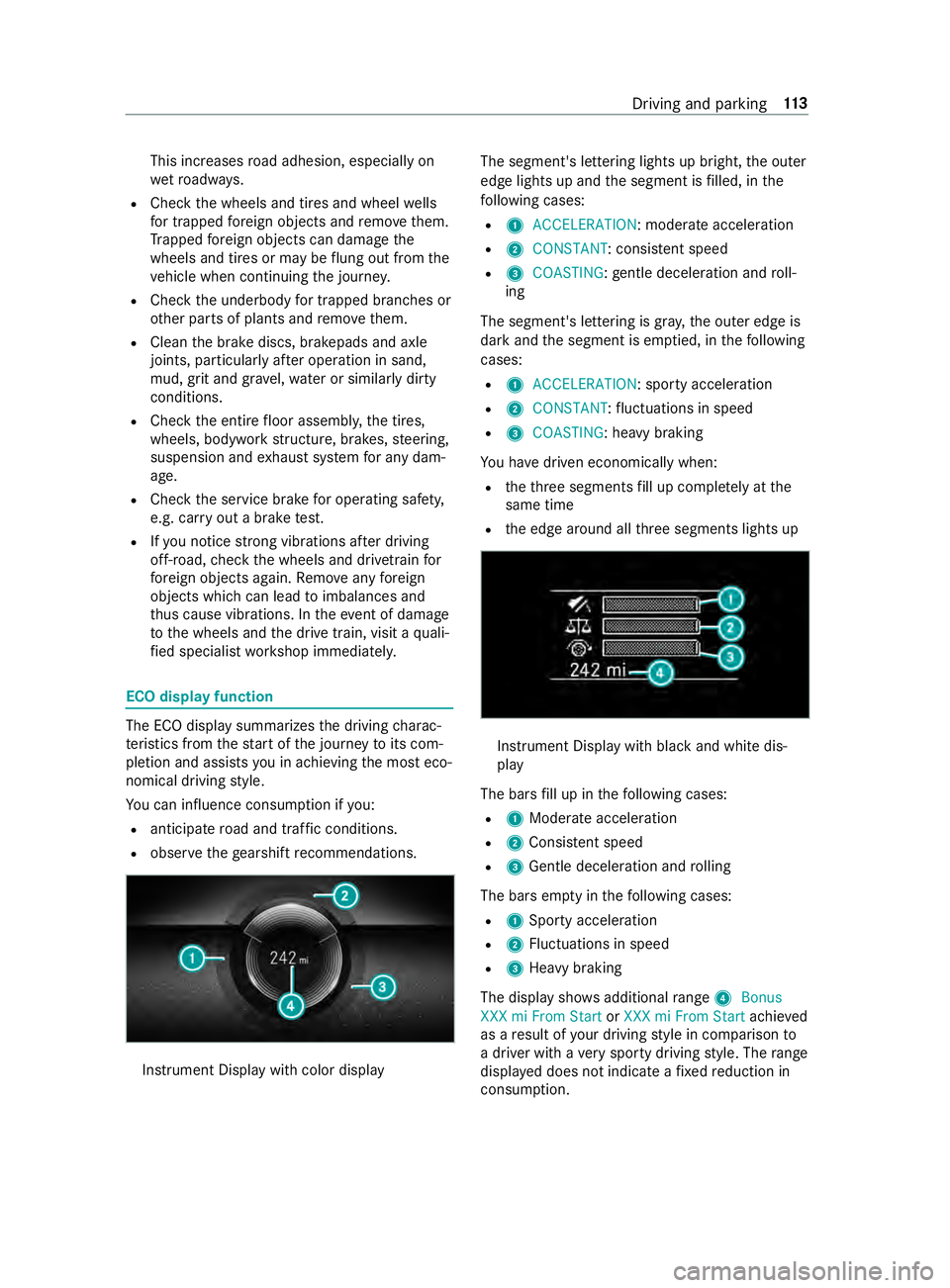
R obser vethege arshift recommendations. Instrument Display wi
thcolor display The segment's lettering lights up bright,
the outer
edge lights up and the segment is filled, in the
fo llowing cases:
R 1 ACCELERATION : moderate acceleration
R 2 CONSTANT: consis tent speed
R 3 COASTING: gentle deceleration and roll‐
ing
The segment's lettering is gray ,th e outer edge is
dark and the segment is em ptied, in thefo llowing
cases:
R 1 ACCELERATION: sporty acceleration
R 2 CONSTANT :fl uctuations in speed
R 3 COASTING: heavy braking
Yo u ha vedriven economically when:
R theth re e segments fill up comple tely at the
same time
R the edge around all thre e segments lights up Instrument Display with black and white dis‐
play
The bars fill up in thefo llowing cases:
R 1Moderate acceleration
R 2Consis tent speed
R 3Gentle deceleration and rolling
The bars em pty in thefo llowing cases:
R 1Sporty acceleration
R 2Fluctuations in speed
R 3Heavy braking
The display sho wsadditional range 4Bonus
XXX mi From Start orXXX mi From Start achieved
as a result of your driving style in comparison to
a driver with a very sporty driving style. The range
displ ayed does not indicate a fixe dre duction in
consum ption. Driving and parking
11 3
Page 144 of 354
#
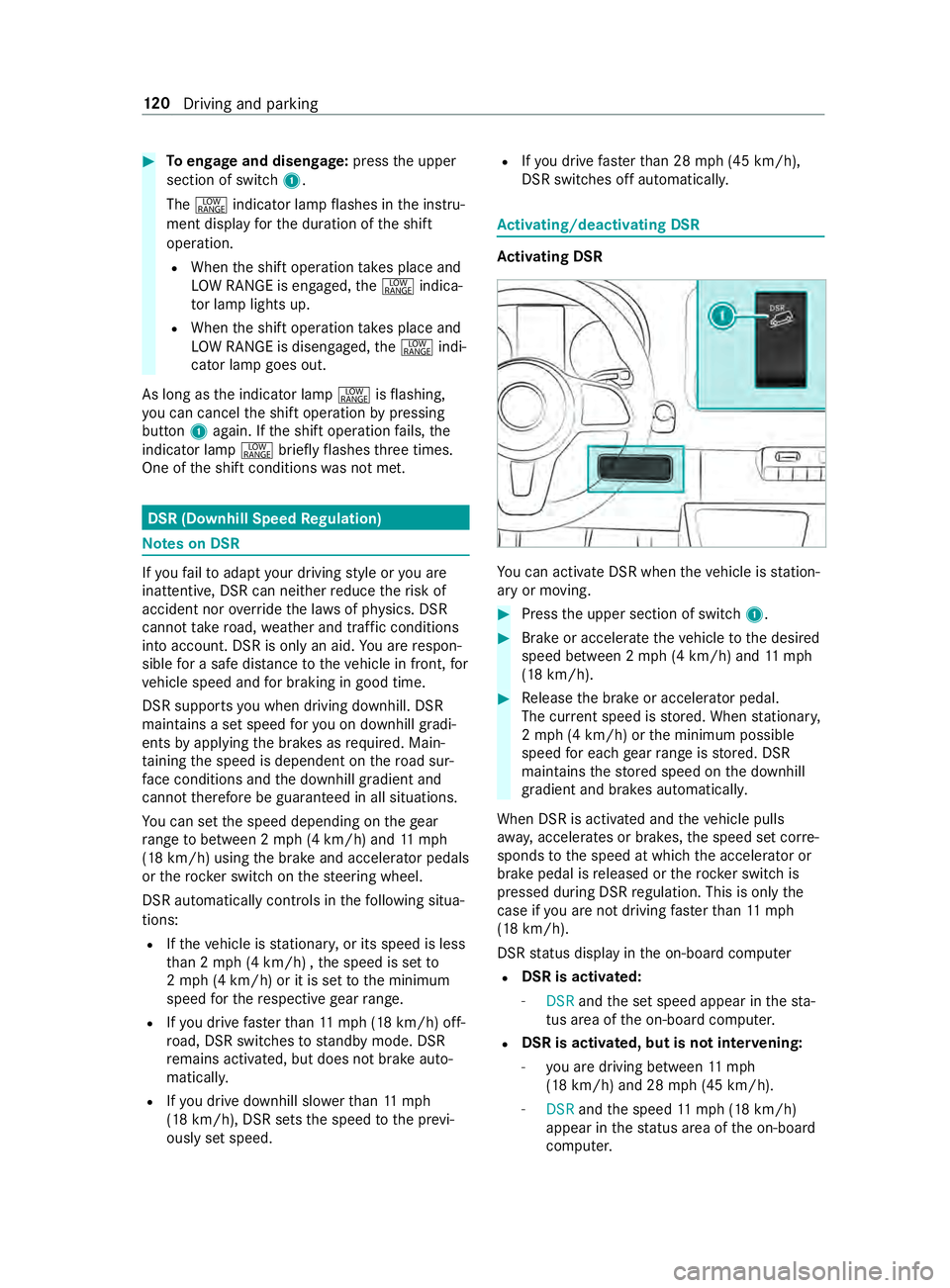
Toengage and disen gage:press the upper
section of switch 1.
The 002E indicator lamp flashes in the instru‐
ment display forth e duration of the shift
operation.
R When the shift operation take s place and
LO W RANGE is engaged, the002E indica‐
to r lamp lights up.
R When the shift operation take s place and
LO W RANGE is disengaged, the002E indi‐
cator lamp goes out.
As long as the indicator lamp 002Eisflashing,
yo u can cancel the shift operation bypressing
button 1again. If the shift operation fails, the
indicator lamp 002Ebrieflyflashes thre e times.
One of the shift conditions was not met. DSR (Downhill Speed
Regulation) Note
s on DSR If
yo ufa ilto adapt your driving style or you are
inat tentive, DSR can nei ther reduce therisk of
accident nor override the la wsof ph ysics. DSR
cannot take road, weather and traf fic conditions
into account. DSR is only an aid. You are respon‐
sible for a safe dis tancetotheve hicle in front, for
ve hicle speed and for braking in good time.
DSR supports you when driving downhill. DSR
main tains a set speed foryo u on downhill gradi‐
ents byapplying the brakes as required. Main‐
ta ining the speed is dependent on thero ad sur‐
fa ce conditions and the downhill gradient and
cann ottherefore be guaranteed in all situations.
Yo u can set the speed depending on thege ar
ra nge tobetween 2 mph (4 km/h) and 11mph
(18 km/h) using the brake and accelera tor pedals
or therock er switch on thesteering wheel.
DSR automatically cont rols in thefo llowing situa‐
tions:
R Ifth eve hicle is stationar y,or its speed is less
th an 2 mph (4 km/h) , the speed is set to
2 mp h (4 km/h) or it is set tothe minimum
speed forth ere spective gear range.
R Ifyo u drive fasterthan 11mp h (18 km/h) off-
ro ad, DSR swit ches tostandby mode. DSR
re mains activated, but does not brake auto‐
matical ly.
R Ifyo u drive downhill slo werth an 11mph
(18 km/h), DSR sets the speed tothe pr evi‐
ously set speed. R
Ifyo u drive fasterthan 28 mph (45 km/h),
DSR switches off automaticall y. Ac
tivating/deactivating DSR Ac
tivating DSR Yo
u can activate DSR when theve hicle is station‐
ary or moving. #
Press the upper section of switch 1. #
Brake or accelerate theve hicle tothe desired
speed between 2 mph (4 km/h) and 11mph
(18 km/h). #
Release the brake or accelera tor pedal.
The cur rent speed is stored. When stationar y,
2 mp h (4 km/h) or the minimum possible
speed for each gear range is stored. DSR
maintains thestored speed on the downhill
gradient and brakes automaticall y.
When DSR is activated and theve hicle pulls
aw ay, accelerates or brakes, the speed set cor re‐
sponds tothe speed at which the accelera tor or
brake pedal is released or thero ck er switch is
pressed during DSR regulation. This is only the
case if you are not driving fasterthan 11mph
(18 km/h).
DSR status display in the on-board computer
R DSR is activated:
- DSR andthe set speed appear in thest a‐
tus area of the on-board computer.
R DSR is activated, but is not inter
vening:
- you are driving between 11mph
(18 km/h) and 28 mph (45 km/h).
- DSR andthe speed 11mp h (18 km/h)
appear in thest atus area of the on-board
computer. 12 0
Driving and pa rking
Page 161 of 354

Depending on
theve hicle's equipment, thera dar
sensors are integrated behind the bumpers
and/or behind thera diator grill. Keep these parts
free of dirt, ice and slush (/ page212). The se n‐
sors must not be co vered, forex ample bybicycle
ra ck s, overhanging loads or sticke rs. Af ter a colli‐
sion, ha vethe function of thera dar sensors
ch ecked at a qualified specialist workshop as
damage (bo thvisible or non-visible) may ha ve
occur redto the bumper or radiator trim. Fu
nction of driving sy stems and driving
saf ety sy stems In
this section, you will find information about the
fo llowing driving sy stems and driving saf ety sys‐
te ms:
R ABS ( Anti-lock braking system)
(/ page 137)
R ASC (Acceleration SkidControl)
(/ page 137)
R BAS (B rake Assist System) (/ page137)
R ESP ®
(Electronic Stability Program)
(/ page 138)
R EBD ( Electronic Brakeforce Distribution)
(/ page 139)
R Active Brake Assi st (/ page 139)
R Cruise co ntrol (/ page 141)
R Active Dis tance Assi stDISTRONIC
(/ page 143)
R Hill start assist
R HOLD function (/ page145)
R Parking Assist PARKTRONIC ( /page 145)
R Rear view camera (/ page147)
R 360° Camera (/ page149)
R ATTENTION ASSIST (/ page151)
R Blind Sp otAssi st (/ page 152)
R Active Lane Keeping Assist (/ page155) Fu
nctions of ABS (Anti-lock Braking Sy stem) Obser
vethe impor tant sa fety guidelines forthe
driving saf ety sy stem.
ABS cont rols the brake pressure in critical situa‐
tions:
R the wheels are pr evented from lo cking when
braking, e.g. during maximum full-s top brak‐
ing or when there is insuf ficient tire traction. R
thesteerability of theve hicle in term s of
ph ysical possibilities is ensured when brak‐
ing.
R ABS is active from speeds of appr ox. 3 mph
(5 km/h). On a slippery road sur face, ABS
inter venes even if you on lybrake gently.
Sy stem limitations
If th ere is a malfunction and theye llow 0025 ABS
wa rning lamp lights up continuously in the instru‐
ment display af terst arting the engine, ABS may
be impaired or inoperative.
If ABS inter venes, you will feel a pulsing in the
brake pedal. The pulsating brake pedal may be an
indication of hazardous road conditions and func‐
tions as a reminder totake extra care while driv‐
ing.
If ABS in terv enes: keep the brake pedal firm ly
depressed until the braking situation has passed.
To car ryout maximum full-s top braking:
dep ress the brake pedal with full forc e. Fu
nction of BAS (Brake Assist Sy stem) &
WARNING Risk of an accident caused by
a malfunction in BAS (Brake Assi stSys‐
te m)
If BA S is malfunctioning, the braking dis tance
in an emergency braking situation is
increased. #
Depress the brake pedal with full force
in emer gency braking situations. ABS
pr eve nts the wheels from locking. BA
S suppo rts yo u with additional braking forc e in
an emer gency braking situation.
If yo u depress the brake pedal quickl y,BA S is
acti vated:
R BAS au tomatically boosts the braking forc e of
th e brakes
R BAS can sho rten the braking dis tance
R ABS pr events the wheels from locking
When youre lease the brake pedal, the brakes
function as usual again. BAS is deactivated. Fu
nctions of ASR (Acceleration Skid Control) ASR can neither
reduce therisk of an accident
nor override the la wsof ph ysics if the driver does
not pay attention when pulling away or accelerat‐
ing. ASR is only an aid. Alw ays adapt your driving Driving and parking
137
Page 162 of 354

st
yle to suit the pr evailing road and weather con‐
ditions.
If yo u activate or deactivate the all-wheel drive in
a ve hicle with this option, ASR will be deactivated
fo rth e duration of the activation/deactivation
process.
Ve hicles without steering wheel but tons: if
ASR is malfunctioning, the00E5 indicator lamp
lights up while the engine is running and the
engine output may be reduced (/ page 23).
ASR impr oves traction, i.e. the transfer of po wer
from the tires tothero ad sur face, for a sus tained
period and, thereb y,also impr ovesth e driving
st ability of theve hicle. If the driving wheels start
to spin, ASR brakes individual drive wheels and
limits the engine torque. ASRthus significantly
assists you when pulling away and accelerating,
especially on wet or slippe ryroads.
If traction on thero ad sur face is not suf ficient,
eve n ASR will not allow youto pull away without
dif ficulty. The type of tires and totalwe ight of the
ve hicle as well as the gradient of thero ad also
play a crucial role.
If ASR inter venes, the00E5 warning lamp in the
instrument display flashes. Fu
nctions of ESP ®
(Electronic Stability Pro‐
gr am) &
WARNING Risk of skidding if ESP ®
is
malfunctioning
If ESP ®
is malfunctioning, ESP ®
cannot car ry
out vehicle stabilization. In addition, other
driving saf ety sy stems are switched off. #
Drive on carefull y. #
Have ESP ®
ch ecked at a qualified spe‐
cialist workshop. &
WARNING Risk of skidding if ESP ®
is
deactivated
If yo u deactivate ESP ®
, ESP ®
cannot car ryout
ve hicle stabilization. #
ESP ®
should only be deactivated in the
fo llowing situations. Do not opera
tetheve hicle on a roller dynamome‐
te r (e.g. for a per form ance test). If you ha veto
operate theve hicle on a roller dynamom eter, con‐
sult a qualified specialist workshop beforehand. If
yo u activate or deactivate the all-wheel drive in
a ve hicle with this option, ESP ®
will be deactiva‐
te dfo rth e duration of the activation/deactiva‐
tion process.
If ESP ®
is malfunctioning or deactivated, the
00E5 warning lamp lights up while the engine is
ru nning and the engine output may be reduced
(/ page 23).
% Only use wheels with
there commended tire
sizes. Only then will ESP ®
function properly. Ac
tivating/deactivating ESP ®
(Electronic Sta‐
bility Prog ram) Multimedia sy
stem:
4 © 5
Settings 5
Quick Access
5 ESP
% ESP®
can only be activated and deactivated
via quick access when at least one other
function is available in quick access. Other‐
wise, you can find ESP ®
in theAssistance
menu. #
Select ESP.
A prom ptappears. #
Select Onor00BB Off.
If th e00BB ESP®
OFF warning lamp lights up con‐
st antly in the instrument clus ter,ESP ®
is deacti‐
va ted.
Obser vethe information on warning lamps and
display messages which may appear in the instru‐
ment clus ter. Fu
nctions of ESP ®
Crosswind Assist Crosswind Assist does not
workif ESP ®
is deacti‐
va ted or disabled due toa malfunction.
Crosswind Assist does not react under thefo llow‐
ing conditions:
R The vehicle is subjected tosevere jolts and
vib rations, e.g. as a result of une ven su rfaces
or po tholes.
R The vehicle loses traction, e.g. on snow or ice
or when hydroplaning.
R The driver is per form ing sudden and lar ge
st eering mo vements.
Crosswind Assist is operational again as soon as
th e driving conditions return tonormal.
Crosswind Assi stdetects stro ng crosswind gu sts
th at can impair ability of your vehicle todrive 13 8
Driving and pa rking
Page 163 of 354

st
ra ight ahead. Crosswind Assist inter venes
depending on the direction and stre ngth of the
crosswind.
A stabilizing brake application helps youto keep
th eve hicle on trac k.
Information is shown in the instrument clus ter in
th eeve nt of a clear lydiscernible inter vention by
Crosswind Assist.
Crosswind Assist is active abo veave hicle speed
of 50 mph (80 km/h) when theve hicle is driving
st ra ight ahead or cornering gentl y. Fu
nction of ESP ®
trailer stabilization &
WARNING Risk of accident in poor road
and weather conditions
In poor road and weather conditions, the
trailer stabilization cannot pr event lu rching of
th eve hicle/trailer combination. Trailers with
a high cen ter of gr avity may tip over before
ESP ®
de tects this. #
Always adapt your driving style to suit
th e cur rent road and weather condi‐
tions. ESP
®
trailer stabilization coun tera cts critical driv‐
ing situations in good time and thereby pr ovides
considerable assis tance when driving wi th a
traile r. Trailer stabilization is part of ESP ®
.
If th e sensor sy stem and evaluation logic de tect
trailer swinging mo vements, ESP ®
trailer stabili‐
zation initially brakes individual vehicle wheels in
a ta rgeted manner. It thus coun tera cts swinging
mo vements. If the swinging mo vements do not
st op, theve hicle is braked until theve hicle/
trailer combination is stabilized. If necessar y,the
ve hicle's engine output is limited.
If yo ur vehicle with trailer (vehicle/trailer combi‐
nation) starts toswer ve,yo u are able tostabilize
th eve hicle/trailer combination only bybraking.
ESP ®
trailer stabilization helps youto stabilize
th eve hicle/trailer combination in this situation.
ESP ®
trailer stabilization is active abo vespeeds
of 40 mph (6 5 km/h).
If ESP ®
is deactivated because of a malfunction,
trailer stabilization will not function. Fu
nction of EBD (electronic brake forc e distri‐
bution) EBD has
thefo llowing characteristics:
R monitoring and controlling the braking force
on there ar wheels
R impr oving driving stabilization when braking,
especially on bends Fu
nction of Active Brake Assi st Ac
tive Brake Assi stconsi sts of thefo llowing func‐
tions:
R Distance warning function
R Autonomous braking function
R Situation-dependent braking assis tance
Ac tive Brake Assi stcan help youto minimize the
ri sk of a collision with vehicles or pedestrians or
to reduce the ef fects of such a collision.
If Ac tive Brake Assi sthas de tected a risk of colli‐
sion, you will be warned visually and acousticall y.
If yo u do not react tothe visual or acoustic warn‐
ing, autonomous braking can be initiated in criti‐
cal situations.
If th ere are pedestrians and cyclists crossing: in
especially critical situations, Active Brake Assi st
can initiate au tonomous braking di rectly. In this
case, the visual and acoustic warning occurs
simultaneously with the braking application.
If yo u apply the brake yourself in a critical situa‐
tion, or apply the brakes during autonomous
braking, situation-dependent braking assis tance
occu rs. The brake pressure increases up tomaxi‐
mum full-s top braking if necessar y.Situation-
dependent braking assis tance only inter venes
when the brakes are applied firm ly;ot herwise, it
re mains within the autonomous braking process. &
WARNING Risk of accident caused by
limited de tection per form ance of Active
Brake Assi st
Ac tive Brake Assi stcannot al ways clea rly
identify objects and complex traf fic situa‐
tions.
Due tothe nature of the sy stem, complex
driving conditions may also cause Brake
Assist tointer vene or not inter vene wi thout
re ason. In such cases, and in theeve nt of
Ac tive Brake Assi stmalfunctioning, the brake
sy stem will continue tobe available with full
brake boost and BAS. Driving and pa
rking 13 9
Page 165 of 354

Canceling a brake application of
Active Brake
Assi st
Yo u can cancel a brake application of Active
Brake Assi stat any time by:
R Fully depressing the accelerator pedal or with
kickdown.
R Fully releasing the brake pedal (only during
situation-dependent braking assis tance).
Ac tive Brake Assi stmay cancel the brake applica‐
tion when one of thefo llowing conditions is fulfil‐
led:
R You maneuver toavo idthe obs tacle.
R Thereis no longer a risk of collision.
R An obs tacle is no longer de tected in front of
yo ur vehicle.
Sy stem limitations
The sy stem may be impaired or may not function
in thefo llowing situations:
R The sensors are af fected bysno w,rain, fog or
heavy spr ay.
R The sensors are dirty, fogged up, damaged or
co vered.
R The sensors are af fected byinter fere nce from
ot her radar sources, e.g. strongradar reflec‐
tions in parking garage s.
R If a loss of tire pressure or a defective tire has
been de tected and displa yed.
R Full sy stem per form ance is not available for a
fe w seconds af ter switching on the ignition or
af te r driving off.
The sy stem may not react cor rectly in thefo llow‐
ing situations:
R In complex traf fic situations, objects may not
al wa ys be clear lyde tected.
R Pedestrians or vehicles mo vequickly into the
de tection range of the sensors.
R Pedestrians are obscured by other objects.
R In bends with a nar rowradius. Setting
Active Brake Assi st Requ
irements:
R The ignition is switched on Multimedia sy
stem:
4 © 5
Settings 5
Assistance
5 Active Brake Assist
The following settings are available:
R Early
R Medium
R Late #
Select a setting.
The Medium setting is selec ted automatically
eve rytime the engine is star ted.
Deactivating Active Brake Assi st
% It is
recommended that Active Brake Assi stis
alw ays left activated. #
Select Off.
The dis tance warning function and autono‐
mous braking function are deactivated.
% When
Active Brake Assi stis deactivated, the
00D4 symbol appears inthest atus area of
th e multifunction displa y. Cruise control
Fu
nction of cruise control
Cruise cont rol accelerates and brakes theve hicle
automatically in order tomaintain a pr eviously
st ored speed.
If yo u accelerate toove rtake, forex ample, the
st ored speed is not dele ted. If youre mo veyour
fo ot from the accelerator pedal af terove rtaking,
cruise control will resume speed regulation back
to thestored speed.
Cruise contro l is operated using the cor respond‐
ing steering wheel buttons. You can store any
ro ad speed abo ve15 mp h (20 km/h).
If yo ufa ilto adapt your driving style, cruise con‐
trol can neither reduce therisk of an accident nor
ove rride the la wsof ph ysics. It cannot take into
account road, weather or traf fic conditions.
Cruise control is only an aid. You are responsible
fo rth e dis tance totheve hicle in front, forve hicle
speed, braking in good time and forst ay ing in
yo ur lane.
Displa ysinthe multifunction display
The status of cruise control and thestored speed
are shown in the multifunction displa y. Driving and pa
rking 141
Page 166 of 354
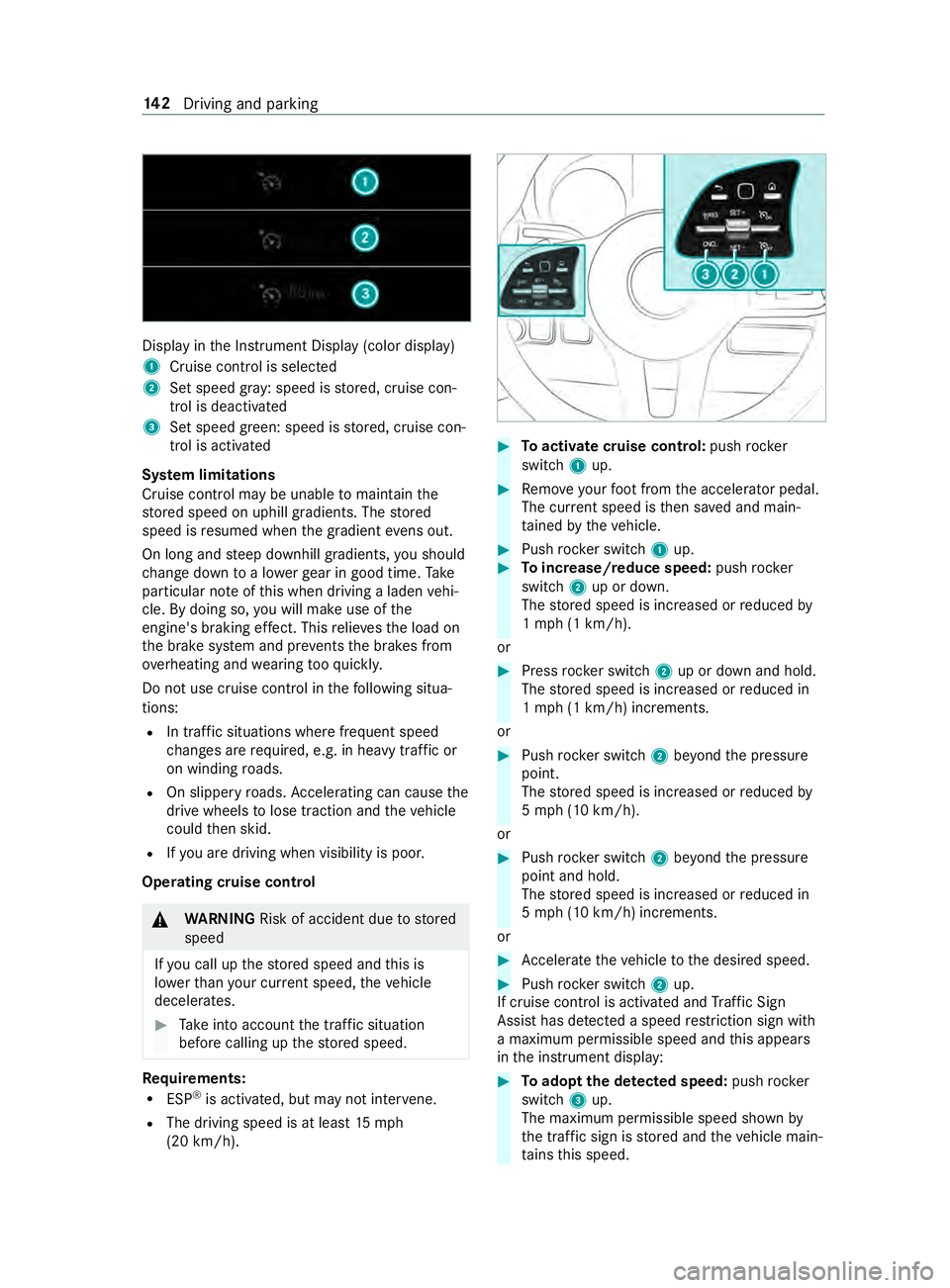
Displ
ayinthe Instrument Display (color display)
1 Cruise cont rol is selec ted
2 Set speed gr ay: speed is stored, cruise con‐
trol is deactivated
3 Set speed green: speed is stored, cruise con‐
trol is activated
Sy stem limitations
Cruise control may be unable tomaintain the
st ored speed on uphill gradients. The stored
speed is resumed when the gradient evens out.
On long and steep downhill gradients, you should
ch ange down toa lo werge ar in good time. Take
particular no teofthis when driving a laden vehi‐
cle. By doing so, you will make use of the
engine's braking ef fect. This relie vesth e load on
th e brake sy stem and pr events the brakes from
ove rheating and wearing tooqu ickl y.
Do not use cruise control in thefo llowing situa‐
tions:
R In traf fic situations whe refrequent speed
ch anges are requ ired, e.g. in heavy traf fic or
on winding roads.
R On slippe ryroads. Accele rating can cause the
drive wheels tolose traction and theve hicle
could then skid.
R Ifyo u are driving when visibility is poor.
Operating cruise cont rol&
WARNING Risk of accident due tostored
speed
If yo u call up thestored speed and this is
lo we rth an your cur rent speed, theve hicle
decelerates. #
Take into account the tra ffic situation
before calling up thestored speed. Re
quirements:
R ESP ®
is activated, but may not inter vene.
R The driving speed is at least 15mph
(20 km/h). #
Toactivate cruise control: pushrock er
switch 1up. #
Remo veyour foot from the accelerator pedal.
The cur rent speed is then sa ved and main‐
ta ined bytheve hicle. #
Push rocker switch 1up. #
Toincrease/reduce speed: pushrock er
switch 2up or down.
The stored speed is increased or reduced by
1 mp h (1 km/h).
or #
Press rocker switch 2up or down and hold.
The stored speed is increased or reduced in
1 mp h (1 km/h) increments.
or #
Push rocker switch 2beyond the pressure
point.
The stored speed is increased or reduced by
5 mp h (10 km/h).
or #
Push rocker switch 2beyond the pressure
point and hold.
The stored speed is increased or reduced in
5 mp h (10 km/h) increments.
or #
Accele rate theve hicle tothe desired speed. #
Push rocker switch 2up.
If cruise cont rol is activated and Traf fic Sign
Assi sthas de tected a speed restriction sign wi th
a maximum permissible speed and this appears
in the instrument display: #
Toadopt the de tected speed: pushrocker
switch 3up.
The maximum permissible speed shown by
th e traf fic sign is stored and theve hicle main‐
ta ins this speed. 14 2
Driving and pa rking