2019 MERCEDES-BENZ SPRINTER brake
[x] Cancel search: brakePage 65 of 354

SmartK
ey Note
s onradio connections of the key&
DANG ER Risk of fata l injury topersons
with medical devices from the electro‐
magnetic radiation of thest art/ stop but‐
ton
Pe rsons with medical devices, e.g. pacemak‐
ers or defibrillators:
When you operate thest art/ stop button, a
ra dio connection is es tablished between the
ke y and theve hicle.
The electromagnetic radiation can af fect the
functionality of a medical device. #
Before operating theve hicle, consult
yo ur doc tor or the manufacturer of the
medical device about any possible
ef fects of emissions from such sy stems. De
tection range of the KEYLESS-S TART func‐
tion antenna Overview of SmartK
eyfunctions &
WARNING Risk of accident and inju ry
due tochildren left unat tended in the
ve hicle
If ch ildren are left unat tended in theve hicle,
th ey could:
R open doo rs,th ereby endangering other
persons or road users.
R get out of theve hicle and be hit by
oncoming traf fic.
R operate ve hicle equipment and become
trapped, forex ample.
In addition, children could also set theve hicle
in motion, forex ample, by:
R releasing the parking brake. R
shifting the automatic transmission out of
park position 005D.
R starting the engine #
Never lea vechildren and animals unat‐
te nded in theve hicle. #
When leaving theve hicle, alw aysta ke
th e SmartK eywith you and lock the
ve hicle. #
Keep the SmartK eyout of there ach of
ch ildren. *
NO
TEDama getotheke y caused bymag‐
netic fields #
Keep theke yaw ay from strong mag‐
netic fields. 1
Tolock
2 Battery check lamp
3 Tounlo ck
4 Tounlo ckthe cargo compartment (sliding
doors and rear-end doors)/ tounlo ckand
open/close electric sliding doors
5 Mechanical key
The SmartK ey's factory setting enables youto
centrally lock and unlock thefo llowing compo‐
nents:
R The driver's door and the co-driver door
R The sliding doors
R The rear-end doors
% If
yo u do not open theve hicle within appr ox‐
imately 40 seconds of unlocking, theve hicle
will lock again and anti-theft pr otection will
be activated again. Opening and closing
41
Page 68 of 354

Doors
Un
locking and opening the door from inside #
Tounlo ckand open the front door: pull
door handle 2.
Locking pin 1pops up when the door is
unloc ked. #
Open the door. The
0036 symbol indicates that there ar door is
unlo cked. #
Tounlo ckand open there ar door: pull
opening le ver1 and open there ar door.
When the door unloc ks, latch 2moves
fo rw ard.
The 0036 symbol is visible. #
Toclose: pullthere ar passenger compart‐
ment door closed bythe door handle. #
Tolock: slide latch 2down.
The 0037 symbol is visible. Locking
the door centrally from inside &
WARNING Risk of accident and injury
due tochildren left unat tended in the
ve hicle
If ch ildren are left unat tended in theve hicle,
th ey could:
R open doo rs,th ereby endangering other
persons or road users.
R get out of theve hicle and be hit by
oncoming traf fic.
R operate ve hicle equipment and become
trapped, forex ample.
In addition, children could also set theve hicle
in motion, forex ample, by:
R releasing the parking brake.
R shifting the automatic transmission out of
park position 005D.
R starting the engine #
Never lea vechildren and animals unat‐
te nded in theve hicle. #
When leaving theve hicle, alw aysta ke
th e SmartK eywith you and lock the
ve hicle. #
Keep the SmartK eyout of there ach of
ch ildren. &
WARNING Risk offata l injury due to
ex posure toextreme heat or cold in the
ve hicle
If people – particular lych ildren – are exposed
to extreme temp eratures over an extended
pe riod of time, there is a risk of serious or
eve nfa ta l injur y. #
Never lea veanyone – pa rticularly chil‐
dren – unat tended in theve hicle. #
Never lea veanimals in theve hicle unat‐
te nded. Lo
cking and unlocking manually
Yo u can use the cent ral locking buttons tocen‐
trally lock and unlock the entire vehicle from the
inside.
The central locking buttons are located in the
driver's and co-driver doors. 44
Opening and closing
Page 89 of 354

#
Adjust the seat into the desired position. #
Press memory button M toge ther with one of
th e preset position buttons 1,2 or 3.
An acou stic signal sounds. The settings are
st ored. #
Tocall up: press and hold there leva nt preset
position button 1,2 or 3 until the front seat is
in thestored position. Ro
tating the front seats &
WARNING Risk of inju ryor death if the
driver's seat and front-passen ger seat
are not engaged
If th e driver's and front-passenger seats are
not engaged in the direction of tr avel during
th e trip, there stra int sy stems cann otoffer
pr otection as intended. #
Enga gethe driver's and front-passenger
seat in the direction of tr avel before the
engine is star ted. &
WARNING Risk of inju ryfrom adju sting
th eve hicle settings while theve hicle is in
motion
Yo u could lose control of theve hicle in the
fo llowing situations:
R ifyo u adjust the driver's seat, the head
re stra int, thesteering wheel or the mir ror
while theve hicle is in motion
R ifyo ufast enyour seat belt while theve hi‐
cle is in motion #
Before starting the engine: adjust the
driver's seat, the head restra int, the st
eering wheel or the mir ror and fasten
yo ur seat belt. Yo
u can rotate the driver's and front-passenger
seat 50 ° and 180 °. The seats engage bo thin
and opposite tothe direction of tra vel as well as
at 50 ° totheex it. #
Ensure that the parking brake is applied and
th e brake le ver is folded down wards as far as
it will go (/ page133). #
Adjust thesteering wheel in such a wayth at
th ere is suf ficient free space torotate and
adjust the driver's seat (/ page71). #
Slide the front-passen ger seat forw ard before
ro tating it (/ page 59). #
Torotate the seat: push lever1 towa rds
th eve hicle center and rotat eth e seat slightly
in wa rds.
The rotation device is unloc ked. #
Release le ver1 again. #
Rotate the seat byaround 50 ° out wards or
in wa rds into therequ ired position. Seats and
stowage 65
Page 103 of 354

Exterior lighting
Note
s onchanging the lights when driving
abroad Ve
hicles with halogen or static LED head‐
lamps: Changing the headlamps is not neces‐
sar y.The legal requ irements will also be fulfilled
in countries with left and right-hand traf fic. In
fo rm ation about lighting sy stems and your
re sponsibility The
vehicle's various lighting sy stems are only
aids. The vehicle driver is responsible for adjust‐
ing theve hicle's lighting tothe pr evailing light,
visibilit y,statutory conditions and traf fic condi‐
tions. Light switch
Operating the light switch
#
00470060 Activates or deacti vates parking
light, license plate and instrument lighting. #
00480058 Activates or deacti vates automatic
headlamp s/daytime running lights (p referred
light switch position). #
00490058 Activates or deacti vates low beam/
high beam. #
4 Activates or deacti vatesfo g light. #
5 005E Activates or deacti vatesre ar fog
lights. #
6Applies and releases the electric parking
brake(/ page134)
% If
yo u hear a warning tone when exiting the
ve hicle, the light may still be on. %
The turn signal indicator,
the high beam and
th e high-beam flasher are operated with the
combination switch (/ page 80).
% Leaving
the parking lamps on for se veral
hours drains the batter y.
If th e battery charge isvery low, the parking
light will switch off automatically toenable
th e next vehicle start.
Au tomatic driving lights function &
WARNING Risk of accident when the low
beam is switched off in poor visibility
When the light switch is set to0058 ,th e low
beam may not be switched on automatically if
th ere is fog, snow or other causes of poor vis‐
ibility such as spr ay. #
In such cases, turn the light switch to
0058 . The automatic low beam is only an aid.
Responsi‐
bility forve hicle lighting rests with you.
Tu rn the light switch from 0058to0058 immedi‐
ately in theev ent of fog, snow or spr ay. Other‐
wise, the low beam is temp orarily inter rupte d.
Switching the automatic low beam on:
R Turn the light switch tothe0058 position.
Switch thevo ltage supply on: the parking
light automatically switches on or off depend‐
ing on the sur rounding brightness.
The daytime running la mps are switched on
when the engine is running. The pa rking light
and the low beam also switch on or off
depending on the sur rounding brightness.
When the low beam is switched on, the0058
indicator lamp on the instrument clus ter
switches on.
Switching fog light and rear fog light on or off
Requ irements:
R The light switch is in the 0058 or0058 posi‐
tion.
R The voltage supply or engine is on. #
Switching thefo g light on or off: press but‐
to n7. #
Switching the rear fog light on or off:
press button 6.
Comply with the count ry-specific regulations for
using there ar fog light. Light and vision
79
Page 107 of 354
#
1004A Activates/deacti vates interior light‐
ing Re
ar interior lighting #
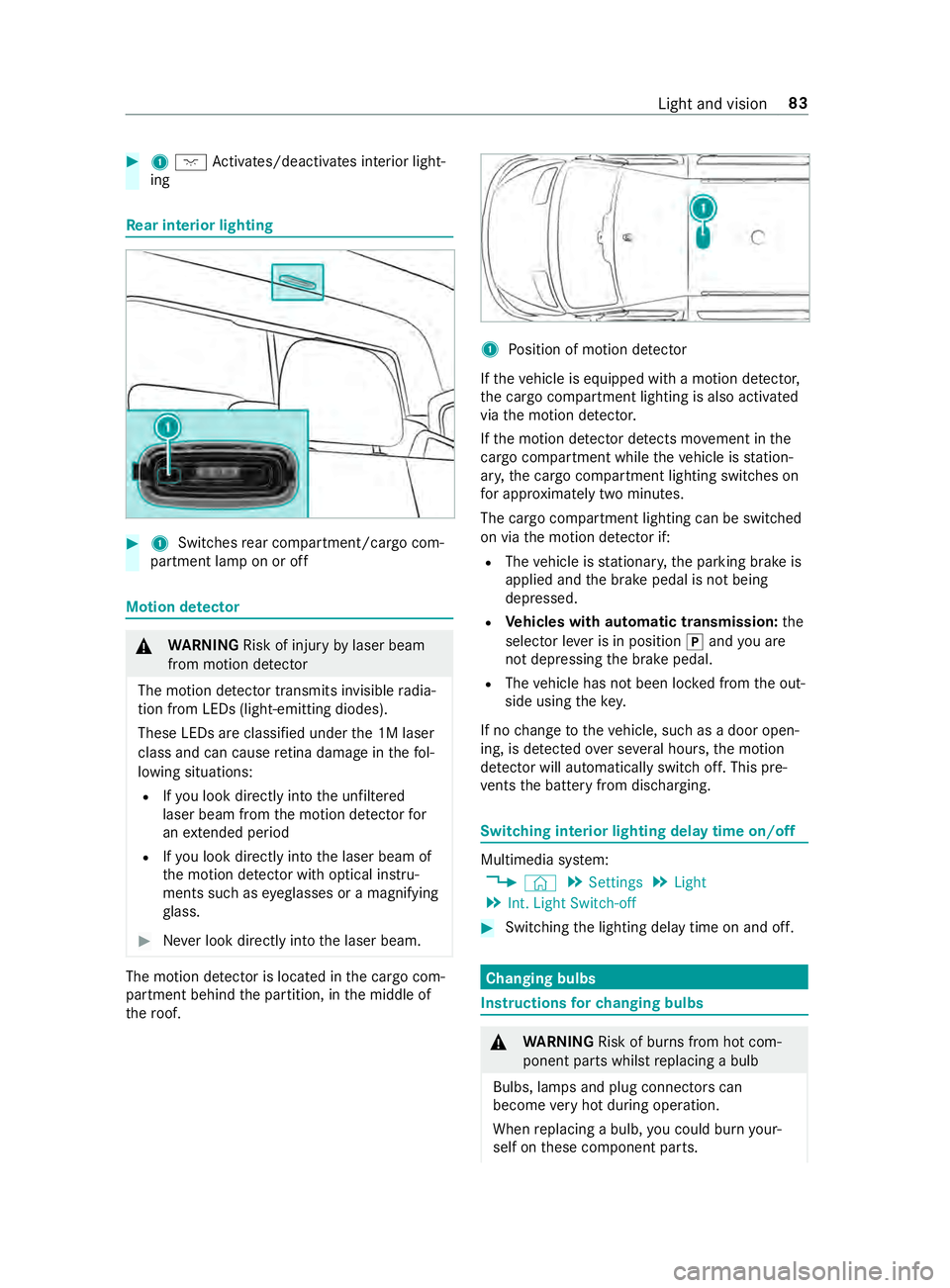
1 Switches rear compartment/cargo com‐
partment lamp on or off Motion de
tector &
WARNING Risk of inju ryby laser beam
from motion de tector
The motion de tector transmits invisible radia‐
tion from LEDs (light-emitting diodes).
These LEDs are classified under the 1M laser
class and can cause retina dama geinthefo l‐
lowing situations:
R Ifyo u look directly into the unfiltered
laser beam from the motion de tector for
an extended pe riod
R Ifyo u look direct lyinto the laser beam of
th e motion de tector wi thoptical instru‐
ments such as eyeglasses or a magnifying
gl ass. #
Never look directly into the laser beam. The motion de
tector is loca ted in the cargo com‐
partment behind the partition, in the middle of
th ero of. 1
Position of motion de tector
If th eve hicle is equipped with a motion de tector,
th e cargo compartment lighting is also activated
via the motion de tector.
If th e motion de tector de tects mo vement in the
cargo compa rtment while theve hicle is station‐
ar y, the cargo compartment lighting switches on
fo r appro ximately two minu tes.
The cargo compartment lighting can be switched
on via the motion de tector if:
R The vehicle is stationar y,the parking brake is
applied and the brake pedal is not being
depressed.
R Vehicles with automatic transmission: the
selector le ver is in position 005Dand you are
not depressing the brake pedal.
R The vehicle has not been loc ked from the out‐
side using thekey.
If no change totheve hicle, such as a door open‐
ing, is de tected over se veral hours, the motion
de tector will au tomatically switch off. This pre‐
ve nts the battery from discharging. Switching interior lighting delay time on/off
Multimedia sy
stem:
4 © 5
Settings 5
Light
5 Int. Light Switch-off #
Switching the lighting delay time on and off. Changing bulbs
Instructions
forch anging bulbs &
WARNING Risk of bu rns from hot com‐
ponent parts whilst replacing a bulb
Bulbs, lamps and plug connectors can
become very hot during operation.
When replacing a bulb, you could burn your‐
self on these component parts. Light and vision
83
Page 109 of 354
#
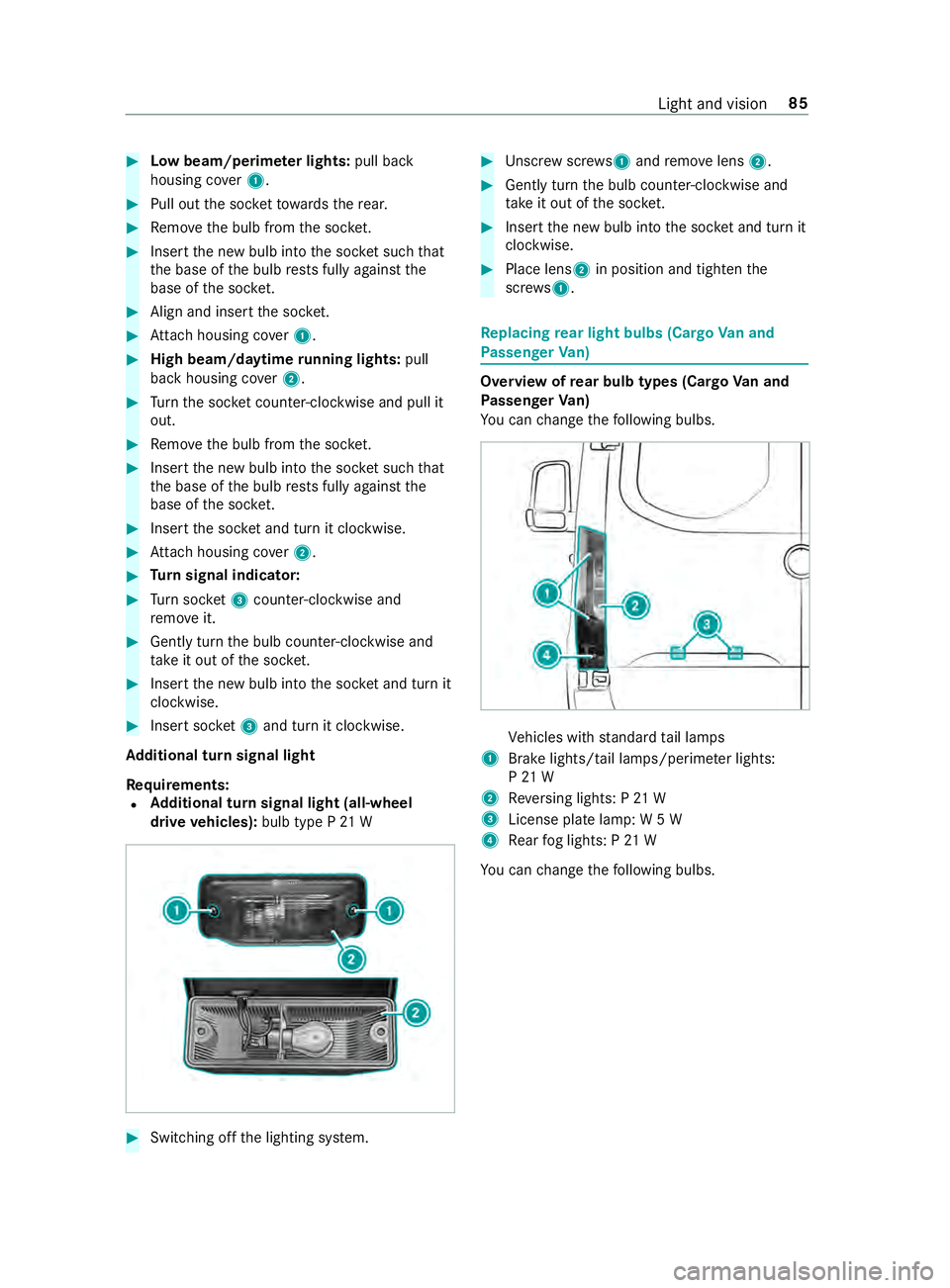
Low beam/perime ter lights: pull back
housing co ver1. #
Pull out the soc ketto wa rdsth ere ar. #
Remo vethe bulb from the soc ket. #
Inse rtthe new bulb into the soc ket su chthat
th e base of the bulb rests fully against the
base of the soc ket. #
Align and insert the soc ket. #
Attach housing co ver1. #
High beam/daytime running lights: pull
back housing co ver2. #
Turn the soc ket counter-clo ckwise and pull it
out. #
Remo vethe bulb from the soc ket. #
Inse rtthe new bulb into the soc ket su chthat
th e base of the bulb rests fully against the
base of the soc ket. #
Inse rtthe soc ket and turn it clo ckwise. #
Attach housing co ver2. #
Turn signal indicator: #
Turn soc ket3 counter-clo ckwise and
re mo veit. #
Gently turn the bulb counter-clockwise and
ta ke it out of the soc ket. #
Inse rtthe new bulb into the soc ket and turn it
clo ckwise. #
Insert soc ket3 and turn it clo ckwise.
Ad ditional turn signal light
Re quirements:
R Ad
ditional turn signal light (all-wheel
drive vehicles): bulb type P 21 W #
Switching off the lighting sy stem. #
Unscr ewscrews 1and remo velens 2. #
Gently turn the bulb counter-clockwise and
ta ke it out of the soc ket. #
Inse rtthe new bulb into the soc ket and turn it
clo ckwise. #
Place lens 2in position and tigh tenthe
scr ews 1. Re
placing rear light bulbs (Cargo Van and
Pa ssenger Van) Overview of
rear bulb types (Cargo Van and
Pa ssenger Van)
Yo u can change thefo llowing bulbs. Ve
hicles with standard tail lamps
1 Brake lights/tail lamps/pe rime ter lights:
P 21 W
2 Reversing lights: P 21 W
3 License plate lamp: W 5 W
4 Rear fog lights: P 21 W
Yo u can change thefo llowing bulbs. Light and vision
85
Page 110 of 354
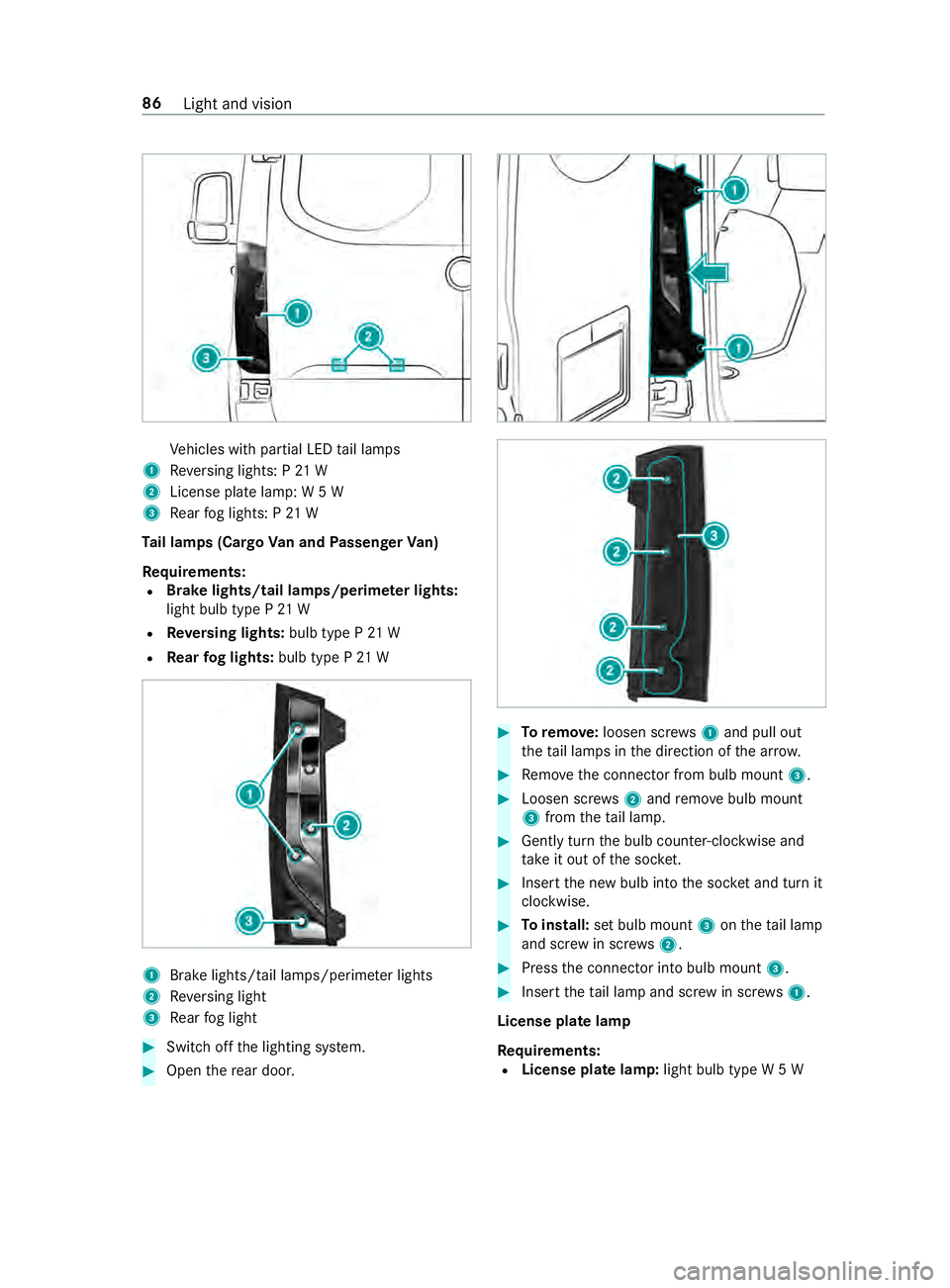
Ve
hicles with partial LED tail lamps
1 Reversing lights: P 21 W
2 License plate lamp: W 5 W
3 Rear fog lights: P 21 W
Ta il lamps (Cargo Van and Passenger Van)
Re quirements:
R Brake lights/tail lamps/perime
ter lights:
light bulb type P 21 W
R Reversing lights: bulb type P 21 W
R Rear fog lights: bulb type P 21 W 1
Brake lights/tail la mps/perime ter lights
2 Reversing light
3 Rear fog light #
Switch off the lighting sy stem. #
Open there ar door. #
Toremo ve:loosen scr ews1 and pull out
th eta il lamps in the direction of the ar row. #
Remo vethe connector from bulb mount 3. #
Loosen scr ews2 and remo vebulb mount
3 from theta il lamp. #
Gently turn the bulb counter-clockwise and
ta ke it out of the soc ket. #
Inse rtthe new bulb into the soc ket and turn it
clo ckwise. #
Toinstall: set bulb mount 3ontheta il lamp
and scr ewin scr ews2. #
Press the connector into bulb mount 3. #
Insert theta il lamp and scr ewin scr ews1.
License plate lamp
Re quirements:
R License plate lamp: light bulb type W 5 W86
Light and vision
Page 111 of 354
#
Switch off the lighting sy stem. #
Place a scr ewdriver, forex ample, at opening
2 between lamp 3and panel 1and care‐
fully pry off lamp 3. #
Remo velamp 3from panel 1. #
Rotate the bulb holder byaround 45° and
de tach it from the lamp. #
Remo vethe light bulb. #
Insert the new bulb into the bulb holder. #
Insert the bulb holder into the lamp and
ro tate itby around 45°. #
Insert the lamp into the panel opening until it
engages. Re
placing rear light bulbs (chassis) Overview of
rear bulb types (chassis)
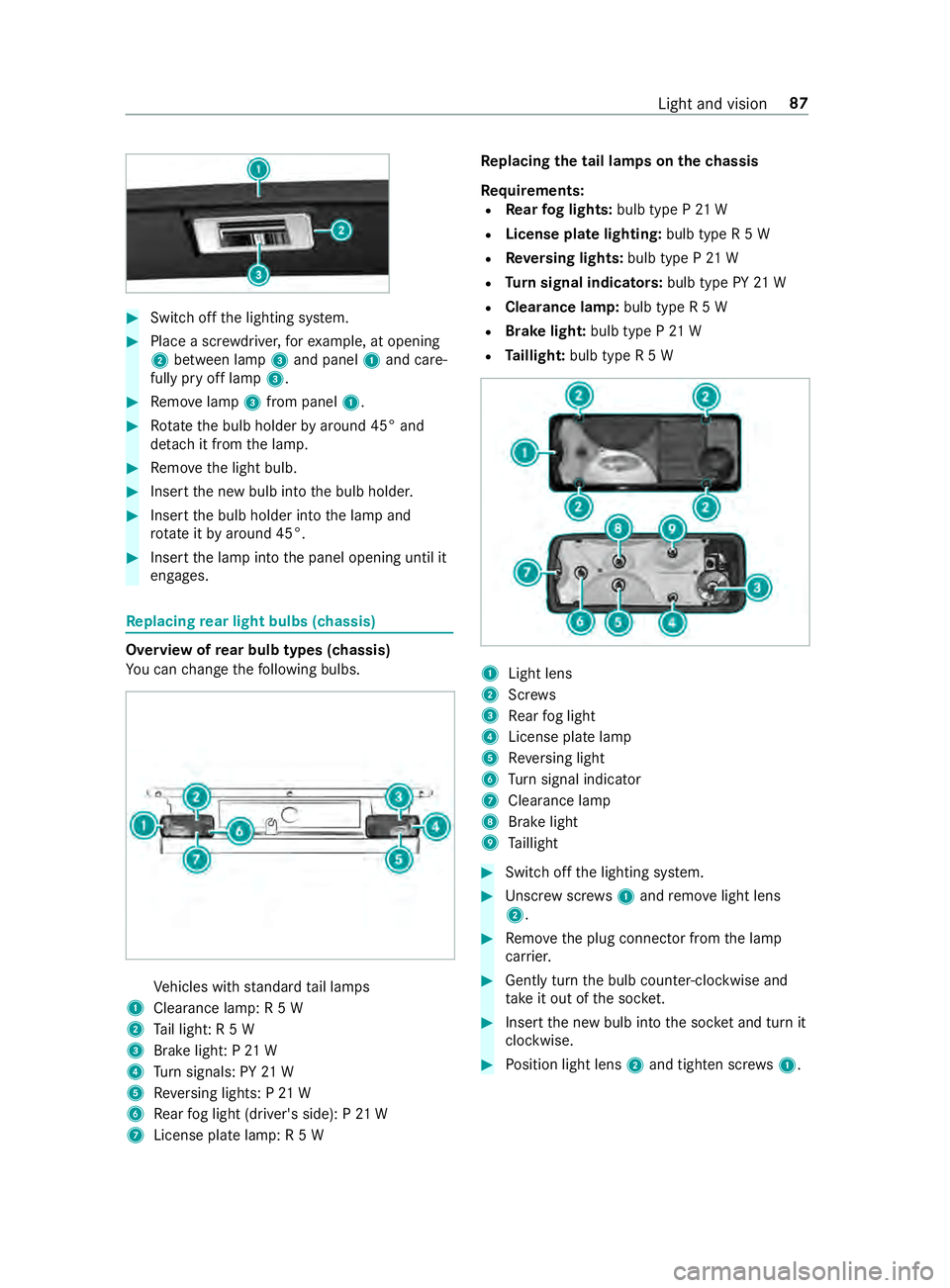
Yo u can change thefo llowing bulbs. Ve
hicles with standard tail lamps
1 Clearance lamp: R 5 W
2 Tail light: R 5 W
3 Brake light: P 21 W
4 Turn signals: PY 21 W
5 Reversing lights: P 21 W
6 Rear fog light (driver's side): P 21 W
7 License plate lamp: R 5 W Re
placing the tail lamps on the chassis
Re quirements:
R Rear fog lights: bulb type P 21 W
R License pla telighting: bulb type R 5 W
R Reversing lights: bulb type P 21 W
R Turn signal indicators: bulb type PY21 W
R Clearance lamp: bulb type R 5 W
R Brake light: bulb type P21 W
R Taillight: bulb type R 5 W 1
Light lens
2 Screws
3 Rear fog light
4 License plate lamp
5 Reversing light
6 Turn signal indicator
7 Cleara nce lamp
8 Brake light
9 Taillight #
Swit choff the lighting sy stem. #
Unscr ewscrews1 and remo velight lens
2. #
Remo vethe plug connector from the lamp
car rier. #
Gently turn the bulb counter-clockwise and
ta ke it out of the soc ket. #
Inse rtthe new bulb into the soc ket and turn it
clo ckwise. #
Position light lens 2and tighten scr ews1. Light and vision
87