2019 MERCEDES-BENZ SL CLASS brakes
[x] Cancel search: brakesPage 158 of 330
Active Distance Assist DISTRONIC
General notes
Active Distance Assist DISTRONIC regulatesthe speed and automatically helps you main-tain the distance from the vehicle detected infront. Vehicles are detected with the aid of theradar sensor system. Active Distance AssistDISTRONIC brakes automatically to avoidexceeding the set speed or to maintain thedesignated distance from the vehicle in front.
You must select a lower gear in good time onlong and steep downhill gradients, especially ifthe vehicle is laden. By doing so, you will makeuse of the braking effect of the engine. Thisrelieves the load on the brake system and pre-vents the brakes from overheating and wear-ing too quickly.
If Active Distance Assist DISTRONIC detectsthat there is a risk of a collision with the vehi-cle in front, you will be warned visually andaudibly. Active Distance Assist DISTRONICcannot prevent a collision without your inter-vention. An intermittent warning tone will thensound and the distance warning lamp will lightup in the instrument cluster. Brake immedi-ately in order to increase the distance fromthe vehicle in front, or take evasive action, pro-vided it is safe to do so.
For Active Distance Assist DISTRONIC toassist you when driving, the radar sensor sys-tem must be operational.
Active Distance Assist DISTRONIC operates inthe speed range between 0 mph (0 km/h) and120 mph (200 km/h).
Do not use Active Distance Assist DISTRONICwhile driving on roads with steep gradients.
As Active Distance Assist DISTRONIC trans-mits radar waves, it can resemble the radardetectors of the responsible authorities. Youcan refer to the relevant chapter in the Opera-tor's Manual if questions are asked about this.
iUSA only:
This device has been approved by the FCCas a "Vehicular Radar System". The radarsensor is intended for use in an automotiveradar system only. Removing, tamperingwith, or altering the device will void any war-ranties, and is not permitted by the FCC. Donot tamper with, alter, or use in any non-approved way.
Any unauthorized modification to this devicecould void the user's authority to operatethe equipment.
iCanada only: This device complies withRSS-210 of Industry Canada. Operation issubject to the following two conditions:
1. This device may not cause interference,and
2. This device must accept any interferencereceived, including interference that maycause undesired operation of the device.
Removal, tampering, or altering of thedevice will void any warranties, and is notpermitted. Do not tamper with, alter, or usein any non-approved way.
Any unauthorized modification to this devicecould void the user's authority to operatethe equipment.
Important safety notes
GWARNING
Active Distance Assist DISTRONIC does not
react to:
Rpeople or animals
Rstationary objects in the road, e.g. stop-
ped or parked vehicles
Roncoming vehicles and crossing traffic
As a result, Active Distance Assist
DISTRONIC may neither give warnings nor
intervene in such situations. There is a risk
of an accident.
Always pay careful attention to the traffic
situation and be ready to brake.
GWARNING
Active Distance Assist DISTRONIC does not
react to:
Rpeople or animals
Rstationary objects in the road, e.g. stop-
ped or parked vehicles (vehicles without
the Driving Assistance package)
Rstationary objects in the road, e.g. stop-
ped or parked vehicles, if sufficient detec-
tion is not possible (vehicles with the Driv-
ing Assistance package)
Roncoming vehicles and crossing traffic
156Driving systems
Driving and pa rking
Page 159 of 330
As a result, Active Distance Assist
DISTRONIC may neither give warnings nor
intervene in such situations. There is a risk
of an accident.
Always pay careful attention to the traffic
situation and be ready to brake.
GWARNING
Distance keeping assistant cannot always
clearly identify other road users and com-
plex traffic situations.
In such cases, distance keeping assistant
can:
Raccelerate or brake the vehicle unexpect-
edly
Rintervene unexpectedly
There is a risk of an accident.
Continue to drive carefully and be ready to
brake, especially if distance keeping assis-
tant warns you.
GWARNING
Active Distance Assist DISTRONIC brakes
your vehicle with up to 50% of the maximum
possible deceleration. If this deceleration is
not sufficient, Active Distance Assist
DISTRONIC alerts you with a visual and
acoustic warning. There is a risk of an acci-
dent.
Adjust your speed in these cases and main-
tain sufficient distance.
Apply the brakes yourself and/or take eva-
sive action.
!When Active Distance Assist DISTRONICor the HOLD function is activated, the vehi-cle brakes automatically in certain situa-tions.
To avoid damage to the vehicle, deactivateActive Distance Assist DISTRONIC and theHOLD function in the following or similar sit-uations:
Rwhen towing the vehicle
Rin the car wash
Active Distance Assist DISTRONIC can neitherreduce the risk of an accident if you fail to
adapt your driving style, nor override the lawsof physics. Active Distance Assist DISTRONICcannot take into account road, weather or traf-fic conditions. Active Distance AssistDISTRONIC is only an aid. You are responsiblefor the distance to the vehicle in front, forvehicle speed, for braking in good time and forstaying in your lane.
Do not use Active Distance Assist DISTRONIC:
RIn road and traffic conditions which do notallow you to maintain a constant speed, e.g.in heavy traffic or on winding roads
Ron slippery road surfaces. Braking or accel-erating could cause the drive wheels to losetraction and the vehicle could then skid
RIn poor visibility, e.g. due to fog, heavy rainor snow
Active Distance Assist DISTRONIC may notdetect narrow vehicles driving in front, e.g.motorcycles, or vehicles driving in a staggeredformation.
In particular, the detection of obstacles can beimpaired if:
RThere is dirt on the sensors or anything elsecovering the sensors
RThere is snow or heavy rain
RThere is interference by other radar sources
RThere are strong radar reflections, for exam-ple in parking garages
If Active Distance Assist DISTRONIC no longerdetects a vehicle in front, Distance PilotDISTRONIC may unexpectedly accelerate tothe speed stored.
This speed may:
RBe too high if you are driving in a turninglane or an exit lane
RBe so high when driving in the right-handlane that you overtake vehicles in the left-hand lane
RBe so high in the left lane that you passvehicles driving on the right
If there is a change of drivers, advise the newdriver of the speed stored.
Driving systems157
Driving an d parking
Z
Page 167 of 330
HOLD function
General notes
The HOLD function can assist the driver in thefollowing situations:
RWhen pulling away, especially on steepslopes
RWhen maneuvering on steep slopes
RWhen waiting in traffic
The vehicle is kept stationary without thedriver having to depress the brake pedal.
The braking effect is canceled and the HOLDfunction deactivated when you depress theaccelerator pedal to pull away.
Important safety notes
GWARNING
If the vehicle is only braked using the HOLD
function, the vehicle may roll away in the fol-
lowing situations when you leave the vehi-
cle:
Rif there is a malfunction in the system or
in the voltage supply
Rif the HOLD function is deactivated by
depressing the accelerator pedal or brake
pedal, e.g. by a vehicle occupant
There is a risk of an accident.
Always deactivate the HOLD function and
secure the vehicle against rolling away
before you leave it.
!When Active Distance Assist DISTRONICor the HOLD function is activated, the vehi-cle brakes automatically in certain situa-tions.
To avoid damage to the vehicle, deactivateActive Distance Assist DISTRONIC and theHOLD function in the following or similar sit-uations:
Rwhen towing the vehicle
Rin the car wash
Deactivating the HOLD function (Ypage 165).
Activation conditions
You can activate the HOLD function if all of thefollowing conditions are fulfilled:
Rthe vehicle is stationary.
Rthe engine is running or if it has been auto-matically switched off by the ECO start/stop function.
Rthe driver's door is closed or your seat beltis fastened.
Rthe electric parking brake is released.
Rthe transmission is in position[,^or\\.
RActive Distance Assist DISTRONIC is deacti-vated
Activating the HOLD function
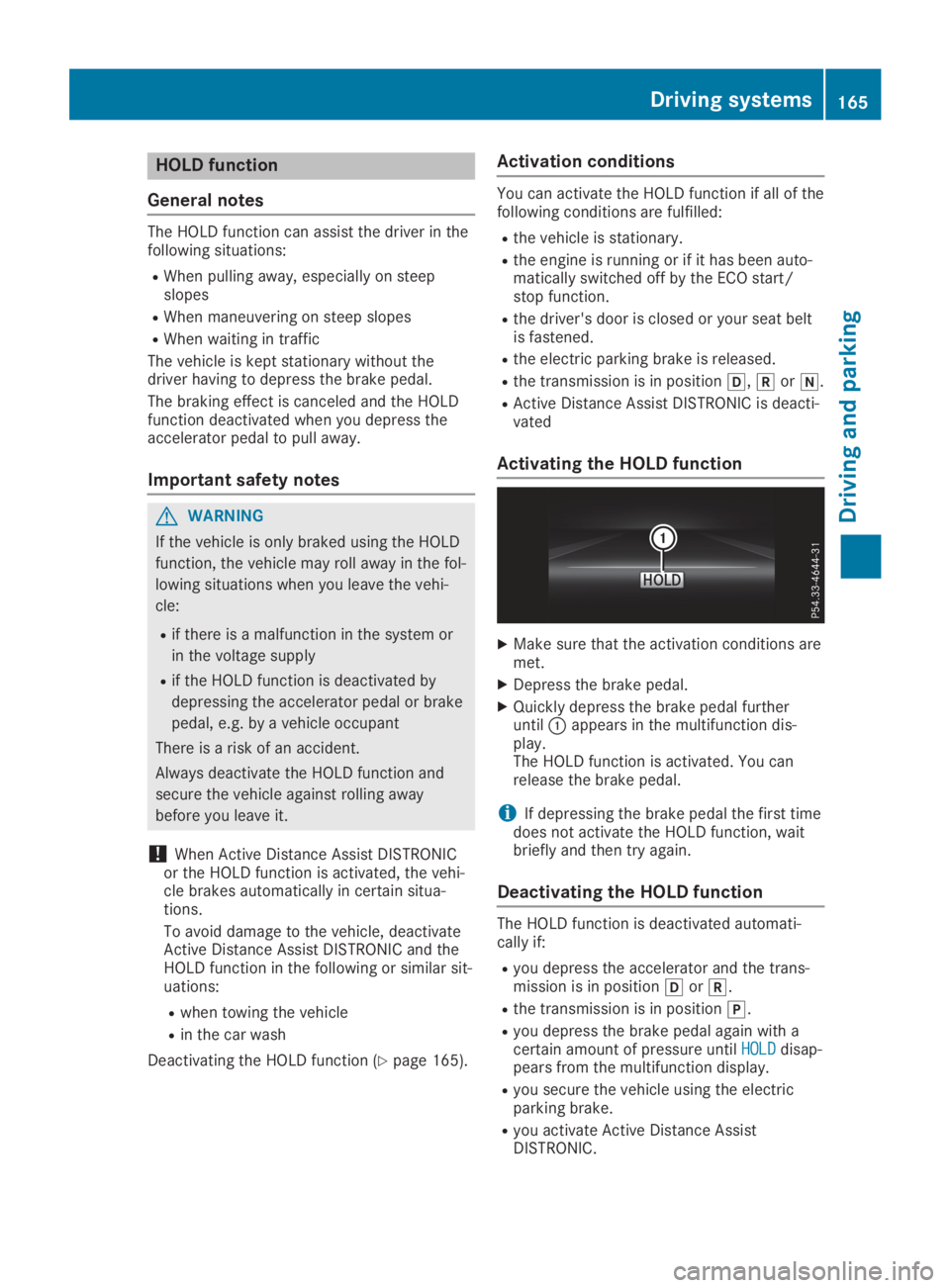
XMake sure that the activation conditions aremet.
XDepress the brake pedal.
XQuickly depress the brake pedal furtheruntilCappears in the multifunction dis-play.The HOLD function is activated. You canrelease the brake pedal.
iIf depressing the brake pedal the first timedoes not activate the HOLD function, waitbriefly and then try again.
Deactivating the HOLD function
The HOLD function is deactivated automati-cally if:
Ryou depress the accelerator and the trans-mission is in position[or^.
Rthe transmission is in position].
Ryou depress the brake pedal again with acertain amount of pressure untilHOLDHOLDdisap-pears from the multifunction display.
Ryou secure the vehicle using the electricparking brake.
Ryou activate Active Distance AssistDISTRONIC.
Driving systems165
Driving and parking
Z
Page 168 of 330
![MERCEDES-BENZ SL CLASS 2019 Owners Manual iAfter a time, the electric parking brakesecures the vehicle and relieves the servicebrake.
When the HOLD function is activated, thetransmission is shifted automatically to posi-tion]if:
Rthe driver&](/manual-img/4/59125/w960_59125-167.png "MERCEDES-BENZ SL CLASS 2019 Owners Manual iAfter a time, the electric parking brakesecures the vehicle and relieves the servicebrake.
When the HOLD function is activated, thetransmission is shifted automatically to posi-tion]if:
Rthe driver&")
iAfter a time, the electric parking brakesecures the vehicle and relieves the servicebrake.
When the HOLD function is activated, thetransmission is shifted automatically to posi-tion]if:
Rthe driver's seat belt is not fastened and thedriver's door is open.
Rthe engine is switched off, unless it is auto-matically switched off by the ECO start/stop function.
The electric parking brake secures the vehicleautomatically if the HOLD function is activatedwhen the vehicle is stationary and:
Ra system malfunction occurs
Rthe power supply is not sufficient
If a malfunction in the electric parking brakeoccurs, the transmission may also be shiftedinto position]automatically.
RACE START
Important safety notes
iRACE START must not be used on normalroads. RACE START must only be activatedand used on dedicated road circuits, outsideof public road use.
iRACE START is only available forMercedes‑AMG vehicles.
RACE START enables optimal accelerationfrom a standing start. For this, a suitably high-grip road surface is required and the vehicleand tires must be in good working order.
GWARNING
If you use RACE START, individual tires may
start to spin and the vehicle could skid.
Depending on the selected ESP®mode,
there is an increased risk of skidding and
having an accident. Make sure that no per-
sons, animals or obstacles are within range
of the vehicle.
iObserve the safety notes on driving safetysystems (Ypage 60).
Be sure to read the safety notes and infor-
mation on ESP®(Ypage 65).
Activation conditions
You can activate RACE START if:
Rthe doors are closed.
Rthe engine is running and it has reached anoperating temperature of approximately160 ‡ (71 †). This is the case when the oiltemperature gage in the multifunction dis-play is shown in white.
Rthe engine is running and the engine andtransmission are at operating temperature.This is the case when the oil temperaturegage in the multifunction display is shown inwhite (Ypage 202).
RESP®is functioning correctly (Ypage 66)
Rthe drive programS,S+orRaceis selected(Ypage 133)
Rthe steering wheel is in the straight-aheadposition
Rthe vehicle is stationary and the brake pedalis depressed (left foot)
Rthe transmission is in position[
Activating RACE START
iWhen manual mode (Ypage 141) is active,the transmission automatically shifts up inthe RACE START drive program. This func-tion supports maximum acceleration withRACE START. After going through an accel-erating process once from a stationary posi-tion, this function is automatically deactiva-ted.
XDepress the brake pedal with your left footand keep it depressed.
XPull and hold both steering wheel paddleshifters.
XTheRACE START Confirm: Paddle UPRACE START Confirm: Paddle UPCancel: Paddle DOWNCancel: Paddle DOWNmessage appears inthe multifunction display.
XRelease both steering wheel paddle shifters.
iIf the activation conditions are no longerfulfilled, RACE START is canceled. TheRACE START CanceledRACE START Canceledmessage appears inthe multifunction display.
166Driving systems
Driving an d parking
Page 175 of 330

exiting a parking space. Make sure that thereare no persons, animals or objects in themaneuvering area when you are maneuveringor parking.
!When parking, pay particular attention toobjects above or below the sensors, such asflower pots or trailer drawbars.PARKTRONIC does not detect such objectswhen they are in the immediate vicinity ofthe vehicle. You could damage the vehicleor the objects.
The sensors may not detect snow and otherobjects that absorb ultrasonic waves.
Ultrasonic sources such as an automatic carwash, the compressed-air brakes on a truckor a pneumatic drill could causePARKTRONIC to malfunction.
PARKTRONIC may not function correctly onuneven terrain.
Parking Assist PARKTRONIC is activated auto-matically when you:
Rswitch on the ignition
Rshift the transmission to position[,^or\\
Rrelease the electric parking brake
Parking Assist PARKTRONIC is deactivated atspeeds above 11 mph (18 km/h). It is reacti-vated at lower speeds.
Range of the sensors
General notes
Parking Assist PARKTRONIC does not take intoaccount obstacles located:
Rbelow the detection range, such as persons,animals or objects
Rabove the detection range, e.g. overhangingloads, tail sections or loading ramps oftrucks
CSensors in the front bumper, left-hand side(example)
The sensors must be free from dirt, ice orslush. They can otherwise not function cor-rectly. Clean the sensors regularly, taking carenot to scratch or damage them (Ypage 275).
Range
Front sensors
CenterApprox. 40 in (approx.100 cm)
CornersApprox. 24 in (approx.60 cm)
Driving systems173
Driving and parking
Z
Page 189 of 330
Either no braking application, or a course-cor-recting brake application adapted to the driv-ing situation occurs if:
Rthere are vehicles or obstacles, e.g. crashbarriers, located on both sides of your vehi-cle.
Ra vehicle approaches you too closely at theside.
Ryou have adopted a sporty driving style withhigh cornering speeds.
Ryou clearly brake or accelerate.
Ra driving safety system intervenes, e.g.
ESP®or PRE-SAFE®Brake.
RESP®is switched off.
Ra loss of tire pressure or a defective tire isdetected.
Switching on Active Blind Spot Assist
XMake sure that Active Blind Spot Assist isactivated (Ypage 199).
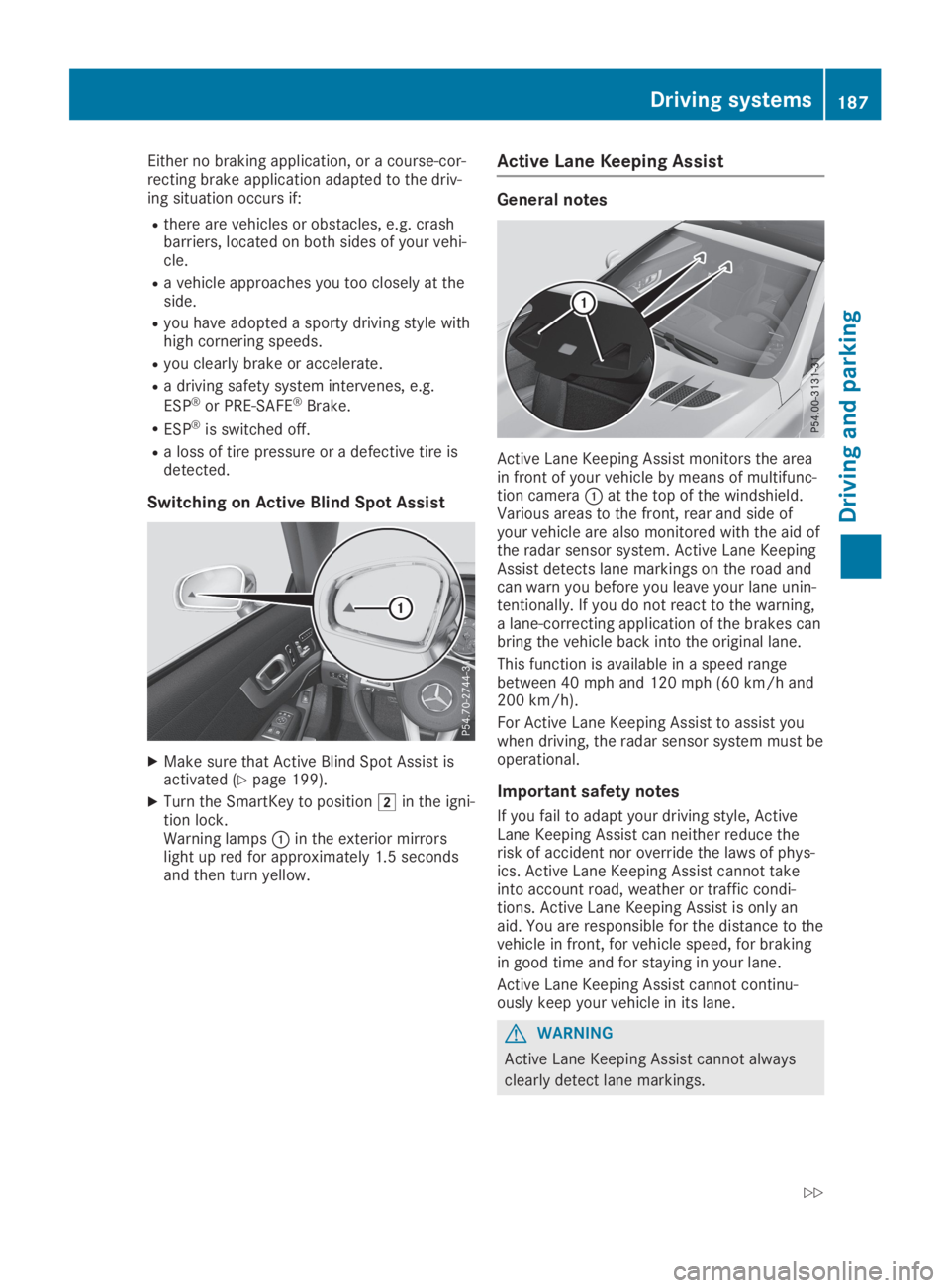
XTurn the SmartKey to positionHin the igni-tion lock.Warning lampsCin the exterior mirrorslight up red for approximately 1.5 secondsand then turn yellow.
Active Lane Keeping Assist
General notes
Active Lane Keeping Assist monitors the areain front of your vehicle by means of multifunc-tion cameraCat the top of the windshield.Various areas to the front, rear and side ofyour vehicle are also monitored with the aid ofthe radar sensor system. Active Lane KeepingAssist detects lane markings on the road andcan warn you before you leave your lane unin-tentionally. If you do not react to the warning,a lane-correcting application of the brakes canbring the vehicle back into the original lane.
This function is available in a speed rangebetween 40 mph and 120 mph (60 km/h and200 km/h).
For Active Lane Keeping Assist to assist youwhen driving, the radar sensor system must beoperational.
Important safety notes
If you fail to adapt your driving style, ActiveLane Keeping Assist can neither reduce therisk of accident nor override the laws of phys-ics. Active Lane Keeping Assist cannot takeinto account road, weather or traffic condi-tions. Active Lane Keeping Assist is only anaid. You are responsible for the distance to thevehicle in front, for vehicle speed, for brakingin good time and for staying in your lane.
Active Lane Keeping Assist cannot continu-ously keep your vehicle in its lane.
GWARNING
Active Lane Keeping Assist cannot always
clearly detect lane markings.
Driving systems187
Driving an d parking
Z
Page 273 of 330
Rsolvents
Rcleaning agents containing solvents
Do not scrub.
Do not touch the surfaces and films withhard objects, e.g. rings or ice scrapers. Oth-erwise, you may scratch or damage the sur-faces and films.
!Do not park your vehicle for a long periodof time directly after cleaning, particularlyafter cleaning the wheel rim with wheelcleaner. Wheel cleaner can lead to theincreased corrosion of the brake discs andpads. Therefore, drive for a few minutesafter cleaning. By heating up the brakes, thebrake discs and pads dry. The vehicle canthen be parked for a long period of time.
Regular care of your vehicle is a condition forretaining the quality in the long term.
Use care products and cleaning agents recom-mended and approved by Mercedes-Benz.
Washing the vehicle and cleaning
the paintwork
Automatic car wash
GWARNING
Braking efficiency is reduced after washing
the vehicle. There is a risk of an accident.
After the vehicle has been washed, brake
carefully while paying attention to the traffic
conditions until full braking power is
restored.
!When DISTRONIC PLUS or the HOLD func-tion is activated, the vehicle brakes auto-matically in certain situations.
To avoid damage to the vehicle, deactivateDISTRONIC PLUS and the HOLD function inthe following or similar situations:
Rwhen towing the vehicle
Rin the car wash
!It is preferable to use car washes withadjustable high-pressure pre-cleaning thatcorresponds to the specification for theCabriolet program. In car washes that usehigh water pressures, there is a risk that asmall amount of water may leak into thevehicle.
!Vehicles with HANDS-FREE ACCESS: if aSmartKey with KEYLESS-GO is within thedetection range of the KEYLESS-GOantenna, the following situations could leadto the unintentional opening of the trunk lid:
Rusing a car wash
Rusing a power washer
Make sure that the SmartKey is at least6.5 ft (2 m) away from the vehicle.
!Never clean your vehicle in a TouchlessAutomatic Car Wash as these use specialcleaning agents. These cleaning agents candamage the paintwork or plastic parts.
If you have your vehicle cleaned in a high-pressure automatic car wash, smallamounts of water may enter the vehicle.
!Make sure that the automatic transmissionis in positionNwhen washing your vehiclein a tow-through car wash. The vehicle couldbe damaged if the transmission is in anotherposition.
!Make sure that:
Rthe side windows and the roof are com-pletely closed
Rthe climate control blower is switched off
Rthe windshield wiper switch is at position0
The vehicle could otherwise be damaged.
You can clean the vehicle at an automatic carwash from the very start.
Preferably clean the vehicle at automatic carwashes that use textile washing elementswithout brushes. This prevents fine scratchesfrom forming on the paintwork and film.
If the vehicle is very dirty, pre-wash it beforecleaning it in an automatic car wash.
After using an automatic car wash, wipe offwax from the windshield and the wiper blades.This will prevent smears and reduce wipingnoises caused by residue on the windshield.
iVehicles with decorative film: select awash program without hot wax at the auto-matic car wash.
Washing by hand
In some countries, washing by hand is onlyallowed at specially equipped washing bays.
Care271
Maintenance and care
Z
Page 276 of 330

a decorative film when the decorative film isremoved.
iHave work or repairs on decorative filmcarried out at a qualified specialist work-shop. Mercedes-Benz recommends that youuse an authorized Mercedes-Benz Center forthis purpose.
Cleaning the vehicle parts
Cleaning the wheels
GWARNING
The water jet from a circular jet nozzle (dirt
blasters) can cause invisible exterior dam-
age to the tires or chassis components.
Components damaged in this way may fail
unexpectedly. There is a risk of an accident.
Do not use power washers with circular jet
nozzles to clean the vehicle. Have damaged
tires or chassis components replaced imme-
diately.
!Do not use acidic wheel cleaning productsto remove brake dust. This could damagewheel bolts and brake components.
!Do not park your vehicle for a long periodof time directly after cleaning, particularlyafter cleaning the wheel rim with wheelcleaner. Wheel cleaner can lead to theincreased corrosion of the brake discs andpads. Therefore, drive for a few minutesafter cleaning. By heating up the brakes, thebrake discs and pads dry. The vehicle canthen be parked for a long period of time.
Cleaning the windows
GWARNING
You could become trapped by the wind-
shield wipers if they start moving while
cleaning the windshield or wiper blades.
There is a risk of injury.
Always switch off the windshield wipers and
the ignition before cleaning the windshield
or wiper blades.
!Only fold the windshield wipers away fromthe windshield when vertical. Otherwise, youwill damage the hood.
!Do not use dry cloths, abrasive products,solvents or cleaning agents containing sol-vents to clean the inside of the windows. Donot touch the insides of the windows withhard objects, e.g. an ice scraper or ring.There is otherwise a risk of damaging thewindows.
!Clean the water drainage channels of thewindshield and the rear window at regularintervals. Deposits such as leaves, petalsand pollen may under certain circumstancesprevent water from draining away. This canlead to corrosion damage and damage toelectronic components.
XClean the inside and outside of the windowswith a damp cloth and a cleaning productthat is recommended and approved byMercedes-Benz.
Cleaning wiper blades
GWARNING
If the windshield wipers are set in motion
while you are cleaning the windshield, you
can be trapped by the wiper arm. There is a
risk of injury.
Always switch off the windshield wipers and
the ignition before cleaning the windshield.
!Do not pull the wiper blade. Otherwise, thewiper blade could be damaged.
!Do not clean wiper blades too often anddo not rub them too hard. Otherwise, thegraphite coating could be damaged. Thiscould cause wiper noise.
!Hold the wiper arm securely when foldingback. The windshield could be damaged ifthe wiper arm smacks against it suddenly.
XFold the windshield wiper arms away fromthe windshield.
XCarefully clean the wiper blades with adamp cloth.
XFold the windshield wiper arms back againbefore switching on the ignition.
274Care
Maintenance and care