2019 MERCEDES-BENZ SL CLASS bulb
[x] Cancel search: bulbPage 4 of 330

Index.......................................................4
Digital Operator's Manual..................23
Introduction ...........................................23
Operation ............................................... 23
Introduction.........................................24
Protecting the environment ...................24
Genuine Mercedes-Benz parts ...............24
Operator's Manual ................................. 25
Service and vehicle operation ................25
Operating safety .................................... 27
QR code for rescue card ........................ 29
Data storage .......................................... 29
Information on copyright ....................... 31
At a glance...........................................32
Cockpit .................................................. 32
Instrument cluster ................................. 33
Multifunction steering wheel ................. 34
Center console ...................................... 35
Overhead control panel .........................38
Door control panel ................................. 39
Safety...................................................40
Panic alarm ............................................ 40
Occupant safety .................................... 40
Children in the vehicle ........................... 57
Pets in the vehicle ................................. 59
Driving safety systems ........................... 60
Protection against theft .........................72
Opening and closing...........................74
SmartKey ............................................... 74
Doors ..................................................... 79
Trunk ..................................................... 81
Side windows ......................................... 87
Roof .......................................................90
Seats, steering wheel and mir-
rors.......................................................97
Correct driver's seat position ................97
Seats ..................................................... 97
Steering wheel ..................................... 103
Mirrors ................................................. 105
Memory function ................................. 107
Lights and windshield wipers..........109
Exterior lighting ................................... 109
Interior lighting .................................... 112
Replacing bulbs ................................... 113
Windshield wipers ................................ 113
Climate control.................................116
Overview of climate control systems ... 116
Operating the climate control sys-
tems .................................................... 118
Setting the air vents ............................ 122
Driving and parking..........................125
Notes on breaking-in a new vehicle ..... 125
Driving ................................................. 125
DYNAMIC SELECT button (all vehi-
cles except Mercedes-AMG vehi-
cles) ..................................................... 132
DYNAMIC SELECT controller
(Mercedes-AMG vehicles) .................... 133
Automatic transmission ....................... 134
Refueling ............................................. 144
Parking ................................................ 146
Driving tips .......................................... 149
Driving systems ................................... 154
On-board computer and displays....190
Important safety notes ........................ 190
Displays and operation ........................ 190
Menus and submenus ......................... 193
Display messages ................................ 205
Warning and indicator lamps ............... 233
Multimedia system...........................243
General notes ...................................... 243
Important safety notes ........................ 243
Function restrictions ............................ 243
Operating system ................................ 244
Stowage and features......................249
Stowage areas ..................................... 249
Features .............................................. 252
2Contents
Page 15 of 330

Active light function....................... 111
Automatic headlamp mode ............ 109
Cornering light function ................. 111
Hazard warning lamps ................... 111
High beam flasher .......................... 110
High-beam headlamps................... 110
Light switch ................................... 109
Low-beam headlamps.................... 110
Parking lamps ................................ 110
Setting the brightness of the
ambient lighting (on-board com-
puter) ............................................. 200
Standing lamps .............................. 110
Switching the daytime running
lamps on/off (on-board com-
puter) ............................................. 200
Switching the exterior lighting
delayed switch-off on/off (on-
board computer) ............................ 200
Switching the surround lighting
on/off (on-board computer) .......... 200
Turn signals ................................... 110
see Interior lighting
see Replacing the bulbs
Loading aid (trunk)
Raising/lowering the roof .............. 251
Locking
see Central locking
Locking (doors)
Automatic ........................................ 81
Emergency locking ........................... 81
From inside (central locking but-
ton) .................................................. 80
Locking centrally
see Central locking
Locking verification signal (on-
board computer)............................... 201
Low-beam headlamps
Display message ............................ 217
Switching on/off........................... 110
Luggage cover
see Trunk partition
M
M+S tires............................................ 295
MAGIC SKY CONTROL......................... 94
Malfunction message
see Display messages
Matte finish (cleaning instruc-
tions).................................................. 273
Mechanical key
Function/notes................................ 76
General notes .................................. 76
Inserting .......................................... 76
Locking vehicle................................ 81
Removing ......................................... 76
Unlocking the driver's door.............. 81
Media Interface
see Digital Operator's Manual
Memory card (audio)......................... 196
Memory function............................... 107
Mercedes me connect
Call priority .................................... 258
General notes ................................ 255
Info call button .............................. 258
Mercedes-Benz emergency call..... 256
Remote Vehicle Health Check ....... 259
Roadside Assistance call button .... 257
Self-diagnosis ................................ 255
System .......................................... 255
Mercedes-Benz Intelligent Drive
Active Blind Spot Assist ................. 184
Active Distance Assist
DISTRONIC with Active Steering
Assist ............................................. 163
Active Lane Keeping Assist ............ 187
ATTENTION ASSIST ........................ 183
PRE-SAFE®PLUS (anticipatory
occupant protection PLUS) .............. 56
Rear view camera .......................... 179
Message memory (on-board com-
puter).................................................. 205
Messages
see Display messages
Mirrors
see Exterior mirrors
Mobile phone
Connecting (Bluetooth®inter-
face) .............................................. 246
Frequencies ................................... 319
Installation ..................................... 319
Menu (on-board computer) ............ 196
Transmission output (maximum) .... 319
Index13
Page 18 of 330

Qualified specialist workshop........... 28
R
RACE START
Important safety notes .................. 166
RACE START (Mercedes-AMG
vehicles)............................................. 166
RACE TIMER (on-board computer,
Mercedes-AMG vehicles).................. 203
Radio
Selecting a station .........................195
see Digital Operator's Manual
Radio mode
see also Digital Operator's Man-
ual ..................................................243
Radio-wave reception/transmis-
sion in the vehicle
Declaration of conformity ................ 27
REACH Regulation............................... 28
Reading lamp..................................... 112
Rear fog lamp
Display message ............................ 217
Rear lamps
see Lights
Rear view camera
Cleaning instructions ..................... 275
Display in the multimedia system .. 180
Function/notes .............................179
Switching on/off ........................... 180
Rear window defroster
General notes ................................ 121
Problem (malfunction) ................... 121
Switching on/off ........................... 121
Rear-view mirror
Dipping (automatic) ....................... 106
Refrigerant (air-conditioning sys-
tem)
Important safety notes .................. 326
Refueling
Fuel gauge ....................................... 33
Important safety notes .................. 144
Refueling process .......................... 145
see Fuel
Remote control
Programming (garage door
opener) .......................................... 260
Replacing bulbs
General notes ................................ 113
Reporting safety defects.................... 29
Rescue card......................................... 29
Reserve (fuel tank)
see Fuel
Reserve fuel
Display message ............................ 221
Warning lamp ................................. 239
Residual heat (climate control)........122
Restraint system
Display message ............................ 214
Introduction ..................................... 40
Warning lamp ................................. 238
Warning lamp (function) ................... 41
Reverse gear (selector lever)........... 136
Reversing feature
Side windows ................................... 87
Trunk lid ...........................................82
Reversing lamps (display mes-
sage)................................................... 217
Roadside Assistance (breakdown).... 26
Roll bar
Display message............................ 213
Operation ......................................... 52
Roller sunblind.................................... 94
Roof
Display message ............................ 230
Important safety notes .................... 90
Opening/closing (with roof
switch) ............................................. 91
Opening/closing (with SmartKey) .... 92
Overview .......................................... 90
Problem (malfunction) ..................... 95
Relocking ......................................... 92
Roof switch.......................................... 91
Route guidance
see also Digital Operator's Man-
ual .................................................. 243
Route guidance active...................... 194
S
Safety
Children in the vehicle ..................... 57
see Occupant safety
Safety system
see Driving safety systems
16Index
Page 115 of 330
Interior lighting control
General notes
In order to prevent the vehicle's battery fromdischarging, the interior lighting functions areautomatically deactivated after some time,unless the SmartKey is in positionHin theignition lock.
The color and brightness of the ambient light-ing are set via the multimedia system(Ypage 200).
Automatic interior lighting control
XTo switch on:set the switch to center posi-tionK.
XTo switch off:set the switch to the3position.
The interior lighting automatically switches onif you:
Runlock the vehicle
Ropen a door
Rremove the SmartKey from the ignition lock
The interior lighting is switched on for a settime when the SmartKey is removed from theignition lock. You can activate this delayedswitch-off using the on-board computer(Ypage 201).
Replacing bulbs
The front and rear lamps of your vehicle areequipped with LED bulbs. Do not replace thebulbs yourself. Contact a qualified specialistworkshop which has the necessary specialistknowledge and tools to carry out the workrequired.
Bulbs and lamps are an important aspect ofvehicle safety. You must therefore make surethat these function correctly at all times. Havethe headlamp setting checked regularly.
Windshield wipers
Switching the windshield wipers
on/off
!Do not operate the windshield wiperswhen the windshield is dry, as this could
damage the wiper blades. Moreover, dustthat has collected on the windshield canscratch the glass if wiping takes place whenthe windshield is dry.
If it is necessary to switch on the windshieldwipers in dry weather conditions, always usewasher fluid when operating the windshieldwipers.
!If the windshield wipers leave smears onthe windshield after the vehicle has beenwashed in an automatic car wash, wax orother residues may be the reason for this.Clean the windshield using washer fluidafter washing the vehicle in an automaticcar wash.
!Intermittent wiping with rain sensor: dueto optical influences and the windshieldbecoming dirty in dry weather conditions,the windshield wipers may be activatedinadvertently. This could then damage thewindshield wiper blades or scratch the wind-shield.
For this reason, you should always switchoff the windshield wipers in dry weather.
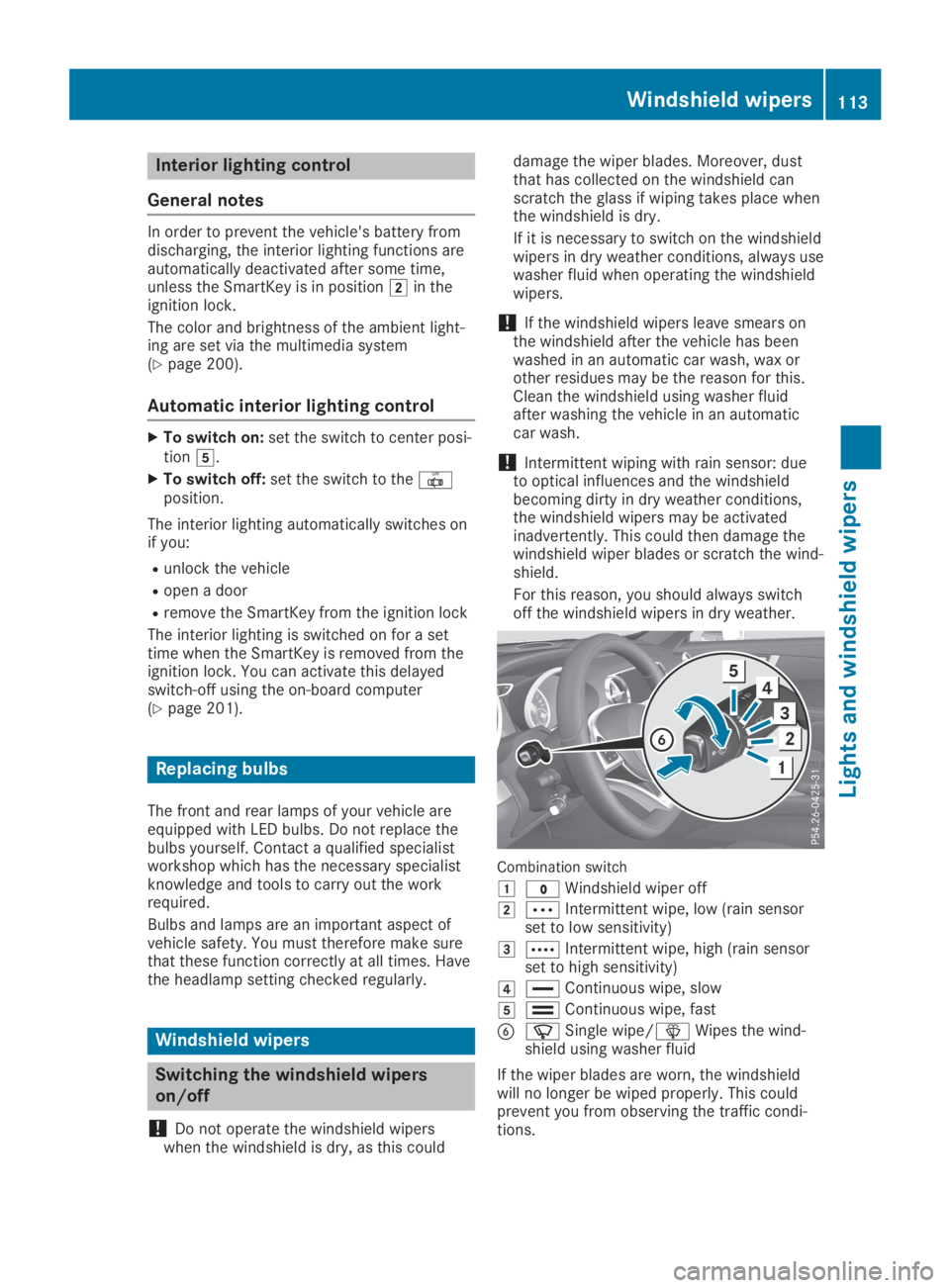
Combination switch
G?Windshield wiper off
HbIntermittent wipe, low (rain sensorset to low sensitivity)
IcIntermittent wipe, high (rain sensorset to high sensitivity)
J
Page 182 of 330

Under the following circumstances, the rearview camera will not function, or will functionin a limited manner:
Rif the trunk lid is open
Rin heavy rain, snow or fog
Rat night or in very dark places
Rif the camera is exposed to very bright light
Rif the area is lit by fluorescent bulbs or LEDlighting (the display may flicker)
Rif there is a sudden change in temperature,e.g. when driving into a heated garage inwinter
Rif the camera lens is dirty or obstructed.Observe the notes on cleaning(Ypage 275)
Rif the rear of your vehicle is damaged. In thiscase, have the camera position and settingchecked at a qualified specialist workshop.
The field of vision and other functions of therear view camera may be restricted due toadditional accessories on the rear of the vehi-cle (e.g. license plate holder, bicycle rack).
On vehicles with height-adjustable chassis,leaving the standard height can result in inac-curacies in the guide lines, depending on tech-nical conditions.
iThe contrast of the display may be affec-ted by the sudden presence of sunlight orother light sources, e.g. when exiting agarage. Pay particular attention in this situa-tion.
iIf usability is severely restricted, e.g. dueto pixel errors, have the display repaired orreplaced.
Activating/deactivating the rear view
camera
XTo activate:make sure that the SmartKeyis in positionHin the ignition lock.
XMake sure that theActivation by R gearActivation by R gearfunction is selected in the multimedia sys-tem; see the Digital Operator's Manual.
XEngage reverse gear.The multimedia system shows the areabehind the vehicle with guide lines.
The image from the rear view camera isavailable throughout the maneuvering proc-ess.
To deactivate:the rear view camera deacti-vates if you shift the transmission to position], or after driving forwards a short distance.
The inner segments of the warning indicatorare displayed in red if there is a complete sys-tem failure. The indicator lamp in thePARKTRONIC button lights up.
If the system fails at the rear of the vehicle:
Rthe rear segments are shown in red whenbacking up.
Rthe rear segments are hidden when drivingforwards.
Displays in the multimedia system
The rear view camera may show a distortedview of obstacles, show them incorrectly ornot at all. The rear view camera does not showobjects in the following positions:
Rvery close to the rear bumper
Runder the rear bumper
Rin close range above the handle on the trunklid
!Objects not at ground level may appear tobe further away than they actually are, e.g.:
Rthe bumper of a parked vehicle
Rthe drawbar of a trailer
Rthe ball coupling of a trailer tow hitch
Rthe rear section of an HGV
Ra slanted post
Use the guidelines only for orientation.Approach objects no further than the bot-tom-most guideline.
CYellow guide line at a distance of approx-imately 13 ft (4.0 m) from the rear area
DWhite guide line without steering input –vehicle width including the exterior mirrors(static)
180Driving systems
Driving and parking
Page 219 of 330

Display messagesPossible causes/consequences andPPSolutions
cator lamp remains lit or goes out depends on how OCS classifiesthe occupant.
If the conditions are not fulfilled, the system is not operating cor-rectly.
XVisit a qualified specialist workshop immediately.
Observe the additional information on OCS (Ypage 48).
Lights
Display messagesPossible causes/consequences andPPSolutions
I
Check Left LowCheck Left LowBeamBeam(Example)
The corresponding bulb is faulty.
XVisit a qualified specialist workshop.
or
XCheck whether you are permitted to replace the bulb yourself(Ypage 113).
LED light sources: the display message for the corresponding lamponly appears when all the LEDs in the lamp have failed.
I
Active HeadlampsActive HeadlampsInoperativeInoperative
The active light function is faulty.
XVisit a qualified specialist workshop.
I
Malfunction SeeMalfunction SeeOperator's ManualOperator's Manual
The exterior lighting is malfunctioning.
XVisit a qualified specialist workshop.
I
Auto Lamp FunctionAuto Lamp FunctionInoperativeInoperative
The light sensor is defective.
XVisit a qualified specialist workshop.
I
Switch Off LightsSwitch Off Lights
The lights are still switched on when you leave the vehicle. A warn-ing tone also sounds.
XTurn the light switch to positionX.
Displaymessages217
On-b oard computer and displays
Z
Page 274 of 330

Observe the legal requirements in each coun-try.
XDo not use hot water and do not wash thevehicle in direct sunlight.
XUse a soft sponge to clean.
XUse a mild cleaning agent, such as a carshampoo approved by Mercedes-Benz.
XThoroughly hose down the vehicle with agentle jet of water.
XDo not point the water jet directly towardsthe air inlet or the edges of decorative foils.
XUse plenty of water and rinse out thesponge frequently.
XRinse the vehicle with clean water and drythoroughly with a chamois.
XDo not let the cleaning agent dry on thepaintwork or the decorative foils.
Carefully remove all deposits of road salt assoon as possible when driving in winter.
Power washers
GWARNING
The water jet from a circular jet nozzle (dirt
blasters) can cause invisible exterior dam-
age to the tires or chassis components.
Components damaged in this way may fail
unexpectedly. There is a risk of an accident.
Do not use power washers with circular jet
nozzles to clean the vehicle. Have damaged
tires or chassis components replaced imme-
diately.
!Vehicles with decorative film: parts of yourvehicle are covered with decorative film.Maintain a distance of at least 27.5 in(70 cm) between the film-covered parts ofthe vehicle and the nozzle of the powerwasher.
Information about the correct distance isavailable from the equipment manufacturer.
Move the power washer nozzle around whencleaning your vehicle.
The water temperature of the power washermust not exceed 140 ‡ (60 †).
!Always maintain a distance of at least12 in (30 cm) between the vehicle and thepower washer nozzle. Information about thecorrect distance is available from the equip-ment manufacturer.
Move the power washer nozzle around whencleaning your vehicle.
Do not aim directly at any of the following:
RTires
RDoor gaps, roof gaps, joints, etc.
RElectrical components
RBattery
RPlug-type couplings
RLight bulbs
RSeals
RTrim elements
RVentilation slots
Damaged seals or electrical componentscan lead to leaks or failures.
!Vehicles with HANDS-FREE ACCESS: if aSmartKey with KEYLESS-GO is within thedetection range of the KEYLESS-GOantenna, the following situations could leadto the unintentional opening of the trunk lid:
Rusing a car wash
Rusing a power washer
Make sure that the SmartKey is at least6.5 ft (2 m) away from the vehicle.
Cleaning the paintwork
!Do not affix:
Rstickers
Rfilms
Rmagnetic plates or similar items
to painted surfaces. You could otherwisedamage the paintwork.
Scratches, corrosive deposits, areas affectedby corrosion and damage caused by inade-quate care cannot always be completelyrepaired. In such cases, visit a qualified spe-cialist workshop.
XRemove dirt immediately, where possible,while avoiding rubbing too hard.
XSoak insect remains with insect removerand rinse off the treated areas afterwards.
XSoak bird droppings with water and rinse offthe treated areas afterwards.
XRemove tree resin, oils, fuels and greases byrubbing gently with a cloth soaked in petro-leum ether or lighter fluid
XRemove coolant and brake fluid with a moistcloth and clear water.
272Care
Maintenance and care