2019 MERCEDES-BENZ S-CLASS SEDAN & MAYBACH display
[x] Cancel search: displayPage 302 of 578
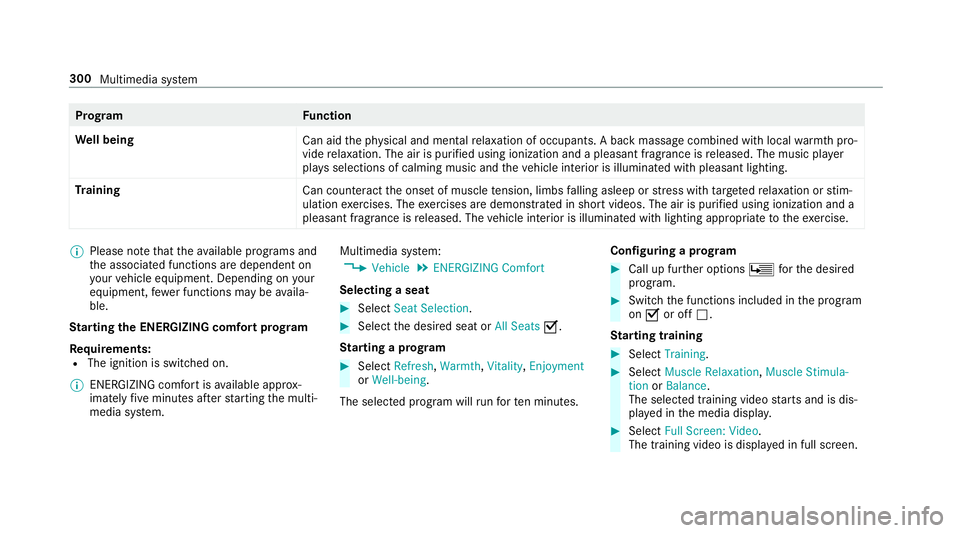
Pr
og ramF unction
We llbeing
Canaidtheph ysical and men talre lax ation ofocc upant s.Abac kmassag ecom bined withlocal warmthpro‐
vide relax ation .The airispur ified using ionization andapleasant fragr anc eis released. Themusic player
pla ysselections ofcalming musicandtheve hicle interior isillu minat edwithpleasa ntlighting.
Tr aini ng
Cancount eract theonse tof muscle tensi on, limbs falling asleep orstre ss wit hta rgeted relax ation orstim‐
ulation exercises. Theexercises aredemon stra tedin shor tvideos. Theairispur ified using ionization anda
pleasant fragr ance isreleased. Thevehicle interior isillu minat edwithlighting appropriateto theex ercise. %
Please note that theav ailable prog rams and
th eassociat edfunc tionsar edependent on
yo ur vehicle equipment. Depending onyour
eq uipme nt,fe we rfunctions maybe availa‐
ble.
St arting theENER GIZIN Gcomf ortpr og ram
Re quirement s:
R The ignit ionisswitc hedon.
% ENE RGIZING comfortis available approx‐
imat elyfive minut esafte rst ar tin gth emulti‐
media system. Multimedia
system:
, Vehicle .
ENE RGIZING Comfort
Selecting aseat #
Select SeatSelect ion. #
Select thedesir edseat orAll Seats 0073.
St arting apr og ram #
Select Refres h,Wa rmth, Vitality, Enjoym ent
or Wel l-being.
The select edprogr am willru nfo rte nminu tes. Conf
iguringapr og ram #
Call upfurther option sÜ forth edesir ed
pr ogr am. #
Switc hth efunc tionsincluded inthepr ogr am
on 0073 oroff0053.
St arting traini ng #
Select Training. #
Select MuscleRelaxati on,Mus cleStimul a-
tion orBala nce.
The selected trai ning videostar ts and isdis‐
pla yedin themedia display. #
Select FullScree n:Vid eo.
The trai ning video isdispl ayed infull screen. 300
Multimedia system
Page 316 of 578
dr
ops down to0feet (0 m) and thecur rent
ve hicle position symbolhasreac hed the
highlight edchang e-of-dir ect ion poin t.
When thech ang eof dir ect ion iscom plete,
th emap appear sin full-scr eenmode.
% Chang esofdir ect ion arealso showninthe
Ins trument Display.
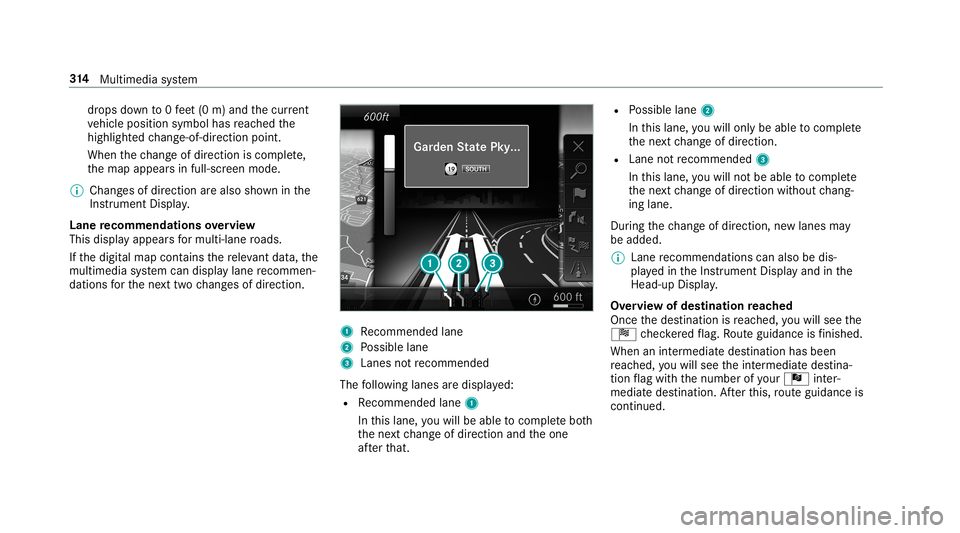
Lane recomm endationsov ervie w
This displa yappear sfo rmulti -lane roads.
If th edigit almap contains there leva nt data,th e
multime diasystem can displa ylane recomme n‐
da tions forth ene xt twoch ang esofdir ect ion. 1
Recomme ndedlane
2 Possible lane
3 Lanes notre comme nded
The follo wing lanes aredispla yed:
R Recomme ndedlane 1
In this lane, youwill beable tocom plet ebo th
th ene xt chang eof dir ect ion and theone
af te rth at. R
Possible lane2
In this lane, youwill onlybe able tocom plet e
th ene xt chang eof dir ect ion.
R Lan eno tre comme nded3
In this lane, youwill notbe able tocom plet e
th ene xt chang eof dir ect ion without chang ‐
ing lane .
Dur ing thech ang eof dir ect ion,ne wlane sma y
be added.
% Lanere comme ndations canalso be dis‐
pl ay ed intheIns trument Displayand inthe
Hea d-up Display.
Ov ervie wof des tinat ionreac hed
Once thedes tinat ionisreac hed, youwill see the
Í checkeredflag. Routeguidan ceisfinis hed .
Whe nan intermed iate des tination hasbeen
re ac hed, youwill see theint ermediat edes tina‐
tion flag withth enumber ofyour Î inter‐
med iatedes tinatio n.Afterth is, routeguidan ceis
co ntinue d. 31
4
Multimedia system
Page 318 of 578
#
Select Nav igati on and Traffic Announce -
ments . #
Swi tchAud ioFad eou tDuri ngVoi ceGuidance
on 0073 oroff0053.
Re peati ngnavig atio nanno unceme nts
Re quirement s:
R Aro utehas already been creat ed.
R Routeguidan ceisact ive.
Mult imed iasystem:
, Navigation #
Select !Voice Guidance . #
Select #Voice Guidance .
The current navig ation anno uncement is
re peat ed.
% Youcan add andcallupthis func tion asa
fa vo rite und erRepeat VoiceGuidan ce.
Cancel ingrout eguidanc e
Re quirement s:
R Aro utehas already been creat ed.
R Routeguidan ceisact ive. Mult
imed iasystem:
, Navigation #
Select %Cancel RouteGuidance .
Ov ervie wof routeguidanc eto an off-r oad
des tinatio n
An off-r oad destinatio nis wit hin thedigit almap.
The map contains noroads that lead tothedes‐
tinat ion.
Yo ucan enterge o-coor dinatesorath re ewo rd
addr essforof f-r oad destinations onthemap.
Ro uteguidan ceguides youfo ras long aspossi ‐
ble withna vig ation announcements anddisplays
on roads that arekn ow nto themultimedia sys‐
te m.
Shor tlybef oreyo ure ac hth elas tkn ow npo sitio n
on themap, youwill hear the"Please follo wthe
dir ect ion arrow "ann oun cem ent.The displ ay
sho wsadir ect ion arrow and thelinear distance
to thedes tinat ion. Ov
ervie wof routeguidanc efrom anoff-r oad
loc ation toades tinatio n
Of f-road position: thecur rent vehicle position is
locat edwithin thedigit almap onroads that are
no tav ailable.
When routeguidan cebegin sth efo llo wing dis‐
pla ysappear :
R The Road NotMapped messageis sho wn.
R Adir ect ion arro w sho wing thelinear direc‐
tion tothePOI.
When theve hicle isbac kon aro ad know nto the
multime diasystem, routeguidan cecontinue sas
no rm al.
Ov ervie wof off-ro ad status during route
guidanc e
Due toroadw orks ,fo rex am ple, ther ema ybe dif‐
fe re nces betwee nth edat aon thedigit almap
and theactual courseofthero ad. Insuc hcas es,
th emultimedia system will temp orarily be
unable tolocat eth eve hicle's current positio non
th edigit almap. Thevehicle isoff-r oad. 31
6
Multimedia system
Page 320 of 578
R
Rear Seat Entertainm entSystem
% Recei veddes tinations aresa ve din thepr ev i‐
ous destination s.
A pr om ptappear son themedia display. #
Ades tination hasbeen receiv edwit hou t
pict ureinf orma tion :selec tYes . #
Ifro uteguidan ceisno tact ive, sele ctStart
Rout eGuidan ce.
The routeto thedes tinat ioniscalculat ed.
The map showsthero ute. Ro uteguidan ce
th en begins.
or #
Ifro uteguidan ceisact ive, sele ctStart New
Rout eGuidan ceorSet asNex tWay Point.
St art New RouteGuidan ce:th ere cei veddes‐
tin ation addressissetas ane wdes tination.
The prev ious destination sand intermediat e
des tination sar edele ted. Ro uteguidan ceto
th ene wdes tinat ionbegins.
Set asNext WayPoint :th ere cei veddes tina‐
tion addr essissetas thene xt int ermediat e
des tinat ion.Routeguidan cebegin s. #
Ades tination hasbeen receiv edwit hpic‐
tu re informa tion: select Start Route Guid-
ance .
Ro uteguidan cestar ts. #
Aro ut ehas beenre ceiv ed:selec tSt art
Rout eGuid. from Beginning ofRout e.
or #
Select Start Rout eGuidan cefrom Curre nt
Posi tion.
Ro uteguidan cestar ts from theselect ed
position . Ro
uteguidanc ewith current traf fic re por ts Tr
af fic inf orma tion overview
Tr af fic re por tsarere cei vedusing LiveTr af fic
Inf ormation andareused forro uteguidan ce.
This serviceis una vailable insome countries.
Ther ema ybe differe nces betwee nth etraf fic
re por tsrecei vedand theactual road and traffic
condi tions. Im
por tant informa tionon LiveTr af fic Inf orma‐
tion:
R Current traffic repor tsarere cei vedvia the
Int erne tconnection.
R The traf fic situ ation isup datedat shor t,re gu‐
lar interva ls.
R The subsc ript ion informatio nsho wsthest a‐
tus (→pag e31 8).
In fo rm atio non theve hicle's position isregular ly
sent toDai mle rAG .The data isimmed iatelyre n‐
de redanon ymous byDai mle rAG and forw arded
to thetra ffic dat apr ov ider .Usin gth is dat a,traf‐
fi c re por tsreleva nt totheve hicle's position are
sent totheve hicle. Thevehicle actsasasensor
fo rth eflow oftraf fic and helpstoimprove the
qu alit yof thetra ffic repor ts.
If yo udo notwish totrans mityo ur vehicle posi‐
tion, youcan have this ser vice deact ivat ed atan
aut hor ized Mercedes -Benz Cent er.
Displa yingsubscr iption informa tion
Re quirement s:
R The vehicle iseq uipped withLiv eTr af fic
Inf ormation. 31
8
Multimedia system
Page 323 of 578

•
Fil ters thedispla yof POIs inthevicinit y
accor dingtoPOI categor y
5 Switc hesthedispla yof per sonal POIsym‐
bols onthemap onoroff
6 Switc hesone ofthefo llo wing displa yson or
of fdepending ontheeq uipment :
• We ather informat ion
• Sat ellit emap
• Traf fic inci dents
7 Switches thetra ffic map displa yon oroff
The map andsatellit eimag esaresho wninglobe
pr oject ion.This allowsfora re alis ticmap displa y
in all map scales. Themap uses elevatio nmod el‐
ing .
Dep endingonthemap data,im por tant buildi ngs
in ma nyciti esaredep icted realis ticallyon the
map insmal lmap scale s(e.g. 1/32 mi(20 m),
1/1 6mi (50 m)). Other buildings aresho wnas
model s.
% Youcan setth eunit ofmeasur ementofthe
map scale (→pag e29 4). If
online information isavailable, fuelprice sand
th eav ailabilit yof par kingspac esinpar king
ga rage sar edispla yed, forex am ple.
% Requiremen ts:
R Mer cedes meconnectis available.
R Youha ve auser accoun tfo rth e
Mer cedes meportal.
R The service hasbeen activat ed atan
aut hor ized Mercedes -Benz Cent er.
Fu rther information canbefound at:ht tp :/ /
www .merced es.me
% The onlineinf ormat ionisno tav ailable inall
coun tries.
If Dis play inCOMA NDisact ivat ed inTraf fic Sign
Assi st(→ pag e24 0), spee dlim its an dov ertaking
re strictions aredispl ayed on themap.
% Com panylogos displayedon themap are
tra demar ksofthere spectiv ecom panies and
used solely forth epur pose ofindicat ingthe
locat ionsofthese com panies. Theuseof
suc hlogos onthemap does notindicat e
appr oval of, suppo rtof or adv ertising by th
ese com panies forth ena vig ation system
itself.
Se tting thema pscale
Re quirement s:
R The map issho wn.
Multime diasystem:
, Navigation #
Tozoo min: swi pedown ontheTo uc hCon ‐
tr ol.
or #
Turn thecon troller count er-cloc kwise.
or #
Movetwofing ersap arton theto uc hpad. #
Tozoo mout: swipeup on theTo uc hCon trol.
or #
Turn thecon troller clockwise.
or #
Movetwofing ersto ge ther on theto uc hpad.
% Youcan setth eunit ofmeasur ementofthe
map scale (→pag e29 4). Mul
timedi asy stem 32
1
Page 339 of 578

Making
acall from thecall list
Multi media system:
, Phone .
ø Recent Calls #
Select anumber .
The callismade. Te
xt messag es Ov
ervie wof text messag efunctions
If th econ nect edmobile phonesuppor tsthe
MAP Bluetooth®
pr ofile, thete xt mes sage func‐
tions canbeuse don themultimedia system.
Yo ucan obtain further information aboutset‐
ting sand suppor tedfunc tionsof Blue tooth®
-
cap ablemob ile pho nes from anauthor ized
Mer cedes-B enzCent eror at:htt p://
www .mercedes-ben z.com/con nect
Some mobile phones requ ire fur ther settings
af te rbeing connect edtothemultimedia system
(see manuf acturer'soper ating instruction s).
Ne wmessag esareidentif iedbythei sym‐
bol inthemedia displayand anaudible signal. Depen
dingonthemobile phone, themultimedia
sy stem onlydispla ysnewinco ming text mes ‐
sa ge sor the10 0ne we sttext mes sage s.
Conf iguringthete xt messag esdispla yed
Multimedia system:
, Phone .
Z Option s.
Text Mes-
sage .
Message Display #
Select p.
A menu withth efo llo wing option sis sho wn:
R AllMessage s
R New andUnread Message s
R New Message s
R Off (The text mes sage sar eno tdispla yed
aut omat ically.) #
Select anoption.
% The setting mayno tbe acti veunt ilth e
mobil ephone isreconnect ed. Re
ading text messag es
Multimedia system:
, Phone .
i TextMessage
Re ading ate xt messag e #
Select ate xt mes sage .
The messag ete xt isdispl ayed.
Using there ad-aloud function #
Select ate xt mes sage . #
Select Read Alou d.
The text mes sage isread aloud.
Com posingand send ingate xt messag e
Multimedia system:
, Phone .
i TextMessage #
Select WriteNewTextMessage.
Ad ding are cipie nt #
Select PresstoAdd Recip ient. #
Select thecon tact.
Di ctating text #
Select PresstoDictat e. Multimedia
system 33
7
Page 340 of 578
#
Tostar tth edictat ionfunction: press on
th ecent ralcon trol elemen t.
The app forth edict ation function isloaded.
If th er ewa sno prior Interne tconn ection, a
conn ection isno wes tablished. #
Sayth emessag e.
The dictation endsautomaticall yaf te ryo u
ha ve finis hed speaking.
Af terth evo ice mess agehas been proces sed,
it is sho wnastext. #
Toreplac eamess age:sel ect Replace mes-
sag e.
The text that has been dictat edand shown
on thedispla yis rese tand canbedict ated
ag ain.
Editing text #
Select thewo rd. #
Tocall upthecor rection menu:press on
th ecent ralcon trol elemen t.
The follo wing option sar eav ailable:
R Adjus ting thecapit alization ofwo rds(if
suppor tedby thech aract erset) R
Expand ingthech oice ofwo rds
R Deleting theselect ion
R Recor ding ane wdict ati on #
Tolea vethemenu :selec tDon e.
Send ingtext messag es #
Select SendTextMessage .
Re plyin gto ate xt messag e
Multimedia system:
, Phone .
i TextMessage #
Open thete xt mes sage . #
Select p. #
Select Reply.
Cal ling ate xt messag esender
Multimedia system:
, Phone .
i TextMessage #
Open thete xt mes sage . #
Select p. #
Select CallSende r. De
leting text messag es
Multimedia system:
, Phone .
i TextMessage #
Select p. #
Todel eteate xt messag e:select Delete. #
Outbox
or #
Select Drafts. Mer
cedes-Benz link Ov
ervie wof Mer cedes-Benz Link
Using Mercedes-Benz Link,va rious funct ions
and select edmobile phoneappscanbetransf er‐
re dto themedia display.
The Mercedes-B enzLink controlbo xsupplemen ‐
ta ry equipment isrequ ired forth is. Youcan
obt ain this at an aut hor ized Mercedes -Benz Cen‐
te r.
% The Mercedes-B enzLink controlbo xuses
th eAn droid oper ating system. 338
Multimedia system
Page 341 of 578
%
The service prov ider isresponsible forth ese
apps andtheser vices andcontent conne c‐
te dto it.
Connecting Mercedes-B enzLink withth e
mu ltim edia system #
Conn ecttheMer cedes- BenzLinkcontrol bo x
wit hth e00C2 USBportof themultimedia
con nect ionunit using asuit able connect ing
cable.
% Asuit able connect ingcable isavailable sep‐
ar atelyat an aut hor izedMer cedes-Ben zCen‐
te r.
Using Mercedes-Benz Link
Re quirement s:
R The Mercedes- BenzLink control bo xis con ‐
nec tedwit hth emultimedia system using the
00C2 USBport.
Multimedi asy stem:
, Connec t #
Select Mercedes- BenzLink. #
Select MBLink.
The mobile phonefunctionsand apps are
av ailable andshownonthemedia display.
Yo ucan find mor einf orma tionin theMer cedes-
Benz Linkcontrol bo xoper ating instruction s.
Ending Mercedes-Benz Link
Multimedia system:
, Connec t.
Mercedes- BenzLink #
Select Disconnect.
The connect ionisended.
The mobile phonecontinues tobe supplied
wit helect ricity .
or #
Disco nnect thecon nect ingcable between
th eMer cedes- BenzLinkcontrol bo xand the
multime diasystem.
% Mer cedes- Benzrecomme ndsdisconnecti ng
th econ nect ingcable onlywhen theve hicle
is statio nary. App
leCar Play™ Ov
ervie wof App leCar Play™ &
WARNIN GRisk ofdist ra ction from infor‐
mati onsystems andcomm unication s
eq uipment
If yo uoper ateinf ormat ionand comm unic a‐
tio neq uipme ntintegratedin theve hicle
when driving, youwill bedistract ed from the
tr af fic situ ation. Thiscou ldalso cau seyouto
lose control of theve hicle. #
Onlyoper ateth is eq uipmen twhen the
tr af fic situ ation per mits. #
Ifyo ucan notbe sur eof this, stop the
ve hicle whilstpa ying attention toroad
and traffic condi tions andoperate the
eq uipment withth eve hicle statio nary. Yo
umus tobse rveth eleg alrequ iremen tsforth e
cou ntryin whi chyouar ecur rentl ydr ivi ng when
op erati ng themultimedia system.
iPhone ®
func tionscan beused viathemultime‐
dia system using Apple CarPla y™.Theyar eoper‐
at ed using thecent ralcon trol elemen tor the Multimedia
system 339