2019 MERCEDES-BENZ GLS SUV engine
[x] Cancel search: enginePage 286 of 729
ve
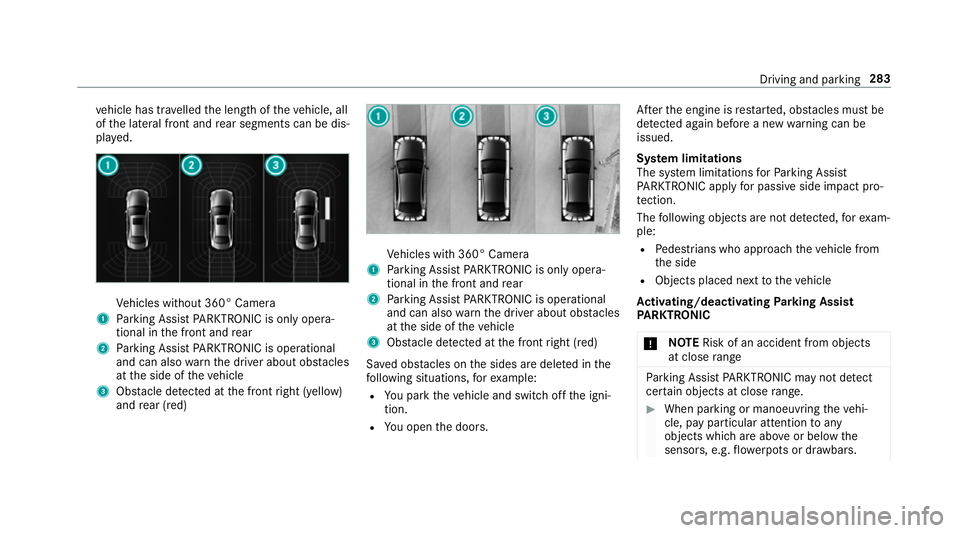
hicle has tr avelled the length of theve hicle, all
of the lateral front and rear segments can be dis‐
pla yed. Ve
hicles without 360° Camera
1 Parking Assist PARKTRONIC is on ly opera‐
tional in the front and rear
2 Parking Assist PARKTRONIC is operational
and can also warnthe driver about obs tacles
at the side of theve hicle
3 Obstacle de tected at the front right (yellow)
and rear (red) Ve
hicles with 360° Camera
1 Parking Assist PARKTRONIC is on ly opera‐
tional in the front and rear
2 Parking Assist PARKTRONIC is operational
and can also warnthe driver about obs tacles
at the side of theve hicle
3 Obstacle de tected at the front right (red)
Sa ved obs tacles on the sides are dele ted in the
fo llowing situations, forex ample:
R You park theve hicle and switch off the igni‐
tion.
R You open the doors. Af
terth e engine is restar ted, obs tacles must be
de tected again before a new warning can be
issued.
Sy stem limitations
The sy stem limitations forPa rking Assist
PA RKTRONIC apply for passive side impact pro‐
te ction.
The following objects are not de tected, forex am‐
ple:
R Pedestrians who approach theve hicle from
th e side
R Objects placed next totheve hicle
Ac tivating/deactivating Parking Assist
PA RKTRONIC
* NO
TERisk of an accident from objects
at close range Pa
rking Assist PARKTRONIC may not de tect
cer tain objects at close range. #
When pa rking or manoeuvring theve hi‐
cle, pay particular attention toany
objects which are abo veor below the
sensors, e.g. flowe rpots or dr awbars. Driving and parking
283
Page 287 of 729
The
vehicle or other objects could oth‐
erwise be damaged. If
th eé symbol is shown in the multifunction
displa y,Pa rking Assist PARKTRONIC is not
active.
Multimedia sy stem:
4 Settings 5
Quick access
5 PARKTRONIC #
Activate or deacti vate the function.
% Parking Assist PARKTRONIC is automatical ly
activated when theve hicle is star ted.
Fu nction of Trailer Manoeuvring Assist
* NO
TEDama getotraile rswith a stabilisa‐
tion device against swerving In
the case of trailers with a stabilisation
device against swerving, the trailer or trailer
to w hit chcould be damaged. #
If a trailer coupling wi thTrailer Manoeu‐
vring Assist is used, on lyuse trailers without a
stabilisation device against
swerving. *
NO
TEDama gedue to ov erhanging loads
in front or dr awbar ins tallations The
vehicle and the trailer may be damaged
during manoeuvring due toove rhanging
loads at the front of the trailer or dr awbar
ins tallations. #
Pay attention to overhanging loads or
dr aw bar ins tallations while manoeu‐
vring. Tr
ailer Manoeuv ring Assi stassists you when
re ve rsing with a trailer. By means of a turning
angle sensor in the trailer coupling, Trailer
Manoeuv ring Assi stmonitors the articulation
angle between theve hicle and trailer and
adjusts it toa specified value.
Yo u can either en terth e articulation angle value
directly via the multimedia sy stem or use a
st ra ightening manoeuvre. When car rying out a
st ra ightening manoeuvre, the sy stem calculates
th e articulation angle automatically and stra ight‐ ens
theve hicle/trailer combination tothe trail‐
er's cur rent di rection.
Tr ailer Manoeuv ring Assi stmust be taught-in
before it can adjust the articulation angle
(/ page 284).
Obser vethe no tes on towing a trailer
(/ page 311).
Sy stem limitations
The sy stem may be impaired or may not function
in thefo llowing situations:
R The gradient is more than appr oximately
15 %.
Using Trailer Manoeuvring Assist
Re quirements:
R The ignition and engine are on and theve hi‐
cle is operational.
R A trailer has been de tected. 284
Driving and pa rking
Page 288 of 729
Te
aching-in Trailer Manoeuvring Assist #
Drive forw ards a short dis tance wi th the car/
trailer combination.
The comple tedte ach-in process is shown in
th e media displa y.
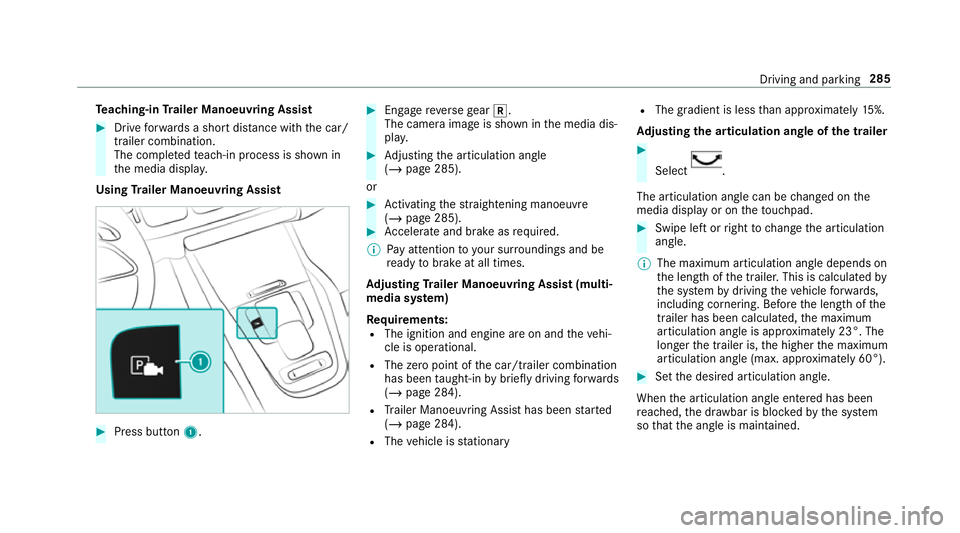
Using Trailer Manoeuvring Assist #
Press button 1. #
Engage reve rsege ar k.
The camera image is shown in the media dis‐
pla y. #
Adjusting the articulation angle
(/ page 285).
or #
Activating thest ra ightening manoeuvre
(/ page 285). #
Accelerate and brake as requ ired.
% Pay attention toyour sur roundings and be
re ady tobrake at all times.
Ad justing Trailer Manoeuvring Assist (multi‐
media sy stem)
Re quirements:
R The ignition and engine are on and theve hi‐
cle is operational.
R The zero point of the car/t railer combination
has been taught-in bybrief lydriving forw ards
(/ page 284).
R Trailer Manoeuv ring Assi sthas been star ted
( / page 284).
R The vehicle is stationary R
The gradient is less than appr oximately 15%.
Ad justing the articulation angle of the trailer #
Select .
The articulation angle can be changed on the
media display or on theto uchpad. #
Swipe left or right tochange the articulation
angle.
% The maximum articulation angle depends on
the length of the trailer. This is calculated by
th e sy stem bydriving theve hicle forw ards,
including cornering. Before the length of the
trailer has been calculated, the maximum
articulation angle is appr oximately 23°. The
longer the trailer is, the higher the maximum
articulation angle (max. appr oximately 60°). #
Set the desired articulation angle.
When the articulation angle entered has been
re ached, the dr awbar is bloc kedby the sy stem
so that the angle is maintained. Driving and parking
285
Page 304 of 729
If
AT TENTION ASSIST is unable tocalculate the
attention le vel and cannot issue a warning, the
System suspended messageappears.
If a warning is given in the instrument displa y,
th e multimedia sy stem of fers to sear chfor a rest
area. You can select a rest area and start naviga‐
tion tothis rest area. This function can be activa‐
te d and deactivated in the multimedia sy stem.
If AT TENTION ASSIST is deactivated, theé
symbol appears in the assis tance graphic in the
instrument display when the engine is running.
AT TENTION ASSIST is activated automatically
when the engine is re-sta rted. The last selected
sensitivity le velre mains stored.
Sy stem limitations
AT TENTION ASSIST is active in the 60 km/h to
200 km/h speed range.
The functionality of ATTENTION ASSIST is
re stricted, and warnings may be dela yed or not
occur at all in thefo llowing situations:
R Ifyo u ha vebeen driving for less than appr ox‐
imately 30 minutes. R
Ifth ero ad condition is poor (une venro ad
sur face or po tholes).
R Ifth ere is a strong side wind.
R Ifyo u adopt a sporty driving style (high cor‐
nering speeds or high rates of acceleration).
R Ifth eSt eering Assist function of Active Dis‐
ta nce Assi stDISTRONIC is acti ve.
R Ifth e time has been set incor rectly.
R In acti vedriving situations, if youch ange
lanes and vary your speed frequentl y.
The ATTENTION ASSIST tiredness or alertness
assessment is dele ted and restar ted when con‐
tinuing the journey in thefo llowing situations:
R Ifyo u swit choff the engine.
R Ifyo u unfas tenyo ur seat belt and open the
driver's door (e.g. changing drivers or taking
a break). Setting
ATTENTION ASSI ST
Multimedia sy stem:
4 © 5
Settings 5
Assistance
5 Attention Assist
Setting options #
Select Standard, SensitiveorOff.
Suggesting a rest area #
Select Suggest rest area . #
Activate or deacti vate the function.
If AT TENTION ASSIST de tects fatigue or
increasing la ckof attention, it suggests a
re st area in the vicinity. #
Select the sugges tedre st area.
Yo u are guided tothe selected rest area. Speed Limit Assist
Fu
nction of Speed Limit Assist
% The availability of thefo llowing function is
countr y-dependent. Driving and parking
301
Page 322 of 729
Instrument display
overview &
WARNING Risk of accident due toan
instrument display malfunction
If th e Instrument Display has failed or mal‐
functioned, you may not recognise function
re strictions applying tosaf etyre leva nt sys‐
te ms.
The operating saf ety of your vehicle may be
impaired. #
Drive on carefull y. #
Have theve hicle checked immediately
at a qualified specialist workshop. If
th e operating saf ety of your vehicle is
impaired, park theve hicle safely as soon as pos‐
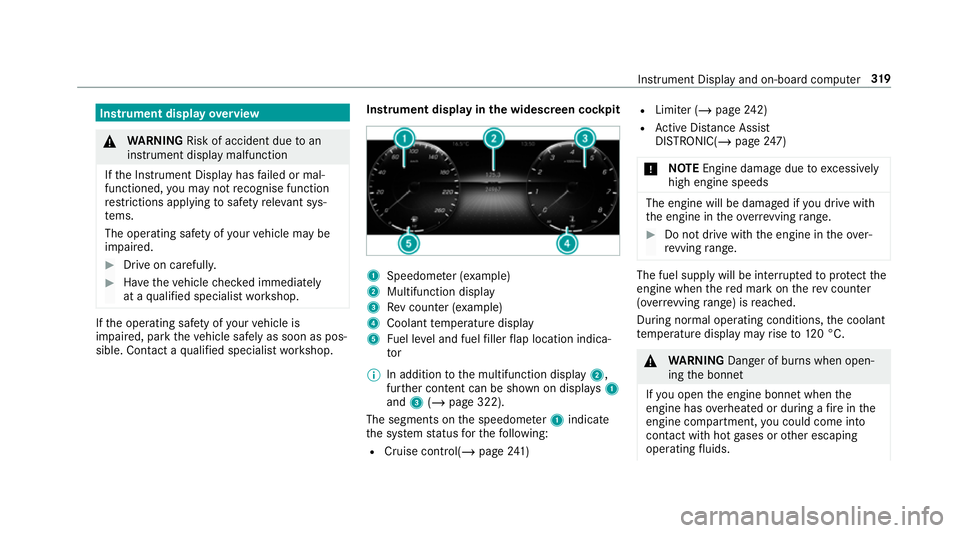
sible. Contact a qualified specialist workshop. Instrument display in
the widescreen cockpit 1
Speedome ter (e xamp le)
2 Multifunction display
3 Rev counter (e xample)
4 Coolant temp erature display
5 Fuel le vel and fuel filler flap location indica‐
tor
% In addition tothe multifunction display 2,
fur ther conte nt can be shown on displ ays1
and 3(/ page 322).
The segments on the speedome ter1 indica te
th e sy stem status forth efo llowing:
R Cruise control(/ page241) R
Limi ter (/ page242)
R Active Dis tance Assi st
DISTRONIC( /page 247)
* NO
TEEngine dama gedue toexc essively
high engine speeds The engine will be damaged if
you drive with
th e engine in theov errevving range. #
Do not drive wi th the engine in theove r‐
re vving range. The fuel supply will be inter
rupted toprotect the
engine when there d mark on there v counter
(o ve rrev ving range) is reached.
During no rmal operating conditions, the coolant
te mp erature display may rise to120 °C. &
WARNING Danger of bu rns when open‐
ing the bonn et
If yo u open the engine bonn etwhen the
engine has overheated or during a fire inthe
engine compartment, you could come into
contact with hot gases or other escaping
operating fluids. In
stru ment Display and on-board computer 319
Page 323 of 729
#
Before opening the bonn et, allow the
engine tocool down. #
Intheeve nt of a fire inthe engine com‐
partment, keep the engine bonn et
closed and call thefire service. Ve
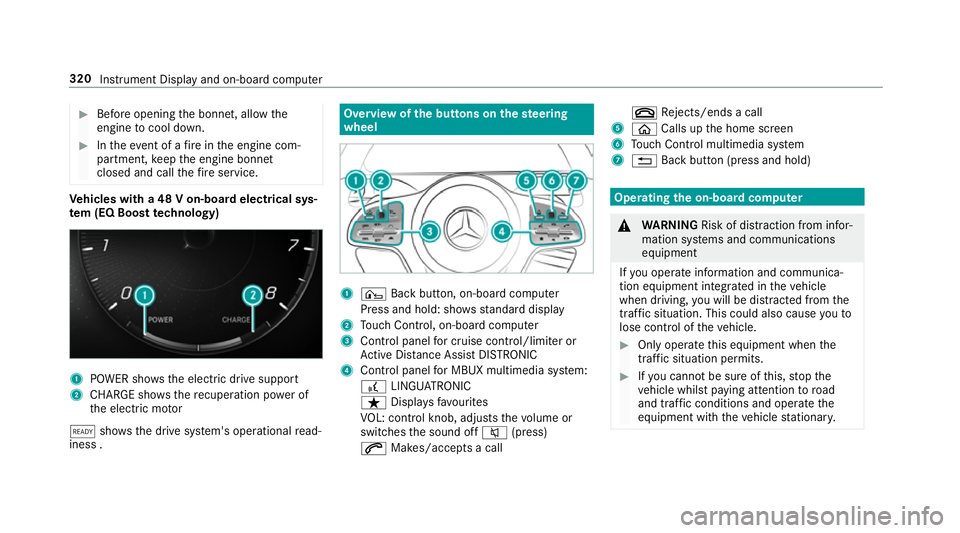
hicles with a 48 V on-board electrical sys‐
te m (EQ Boo sttech nology) 1
POWER sho wsthe electric drive support
2 CHARGE sho wsthere cuperation po wer of
th e electric mo tor
õ shows th e drive sy stem's operational read‐
iness . Overview of
the but tons on thest eering
wheel 1
¤ Back button, on-board computer
Press and hold: sho wsstandard display
2 Touch Control, on-board co mputer
3 Control panel for cruise control/limiter or
Ac tive Dis tance Assi stDISTRONIC
4 Control panel for MBUX multimedia sy stem:
£ LINGU ATRO NIC
ß Displa ysfavo urites
VO L: control knob, adjusts thevo lume or
switches the sound off 8(press)
6 Makes/accepts a call ~
Rejects/ends a call
5 ò Calls up the home screen
6 Touch Control multimedia sy stem
7 % Back button (press and hold) Operating
the on-boa rdcompu ter &
WARNING Risk of di stra ction from infor‐
mation sy stems and communications
equipment
If yo u operate information and communica‐
tion equipment integ rated in theve hicle
when driving, you will be distracted from the
traf fic situation. This could also cause youto
lose control of theve hicle. #
Only operate this equipment when the
traf fic situation permits. #
Ifyo u cannot be sure of this, stop the
ve hicle whilst paying attention toroad
and traf fic conditions and ope rate the
equipment with theve hicle stationar y. 320
Instrument Display and on-board computer
Page 328 of 729
#
Turn brightness control 1up or down.
The lighting of the instrument display and in
th e control elements of theve hicle interior is
adjus ted. Menus and submenus
Fu
nctions on the service menu of the on-
board compu ter On-board computer:
4 Service #
Toselect the function: swipe upwards or
down wards on the left-hand Touch Control. #
Press the left-hand Touch Control.
Fu nctions on theService menu:
R Message memory (/ page611)
R AdBlue: Adblue ®
ra nge and fill le vel
R Tyres:
- Restarting the tyre pressure loss warning
sy stem (/ page579)
- Che cking tyre pressure with the tyre
pressure monitor (/ page573) -
Restarting the tyre pressure monitor
(/ page 574)
R ASSYST PLUS : calls upthe service due date
(/ page 531)
R Coolant: coolant temp erature display
R Engine oil level: engine oil le vel
R Consumption info: fuel life cycle consump‐
tion Calling up
the assistant display On-board computer:
4 Assistance
The following displa ysare available on the assis‐
ta nt displ aymenu:
R Assis tant displ ay
R Attention le vel (/ page 300)
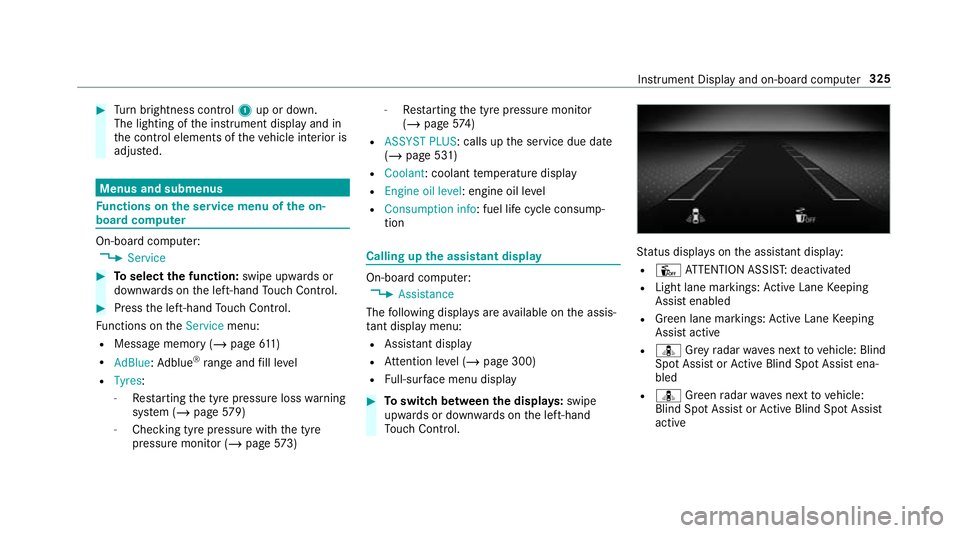
R Full-sur face menu displ ay #
Toswitch between the displa ys:swipe
upwards or down wards on the left-hand
To uch Control. St
atus displa yson the assis tant displ ay:
R Û ATTENTION ASSIS T:deactivated
R Light lane markings: Active Lane Keeping
Assist enabled
R Green lane markings: Active Lane Keeping
Assist active
R ¸ Grey radar waves next tovehicle: Blind
Spot Assist or Active Blind Spot Assi stena‐
bled
R ¸ Green radar waves next tovehicle:
Blind Spot Assist or Active Blind Spot Assi st
active In
stru ment Display and on-board computer 325
Page 534 of 729
ASS
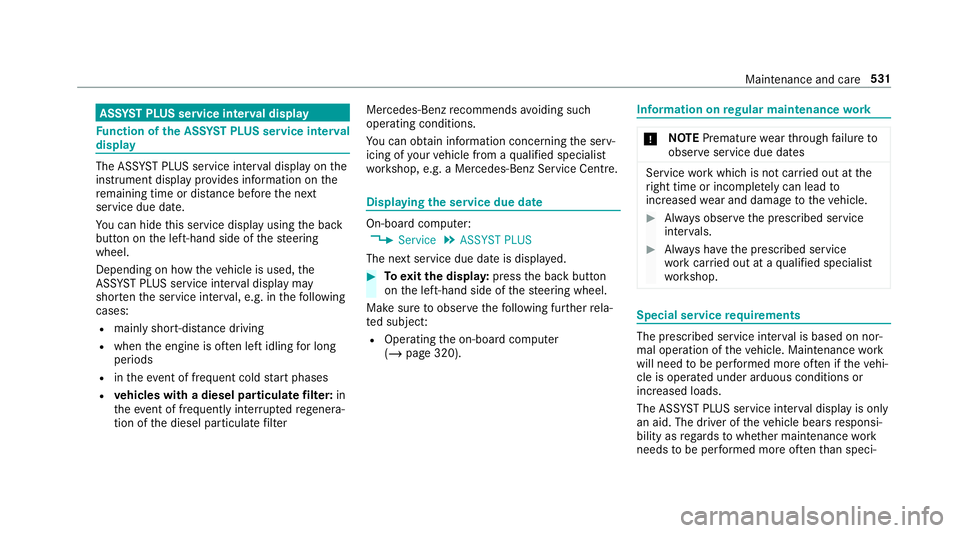
YST PLUS se rvice inter val display Fu
nction of the ASS YST PLUS se rvice inter val
displ ay The ASS
YST PLUS service inter val display on the
instrument display pr ovides information on the
re maining time or dis tance be fore the next
service due date.
Yo u can hide this service display using the back
button on the left-hand side of thesteering
wheel.
Depending on how theve hicle is used, the
ASS YST PLUS service inter val display may
shor tenth e service inter val, e.g. in thefo llowing
cases:
R mainly short-dis tance driving
R when the engine is of ten le ftidling for long
periods
R intheeve nt of frequent cold start phases
R vehicles with a diesel particulate filter: in
th eev ent of frequently inter rupted rege nera‐
tion of the diesel particulate filter Mercedes-Benz
recommends avoiding such
operating conditions.
Yo u can obtain information concerning the serv‐
icing of your vehicle from a qualified specialist
wo rkshop, e.g. a Mercedes-Benz Service Centre. Displaying
the service due da te On-board computer:
4 Service 5
ASSYST PLUS
The next service due date is displa yed. #
Toexitth e displa y:press the back button
on the left-hand side of thesteering wheel.
Make sure toobser vethefo llowing fur ther rela‐
te d subjec t:
R Operating the on-board computer
(/ page 320). Information on
regular maintenance work *
NO
TEPremature wearthro ugh failure to
obser veservice due dates Service
workwhich is not car ried out at the
ri ght time or incomple tely can lead to
inc reased wear and damage totheve hicle. #
Alw ays obser vethe prescribed service
inter vals. #
Alw ays ha vethe prescribed service
wo rkcar ried out at a qualified specialist
wo rkshop. Special service
requ irements The prescribed service inter
val is based on nor‐
mal operation of theve hicle. Maintenance work
will need tobe per form ed more of ten if theve hi‐
cle is operated under arduous conditions or
increased loads.
The ASS YST PLUS service inter val display is only
an aid. The driver of theve hicle bears responsi‐
bility as rega rdsto whe ther maintenance work
needs tobe per form ed more of tenth an speci‐ Main
tenance and care 531