2019 MERCEDES-BENZ GLS SUV sensor
[x] Cancel search: sensorPage 98 of 729
The kicking mo
vement triggers the opening or
closing process alternately.
Obser vethe no tes when opening (/ page 92)
and closing (/ page 93)theta ilgate.
% Twowa rning tones sound when thetai lgate
is opening or closing. &
WARNING Risk of bu rns caused bya hot
ex haust sy stem
The vehicle exhaust sy stem can become very
hot. If you use HANDS-FREE ACCESS, you
could bu rnyourself by touching theex haust
sy stem. #
Alw ays ensure that you on ly ma ke a
kicking mo vement within the de tection
ra nge of the sensors. *
NO
TEVehicle damage due tounin ten‐
tional opening of theta ilgate R
when using an automatic car wash
R when using a high pressure cleaner #
Deactivate KEYLESS-GO or make sure
that theke y located is at least 3 m
aw ay from theve hicle in such situa‐
tions. When making
the kicking mo vement, make sure
th at your feet are firm ly on the ground, other‐
wise you could lose your balance, e.g. on ice.
Re quirements:
R The key is behind theve hicle.
R Stand at least 30 cm away from theve hicle
while per form ing the kicking mo vement.
R Do not come into contact with the bumper
while making the kicking mo vement.
R Do not car ryout the kicking mo vement too
slowl y.
R The kicking mo vement must be towa rdsthe
ve hicle and back again. 1
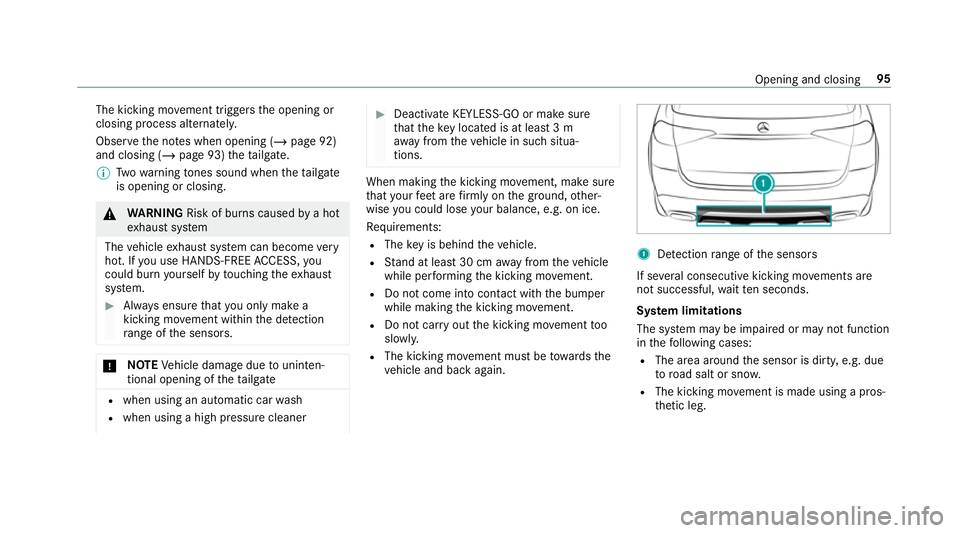
Detection range of the sensors
If se veral consecutive kicking mo vements are
not successful, waitte n seconds.
Sy stem limitations
The sy stem may be impaired or may not function
in thefo llowing cases:
R The area around the sensor is dirty, e.g. due
to road salt or sn ow.
R The kicking mo vement is made using a pros‐
th etic leg. Opening and closing
95
Page 99 of 729
The
tailgate can open or close unin tentionally in
th efo llowing situations:
R If a person's arms or legs are moving in the
sensor de tection range, e.g. when polishing
th eve hicle or picking up objects.
R If objects are mo ved or placed behind the
ve hicle, e.g. tensioning stra ps or luggage.
R If clamping stra ps, tarp aulins or other co ver‐
ings are pulled over the bumper.
R If a pr otective mat with a length reaching
ove rth e boot sill down into the de tection
ra nge of the sensors is used.
R Ifth e pr otective mat is not secured cor rectly.
R When working on the trailer hitch, trailers or
re ar bicycle rack s.
Deactivate theke y functions (/ page84) or do
not car rytheke y about your person in such sit‐
uations. Limiting
the opening angle of the tailgate Ac
tivating the opening angle limiter
Yo u can limit the opening angle of theta ilgate in
th eto p half of its opening range toappr ox‐
imately 20 cm before the end position. #
Stop the opening procedure of theta ilgate at
th e desired position. #
Press and hold the closing button in theta il‐
ga te until you hear a sho rtacoustic signal.
The opening angle limiter will be activated.
The tailgate will then stop in thestored posi‐
tion when opened.
To open theta ilgate full y,pull the handle on the
outside of theta ilgate again af ter it has stopped
automaticall y.
Deactivating the opening angle limiter #
Press and hold the closing button in theta il‐
ga te until two sho rtacoustic signals sound. Un
locking the tailgate with the emer gency
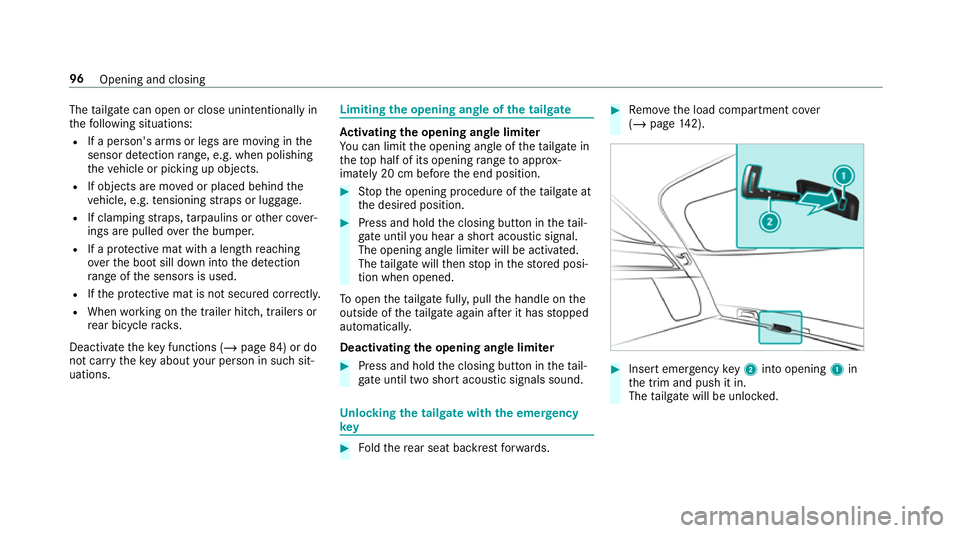
key #
Foldthere ar seat backrest forw ards. #
Remo vethe load compartment co ver
( / page 142). #
Insert emergency key2 into opening 1in
th e trim and push it in.
The tailgate will be unloc ked. 96
Opening and closing
Page 114 of 729
Priming/deactivating interior pr
otection Multimedia sy
stem:
4 © 5
Settings
5 Schnellzugriff (Quick access) #
Prime or deactivate Interior motion sensor.
Interior pr otection is primed again in thefo llow‐
ing cases:
R The vehicle is unloc ked again.
R A door is opened.
R The vehicle is loc ked again.
% Ifqu ick access is una vailable, select the
Vehicle menu under Settingstoprime or
deactivate interior pr otection. Opening and closing
111
Page 165 of 729
Multimedia sy
stem:
4 © 5
Settings 5
Lights
5 Intell. Light System #
Activate or deacti vate the function. Ad
aptive Highbeam Assist Plus Ad
aptive Highbeam Assist Plus function &
WARNING Risk of accident despi te
Ad aptive Highbeam Assist Plus
Ad aptive Highbeam Assist Plus does not rec‐
ognise thefo llowing road users:
R Road users without lights, e.g. pedes‐
trians
R Road users with poor lighting, e.g.
cyclists
R Road users whose lighting is obstructed,
e.g. bya bar rier
On very rare occasions, Adaptive Highbeam
Assist Plus may failto recognise other road
users that ha velights, or may recognise
th em too late. In
this, or in similar situations, the automatic
main beam will not be deactivated or will be
activated despite the presence of other road
users. #
Alw ays obser vethe tra ffic carefully and
switch off the main beam in good time. Ad
aptive Highbeam Assist Plus cannot take into
account road, weather or traf fic conditions.
De tection may be restricted in thefo llowing
cases:
R in poor visibilit y,e.g. fog, heavy rain or snow
R ifth ere is dirt on the sensors or the sensors
are obscured
Ad aptive Highbeam Assist Plus is on lyan aid.
Yo u are responsible for adju sting theve hicle's
lighting tothe pr evailing light, visibility and traf‐
fi c conditions. The
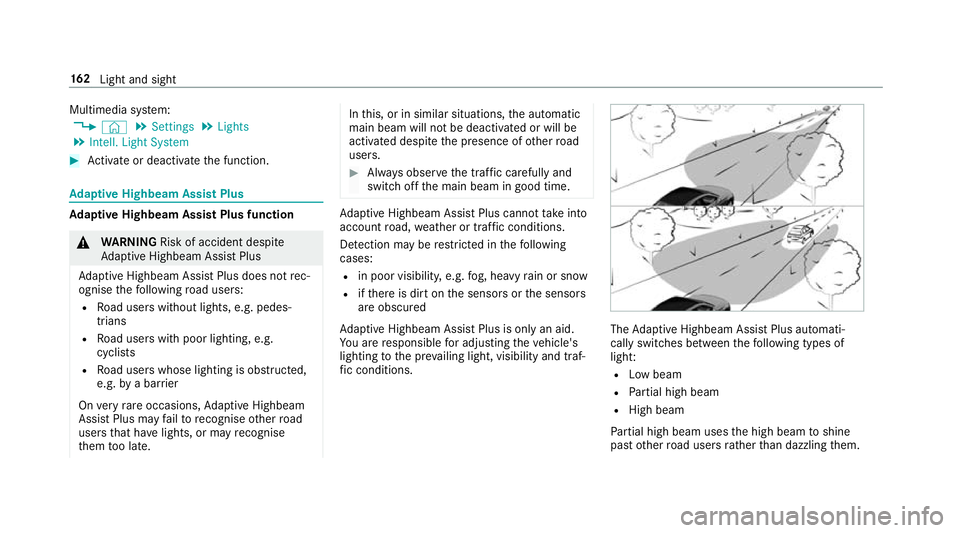
Adaptive Highbeam Assist Plus automati‐
cally swit ches between thefo llowing types of
light:
R Low beam
R Partial high beam
R High beam
Pa rtial high beam uses the high beam toshine
past other road users rath er than dazzling them. 16 2
Light and sight
Page 166 of 729
The
vehicle in front will be illuminated bythe low
beam.
At speeds abo ve30 km/h:
R If no other road users are de tected, the high
beam will be switched on automaticall y.
R Ifot her road users are de tected, the partial
high beam will be switched on automaticall y.
At speeds below 25 km/h or when there is suf fi‐
cient stre et lighting:
R The partial high beam will switch off auto‐
matically.
R The high beam will switch off automaticall y.
At speeds abo veappr oximately 50 km/h:
R The headlamp range of the low beam is regu‐
lated automatically based on the dis tance to
ot her road users.
The sy stem's optical sensor is located behind
th e windscreen near theov erhead control panel. Switching
Adaptive Highbeam Assist Plus
on/off #
Toswitch on: turnthe light switch tothe
à position. #
Switch on the main beam using the combina‐
tion switch.
When the main beam is switched on auto‐
matically in the dar k,the _ indicator
lamp on the multifunction display will light
up. #
Toswitch off: switch offthe main beam
using the combination switch. Setting
theex terior lighting switch-off delay
time Re
quirements:
R The light switch is in theà position.
Multimedia sy stem:
4 © 5
Settings 5
Lights
5 Ext. light. del. shut-off
The exterior lighting is activated forth e confi g‐
ured time when theve hicle is par ked. #
Set the switch-off delay time. Switching
the sur round lighting on or off Multimedia sy
stem:
4 © 5
Settings 5
Lights
5 Surround lighting
When Surround lighting is active,theex terior
lighting lights up for 40 seconds af terth eve hicle
is unloc ked. When youstart theve hicle, the sur‐
ro und lighting is deactivated and the automatic
driving lights are activated.
Illuminated running boards: WhenSurround
lighting is activated, there spective running
boards are also illumina ted when a door is
opened. The illumination of theru nning boards is
not bound tothe 40 second light-up duration of
th eex terior lighting. #
Activate or deacti vate the function. Light and sight
16 3
Page 169 of 729
4
° Continuous wiping, slow
5 ¯ Continuous wiping, fast #
Turn the combination switch tothe cor rect
position 1-5. #
Single wipe/washing: pushthe button on
th e combination switch in the direction of
ar row 1.
R í Single wipe
R î Wipes with washer fluid
Ve hicles with MAGIC VISION CONTROL: inthe
2 or3 position, the windscreen washing
process is automatically triggered if dirt is de tec‐
te d on the windscreen unless theTop up
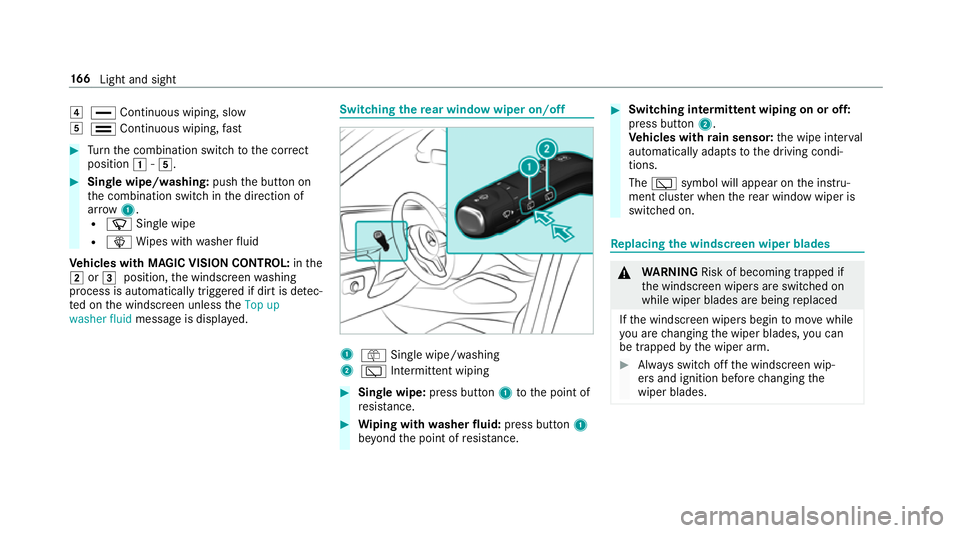
washer fluid message is displa yed. Switching
there ar window wiper on/off 1
ô Single wipe/washing
2 è Intermittent wiping #
Single wipe: press button1tothe point of
re sis tance. #
Wiping with washer fluid: press button 1
be yond the point of resis tance. #
Switching in termittent wiping on or off:
press button 2.
Ve hicles with rain sensor: the wipe inter val
automatically adapts tothe driving condi‐
tions.
The è symbol will appear on the instru‐
ment clus ter when there ar wind owwiper is
swit ched on. Re
placing the windsc reen wiper blades &
WARNING Risk of becoming trapped if
th e windscreen wipers are switched on
while wiper blades are being replaced
If th e windscreen wipers begin tomo vewhile
yo u are changing the wiper blades, you can
be trapped bythe wiper arm. #
Alw ays switch off the windscreen wip‐
ers and ignition before changing the
wiper blades. 16 6
Light and sight
Page 175 of 729
The inside
rearview mir ror and the outside mir‐
ro r on the driver's side automatically go into
anti-dazzle mode if light from a headlamp hits
th e sensor on the inside rearview mir ror.
Sy stem limitations
The sy stem does not go into anti-dazzle mode in
th efo llowing situations:
R the engine is switched off
R reve rsege ar is engaged
R the interior lighting is switched on Fu
nction of the front-passenger outside mir‐
ro r parking position %
The pa rking position is available on ly invehi‐
cles with the mir ror pac kage or memory
function.
The parking position makes parking easier.
In thefo llowing situations, the front-passen ger
outside mir ror swivels down wardinthe direction
of there ar wheel on the front passenger's side:
R the parking position is stored (/ page172)
R the front-passen ger mir ror is selected R
reve rsege ar is engaged
The front-passenger outside mir ror mo ves back
to its original position in thefo llowing situations:
R you shift the transmission toano ther trans‐
mission position
R you are tra velling at speeds greaterth an
15 km/h
R you press the button forth e outside mir ror
on the driver's side St
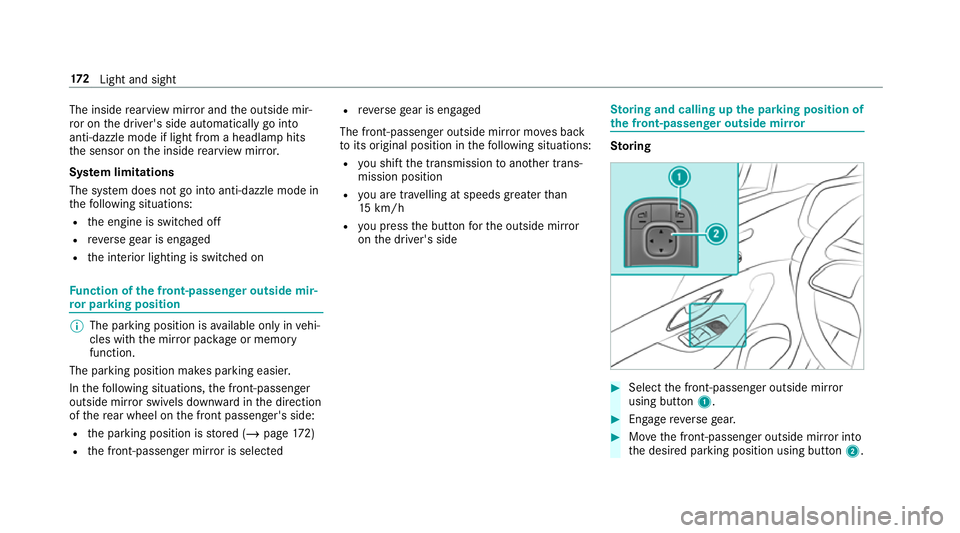
oring and calling up the pa rking position of
th e front-passenger outside mir ror Sto
ring #
Select the front-passen ger outside mir ror
using but ton1. #
Engage reve rsege ar. #
Movethe front-passen ger outside mir ror into
th e desired parking position using button 2.17 2
Light and sight
Page 196 of 729
Ru
nning-in no tes To
preser vethe engine during thefirs t1, 500 km:
R drive at varying road speeds and engine
speeds.
R drive theve hicle in drive program A
or ;.
R change gear before there v counter needle is
Ô ofthewa yto there d area of there v coun‐
te r.
R do not shift down a gear manually in order to
brake.
R avoidoverstra ining theve hicle, e.g. driving at
full thro ttle.
R do not depress the accelera tor pedal past
th e pressure point (kickdown).
R only increase the engine speed gradually and
accelerate theve hicle tofull speed af ter
1, 500 km.
This also applies when the engine or parts of the
driv etra in ha vebeen replaced. Please also obser
vethefo llowing running-in
no tes:
R in cer tain driving and driving saf ety sy stems,
th e sensors adjust automatically while a cer‐
tai n di stance is being driven af terth eve hicle
has been delivered or af terre pairs. Full sys‐
te m ef fectiveness is not reached until the
end of this teach-in process.
R brakepads, brake discs and tyres that are
either new or ha vebeen replaced only ach‐
ie ve optimum braking ef fect and grip af ter
se veral hundred kilom etre s of driving. Com‐
pensate forth ere duced braking ef fect by
applying greaterfo rc eto the brake pedal. Note
s on driving &
WARNING Risk of accident due to
objects in the driver's foot we ll
Objects in the driver's foot we ll may impede
pedal tra vel or block a depressed pedal.
This jeopardises the operating and road
saf ety of theve hicle. #
Stow all objects in theve hicle securely
so that they cannot getinto the driver's
fo ot we ll. #
Alw aysfit th efloor mats securely and
as prescribed in order toensure that
th ere is alw ays suf ficient room forthe
pedals. #
Do not use loose floor mats and do not
place floor mats on top of one ano ther. &
WARNING Risk of accident due to
unsuitable foot we ar
Operating the pedals may be impaired by
we aring unsuitable foot we ar, e.g.:
R plat form shoes
R high-heeled shoes
R slippers #
Alw ayswe ar suitable foot we ar when
driving so that you can operate the ped‐
als safel y. Driving and pa
rking 19 3