2019 MERCEDES-BENZ GLS tire pressure
[x] Cancel search: tire pressurePage 216 of 398
cases, the system may make an inappropriate
brake application, e.g. after intentionally driv-
ing over a solid lane marking. There is a risk of an accident.
An inappropriate brake application may be
interrupted at any time if you steer slightly in
the opposite direction. Always make sure that
there is sufficient distance on the side for
other traffic or obstacles. If you leave your lane, under certain circumstan-
ces the vehicle will brake briefly on one side.
This is meant to assist you in bringing the vehicle
back to the original lane.
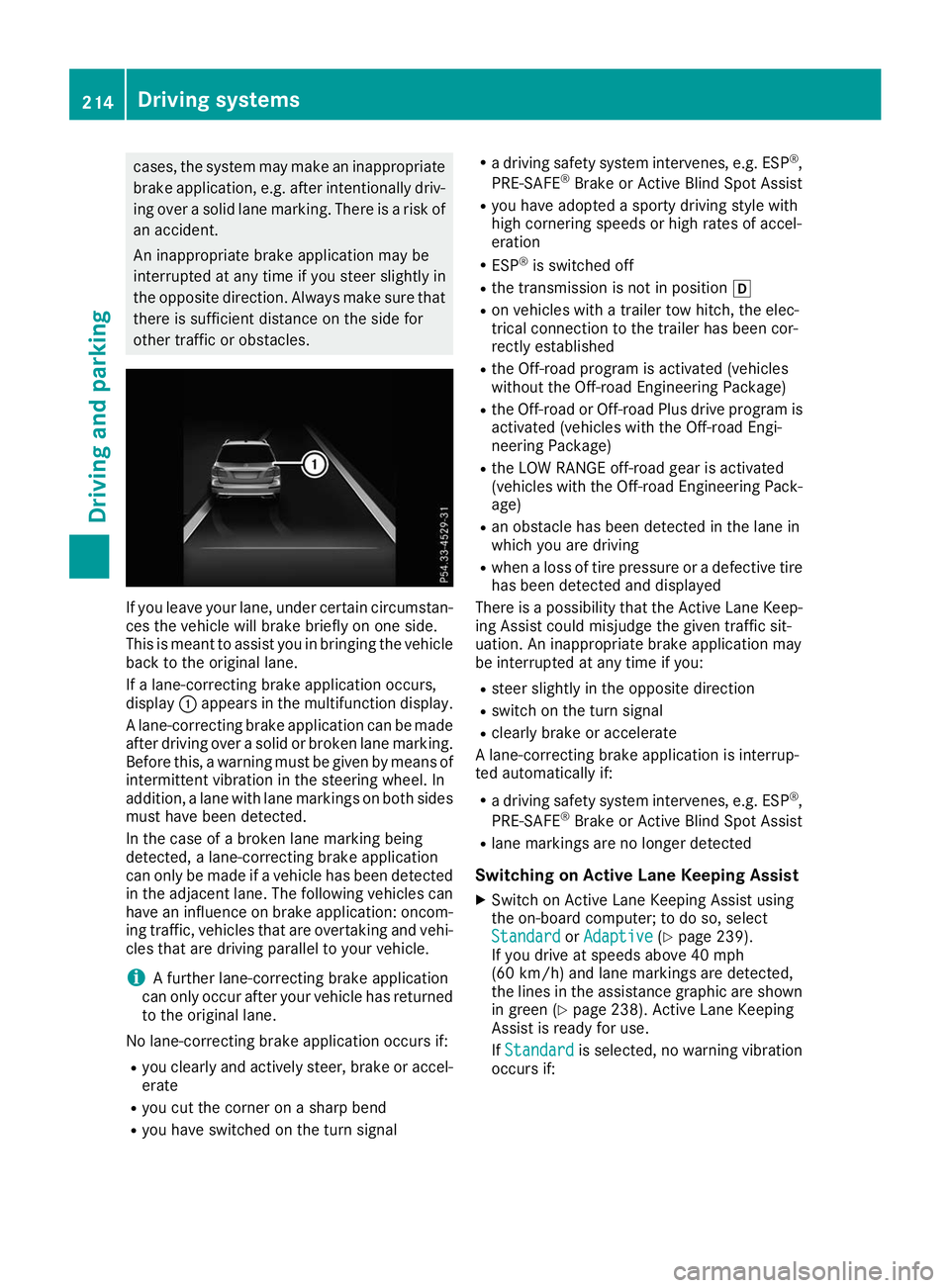
If a lane-correcting brake application occurs,
display 0043appears in the multifunction display.
A lane-correcting brake application can be made
after driving over a solid or broken lane marking.
Before this, a warning must be given by means of
intermittent vibration in the steering wheel. In
addition, a lane with lane markings on both sides must have been detected.
In the case of a broken lane marking being
detected, a lane-correcting brake application
can only be made if a vehicle has been detected
in the adjacent lane. The following vehicles can
have an influence on brake application: oncom- ing traffic, vehicles that are overtaking and vehi-cles that are driving parallel to your vehicle.
i A further lane-correcting brake application
can only occur after your vehicle has returned
to the original lane.
No lane-correcting brake application occurs if:
R you clearly and actively steer, brake or accel-
erate
R you cut the corner on a sharp bend
R you have switched on the turn signal R
a driving safety system intervenes, e.g. ESP ®
,
PRE-SAFE ®
Brake or Active Blind Spot Assist
R you have adopted a sporty driving style with
high cornering speeds or high rates of accel-
eration
R ESP ®
is switched off
R the transmission is not in position 005B
R on vehicles with a trailer tow hitch, the elec-
trical connection to the trailer has been cor-
rectly established
R the Off-road program is activated (vehicles
without the Off-road Engineering Package)
R the Off-road or Off-road Plus drive program is
activated (vehicles with the Off-road Engi-
neering Package)
R the LOW RANGE off-road gear is activated
(vehicles with the Off-road Engineering Pack-
age)
R an obstacle has been detected in the lane in
which you are driving
R when a loss of tire pressure or a defective tire
has been detected and displayed
There is a possibility that the Active Lane Keep-
ing Assist could misjudge the given traffic sit-
uation. An inappropriate brake application may
be interrupted at any time if you:
R steer slightly in the opposite direction
R switch on the turn signal
R clearly brake or accelerate
A lane-correcting brake application is interrup-
ted automatically if:
R a driving safety system intervenes, e.g. ESP ®
,
PRE-SAFE ®
Brake or Active Blind Spot Assist
R lane markings are no longer detected
Switching on Active Lane Keeping Assist X Switch on Active Lane Keeping Assist using
the on-board computer; to do so, select
Standard
Standard orAdaptive
Adaptive (Ypage 239).
If you drive at speeds above 40 mph
(60 km/h) and lane markings are detected,
the lines in the assistance graphic are shown in green (Y page 238). Active Lane Keeping
Assist is ready for use.
If Standard Standard is selected, no warning vibration
occurs if: 214
Driving systemsDriving and parking
Page 218 of 398
ing on road surface and tire conditions. Select a
set speed suitable for the prevailing conditions
and when necessary, apply the brakes manually.
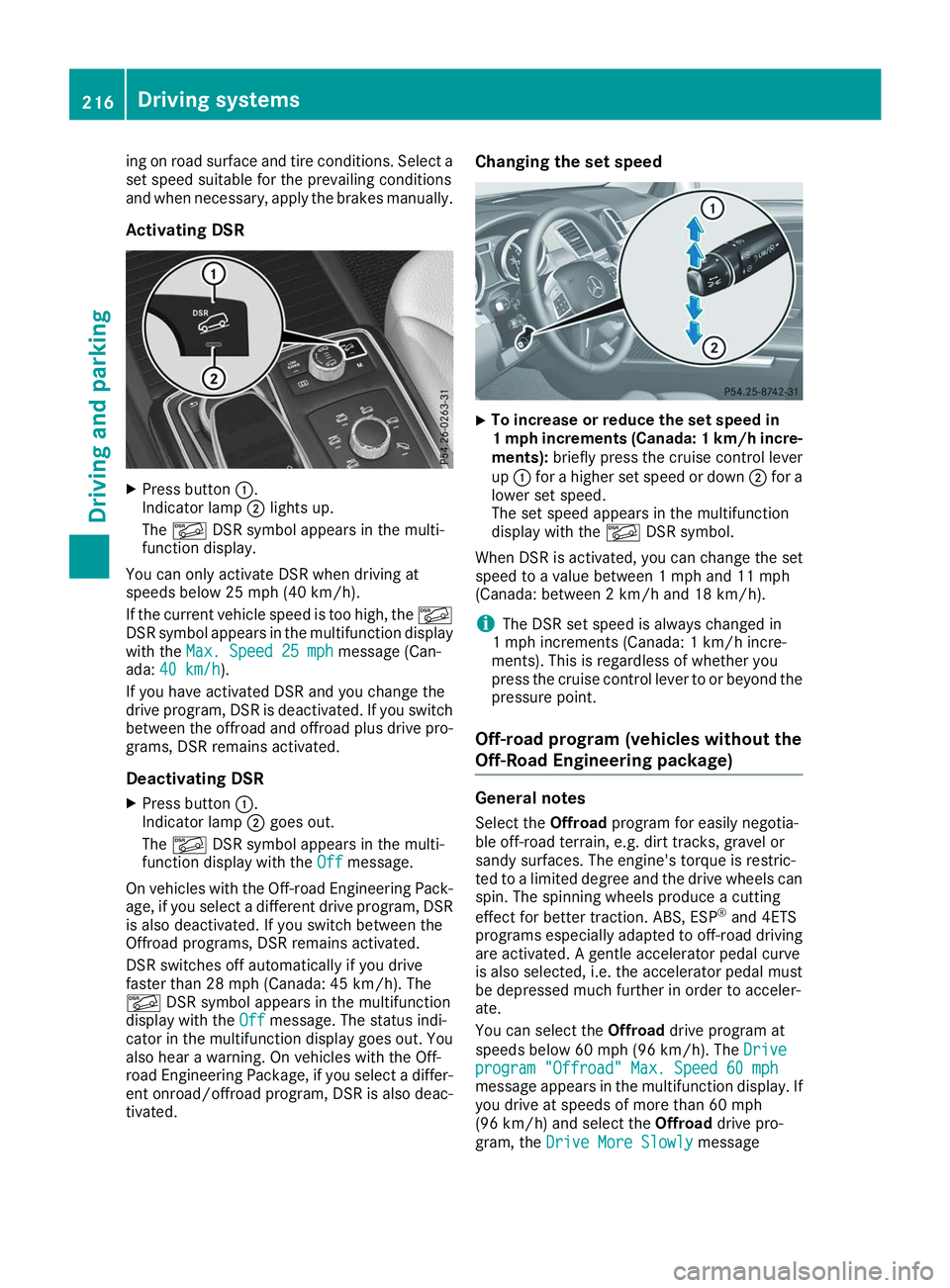
Activating DSR X
Press button 0043.
Indicator lamp 0044lights up.
The 00C6 DSR symbol appears in the multi-
function display.
You can only activate DSR when driving at
speeds below 25 mph (40 km/h).
If the current vehicle speed is too high, the 00C6
DSR symbol appears in the multifunction display
with the Max. Speed 25 mph
Max. Speed 25 mph message (Can-
ada: 40 km/h 40 km/h ).
If you have activated DSR and you change the
drive program, DSR is deactivated. If you switch between the offroad and offroad plus drive pro-grams, DSR remains activated.
Deactivating DSR
X Press button 0043.
Indicator lamp 0044goes out.
The 00C6 DSR symbol appears in the multi-
function display with the Off
Off message.
On vehicles with the Off-road Engineering Pack-
age, if you select a different drive program, DSR is also deactivated. If you switch between the
Offroad programs, DSR remains activated.
DSR switches off automatically if you drive
faster than 28 mph (Canada: 45 km/h). The
00C6 DSR symbol appears in the multifunction
display with the Off
Off message. The status indi-
cator in the multifunction display goes out. You
also hear a warning. On vehicles with the Off-
road Engineering Package, if you select a differ-
ent onroad/offroad program, DSR is also deac- tivated. Changing the set speed
X
To increase or reduce the set speed in
1 mp
hincrements (Canada: 1 km/h incre-
ments): briefly press the cruise control lever
up 0043 for a higher set speed or down 0044for a
lower set speed.
The set speed appears in the multifunction
display with the 00C6DSR symbol.
When DSR is activated, you can change the set
speed to a value between 1 mph and 11 mph
(Canada: between 2 km/h and 18 km/h).
i The DSR set speed is always changed in
1 mph increments (Canada: 1 km/h incre-
ments). This is regardless of whether you
press the cruise control lever to or beyond the
pressure point.
Off-road program (vehicles without the
Off-Road Engineering package) General notes
Select the Offroadprogram for easily negotia-
ble off-road terrain, e.g. dirt tracks, gravel or
sandy surfaces. The engine's torque is restric-
ted to a limited degree and the drive wheels can
spin. The spinning wheels produce a cutting
effect for better traction. ABS, ESP ®
and 4ETS
programs especially adapted to off-road driving are activated. A gentle accelerator pedal curve
is also selected, i.e. the accelerator pedal must
be depressed much further in order to acceler-
ate.
You can select the Offroaddrive program at
speeds below 60 mph (96 km/h). The Drive
Drive
program "Offroad" Max. Speed 60 mph program "Offroad" Max. Speed 60 mph
message appears in the multifunction display. If
you drive at speeds of more than 60 mph
(96 km/h) and select the Offroaddrive pro-
gram, the Drive More Slowly Drive More Slowly message216
Driving systemsDriving and parking
Page 224 of 398
R
is affected more by strong crosswinds
R demands more sensitive steering
R has a larger turning circle
This could impair the handling characteristics.
When towing a trailer, always adjust your speed to the current road and weather conditions. Do
not exceed the maximum permissible speed for
your vehicle/trailer combination. Notes on towing a trailer
General notes !
If you have a trailer tow hitch retrofitted,
changes to the cooling system and drive train may be necessary, depending on the vehicle
type.
If you have a trailer tow hitch retrofitted,
observe the anchorage points on the chassis
frame.
R Do not exceed the legally prescribed maxi-
mum speed for vehicle/trailer combinations
in the relevant country.
This lowers the risk of an accident.
R Only install an approved trailer coupling on
your vehicle.
More information on availability and installa-
tion can be obtained at any qualified special-
ist workshop.
R The bumpers of your vehicle are not suitable
for installing detachable trailer couplings.
R Do not install hired trailer couplings or other
detachable trailer couplings on the bumpers
of your vehicle.
R If you no longer need the ball coupling,
remove it from the ball coupling recess. This
will reduce the risk of damage to the ball cou-
pling.
When towing a trailer, set the tire pressure on
the rear axle of the towing vehicle for the max-
imum load. You will find the values in the tire
pressure table in the fuel filler flap of the vehicle (Y page 371).
Please note that when towing a trailer, the fol-
lowing driving systems have limited availability
or are not available at all:
R Parking Assist PARKTRONIC (Y page 189)
R Blind Spot Assist (Y page 207)
R Active Lane Keeping Assist (Y page 212)On vehicles without level control, the height of
the ball coupling will alter according to the load
placed on the vehicle. If necessary, use a trailer
with a height-adjustable drawbar.
You will find installing dimensions and loads
under "Technical data" (Y page 392).
Driving tips Also observe the notes on pulling away with a
trailer (Y
page 143).
The maximum permissible speed for vehicle/
trailer combinations depends on the type of
trailer. Before beginning the journey, check the
trailer's documents to see what the maximum
permissible speed is for your trailer. Observe the
legally permissible maximum speed in the rele-
vant country.
For certain Mercedes-Benz vehicles, the maxi-
mum permissible rear axle load is increased
when towing a trailer. See "Technical data" to
find out whether this applies to your vehicle
(Y page 392). If you utilize any of the added
maximum rear axle load when towing a trailer,
the vehicle/trailer combination may not exceed
a maximum speed of 60 mph (100 km/h) for
reasons concerning the operating permit. This
also applies in countries in which the maximum
permissible speed for car/trailer combinations
is greater than 60 mph (100 km/h).
When towing a trailer, your vehicle's handling
characteristics will be different in comparison
with when driving without a trailer.
Use the left-hand steering wheel paddle shifter
to shift into a lower gear in good time on long
and steep downhill gradients.
This also applies if you have activated cruise
control or Active Distance Assist DISTRONIC.
This will use the braking effect of the engine, so that less braking will be required to maintain the
speed. This relieves the load on the brake sys-
tem and prevents the brakes from overheating
and wearing too quickly. If you need additional
braking, depress the brake pedal repeatedly
rather than continuously.
Driving tips If the trailer swings from side to side:
X Do not accelerate.
X Do not counter-steer.
X Brake if necessary. 222
Towing a trailerDriving and parking
Page 230 of 398
Use only bicycle racks approved by
Mercedes-Benz.
Bicycle racks cause your vehicle's driving char-
acteristics to change. The vehicle: R is heavier
R is restricted in its acceleration and gradient-
climbing capability
R has an increased braking distance This could impair the handling characteristics.
Adapt your driving style accordingly. Maintain a
safe distance and drive carefully.
When using bicycle racks, set the tire pressure
on the rear axle of the vehicle for the maximum
load. Further information on tire pressure can be
found on the tire pressure table (Y page 355).Loading instructions
The greater the distance between the load's center of gravity and the ball head, the higher the load exerted on the trailer tow hitch.
Therefore, observe the following notes:
R Attach heavy bicycles as close as possible to the vehicle.
R Always distribute the load on the bicycle rack as symmetrically as possible to the vehicle longi-
tudinal axis.
Before loading the bicycle rack, Mercedes-Benz advises you to remove all add-on parts from the
bicycles, e.g. bicycle baskets, child seats or batteries. This will allow you to improve the aerody-
namic resistance and the bicycle rack's center of gravity.
Always secure bicycles against slipping and check that they are firmly seated at regular intervals.
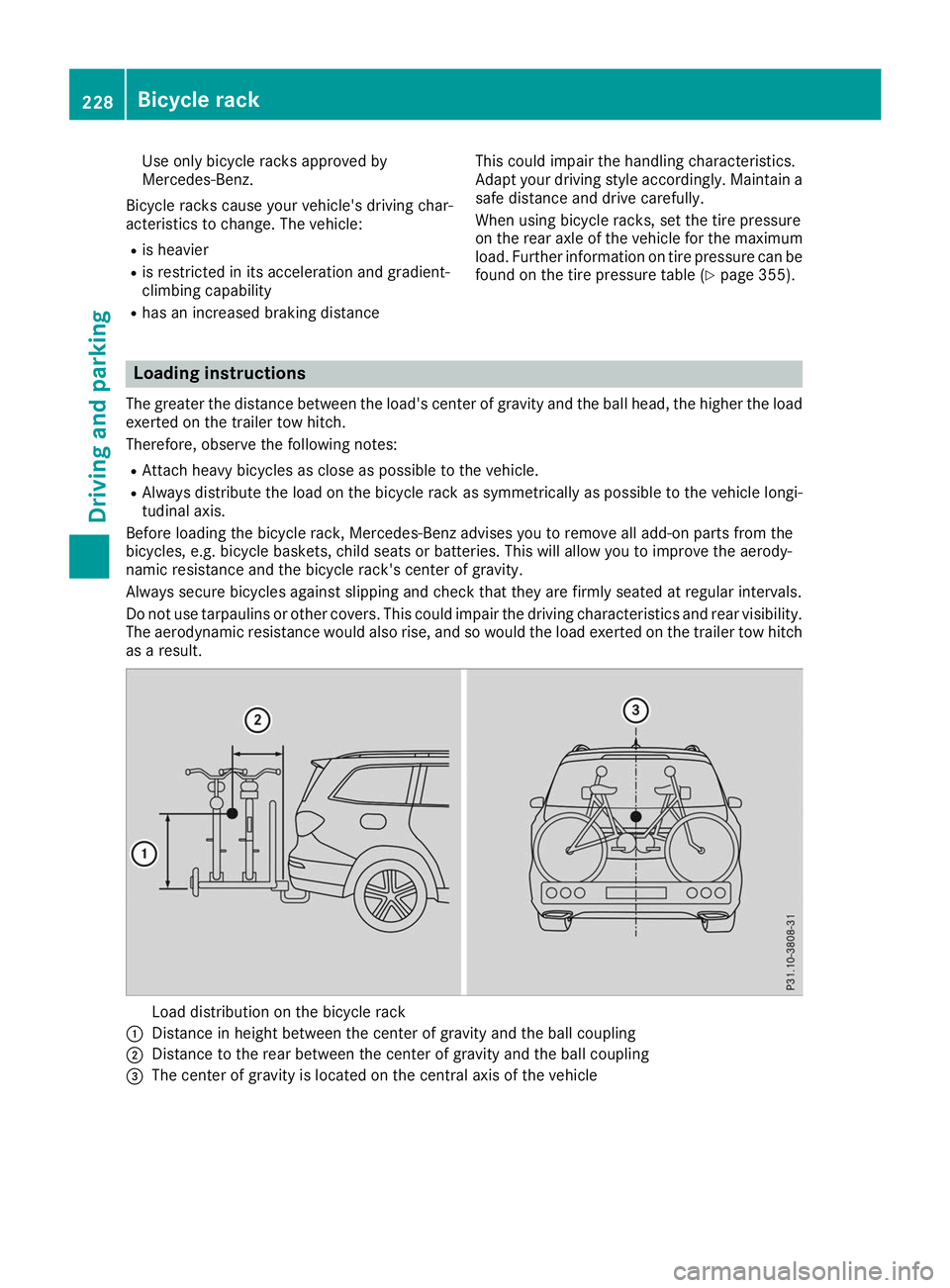
Do not use tarpaulins or other covers. This could impair the driving characteristics and rear visibility. The aerodynamic resistance would also rise, and so would the load exerted on the trailer tow hitchas a result. Load distribution on the bicycle rack
0043 Distance in height between the center of gravity and the ball coupling
0044 Distance to the rear between the center of gravity and the ball coupling
0087 The center of gravity is located on the central axis of the vehicle 228
Bicycle rackDriving and parking
Page 241 of 398
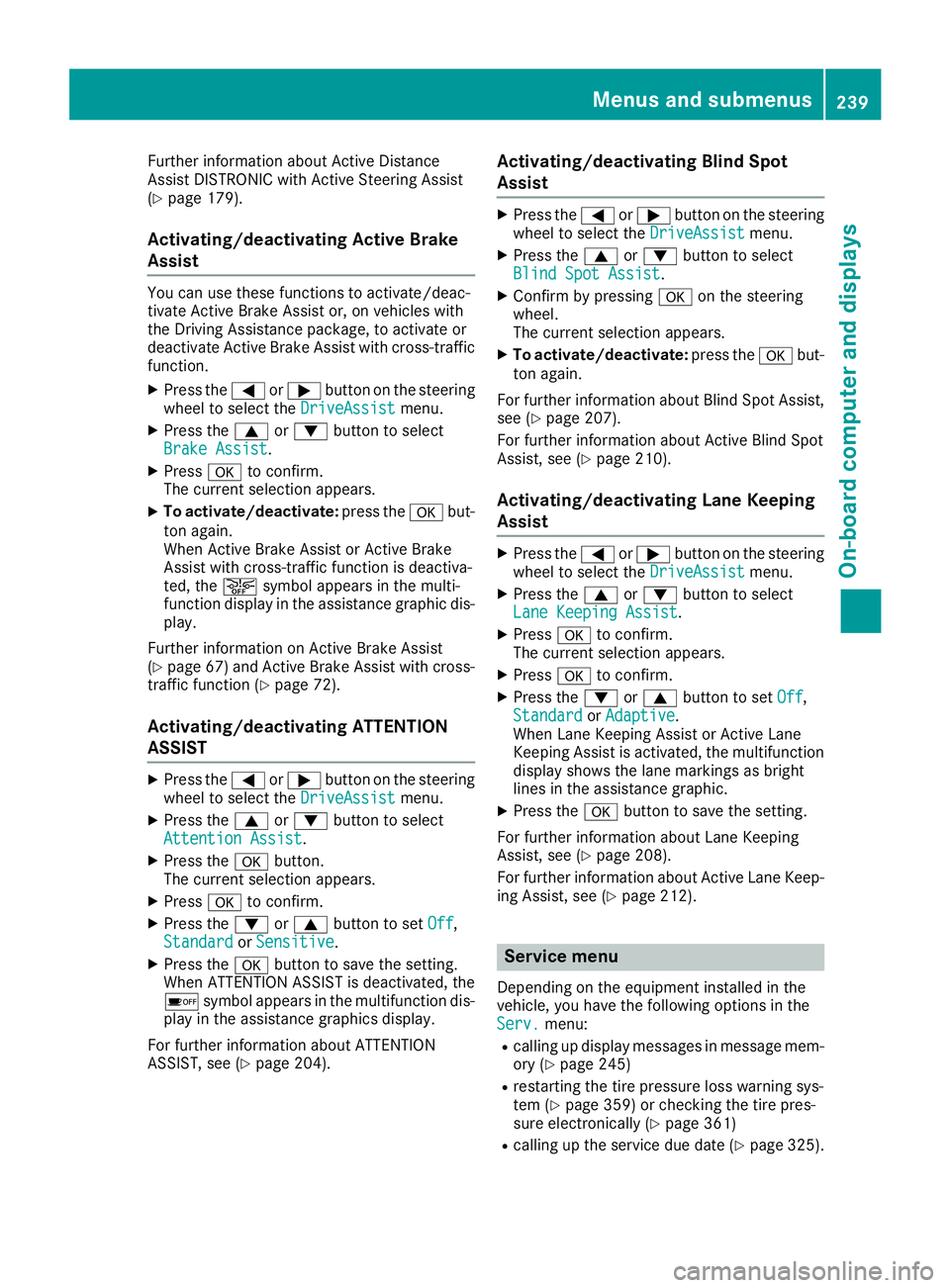
Further information about Active Distance
Assist DISTRONIC with Active Steering Assist
(Y page 179).
Activating/deactivating Active Brake
Assist You can use these functions to activate/deac-
tivate Active Brake Assist or, on vehicles with
the Driving Assistance package, to activate or
deactivate Active Brake Assist with cross-traffic
function.
X Press the 0059or0065 button on the steering
wheel to select the DriveAssist DriveAssistmenu.
X Press the 0063or0064 button to select
Brake Assist
Brake Assist.
X Press 0076to confirm.
The current selection appears.
X To activate/deactivate: press the0076but-
ton again.
When Active Brake Assist or Active Brake
Assist with cross-traffic function is deactiva-
ted, the 00D4symbol appears in the multi-
function display in the assistance graphic dis-
play.
Further information on Active Brake Assist
(Y page 67 )and Active Brake Assist with cross-
traffic function (Y page 72).
Activating/deactivating ATTENTION
ASSIST X
Press the 0059or0065 button on the steering
wheel to select the DriveAssist
DriveAssist menu.
X Press the 0063or0064 button to select
Attention Assist Attention Assist .
X Press the 0076button.
The current selection appears.
X Press 0076to confirm.
X Press the 0064or0063 button to set Off
Off,
Standard
Standard orSensitive
Sensitive .
X Press the 0076button to save the setting.
When ATTENTION ASSIST is deactivated, the
00D7 symbol appears in the multifunction dis-
play in the assistance graphics display.
For further information about ATTENTION
ASSIST, see (Y page 204). Activating/deactivating Blind Spot
Assist X
Press the 0059or0065 button on the steering
wheel to select the DriveAssist DriveAssistmenu.
X Press the 0063or0064 button to select
Blind Spot Assist
Blind Spot Assist .
X Confirm by pressing 0076on the steering
wheel.
The current selection appears.
X To activate/deactivate: press the0076but-
ton again.
For further information about Blind Spot Assist, see (Y page 207).
For further information about Active Blind Spot
Assist, see (Y page 210).
Activating/deactivating Lane Keeping
Assist X
Press the 0059or0065 button on the steering
wheel to select the DriveAssist DriveAssistmenu.
X Press the 0063or0064 button to select
Lane Keeping Assist
Lane Keeping Assist .
X Press 0076to confirm.
The current selection appears.
X Press 0076to confirm.
X Press the 0064or0063 button to set Off
Off,
Standard
Standard orAdaptive
Adaptive.
When Lane Keeping Assist or Active Lane
Keeping Assist is activated, the multifunction display shows the lane markings as bright
lines in the assistance graphic.
X Press the 0076button to save the setting.
For further information about Lane Keeping
Assist, see (Y page 208).
For further information about Active Lane Keep- ing Assist, see (Y page 212). Service menu
Depending on the equipment installed in the
vehicle, you have the following options in the
Serv. Serv. menu:
R calling up display messages in message mem-
ory (Y page 245)
R restarting the tire pressure loss warning sys-
tem (Y page 359) or checking the tire pres-
sure electronically (Y page 361)
R calling up the service due date (Y page 325). Menus and submenus
239On-board computer and displays Z
Page 270 of 398
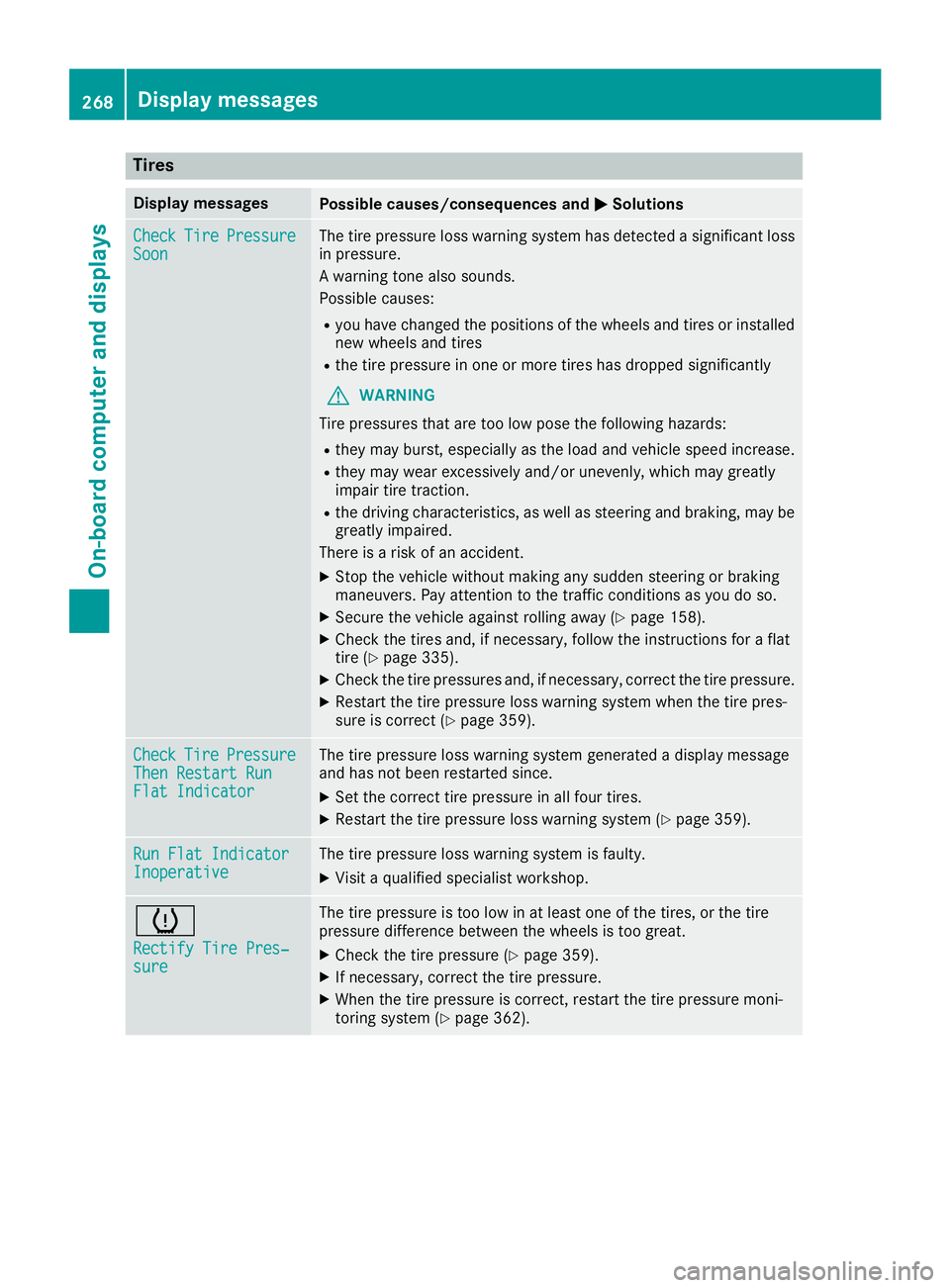
Tires
Display messages
Possible causes/consequences and
0050
0050Solutions Check
Check
Tire
TirePressure
Pressure
Soon
Soon The tire pressure loss warning system has detected a significant loss
in pressure.
A warning tone also sounds.
Possible causes:
R you have changed the positions of the wheels and tires or installed
new wheels and tires
R the tire pressure in one or more tires has dropped significantly
G WARNING
Tire pressures that are too low pose the following hazards: R they may burst, especially as the load and vehicle speed increase.
R they may wear excessively and/or unevenly, which may greatly
impair tire traction.
R the driving characteristics, as well as steering and braking, may be
greatly impaired.
There is a risk of an accident.
X Stop the vehicle without making any sudden steering or braking
maneuvers. Pay attention to the traffic conditions as you do so.
X Secure the vehicle against rolling away (Y page 158).
X Check the tires and, if necessary, follow the instructions for a flat
tire (Y page 335).
X Check the tire pressures and, if necessary, correct the tire pressure.
X Restart the tire pressure loss warning system when the tire pres-
sure is correct (Y page 359). Check Check
Tire
TirePressure
Pressure
Then Restart Run
Then Restart Run
Flat Indicator Flat Indicator The tire pressure loss warning system generated a display message
and has not been restarted since.
X Set the correct tire pressure in all four tires.
X Restart the tire pressure loss warning system (Y page 359).Run Flat Indicator Run Flat Indicator
Inoperative Inoperative The tire pressure loss warning system is faulty.
X Visit a qualified specialist workshop. 0077
Rectify Tire Pres‐ Rectify Tire Pres‐
sure sure The tire pressure is too low in at least one of the tires, or the tire
pressure difference between the wheels is too great.
X Check the tire pressure (Y page 359).
X If necessary, correct the tire pressure.
X When the tire pressure is correct, restart the tire pressure moni-
toring system (Y page 362).268
Display
messagesOn-board computer and displays
Page 271 of 398
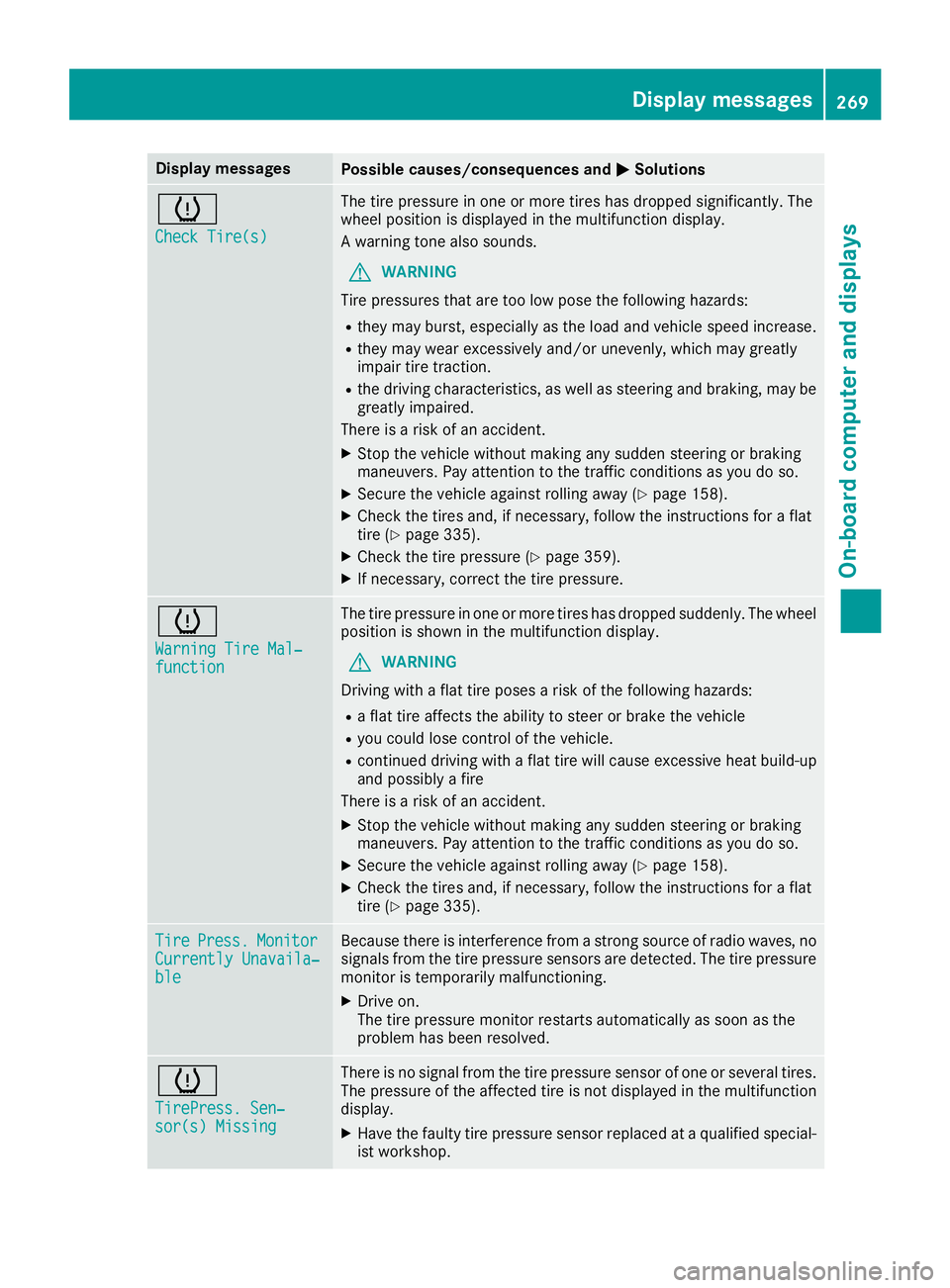
Display messages
Possible causes/consequences and
0050
0050Solutions 0077
Check Tire(s) Check Tire(s) The tire pressure in one or more tires has dropped significantly. The
wheel position is displayed in the multifunction display.
A warning tone also sounds.
G WARNING
Tire pressures that are too low pose the following hazards: R they may burst, especially as the load and vehicle speed increase.
R they may wear excessively and/or unevenly, which may greatly
impair tire traction.
R the driving characteristics, as well as steering and braking, may be
greatly impaired.
There is a risk of an accident.
X Stop the vehicle without making any sudden steering or braking
maneuvers. Pay attention to the traffic conditions as you do so.
X Secure the vehicle against rolling away (Y page 158).
X Check the tires and, if necessary, follow the instructions for a flat
tire (Y page 335).
X Check the tire pressure (Y page 359).
X If necessary, correct the tire pressure. 0077
Warning Tire Mal‐ Warning Tire Mal‐
function function The tire pressure in one or more tires has dropped suddenly. The wheel
position is shown in the multifunction display.
G WARNING
Driving with a flat tire poses a risk of the following hazards: R a flat tire affects the ability to steer or brake the vehicle
R you could lose control of the vehicle.
R continued driving with a flat tire will cause excessive heat build-up
and possibly a fire
There is a risk of an accident.
X Stop the vehicle without making any sudden steering or braking
maneuvers. Pay attention to the traffic conditions as you do so.
X Secure the vehicle against rolling away (Y page 158).
X Check the tires and, if necessary, follow the instructions for a flat
tire (Y page 335). Tire Tire
Press.
Press. Monitor
Monitor
Currently Unavaila‐
Currently Unavaila‐
ble ble Because there is interference from a strong source of radio waves, no
signals from the tire pressure sensors are detected. The tire pressure monitor is temporarily malfunctioning.
X Drive on.
The tire pressure monitor restarts automatically as soon as the
problem has been resolved. 0077
TirePress. Sen‐ TirePress. Sen‐
sor(s) Missing sor(s) Missing There is no signal from the tire pressure sensor of one or several tires.
The pressure of the affected tire is not displayed in the multifunction
display.
X Have the faulty tire pressure sensor replaced at a qualified special-
ist workshop. Display
messages
269On-board computer and displays Z
Page 272 of 398
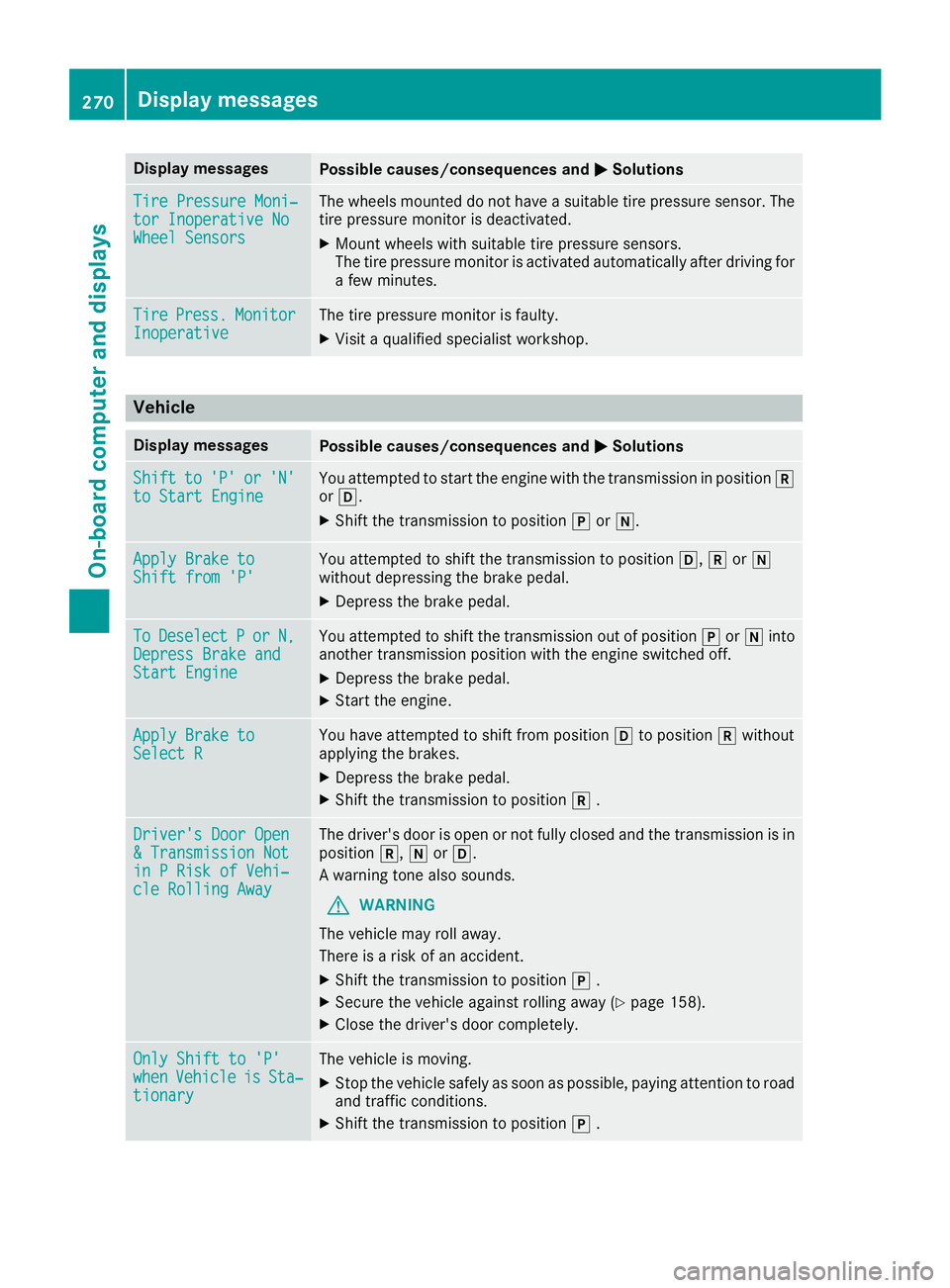
Display messages
Possible causes/consequences and
0050
0050Solutions Tire Pressure Moni‐
Tire Pressure Moni‐
tor Inoperative No tor Inoperative No
Wheel Sensors Wheel Sensors The wheels mounted do not have a suitable tire pressure sensor. The
tire pressure monitor is deactivated.
X Mount wheels with suitable tire pressure sensors.
The tire pressure monitor is activated automatically after driving for a few minutes. Tire
Tire
Press.
Press. Monitor
Monitor
Inoperative
Inoperative The tire pressure monitor is faulty.
X Visit a qualified specialist workshop. Vehicle
Display messages
Possible causes/consequences and
0050
0050Solutions Shift
Shift
to
to'P'
'P' or
or'N'
'N'
to Start Engine
to Start Engine You attempted to start the engine with the transmission in position
005E
or 005B.
X Shift the transmission to position 005Dor005C. Apply Brake to
Apply Brake to
Shift from 'P' Shift from 'P' You attempted to shift the transmission to position
005B,005Eor005C
without depressing the brake pedal.
X Depress the brake pedal. To
To
Deselect
Deselect P
Por
or N,
N,
Depress Brake and
Depress Brake and
Start Engine Start Engine You attempted to shift the transmission out of position
005Dor005C into
another transmission position with the engine switched off.
X Depress the brake pedal.
X Start the engine. Apply Brake to
Apply Brake to
Select R Select R You have attempted to shift from position
005Bto position 005Ewithout
applying the brakes.
X Depress the brake pedal.
X Shift the transmission to position 005E. Driver's Door Open
Driver's Door Open
& Transmission Not & Transmission Not
in P Risk of Vehi‐ in P Risk of Vehi‐
cle Rolling Away cle Rolling Away The driver's door is open or not fully closed and the transmission is in
position 005E,005Cor005B.
A warning tone also sounds.
G WARNING
The vehicle may roll away.
There is a risk of an accident.
X Shift the transmission to position 005D.
X Secure the vehicle against rolling away (Y page 158).
X Close the driver's door completely. Only Shift to 'P' Only Shift to 'P'
when when
Vehicle
Vehicle is
isSta‐
Sta‐
tionary
tionary The vehicle is moving.
X
Stop the vehicle safely as soon as possible, paying attention to road
and traffic conditions.
X Shift the transmission to position 005D. 270
Display
messagesOn-board computer and displays