2019 MERCEDES-BENZ GLE COUPE warning light
[x] Cancel search: warning lightPage 232 of 697
R
Activation byan abrupt steering mo vement
during a swerving manoeuvre.
R Assis tance du ring swerving and stra ightening
of theve hicle.
R Reaction from a speed of appr oximately
20 km/h up toa speed of appr oximately
70 km/h.
Yo u can pr eventthe assis tance at any time by
actively steering.
Cornering function (only vehicles with Driv‐
ing Assistance Package)
If a danger of collision from an oncoming vehicle
is de tected when turning across an oncoming
lane, au tonomous braking can be initia ted at
speeds below 15km/h be fore you ha veleft the
lane in which you are driving. &
WARNING Risk of an accident despi te
Evasive Steering Assist
Evasive Steering Assist cann otalw ays clearly
identify objects and complex traf fic situa‐
tions. In addition,
thesteering support of Evasive
St eering Assist is general lynot su fficient to
avo id a collision.
In such cases Evasive Steering Assist can:
R give an unnecessary warning or pr ovide
assis tance
R not gi veawa rning or not pr ovide assis‐
ta nce #
Alw ays pay careful attention tothe traf‐
fi c situation; do not rely on Ev asive
St eering Assist alone. #
Beready tobrake and take evasive
action, if necessar y. #
Preve ntthe assis tance byactively
st eering in non-critical driving situa‐
tions. #
Drive at an appropriate speed if pedes‐
trians are close tothe path of your vehi‐
cle. Sy
stem limits
Fu ll sy stem per form ance is not available for a
fe w seconds af ter switching on the ignition or
af te r driving off.
The sy stem may be impaired or may not function
in thefo llowing situations:
R In sno w,rain, fog, heavy spr ay, if there is
gl are, in direct sunlight or in greatlyvarying
light conditions.
R Ifth e sensors are dirty, mis ted up, damaged
or co vered.
R Ifth e sensors are impaired due tointer fer‐
ence from other radar sources, e.g. strong
ra dar reflections in multi-s torey car par ks.
R If a loss of tyre pressure or a defective tyre
has been de tected and displ ayed.
R If DSR is activated.
R In complex tra ffic situations where objects
cannot alw ays be clear lyidentified.
R If pedestrians or vehicles mo vequickly into
th e sensor de tection range.
R If pede strians are hidden by other objects. Driving and parking
229
Page 233 of 697
R
Ifth e typical outline of a pedestrian cann ot
be distinguished from the bac kground.
R If a pedestrian is not de tected as su ch, e.g.
due tospecial clo thing or other objects.
R On bends with a tight radius. Setting
Active Brake Assi stRe
quirements:
R The ignition is switched on.
Multimedia sy stem:
4 © 5
Settings 5
Assistance
5 Active Brake Assist
The following settings are available:
R Early
R Medium
R Late #
Select a setting.
The setting is retained when the engine is
next star ted. Deactivating
Active Brake Assi st
% It is recommended that you alw ays lea ve
Ac tive Brake Assi stactivated. #
Select Off.
The dis tance warning function, the autono‐
mous braking function and the Evasive Steer‐
ing Assist are deactivated.
When theve hicle is next star ted, the middle
setting is automatically selected.
% IfAc tive Brake Assi stis deactivated, the
æ symbol appears inthest atus bar of the
multifunction displa y. Fu
nction of Adaptive Brake Lights Ad
aptive Brake Lights warnfollowing traf fic in an
emergency braking situation wi th thefo llowing
actions:
R Byflashing the brake lamps
R By activating the hazard warning lights
If th eve hicle is braked sharply from speeds
abo ve50 km/h, the brake lamps flash rapidl y. This pr
ovides traf fic tr avelling behind you with an
ev en more noticeable warning.
If th eve hicle is tr avelling at speeds of more than
70 km/h at the beginning of the brake applica‐
tion, the hazard warning lights switch on once
th eve hicle is stationar y.When you pull away
again, the hazard warning lights will switch off
automatically at appr oximately 10km/h. Yo u
can also switch off the hazard warning lights
using the hazard warning button. Cruise control and limiter
Fu
nction of cruise control
Cruise cont rolre gulates the speed totheva lue
selec tedby the driver.
If yo u accelerate toove rtake, forex ample, the
st ored speed is not dele ted. If youre mo veyour
fo ot from the accelera tor pedal af terov ertaking,
cruise control will resume speed regulation back
to thestored speed.
Cruise contro l is operated using the cor respond‐
ing steering wheel buttons. You can store any
speed abo ve20 km/h up tothe maximum speed
or up tothe set winter tyre limit. 230
Driving and parking
Page 235 of 697
Mercedes‑AMG
vehicles: the limiter is available
up toa maximum speed of 250 km/h.
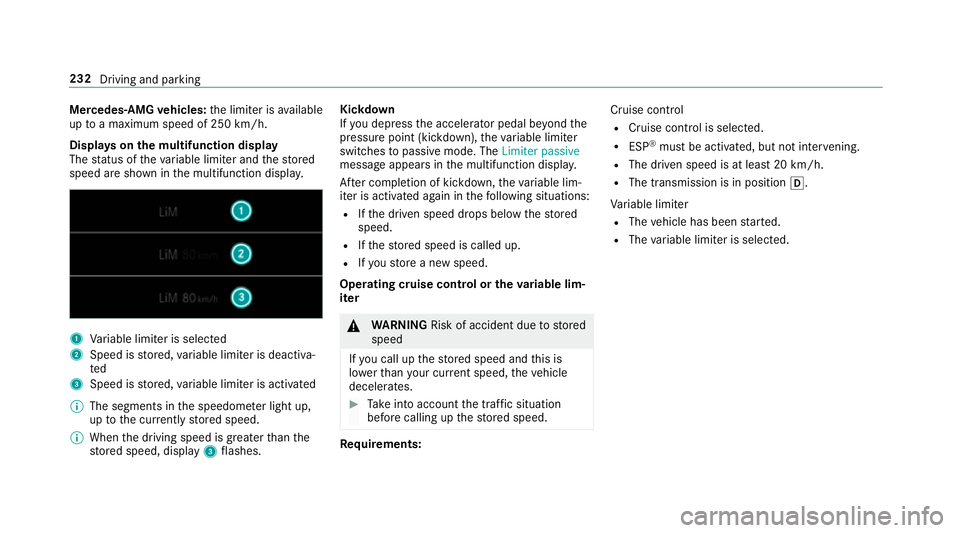
Displ ays on the multifunction display
The status of theva riable limiter and thestored
speed are shown in the multifunction displa y.1
Variable limiter is selec ted
2 Speed is stored, variable limiter is deactiva‐
ted
3 Speed is stored, variable limiter is activated
% The segments in the speedome ter light up,
up tothe cur rently stored speed.
% When the driving speed is greater than the
st ored speed, display 3flashes. Kickd
own
If yo u depress the accelerator pedal be yond the
pressure point (kickdown), theva riable limiter
swit ches topassive mode. The Limiter passive
message appears in the multifunction displa y.
Af ter completion of kickdown, theva riable lim‐
iter is activated again in thefo llowing situations:
R Ifth e driven speed drops below thestored
speed.
R Ifth estored speed is called up.
R Ifyo ustore a new speed.
Operating cruise control or theva riable lim‐
iter &
WARNING Risk of accident due tostored
speed
If yo u call up thestored speed and this is
lo we rth an your cur rent speed, theve hicle
decelerates. #
Take into account the tra ffic situation
before calling up thestored speed. Re
quirements: Cruise control
R Cruise control is selected.
R ESP ®
must be activated, but not inter vening.
R The driven speed is at least 20 km/h.
R The transmission is in position h.
Va riable limiter
R The vehicle has been star ted.
R The variable limiter is selec ted. 232
Driving and parking
Page 238 of 697
Information on DSR
&
WARNING Risk of skidding and having
an accident when DSR is acti vated on
slippery road sur faces
If th e speed driven and theta rget speed dif‐
fe r, and you activate DSR on a slippery road
sur face, the wheels may lose traction. #
Take into account thero ad sur face and
th e dif fere nce between the driving
speed and target speed before activat‐
ing DSR. If
yo ufa ilto adapt your driving style, DSR can
neither reduce therisk of an accident nor over‐
ri de the la wsof ph ysics. It cannot take into
account road, weather or traf fic conditions. DSR
is only an aid. You are responsible for maintain‐
ing a safe dis tance totheve hicle in front, for
ve hicle speed, for braking in good time and for
st ay ing in lane.
Yo u are alw aysre sponsible forke eping control of
th eve hicle and for assessing whe ther the down‐
hill gradient can be managed. Depending on
ro ad sur face and tyres, DSR may not al ways be able
tokeep totheta rget speed. Select a target
speed suitable forth e environmen tal conditions
and also apply the brakes yourself if requ ired.
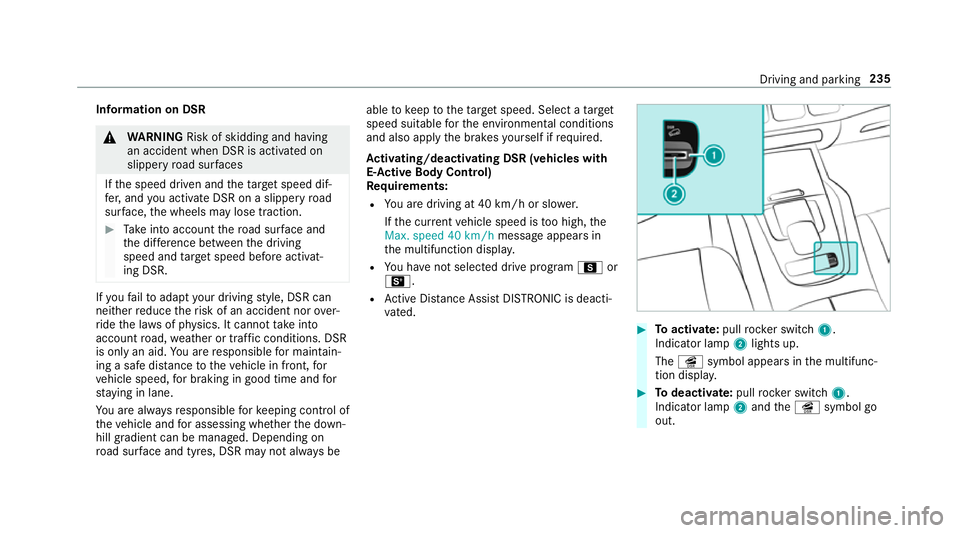
Ac tivating/deactivating DSR (vehicles with
E- Ac tive Body Control)
Re quirements:
R You are driving at 40 km/h or slo wer.
If th e cur rent vehicle speed is too high, the
Max. speed 40 km/h message appears in
th e multifunction displa y.
R You ha venot selected drive program Cor
B.
R Active Dis tance Assi stDISTRONIC is deacti‐
va ted. #
Toactivate: pullrock er switch 1.
Indicator lamp 2lights up.
The î symbol appears in the multifunc‐
tion displa y. #
Todeactivate: pullrock er switch 1.
Indicator lamp 2and theî symbol go
out. Driving and parking
235
Page 240 of 697
th
e set speed. The speed and dis tance tothe
ve hicle in front are set and sa ved on thesteering
wheel on vehicles without the Driving Assis tance
Pa ckage, in thera nge between 20 km/h and
200 km/h and, on vehicles with the Driving
Assis tance Package, in thera nge between
20 km/h and 210 km/h.
Other features of Active Dis tance Assi st
DISTRONIC:
R Adjusts the driving style depending on the
selected drive program (fuel ef ficient, com‐
fo rtable or dynamic) (/ page194)
R Vehicles with Driving Assistance Pack‐
age: reacts tostationary vehicles de tected in
urban speed ranges (e xcept bicycles and
mo torcyc les).
R Initiates acceleration tothestored speed if
th e turn signal indicator is switched on to
ch ange totheove rtaking lane.
R Vehicles with Driving Assistance Pack‐
age: take s one-sided overtaking restrictions
into account on mo torw ays or on multi-lane
ro ads with separate car riag ewa ys(countr y-
dependent). Ve
hicles with Active Parking Assist and Driv‐
ing Assistance Package: ifth eve hicle has
been braked toast andstill on multi-lane, sepa‐
ra te car riag ewa ysby Active Dis tance Assi st
DISTRONIC, it can au tomatically follow theve hi‐
cle in front driving off again within 30 seconds. If
a critical situation is de tected when driving off, a
visual and acoustic warning is given indicating
th at the driver must now take control of theve hi‐
cle. The vehicle is not accelerated any fur ther.
Ac tive Dis tance Assi stDISTRONIC is only an aid.
The driver is responsible forke eping a safe dis‐
ta nce totheve hicle in front, forve hicle speed
and for braking in good time.
Sy stem limits
The sy stem may be impaired or may not function
in thefo llowing situations:
R In sno w,rain, fog, heavy spr ay, if there is
gl are, in direct sunlight or in great lyvarying
light conditions.
R Ifth ere is swirling dust, e.g. when driving off-
ro ad or on sandy sur faces. R
The windscreen in the area of the camera is
dirty, mis ted up, damaged or co vered.
R Ifth era dar sensors are dirty or co vered.
R In multi- stor ey car pa rks or on roads with
st eep uphill or downhill gradients.
R Ifth ere are nar rowvehicles in front, such as
bicycles or mo torcyc les.
In addition, on slippery roads, braking or accel‐
erating can cause one or se veral wheels tolose
traction and theve hicle could then skid.
Do not use Active Dis tance Assi stDISTRONIC in
th ese situations. &
WARNING Risk of accident from acceler‐
ation or braking byActive Dis tance
Assi stDISTRONIC
Ac tive Dis tance Assi stDISTRONIC may accel‐
erate or brake in thefo llowing cases, for
ex ample:
R Ifth eve hicle pulls away using Active Dis‐
ta nce Assi stDISTRONIC. Driving and pa
rking 237
Page 245 of 697
Also,
the speed is reduced if the turn signal indi‐
cator tochange lanes is swit ched on and one of
th efo llowing situations is de tected:
R Turning off at junctions
R Driving on slowing-down lanes
R Driving on lanes adjacent toslowing-down
lanes
The driver is responsible forch oosing theright
speed and observing other road users. This
applies in particular tojunctions, roundabouts
and traf fic lights, as route-based speed adap ta‐
tion does not brake theve hicle toast andstill.
When route guidance is active, thefirs t speed
adjustment is car ried out automaticall y.Ifthe
turn signal indica tor is switched on, the selected
ro ute is confirmed and fur ther speed adjustment
is activated.
Speed adjustment is cancelled in thefo llowing
cases:
R Ifth e turn signal indicator is switched off
before thero ute event.
R Ifth e driver depresses the accelerator or
brake pedal during the process. Sy
stem limits
Ro ute-based speed adap tation does not take
ri ght of wayre gulations into account. The driver
is responsible for complying with road traf fic
re gulations and driving at a suitable speed.
In dif ficult conditions (e.g. unclear roads, lane
nar rowing, wetro ad sur faces, snow or ice) or
when driving wi tha trailer, the speed adjustment
made bythe sy stem may not alw ays be suitable.
In these situations the driver must inter vene
acco rding ly. &
WARNING Risk of accident in spi teof
ro ute-based speed adjustment
Ro ute-based speed adjustment might mal‐
function or be temp orarily una vailable in the
fo llowing situations:
R Ifth e driver does not follow the calcula‐
te dro ute
R If map data is not up todate or available
R Inroad con stru ction areas
R In bad weather or road conditions R
Ifth e accelera tor pedal is depressed
R Intheeve nt of electronical lydispla yed
speed limitations #
Adjust the speed tothe traf fic situation. Setting
route-based speed adjustment Re
quirements:
R Active Dis tance Assi stDISTRONIC is acti va‐
te d.
Multimedia sy stem:
4 © 5
Settings 5
Assistance
5 Route-based speed adapt. #
Activate or deacti vate the function.
When the function is active, theve hicle
speed is adjus ted depending on thero ute
eve nts ahead.
% Further information on thero ute-based
speed adap tation (/ page 241). 242
Driving and pa rking
Page 247 of 697
Sy
stem limits
Ac tive Steering Assist has a limited steering tor‐
qu efo r lateral guidance. In some cases, the
st eering inter vention is not su fficient tokeep the
ve hicle in the lane or todrive thro ugh exits.
The sy stem may be impaired or may not function
in thefo llowing ins tances:
R The reis poor visibilit y,e.g. due tosno w,rain,
fo g, heavy spr ay, greatly varying light condi‐
tions or strong shado wsonthe car riag ewa y.
R There is glare, e.g. from oncoming traf fic,
di re ct sunlight or reflections.
R Insuf ficient road illumination.
R The windsc reen is dirty, mis ted up, damaged
or co vered in the vicinity of the camera, e.g.
by ast icke r.
R No, or se veral, unclear lane markings are
present for one lane, or the markings change
qu ickl y,e.g. in a const ruction area or junc‐
tions.
R The lane markings are wornaw ay, dark or
co vered up, e.g. bydirt or sno w. R
The dis tance totheve hicle in front is too
small and the lane markings thus cannot be
de tected.
R The road is nar row and winding.
R There are obs tacles on the lane or projecting
out into the lane, such as object mar kers.
The sy stem does not pr ovide assis tance in the
fo llowing conditions:
R On tight bends and when turning.
R When crossing junctions.
R Atroundabouts or tollst ations.
R When towing a trailer.
R When actively changing lane without swit ch‐
ing on the turn signal indicator.
R When the tyre pressure is too lo w.
Depending on the selected vehicle settings,
Ac tive Steering Assist may be una vailable.
Obser vethest atus display of Active Steering
Assist in the multifunction display
(/ page 247). &
WARNING Risk of accident if Active
St eering Assist unexpectedly stops func‐
tioning
If th e sy stem limits of Active Steering Assist
are reached there is no guarantee that the
sy stem will remain active or will keep the
ve hicle in lane. #
Alw ayske ep your hands on thesteering
wheel and obser vethe tra ffic carefull y. #
Alw aysst eer theve hicle paying atten‐
tion totraf fic conditions. &
WARNING Risk of accident if Active
St eering Assist unexpectedly inter venes
A malfunction in the de tection of lane mark‐
ings and objects can occu r.
This could cause unexpected steering inter‐
ve ntion. #
Steer according totraf fic conditions. Ac
tivating/deactivating Active Steering
Assist
Re quirements: 244
Driving and pa rking
Page 249 of 697
The lane
change might be initiated although
th e adjacent lane is not free. #
Before changing lanes, make sure that
th e neighbouring lane is free and there
is no danger to otherroad users. #
Monitor the lane change. &
WARNING Risk of accident if Lane
Change Assi stunexpectedly stops func‐
tioning
If th e sy stem limitations for Lane Change
Assist ha vebeen reached, there is no guar‐
antee that the sy stem will remain active.
Lane Change Assist cannot then assist you
by applying steering torques. #
Alw ays monitor the lane change and
ke ep your hands on thesteering wheel.
Obser vethe tra ffic conditions and steer
and/or brake if necessar y. Sy
stem limits
The sy stem limitations of Active Steering Assist
apply toActive Lane Change Assi st
( / page 243).
The sy stem may also be impaired or may not
function in thefo llowing situations:
R The sensors in there ar bumper are dirty,
damaged or co vered, for ins tance by a
st icke r or ice and sno w.
R The exterior lighting is malfunctioning.
Ac tivating/deactivating Active Lane Change
Assi st
Multimedia sy stem:
4 © 5
Settings 5
Assistance
5 Active Lane Change Assist #
Activate or deacti vate the function.
Fu nction of Active Eme rgency Stop Assist
If th e driver continually ignores the visual or
acoustic warning toput their hands on thesteer‐
ing wheel, theBeginning emergency stop mes‐
sage appears in the multifunction displa y.Ifthe
driver still does not respond, Active Dis tance Assi
stDISTRONIC reduces the speed. The vehi‐
cle is decelerated in stages toast andstill.
Depending on the count ry, at speeds below
60 km/h the hazard warning lights switch on
automaticall y.
When theve hicle is stationar y,thefo llowing
actions are car ried out:
R theve hicle is secured with the electric park‐
ing brake
R Active Dis tance Assi stDISTRONIC is ended
R theve hicle is unloc ked
R if possible, an emer gency call is placed to
th e Mercedes-Benz emer gency call centre
The driver can cancel the deceleration at any
time byper form ing one of thefo llowing actions:
R steering
R braking or accelerating
R pressing a steering-wheel button
R operating Touch Control
R activating or deactivating Active Dis tance
Assi stDISTRONIC 246
Driving and pa rking