2019 MERCEDES-BENZ GLC engine
[x] Cancel search: enginePage 67 of 370
Driving safety systems
Overview of driving safety systems
In this section, you will find information aboutthe following driving safety systems:
RABS (Anti-lockBrakingSystem)(Ypage 65)
RBAS (BrakeAssistSystem) (Ypage 66)
RActive Brake Assist (Ypage 66)
RESP®(ElectronicStabilityProgram)(Ypage 68)
REBD (ElectronicBrake forceDistribution)(Ypage 72)
RADAPTIVE BRAKE (Ypage 72)
RActive Brake Assist with cross-traffic function(Ypage 72)
RSTEER CONTROL (Ypage 75)
Important safety notes
If you fail to adapt your driving style or if you areinattentive, the driving safety systems can nei-ther reduce the risk of an accident nor overridethe laws of physics. Driving safety systems aremerely aids designed to assist driving. You areresponsible for maintaining the distance to thevehicle in front, for vehicle speed, for braking ingood time, and for staying in lane. Always adaptyour driving style to suit the prevailing road andweather conditions and maintain a safe distancefrom the vehicle in front. Drive carefully.
The driving safety systems described only workas effectively as possible when there is ade-quate contact between the tires and the roadsurface. Pay particular attention to the informa-tion regarding tires, recommended minimumtire tread depths etc. in the "Wheels and tires"section (Ypage 330).
In wintry driving conditions, always use wintertires (M+S tires)and if necessary, snow chains.Only in this way will the driving safety systemsdescribed in this section work as effectively aspossible.
ABS (Anti-lock Braking System)
General information
ABS regulates brake pressure in such a way thatthe wheels do not lock when you brake. Thisallows you to continue steering the vehicle whenbraking.
The%ABS warning lamp in the instrumentcluster lights up when the ignition is switchedon. It goes out when the engine is running.
ABS works from a speed of about 5 mph(8 km/h), regardless of road-surface conditions.ABS works on slippery surfaces, even when youonly brake gently.
Important safety notes
iObserve the "Important safety notes" sec-tion (Ypage 65).
GWARNING
If ABS is faulty, the wheels could lock when
braking. The steerability and braking charac-
teristics may be severely impaired. Addition-
ally, further driving safety systems are deac-
tivated. There is an increased danger of skid-
ding and accidents.
Drive on carefully. Have ABS checked imme-
diately at a qualified specialist workshop.
When ABS is malfunctioning, other systems,including driving safety systems, will alsobecome inoperative. Observe the informationon the ABS warning lamp (Ypage 259) and dis-play messages which may be shown in theinstrument cluster (Ypage 228).
Braking
XIf ABS intervenes:continue to depress thebrake pedal vigorously until the braking sit-uation is over.
XTo make a full brake application:depressthe brake pedal with full force.
If ABS intervenes when braking, you will feel apulsing in the brake pedal.
The pulsating brake pedal can be an indicationof hazardous road conditions, and functions as areminder to take extra care while driving.
Driving safety systems65
Safety
Z
Page 70 of 370
reacting to moving objects that have alreadybeen detected as such at least once over theperiod of observation.
Up to a speed of approximately 44 mph(70 km/h), Adaptive Brake Assist reacts to sta-tionary obstacles.
If adaptive Brake Assist demands particularlyhigh braking force, preventative passenger pro-
tection measures (PRE-SAFE®) are activatedsimultaneously (Ypage 57).
XKeep the brake pedal depressed until theemergency braking situation is over.ABS prevents the wheels from locking.
The brakes will work normally again if:
Ryou release the brake pedal
Rthere is no longer any danger of a collision
Rno obstacle is detected in front of your vehicle
Adaptive Brake Assist is then deactivated.
Important safety notes
iObserve the "Important safety notes" sec-tion for driving safety systems (Ypage 65).
GWARNING
Adaptive Brake Assist cannot always clearly
identify objects and complex traffic situa-
tions.
In such cases, Adaptive Brake Assist can:
Rintervene unnecessarily
Rnot intervene
There is a risk of an accident.
Always pay careful attention to the traffic sit-
uation and be ready to brake. Terminate the
intervention in a non-critical driving situation.
GWARNING
Adaptive Brake Assist does not react:
Rto people or animals
Rto oncoming vehicles
Rto crossing traffic
Rwhen cornering
As a result, the Adaptive Brake Assist may not
intervene in all critical conditions. There is a
risk of an accident.
Always pay careful attention to the traffic sit-
uation and be ready to brake.
Always adapt your speed to suit the prevailing
road and traffic conditions.
Due to the nature of the system, particularlycomplicated but non-critical driving conditionsmay also cause Brake Assist to intervene.
If adaptive Brake Assist is not available due to amalfunction in the radar sensor system, thebrake system remains available with full brakeboosting effect and BAS.
ESP®(Electronic Stability Program)
General notes
iObserve the "Important safety notes" sec-tion (Ypage 65).
ESP®monitors driving stability and traction, i.e.power transmission between the tires and theroad surface.
If ESP®detects that the vehicle is deviating fromthe direction desired by the driver, one or morewheels are braked to stabilize the vehicle. Theengine output is also modified to keep the vehi-cle on the desired course within physical limits.
ESP®assists the driver when pulling away on
wet or slippery roads. ESP®can also stabilizethe vehicle during braking.
4ETS (Electronic Traction System)
iObserve the "Important safety notes" sec-tion (Ypage 65).
ETS traction control is part of ESP®. On vehicles
with 4MATIC, 4ETS is part of ESP®.
Traction control brakes the drive wheels indi-vidually if they spin. This enables you to pullaway and accelerate on slippery surfaces, forexample if the road surface is slippery on oneside. In addition, more drive torque is transfer-red to the wheel or wheels with traction.
Traction control remains active, even if you
deactivate ESP®.
Important safety notes
iObserve the "Important safety notes" sec-tion (Ypage 65).
68Driving safety systems
Safety
Page 77 of 370
STEER CONTROL
General information
STEER CONTROL helps you by transmitting anoticeable steering force to the steering wheelin the direction required for vehicle stabilization.
This steering assistance is provided in particularif:
Rboth right wheels or both left wheels are on awet or slippery road surface when you brake
Rthe vehicle begins to skid
Important safety notes
iObserve the "Important safety notes" sec-tion (Ypage 65).
No steering support is provided from STEERCONTROL, if:
RESP®is deactivated
RESP®is malfunctioning
Rthe steering is malfunctioning
If ESP®is malfunctioning, you will be assistedfurther by the electrical power steering.
Protection against theft
Immobilizer
The immobilizer prevents your vehicle frombeing started without the correct SmartKey.
XTo activate with the SmartKey:remove theSmartKey from the ignition lock.
XTo activate with KEYLESS-GO start-func-tion or KEYLESS-GO:switch the ignition offand open the driver's door.
XTo deactivate:switch on the ignition.
When leaving the vehicle, always take theSmartKey with you and lock the vehicle. Anyonecan start the engine if a valid SmartKey has beenleft inside the vehicle.
iThe immobilizer is always deactivated whenyou start the engine.
In the event that the engine cannot be started(yet the vehicle's battery is charged), the sys-tem is not operational. Contact an authorizedMercedes-Benz Center or call1-800-FOR-MERCedes (in the USA) or1-800-387-0100 (in Canada).
ATA (anti-theft alarm system)
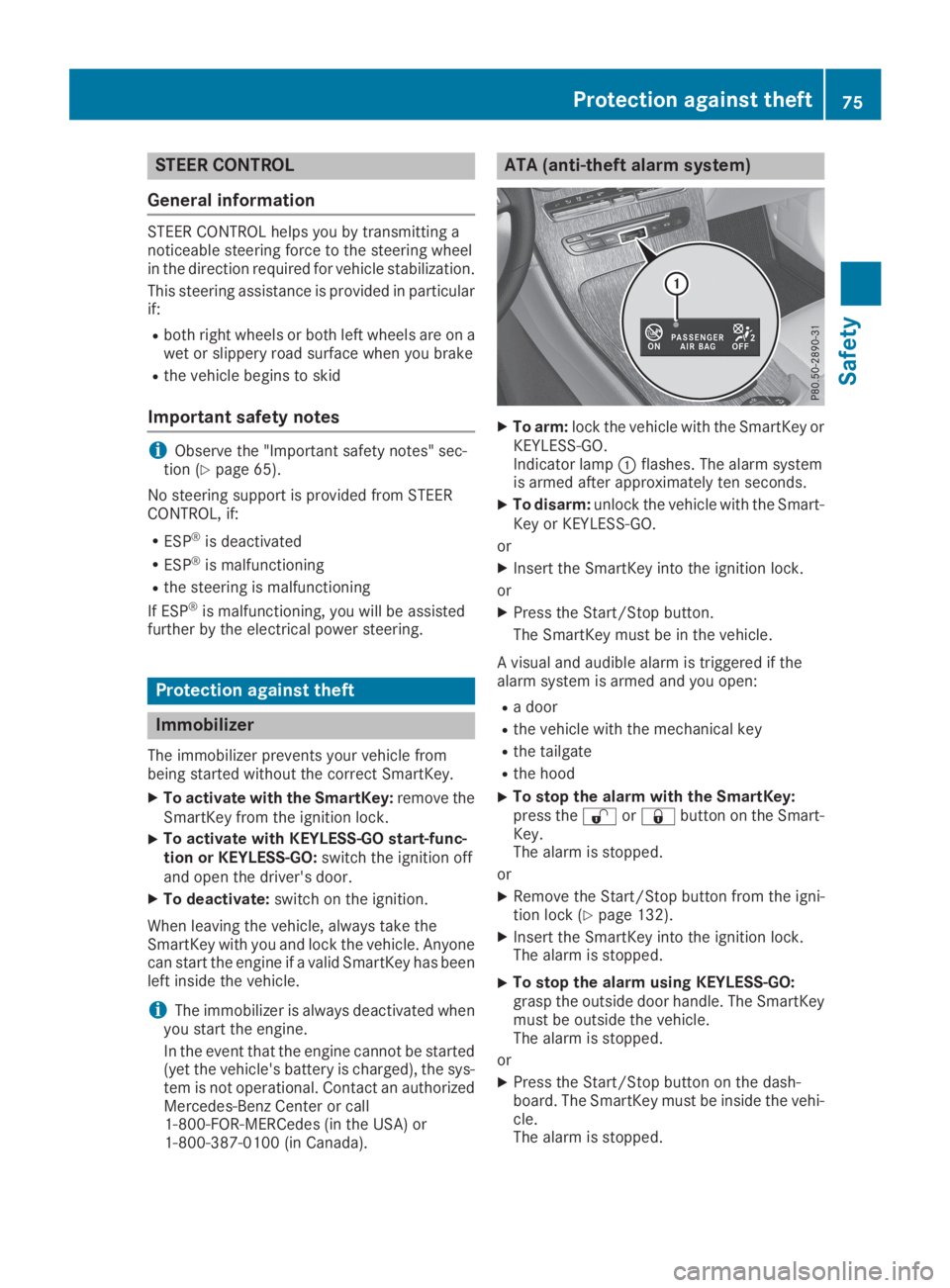
XTo arm:lock the vehicle with the SmartKey orKEYLESS-GO.Indicator lampCflashes. The alarm systemis armed after approximately ten seconds.
XTo disarm:unlock the vehicle with the Smart-Key or KEYLESS-GO.
or
XInsert the SmartKey into the ignition lock.
or
XPress the Start/Stop button.
The SmartKey must be in the vehicle.
A visual and audible alarm is triggered if thealarm system is armed and you open:
Ra door
Rthe vehicle with the mechanical key
Rthe tailgate
Rthe hood
XTo stop the alarm with the SmartKey:press the6or7button on the Smart-Key.The alarm is stopped.
or
XRemove the Start/Stop button from the igni-tion lock (Ypage 132).
XInsert the SmartKey into the ignition lock.The alarm is stopped.
XTo stop the alarm using KEYLESS-GO:grasp the outside door handle. The SmartKeymust be outside the vehicle.The alarm is stopped.
or
XPress the Start/Stop button on the dash-board. The SmartKey must be inside the vehi-cle.The alarm is stopped.
Protection against theft75
Safety
Z
Page 79 of 370
SmartKey
Important safety notes
GWARNING
If children are left unsupervised in the vehicle,
they could:
Ropen the doors, thus endangering other
people or road users.
Rget out and disrupt traffic.
Roperate the vehicle's equipment.
Additionally, children could set the vehicle in
motion if, for example, they:
Rrelease the parking brake.
Rshifting the automatic transmission out of
park positionP
RStart the engine.
There is a risk of an accident and injury.
When leaving the vehicle, always take the
SmartKey with you and lock the vehicle. Never
leave children or animals unattended in the
vehicle. Always keep the SmartKey out of
reach of children.
GWARNING
If you attach heavy or large objects to the
SmartKey, the SmartKey could be uninten-
tionally turned in the ignition lock. This could
cause the engine to be switched off. There is a
risk of an accident.
Do not attach any heavy or large objects to the
SmartKey. Remove any bulky key rings before
inserting the SmartKey into the ignition lock.
!Keep the SmartKey away from strong mag-netic fields. Otherwise, the remote controlfunction could be affected.
Strong magnetic fields can occur in the vicin-ity of powerful electrical installations.
Do not keep the SmartKey:
Rwith electronic devices, e.g. a mobile phoneor another SmartKey.
Rwith metallic objects, e.g. coins or metal foil.
Rinside metallic objects, e.g. a metal case.
This can affect the functionality of the Smart-Key.
Vehicles with KEYLESS-GO start function:donot keep the SmartKey in the cargo compart-ment. Otherwise, the SmartKey may not bedetected, e.g. when starting the engine usingthe Start/Stop button.
A brief radio connection between the vehicleand the SmartKey determines whether a validSmartKey is in, or in the direct vicinity of, thevehicle. This occurs, for example:
Rwhen starting the engine
Rwhile driving
Rwhen using HANDS-FREE ACCESS
Rwhen the external door handles are touched
Rduring convenience closing
SmartKey functions
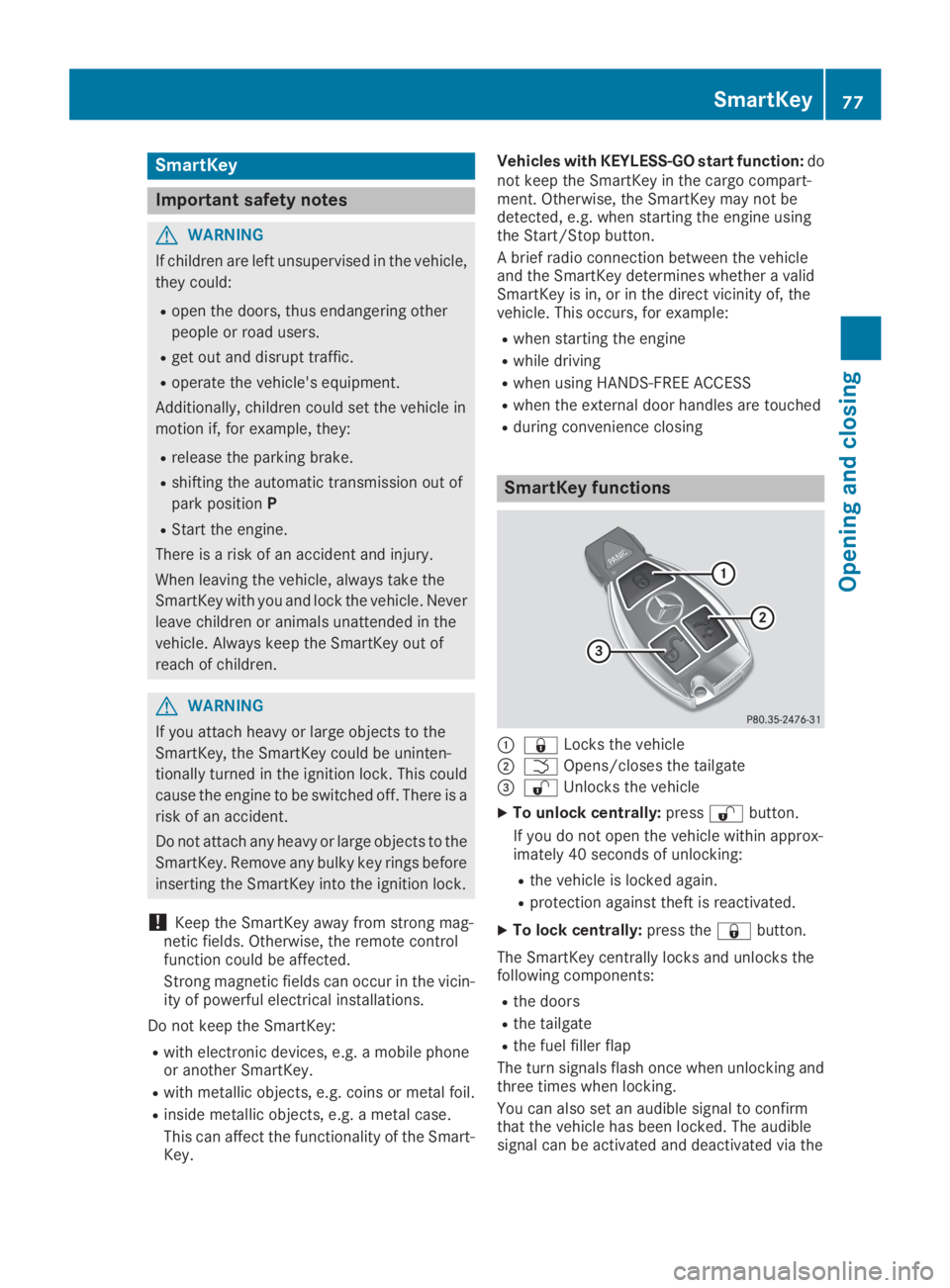
C7Locks the vehicle
DTOpens/closes the tailgate
Page 80 of 370
multimedia system; see the Digital Operator'sManual.
You will receive visual and acoustic locking con-firmation if all components were able to belocked.
When the locator lighting is activated via themultimedia system, it lights up when it is darkafter the vehicle is unlocked with the SmartKey;see the Digital Operator's Manual.
XTo open the tailgate automatically fromoutside the vehicle:press and hold theTbutton until the tailgate opens.
XTo close the tailgate automatically fromoutside the vehicle:if the SmartKey is loca-ted in the immediate vicinity of the vehicle,press theTbutton on the SmartKey.When the tailgate closes you can then releasethe button.
KEYLESS-GO
General notes
Bear in mind that the engine can be started byany of the vehicle occupants if there is a Smart-Key in the vehicle (Ypage 133).
Locking/unlocking centrally
You can start, lock or unlock the vehicle usingKEYLESS-GO. To do this, you only need carry theSmartKey with you. You can combine the func-tions of KEYLESS-GO with those of a conven-tional SmartKey. Unlock the vehicle by usingKEYLESS-GO, for instance, and lock it using the7button on the SmartKey.
The driver's door and the door at which the han-dle is used, must both be closed. The SmartKeymust be outside the vehicle. When locking orunlocking with KEYLESS-GO, the distancebetween the SmartKey and the correspondingdoor handle must not be greater than 3 ft (1 m).
A brief radio connection between the vehicleand the SmartKey determines whether a validSmartKey is in, or in the direct vicinity of, thevehicle. This occurs, for example:
Rwhen starting the engine
Rwhile driving
Rwhen using HANDS-FREE ACCESS
Rwhen the external door handles are touched
Rduring convenience closing
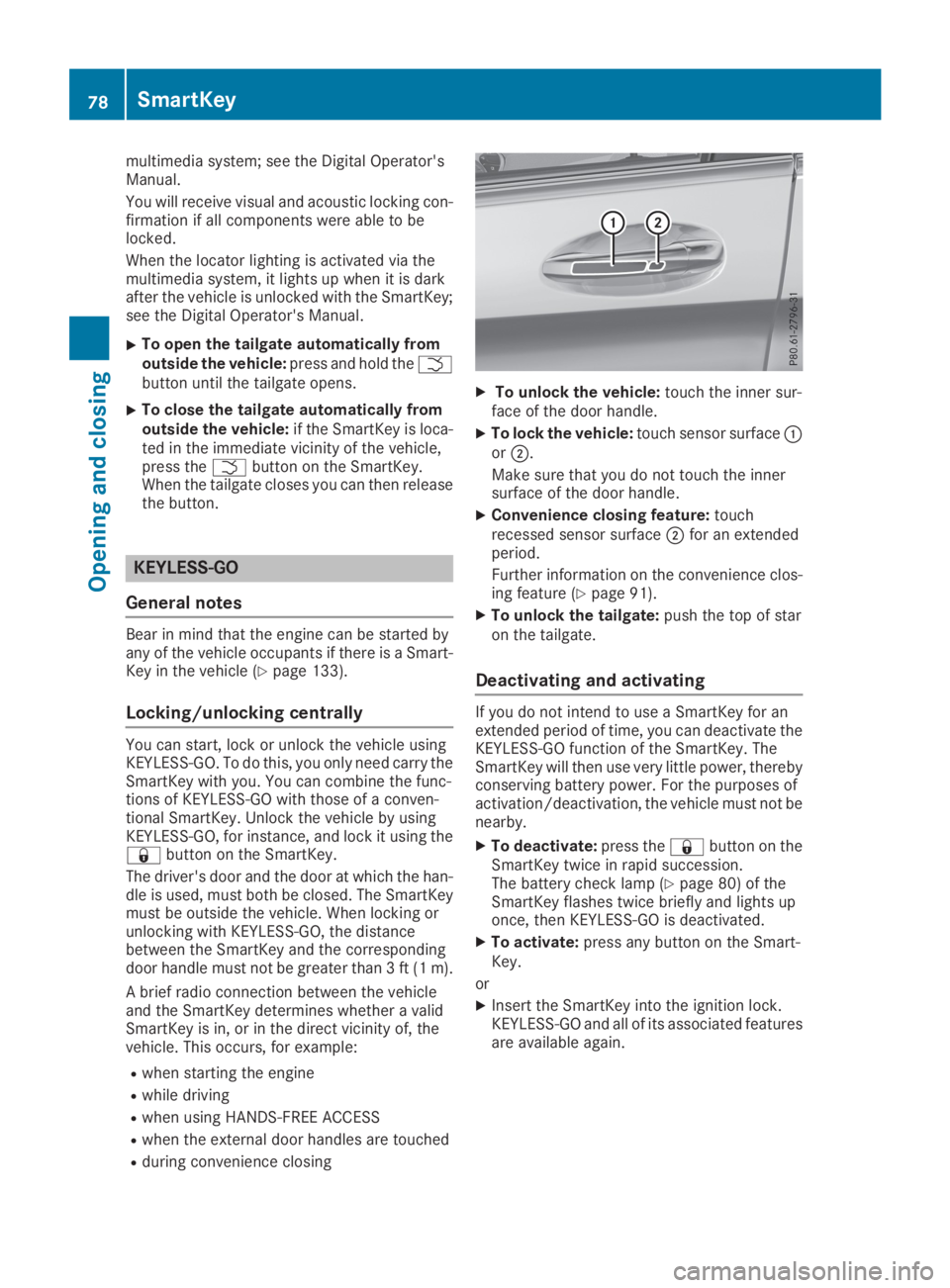
XTo unlock the vehicle:touch the inner sur-face of the door handle.
XTo lock the vehicle:touch sensor surfaceCorD.
Make sure that you do not touch the innersurface of the door handle.
XConvenience closing feature:touchrecessed sensor surfaceDfor an extendedperiod.
Further information on the convenience clos-ing feature (Ypage 91).
XTo unlock the tailgate:push the top of staron the tailgate.
Deactivating and activating
If you do not intend to use a SmartKey for anextended period of time, you can deactivate theKEYLESS-GO function of the SmartKey. TheSmartKey will then use very little power, therebyconserving battery power. For the purposes ofactivation/deactivation, the vehicle must not benearby.
XTo deactivate:press the7button on theSmartKey twice in rapid succession.The battery check lamp (Ypage 80) of theSmartKey flashes twice briefly and lights uponce, then KEYLESS-GO is deactivated.
XTo activate:press any button on the Smart-Key.
or
XInsert the SmartKey into the ignition lock.KEYLESS-GO and all of its associated featuresare available again.
78SmartKey
Opening and closing
Page 81 of 370
KEYLESS-GO start function
General notes
Bear in mind that the engine can be started byany of the vehicle occupants if there is a Smart-Key in the vehicle (Ypage 133).
Changing the settings of the locking
system
You can change the settings of the locking sys-tem. This means that only the driver's door andthe fuel filler flap are unlocked when the vehicleis unlocked. This is useful if you frequently travelalone.
XTo change the setting:press and hold downthe6and7buttons simultaneouslyfor approximately six seconds until the bat-tery check lamp (Ypage 80) flashes twice.
If the setting of the locking system is changedwithin the signal range of the vehicle, pressingthe7or6button:
Rlocks or
Runlocks the vehicle
The SmartKey now functions as follows:
XTo unlock:press the6button once.
XTo unlock centrally:press the6buttontwice.
XTo lock:press the7button.
XTo restore the factory settings:press andhold the6and7buttons simultane-ously for approximately six seconds until thebattery check lamp (Ypage 80) flashestwice.
The KEYLESS-GO functions can be changed asfollows:
XTo unlock the driver's door:touch the innersurface of the door handle on the driver'sdoor.
XTo unlock centrally:touch the inner surfaceof the door handle on the front-passengerdoor or the rear door.
XTo lock centrally:touch the outer sensorsurface on one of the door handles.
Mechanical key
General notes
If the vehicle can no longer be locked orunlocked with the SmartKey or KEYLESS-GO,use the mechanical key.
If you use the mechanical key to unlock andopen the driver's door, the anti-theft alarm sys-tem will be triggered. Switch off the alarm(Ypage 75).
If you unlock the vehicle using the mechanicalkey, the fuel filler flap will not be unlocked auto-matically.
XTo unlock the fuel filler flap:insert theSmartKey into the ignition lock.
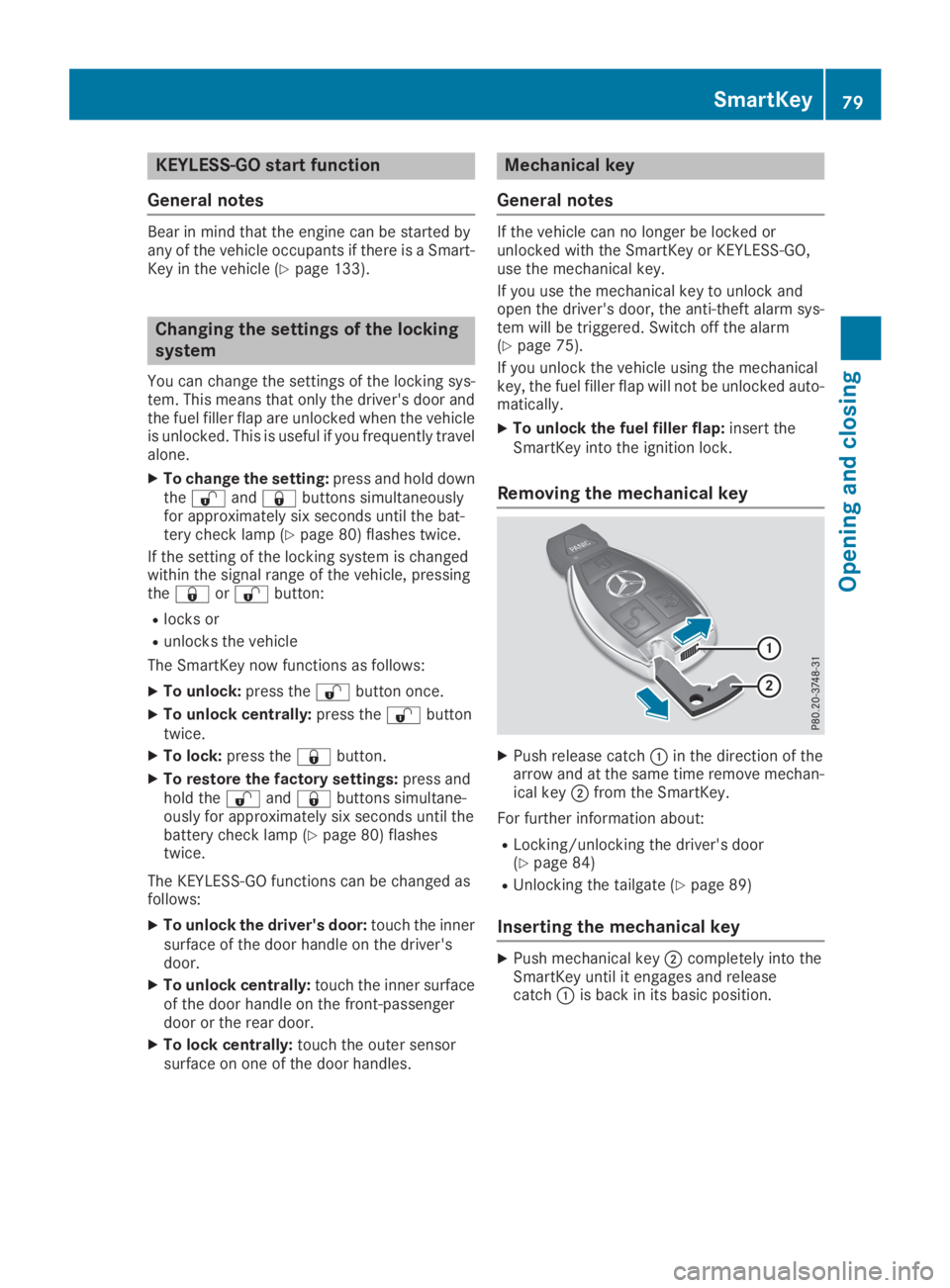
Removing the mechanical key
XPush release catchCin the direction of thearrow and at the same time remove mechan-ical keyDfrom the SmartKey.
For further information about:
RLocking/unlocking the driver's door(Ypage 84)
RUnlocking the tailgate (Ypage 89)
Inserting the mechanical key
XPush mechanical keyDcompletely into theSmartKey until it engages and releasecatchCis back in its basic position.
SmartKey79
Opening and closing
Z
Page 84 of 370
ProblemPossible causes/consequences andPPSolutions
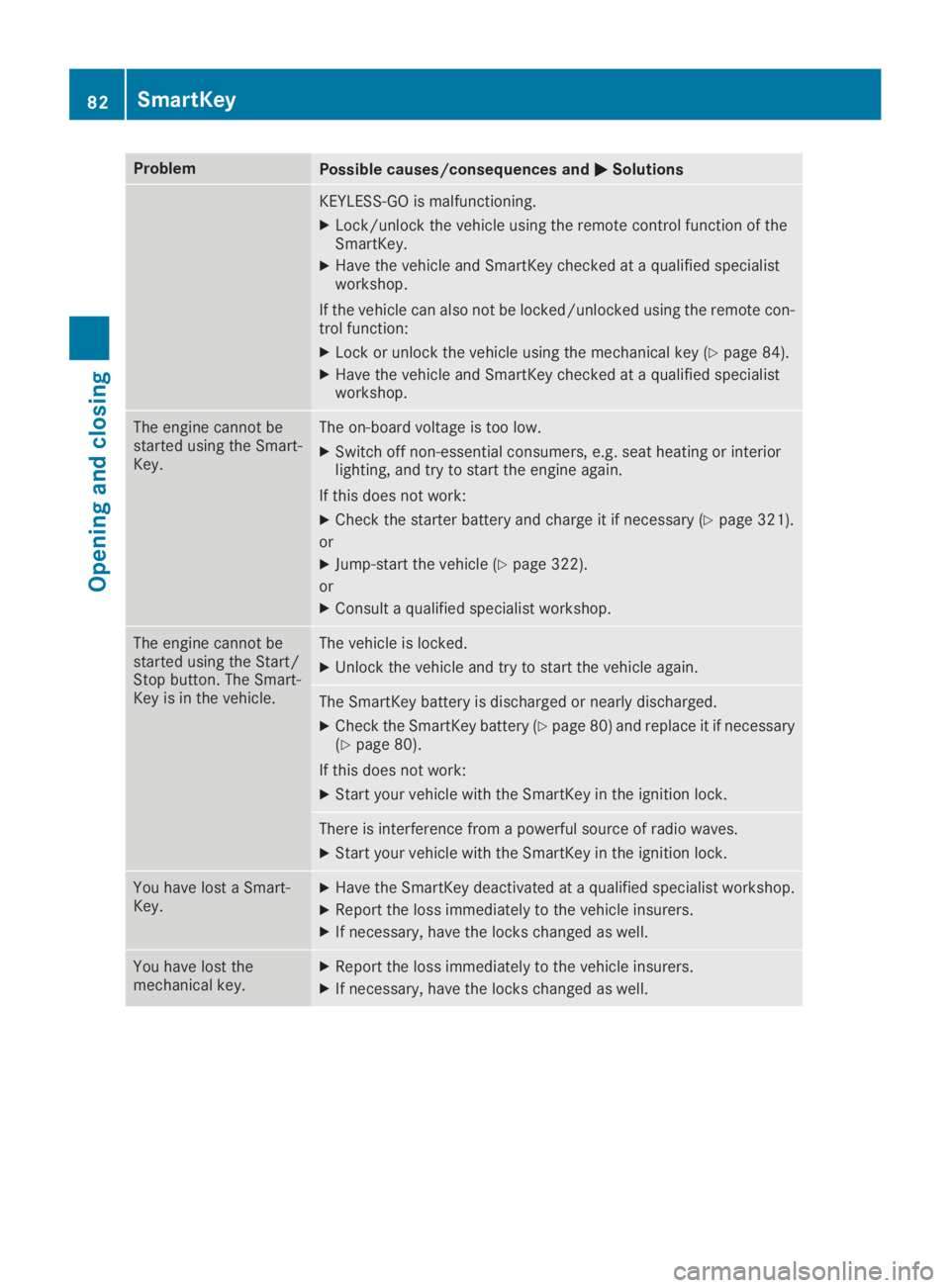
KEYLESS-GO is malfunctioning.
XLock/unlock the vehicle using the remote control function of theSmartKey.
XHave the vehicle and SmartKey checked at a qualified specialistworkshop.
If the vehicle can also not be locked/unlocked using the remote con-trol function:
XLock or unlock the vehicle using the mechanical key (Ypage 84).
XHave the vehicle and SmartKey checked at a qualified specialistworkshop.
The engine cannot bestarted using the Smart-Key.
The on-board voltage is too low.
XSwitch off non-essential consumers, e.g. seat heating or interiorlighting, and try to start the engine again.
If this does not work:
XCheck the starter battery and charge it if necessary (Ypage 321).
or
XJump-start the vehicle (Ypage 322).
or
XConsult a qualified specialist workshop.
The engine cannot bestarted using the Start/Stop button. The Smart-Key is in the vehicle.
The vehicle is locked.
XUnlock the vehicle and try to start the vehicle again.
The SmartKey battery is discharged or nearly discharged.
XCheck the SmartKey battery (Ypage 80) and replace it if necessary(Ypage 80).
If this does not work:
XStart your vehicle with the SmartKey in the ignition lock.
There is interference from a powerful source of radio waves.
XStart your vehicle with the SmartKey in the ignition lock.
You have lost a Smart-Key.XHave the SmartKey deactivated at a qualified specialist workshop.
XReport the loss immediately to the vehicle insurers.
XIf necessary, have the locks changed as well.
You have lost themechanical key.XReport the loss immediately to the vehicle insurers.
XIf necessary, have the locks changed as well.
82SmartKey
Opening and closing
Page 85 of 370
Doors
Important safety notes
GWARNING
If children are left unsupervised in the vehicle,
they could:
Ropen the doors, thus endangering other
people or road users.
Rget out and disrupt traffic.
Roperate the vehicle's equipment.
Additionally, children could set the vehicle in
motion if, for example, they:
Rrelease the parking brake.
Rshifting the automatic transmission out of
park positionP
RStart the engine.
There is a risk of an accident and injury.
When leaving the vehicle, always take the
SmartKey with you and lock the vehicle. Never
leave children or animals unattended in the
vehicle. Always keep the SmartKey out of
reach of children.
Unlocking and opening doors from
the inside
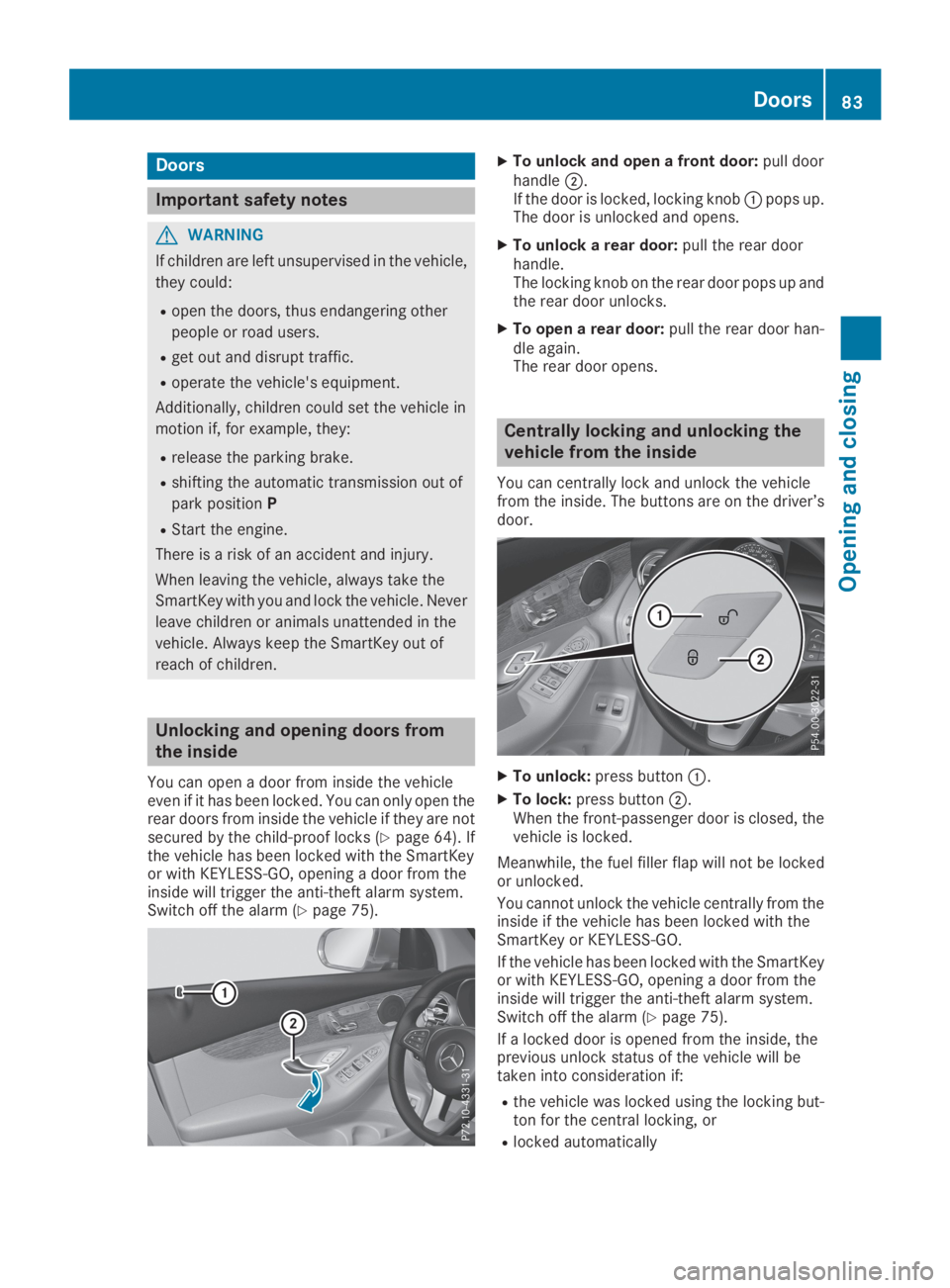
You can open a door from inside the vehicleeven if it has been locked. You can only open therear doors from inside the vehicle if they are notsecured by the child-proof locks (Ypage 64). Ifthe vehicle has been locked with the SmartKeyor with KEYLESS-GO, opening a door from theinside will trigger the anti-theft alarm system.Switch off the alarm (Ypage 75).
XTo unlock and open a front door:pull doorhandleD.If the door is locked, locking knobCpops up.The door is unlocked and opens.
XTo unlock a rear door:pull the rear doorhandle.The locking knob on the rear door pops up andthe rear door unlocks.
XTo open a rear door:pull the rear door han-dle again.The rear door opens.
Centrally locking and unlocking the
vehicle from the inside
You can centrally lock and unlock the vehiclefrom the inside. The buttons are on the driver’sdoor.
XTo unlock:press buttonC.
XTo lock:press buttonD.When the front-passenger door is closed, thevehicle is locked.
Meanwhile, the fuel filler flap will not be lockedor unlocked.
You cannot unlock the vehicle centrally from theinside if the vehicle has been locked with theSmartKey or KEYLESS-GO.
If the vehicle has been locked with the SmartKeyor with KEYLESS-GO, opening a door from theinside will trigger the anti-theft alarm system.Switch off the alarm (Ypage 75).
If a locked door is opened from the inside, theprevious unlock status of the vehicle will betaken into consideration if:
Rthe vehicle was locked using the locking but-ton for the central locking, or
Rlocked automatically
Doors83
Opening and closing
Z