2019 MERCEDES-BENZ GLC sensor
[x] Cancel search: sensorPage 68 of 370
BAS (Brake Assist System)
General information
BAS operates in emergency braking situations.If you depress the brake pedal quickly, BASautomatically boosts the braking force, thusshortening the stopping distance.
Important safety notes
iObserve the "Important safety notes" sec-tion (Ypage 65).
GWARNING
If BAS is malfunctioning, the braking distance
in an emergency braking situation is
increased. There is a risk of an accident.
In an emergency braking situation, depress
the brake pedal with full force. ABS prevents
the wheels from locking.
Braking
XKeep the brake pedal firmly depressed untilthe emergency braking situation is over.ABS prevents the wheels from locking.
The brakes will function as usual once yourelease the brake pedal. BAS is deactivated.
Active Brake Assist
General information
iObserve the "Important safety notes" sec-tion (Ypage 65).
Active Brake Assist consists of a distance warn-ing function with an autonomous braking func-tion and Adaptive Brake Assist.
Active Brake Assist can help you to minimize therisk of a collision with the vehicle traveling infront or reduce the effects of such a collision.
If Active Brake Assist detects that there is a riskof collision, you will be warned visually andacoustically. If you do not react to the visual andaudible collision warning, autonomous brakingcan be initiated in critical situations. If you applythe brake yourself in a critical situation, Adap-tive Brake Assist of the Active Brake Assist sys-tem supports you.
Important safety notes
In particular, the detection of obstacles can beimpaired if:
RThere is dirt on the sensors or anything elsecovering the sensors
RThere is snow or heavy rain
RThere is interference by other radar sources
RThere are strong radar reflections, for exam-ple in parking garages
RA narrow vehicle is traveling in front, e.g. amotorbike
RA vehicle is traveling in front on a different line
RYou are driving a new vehicle or servicing onthe Active Brake Assist system has just beencarried out
Observe the important safety notes in the"Breaking-in notes" section (Ypage 130).
Following damage to the front end of the vehicle,have the configuration and operation of theradar sensor checked at a qualified specialistworkshop. This also applies to collisions at slowspeeds where there is no visible damage to thefront of the vehicle.
Activating/deactivating
Active Brake Assist is automatically active afterswitching on the ignition.
You can activate or deactivate Active BrakeAssist (Ypage 220) in the on-board computer.When deactivated, the distance warning func-tion and the autonomous braking function arealso deactivated.
If Active Brake Assist is deactivated, the
Page 70 of 370
reacting to moving objects that have alreadybeen detected as such at least once over theperiod of observation.
Up to a speed of approximately 44 mph(70 km/h), Adaptive Brake Assist reacts to sta-tionary obstacles.
If adaptive Brake Assist demands particularlyhigh braking force, preventative passenger pro-
tection measures (PRE-SAFE®) are activatedsimultaneously (Ypage 57).
XKeep the brake pedal depressed until theemergency braking situation is over.ABS prevents the wheels from locking.
The brakes will work normally again if:
Ryou release the brake pedal
Rthere is no longer any danger of a collision
Rno obstacle is detected in front of your vehicle
Adaptive Brake Assist is then deactivated.
Important safety notes
iObserve the "Important safety notes" sec-tion for driving safety systems (Ypage 65).
GWARNING
Adaptive Brake Assist cannot always clearly
identify objects and complex traffic situa-
tions.
In such cases, Adaptive Brake Assist can:
Rintervene unnecessarily
Rnot intervene
There is a risk of an accident.
Always pay careful attention to the traffic sit-
uation and be ready to brake. Terminate the
intervention in a non-critical driving situation.
GWARNING
Adaptive Brake Assist does not react:
Rto people or animals
Rto oncoming vehicles
Rto crossing traffic
Rwhen cornering
As a result, the Adaptive Brake Assist may not
intervene in all critical conditions. There is a
risk of an accident.
Always pay careful attention to the traffic sit-
uation and be ready to brake.
Always adapt your speed to suit the prevailing
road and traffic conditions.
Due to the nature of the system, particularlycomplicated but non-critical driving conditionsmay also cause Brake Assist to intervene.
If adaptive Brake Assist is not available due to amalfunction in the radar sensor system, thebrake system remains available with full brakeboosting effect and BAS.
ESP®(Electronic Stability Program)
General notes
iObserve the "Important safety notes" sec-tion (Ypage 65).
ESP®monitors driving stability and traction, i.e.power transmission between the tires and theroad surface.
If ESP®detects that the vehicle is deviating fromthe direction desired by the driver, one or morewheels are braked to stabilize the vehicle. Theengine output is also modified to keep the vehi-cle on the desired course within physical limits.
ESP®assists the driver when pulling away on
wet or slippery roads. ESP®can also stabilizethe vehicle during braking.
4ETS (Electronic Traction System)
iObserve the "Important safety notes" sec-tion (Ypage 65).
ETS traction control is part of ESP®. On vehicles
with 4MATIC, 4ETS is part of ESP®.
Traction control brakes the drive wheels indi-vidually if they spin. This enables you to pullaway and accelerate on slippery surfaces, forexample if the road surface is slippery on oneside. In addition, more drive torque is transfer-red to the wheel or wheels with traction.
Traction control remains active, even if you
deactivate ESP®.
Important safety notes
iObserve the "Important safety notes" sec-tion (Ypage 65).
68Driving safety systems
Safety
Page 74 of 370
Crosswind Assist is active at vehicle speedsabove 50 mph(80 km/h)when driving straightahead or cornering gently.
Important safety notes
Crosswind Assist does not work if ESP®isswitched off or deactivated because of a mal-function.
EBD (electronic brake force distribu-
tion)
General information
EBD monitors and controls the brake pressureon the rear wheels to improve driving stabilitywhile braking.
Important safety notes
iObserve the "Important safety notes" sec-tion (Ypage 65).
GWARNING
If EBD is malfunctioning, the rear wheels can
lock, e.g. under full braking. This increases the
risk of skidding and an accident.
You should therefore adapt your driving style
to the different handling characteristics. Have
the brake system checked at a qualified spe-
cialist workshop.
Observe information regarding indicator andwarning lamps (Ypage 259) as well as displaymessages (Ypage 230).
ADAPTIVE BRAKE
ADAPTIVE BRAKE enhances braking safety andoffers increased braking comfort. In addition tothe braking function, ADAPTIVE BRAKE also hasthe HOLD function (Ypage 170) and hill startassist (Ypage 135).
Active Brake Assist with cross-traffic
function
General information
iObserve the important safety notes in the"Driving safety systems" section (Ypage 65).
Active Brake Assist with cross-traffic functioncan help you to minimize the risk of a collisionwith a vehicle in front or a pedestrian and reducethe effects of such a collision. If the Active BrakeAssist with cross-traffic function detects a riskof collision, you will be warned visually andacoustically and, if necessary, your brake appli-cation will be assisted according to the situa-tion. If you do not react, the system can alsoreact by braking automatically. In the event of adetected risk of collision due to crossing traffic,you will also be visually and acoustically warnedas well as assisted by the brake boosting effectaccording to the situation.
Active Brake Assist with cross-traffic function isonly available in vehicles with the Driving Assis-tance Plus package.
For Active Brake Assist with cross-traffic func-tion to assist you when driving, the radar sensorsystem and the camera system must be opera-tional.
If the radar sensor system or the camera systemis malfunctioning, Active Brake Assist withcross-traffic function is restricted or no longeravailable. The brake system is still available withcomplete brake boosting effect and BAS.
The radar sensor system and camera systemhelp Active Brake Assist with cross-traffic func-tion to detect obstacles that are in the path ofyour vehicle for an extended period of time.
In addition, pedestrians in the path of your vehi-cle can be detected.
Active Brake Assist with cross-traffic functiondetects pedestrians using typical characteris-tics such as body contours and the posture of aperson standing upright.
iObserve the restrictions described in the"Important safety notes" section(Ypage 72).
Important safety notes
GWARNING
Active Brake Assist with cross-traffic function
will initially brake your vehicle by a partial
72Driving safety systems
Safety
Page 75 of 370
application of the brakes if a danger of colli-
sion is detected. There may be a collision
unless you brake yourself. Even after subse-
quent full application of the brakes a collision
cannot always be avoided, particularly when
approaching at too high a speed. There is a
risk of an accident.
Always apply the brakes yourself and try to
take evasive action, provided it is safe to do
so.
In the event of a partial application of the brakes,the vehicle is braked with up to 50% of the fullbraking pressure.
GWARNING
Active Brake Assist with cross-traffic function
cannot always clearly identify objects and
complex traffic situations.
In such cases, Active Brake Assist with cross-
traffic function might:
Rissue an unnecessary warning or engage
Rneither give a warning nor intervene
There is a risk of an accident.
Always pay particular attention to the traffic
situation and be prepared to brake, especially
if Active Brake Assist with cross-traffic func-
tion alerts you. Terminate the intervention in a
non-critical driving situation.
GWARNING
Active Brake Assist with cross-traffic function
cannot always clearly identify people, partic-
ularly if they are moving. Active Brake Assist
with cross-traffic function cannot intervene in
these cases. There is a risk of an accident.
Always pay particular attention to the traffic
situation and be prepared to brake, especially
if Active Brake Assist with cross-traffic func-
tion alerts you.
In order to maintain the appropriate distance tothe vehicle in front and thus prevent a collision,you must apply the brakes yourself.
GWARNING
Active Brake Assist with cross-traffic function
does not react:
Rto small people, e.g. children
Rto animals
Rto oncoming vehicles
Rwhen cornering
As a result, Active Brake Assist with cross-
traffic function may not warn you or engage in
all critical situations. There is a risk of an acci-
dent.
Always pay careful attention to the traffic sit-
uation and be ready to brake.
In the event of snowfall or heavy rain, the rec-ognition can be impaired.
Recognition by the radar sensor system is alsoimpaired if:
Rthere is dirt on the sensors or anything elsecovering the sensors
Rthere is interference by other radar sources
Rthere are strong radar reflections, for exam-ple in parking garages
Ra narrow vehicle is traveling in front, e.g. amotorbike
Ra vehicle is traveling in front on a different line
Rvehicles moving quickly into the radar sensorsystem detection range
Recognition by the camera system is alsoimpaired in the event of:
Rdirt on the camera or if the camera is covered
Rglare on the camera system, e.g. from the sunbeing low in the sky
Rdarkness
Ror if:
-pedestrians move quickly, e.g. into the pathof the vehicle
-the camera system no longer recognizes apedestrian as a person due to special cloth-ing or other objects
-a pedestrian is concealed by other objects
-the typical outline of a pedestrian is notdistinguishable from the background
Following damage to the front end of the vehicle,have the configuration and operation of theradar sensors checked at a qualified specialistworkshop. This also applies to collisions at slow
Driving safety systems73
Safety
Z
Page 80 of 370
multimedia system; see the Digital Operator'sManual.
You will receive visual and acoustic locking con-firmation if all components were able to belocked.
When the locator lighting is activated via themultimedia system, it lights up when it is darkafter the vehicle is unlocked with the SmartKey;see the Digital Operator's Manual.
XTo open the tailgate automatically fromoutside the vehicle:press and hold theTbutton until the tailgate opens.
XTo close the tailgate automatically fromoutside the vehicle:if the SmartKey is loca-ted in the immediate vicinity of the vehicle,press theTbutton on the SmartKey.When the tailgate closes you can then releasethe button.
KEYLESS-GO
General notes
Bear in mind that the engine can be started byany of the vehicle occupants if there is a Smart-Key in the vehicle (Ypage 133).
Locking/unlocking centrally
You can start, lock or unlock the vehicle usingKEYLESS-GO. To do this, you only need carry theSmartKey with you. You can combine the func-tions of KEYLESS-GO with those of a conven-tional SmartKey. Unlock the vehicle by usingKEYLESS-GO, for instance, and lock it using the7button on the SmartKey.
The driver's door and the door at which the han-dle is used, must both be closed. The SmartKeymust be outside the vehicle. When locking orunlocking with KEYLESS-GO, the distancebetween the SmartKey and the correspondingdoor handle must not be greater than 3 ft (1 m).
A brief radio connection between the vehicleand the SmartKey determines whether a validSmartKey is in, or in the direct vicinity of, thevehicle. This occurs, for example:
Rwhen starting the engine
Rwhile driving
Rwhen using HANDS-FREE ACCESS
Rwhen the external door handles are touched
Rduring convenience closing
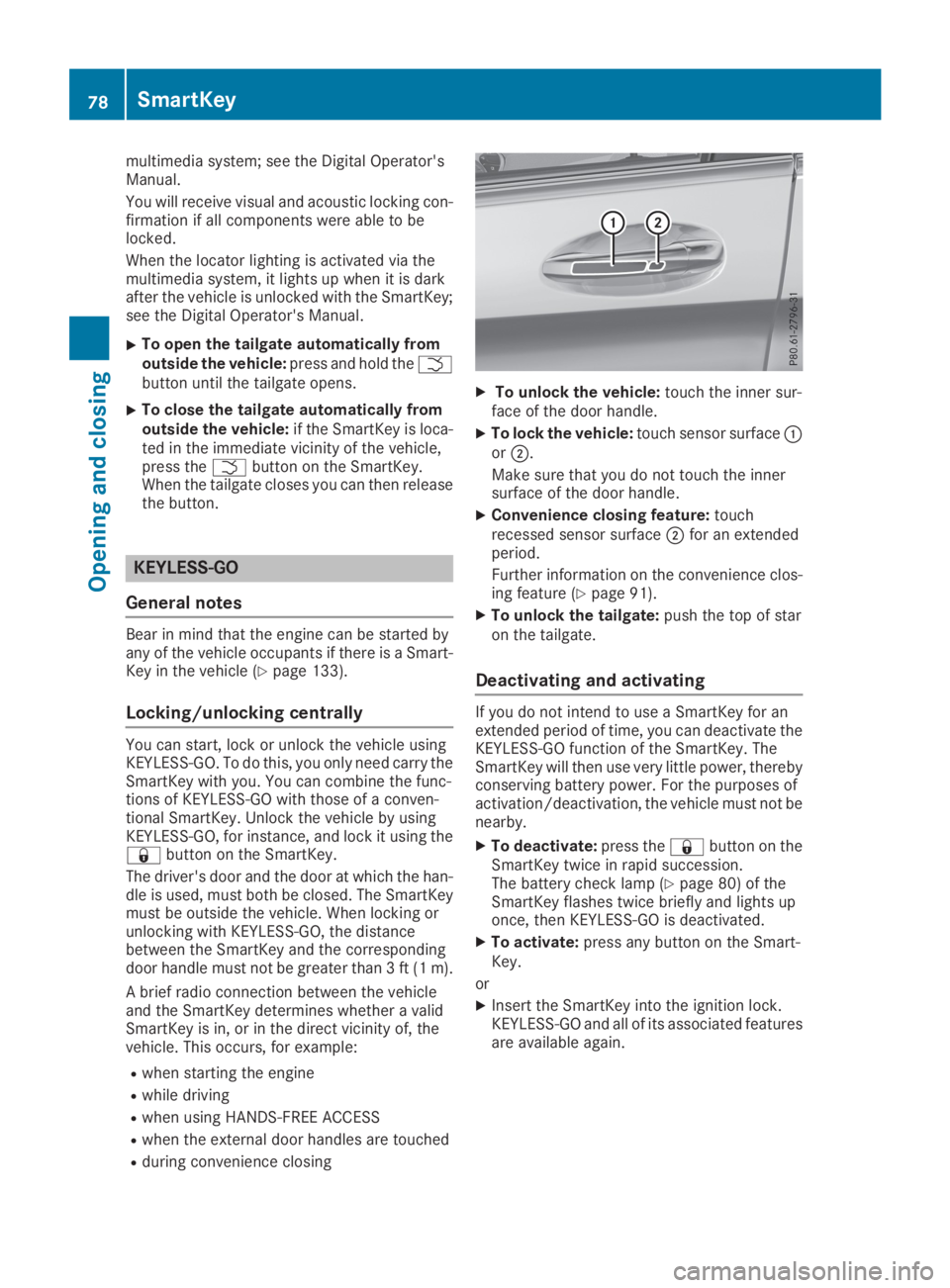
XTo unlock the vehicle:touch the inner sur-face of the door handle.
XTo lock the vehicle:touch sensor surfaceCorD.
Make sure that you do not touch the innersurface of the door handle.
XConvenience closing feature:touchrecessed sensor surfaceDfor an extendedperiod.
Further information on the convenience clos-ing feature (Ypage 91).
XTo unlock the tailgate:push the top of staron the tailgate.
Deactivating and activating
If you do not intend to use a SmartKey for anextended period of time, you can deactivate theKEYLESS-GO function of the SmartKey. TheSmartKey will then use very little power, therebyconserving battery power. For the purposes ofactivation/deactivation, the vehicle must not benearby.
XTo deactivate:press the7button on theSmartKey twice in rapid succession.The battery check lamp (Ypage 80) of theSmartKey flashes twice briefly and lights uponce, then KEYLESS-GO is deactivated.
XTo activate:press any button on the Smart-Key.
or
XInsert the SmartKey into the ignition lock.KEYLESS-GO and all of its associated featuresare available again.
78SmartKey
Opening and closing
Page 81 of 370
KEYLESS-GO start function
General notes
Bear in mind that the engine can be started byany of the vehicle occupants if there is a Smart-Key in the vehicle (Ypage 133).
Changing the settings of the locking
system
You can change the settings of the locking sys-tem. This means that only the driver's door andthe fuel filler flap are unlocked when the vehicleis unlocked. This is useful if you frequently travelalone.
XTo change the setting:press and hold downthe6and7buttons simultaneouslyfor approximately six seconds until the bat-tery check lamp (Ypage 80) flashes twice.
If the setting of the locking system is changedwithin the signal range of the vehicle, pressingthe7or6button:
Rlocks or
Runlocks the vehicle
The SmartKey now functions as follows:
XTo unlock:press the6button once.
XTo unlock centrally:press the6buttontwice.
XTo lock:press the7button.
XTo restore the factory settings:press andhold the6and7buttons simultane-ously for approximately six seconds until thebattery check lamp (Ypage 80) flashestwice.
The KEYLESS-GO functions can be changed asfollows:
XTo unlock the driver's door:touch the innersurface of the door handle on the driver'sdoor.
XTo unlock centrally:touch the inner surfaceof the door handle on the front-passengerdoor or the rear door.
XTo lock centrally:touch the outer sensorsurface on one of the door handles.
Mechanical key
General notes
If the vehicle can no longer be locked orunlocked with the SmartKey or KEYLESS-GO,use the mechanical key.
If you use the mechanical key to unlock andopen the driver's door, the anti-theft alarm sys-tem will be triggered. Switch off the alarm(Ypage 75).
If you unlock the vehicle using the mechanicalkey, the fuel filler flap will not be unlocked auto-matically.
XTo unlock the fuel filler flap:insert theSmartKey into the ignition lock.
Removing the mechanical key
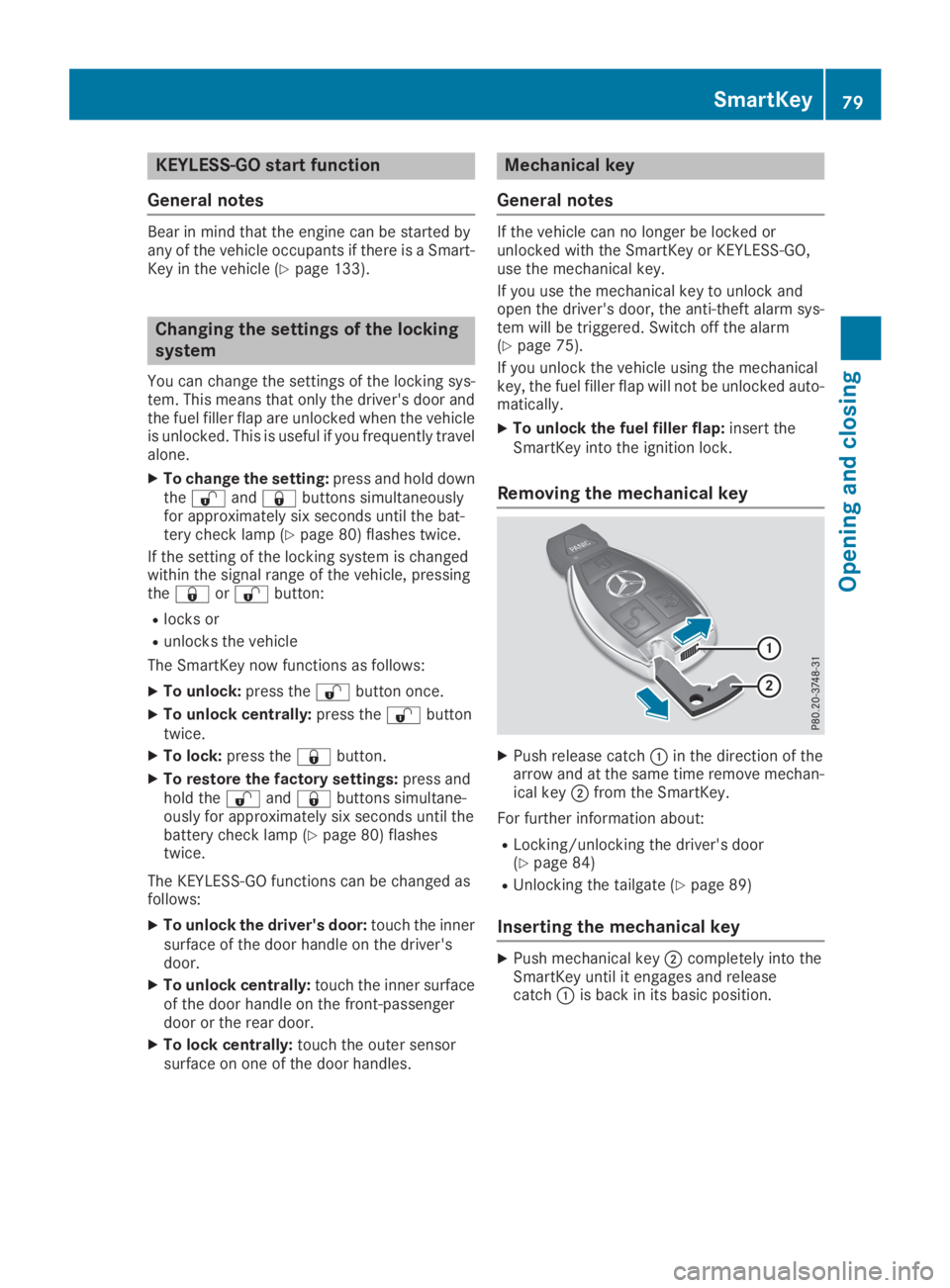
XPush release catchCin the direction of thearrow and at the same time remove mechan-ical keyDfrom the SmartKey.
For further information about:
RLocking/unlocking the driver's door(Ypage 84)
RUnlocking the tailgate (Ypage 89)
Inserting the mechanical key
XPush mechanical keyDcompletely into theSmartKey until it engages and releasecatchCis back in its basic position.
SmartKey79
Opening and closing
Z
Page 89 of 370
If KEYLESS-GO detects a SmartKey in the cargocompartment before the closing procedurestarts, the tailgate remains open.
HANDS-FREE ACCESS
General notes
With KEYLESS-GO and HANDS-FREE ACCESS,you can open or close the tailgate or stop theprocedure without using your hands. This is use-ful if you have your hands full. To do this, makea kicking movement under the bumper with yourfoot.
Observe the following points:
RCarry your KEYLESS-GO key about your per-son. The SmartKey must be at the rear of thevehicle in the detection range of KEYLESS-GO.
RWhen making the kicking movement, makesure that you are standing firmly on theground and that there is sufficient clearanceto the rear of the vehicle. You could otherwiselose your balance, for example on ice.
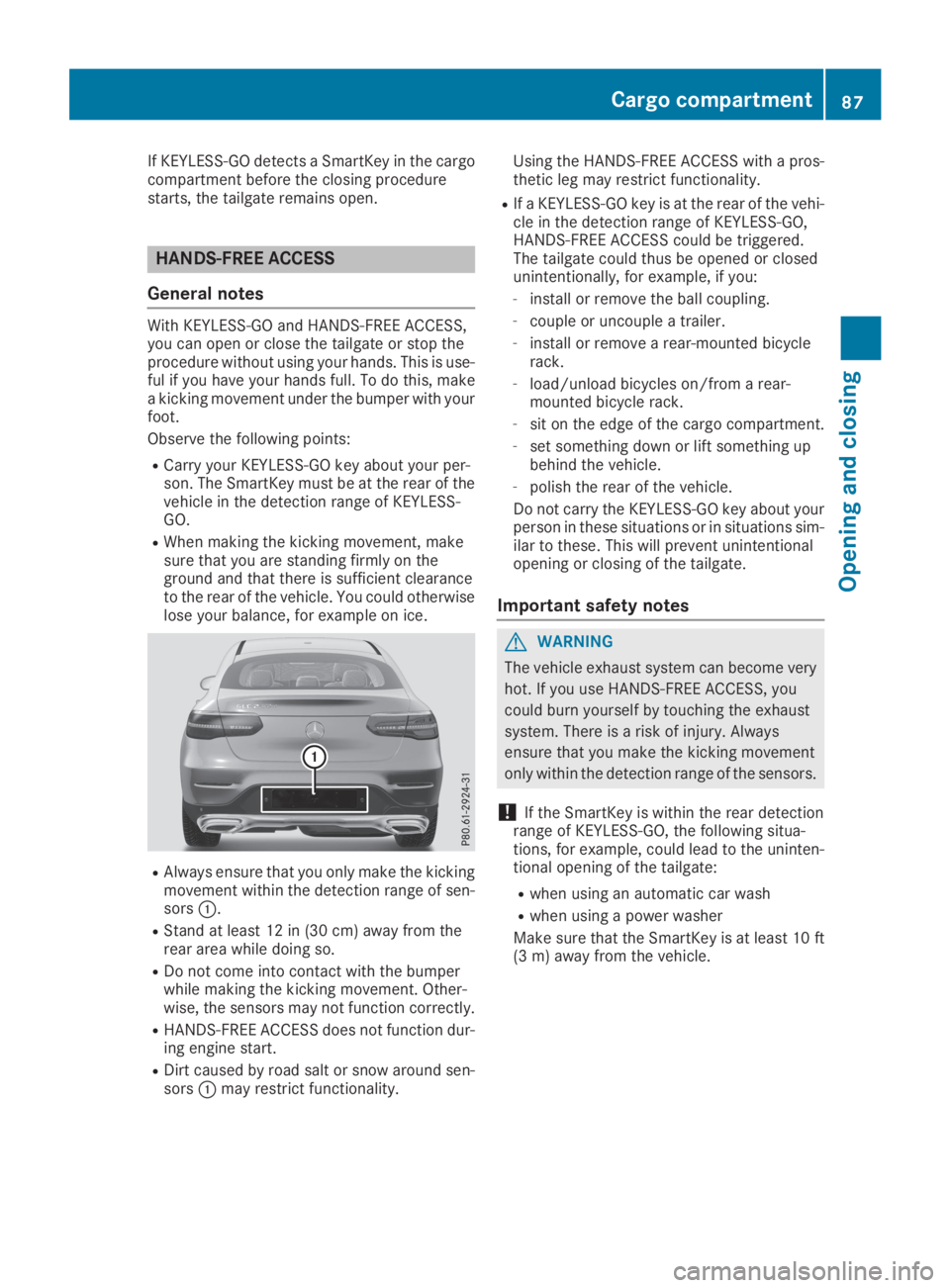
RAlways ensure that you only make the kickingmovement within the detection range of sen-sorsC.
RStand at least 12 in (30 cm) away from therear area while doing so.
RDo not come into contact with the bumperwhile making the kicking movement. Other-wise, the sensors may not function correctly.
RHANDS-FREE ACCESS does not function dur-ing engine start.
RDirt caused by road salt or snow around sen-sorsCmay restrict functionality.
Using the HANDS-FREE ACCESS with a pros-thetic leg may restrict functionality.
RIf a KEYLESS-GO key is at the rear of the vehi-cle in the detection range of KEYLESS-GO,HANDS-FREE ACCESS could be triggered.The tailgate could thus be opened or closedunintentionally, for example, if you:
-install or remove the ball coupling.
-couple or uncouple a trailer.
-install or remove a rear-mounted bicyclerack.
-load/unload bicycles on/from a rear-mounted bicycle rack.
-sit on the edge of the cargo compartment.
-set something down or lift something upbehind the vehicle.
-polish the rear of the vehicle.
Do not carry the KEYLESS-GO key about yourperson in these situations or in situations sim-ilar to these. This will prevent unintentionalopening or closing of the tailgate.
Important safety notes
GWARNING
The vehicle exhaust system can become very
hot. If you use HANDS-FREE ACCESS, you
could burn yourself by touching the exhaust
system. There is a risk of injury. Always
ensure that you make the kicking movement
only within the detection range of the sensors.
!If the SmartKey is within the rear detectionrange of KEYLESS-GO, the following situa-tions, for example, could lead to the uninten-tional opening of the tailgate:
Rwhen using an automatic car wash
Rwhen using a power washer
Make sure that the SmartKey is at least 10 ft(3 m) away from the vehicle.
Cargo compartment87
Opening and closing
Z
Page 90 of 370

Operation
XTo open or close:kick with your foot intosensor detection rangeCbeneath thebumper.Two warning tones sound while the tailgate isopening or closing.
XIf the tailgate does not open or close afterseveral attempts:wait at least ten secondsthen kick under the bumper once again.
If you hold your foot under the bumper for toolong, the tailgate does not open or close. Repeatthe leg movement more quickly if this occurs.
To stop the opening or closing procedure, youhave the following options:
RKick with your foot into sensor detectionrangeCbeneath the bumper.
RPress the top of the star on the tailgate.
RPress the closing button on the tailgate.
RPress theTbutton on the SmartKey.
If the tailgate closing procedure has been stop-ped:
RMove your foot under the bumper again andthe tailgate will open.
If the tailgate opening procedure has been stop-ped:
RKick with your foot under the bumper againand the tailgate will close.
Opening/closing automatically from
inside
Important safety notes
GDANGER
Combustion engines emit poisonous exhaust
gases such as carbon monoxide. Exhaust
gases can enter the vehicle interior if the tail-
gate is open while the engine is running, espe-
cially if the vehicle is in motion. There is a risk
of poisoning.
Always switch off the engine before opening
the tailgate. Never drive with the tailgate
open.
GWARNING
Parts of the body could become trapped dur-
ing automatic closing of the tailgate. In addi-
tion, people may be standing in the closing
area or may enter the closing area, e.g. chil-
dren, during the closing procedure. There is a
risk of injury.
Make sure that nobody is in the vicinity of the
closing area during the closing process.
Release the remote operating switch imme-
diately if somebody becomes trapped. To re-
open the tailgate pull on the remote operating
switch.
Vehicles with HANDS-FREE ACCESS:
You can also stop the closing process by per-forming a kicking movement under the rearbumper.
!The tailgate swings upwards and to the rearwhen opened. Therefore, make sure thatthere is sufficient clearance above and behindthe tailgate.
Two warning tones sound while the tailgate isopening or closing.
The opening dimensions of the tailgate can befound in the "Vehicle data" section(Ypage 363).
Opening and closing
88Cargo compartment
Opening and closing