2019 MERCEDES-BENZ GLC parking brake
[x] Cancel search: parking brakePage 65 of 370
You can thus avoid the risks that could arise asa result of:
Ran incorrectly categorized person in the front-passenger seat
Rdeactivating the front passenger front air bagunintentionally
Rthe unsuitable positioning of the childrestraint system, e.g. too close to the dash-board
Rearward-facing child restraint system
If circumstances require you to secure a child ina rearward-facing child restraint system on thefront-passenger seat, always make sure that thefront passenger front air bag is deactivated.Only if the PASSENGER AIR BAG OFF indicatorlamp is lit continuously (Ypage 44), is the frontpassenger front air bag deactivated.
Always observe the child restraint system man-ufacturer's installation and operating instruc-tions.
Forward-facing child restraint system
If it is absolutely necessary to install a forward-facing child restraint system on the front-passenger seat, always move the front-passenger seat as far back as possible. Fullyretract the seat cushion length. The entire baseof the child restraint system must always rest onthe seat cushion of the front-passenger seat.The backrest of the child restraint system mustlie as flat as possible against the backrest of thefront-passenger seat. The child restraint systemmust not touch the roof or be subjected to a loadby the head restraint. Adjust the angle of theseat backrest and the head restraint positionaccordingly. Always make sure that the shoul-der belt strap is correctly routed from the vehi-cle belt outlet to the shoulder belt guide on thechild restraint system. The shoulder belt strapmust be routed forward and down from the vehi-cle belt outlet. If necessary, adjust the vehiclebelt outlet and the front-passenger seat accord-ingly.
Always observe the child restraint system man-ufacturer's installation and operating instruc-tions.
Child-proof locks
Important safety notes
GWARNING
If children are traveling in the vehicle, they
could:
Ropen doors, thus endangering other people
or road users
Rexit the vehicle and be caught by oncoming
traffic
Roperate vehicle equipment and become
trapped
There is a risk of an accident and injury.
Always activate the child-proof locks and
override feature if children are traveling in the
vehicle. When leaving the vehicle, always take
the key with you and lock the vehicle. Never
leave children unattended in the vehicle.
Override feature for:
Rthe rear doors (Ypage 64)
Rthe rear side windows (Ypage 64)
GWARNING
If you leave children unsupervised in the vehi-
cle, they could set it in motion by, for example:
Rrelease the parking brake.
Rshift the automatic transmission out of the
parking positionP.
Rstart the engine.
In addition, they may operate vehicle equip-
ment and become trapped. There is a risk of
an accident and injury.
When leaving the vehicle, always take the
SmartKey with you and lock the vehicle. Never
leave children unsupervised in the vehicle.
GWARNING
If persons, particularly children are subjected
to prolonged exposure to extreme heat or
cold, there is a risk of injury, possibly even
fatal. Never leave children unattended in the
vehicle.
Children in the vehicle63
Safety
Z
Page 68 of 370
BAS (Brake Assist System)
General information
BAS operates in emergency braking situations.If you depress the brake pedal quickly, BASautomatically boosts the braking force, thusshortening the stopping distance.
Important safety notes
iObserve the "Important safety notes" sec-tion (Ypage 65).
GWARNING
If BAS is malfunctioning, the braking distance
in an emergency braking situation is
increased. There is a risk of an accident.
In an emergency braking situation, depress
the brake pedal with full force. ABS prevents
the wheels from locking.
Braking
XKeep the brake pedal firmly depressed untilthe emergency braking situation is over.ABS prevents the wheels from locking.
The brakes will function as usual once yourelease the brake pedal. BAS is deactivated.
Active Brake Assist
General information
iObserve the "Important safety notes" sec-tion (Ypage 65).
Active Brake Assist consists of a distance warn-ing function with an autonomous braking func-tion and Adaptive Brake Assist.
Active Brake Assist can help you to minimize therisk of a collision with the vehicle traveling infront or reduce the effects of such a collision.
If Active Brake Assist detects that there is a riskof collision, you will be warned visually andacoustically. If you do not react to the visual andaudible collision warning, autonomous brakingcan be initiated in critical situations. If you applythe brake yourself in a critical situation, Adap-tive Brake Assist of the Active Brake Assist sys-tem supports you.
Important safety notes
In particular, the detection of obstacles can beimpaired if:
RThere is dirt on the sensors or anything elsecovering the sensors
RThere is snow or heavy rain
RThere is interference by other radar sources
RThere are strong radar reflections, for exam-ple in parking garages
RA narrow vehicle is traveling in front, e.g. amotorbike
RA vehicle is traveling in front on a different line
RYou are driving a new vehicle or servicing onthe Active Brake Assist system has just beencarried out
Observe the important safety notes in the"Breaking-in notes" section (Ypage 130).
Following damage to the front end of the vehicle,have the configuration and operation of theradar sensor checked at a qualified specialistworkshop. This also applies to collisions at slowspeeds where there is no visible damage to thefront of the vehicle.
Activating/deactivating
Active Brake Assist is automatically active afterswitching on the ignition.
You can activate or deactivate Active BrakeAssist (Ypage 220) in the on-board computer.When deactivated, the distance warning func-tion and the autonomous braking function arealso deactivated.
If Active Brake Assist is deactivated, the
Page 75 of 370
application of the brakes if a danger of colli-
sion is detected. There may be a collision
unless you brake yourself. Even after subse-
quent full application of the brakes a collision
cannot always be avoided, particularly when
approaching at too high a speed. There is a
risk of an accident.
Always apply the brakes yourself and try to
take evasive action, provided it is safe to do
so.
In the event of a partial application of the brakes,the vehicle is braked with up to 50% of the fullbraking pressure.
GWARNING
Active Brake Assist with cross-traffic function
cannot always clearly identify objects and
complex traffic situations.
In such cases, Active Brake Assist with cross-
traffic function might:
Rissue an unnecessary warning or engage
Rneither give a warning nor intervene
There is a risk of an accident.
Always pay particular attention to the traffic
situation and be prepared to brake, especially
if Active Brake Assist with cross-traffic func-
tion alerts you. Terminate the intervention in a
non-critical driving situation.
GWARNING
Active Brake Assist with cross-traffic function
cannot always clearly identify people, partic-
ularly if they are moving. Active Brake Assist
with cross-traffic function cannot intervene in
these cases. There is a risk of an accident.
Always pay particular attention to the traffic
situation and be prepared to brake, especially
if Active Brake Assist with cross-traffic func-
tion alerts you.
In order to maintain the appropriate distance tothe vehicle in front and thus prevent a collision,you must apply the brakes yourself.
GWARNING
Active Brake Assist with cross-traffic function
does not react:
Rto small people, e.g. children
Rto animals
Rto oncoming vehicles
Rwhen cornering
As a result, Active Brake Assist with cross-
traffic function may not warn you or engage in
all critical situations. There is a risk of an acci-
dent.
Always pay careful attention to the traffic sit-
uation and be ready to brake.
In the event of snowfall or heavy rain, the rec-ognition can be impaired.
Recognition by the radar sensor system is alsoimpaired if:
Rthere is dirt on the sensors or anything elsecovering the sensors
Rthere is interference by other radar sources
Rthere are strong radar reflections, for exam-ple in parking garages
Ra narrow vehicle is traveling in front, e.g. amotorbike
Ra vehicle is traveling in front on a different line
Rvehicles moving quickly into the radar sensorsystem detection range
Recognition by the camera system is alsoimpaired in the event of:
Rdirt on the camera or if the camera is covered
Rglare on the camera system, e.g. from the sunbeing low in the sky
Rdarkness
Ror if:
-pedestrians move quickly, e.g. into the pathof the vehicle
-the camera system no longer recognizes apedestrian as a person due to special cloth-ing or other objects
-a pedestrian is concealed by other objects
-the typical outline of a pedestrian is notdistinguishable from the background
Following damage to the front end of the vehicle,have the configuration and operation of theradar sensors checked at a qualified specialistworkshop. This also applies to collisions at slow
Driving safety systems73
Safety
Z
Page 79 of 370
SmartKey
Important safety notes
GWARNING
If children are left unsupervised in the vehicle,
they could:
Ropen the doors, thus endangering other
people or road users.
Rget out and disrupt traffic.
Roperate the vehicle's equipment.
Additionally, children could set the vehicle in
motion if, for example, they:
Rrelease the parking brake.
Rshifting the automatic transmission out of
park positionP
RStart the engine.
There is a risk of an accident and injury.
When leaving the vehicle, always take the
SmartKey with you and lock the vehicle. Never
leave children or animals unattended in the
vehicle. Always keep the SmartKey out of
reach of children.
GWARNING
If you attach heavy or large objects to the
SmartKey, the SmartKey could be uninten-
tionally turned in the ignition lock. This could
cause the engine to be switched off. There is a
risk of an accident.
Do not attach any heavy or large objects to the
SmartKey. Remove any bulky key rings before
inserting the SmartKey into the ignition lock.
!Keep the SmartKey away from strong mag-netic fields. Otherwise, the remote controlfunction could be affected.
Strong magnetic fields can occur in the vicin-ity of powerful electrical installations.
Do not keep the SmartKey:
Rwith electronic devices, e.g. a mobile phoneor another SmartKey.
Rwith metallic objects, e.g. coins or metal foil.
Rinside metallic objects, e.g. a metal case.
This can affect the functionality of the Smart-Key.
Vehicles with KEYLESS-GO start function:donot keep the SmartKey in the cargo compart-ment. Otherwise, the SmartKey may not bedetected, e.g. when starting the engine usingthe Start/Stop button.
A brief radio connection between the vehicleand the SmartKey determines whether a validSmartKey is in, or in the direct vicinity of, thevehicle. This occurs, for example:
Rwhen starting the engine
Rwhile driving
Rwhen using HANDS-FREE ACCESS
Rwhen the external door handles are touched
Rduring convenience closing
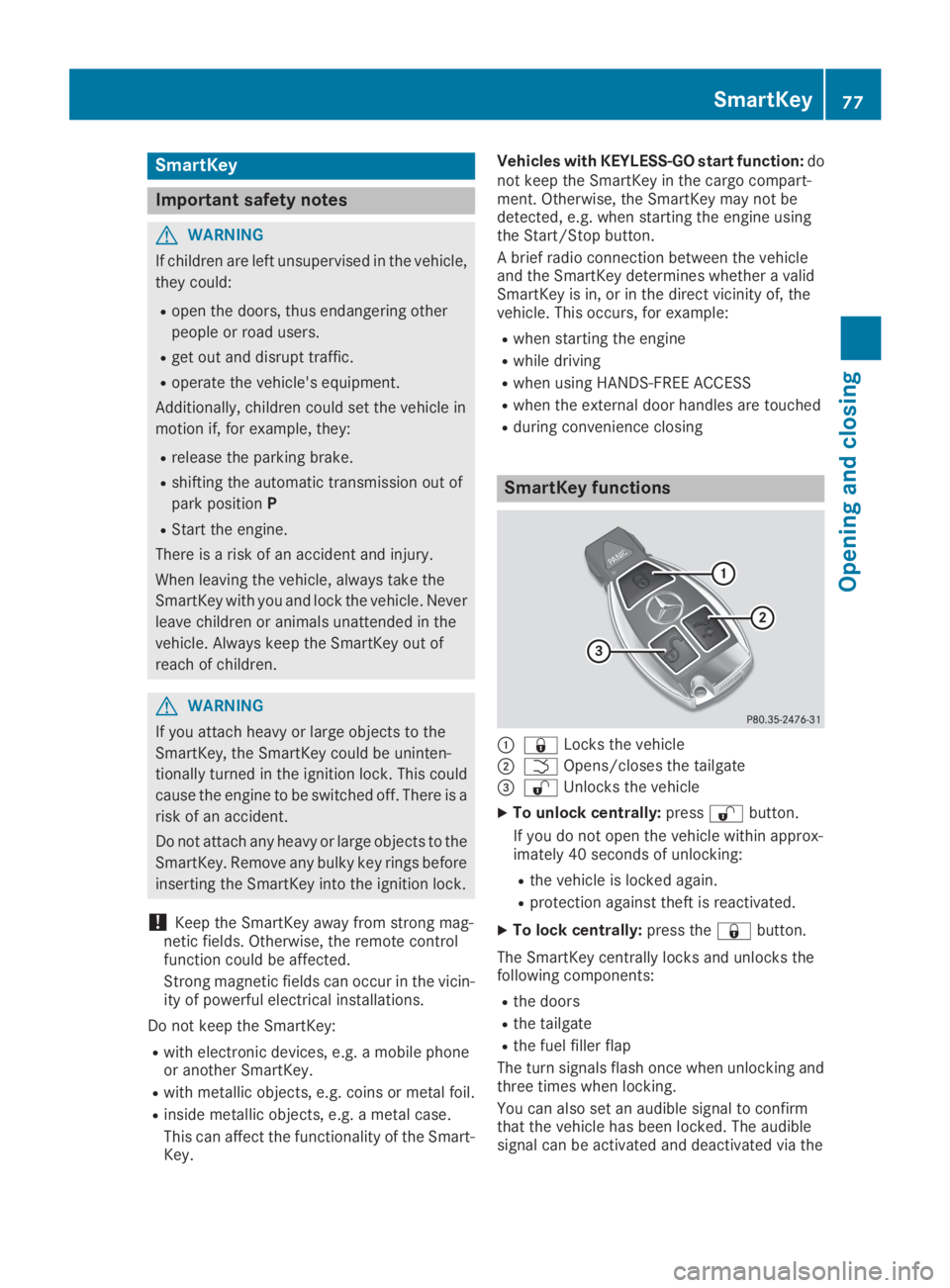
SmartKey functions
C7Locks the vehicle
DTOpens/closes the tailgate
Page 85 of 370
Doors
Important safety notes
GWARNING
If children are left unsupervised in the vehicle,
they could:
Ropen the doors, thus endangering other
people or road users.
Rget out and disrupt traffic.
Roperate the vehicle's equipment.
Additionally, children could set the vehicle in
motion if, for example, they:
Rrelease the parking brake.
Rshifting the automatic transmission out of
park positionP
RStart the engine.
There is a risk of an accident and injury.
When leaving the vehicle, always take the
SmartKey with you and lock the vehicle. Never
leave children or animals unattended in the
vehicle. Always keep the SmartKey out of
reach of children.
Unlocking and opening doors from
the inside
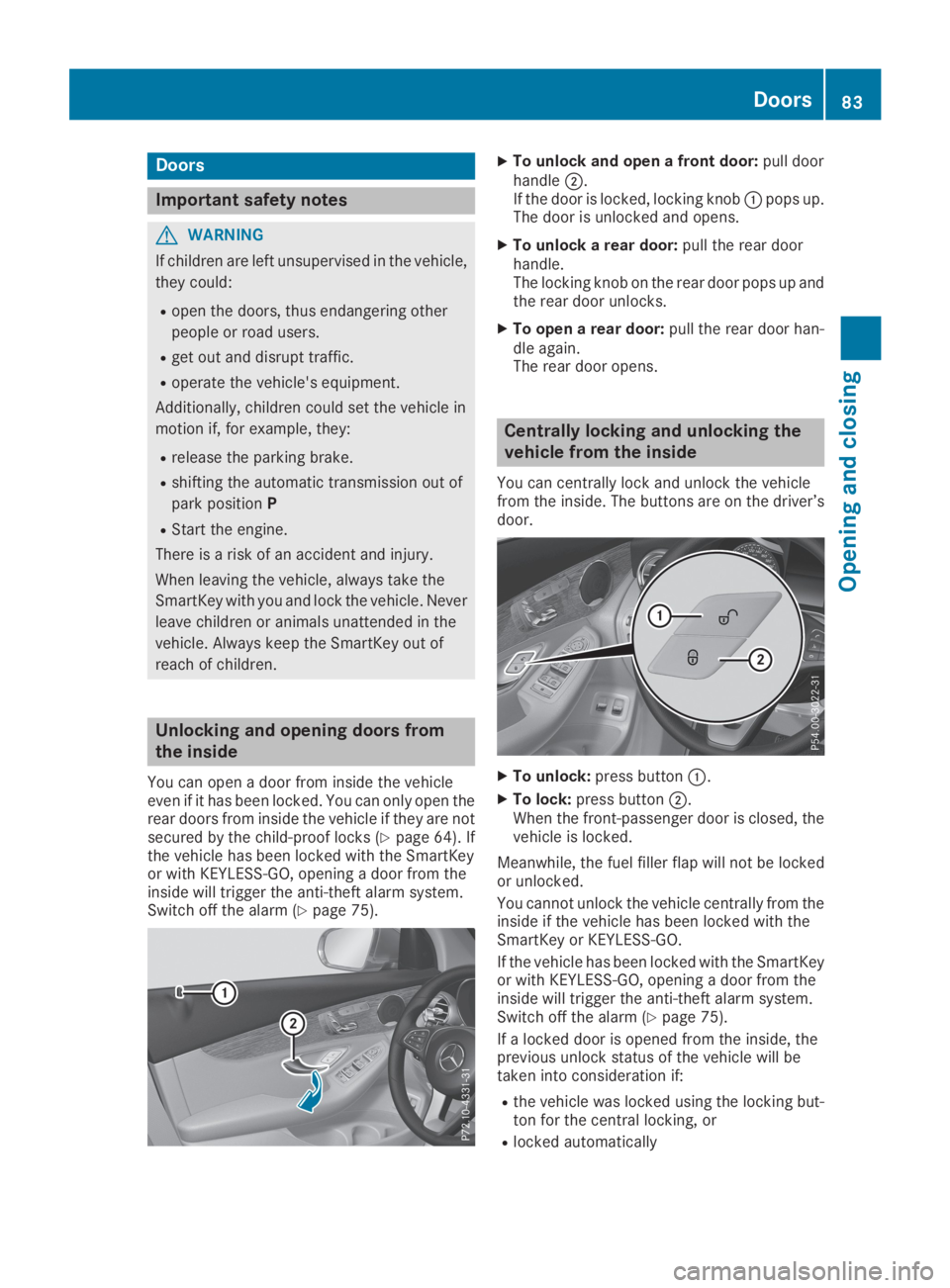
You can open a door from inside the vehicleeven if it has been locked. You can only open therear doors from inside the vehicle if they are notsecured by the child-proof locks (Ypage 64). Ifthe vehicle has been locked with the SmartKeyor with KEYLESS-GO, opening a door from theinside will trigger the anti-theft alarm system.Switch off the alarm (Ypage 75).
XTo unlock and open a front door:pull doorhandleD.If the door is locked, locking knobCpops up.The door is unlocked and opens.
XTo unlock a rear door:pull the rear doorhandle.The locking knob on the rear door pops up andthe rear door unlocks.
XTo open a rear door:pull the rear door han-dle again.The rear door opens.
Centrally locking and unlocking the
vehicle from the inside
You can centrally lock and unlock the vehiclefrom the inside. The buttons are on the driver’sdoor.
XTo unlock:press buttonC.
XTo lock:press buttonD.When the front-passenger door is closed, thevehicle is locked.
Meanwhile, the fuel filler flap will not be lockedor unlocked.
You cannot unlock the vehicle centrally from theinside if the vehicle has been locked with theSmartKey or KEYLESS-GO.
If the vehicle has been locked with the SmartKeyor with KEYLESS-GO, opening a door from theinside will trigger the anti-theft alarm system.Switch off the alarm (Ypage 75).
If a locked door is opened from the inside, theprevious unlock status of the vehicle will betaken into consideration if:
Rthe vehicle was locked using the locking but-ton for the central locking, or
Rlocked automatically
Doors83
Opening and closing
Z
Page 133 of 370
GWARNING
If you switch off the ignition while driving,
safety-relevant functions are only available
with limitations, or not at all. This could affect,
for example, the power steering and the brake
boosting effect. You will require considerably
more effort to steer and brake. There is a risk
of an accident.
Do not switch off the ignition while driving.
GWARNING
If the parking brake has not been fully
released when driving, the parking brake can:
Roverheat and cause a fire
Rlose its hold function.
There is a risk of fire and an accident. Release
the parking brake fully before driving off.
!Do not warm up the engine while stationary.Pull away immediately. Avoid high enginespeeds and full throttle until the engine hasreached its operating temperature.
In vehicles with automatic transmission,engage positions P and R only when the vehi-cle is stationary.
Where possible, avoid spinning the drivewheels when pulling away on slippery roads.You could otherwise damage the drive train.
!Mercedes-AMG vehicles:at low engine oiltemperatures below 68 ‡ (+20 †), the max-imum engine speed is restricted in order toprotect the engine. To protect the engine andmaintain smooth engine operation, avoid driv-ing at full throttle when the engine is cold.
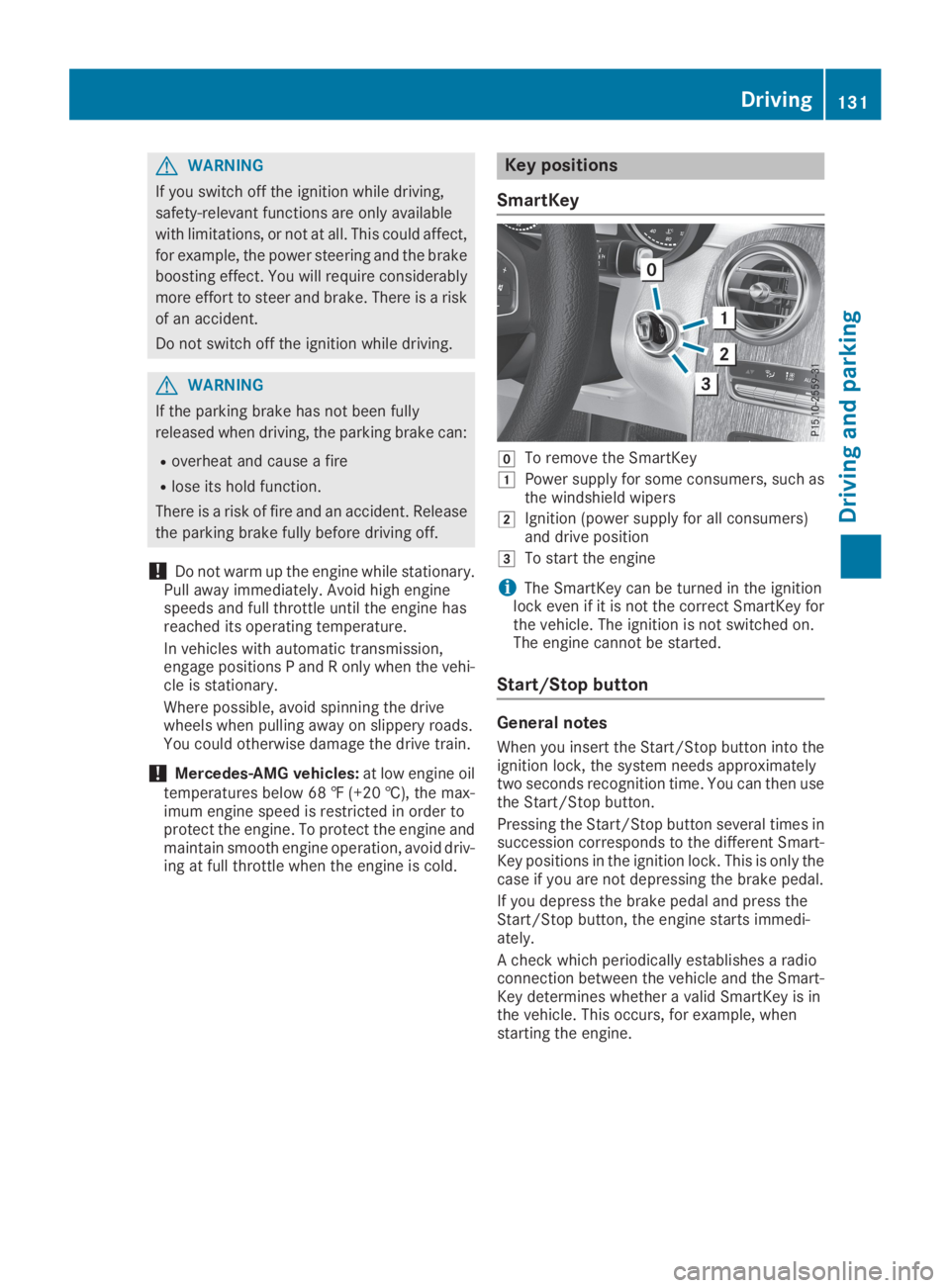
Key positions
SmartKey
ZTo remove the SmartKey
GPower supply for some consumers, such asthe windshield wipers
HIgnition (power supply for all consumers)and drive position
ITo start the engine
iThe SmartKey can be turned in the ignitionlock even if it is not the correct SmartKey forthe vehicle. The ignition is not switched on.The engine cannot be started.
Start/Stop button
General notes
When you insert the Start/Stop button into theignition lock, the system needs approximatelytwo seconds recognition time. You can then usethe Start/Stop button.
Pressing the Start/Stop button several times insuccession corresponds to the different Smart-Key positions in the ignition lock. This is only thecase if you are not depressing the brake pedal.
If you depress the brake pedal and press theStart/Stop button, the engine starts immedi-ately.
A check which periodically establishes a radioconnection between the vehicle and the Smart-Key determines whether a valid SmartKey is inthe vehicle. This occurs, for example, whenstarting the engine.
Driving131
Driving and parking
Z
Page 135 of 370
Starting the engine
Important safety notes
GWARNING
If children are left unsupervised in the vehicle,
they could:
Ropen the doors, thus endangering other
people or road users.
Rget out and disrupt traffic.
Roperate the vehicle's equipment.
Additionally, children could set the vehicle in
motion if, for example, they:
Rrelease the parking brake.
Rshifting the automatic transmission out of
park positionP
RStart the engine.
There is a risk of an accident and injury.
When leaving the vehicle, always take the
SmartKey with you and lock the vehicle. Never
leave children or animals unattended in the
vehicle. Always keep the SmartKey out of
reach of children.
GDANGER
Combustion engines emit poisonous exhaust
gases such as carbon monoxide. Inhaling
these exhaust gases is hazardous to health
and can result in poisoning. There is a risk of
fatal injury. Therefore, never leave the engine
running an enclosed space without adequate
ventilation.
GWARNING
Flammable materials introduced through
environmental influence or by animals can
ignite if in contact with the exhaust system or
parts of the engine that heat up. There is a risk
of fire.
Carry out regular checks to make sure that
there are no flammable foreign materials in
the engine compartment or in the exhaust
system.
General notes
The catalytic converter is preheated for up to30 seconds after a cold start. The sound of theengine may change during this time.
Automatic transmission
XShift the transmission to position](Ypage 141).The transmission position indicator on themultifunction display shows](Ypage 142).
iYou can start the engine in transmissionposition]and\\.
Starting procedure with the SmartKey
To start the engine using the SmartKey insteadof the Start/Stop button, pull the Start/Stopbutton out of the ignition lock.
XTurn the SmartKey to positionIin the igni-tion lock and release it as soon as the engineis running.
If the engine will not start:
XRemove the SmartKey from the ignition lock.
XReinsert the SmartKey into the ignition lockafter a short waiting period.
XTurn the SmartKey to positionHin the igni-tion lock (Ypage 131).The indicator lamps in the instrument clusterlight up (Ypage 256).
XTurn the SmartKey to positionIin the igni-tion lock (Ypage 131) and release it as soonas the engine is running.
Starting procedure with the Start/Stop
button
The Start/Stop button is only available on vehi-cles with KEYLESS-GO or the KEYLESS-GO startfunction.
The Start/Stop button can be used to start thevehicle manually without inserting the SmartKeyinto the ignition lock. The Start/Stop buttonmust be inserted in the ignition lock and theSmartKey must be in the vehicle. This mode forstarting the engine operates independently ofthe ECO start/stop automatic engine start func-tion.
You can start the engine if a valid SmartKey is inthe vehicle. Switch off the engine and always
Driving133
Driving and parking
Z
Page 136 of 370
take the SmartKey with you when leaving thevehicle, even if you only leave it for a short time.Pay attention to the important safety notes.
XDepress the brake pedal and keep itdepressed.
XPress the Start/Stop button once(Ypage 132).The engine starts.
Starting procedure via smartphone
Observe the important safety notes on startingthe engine (Ypage 133).
You can also start your engine via your smart-phone from outside the vehicle. In this case, thepreviously selected climate control setting isactivated. In this way you can cool or heat theinterior of the vehicle before starting the jour-ney.
Only start the engine via your smartphone if it issafe to start and run the engine where your vehi-cle is parked.
Observe the legal stipulations in the area whereyour vehicle is parked. Engine start via smart-phone may be limited to certain countries orregions.
You can execute a maximum of two consecutivestarting attempts via your smartphone. If youpress the start/stop button or insert the Smart-Key into the ignition lock, you can carry out twomore starting attempts with your smartphone.
The engine runs for ten minutes when startingwith the smartphone.
Once you have started the engine, you canswitch the engine off via your smartphone at anytime.
You can only start the engine via your smart-phone if:
Rthe SmartKey is in the ignition lock
Rpark position]is selected
Rthe accelerator pedal is not depressed
Rthe anti-theft alarm system is not activated
Rthe panic alarm is not activated
Rthe hazard warning lamps are switched off
Rthe hood is closed
Rthe doors are closed and locked
Rthe windows and sliding sunroof are closed
Also make sure that:
Rthe fuel tank is sufficiently filled
Rthe starter battery has been sufficientlycharged
GWARNING
Limbs could be crushed or trapped if the
engine is started unintentionally during ser-
vice or maintenance work. There is a risk of
injury.
Always secure the engine against uninten-
tional starting before carrying out mainte-
nance or repair work.
Make sure that the engine cannot be started viayour smartphone before carrying out mainte-nance or repairs. You can prevent an enginestart via your smartphone, for example, if you:
Rswitch on the hazard warning lamps
Rdo not lock the doors
Ropen a side window
Pulling away
General notes
GWARNING
If the engine speed is above the idling speed
and you engage transmission positionDorR,
the vehicle could pull away suddenly. There is
a risk of an accident.
When engaging transmission positionDorR,
always firmly depress the brake pedal and do
not simultaneously accelerate.
Depress the accelerator carefully when pullingaway.
The vehicle locks centrally once you have pulledaway. The locking knobs in the doors drop down.
You can open the doors from the inside at anytime.
You can also deactivate the automatic lockingfeature, see the Digital Operator's Manual.
It is possible to shift the transmission from posi-tion]to the desired position only if youdepress the brake pedal. Only then is the park-ing lock released. If you do not depress thebrake pedal, the DIRECT SELECT lever can still
134Driving
Driving an d parking