2019 MERCEDES-BENZ GLB SUV radio
[x] Cancel search: radioPage 28 of 689
Brazil on
ly:
No teon the two-w ayradio sy stems in theve hi‐
cle:
These sy stems are not pr otected from harmful
inter fere nce and mu stnot cause inter fere nce in
duly appr oved sy stems.
Nigeria onl y:
The connection and use of two-w ayradios in this
ve hicle is not permitted bythe Nigerian Commu‐
nications Commission.
Thailand onl y:
The radio-based wireless components in this
ve hicle meet there qu irements of theNa tional
Broadca sting and Telecommunications Commis‐
sion (NBTC).
Ty re pressure moni toring sensors
Schrader Elect ronics Ltd, 11Tech nology Park,
Belfast Road, Antrim BT41 1QS, Northern Ireland
Re mo telocking sy stem
Marquardt GmbH, Schloßstraße 16,78 604 Rie‐
th eim, Germany
Huf Hülsbeck & Für stGmbH & Co. KG,St eeger
St raße 17, 425 51Velbert, Germany Hella
KGaA Hueck & Co., Rixbe cker Straße 75,
59552 Lipp stadt, Germany
Re mo telocking sy stem control unit
Marquardt GmbH, Schloßstraße 16,78 604 Rie‐
th eim, Germany
Leopold Kostal GmbH & Co. KG, Hauert 11 ,
44 227 Dortmund, Germany
Continental Automotive GmbH, Siemens‐
st ra ße 12, 93055 Regensbu rg, Germany
Antenna modules
Hirschmann Car Communication GmbH,
St utt garter Straße 45-51 ,72 654 Nec kartenzlin‐
ge n, Ge rmany
Ka thre in Au tomotive GmbH & Co. KG,Rö mer‐
ri ng 1,3113 7 Hildesheim, Germany
Door handles with near-field communication
function
Huf Hülsbeck & Für stGmbH & Co. KG,St eeger
St raße 17, 425 51Velbert, Germany
Garage door openers
GenteX Corporation, 600 North Centennial
St reet, Zeeland MI 49464, USA Sensor
for in terior moni toring
META Sy stems, Via Galimbe rti 9, 42 124Re ggio
Emilia, Italy
Ra dar senso rs
Au toliv Electronics ASP Inc., 26545 American
Drive, Southfield, MI 48034, USA
ADC Automotive Dis tance Control Sy stems
GmbH, Peter-Dornie r-Strasse 10, 88 131 Lindau,
Germany
Ro bert Bosch GmbH, Daimler stra sse 6,
71 229 Leonberg, Germany
Mobile communication and telematics
Harman Bec kerAu tomotive Sy stems GmbH,
Po stfach 2260,76303 Karlsbad, Germany
Pa nasonic Automotive & Industrial Sy stems
Europe GmbH, Robert-Bosch-Strasse 27-29,
63225 Langen, Ge rmany
Mitsubishi Elect ric Co rporation, 2-3-33 Miwa,
Sanda-City, 669-15 13Hyogo, Japan
Wire less headphones
Harman Bec kerAu tomotive Sy stems GmbH,
Po stfach 2260,76303 Karlsbad, Germany General no
tes25
Page 31 of 689
Ra
dio ope rating permit for antenna ampli fier Ra
dio equipment appr oval number RKE2 13E1 Count
ryRadio equipment appr oval
number
Ar ge ntina Re
gistrierungsnummer: H-1 5475
Produktname: Verstär ker
Modell:RKE2 13E1
Her steller: "KATHREIN Automo‐
tive GmbH"
Ad resse: Römer ring 1,3113 7 Hil‐
desheim, Germany
Firma: "KATHREIN Automotive
Po rtugal, Sociedade Unipessoal,
Lda"
Ad resse: Parque Indus trial Con‐
st antim, 5000-082 Vila Re al, Por‐
tugal Jack
Copy and translation of
the original declaration
of confo rmity:
EC declaration of conformity
1.
The signator y,as a representative
Manufacturer:
BRANO a.s.
7474 1 Hradec nad Mor avicí, Opa vská 1000,
Czech Republic
ID No.: 64-387-5933
VA TRe g.No.: CZ64-387-5933
declares, as our sole responsibility, that the
product:
2. a)
Designation:
Jack
Ty pe, number:
A) A 164 580 02 18, A 166 580 0118
B) A 240 580 00 18 C) A 639 580 02
18
Ye ar of manufacture: 20 15
Fu lfils all releva nt conditions
Directi veNo. 2006/42/EC
b)
Desc ript ion and purpose of use:
The jack is only intended forra ising the specified
ve hicle in accordance with the operating instruc‐
tions af fixe dto the jac k.
3.
Refe rence da taofthe harmonised standards or
specifications
A) ISO 4063, EN ISO 14341- A,DBL 7382.20,
MBN 10435, AS 2693
B) ISO 4063, ISO 14341- A,DBL 7392. 10, MBN
10 435
C) DBL 7392. 10, DBL 8230. 10
The tech nical documentation of the product is
st ored at the manufacturer's plant. Representa‐
tive forth e compilation of thete ch nical docu‐
mentation: Director of theTe ch nical Department
Brano a.s. 28
General no tes
Page 89 of 689
Problems with
thekey Problem
Possible causes/consequences and M
MSolutions
Yo u can no lon ger lock or unlock the
ve hicle. Po
ssible causes:
R The key bat tery iswe ak or dischar ged.
R There is inter fere nce from a po werful radio signal source.
R The key is faulty. #
Check the battery using the indicator lamp and replace if necessary (/ page84). #
Use the emer gency keyto lock or unlock (/ page84). #
Have theke ych ecked at a qualified specialist workshop.
Yo u ha velost a key. #
Have theke y deacti vated at a qualified specialist workshop. #
If necessar y,ha ve the mechanical lock replaced as well. Doors
Note
s onthe additional door lock The additional door lock is only
available for
ve hicles forth eUni ted Kingdom. &
WARNING Risk of inju ryto persons
inside theve hicle when the additional
door lock is activated
If th e additional door lock is activated, the
doors can no longer be opened from the
inside. If
th ere are persons in theve hicle, they can
no longer le aveth eve hicle, e.g. in hazardous
situations. #
Never lea vepersons unattended in the
ve hicle, particularly children, elderly
persons or persons in need of help. 86
Opening and closing
Page 93 of 689
Problems with KEYLESS-GO
Problem
Possible causes/consequences and M
MSolutions
Yo u can no lon ger lock or unlock the
ve hicle using KEYLESS-GO. Po
ssible causes:
R The key functions ha vebeen deactivated (/ page84).
R The key bat tery iswe ak or dischar ged.
R There is inter fere nce from a po werful radio signal source.
R The key is faulty. #
Activate theke y functions (/ page84). #
Check the battery using the indicator lamp and replace if necessary (/ page84). #
Use the emer gency keyto unlo ckor lock theve hicle (/ page84). #
Have theve hicle and keych ecked at a qualified specialist workshop. Ac
tivating/deactivating the automatic lo ck‐
ing feature The
vehicle is loc ked automatically when the
ignition is switched on and the wheels are turn‐
ing fast erthan walking pace. 90
Opening and closing
Page 223 of 689
Ra
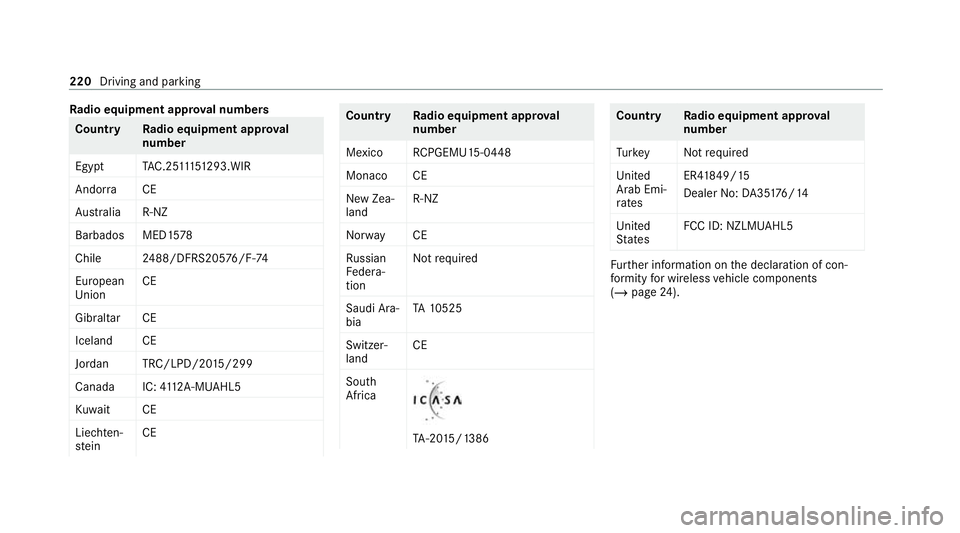
dio equipment appr oval numbers Countr
yRadio equipment appr oval
number
Egyp tT AC.25 111 51293.WIR
Andor ra CE
Au stra lia R-NZ
Barbados MED1 578
Chile 2488/DFRS205 76/F-74
European
Union CE
Gibral tarCE
Iceland CE
Jordan TRC/LPD/20 15/299
Canad aI C:4112 A-MUAHL5
Ku wa it CE
Liechten‐
st ein CE Countr
yRadio equipment appr oval
number
Mexico RCPGEMU15-0448
Monaco CE
New Zea‐
land R-
NZ
Nor wayCE
Ru ssian
Fe dera‐
tion Not
requ ired
Saudi Ara‐
bia TA
10525
Switzer‐
land CE
South
Africa TA
-20 15/1386 Countr
yRadio equipment appr oval
number
Tu rkey Notrequ ired
Uni ted
Arab Emi‐
ra tes ER4
1849/15
Dealer No: DA35176/14
United
St ates FCC ID: NZLM
UAHL5 Fu
rther information on the declaration of con‐
fo rm ity for wireless vehicle components
(/ page 24). 220
Driving and parking
Page 297 of 689
Instrument display
overview
Mercedes-AMG vehicles: be sure toobser ve
th e no tes in the Supplement. Otherwise, you
may failto recognise dangers. &
WARNING Risk of accident due toan
instrument display malfunction
If th e Instrument Display has failed or mal‐
functioned, you may not recognise function
re strictions applying tosaf etyre leva nt sys‐
te ms.
The operating saf ety of your vehicle may be
impaired. #
Drive on carefull y.#
Have theve hicle checked immediately
at a qualified specialist workshop. If
th e operating saf ety of your vehicle is
impaired, park theve hicle immediately and
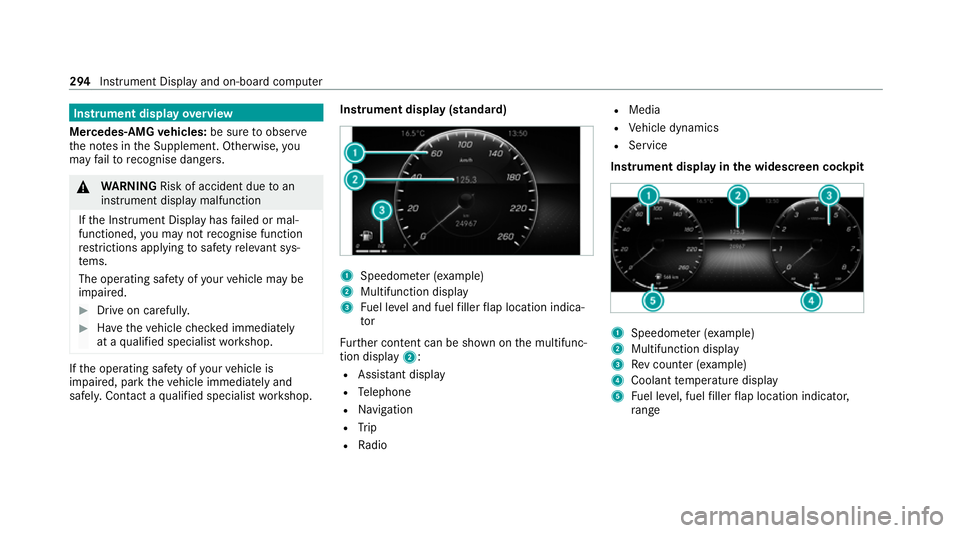
safel y.Con tact a qualified specialist workshop. Instrument display (standard)
1
Speedome ter (e xamp le)
2 Multifunction display
3 Fuel le vel and fuel filler flap location indica‐
tor
Fu rther content can be shown on the multifunc‐
tion display 2:
R Assis tant displ ay
R Telephone
R Navigation
R Trip
R Radio R
Media
R Vehicle dynamics
R Service
Instrument display in the widescreen cockpit 1
Speedome ter (e xamp le)
2 Multifunction display
3 Rev counter (e xample)
4 Coolant temp erature display
5 Fuel le vel, fuel filler flap location indicator,
ra nge 294
Instrument Display and on-boa rdcompu ter
Page 299 of 689
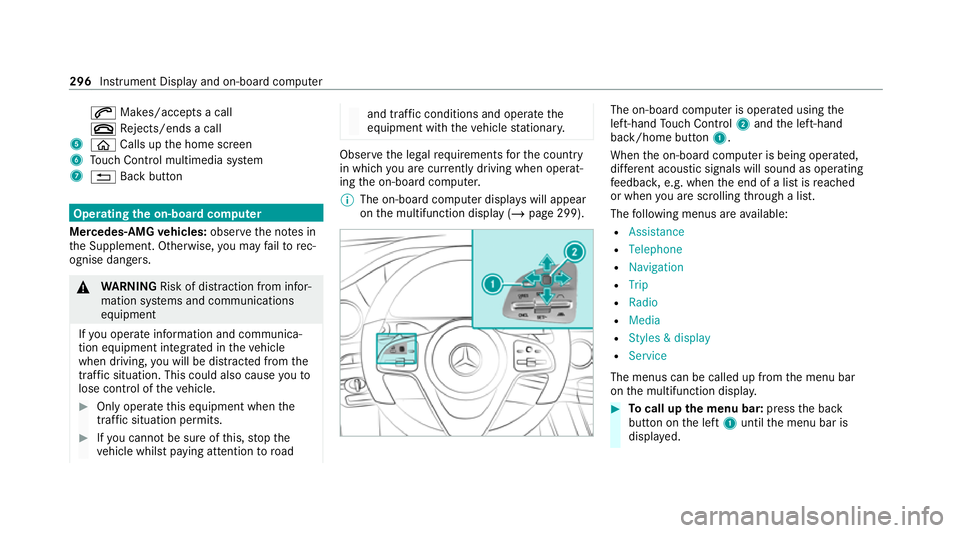
6
Makes/accepts a call
~ Rejects/ends a call
5 ò Calls up the home screen
6 Touch Control multimedia sy stem
7 % Back button Operating
the on-boa rdcompu ter
Mercedes-AMG vehicles: observeth e no tes in
th e Supplement. Otherwise, you may failto rec‐
ognise dangers. &
WARNING Risk of di stra ction from infor‐
mation sy stems and communications
equipment
If yo u operate information and communica‐
tion equipment integ rated in theve hicle
when driving, you will be distracted from the
traf fic situation. This could also cause youto
lose control of theve hicle. #
Only operate this equipment when the
traf fic situation permits. #
Ifyo u cannot be sure of this, stop the
ve hicle whilst paying attention toroad and traf
fic conditions and ope rate the
equipment with theve hicle stationar y. Obser
vethe legal requ irements forth e count ry
in which you are cur rently driving when operat‐
ing the on-board computer.
% The on-board computer displa yswill appear
on the multifunction display (/ page 299). The on-board computer is operated using
the
left-hand Touch Control 2and the left-hand
back/home button 1.
When the on-board computer is being operated,
dif fere nt acoustic signals will sound as operating
fe edbac k,e.g. when the end of a list is reached
or when you are sc rolling thro ugh a list.
The following menus are available:
R Assistance
R Telephone
R Navigation
R Trip
R Radio
R Media
R Styles & display
R Service
The menus can be called up from the menu bar
on the multifunction displa y. #
Tocall up the menu bar: pressthe back
button on the left 1until the menu bar is
displa yed. 296
Instrument Display and on-board computer
Page 302 of 689
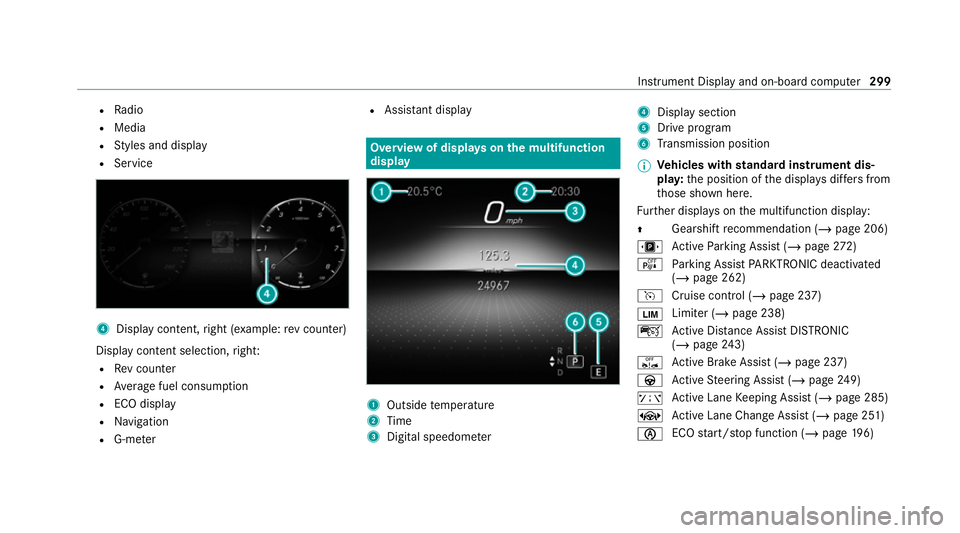
R
Radio
R Media
R Styles and display
R Service 4
Display conte nt,right (e xamp le:rev counter)
Display content selection, right:
R Rev counter
R Average fuel consum ption
R ECO display
R Navigation
R G-me ter R
Assi stant display Overview of displa
yson the multifunction
display 1
Outside temp erature
2 Time
3 Digital speedome ter 4
Displ aysection
5 Drive program
6 Transmission position
% Ve
hicles with standard instrument dis‐
pla y:the position of the displa ysdiffers from
th ose shown here.
Fu rther displa yson the multifunction display:
Z Gearshift
recommendation (/ page 206)
u Active Parking Assist (/ page272)
é Parking Assist PARKTRONIC deacti vated
( / page 262)
h Cruise control (/ page 237)
È Limiter (/
page 238)
ç Active Dis tance Assi stDISTRONIC
(/ page 243)
ê Active Brake Assi st (/ page 237)
à Active Steering Assist (/ page249)
ð Active Lane Keeping Assist (/ page 285)
± Active Lane Change Assi st (/ page 251)
è ECO
start/ stop function (/ page196) In
stru ment Display and on-board computer 299