2019 MERCEDES-BENZ GLA key
[x] Cancel search: keyPage 16 of 346
Triggering the vehicle alarm ........... 268
Vehicle remote locking .................. 266
Vehicle remote unlocking .............. 265
Message memory (on-board com-
puter).................................................. 203
Messages
see Display messages
Mirror turn signal
Cleaning ......................................... 282
Mirrors
see Exterior mirrors
see Rear-view mirror
see Vanity mirror (in the sun visor)
Mobile phone
Connecting (Bluetooth®inter-
face) ..............................................246
Connecting (device manager) ........247
Frequencies ................................... 332
Installation ..................................... 332
Menu (on-board computer) ............ 195
Transmission output (maximum) .... 332
Model type
see Vehicle identification plate
Modifying the programming
(SmartKey)...........................................71
MOExtended tires.............................. 288
Mounting wheels
Lowering the vehicle ...................... 329
Mounting a new wheel ................... 328
Preparing the vehicle .....................326
Raising the vehicle ......................... 327
Removing a wheel .......................... 328
Securing the vehicle against roll-
ing away ........................................ 326
MP3
Operation ....................................... 195
see also Digital Operator's Man-
ual ..................................................242
Multifunction display
Function/notes .............................191
Permanent display ......................... 199
Multifunction steering wheel
Operating the on-board com-
puter .............................................. 189
Overview .......................................... 33
Multimedia system
Switching on and off ......................243
Music files
see also Digital Operator's Man-
ual ..................................................242
N
Navigation
Entering a destination .................... 244
Menu (on-board computer) ............ 193
see also Digital Operator's Man-
ual ..................................................242
Notes on breaking-in a new vehi-
cle....................................................... 124
O
Occupant Classification System
(OCS)
Conditions ....................................... 47
Faults ............................................... 51
Operation ......................................... 47
Self-test ...........................................50
Occupant safety
Air bags ...........................................44
Automatic measures after an
accident ........................................... 53
Belt warning ..................................... 44
Children in the vehicle ..................... 53
Important safety notes.................... 39
Introduction to the restraint sys-
tem .................................................. 39
Occupant Classification System
(OCS) ............................................... 47
PASSENGER AIR BAG indicator
lamps ............................................... 40
Pets in the vehicle ........................... 59
Restraint system warning lamp ........ 40
Seat belt .......................................... 41
OCS
Faults ............................................... 51
Operation ......................................... 47
Self-test ........................................... 50
Odometer........................................... 192
Off-road driving
Approach/departure angle ............ 340
Checklist after driving off-road ...... 155
Checklist before driving off-road .... 155
General information ....................... 154
Important safety notes .................. 153
14Index
Page 20 of 346
Securing cargo..................................255
Selecting a gear
see Automatic transmission
Selector lever
Cleaning ......................................... 284
Sensors (cleaning instructions)....... 282
Service menu (on-board com-
puter)..................................................198
Service message
see ASSYST PLUS
Service products
Brake fluid ..................................... 337
Coolant (engine) ............................ 337
Engine oil ....................................... 336
Fuel ................................................ 334
Important safety notes .................. 334
Refrigerant (air-conditioning sys-
tem) ............................................... 338
Washer fluid ................................... 338
Setting a speed
see Cruise control
Setting the air distribution...............120
Setting the airflow............................ 120
Setting the date/time format
see also Digital Operator's Man-
ual ..................................................242
Setting the language
see also Digital Operator's Man-
ual ..................................................242
Setting the time
see also Digital Operator's Man-
ual ..................................................242
Settings
Factory (on-board computer) ......... 200
On-board computer ....................... 198
SETUP (on-board computer,
Mercedes-AMG vehicles).................. 201
Side impact air bag.............................46
Side marker lamp (display mes-
sage)................................................... 216
Side windows
Cleaning ......................................... 281
Convenience closing feature ............ 85
Convenience opening feature ..........84
Important safety information ........... 83
Opening/closing .............................. 84
Problem (malfunction) .....................86
Resetting .........................................86
Reversing feature .............................83
SIRIUS services
see also Digital Operator's Man-
ual .................................................. 242
Situation-dependent braking
assistance
Function/notes ................................ 63
Sliding sunroof
see Panorama roof with power
tilt/sliding panel
SmartKey
Changing the battery ....................... 72
Changing the programming .............71
Checking the battery .......................72
Convenience closing feature ............ 85
Convenience opening feature .......... 84
Display message ............................ 229
Door central locking/unlocking .......69
Important safety notes .................... 69
KEYLESS-GO start function .............. 71
Loss .................................................73
Mechanical key ................................ 71
Positions (ignition lock) ................. 125
Problem (malfunction) ..................... 73
Starting the engine ........................ 127
SmartKey positions (ignition
lock)....................................................125
SMS
see also Digital Operator's Man-
ual ..................................................242
Snow chains...................................... 307
Sockets
Center console .............................. 260
General notes ................................ 260
Luggage compartment ................... 260
Rear compartment ......................... 260
Sound
Switching on/off ........................... 243
Special seat belt retractor.................. 54
Specialist workshop............................ 27
Speed, controlling
see Cruise control
Speedometer
Activating/deactivating the addi-
tional speedometer ........................ 199
Digital ............................................ 193
In the Instrument cluster ................. 32
18Index
Page 24 of 346
Type identification plate
see Vehicle identification plate
U
Unlocking
Emergency unlocking ....................... 76
From inside the vehicle (central
unlocking button) ............................. 75
Upshift indicator (on-board com-
puter, Mercedes-AMG vehicles)....... 200
USB devices
Connecting to the Media Inter-
face ...............................................249
V
Vanity mirror (in the sun visor)........259
Vehicle
Correct use ...................................... 27
Data acquisition ............................... 28
Display message ............................ 225
Equipment ....................................... 26
Individual settings .......................... 198
Limited Warranty .............................28
Loading .......................................... 316
Locking (in an emergency) ............... 77
Locking (SmartKey) .......................... 69
Lowering ........................................ 329
Maintenance .................................... 26
Parking for a long period ................ 148
Pulling away................................... 128
Raising ........................................... 327
REACH Regulation ........................... 28
Reporting problems ......................... 28
Securing from rolling away ............ 326
Transporting .................................. 300
Unlocking (in an emergency) ........... 76
Unlocking (SmartKey)...................... 69
Vehicle data ................................... 339
Vehicle battery
see Battery (vehicle)
Vehicle data
Roof load (maximum) ..................... 339
Vehicle data (off-road driving)
Approach/departure angle ............ 340
Maximum gradient climbing abil-
ity .................................................. 340
Vehicle dimensions........................... 339
Vehicle emergency locking................ 77
Vehicle identification number
see VIN
Vehicle identification plate.............. 333
Vehicle tool kit.................................. 287
Ventilation
Setting the vents ........................... 123
Video
Operating the DVD ......................... 195
see also Digital Operator's Man-
ual .................................................. 242
VIN
Seat ............................................... 334
Type plate ...................................... 333
W
Warning and indicator lamps
ABS ................................................ 233
Active Brake Assist ........................ 240
Brakes ........................................... 232
Check Engine ................................. 238
Coolant .......................................... 238
Distance warning ........................... 240
ESP®.............................................. 235
ESP®OFF ....................................... 236
Fuel tank ........................................ 238
Overview .......................................... 32
Reserve fuel................................... 238
Restraint system ............................ 237
Seat belt ........................................ 230
SPORT handling mode................... 236
Tire pressure monitor .................... 241
Washer fluid
Display message ............................ 228
Weather display (COMAND)
see also Digital Operator's Man-
ual.................................................. 242
Wheel and tire combinations
Tires ............................................... 329
Wheel bolt tightening torque........... 329
Wheel chock...................................... 326
Wheels
Changing a wheel.......................... 325
Checking ........................................ 304
Cleaning ......................................... 281
Emergency spare wheel ................. 330
22Index
Page 26 of 346
Introduction
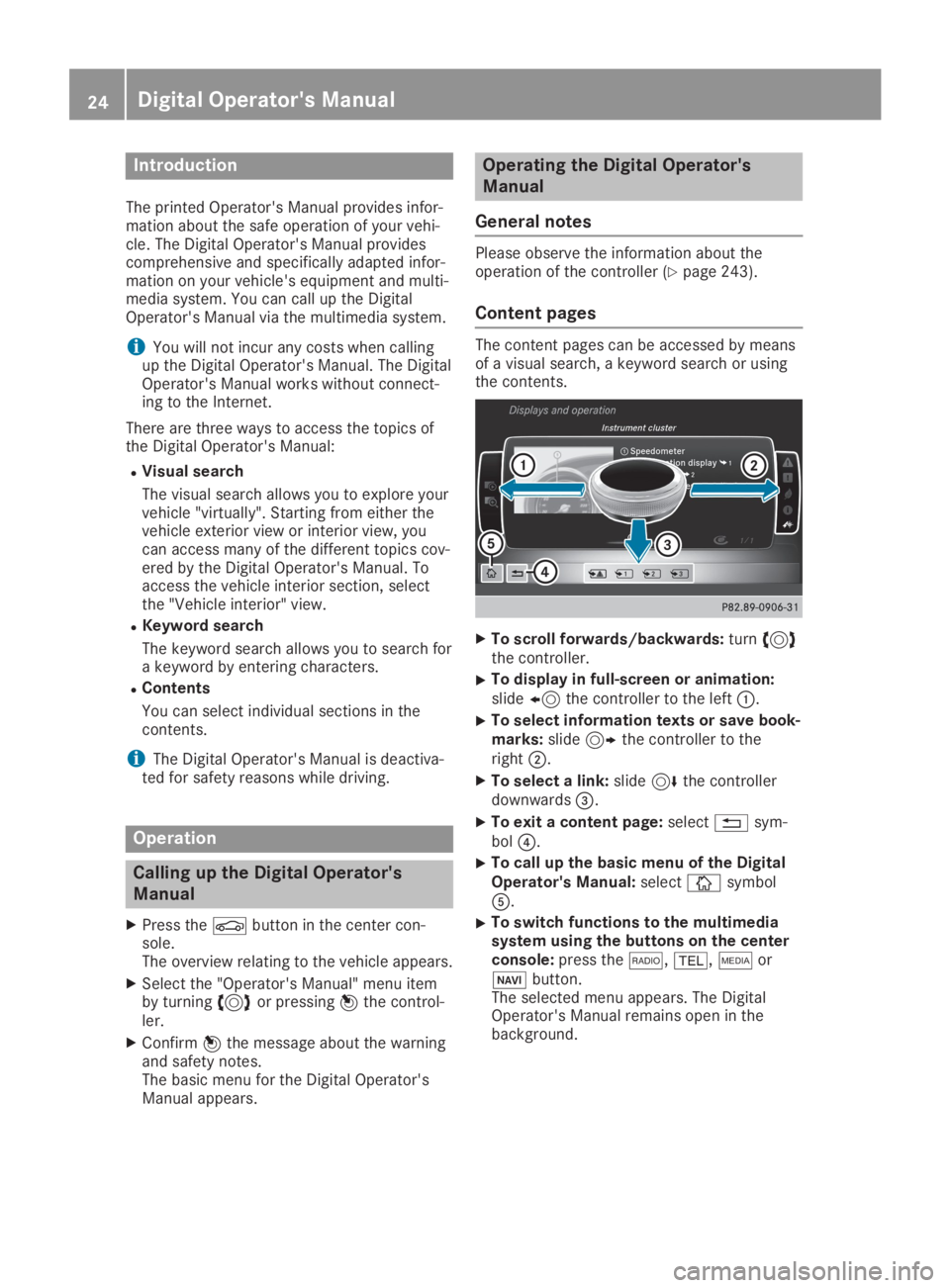
The printed Operator's Manual provides infor-mation about the safe operation of your vehi-cle. The Digital Operator's Manual providescomprehensive and specifically adapted infor-mation on your vehicle's equipment and multi-media system. You can call up the DigitalOperator's Manual via the multimedia system.
iYou will not incur any costs when callingup the Digital Operator's Manual. The DigitalOperator's Manual works without connect-ing to the Internet.
There are three ways to access the topics ofthe Digital Operator's Manual:
RVisual search
The visual search allows you to explore yourvehicle "virtually". Starting from either thevehicle exterior view or interior view, youcan access many of the different topics cov-ered by the Digital Operator's Manual. Toaccess the vehicle interior section, selectthe "Vehicle interior" view.
RKeyword search
The keyword search allows you to search fora keyword by entering characters.
RContents
You can select individual sections in thecontents.
iThe Digital Operator's Manual is deactiva-ted for safety reasons while driving.
Operation
Calling up the Digital Operator's
Manual
XPress the
Page 41 of 346
Panic alarm
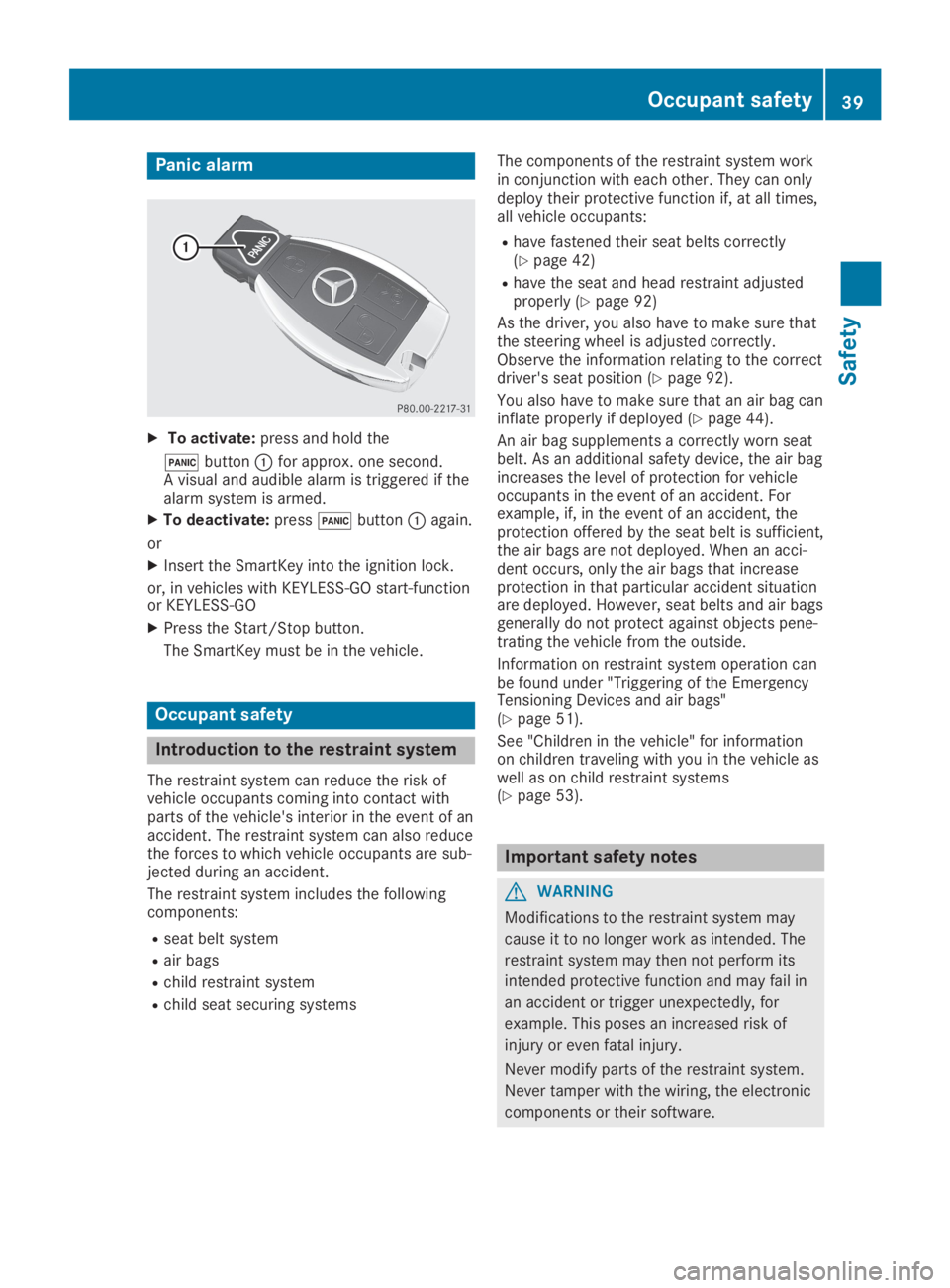
XTo activate:press and hold the
3buttonCfor approx. one second.A visual and audible alarm is triggered if thealarm system is armed.
XTo deactivate:press3buttonCagain.
or
XInsert the SmartKey into the ignition lock.
or, in vehicles with KEYLESS-GO start-functionor KEYLESS‑GO
XPress the Start/Stop button.
The SmartKey must be in the vehicle.
Occupant safety
Introduction to the restraint system
The restraint system can reduce the risk ofvehicle occupants coming into contact withparts of the vehicle's interior in the event of anaccident. The restraint system can also reducethe forces to which vehicle occupants are sub-jected during an accident.
The restraint system includes the followingcomponents:
Rseat belt system
Rair bags
Rchild restraint system
Rchild seat securing systems
The components of the restraint system workin conjunction with each other. They can onlydeploy their protective function if, at all times,all vehicle occupants:
Rhave fastened their seat belts correctly(Ypage 42)
Rhave the seat and head restraint adjustedproperly (Ypage 92)
As the driver, you also have to make sure thatthe steering wheel is adjusted correctly.Observe the information relating to the correctdriver's seat position (Ypage 92).
You also have to make sure that an air bag caninflate properly if deployed (Ypage 44).
An air bag supplements a correctly worn seatbelt. As an additional safety device, the air bagincreases the level of protection for vehicleoccupants in the event of an accident. Forexample, if, in the event of an accident, theprotection offered by the seat belt is sufficient,the air bags are not deployed. When an acci-dent occurs, only the air bags that increaseprotection in that particular accident situationare deployed. However, seat belts and air bagsgenerally do not protect against objects pene-trating the vehicle from the outside.
Information on restraint system operation canbe found under "Triggering of the EmergencyTensioning Devices and air bags"(Ypage 51).
See "Children in the vehicle" for informationon children traveling with you in the vehicle aswell as on child restraint systems(Ypage 53).
Important safety notes
GWARNING
Modifications to the restraint system may
cause it to no longer work as intended. The
restraint system may then not perform its
intended protective function and may fail in
an accident or trigger unexpectedly, for
example. This poses an increased risk of
injury or even fatal injury.
Never modify parts of the restraint system.
Never tamper with the wiring, the electronic
components or their software.
Occupant safety39
Safety
Z
Page 45 of 346
Only then can the forces which occur be dis-tributed over the area of the belt.
Rthe shoulder section of the belt is routedacross the center of your shoulder
The shoulder section of the seat belt shouldnot touch your neck or be routed under yourarm or behind your back. Where possible,adjust the seat belt to the appropriateheight.
Rthe lap belt is taut and passes across yourlap as low down as possible
The lap belt must always be routed acrossyour hip joints and not across your abdo-men. This applies particularly to pregnantwomen. If necessary, push the lap belt downto your hip joint and pull it tight using theshoulder section of the belt.
Rthe seat belt is not routed across sharp,pointed or fragile objects
If you have such items located on or in yourclothing, e.g. pens, keys or eyeglasses,store these in a suitable place.
Ronly one person is using a seat belt
Infants and children must never travel sit-ting on the lap of a vehicle occupant. In theevent of an accident, they could be crushedbetween the vehicle occupant and seat belt.
Robjects are never secured with a seat belt ifthe seat belt is also being used by one ofthe vehicle's occupants
Also ensure that there are never objectsbetween a person and the seat, e.g. cush-ions.
Seat belts are only intended to secure andrestrain vehicle occupants. Always observe the"Loading guidelines" for securing objects, lug-gage or loads (Ypage 250).
Fastening and adjusting the seat belts
Observe the safety notes on the seat belt(Ypage 41) and the notes on correct use ofseat belts (Ypage 42).
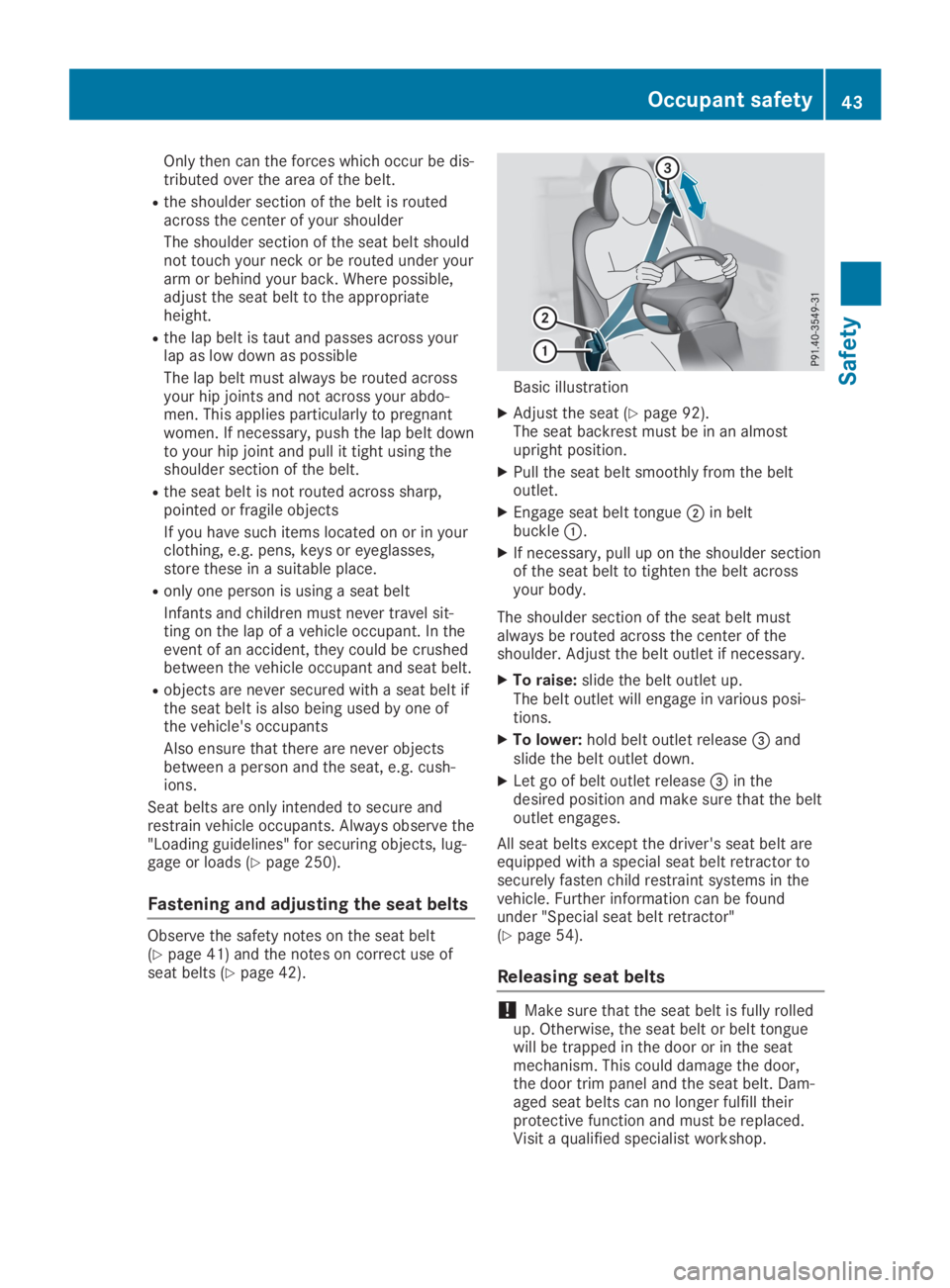
Basic illustration
XAdjust the seat (Ypage 92).The seat backrest must be in an almostupright position.
XPull the seat belt smoothly from the beltoutlet.
XEngage seat belt tongueDin beltbuckleC.
XIf necessary, pull up on the shoulder sectionof the seat belt to tighten the belt acrossyour body.
The shoulder section of the seat belt mustalways be routed across the center of theshoulder. Adjust the belt outlet if necessary.
XTo raise:slide the belt outlet up.The belt outlet will engage in various posi-tions.
XTo lower:hold belt outlet release
Page 50 of 346
The indicator lamps inform you whether thefront-passenger front air bag is deactivated orenabled.
XPress the Start/Stop button once or twice,or turn the SmartKey to positionGorHinthe ignition lock.The system carries out self-diagnostics.
The PASSENGER AIR BAG OFF andPASSENGER AIR BAG ON indicator lamps mustlight up simultaneously for approximately sixseconds.
The indicator lamps display the status of thefront-passenger front air bag.
RPASSENGER AIR BAG ON lights up for60 seconds, subsequently both indicatorlamps are off (PASSENGER AIR BAG ON andOFF): the front-passenger front air bag isable to deploy in the event of an accident.
RPASSENGER AIR BAG OFF lights up: thefront-passenger front air bag is deactivated.It will then not be deployed in the event ofan accident.
If the PASSENGER AIR BAG ON indicator lampis off, only the PASSENGER AIR BAG OFF indi-cator lamp shows the status of the front-passenger front air bag. The PASSENGER AIRBAG OFF indicator lamp may be lit continu-ously or be off.
If the status of the front-passenger front airbag changes while the vehicle is in motion, anair bag display message appears in the instru-ment cluster (Ypage 213). When the front-passenger seat is occupied, always pay atten-tion to the PASSENGER AIR BAG OFF indicatorlamp. Be aware of the status of the front-passenger front air bag both before and duringthe journey.
GWARNING
If the PASSENGER AIR BAG OFF indicator
lamp is lit, the front-passenger front air bag
is disabled. It will not be deployed in the
event of an accident and cannot perform its
intended protective function. A person in the
front-passenger seat could then, for exam-
ple, come into contact with the vehicle's
interior, especially if the person is sitting too
close to the dashboard. This poses an
increased risk of injury or even fatal injury.
When the front-passenger seat is occupied,
always ensure that:
Rthe classification of the person in the
front-passenger seat is correct and the
front-passenger front air bag is enabled or
disabled in accordance with the person in
the front-passenger seat
Rthe front-passenger seat has been moved
back as far back as possible.
Rthe person is seated correctly.
Make sure, both before and during the jour-
ney, that the status of the front-passenger
front air bag is correct.
GWARNING
If you secure a child in a rearward-facing
child restraint system on the front-
passenger seat and the PASSENGER AIR
BAG OFF indicator lamp is off, the front-
passenger front air bag can deploy in the
event of an accident. The child could be
struck by the air bag. This poses an
increased risk of injury or even fatal injury.
Make sure that the front-passenger front air
bag has been deactivated. The PASSENGER
AIR BAG OFF indicator lamp must be lit.
NEVER use a rearward-facing child restraint
on a seat protected by an ACTIVE FRONT
AIRBAG in front of it; DEATH or SERIOUS
INJURY to the child can occur.
If the PASSENGER AIR BAG OFF indicator lampstays off, do not install a rearward-facing childrestraint system on the front-passenger seat.You can find more information on OCS under"Problems with the Occupant ClassificationSystem" (Ypage 51).
48Occupant safety
Safety
Page 56 of 346
child restraint system manufacturer's instal-lation instructions.
Ralways observe the instructions and safetynotes on the "Occupant classification sys-tem (OCS)". (Ypage 47)
GWARNING
If you leave children unsupervised in the
vehicle, they could set it in motion by, for
example:
Rrelease the parking brake.
Rshift the automatic transmission out of
the parking positionP.
Rstart the engine.
In addition, they may operate vehicle equip-
ment and become trapped. There is a risk of
an accident and injury.
When leaving the vehicle, always take the
SmartKey with you and lock the vehicle.
Never leave children unsupervised in the
vehicle.
GWARNING
If persons, particularly children are subjec-
ted to prolonged exposure to extreme heat
or cold, there is a risk of injury, possibly
even fatal. Never leave children unattended
in the vehicle.
GWARNING
If the child restraint system is subjected to
direct sunlight, parts may get very hot. Chil-
dren may burn themselves on these parts,
particularly on the metal parts of the child
restraint system. There is a risk of injury.
If you leave the vehicle, taking the child with
you, always ensure that the child restraint
system is not exposed to direct sunlight.
Protect it with a blanket, for example. If the
child restraint system has been exposed to
direct sunlight, let it cool down before secur-
ing the child in it. Never leave children unat-
tended in the vehicle.
Always ensure that all vehicle occupants havetheir seat belts fastened correctly and are sit-ting properly. Particular attention must be paidto children.
Observe the safety notes on the seat belt(Ypage 41) and the notes on correct use ofseat belts (Ypage 42).
A booster seat may be necessary to achieveproper seat belt positioning for children over40 lbs (18 kg) until they reach a height wherea three-point seat belt can be properly fas-tened without a booster seat.
Special seatbelt retractor
GWARNING
If the seat belt is released while driving, the
child restraint system will no longer be
secured properly. The special seat belt
retractor is disabled and the inertia real
draws in a portion of the seat belt. The seat
belt cannot be immediately refastened.
There is an increased risk of injury, possibly
even fatal.
Stop the vehicle immediately, paying atten-
tion to road and traffic conditions. Reacti-
vate the special seat belt retractor and
secure the child restraint system properly.
All seat belts in the vehicle, except the driver'sseat belt, are equipped with a special seat beltretractor. When activated, the special seat beltretractor ensures that the seat belt cannotslacken once the child seat is secured.
Installing a child restraint system:
XMake sure you observe the child restraintsystem manufacturer's installation instruc-tions.
XPull the seat belt smoothly from the beltoutlet.
XEngage seat belt tongue in belt buckle.
Activating the special seat belt retractor:
XPull the seat belt out fully and let the inertiareel retract it again.While the seat belt is retracting, you shouldhear a ratcheting sound. The special seatbelt retractor is enabled.
XPush the child restraint system down so thatthe seat belt is tight and does not loosen.
54Children in the vehicle
Safety