2019 MERCEDES-BENZ EQC SUV USB port
[x] Cancel search: USB portPage 31 of 629

Fa
ult memories in theve hicle can be reset by a
service outlet as part of repair or maintenance
wo rk.
Depending on the selected equipment, you can
import data into vehicle con venience and info‐
ta inment functions yourself.
This includes, forex ample:
R multimedia data such as music, films or pho‐
to sfo r playback in an integrated multimedia
sy stem
R address book data for use in connection with
an integrated hands-free sy stem or an inte‐
grated navigation sy stem
R entered navigation destinations
R data about the use of internet services
This data can be sa ved locally in theve hicle or it
is located on a device which you ha veconnected
to theve hicle (e.g. a smartphone, USB flash
drive or MP3 pla yer). If this data is stored in the
ve hicle, you can dele teit at any time. This data
is sent tothird parties only at your requ est, par‐
ticular lywhen you use online services in accord‐
ance with the settings that you ha veselected. Yo
u can store or change con venience settings/
individualisations in theve hicle at any time.
Depending on the equipment, this includes, for
ex ample:
R settings forth e seat and steering wheel posi‐
tions
R suspension and climate control settings
R customisations such as interior lighting
If yo ur vehicle is accordingly equipped, you can
connect your smartphone or ano ther mobile end
device totheve hicle. You can cont rolth is by
means of the control elements integrated in the
ve hicle. Images and audio from the smartphone
can be output via the multimedia sy stem. Cer‐
ta in information is simultaneously transfer redto
yo ur smartphone.
Depending on the type of integration, this can
include:
R general vehicle data
R position data
This allo wsyouto use selected apps on your
smartphone, such as navigation or music play‐ bac
k.There is no fur ther interaction between the
smartphone and theve hicle; in particular, vehi‐
cle data is not directly accessible. Which type of
fur ther data processing occurs is de term ined by
th e pr ovider of the specific app used. Which set‐
tings you can make, if an y,depends on the spe‐
cific app and the operating sy stem of your
smartphone. Online services
Wire
less network connection
If yo ur vehicle has a wireless network connec‐
tion, it enables data tobe exc hanged between
yo ur vehicle and additional sy stems. The wire‐
less network connection is enabled via theve hi‐
cle's transmission and reception unit or via con‐
nected mobile end devices (e.g. sma rtphones).
Online functions can be used via the wireless
network connection. This includes online serv‐
ices and applications/apps pr ovided bythe man‐
ufacturer or other pr oviders.
Manu factu rer's se rvices
Re garding online services of the manufacturer,
th e individual functions are described bythe 28
General no tes
Page 338 of 629
Importing/exporting data
* NO
TELoss of da tadue topremature
re mo val #
Do not remo vethe data storage
medium when data is being expor ted.
Mercedes-Benz is not liable for any loss of
data. Re
quirements:
R The vehicle is stationar y.
R The ignition is switched on.
R A USB device is connected.
Multimedia sy stem:
4 © 5
Settings 5
System
5 System backup #
Select Import data orExport data.
Importing #
Select a data storage medium.
A prom ptappears asking whe ther youre ally
wish to overwrite the cur rent da ta. If da ta originates from ano
ther vehicle, this is recog‐
nised du ring da tareading. #
Con firm the prom pt.
The files are impor ted. The multimedia sy stem is
re star ted once the data has been impor ted.
% Current vehicle settings can be edited af ter
th e import.
Exporting
If PIN pr otection is activated, your PIN is reques‐
te d. #
Ente rth efo ur-digit PIN. #
Select a data storage medium.
A prom ptappears asking whe ther youre ally
wish tocar ryout theex port. #
Confirm the prom pt.
The data is expor ted. The data export may
ta ke several minutes.
% After successful export, the data is sa ved in
th e "MyMercedesBac kup" directory which
can be found on thestorage medium. Ac
tivating/deactivating PIN pr otection Re
quirements:
R Tounlo ckthe PIN: there is an Internet con‐
nection.
R A Mercedes me account exists at http://
www.me rcedes.me.
R An individual user profile is active
(/ page 311).
Multimedia sy stem:
4 © 5
Settings 5
System
5 PIN protection
Setting the PIN #
Select Set PIN. #
Enter a four-digit PIN. #
Enterth efo ur-digit PIN again.
If bo thPINs match, PIN pr otection is active.
Changing the PIN #
Select Change settings. #
Enterth e cur rent PIN. #
Select Change PIN . MBUX multimedia sy
stem 335
Page 339 of 629

#
Set a new PIN.
Ac tivating PIN pr otection for data export #
Select Protect data export .
Ac tivate or deacti vate the function.
Un blocking the PIN via the Mercedes me por‐
tal
If th e PIN has been entered incor rectly three
times, the PIN will be bloc ked. You can ha ve a
single-use password sent to you via the
Mercedes me connect online por talto reset the
PIN pr otection. #
Select Unblock PIN. #
Ente rth e single-use password.
PIN pr otection is reset, and you can set a
new PIN. Software upda
teInformation on software upda
tes
A software upda teconsi sts of thre esteps:
R Downloading or copying of the data requ ired
fo r ins tallation
R Installation of the update R
Activation of the update byrestarting the
sy stem
The multimedia sy stem pr ovides a message
when an update is available.
Depending on the source, you can per form vari‐
ous updates:
Software updates Source of
the
update Up
date type
Interne tN avigation map, sys‐
te m updates, Digital
Owner's Manual
External storage
medium, e.g. USB
fl ash drive Na
vigation maps %
Installation can take several minutes and
cancellation is not possible. If you do not
ins tallth e software updates then thest atus
of your vehicle will not be up-to-date. During
th e ins tallation, individual functions or con‐ trol elements are not
available or on lyavaila‐
ble toa limited deg ree.
Ad vantages of updating software
Software updates ensure your vehicle's tech nol‐
ogy is up-to-date.
In order toimpr oveth equ ality of our services
yo u will recei vefuture updates foryo ur multime‐
dia sy stem, the Mercedes me connect services
and your vehicle's communication module.
These will con veniently be sent to you via the
mobile phone connection in your vehicle and, in
many cases, ins talled automaticall y.Yo u can
monitor thest atus of your updates at any time
on the Mercedes me por tal and find information
about po tential inno vations.
Yo ur advantages at a glance:
R con veniently recei vesoftware update s via
th e mobile phone network
R impr ovesth equ ality and availability of
Mercedes me connect services
R keeps your multimedia sy stem and communi‐
cation module up-to-date 336
MBUX multimedia sy stem
Page 393 of 629
Multimedia sy
stem:
4 © 5
Mercedes me & Apps
5 Dashcam #
If se veral USB devices are connec ted with
th e multimedia sy stem, select the USB
device (/ page 389). #
Toselect a recording mode: selectIndivid-
ual recording orLoop recording .
If Individual recording is selected and the
memory is full there cording stops. An indi‐
vidual recording is au tomatical lyprotected
against being overwritten.
If Loop recording has been selected, se veral
short video files are recorded. When the
memory limit is reached, the oldest video file
is dele ted and recording is continued au to‐
matical ly. #
Tostar t:select Start recording.
The length of there cording is shown. The
Please do not remove the storage medium.
message appea rs. The video file is stored on
th e USB device. #
Toend: select End recording . A
report may appear in thefo llowing cases:
R Forth eIndividual recording recording mode:
th e memory is full or there are only a few
minutes recording time available. The video
re cording stops or will be stopped immi‐
nently.
Chan gethe USB device or dele tea video file.
R If a video recording has star ted and a
national border is de tected, theNational bor-
der crossed. Please observe the countryspe-
cific regulations regarding video recording.
message appears.
This function is not available in all countries.
R The camera is not functional, theCamera
unavailable message appears.
Ha ve the camera checked in a Mercedes-
Benz service centre.
Deleting a dashcam video recording
Requ irements:
R A USB device with video recordings is con‐
nected wi th the multimedia sy stem
(/ page 440). %
You are legally responsible for operation and
use of the dashcam functions. The legal
re qu irements relating tooperation and use
of the dashcam can vary depending on the
country in whi chthe dashcam is operated.
Therefore, obser vethe legal requirements, in
particular the data pr otection regulations, in
yo ur count ry.
Fo rth is reason, before using the dashcam
inform yourself about there gulation de tails
fo rth ere spective countr y.
This function is not permitted in all count ries.
Multimedia sy stem:
4 © 5
Mercedes me & Apps
5 Dashcam #
Select thep symbol.
The RECORDINGS menu appears. #
Select Vfor a video file. #
Select Delete. #
Select Yes. #
Todel ete all video files: select Ä. #
Select Delete all entries. 390
MBUX multimedia sy stem
Page 404 of 629
Overview of importing contacts
Contacts from
various sources Source
Requirements:
ò USB device The USB device is
connected with the
USB port.
ñ Bluetooth ®
con‐
nection If
th e sending of
vCards via Blue tooth®
is suppor ted, vCards
can be recei ved on
mobile phones or net‐
books, forex ample.
Blue tooth ®
is activa‐
te d in the multimedia
sy stem and on the
re spective device
(see the manufactur‐
er's operating instruc‐
tions). Importing contacts into
the contacts menu
Multimedia sy stem:
4 © 5
Phone 5
Z 5
General
5 Import contacts #
Select a mobile phone
which the conta cts should be impor ted. #
Select an option.
Saving a mobile phone contact
Multimedia sy stem:
4 © 5
Phone 5
g #
Select órinthe line of the mobile
phone conta ct. #
Select Ä. #
Select Save in vehicle . #
Select Yes.
The contact sa ved in the multimedia sy stem
is identified bytheq symbol.
Calling a contact
Multimedia sy stem:
4 © 5
Phone 5
g #
Select ªSearch contacts . #
Ente rch aracters into the sear chfield. #
Select the conta ct. #
Select thete lephone number.
The number is dialled.
Selecting fur ther options in the contacts
menu
Multimedia sy stem:
4 © 5
Phone 5
g #
Select rinthe line of the conta ct. #
Select Ä.
Depending on thestored data, thefo llowing
options are available:
R Add voice tag /Delete voice tag
R Set relation /Remove relation
R Send DTMF tones (for a number with DTMF
to nes)
The function is available when a call is active. #
Select an option. MBUX multimedia sy
stem 401
Page 413 of 629
operated contro
l system. You can activate the
vo ice-opera ted control sy stem bypressing and
holding the£ button on the multifunction
st eering wheel.
When using Mercedes-Benz Link via thevo ice-
opera ted control sy stem, the multimedia sy stem
can still be operated via LINGU ATRO NIC
(/ page 276).
The Me rcedes-Benz Link control box supplemen‐
ta ry equipment is requiredforth is. This is availa‐
ble at a Mercedes-Benz service centre.
On lyone mobile phone at a time can be connec‐
te d via Mercedes-Benz Link tothe multimedia
sy stem.
When a mobile phone is connected with
Mercedes-Benz Link, only one additional mobile
phone can be connected using Blue tooth®
with
th e multimedia sy stem when in two phone
mode.
% The Mercedes-Benz Link control box uses
the Android operating sy stem.
% The service pr ovider is responsible forth ese
apps and the services and conte nt connec‐
te dto it. Note
s on Mercedes-Benz Link
If a mobile phone is used with Mercedes-Benz
Link, USB access using the media menu is possi‐
ble forth is mobile phone.
% Only one route guidance can be active at a
time. If route guidance is active on the multi‐
media sy stem, it is closed when route guid‐
ance is star ted on the mobile phone.
Connecting Mercedes-Benz Link with the
mu ltimedia sy stem
Re quirements:
R The vehicle is fitted wi th the Mercedes-Benz
Link control box.
R The Mercedes-Benz Link app is ins talled on
th e mobile phone.
R The mobile phone is switched on.
R Mercedes-Benz Link is connected tothe mul‐
timedia sy stem via theç USB port using
a suitable cable (/ page440).
% The firs t acti vation of Me rcedes-Benz Link
on the multimedia sy stem must be car ried
out when theve hicle is stationary for saf ety
re asons. Multimedia sy
stem:
4 © 5
Mercedes me & Apps
5 Smartphone 5
Mercedes-Benz Link
5 Start Mercedes-Benz Link
Ac cepting/rejecting the data pr otection reg‐
ulations
Fo rth e initial start of the application: a message
with the data pr otection pr ovisions appears. #
Select Accept & start .
Quitting Mercedes-Benz Link #
Press theò button.
% Mercedes-Benz Link starts automatically
when it is connec ted with the sy stem using a
cable. If Mercedes-Benz Link was not dis‐
pla yed in thefo re ground before disconnect‐
ing, the application starts in the bac kground
when reconnected. You can call up
Mercedes-Benz Link using the main menu.
Yo u can find more information in the Mercedes-
Benz Link control box operating instructions. 41 0
MBUX multimedia sy stem
Page 415 of 629
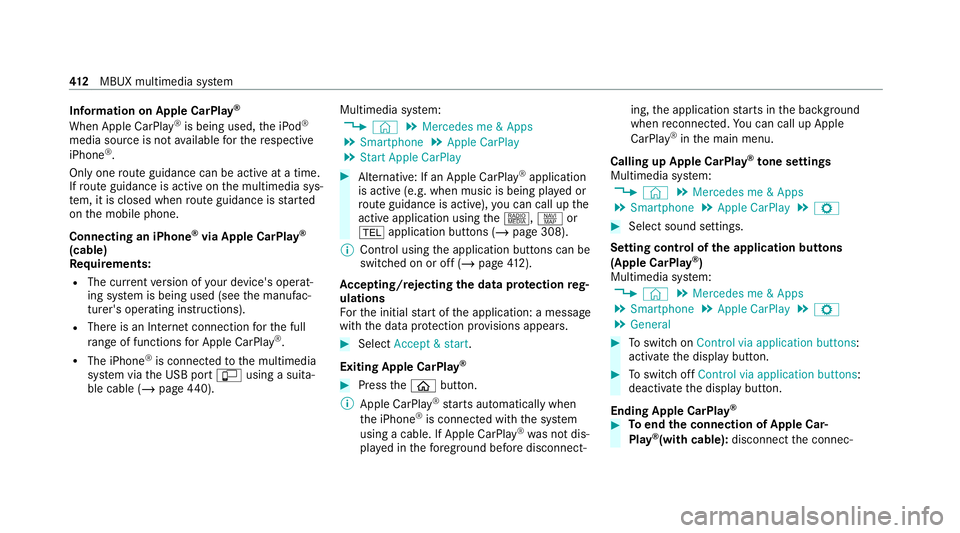
Information on Apple CarPlay
®
When Apple CarPlay ®
is being used, the iPod ®
media source is not available forth ere spective
iPhone ®
.
Only one route guidance can be active at a time.
If ro ute guidance is active on the multimedia sys‐
te m, it is closed when route guidance is star ted
on the mobile phone.
Connecting an iPhone ®
via Apple CarPlay ®
(cable)
Requ irements:
R The cur rent version of your device's operat‐
ing sy stem is being used (see the manufac‐
turer's operating instructions).
R There is an Internet connection forth e full
ra nge of functions for Apple CarPlay ®
.
R The iPhone ®
is connected tothe multimedia
sy stem via the USB port çusing a suita‐
ble cable (/ page440). Multimedia sy
stem:
4 © 5
Mercedes me & Apps
5 Smartphone 5
Apple CarPlay
5 Start Apple CarPlay #
Alternative: If an Apple CarPlay ®
application
is active (e.g. when music is being pla yed or
ro ute guidance is active), you can call up the
active application using the|, zor
% application buttons (/ page 308).
% Control using the application buttons can be
switched on or off (/ page412).
Ac cepting/rejecting the data pr otection reg‐
ulations
Fo rth e initial start of the application: a message
with the data pr otection pr ovisions appears. #
Select Accept & start .
Exiting Apple CarPlay ® #
Press theò button.
% Apple CarPlay ®
starts automatically when
th e iPhone ®
is connected with the sy stem
using a cable. If Apple CarPlay ®
wa s not dis‐
pla yed in thefo re ground be fore disconnect‐ ing,
the application starts in the bac kground
when reconnected. You can call up Apple
CarPlay ®
in the main menu.
Calling up Apple CarPlay ®
to ne settings
Multimedia sy stem:
4 © 5
Mercedes me & Apps
5 Smartphone 5
Apple CarPlay 5
Z #
Select sound settings.
Setting control of the application but tons
(Apple CarPlay ®
)
Multimedia sy stem:
4 © 5
Mercedes me & Apps
5 Smartphone 5
Apple CarPlay 5
Z
5 General #
Toswitch on Control via application buttons :
activate the display button. #
Toswitch off Control via application buttons :
deactivate the display button.
Ending Apple CarPlay ® #
Toend the connection of Apple Car‐
Play ®
(with cable): disconnectthe connec‐ 412
MBUX multimedia sy stem
Page 416 of 629
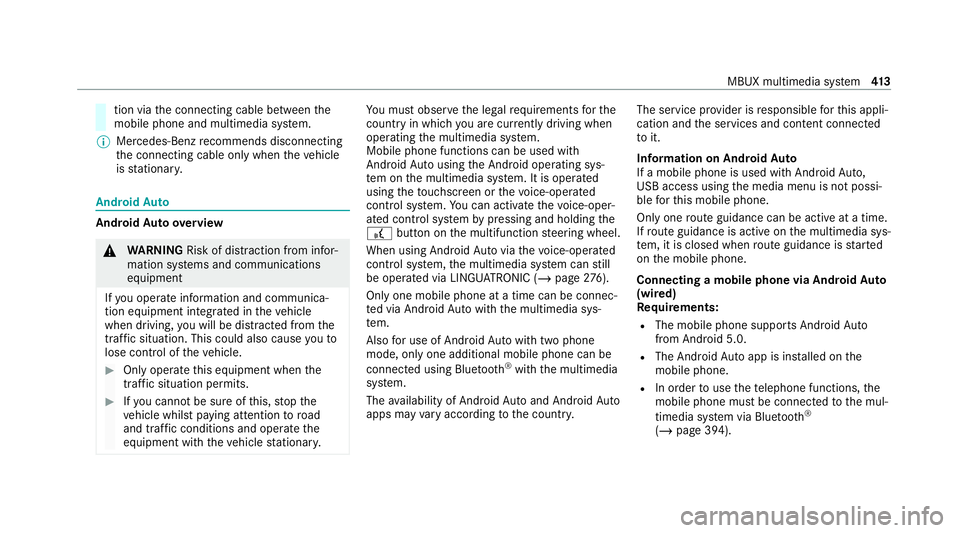
tion via
the connecting cable between the
mobile phone and multimedia sy stem.
% Mercedes-Benz recommends disconnecting
th e connecting cable only when theve hicle
is stationar y. Android
Auto Android
Autoove rview &
WARNING Risk of di stra ction from infor‐
mation sy stems and communications
equipment
If yo u operate information and communica‐
tion equipment integ rated in theve hicle
when driving, you will be distracted from the
traf fic situation. This could also cause youto
lose control of theve hicle. #
Only operate this equipment when the
traf fic situation permits. #
Ifyo u cannot be sure of this, stop the
ve hicle whilst paying attention toroad
and traf fic conditions and ope rate the
equipment with theve hicle stationar y. Yo
u must obse rveth e legal requirements forthe
country in whi chyou are cur rently driving when
operating the multimedia sy stem.
Mobile phone functions can be used with
Android Autousing the Android operating sys‐
te m on the multimedia sy stem. It is operated
using theto uchsc reen or thevo ice-opera ted
control sy stem. You can activate thevo ice-oper‐
ated control sy stem bypressing and holding the
£ button on the multifunction steering wheel.
When using Android Autovia thevo ice-opera ted
control sy stem, the multimedia sy stem can still
be opera ted via LINGU ATRO NIC (/ page276).
On lyone mobile phone at a time can be connec‐
te d via Android Autowith the multimedia sys‐
te m.
Also for use of Android Autowith two phone
mode, only one additional mobile phone can be
connec ted using Blue tooth®
with the multimedia
sy stem.
The availability of Android Autoand Android Auto
apps may vary according tothe count ry. The service pr
ovider is responsible forth is appli‐
cation and the services and conte nt connected
to it.
Information on Android Auto
If a mobile phone is used with Android Auto,
USB access using the media menu is not possi‐
ble forth is mobile phone.
Only one route guidance can be active at a time.
If ro ute guidance is active on the multimedia sys‐
te m, it is closed when route guidance is star ted
on the mobile phone.
Connecting a mobile phone via Android Auto
(wired)
Re quirements:
R The mobile phone supports Android Auto
from Android 5.0.
R The Android Autoapp is ins talled on the
mobile phone.
R In order touse thete lephone functions, the
mobile phone must be connected tothe mul‐
timedia sy stem via Blue tooth®
( / page 394). MBUX multimedia sy
stem 413