2019 MERCEDES-BENZ EQC SUV ad blue
[x] Cancel search: ad bluePage 412 of 629
Using
the dictation function
% The dictation function is not available every‐
where nor without limitation. For initial acti‐
va tion of the function it may be necessary to
select thete rm s of use in the Mercedes me
por tal. #
Select an e-mail. #
Select Reply. #
Select p.
The dictating function is star ted. #
Dictate thete xt of the e-mail.
Af terth evo ice ent ryhas been processed, it
is shown as text. #
Select Send.
Using voice control #
Use the LINGU ATRO NIC Answer e-mail voice
command.
Yo u are guided bythe dialogue.
% Additional information on operation of LIN‐
GU ATRO NIC (/ page276).
Fo rw arding e-mail
Re quirements: R
A mobile phone with e-mail con tacts is con‐
nected tothe multimedia sy stem via Blue‐
tooth ®
.
Multimedia sy stem:
4 © 5
Mercedes me & Apps
5 In-Car Office 5
E-mail
Using theke yboard #
Select an e-mail. #
Select Forward. #
Toforw ard with attachment: select
Forward with attachment. #
Toforw ard with out attachment: select
Forward without attachment . #
Enterth e e-mail text in the cor responding
fi eld using theke ypad. #
Select Send. Mercedes-Benz link
Overview of Mercedes-Benz Link
&
WARNING Risk of di stra ction from infor‐
mation sy stems and communications
equipment
If yo u operate information and communica‐
tion equipment integ rated in theve hicle
when driving, you will be distracted from the
traf fic situation. This could also cause youto
lose control of theve hicle. #
Only operate this equipment when the
traf fic situation permits. #
Ifyo u cannot be sure of this, stop the
ve hicle whilst paying attention toroad
and traf fic conditions and ope rate the
equipment with theve hicle stationar y. Yo
u must obse rveth e legal requirements forthe
country in whi chyou are cur rently driving when
operating the multimedia sy stem.
Wi th Mercedes-Benz Link you can use mobile
phone functions via the multimedia sy stem. It is
operated using theto uchsc reen or thevo ice- MBUX multimedia sy
stem 409
Page 413 of 629
operated contro
l system. You can activate the
vo ice-opera ted control sy stem bypressing and
holding the£ button on the multifunction
st eering wheel.
When using Mercedes-Benz Link via thevo ice-
opera ted control sy stem, the multimedia sy stem
can still be operated via LINGU ATRO NIC
(/ page 276).
The Me rcedes-Benz Link control box supplemen‐
ta ry equipment is requiredforth is. This is availa‐
ble at a Mercedes-Benz service centre.
On lyone mobile phone at a time can be connec‐
te d via Mercedes-Benz Link tothe multimedia
sy stem.
When a mobile phone is connected with
Mercedes-Benz Link, only one additional mobile
phone can be connected using Blue tooth®
with
th e multimedia sy stem when in two phone
mode.
% The Mercedes-Benz Link control box uses
the Android operating sy stem.
% The service pr ovider is responsible forth ese
apps and the services and conte nt connec‐
te dto it. Note
s on Mercedes-Benz Link
If a mobile phone is used with Mercedes-Benz
Link, USB access using the media menu is possi‐
ble forth is mobile phone.
% Only one route guidance can be active at a
time. If route guidance is active on the multi‐
media sy stem, it is closed when route guid‐
ance is star ted on the mobile phone.
Connecting Mercedes-Benz Link with the
mu ltimedia sy stem
Re quirements:
R The vehicle is fitted wi th the Mercedes-Benz
Link control box.
R The Mercedes-Benz Link app is ins talled on
th e mobile phone.
R The mobile phone is switched on.
R Mercedes-Benz Link is connected tothe mul‐
timedia sy stem via theç USB port using
a suitable cable (/ page440).
% The firs t acti vation of Me rcedes-Benz Link
on the multimedia sy stem must be car ried
out when theve hicle is stationary for saf ety
re asons. Multimedia sy
stem:
4 © 5
Mercedes me & Apps
5 Smartphone 5
Mercedes-Benz Link
5 Start Mercedes-Benz Link
Ac cepting/rejecting the data pr otection reg‐
ulations
Fo rth e initial start of the application: a message
with the data pr otection pr ovisions appears. #
Select Accept & start .
Quitting Mercedes-Benz Link #
Press theò button.
% Mercedes-Benz Link starts automatically
when it is connec ted with the sy stem using a
cable. If Mercedes-Benz Link was not dis‐
pla yed in thefo re ground before disconnect‐
ing, the application starts in the bac kground
when reconnected. You can call up
Mercedes-Benz Link using the main menu.
Yo u can find more information in the Mercedes-
Benz Link control box operating instructions. 41 0
MBUX multimedia sy stem
Page 414 of 629
Calling up Mercedes-Benz Link sound set‐
tings
Multimedia sy stem:
4 © 5
Mercedes me & Apps
5 Smartphone 5
Mercedes-Benz Link
5 Z #
Select sound settings.
Ending Mercedes-Benz Link #
Disconnect the connecting cable between
Mercedes-Benz Link and the multimedia sys‐
te m.
% Mercedes-Benz recommends disconnecting
th e connecting cable only when theve hicle
is stationar y. Apple CarPlay
® Overview of Apple CarPlay
® &
WARNING Risk of di stra ction from infor‐
mation sy stems and communications
equipment
If yo u operate information and communica‐
tion equipment integ rated in theve hicle
when driving, you will be distracted from the
traf fic situation. This could also cause youto
lose control of theve hicle. #
Only operate this equipment when the
traf fic situation permits. #
Ifyo u cannot be sure of this, stop the
ve hicle whilst paying attention toroad
and traf fic conditions and ope rate the
equipment with theve hicle stationar y. Yo
u must obse rveth e legal requirements forthe
country in whi chyou are cur rently driving when
operating the multimedia sy stem.
iPhone ®
functions can be used via the multime‐
dia sy stem using Apple CarPlay ®
. They are oper‐
ated using theto uchsc reen, touchpad, Touch Control or
the Siri ®
vo ice-operated control sys‐
te m. You can activate thevo ice-operated control
sy stem bypressing and holding the£ button
on the multifunction steering wheel.
When using Apple CarPlay ®
via thevo ice-oper‐
ated control sy stem, the multimedia sy stem can
st ill be opera ted via LINGU ATRO NIC
(/ page 276).
Only one iPhone ®
at a time can be connected via
Apple CarPlay ®
with the multimedia sy stem.
Also for use of Apple CarPlay ®
with two phone
mode, only one additional mobile phone can be
connected using Blue tooth ®
with the multimedia
sy stem.
The availability of Apple CarPlay ®
may vary
according tothe count ry.
The service pr ovider is responsible forth is appli‐
cation and the services and conte nt connected
to it.
Apple CarPlay ®
is a regis tere d trademark of
Apple Inc. MBUX multimedia sy
stem 411
Page 416 of 629
tion via
the connecting cable between the
mobile phone and multimedia sy stem.
% Mercedes-Benz recommends disconnecting
th e connecting cable only when theve hicle
is stationar y. Android
Auto Android
Autoove rview &
WARNING Risk of di stra ction from infor‐
mation sy stems and communications
equipment
If yo u operate information and communica‐
tion equipment integ rated in theve hicle
when driving, you will be distracted from the
traf fic situation. This could also cause youto
lose control of theve hicle. #
Only operate this equipment when the
traf fic situation permits. #
Ifyo u cannot be sure of this, stop the
ve hicle whilst paying attention toroad
and traf fic conditions and ope rate the
equipment with theve hicle stationar y. Yo
u must obse rveth e legal requirements forthe
country in whi chyou are cur rently driving when
operating the multimedia sy stem.
Mobile phone functions can be used with
Android Autousing the Android operating sys‐
te m on the multimedia sy stem. It is operated
using theto uchsc reen or thevo ice-opera ted
control sy stem. You can activate thevo ice-oper‐
ated control sy stem bypressing and holding the
£ button on the multifunction steering wheel.
When using Android Autovia thevo ice-opera ted
control sy stem, the multimedia sy stem can still
be opera ted via LINGU ATRO NIC (/ page276).
On lyone mobile phone at a time can be connec‐
te d via Android Autowith the multimedia sys‐
te m.
Also for use of Android Autowith two phone
mode, only one additional mobile phone can be
connec ted using Blue tooth®
with the multimedia
sy stem.
The availability of Android Autoand Android Auto
apps may vary according tothe count ry. The service pr
ovider is responsible forth is appli‐
cation and the services and conte nt connected
to it.
Information on Android Auto
If a mobile phone is used with Android Auto,
USB access using the media menu is not possi‐
ble forth is mobile phone.
Only one route guidance can be active at a time.
If ro ute guidance is active on the multimedia sys‐
te m, it is closed when route guidance is star ted
on the mobile phone.
Connecting a mobile phone via Android Auto
(wired)
Re quirements:
R The mobile phone supports Android Auto
from Android 5.0.
R The Android Autoapp is ins talled on the
mobile phone.
R In order touse thete lephone functions, the
mobile phone must be connected tothe mul‐
timedia sy stem via Blue tooth®
( / page 394). MBUX multimedia sy
stem 413
Page 430 of 629
Online and Internet functions
Internet connection
Information on connecting
tothe Internet &
WARNING Risk of di stra ction from infor‐
mation sy stems and communications
equipment
If yo u operate information and communica‐
tion equipment integ rated in theve hicle
when driving, you will be distracted from the
traf fic situation. This could also cause youto
lose control of theve hicle. #
Only operate this equipment when the
traf fic situation permits. #
Ifyo u cannot be sure of this, stop the
ve hicle whilst paying attention toroad
and traf fic conditions and ope rate the
equipment with theve hicle stationar y. Yo
u must obse rveth e legal requirements forthe
country in whi chyou are cur rently driving when
operating the multimedia sy stem. &
WARNING Risk of an accident from
ope rating mobile communication equip‐
ment while theve hicle is in motion
Mobile communications devices distract the
driver from the traf fic situation. This could
also cause the driver tolose control of the
ve hicle. #
Asthe driver, only operate mobile com‐
munications devices when theve hicle is
st ationar y. #
As a vehicle occupant, only use mobile
communications devices in the areas
intended forth is purpose, e.g. in the
re ar passenger compartment. Yo
u must obse rveth e legal requirements forthe
country in whi chyou are cur rently driving when
operating mobile communication equipment in
th eve hicle. Depending on
theve hicle's equipment, you can
es tablish an Internet connection in thefo llowing
wa ys:
R Vehicles with a communication module:
Internet use including Mercedes me connect
services and data roaming (/ page 427).
R Vehicles without a communication mod‐
ule:
- viaWi-Fi wi tha data-enabled mobile
phone (/ page 428)
- via Blue tooth®
with a data-enabled
mobile phone (/ page 428)
The In tern et functions can only be used toa limi‐
te d degree whilst driving.
Fu nction of the communication module
On vehicles with a built-in communication mod‐
ule, the Internet connection is es tablished via an
integrated SIM card.
To use In tern et access via the communication
module thefo llowing conditions must be me t:
R Mercedes me connect is active and ready for
operation. MBUX multimedia sy
stem 427
Page 431 of 629
R
Mercedes me connect is activated for Inter‐
net access.
R In some countries: data volume via Mercedes
me connect is available.
In some countries: if the data volume limit is
re ached, theav ailability of Mercedes me con‐
nect services is limited. The data volume must
be pur chased via Mercedes me connect.
% Con tact a Mercedes-Benz service centre to
fi nd out wh ether it is possible topur chase
data volume in your count ry.
Setting up an Internet connection via Wi-Fi
Re quirements:
R theWi -Fi function is acti vated on the multi‐
media sy stem (/ page 332).
R theWi -Fi function is acti vated on the mobile
phone (see the manufacturer's operating
instructions).
R Internet access via Wi-Fi is acti vated (see the
manufacturer's operating instructions). The Internet connection via
Wi-Fi is restricted or
does not function if:
R the mobile phone is switched off
R mobile data use is deactivated on the mobile
phone
R theWi -Fi function is deacti vated on the multi‐
media sy stem
R theWi -Fi function is deacti vated on the
mobile phone
R Internet access via Wi-Fi is deacti vated on
th e mobile phone
Multimedia sy stem:
4 © 5
Settings 5
System
5 Wi-Fi & Bluetooth 5
Internet settings
5 Connect via Wi-Fi #
Select the networ k. #
Log in totheWi -Fi network (/ page 332).
Setting up an Internet connection via Blue‐
to oth ®
Re quirements: R
The mobile phone supports the Blue tooth®
profile PAN (Personal AreaNet work).
R The mobile phone is connec tedto the multi‐
media sy stem via Blue tooth®
(/ page 394).
If a mobile phone is connec tedto the multi‐
media sy stem forth efirs t time via Blue‐
to oth ®
,yo u will be assis tedth ro ugh the proc‐
ess of setting up an Internet connection.
The Internet connection can also be confi g‐
ured manuall y.
Multimedia sy stem:
4 © 5
Settings 5
System
5 Wi-Fi & Bluetooth 5
Internet settings
5 Connect via Bluetooth #
Select the mobile phone.
The Internet connection is es tablished.
The Internet connection via Blue tooth®
is restric‐
te d or does not function in thefo llowing cases:
R the mobile phone is switched off
R the mobile phone is connected a an addi‐
tional mobile phone 428
MBUX multimedia sy stem
Page 432 of 629
R
the mobile phone network co verage is insuf‐
fi cient
R mobile da tause is deactivated on the mobile
phone
R the Blue tooth®
function on the multimedia
sy stem is switched off and the mobile phone
is to be connec ted via Blue tooth®
R the Blue tooth®
function is switched off on
th e mobile phone and the mobile phone is to
be connec ted via Blue tooth®
R neither the mobile phone network nor the
mobile phone allow simultaneous use of a
te lephone and an Internet connection
R the mobile phone has not been enabled for
Internet access via Blue tooth®
Establishing an au tomatic In tern et connec‐
tion
Multimedia sy stem:
4 © 5
Settings 5
System
5 Wi-Fi & Bluetooth 5
Internet settings #
Highlight the mobile phone. #
Select r. #
Activate Permanent Internet connection
D.
Cancelling In ternetaccess permission for a
mobile phone
Multimedia sy stem:
4 © 5
Settings 5
System
5 Wi-Fi & Bluetooth 5
Internet settings #
Select rinthe line of the mobile phone. #
Select Delete configuration. #
Select Yes.
Displaying mobile phone details
Multimedia sy stem:
4 © 5
Settings 5
System
5 Wi-Fi & Bluetooth 5
Internet settings #
Select rinthe line of the mobile phone. #
Select Details.
Establishing an Internet connection
Multimedia sy stem:
4 © 5
Mercedes me & Apps #
Forex ample, select zBrowser . %
The multimedia sy stem usually es tablishes
th e Internet connection automaticall y.Ifthe
multimedia sy stem is not connected tothe
Internet, the Internet connection is es tab‐
lished when an Internet application is used.
% The availability of the function is dependent
on the count ry.
Setting automatic disconnection of the Inter‐
net connection
Multimedia sy stem:
4 © 5
Settings 5
System
5 Wi-Fi & Bluetooth 5
Internet settings #
Select rinthe line of the mobile phone. #
Select Disconnect when inactive .
The following options are available:
R 5 minutes
R 10 minutes
R 20 minutes
R Unlimited #
Select an option. MBUX multimedia sy
stem 429
Page 433 of 629
Connection
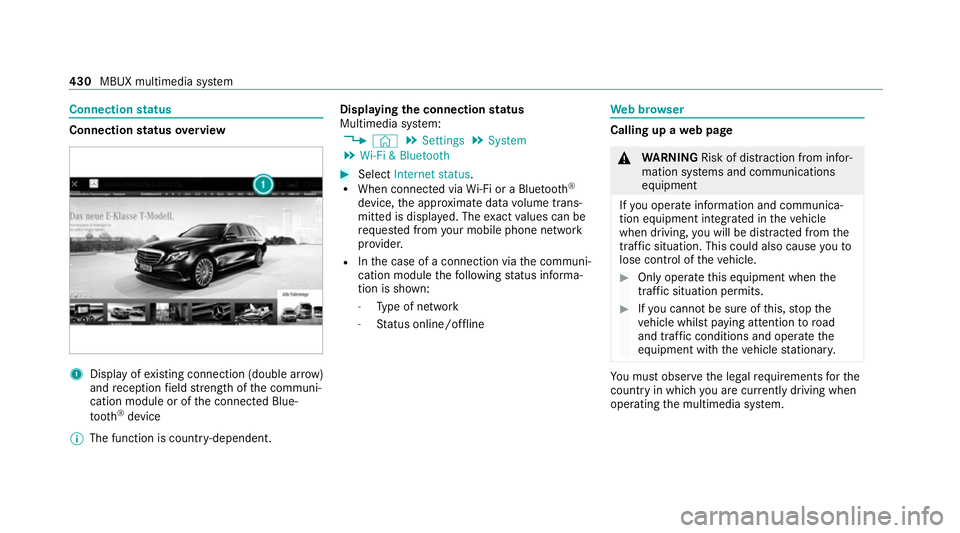
status Connection
status overview 1
Display of existing connection (double ar row)
and reception field stre ngth of the communi‐
cation module or of the connected Blue‐
tooth ®
device
% The function is count ry-dependent. Displ
aying the connection status
Multimedia sy stem:
4 © 5
Settings 5
System
5 Wi-Fi & Bluetooth #
Select Internet status .
R When connected via Wi-Fi or a Blu etoo th®
device, the appr oximate data volume trans‐
mit ted is displa yed. The exact values can be
re qu ested from your mobile phone network
pr ov ider.
R Inthe case of a connection via the communi‐
cation module thefo llowing status informa‐
tion is shown:
- Type of network
- Status online/of fline We
b br owser Calling up a
web page &
WARNING Risk of di stra ction from infor‐
mation sy stems and communications
equipment
If yo u operate information and communica‐
tion equipment integ rated in theve hicle
when driving, you will be distracted from the
traf fic situation. This could also cause youto
lose control of theve hicle. #
Only operate this equipment when the
traf fic situation permits. #
Ifyo u cannot be sure of this, stop the
ve hicle whilst paying attention toroad
and traf fic conditions and ope rate the
equipment with theve hicle stationar y. Yo
u must obse rveth e legal requirements forthe
country in whi chyou are cur rently driving when
operating the multimedia sy stem. 430
MBUX multimedia sy stem