2019 MERCEDES-BENZ CLA Radio
[x] Cancel search: RadioPage 234 of 330
Operating system
Overview
General notes
!Do not use the space in front of the displayfor storage. Objects placed here could dam-age the display or impair its function. Avoidany direct contact with the display surface.Pressure on the display surface may result inimpairments to the display, which could beirreversible.
Wearing polarized sunglasses may impair yourability to read the display.
The display has an automatic temperature-con-trolled switch-off feature. The brightness isautomatically reduced if the temperature is toohigh. The display may temporarily switch offcompletely.
Cleaning instructions
!Do not touch the display. The display has avery sensitive high-gloss surface; there is arisk of scratching. If you have to clean thescreen, however, use a mild cleaning agentand a soft, lint-free cloth.
The display must be switched off and havecooled down before you start cleaning. Do notapply pressure to the display surface whencleaning it, as this could cause irreversible dam-age to the display.
Switching the multimedia system
on/off
XPress theCcontrol knob.
Adjusting the volume
XTurn theCcontrol knob.
The volume is adjusted:
Rfor the currently selected media source
Rduring traffic or navigation announcements
Rin hands-free mode during an active call
Switching the sound on or off
XPress thecbutton on the control panel.If the audio output is switched off, the statusline will show thecsymbol. If you switch
the media source or set the volume, the soundis automatically switched on.
iNavigation announcements will be heardeven if the sound is muted.
Functions
The multimedia system has the following func-tions:
RRadio mode
RMedia mode with media search
RSound systems
RNavigation system
COMAND: navigation via the hard drive
Audio 20: navigation via SD card
RCommunication functions
RSIRIUS Weather (COMAND)
RVehicle functions with system settings
RFavorites functions
Controller
The controller in the center console lets you:
Rselect menu items on the display
Renter characters
Rselect a destination on the map
Rsave entries
The controller can be:
Rturned3
Rslid left or right1
Rslid forwards or back4
Rslid diagonally2
Rpressed briefly or pressed and held7
Back button
You can use the8button to exit a menu or tocall up the main menu of the current operatingmode.
XTo exit the menu:briefly press the8button.The multimedia system changes to the nexthigher menu level in the current operatingmode.
XTo call up the main menu:press the8button for longer than two seconds.The multimedia system changes to the mainmenu of the current operating mode.
232Operating system
Multimedia system
Page 287 of 330
!When Active Brake Assist, Active DistanceAssist DISTRONIC or the HOLD function isactivated, the vehicle brakes automatically incertain situations.
To avoid damage to the vehicle, deactivatethese systems in the following or similar sit-uations:
Rwhen towing the vehicle
Rin the car wash
!Make sure that the electric parking brake isreleased. If the electric parking brake is faulty,visit a qualified specialist workshop.
!Only secure the tow rope or tow bar at thetowing eyes. Otherwise, the vehicle could bedamaged.
!Do not use the towing eyes for recovery pur-poses as this could damage the vehicle. If indoubt, recover the vehicle with a crane.
!When towing, pull away slowly andsmoothly. If the tractive power is too high, thevehicles could be damaged.
!The vehicle can be towed a maximum of30 miles (50km). The towing speed of 30 mph(50km/h) must not be exceeded.
If the vehicle has to be towed more than30 miles (50km), the front axle must be raisedor the entire vehicle raised and transported.
!Do not tow with sling-type equipment. Thiscould damage the vehicle.
!When towing away vehicles with KEYLESS-GO, use the key instead of the Start/Stopbutton. The automatic transmission may oth-erwise shift to position]when you open thedriver's or front-passenger door, which coulddamage the transmission.
!Vehicles with automatic transmission mustnot be started by tow-starting. This could oth-erwise damage the transmission.
It is better to have the vehicle transported thanto have it towed away.
If the vehicle can no longer be driven because ofan accident or breakdown, you have the follow-ing options:
RTransporting the vehicle.
As a rule, you should have the vehicle trans-ported.
RTowing the vehicle with a tow rope or tow bar.
Only tow the vehicle in exceptional cases.
The battery must be connected and charged.Otherwise, you:
Rcannot turn the SmartKey to positionHinthe ignition lock.
Rcannot release the electric parking brake.
Rcannot shift the transmission to position\\.
The function of the electric parking brake andthe parking lock is dependent on the on-boardvoltage.
If the on-board voltage is low or if there is a sys-tem malfunction:
Rthe electric parking brake may not be appliedin certain circumstances, or
Rit may no longer be possible to shift the trans-mission to position]
Switch off non-essential consumers, e.g. theradio.
Deactivate the automatic locking feature beforethe vehicle is towed (Ypage 189). You couldotherwise be locked out when pushing or towingthe vehicle.
Installing/removing the towing eye
Installing the towing eye
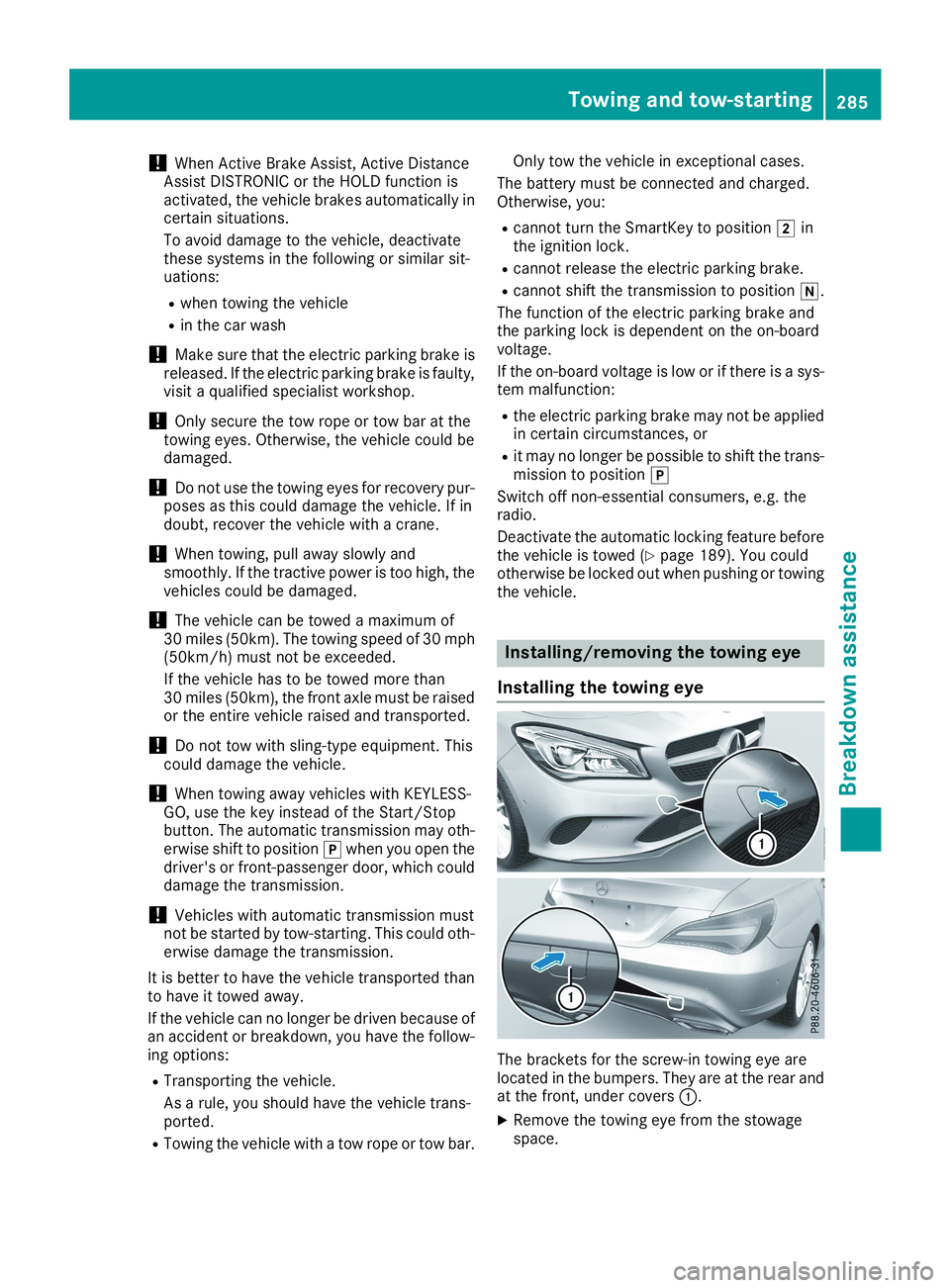
The brackets for the screw-in towing eye arelocated in the bumpers. They are at the rear andat the front, under coversC.
XRemove the towing eye from the stowagespace.
Towing and tow-starting285
Breakdown assistance
Z
Page 301 of 330
halt by braking carefully. Avoid abrupt steeringmovements.
The tire pressure monitor has a yellow warninglamp in the instrument cluster for indicatingpressure loss or a malfunction. Whether thewarning lamp flashes or lights up indicateswhether a tire pressure is too low or the tirepressure monitor is malfunctioning:
Rif the warning lamp is lit continuously, the tirepressure on one or more tires is significantlytoo low. The tire pressure monitor is not mal-functioning.
Rif the warning lamp flashes for around aminute and then remains lit constantly, thetire pressure monitor is malfunctioning.
In addition to the warning lamp, a messageappears in the multifunction display. Observethe information on display messages(Ypage 213).
It may take up to ten minutes for a malfunctionof the tire pressure monitor to be indicated. Amalfunction will be indicated by the tire pres-sure warning lamp flashing for approximatelyone minute and then remaining lit. When themalfunction has been rectified, the tire pressurewarning lamp goes out after a few minutes ofdriving.
The tire pressure values indicated by the on-board computer may differ from those meas-ured at a gas station with a pressure gauge. Thetire pressures shown by the on-board computerrefer to those measured at sea level. At highaltitudes, the tire pressure values indicated by apressure gauge are higher than those shown bythe on-board computer. In this case, do notreduce the tire pressures.
The operation of the tire pressure monitor canbe affected by interference from radio transmit-ting equipment (e.g. radio headphones, two-wayradios) that may be being operated in or near thevehicle.
Checking the tire pressure electroni-
cally
XMake sure that the SmartKey is in positionHin the ignition lock (Ypage 123).
XPressYoreon the steering wheel toselect theServ.Serv.menu.
XPress thecordbutton to selectTire PressureTire Pressure.
XPress thevbutton.The current tire pressure of each tire is shownin the multifunction display.
If the vehicle was parked for longer than20 minutes, theTire pressure will beTire pressure will bedisplayed after driving a few minutesdisplayed after driving a few minutesmessage is shown.
After a teach-in process, the tire pressure mon-itor automatically detects new wheels or newsensors. As long as a clear allocation of the tirepressure value to the individual wheels is notpossible, theTireTirePressurePressureMonitorMonitorActiveActivemessage is shown instead of the tire pressuredisplay. The tire pressures are already beingmonitored.
If an emergency spare wheel is mounted, thesystem may continue to show the tire pressureof the wheel that has been removed for a fewminutes. If this occurs, note that the value dis-played for the position where the spare wheel isfitted is not the same as the current tire pres-sure of the emergency spare wheel.
Tire pressure monitor warning mes-
sages
If the tire pressure monitor detects a pressureloss in one or more tires, a warning message isshown in the multifunction display. The yellowtire pressure warning lamp then lights up.
RIf thePlease Correct Tire PressurePlease Correct Tire Pressuremessage appears in the multifunction display,the tire pressure in at least one tire is too low.The tire pressure must be corrected when theopportunity arises.
RIf theCheck Tire PressureCheck Tire Pressuremessageappears in the multifunction display, the tirepressure in one or more tires has droppedsignificantly. The tires must be checked.
RIf theTireTirePressurePressureWarningWarningTireTireFail‐Fail‐ureuremessage appears, the tire pressure in oneor more tires has dropped suddenly. The tiresmust be checked.
Observe the instructions and safety notes in thedisplay messages in the "Tires" section(Ypage 213).
If the wheel positions on the vehicle are rotated,the tire pressures may be displayed for thewrong positions for a short time. This is rectifiedafter a few minutes of driving, and the tire pres-sures are displayed for the correct positions.
Tire pressure299
Wheels and tires
Z
Page 302 of 330

Restarting the tire pressure monitor
When you restart the tire pressure monitor, allexisting warning messages are deleted and thewarning lamps go out. The monitor uses the cur-rently set tire pressures as the reference valuesfor monitoring. In most cases, the tire pressuremonitor will automatically detect the new refer-ence values after you have changed the tirepressure. However, you can also set referencevalues manually as described here. The tirepressure monitor then monitors the new tirepressure values.
XSet the tire pressure to the value recommen-ded for the corresponding driving situation onthe Tire and Loading Information placard onthe driver's side B-pillar (Ypage 293).
You can find more tire pressure values forvarious operating conditions in the tire pres-sure table inside the fuel filler flap(Ypage 141).
XMake sure that the tire pressure is correct onall four wheels.
XMake sure that the SmartKey is in positionHin the ignition lock (Ypage 123).
XPressYoreon the steering wheel toselect theServ.Serv.menu.
XPress thecordbutton to selectTire PressureTire Pressure.
XPress thevbutton.The multifunction display shows the currenttire pressure for each tire or theTire pres‐Tire pres‐suresurewillwillbebedisplayeddisplayedafterafterdrivingdrivinga few minutesa few minutesmessage.
XPress thedbutton.The multifunction display shows theUseUseCurrent Pressures as New ReferenceCurrent Pressures as New ReferenceValuesValuesmessage.
If you wish to confirm the restart:
XPress thevbutton.TheTireTirePress.Press.MonitorMonitorRestartedRestartedmes-sage appears in the multifunction display.
After driving for a few minutes, the systemchecks whether the current tire pressures arewithin the specified range. The new tire pres-sures are then accepted as reference valuesand monitored.
If you wish to cancel the restart:
XPress the8button.The tire pressure values stored at the lastrestart will continue to be monitored.
Radio type approval for the tire pres-
sure monitor
CountryRadio type approval number
USAFCC ID: MRXMW2433A
FCCIC ID:MRXGG4 This devicecomplies with part 15 of the FCCrules and with license exemptRSS standards of Industry Can-ada. Operation is subject to thefollowing conditions. (1) Thisdevice may not cause harmfulinterference, and (2) This devicemust accept any interferencereceived, including interferencethat may cause undesired oper-ation. Le present appareil estconforme d'industrie Canadaapplicables aux appareils radioexempts de licence. L'exploita-tion est authorisee aux deux con-ditions suivantes. (1). L'appareilne doit pas produire de brouil-lage, et (2) L'autisateur de l'ap-pareil doit accepter tout brouil-lage radioelectrique subi, memesi le brouillage est susceptibled'en compromettre le fonc-tionnement. WARNING: Changesor modifications not expressivelyapproved by the party responsi-ble for compliance could void theusers authority to operate theequipment. The term "IC:" beforethe radio certification numberonly signifies Canada technicalspecifications were met.
FCC ID:MRXMC34MA4 Thisdevice complies with part 15 ofthe FCC rules and with licenseexempt RSS standards of Indus-try Canada. Operation is subjectto the following conditions. (1)This device may not cause harm-ful interference, and (2) Thisdevice must accept any interfer-ence received, including interfer-ence that may cause undesiredoperation. Le present appareilest conforme d'industrie Canadaapplicables aux appareils radioexempts de license. L'exploita-tion est authorisee aux deux con-ditions suivantes. (1). L'appareil
300Tire pressure
Wheels and tires
Page 303 of 330

CountryRadio type approval number
ne doit pas produire de brouil-lage, et (2) L'autisatuer de l'ap-pareil doit accepter tout brouil-lage radioelectrique subi, memesi le brouillage est susceptibled'en compromettre le fonc-tionnement. WARNING: Changesor modifications not expressivelyapproved by the party responsi-ble for compliance could void theusers authority to operate theequipment. The term "IC:" beforethe radio certification numberonly signifies Canada technicalspecifications were met.
CanadaIC: 2546A-MW2433A
IC:2546A-GG4 This device com-plies with part 15 of the FCCrules and with license exemptRSS standards of Industry Can-ada. Operation is subject to thefollowing conditions. (1) Thisdevice may not cause harmfulinterference, and (2) This devicemust accept any interferencereceived, including interferencethat may cause undesired oper-ation. Le present appareil estconforme d'industrie Canadaapplicables aux appareils radioexempts de license. L'exploita-tion est authorisee aux deux con-ditions suivantes. (1). L'appareilne doit pas produire de brouil-lage, et (2) L'autisateur de l'ap-pareil doit accepter tout brouil-lage radioelectrique subi, memesi le brouillage est susceptibled'en compromettre le fonc-tionnement. WARNING: Changesor modifications not expressivelyapproved by the party responsi-ble for compliance could void theusers authority to operate theequipment. The term "IC:" beforethe radio certification numberonly signifies Canada technicalspecifications were met.
IC: 2546A-MC34MA4
Loading the vehicle
Instruction labels for tires and loads
GWARNING
Overloaded tires can overheat, causing a
blowout. Overloaded tires can also impair the
steering and driving characteristics and lead
to brake failure. There is a risk of accident.
Observe the load rating of the tires. The load
rating must be at least half of the GAWR of
your vehicle. Never overload the tires by
exceeding the maximum load.
Two instruction labels on your vehicle show themaximum possible load.
(1) The Tire and Loading Information placard ison the B-pillar on the driver's side. The Tireand Loading Information placard shows themaximum permissible number of occu-pants and the maximum permissible vehicleload. It also contains details of the tire sizesand corresponding pressures for tiresmounted at the factory.
(2) The vehicle identification plate is on the B-pillar on the driver's side. The vehicle iden-tification plate informs you of the grossvehicle weight rating. It is made up of thevehicle weight, all vehicle occupants, thefuel and the cargo. You can also find infor-mation about the maximum gross axleweight rating on the front and rear axle.
The maximum gross axle weight rating isthe maximum weight that can be carried byone axle (front or rear axle). Never exceedthe maximum load or the maximum grossaxle weight rating for the front or rear axle.
CB-pillar, driver's side
Loading the vehicle301
Wheels and tires
Z
Page 319 of 330
Information regarding technical data
iThe data stated here specifically refers to avehicle with standard equipment. Consult anauthorized Mercedes-Benz Center for thedata for all vehicle variants and trim levels.
Vehicle electronics
Installing two-way radios and mobile
phones (RF transmitters)
GWARNING
The electromagnetic radiation from two-way
radios can interfere with the vehicle electron-
ics if two-way radios are manipulated or ret-
rofitted incorrectly. This could jeopardize the
operating safety of the vehicle. There is a risk
of an accident.
You should have all work on electrical and
electronic components carried out at a quali-
fied specialist workshop.
GWARNING
If you incorrectly operate two-way radios in
the vehicle, the electromagnetic radiation
may interfere with the vehicle electronics, for
example if:
Rthe two-way radio is not connected to an
exterior antenna
Rthe exterior antenna is not correctly moun-
ted or is not low-reflection
This could jeopardize the operating safety of
the vehicle. There is a risk of an accident.
Have the low-reflection exterior antenna
installed at a qualified specialist workshop.
Always connect two-way radios to the low-
reflection exterior antenna when operating in
the vehicle.
!The operating permit may be invalidated ifthe instructions for installation and use oftwo-way radios are not observed.
In particular, the following conditions must becomplied with:
Ronly approved wavebands may be used
Robserve the maximum permissible outputin these wavebands
Ronly approved antenna positions may beused
Excessive levels of electromagnetic radiationmay cause damage to your health and the healthof others. Using an exterior antenna takes intoaccount current scientific discussions relatingto the possible health hazards that may resultfrom electromagnetic fields.
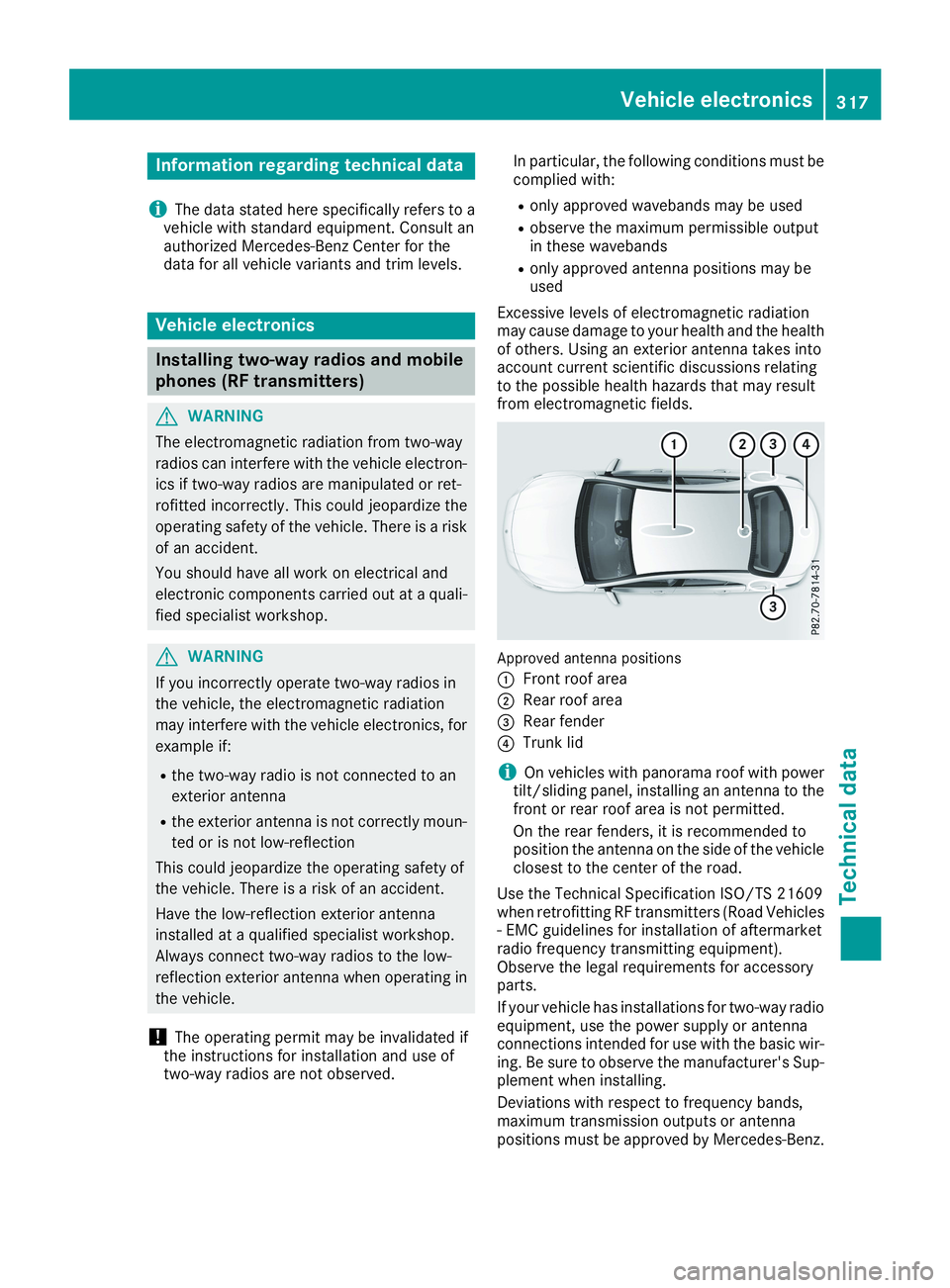
Approved antenna positions
CFront roof area
DRear roof area
Page 320 of 330
The maximum transmission output (PEAK) at thebase of the antenna must not exceed the fol-lowing values:
Frequency bandMaximumtransmissionoutput
Short wave
3 - 54 MHz
100 W
4 m waveband
74 - 88 MHz
30 W
2 m waveband
144 - 174 MHz
50 W
Trunked radio system/Tetra
380 - 460 MHz
10 W
70 cm waveband
400 - 460 MHz
35 W
Mobile communications(2G/3G/4G)10 W
The following can be used in the vehicle withoutrestrictions:
RRF transmitters with a maximum transmis-sion output of up to 100 mW
RRF transmitters with transmitter frequenciesin the 380 - 410 MHz frequency band and amaximum transmission output of up to 2 W(trunked radio system/Tetra)
RMobile phones (2G/3G/4G)
There is no restriction for antenna positions onthe outside of the vehicle for the following fre-quency bands:
RTrunked radio system/Tetra
R70 cm waveband
R2G/3G/4G
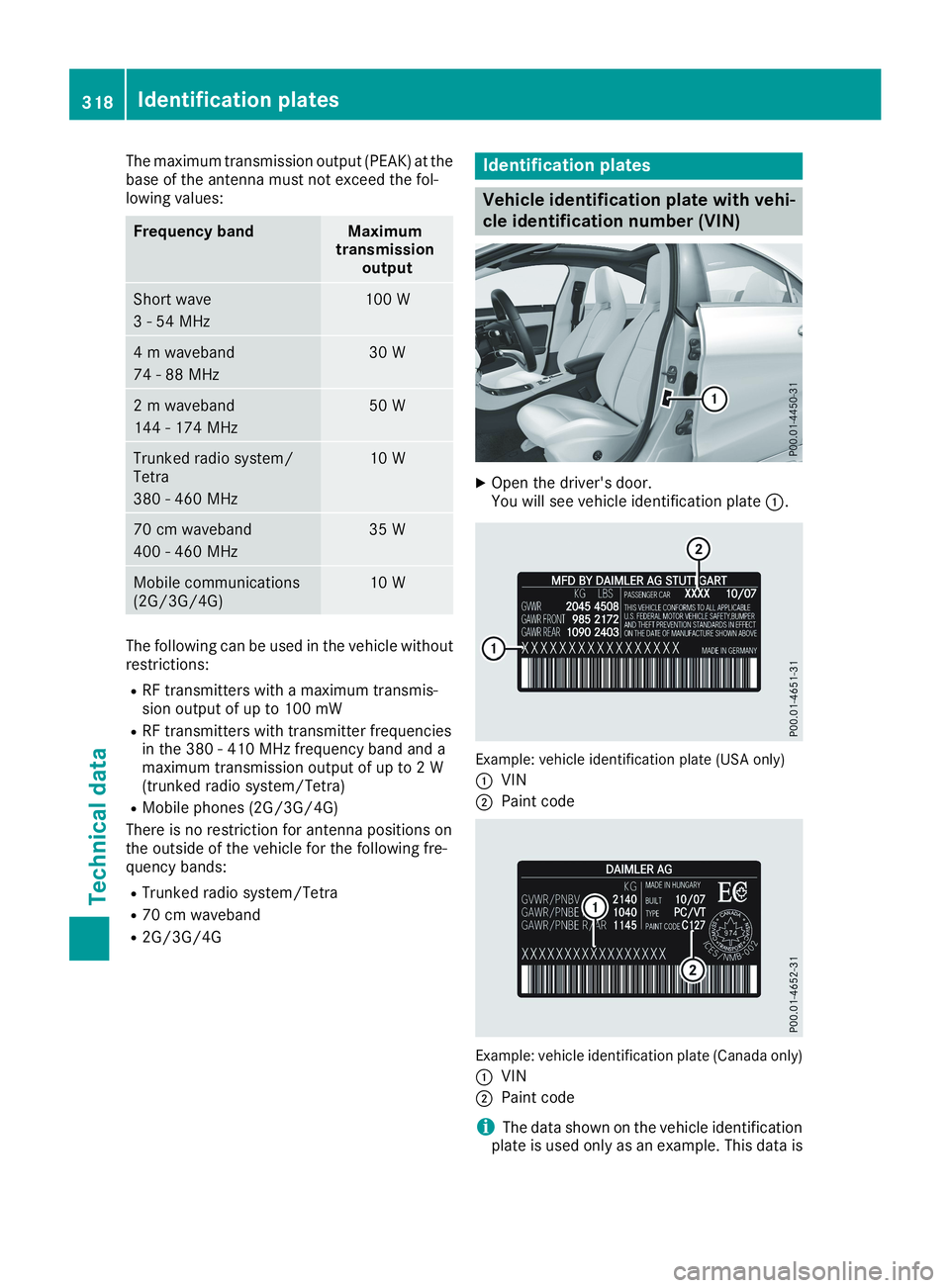
Identification plates
Vehicle identification plate with vehi-
cle identification number (VIN)
XOpen the driver's door.You will see vehicle identification plateC.
Example: vehicle identification plate (USA only)
CVIN
DPaint code
Example: vehicle identification plate (Canada only)
CVIN
DPaint code
iThe data shown on the vehicle identificationplate is used only as an example. This data is
318Identification plates
Technical data