2019 MERCEDES-BENZ CLA COUPE cruise control
[x] Cancel search: cruise controlPage 10 of 645
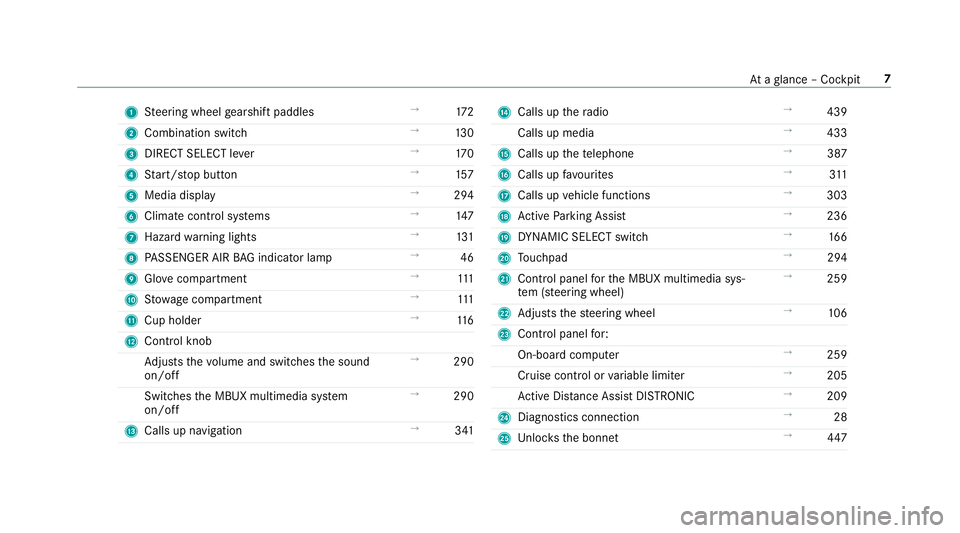
1
Steering wheel gearshift paddles →
172
2 Combination swit ch →
13 0
3 DIRECT SELECT le ver →
17 0
4 Start/ stop button →
157
5 Media display →
294
6 Climate contro l systems →
147
7 Haza rdwa rning lights →
131
8 PASSENGER AIR BAG indicator lamp →
46
9 Glovecompa rtment →
111
A Stow age compartment →
111
B Cup holder →
11 6
C Control knob
Adjusts thevo lume and switches the sound
on/off →
290
Switches the MBUX multimedia sy stem
on/off →
290
D Calls up navigation →
341 E
Calls up thera dio →
439
Calls up media →
433
F Calls up thete lephone →
387
G Calls up favo urites →
311
H Calls up vehicle functions →
303
I Active Parking Assist →
236
J DYNA MIC SELECT switch →
16 6
K Touchpad →
294
L Control panel forth e MBUX multimedia sys‐
te m (s teering wheel) →
259
M Adjusts thesteering wheel →
106
N Control panel for:
On-board computer →
259
Cruise contro l orvariable limiter →
205
Ac tive Dis tance Assi stDISTRONIC →
209
O Diagno stics connection →
28
P Unloc ksthe bonn et →
447 At
aglance – Cockpit 7
Page 195 of 645
R
ESP ®
(E lectronic Stability Program)
(/ page 193)
R Speed Limit Assi st (/ page 242)
R Active Speed Limit Assi st (/ page 211)
R HOLD function (/ page219)
R STEER CONTROL (/ page 196)
R Active Steering Assist (/ page213)
R Limi ter (/ page 204)
R Active Parking Assist (/ page 234)
R Parking Assist PARKTRONIC ( /page 222)
R Reversing camera (/ page 227)
R Cruise control (/ page 203)
R Blind Spot Assist and Active Blind Spot Assi st
with exitwa rning (/ page246)
R Traf fic Sign Assi st (/ page 244) Fu
nction of ABS (Anti-lock Braking Sy stem) ABS
regulates the brake pressure in critical driv‐
ing situations:
R During braking, e.g. at full brake application
or insuf ficient tyre traction, the wheels are
pr eve nted from lo cking.
R Vehicle steerability while braking is ensured.
If ABS inter venes when braking, you will feel a
pulsing in the brake pedal. The pulsating brake
pedal can be an indication of hazardous road
conditions and can ser veas a reminder totake
ex tra care while driving.
Sy stem limitations
R ABS is active from speeds of appr ox.
8 km/h.
R ABS may be impai red or may not function if a
malfunction has occur red and theye l‐
low ! ABSwarning lamp lights up contin‐
uously in the instrument clus ter af terthe
engine is star ted. Fu
nction of BAS (Brake Assist Sy stem) &
WARNING Risk of an accident caused by
a malfunction in BAS (Brake Assi stSys‐
te m)
If BA S is malfunctioning, the braking dis tance
in an emergency braking situation is
increased. #
Dep ress the brake pedal with full force
in emer gency braking situations. ABS
pr eve nts the wheels from locking. BA
S suppo rts yo ur eme rgency braking situation
with additional brake forc e.
If yo u depress the brake pedal quickl y,BA S is
acti vated:
R BAS au tomatical lyboosts the brake pres‐
sure.
R BAS can sho rten the braking dis tance.
R ABS pr events the wheels from locking.
The brakes will function as usual once you
re lease the brake pedal. BAS is deactivated. 19 2
Driving and pa rking
Page 206 of 645
Multimedia sy
stem:
4 © 5
Settings 5
Assistance
5 Active Brake Assist
The following settings are available:
R Early
R Medium
R Late #
Select a setting.
The setting is retained when the engine is
next star ted.
Deactivating Active Brake Assi st
% It is recommended that you alw ays lea ve
Ac tive Brake Assi stactivated. #
Select Off.
The dis tance warning function, the autono‐
mous braking function and the Evasive Steer‐
ing Assist are deactivated.
When theve hicle is next star ted, the middle
setting is automatically selected.
% IfAc tive Brake Assi stis deactivated, the
æ symbol appears inthest atus bar of the
multifunction displa y. Fu
nction of Adaptive Brake Lights Ad
aptive Brake Lights warnfollowing traf fic in an
emergency braking situation wi th thefo llowing
actions:
R Byflashing the brake lamps
R By activating the hazard warning lights
If th eve hicle is braked sharply from speeds
abo ve50 km/h, the brake lamps flash rapidl y.
This pr ovides traf fic tr avelling behind you with an
ev en more noticeable warning.
If th eve hicle is tr avelling at speeds of more than
70 km/h at the beginning of the brake applica‐
tion, the hazard warning lights switch on once
th eve hicle is stationar y.When you pull away
again, the hazard warning lights will switch off
automatically at appr oximately 10km/h. Yo u
can also switch off the hazard warning lights
using the hazard warning button. Cruise control and limiter
Fu
nction of cruise control
Cruise cont rolre gulates the speed totheva lue
selec tedby the driver. If
yo u accelerate toove rtake, forex ample, the
st ored speed is not dele ted. If youre mo veyour
fo ot from the accelera tor pedal af terov ertaking,
cruise control will resume speed regulation back
to thestored speed.
Cruise contro l is operated using the cor respond‐
ing steering wheel buttons. You can store any
speed abo ve20 km/h up tothe maximum speed
or up tothe set winter tyre limit.
If yo ufa ilto adapt your driving style, cruise con‐
trol can neither reduce therisk of an accident
nor override the la wsof ph ysics. It cannot take
into account road, weather or traf fic conditions.
Cruise control is only an aid. The driver is
re sponsible forth e dis tance totheve hicle in
front, forve hicle speed, for braking in good time
and forst ay ing in lane.
Displa yson the multifunction display
The status of cruise control and thestored
speed are shown in the multifunction displa y. Driving and pa
rking 203
Page 207 of 645
1
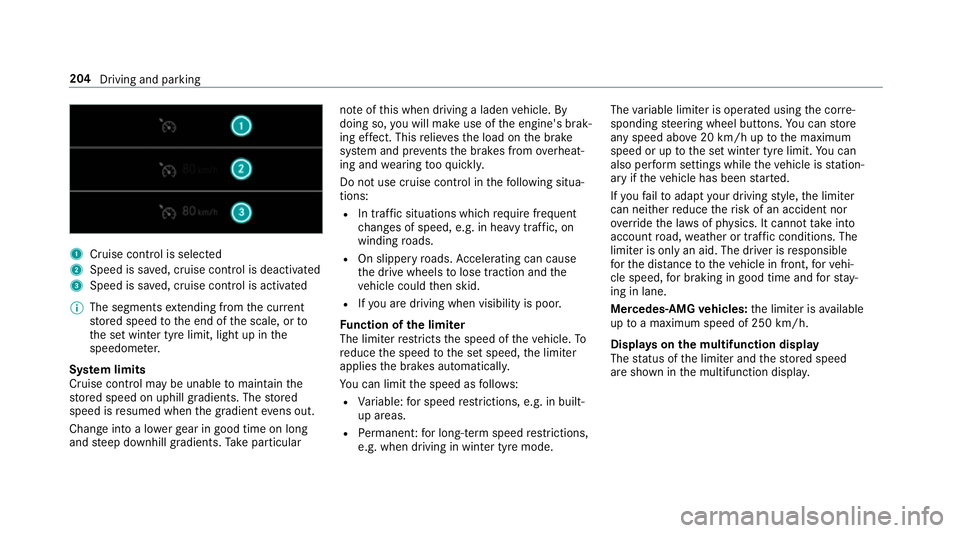
Cruise cont rol is selec ted
2 Speed is sa ved, cruise control is deactivated
3 Speed is sa ved, cruise control is activated
% The segments extending from the cur rent
st ored speed tothe end of the scale, or to
th e set winter tyre limit, light up in the
speedome ter.
Sy stem limits
Cruise control may be unable tomaintain the
st ored speed on uphill gradients. The stored
speed is resumed when the gradient evens out.
Change into a lo werge ar in good time on long
and steep downhill gradients. Take particular no
te ofthis when driving a laden vehicle. By
doing so, you will make use of the engine's brak‐
ing ef fect. This relie vesth e load on the brake
sy stem and pr events the brakes from overheat‐
ing and wearing tooqu ickl y.
Do not use cruise control in thefo llowing situa‐
tions:
R In traf fic situations whi chrequ ire frequent
ch anges of speed, e.g. in heavy traf fic, on
winding roads.
R On slippe ryroads. Accelerating can cause
th e drive wheels tolose traction and the
ve hicle could then skid.
R Ifyo u are driving when visibility is poor.
Fu nction of the limiter
The limiter restricts the speed of theve hicle. To
re duce the speed tothe set speed, the limiter
applies the brakes automaticall y.
Yo u can limit the speed as follo ws:
R Variable: for speed restrictions, e.g. in built-
up areas.
R Perm anen t:for long-term speed restrictions,
e.g. when driving in winter tyre mode. The
variable limiter is operated using the cor re‐
sponding steering wheel buttons. You can store
any speed abo ve20 km/h up tothe maximum
speed or up tothe set winter tyre limit. You can
also per form settings while theve hicle is station‐
ary if theve hicle has been star ted.
If yo ufa ilto adapt your driving style, the limiter
can neither reduce therisk of an accident nor
ov erride the la wsof ph ysics. It cannot take into
account road, weather or traf fic conditions. The
limiter is only an aid. The driver is responsible
fo rth e dis tance totheve hicle in front, forve hi‐
cle speed, for braking in good time and forst ay‐
ing in lane.
Mercedes‑AMG vehicles: the limiter is available
up toa maximum speed of 250 km/h.
Displ ays on the multifunction display
The status of the limiter and thestored speed
are shown in the multifunction displa y.204
Driving and parking
Page 208 of 645
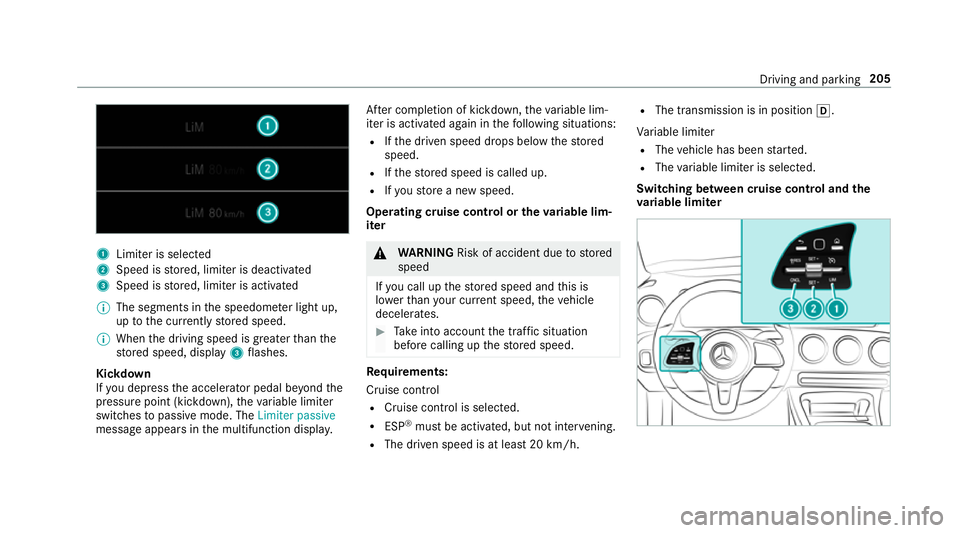
1
Limiter is selected
2 Speed is stored, limiter is deactivated
3 Speed is stored, limiter is activated
% The segments in the speedome ter light up,
up tothe cur rently stored speed.
% When the driving speed is greater than the
st ored speed, display 3flashes.
Kickd own
If yo u depress the accelerator pedal be yond the
pressure point (kickdown), theva riable limiter
swit ches topassive mode. The Limiter passive
message appears in the multifunction displa y.Af
ter completion of kickdown, theva riable lim‐
iter is activated again in thefo llowing situations:
R Ifth e driven speed drops below thestored
speed.
R Ifth estored speed is called up.
R Ifyo ustore a new speed.
Operating cruise control or theva riable lim‐
iter &
WARNING Risk of accident due tostored
speed
If yo u call up thestored speed and this is
lo we rth an your cur rent speed, theve hicle
decelerates. #
Take into account the tra ffic situation
before calling up thestored speed. Re
quirements:
Cruise control
R Cruise control is selected.
R ESP ®
must be activated, but not inter vening.
R The driven speed is at least 20 km/h. R
The transmission is in position h.
Va riable limiter
R The vehicle has been star ted.
R The variable limiter is selec ted.
Switching between cruise control and the
va riable limi ter Driving and pa
rking 205
Page 209 of 645
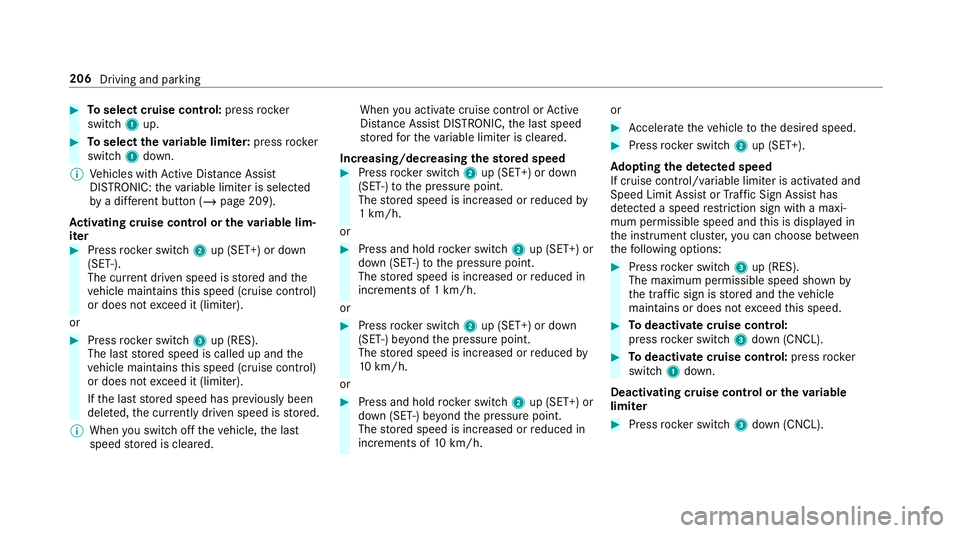
#
Toselect cruise control: pressrocker
switch 1up. #
Toselect theva riable limi ter: press rocker
switch 1down.
% Vehicles with Active Dis tance Assi st
DISTRONIC: theva riable limiter is selec ted
by a dif fere nt button (/ page 209).
Ac tivating cruise control or the variable lim‐
iter #
Press rocker switch 2up (SET+) or down
(SET-).
The cur rent driven speed is stored and the
ve hicle maintains this speed (cruise control)
or does not exceed it (limiter).
or #
Press rocker switch 3up (RES).
The last stored speed is called up and the
ve hicle maintains this speed (cruise control)
or does not exceed it (limiter).
If th e last stored speed has pr eviously been
dele ted, the cur rently driven speed is stored.
% When you swit choff theve hicle, the last
speed stored is cleared. When
you activate cruise cont rol or Active
Dis tance Assi stDISTRONIC, the last speed
st ored forth eva riable limiter is cleared.
Increasing/decreasing thesto red speed #
Press rocker switch 2up (SET+) or down
(SET-) tothe pressure point.
The stored speed is increased or reduced by
1 km/h.
or #
Press and hold rocker switch 2up (SET+) or
down (SET-) tothe pressure point.
The stored speed is increased or reduced in
increments of 1 km/h.
or #
Press rocker switch 2up (SET+) or down
(SET-) be yond the pressure point.
The stored speed is increased or reduced by
10 km/h.
or #
Press and hold rocker switch 2up (SET+) or
down (SET-) be yond the pressure point.
The stored speed is increased or reduced in
increments of 10km/h. or #
Accelerate theve hicle tothe desired speed. #
Press rocker switch 2up (SET+).
Ad opting the de tected speed
If cruise control/ variable limiter is activated and
Speed Limit Assist or Traf fic Sign Assi sthas
de tected a speed restriction sign wi tha maxi‐
mum permissible speed and this is displa yed in
th e instrument clus ter,yo u can choose between
th efo llowing options: #
Press rocker switch 3up (RES).
The maximum permissible speed shown by
th e traf fic sign is stored and theve hicle
maintains or does not exceed this speed. #
Todeactivate cruise control:
press rocker switch 3down (CNCL). #
Todeactivate cruise control: pressrock er
switch 1down.
Deactivating cruise control or theva riable
limi ter #
Press rocker switch 3down (CNCL). 206
Driving and parking
Page 210 of 645
%
Ifyo u brake, deactivate ESP ®
or if ESP ®
inter venes, cruise control is deacti vated. The
va riable limiter is not deactivated.
Pe rm anent limi ter
If th eve hicle should ne verexc eed a specific
speed (e.g. for driving in winter tyre mode), you
can set this speed with the permanent limiter.
Yo u do this by limiting the speed toava lue
between 160 km/h and 240 km/h in the multi‐
media sy stem (/ page 207).
Shortly before the set speed is reached, it
appears in the multifunction displa y.When you
confirm the message with %, display mes‐
sages no longer appear until you swit choff the
ve hicle. The speed will only be displa yed again
once theve hicle has been restar ted or if the set
speed is changed.
The permanent limiter does not swit chtopas‐
sive mode even du ring kickdown and the driven
speed remains below the set speed. Setting
the speed limitation for winter tyres
Multimedia sy stem:
4 © 5
Settings 5
Fahrzeug (Vehicle)
5 Winter tyres limit #
Select a speed or deactivate the function. Ac
tive Di stance Assist DISTRO NIC Fu
nction of Active Di stance Assist
DISTRO NIC Ac
tive Dis tance Assi stDISTRONIC maintains the
set speed on free-flowing roads. If vehicles in
front are de tected, the set dis tance is main‐
ta ined, if necessar y,until theve hicle comes to ahalt. The
vehicle accelerates or brakes depend‐
ing on the dis tance totheve hicle in front and
th e set speed. The speed and dis tance tothe
ve hicle in front are set and sa ved on thesteering
wheel on vehicles without the Driving Assis tance
Pa ckage, in thera nge between 20 km/h and
200 km/h and, on vehicles with the Driving
Assis tance Package, in thera nge between
20 km/h and 210 km/h.
Other features of Active Dis tance Assi st
DISTRONIC:
R Adjusts the driving style depending on the
selected drive program (fuel-saving, comfort‐
able or dynamic) (/ page166)
R Vehicles with Driving Assistance Pack‐
age: reacts tostationary vehicles de tected in
urban speed ranges (e xcept bicycles and
mo torcyc les).
R Initiates acceleration tothestored speed if
th e turn signal indicator is switched on to
ch ange totheov ertaking lane.
R Vehicles with Driving Assistance Pack‐
age: takes one-sided overtaking restrictions
into account on mo torw ays or on multi-lane Driving and parking
207
Page 247 of 645
Setting Speed Limit Assist
Multimedia sy
stem:
4 © 5
Settings 5
Assistance
5 Speed Limit Assist
Ad justing the type of warning #
Select Visual & audible ,Visual orNone.
Ad justing the warning threshold
This value de term ines the speed at which a
wa rning is issued when exceeded. #
Select Warning threshold. #
Set the desired speed.
% If one of thefo llowing sy stems is activated,
th e speed de tected can be manually adop ted
as the speed limit:
R Active Dis tance Assi stDISTRONIC
R Cruise control
R Variable limiter
Fu rther information (/ page 209). Tr
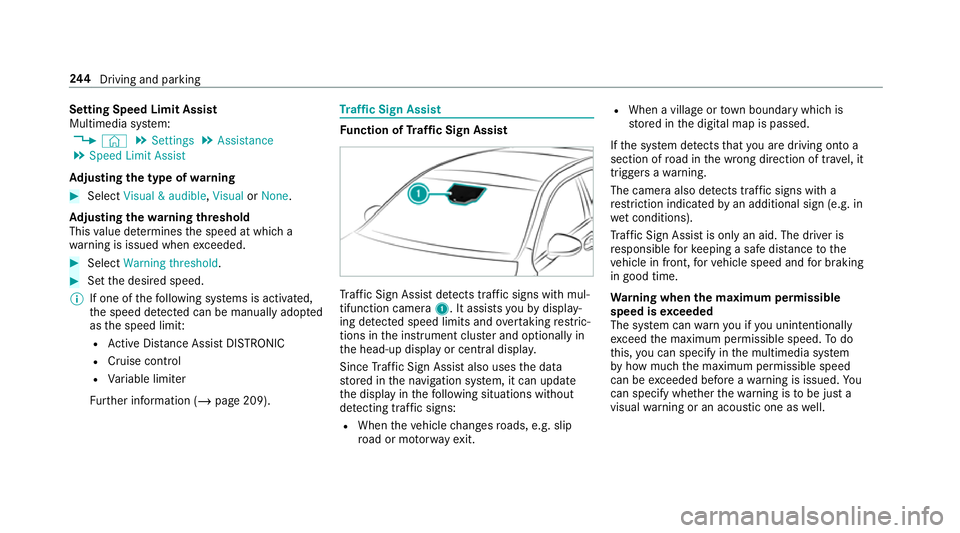
af fic Sign Assist Fu
nction of Traf fic Sign Assist Tr
af fic Sign Assi stdetects traf fic signs wi thmul‐
tifunction camera 1. It assistsyo uby display‐
ing de tected speed limits and overtaking restric‐
tions in the instrument clus ter and optionally in
th e head-up display or cent ral displa y.
Since Traf fic Sign Assi stalso uses the data
st ored in the navigation sy stem, it can update
th e display in thefo llowing situations without
de tecting traf fic signs:
R When theve hicle changes roads, e.g. slip
ro ad or mo torw ay ex it. R
When a village or town boundary which is
st ored in the digital map is passed.
If th e sy stem de tects that you are driving on to a
section of road in the wrong direction of tr avel, it
triggers a warning.
The camera also de tects traf fic signs wi th a
re striction indicated byan additional sign (e.g. in
we t conditions).
Tr af fic Sign Assi stis only an aid. The driver is
re sponsible forke eping a safe dis tance tothe
ve hicle in front, forve hicle speed and for braking
in good time.
Wa rning when the maximum permissible
speed is exceeded
The sy stem can warnyou if you unin tentionally
exc eed the maximum permissible speed. Todo
th is, you can specify in the multimedia sy stem
by how much the maximum permissible speed
can be exceeded before a warning is issued. Yo u
can specify whe ther thewa rning is tobe just a
visual warning or an acoustic one as well. 244
Driving and pa rking