2019 MERCEDES-BENZ AMG GT ROADSTER odometer
[x] Cancel search: odometerPage 16 of 298
Raising the vehicl
e .........................282
Removing a wheel .......................... 284
Securing the vehicle against roll-
ing away ........................................ 282
MP3
Operation ....................................... 165
see also Digital Operator's Man-
ual ................................................. .209
Multifunction display
Function/notes ............................ .161
Multifunction steering wheel
Operating the on-board computer .. 160
Overview .......................................... 35
Multimedia system
Switching on and off ..................... .210
Music files
see also Digital Operator's Man-
ual ................................................. .209 N
Navigation Displaying (on-board computer) ..... 163
Menu (on-board computer) ............ 163
see also Digital Operator's Man-
ual ................................................. .209
Neck-level heating/head-level
heating
see AIRSCARF
Notes on breaking-in a new vehi-
cle ....................................................... 109 O
Occupant Classification System
(OCS) Conditions ....................................... 48
Faults ............................................... 51
Operation ......................................... 48
System self-test ............................... 50
Occupant safety
Air bags .......................................... .45
Automatic measures after an acci-
dent ................................................. 55
Belt warning .................................... .44
Children in the vehicle .................... .55
Important safety notes .................... 40
Introduction to the restraint sys-
tem .................................................. 40 Occupant Classification System
(OCS) ............................................... 48
PASSENGER AIR BAG indicator
lamps ............................................... 41
Pets in the vehicle ........................... 58
PRE-SAFE ®
(anticipatory occu-
pant protection) ............................... 54
Restraint system warning lamp ........ 41
Seat belt .......................................... 41
Odometer ........................................... 161
Oil
see Engine oil
On-board computer
Active Distance Assist
DISTRONIC .................................... 142
AMG menu .....................................1 70
Assistance graphic menu .............. .167
Assistance menu ........................... 168
Display messages .......................... 173
Displaying a service message ....... .241
Factory settings ............................ .170
G-Mete r......................................... 171
Important safety notes .................. 159
Instrument cluster menu ............... 169
Lights menu ................................... 169
Media menu ................................... 165
Menu overview .............................. 161
Message memory .......................... 174
Navigation menu ............................ 163
Operation ....................................... 160
RACETIMER ................................... 172
Radio menu ................................... 164
Service menu ................................. 168
Settings menu ............................... 168
Standard display ............................ 161
Telephone menu ............................ 166
Trip menu ...................................... 161
Video DVD operation ..................... 166
On-board diagnostic interface
see Diagnostics connection
Operating safety
Declaration of conformity ................ 27
Important safety notes .................... 26
Operating system
see On-board computer
Operation
Digital Operator's Manual ................ 23 14
Index
Page 22 of 298
PSI (pounds per square inch) (def-
inition) ...........................................2 80
Replacing ....................................... 281
Service life ..................................... 264
Sidewall (definition) ....................... 280
Speed rating (definition) ................ 280
Storing .......................................... .282
Structure and characteristics
(definition) ..................................... 279
Summer tires in winter .................. 265
Temperature .................................. 275
TIN (Tire Identification Number)
(definition) ..................................... 281
Tire bead (definition) ..................... .280
Tire pressure (definition) ................ 280
Tire pressures (recommended) ...... 279
Tire size (data) ............................... 285
Tire size designation, load-bearing capacity, speed rating .................... 276
Tire tread ....................................... 264
Tire tread (definition) ..................... 280
Total load limit (definition) ............. 281
Traction ......................................... 275
Traction (definition) ....................... 281
Tread wea r..................................... 275
Uniform Tire Quality Grading
Standards ...................................... 274
Uniform Tire Quality Grading
Standards (definition) .................... 279
Wear indicator (definition) ............. 281
Wheel and tire combination ........... 285
Wheel rim (definition) .................... 279
see Flat tire
Tool
see Vehicle tool kit
Touchpad
Changing the station/music
track .............................................. 212
Character suggestions ................... 211
Deleting characters ....................... 211
Entering a space ............................ 211
Entering characters ....................... 211
Gesture control .............................. 211
Handwriting recognition ................ 211
Operating the touchpad ................. 211
Overview ........................................ 211
Quick access for Audio .................. 212
Switching ....................................... 211 Switching input line ....................... 211
Tow-starting
Emergency engine starting ............ 261
Towing
Permitted towing methods ............ 259
Towing away
Important safety guidelines ........... 258
Installing the towing eye ................ 259
Removing the towing eye ............... 260
Transporting the vehicle ................ 260
With both axles on the ground ....... 260
Towing eye ......................................... 249
Traction system
see ETS (Electronic Traction System)
Traffic reports
see also Digital Operator's Man-
ual .................................................. 209
Transmission
Driving tips .................................... 120
Selector lever ................................ 117
see Automatic transmission
Transmission position display ......... 119
Transmission positions
General notes ................................ 117
Overview ........................................ 118
Transporting the vehicle .................. 260
Trim pieces (cleaning instruc-
tions) .................................................. 247
Trip computer (on-board com-
puter) .................................................. 162
Trip odometer
Calling up ....................................... 161
Resetting (on-board computer) ...... 162
Trunk lid
Display message ............................ 196
Important safety notes .................... 74
Locking separately ........................... 76
Opening (automatically from
inside) .............................................. 75
Opening dimensions ...................... 293
Opening/closing (from the out-
side) ................................................. 74
Unlocking with KEYLESS-GO ............ 74
Trunk load (maximum) ...................... 293
Turn signals
Display message ............................ 186
Switching on/of f.............................. 97 20
Index
Page 27 of 298
More than 300,000 different genuine
Mercedes-Benz parts are available for
Mercedes-Benz models.
All authorized Mercedes-Benz Centers maintain
a supply of genuine Mercedes-Benz parts for
necessary service and repair work. In addition,
strategically located parts delivery centers pro-
vide quick and reliable parts service.
Always specify the vehicle identification number (VIN) when ordering genuine Mercedes-Benz
parts (Y page 287). Operator's Manual
Vehicle equipment
i This Operator's Manual describes all models
and all standard and optional equipment of
your vehicle available at the time of this Oper-
ator's Manual going to print. Country-specific
differences are possible. Bear in mind that
your vehicle may not feature all functions
described here. This also applies to safety-
relevant systems and functions. The equip-
ment in your vehicle may therefore differ from that shown in the descriptions and illustra-
tions.
The original purchase agreement lists all sys-
tems installed in your vehicle.
Should you have any questions concerning
equipment and operation, please consult an
authorized Mercedes-Benz Center.
The Operator's Manual and Maintenance Book-
let are important documents and should be kept
in the vehicle. Service and vehicle operation
Warranty
The Limited Warranty for your vehicle applies in
accordance with the warranty terms and condi-
tions in the Service and Warranty Information
booklet.
Your authorized Mercedes-Benz Center will
replace and repair all factory-installed parts in
accordance with the following warranty terms
and conditions:
R New Vehicle Limited Warranty
R Emission System Warranty
R Emission Performance Warranty R
California, Connecticut, Maine, Massachu-
setts, New York, Pennsylvania, Rhode Island
and Vermont Emission Control System War-
ranty
R State warranty enforcement laws (lemon
laws)
Replacement parts and accessories are covered
by the Mercedes-Benz Parts and Accessories
warranties. These are available at any author-
ized Mercedes-Benz Center.
i Should you lose your Service and Warranty
Information booklet, have an authorized
Mercedes-Benz Center arrange for a replace-
ment. The new Service and Warranty Infor-
mation booklet will be posted to you. Information for customers in Califor-
nia
Under California law you may be entitled to a
replacement of your vehicle or a refund of the
purchase price or lease price, if after a reason-
able number of repair attempts Mercedes-Benz USA, LLC and/or its authorized repair or servicefacilities fail to fix one or more substantial
defects or malfunctions in the vehicle that are
covered by its express warranty.
During the period of 18 months from original
delivery of the vehicle or the accumulation of
18,000 miles (approximately 29,000 km) on the
odometer of the vehicle, whichever occurs first,
a reasonable number of repair attempts is pre-
sumed for a retail buyer or lessee if one or more of the following occurs:
(1) the same substantial defect or malfunction results in a condition that is likely to cause
death or serious bodily injury if the vehicle is
driven, that defect or malfunction has been subject to repair two or more times, and youhave directly notified Mercedes-Benz USA,
LLC in writing of the need for its repair.
(2) the same substantial defect or malfunction of a less serious nature than category (1)
has been subject to repair four or more
times and you have directly notified
Mercedes-Benz in writing of the need for its
repair.
(3) the vehicle is out of service by reason of repair of the same or different substantial
defects or malfunctions for a cumulative
total of more than 30 calendar days.
Please send your written notice to: Service and vehicle operation
25Introduction Z
Page 163 of 298
Right control panel
0076 R
Rejects or ends a call
R Exits the telephone book/redial
memory 0061 R
Makes or accepts a call
R Switches to the redial memory 0081
0082 R
Adjusts the volume 0063 R
Mute 00E3 R
Switches on the Voice Control Sys-
tem (see the Digital Operator's
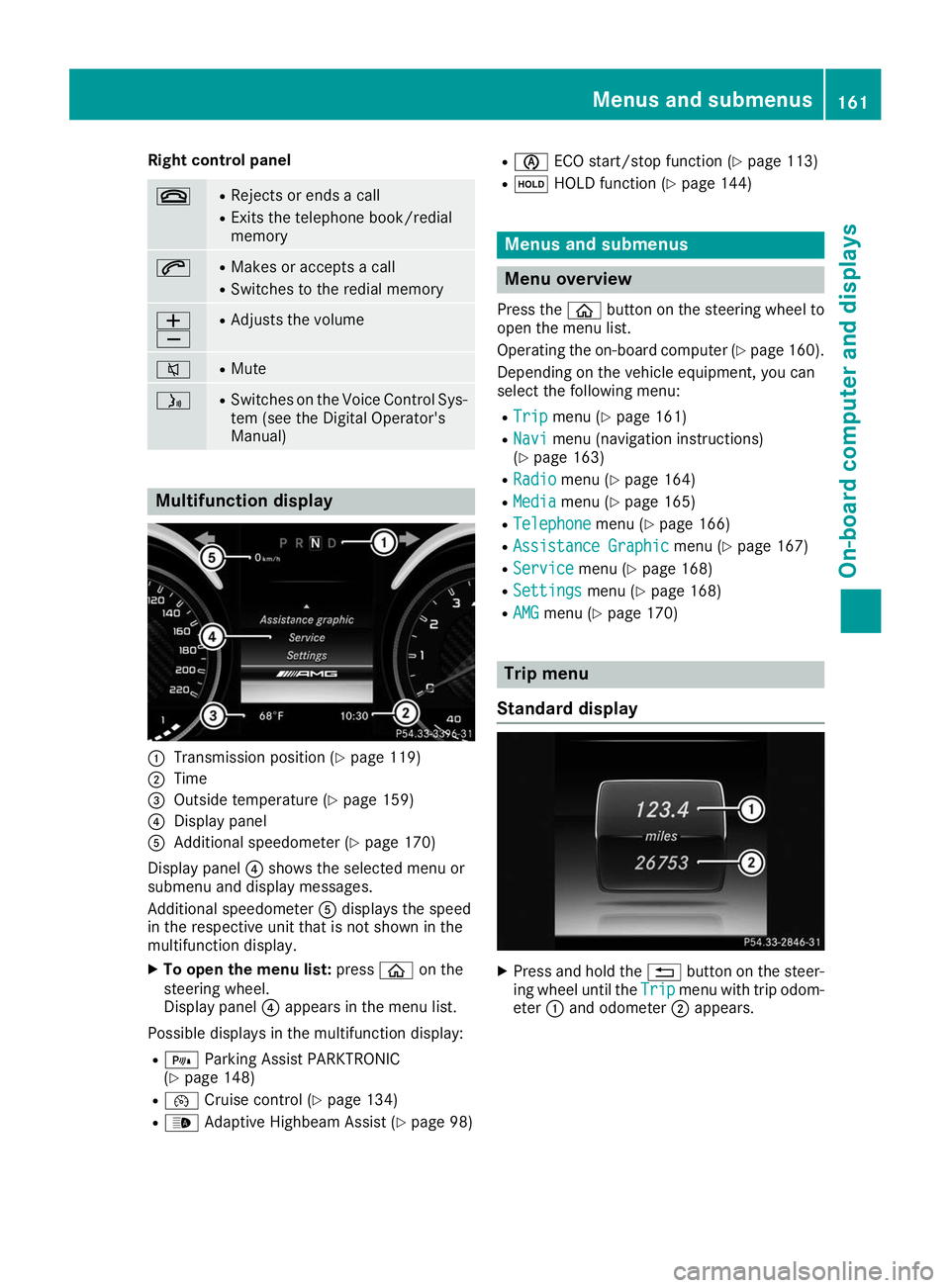
Manual) Multifunction display
0043
Transmission position (Y page 119)
0044 Time
0087 Outside temperature (Y page 159)
0085 Display panel
0083 Additional speedometer (Y page 170)
Display panel 0085shows the selected menu or
submenu and display messages.
Additional speedometer 0083displays the speed
in the respective unit that is not shown in the
multifunction display.
X To open the menu list: press00E2on the
steering wheel.
Display panel 0085appears in the menu list.
Possible displays in the multifunction display: R = Parking Assist PARKTRONIC
(Y page 148)
R 00B2 Cruise control (Y page 134)
R 00CE Adaptive Highbeam Assist (Y page 98)R
00D6 ECO start/stop function (Y page 113)
R 00D9 HOLD function (Y page 144) Menus and submenus
Menu overview
Press the 00E2button on the steering wheel to
open the menu list.
Operating the on-board computer (Y page 160).
Depending on the vehicle equipment, you can
select the following menu:
R Trip Trip menu (Y page 161)
R Navi Navi menu (navigation instructions)
(Y page 163)
R Radio
Radio menu (Y page 164)
R Media
Media menu (Y page 165)
R Telephone
Telephone menu (Ypage 166)
R Assistance Graphic
Assistance Graphic menu (Ypage 167)
R Service
Service menu (Ypage 168)
R Settings
Settings menu (Ypage 168)
R AMG
AMG menu (Y page 170) Trip menu
Standard display X
Press and hold the 0038button on the steer-
ing wheel until the Trip
Tripmenu with trip odom-
eter 0043and odometer 0044appears. Menus and submenus
161On-board computer and displays Z
Page 164 of 298
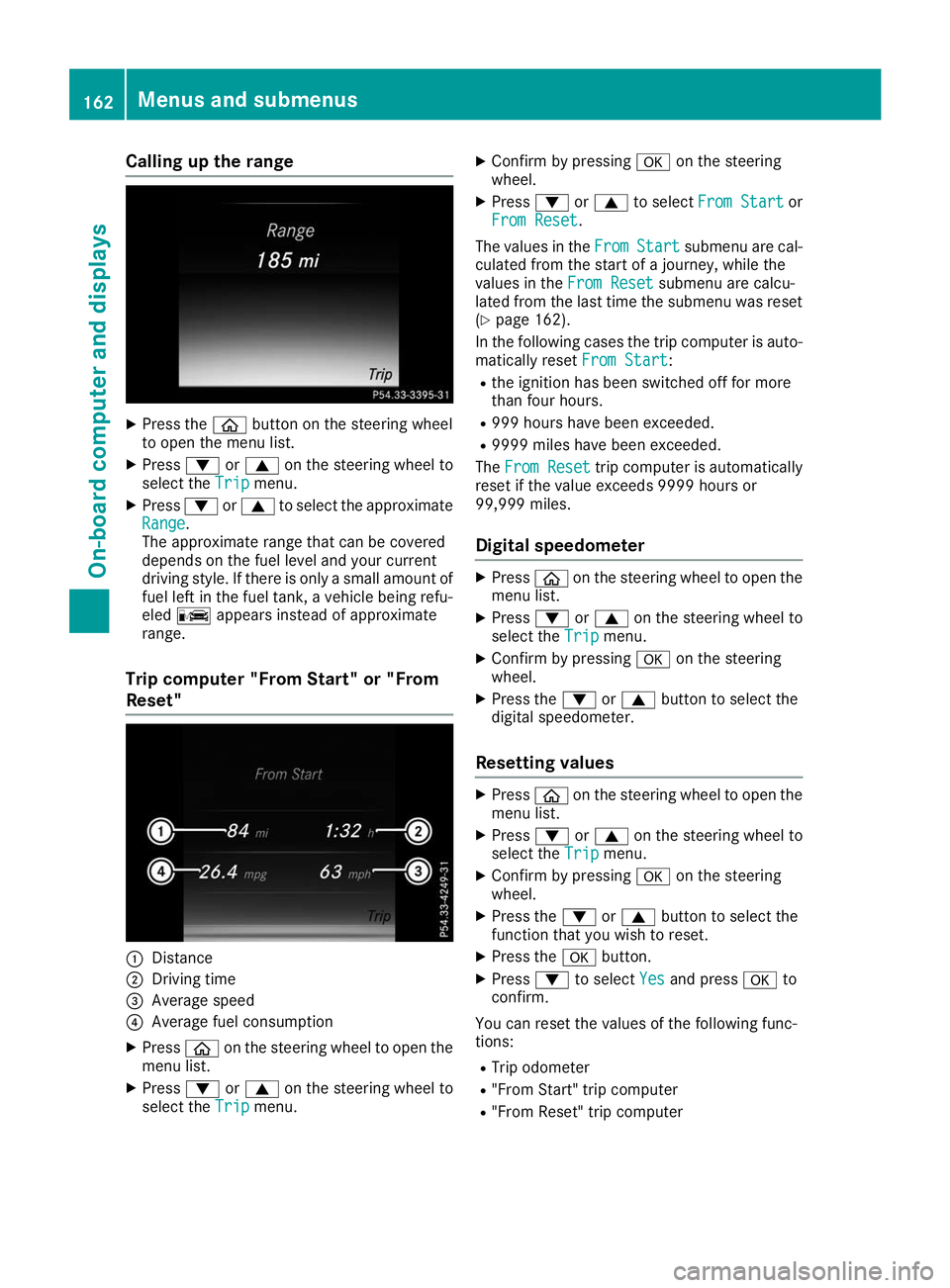
Calling up the range
X
Press the 00E2button on the steering wheel
to open the menu list.
X Press 0064or0063 on the steering wheel to
select the Trip
Trip menu.
X Press 0064or0063 to select the approximate
Range
Range.
The approximate range that can be covered
depends on the fuel level and your current
driving style. If there is only a small amount of
fuel left in the fuel tank, a vehicle being refu-
eled 00A8 appears instead of approximate
range.
Trip computer "From Start" or "From
Reset" 0043
Distance
0044 Driving time
0087 Average speed
0085 Average fuel consumption
X Press 00E2on the steering wheel to open the
menu list.
X Press 0064or0063 on the steering wheel to
select the Trip Tripmenu. X
Confirm by pressing 0076on the steering
wheel.
X Press 0064or0063 to select From Start From Start or
From Reset From Reset.
The values in the From
FromStart
Start submenu are cal-
culated from the start of a journey, while the
values in the From Reset
From Resetsubmenu are calcu-
lated from the last time the submenu was reset
(Y page 162).
In the following cases the trip computer is auto- matically reset From Start
From Start:
R the ignition has been switched off for more
than four hours.
R 999 hours have been exceeded.
R 9999 miles have been exceeded.
The From Reset From Reset trip computer is automatically
reset if the value exceeds 9999 hours or
99,999 miles.
Digital speedometer X
Press 00E2on the steering wheel to open the
menu list.
X Press 0064or0063 on the steering wheel to
select the Trip Tripmenu.
X Confirm by pressing 0076on the steering
wheel.
X Press the 0064or0063 button to select the
digital speedometer.
Resetting values X
Press 00E2on the steering wheel to open the
menu list.
X Press 0064or0063 on the steering wheel to
select the Trip
Tripmenu.
X Confirm by pressing 0076on the steering
wheel.
X Press the 0064or0063 button to select the
function that you wish to reset.
X Press the 0076button.
X Press 0064to select Yes
Yesand press 0076to
confirm.
You can reset the values of the following func-
tions:
R Trip odometer
R "From Start" trip computer
R "From Reset" trip computer 162
Menus and submenusOn-board computer and displays
Page 171 of 298
X
Press 0064or0063 to select Off
Off,Standard
Standard
or Sensitive
Sensitive.
X Press 0076to confirm the selection.
When ATTENTION ASSIST is deactivated, the
00D7 symbol appears in the Assistance Assistance
Graphic
Graphic menu in the multifunction display.
For further information about ATTENTION
ASSIST, see (Y page 154).
Setting Lane Keeping Assist
X Press the 00E2button on the steering wheel
to open the menu list.
X Press the 0064or0063 button on the steering
wheel to select the Settings
Settings menu.
X Confirm by pressing 0076on the steering
wheel.
X Press 0064or0063 to select the DriveAs‐ DriveAs‐
sist
sist submenu.
X Press 0076to confirm.
X Press 0064or0063 to select Lane
Lane Keeping
Keeping
Assist
Assist.
X Press 0076to confirm.
Press 0064or0063 to select Off
Off,Standard
Standard
or Adaptive
Adaptive.
X To change the setting: press0076again.
Further information about Lane Keeping Assist
(Y page 157).
Light submenu Switching the daytime running lamps on/
off
This function is not available in Canada.
X Press 00E2on the steering wheel to open the
menu list.
X Press 0064or0063 on the steering wheel to
select the Settings
Settings menu.
X Confirm by pressing 0076on the steering
wheel.
X Press 0064or0063 to select the Lights
Lights
submenu.
X Press 0076to confirm.
X Using 0064or0063, select the Daytime
Daytime
Running Lights
Running Lights function.
If the Daytime
Daytime Running
RunningLights
Lightsfunction has
been switched on, the cone of light and the
0086 symbol in the multifunction display are
shown in white.
X Press the 0076button to save the setting. Further information about
Daytime Running
Daytime Running
Lights Lights(Y page 96).
Instrument cluster submenu Setting the brightness for the display and
switches
You can use the Brightness
Brightnessfunction to set the
brightness of the multifunction display and the
switches in the vehicle in increments.
X Press 00E2on the steering wheel to open the
menu list.
X Press 0064or0063 on the steering wheel to
select the Settings
Settings menu.
X Confirm by pressing 0076on the steering
wheel.
X Press 0064or0063 to select the Instru‐ Instru‐
ment Cluster
ment Cluster submenu.
X Press 0076to confirm.
X Press 0064or0063 to select the Brightness
Brightness
function.
X Press 0076to confirm.
You can see the selected setting Level
Levelwith a
value between 0 and 10. Level 0 corresponds to a dim light and level 10 corresponds to a
bright light.
X Press 0064or0063 to change the brightness.
The brightness is set simultaneously with the
selection.
X Press 0076or0038 to save the setting.
Selecting the distance unit The Display Unit Speed-/Odometer: Display Unit Speed-/Odometer: func-
tion allows you to choose whether certain dis-
plays appear in kilometers or miles in the mul-
tifunction display.
X Use 00E2 on the steering wheel to call up the
list of menus.
X Press the 0064or0063 button on the steering
wheel to select the Settings Settingsmenu.
X Confirm by pressing 0076on the steering
wheel.
X Press the 0064or0063 button to select the
Instrument Cluster
Instrument Cluster submenu.
X Press 0076to confirm.
X Press the 0064or0063 button to select the
Display Unit Speed-/Odometer
Display Unit Speed-/Odometer function.
You will see the selected setting: km
kmorMiles
Miles.
X Press the 0076button to save the setting. Menus and submenus
169On-board computer and displays Z
Page 172 of 298
The selected unit of measurement for distance
applies to:
R Digital speedometer in the Trip
Trip menu
R Odometer and the trip odometer
R Trip computer
R Range
R Navigation instructions in the Navi
Navi menu
R Cruise control
R Active Distance Assist DISTRONIC
R ASSYST PLUS service interval display
Switching the additional speedometer
on/off
If the additional speedometer is switched on,
the speed is shown in the status bar in the mul- tifunction display instead of the outside tem-
perature.
The additional speedometer displays the speed
in the respective unit that is not shown in the
multifunction display.
X Press 00E2on the steering wheel to open the
main menu.
X Press 0064or0063 on the steering wheel to
select the Settings Settings menu.
X Confirm by pressing 0076on the steering
wheel.
X Press 0064or0063 to select the Instru‐
Instru‐
ment Cluster
ment Cluster submenu.
X Press 0076to confirm.
X Press 0064or0063 to select the Addi‐
Addi‐
tional Speedometer [km/h]
tional Speedometer [km/h] function.
The current selection appears.
X To switch on/off: press0076again.
Restoring the factory settings X
Press 00E2on the steering wheel to open the
menu list.
X Press 0064or0063 on the steering wheel to
select the Settings
Settings menu.
X Confirm by pressing 0076on the steering
wheel.
X Press 0064or0063 to select the Factory
Factory
Settings
Settings submenu.
X Press 0076to confirm.
The Reset All Settings?
Reset All Settings? function
appears. X
Press 0064or0063 to select No
No orYes
Yes.
X Press 0076to confirm the selection.
If you have selected Yes
Yes, the multifunction
display shows a confirmation message.
For safety reasons, the Daytime Running
Daytime Running
Lights
Lights function in the Lights
Lightssubmenu is only
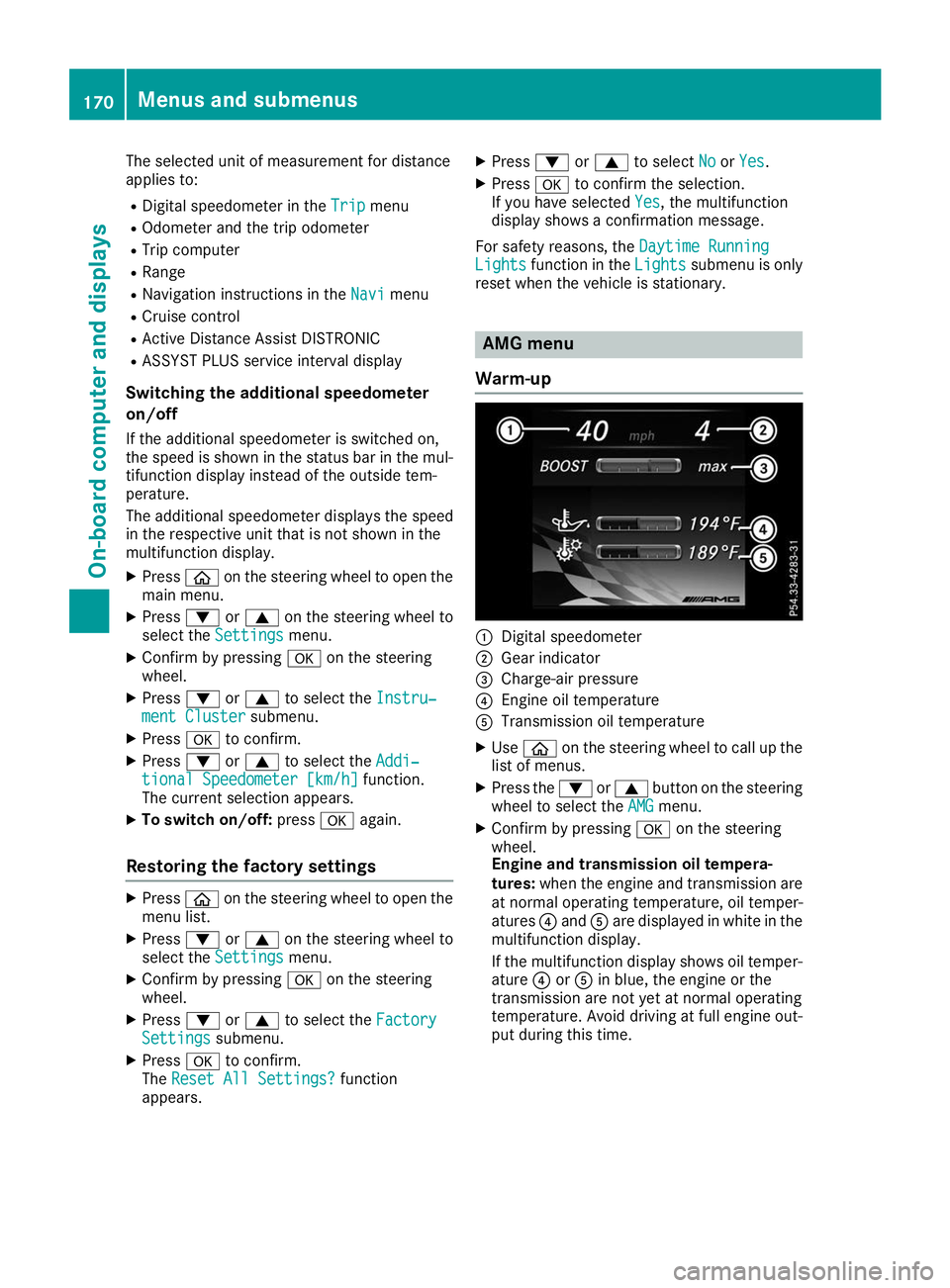
reset when the vehicle is stationary. AMG menu
Warm-up 0043
Digital speedometer
0044 Gear indicator
0087 Charge-air pressure
0085 Engine oil temperature
0083 Transmission oil temperature
X Use 00E2 on the steering wheel to call up the
list of menus.
X Press the 0064or0063 button on the steering
wheel to select the AMG AMGmenu.
X Confirm by pressing 0076on the steering
wheel.
Engine and transmission oil tempera-
tures: when the engine and transmission are
at normal operating temperature, oil temper-
atures 0085and 0083are displayed in white in the
multifunction display.
If the multifunction display shows oil temper- ature 0085or0083 in blue, the engine or the
transmission are not yet at normal operating
temperature. Avoid driving at full engine out-
put during this time. 170
Menus and submenusOn-board computer and displays