2019 MERCEDES-BENZ AMG GT ROADSTER instrument panel
[x] Cancel search: instrument panelPage 4 of 298
Index
....................................................... 4Digital Operator's Manual
..................23
Introduction .......................................... .23
Operation ............................................... 23 Introduction
......................................... 24
Protecting the environment ...................24
Genuine Mercedes-Benz parts .............. .24
Operator's Manual ................................. 25
Service and vehicle operation ................25
Operating safety .................................... 26
QR code for rescue card ........................ 29
Data stored in the vehicle ......................29
Mercedes me website ............................31
Information on copyright ....................... 32 At a glance
........................................... 33
Cockpit .................................................. 33
Instrument cluster .................................34
Multifunction steering wheel ................. 35
Center console ...................................... 36
Overhead control panel .........................37
Central control panel ............................ .38
Door control panel ................................. 39 Safety
................................................... 40
Panic alarm ............................................ 40
Occupant safety .................................... 40
Children in the vehicle ........................... 55
Pets in the vehicle ................................. 58
Driving safety systems ........................... 58
Protection against theft ........................ .64Opening and closing
...........................66
SmartKey ............................................... 66
Doors ..................................................... 72
Trunk ..................................................... 74
Side windows ......................................... 76
Soft top (Roadster) ................................ 80 Seats, steering wheel and mirrors
....84
Correct driver's seat position ................84
Seats ..................................................... 84 Steering wheel ....................................... 90
Mirrors ................................................... 91
Memory function ................................... 94 Lights and windshield wipers
............96
Exterior lighting ..................................... 96
Interior lighting ...................................... 99
Replacing bulbs ................................... 100
Windshield wipers ................................ 100 Climate control
................................. 103
Overview of climate control systems ... 103
Operating the climate control sys-
tems .................................................... 104
Air vents .............................................. 107 Driving and parking
..........................109
Notes on breaking-in a new vehicle ..... 109
Driving ................................................. 109
DYNAMIC SELECT controller ............... 116
AMG SPEEDSHIFT DCT 7-speed
sports transmission ............................. 117
Refueling ............................................. 125
Parking ................................................ 127
Driving tips .......................................... 131
Driving systems ................................... 134 On-board computer and displays
....159
Important safety notes ........................ 159
Displays and operation ........................ 159
Menus and submenus ......................... 161
Display messages ................................ 173
Warning and indicator lamps in the
instrument cluster ............................... 199 Multimedia system
...........................209
General notes ...................................... 209
Important safety notes ........................ 209
Function restrictions ............................ 209
Operating system ................................ 210 Stowage and features
......................218
Stowage areas ..................................... 218
Features .............................................. 220 2
Contents
Page 10 of 298
Convenience opening
With the SmartKey .......................... .78
Coolant (engine)
Checking the level ........................ .239
Display message ............................ 187
Filling capacity ............................... 292
Important safety notes .................. 292
Temperature display in the instru-
ment cluster .................................. 159
Warning lamp ................................. 204
Cooling
see Climate control
Copyright ............................................. 32
Cornering light function
Display message ............................ 186
Cruise control
Cruise control lever ....................... 135
Deactivating ................................... 136
Display message ............................ 191
General notes ................................ 134
Setting a speed .............................. 136
Storing and maintaining current
speed ............................................. 135
Storing, maintaining and calling
up a spee d..................................... 135
Cup holder
Center console .............................. 220
Important safety notes .................. 220
Customer Assistance Center
(CAC) ..................................................... 28
Customer Relations Department ....... 28D
Dashboard see Cockpit
Dashboard lighting
see Instrument cluster lighting
Data
see Technical data
Data carrier
Selecting ........................................ 165
Daytime running lamp mode
see Daytime running lamps
Daytime running lamps
Display message ............................ 186
Function/note s................................ 96 Switching on/off (on-board com-
puter) ............................................. 169
Declarations of conformity ................. 27
Decorative film
Cleaning instructions ..................... 244
Diagnostics connection ...................... 27
Digital Operator's Manual
Help ................................................. 23
Introduction ..................................... 23
Digital speedometer ......................... 162
Display
see Display messages
see Warning and indicator lamps
Display messages
ASSYST PLU S................................ 240
Calling up (on-board computer) ..... 174
Driving system s............................. 189
Engine ............................................ 187
General notes ................................ 173
Hiding (on-board computer) ........... 174
Introduction ................................... 173
Lights ............................................. 186
Safety systems .............................. 175
SmartKey ....................................... 197
Tires ............................................... 192
Vehicle ........................................... 194
Distance recorder ............................. 161
Distance warning (warning lamp) .... 206
Distance warning function
Function/note s................................ 60
Door control panel
Overview .......................................... 39
Doors
Automatic locking (switch) ............... 73
Central locking/unlocking
(SmartKey) ....................................... 66
Display message ............................ 196
Emergency locking ........................... 73
Emergency unlocking ....................... 73
Important safety notes .................... 72
Opening (from inside) ...................... 72
Drinking and driving ......................... 131
Drive program
Automatic ...................................... 122
Display ........................................... 119
Manual ........................................... 122
Selecting ........................................ 116 8
Index
Page 35 of 298
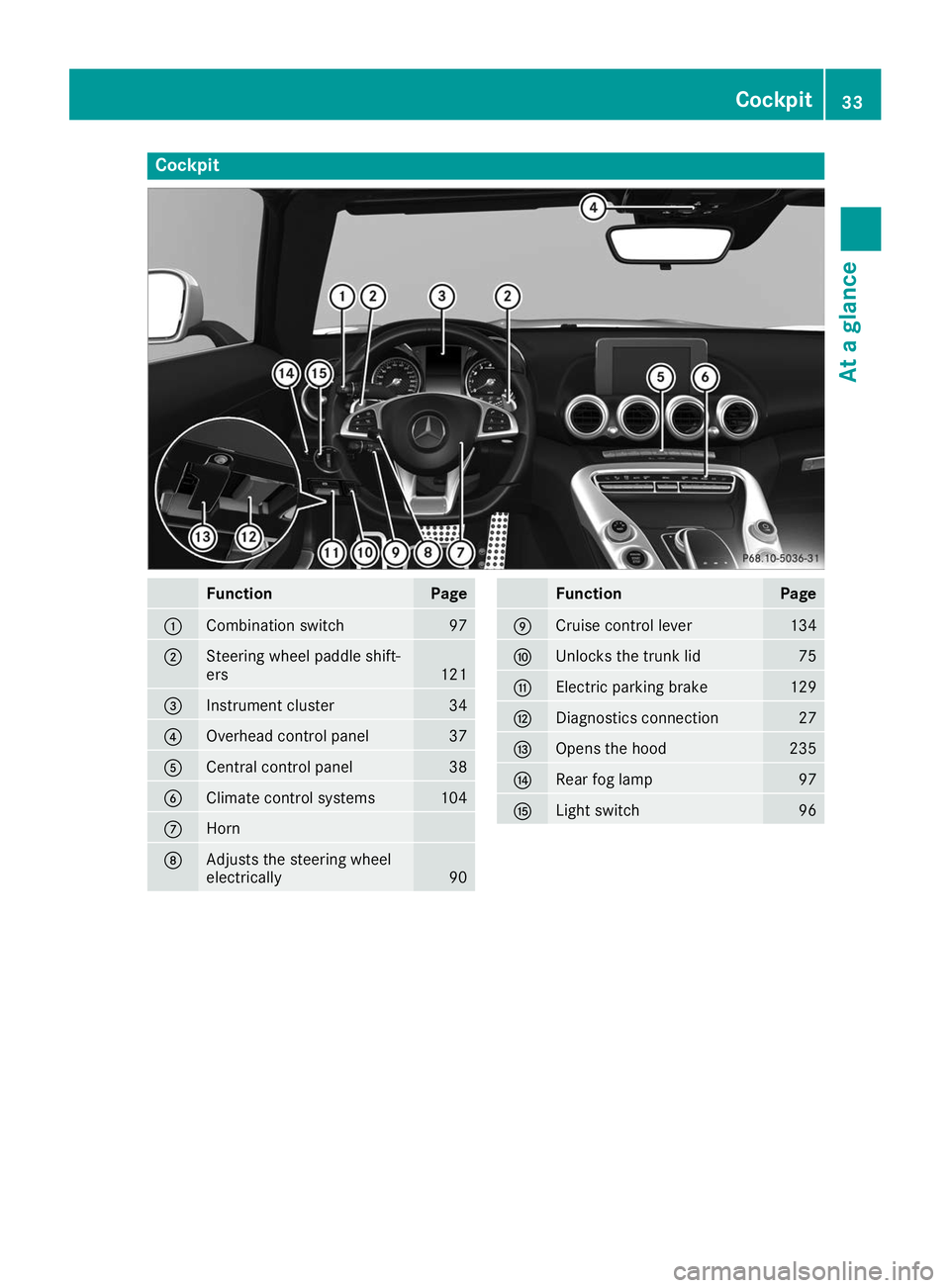
Cockpit
Function Page
0043
Combination switch 97
0044
Steering wheel paddle shift-
ers
121
0087
Instrument cluster 34
0085
Overhead control panel 37
0083
Central control panel 38
0084
Climate control systems 104
006B
Horn
006C
Adjusts the steering wheel
electrically 90 Function Page
006D
Cruise control lever 134
006E
Unlocks the trunk lid 75
006F
Electric parking brake 129
0070
Diagnostics connection 27
0071
Opens the hood 235
0072
Rear fog lamp 97
0073
Light switch 96Cockpit
33At a glance
Page 64 of 298
ESP
®
(Electronic Stability Program)
General notes i
Observe the "Important safety notes" sec-
tion (Y page 58).
ESP ®
monitors driving stability and traction, i.e.
power transmission between the tires and the
road surface.
If ESP ®
detects that the vehicle is deviating from
the direction desired by the driver, one or more
wheels are braked to stabilize the vehicle. The
engine output is also modified to keep the vehi- cle on the desired course within physical limits.
ESP ®
assists the driver when pulling away on
wet or slippery roads. ESP ®
can also stabilize
the vehicle during braking.
ETS (Electronic Traction System) i
Observe the "Important safety notes" sec-
tion (Y page 58).
ETS traction control is part of ESP ®
.
Traction control brakes the drive wheels indi-
vidually if they spin. This enables you to pull
away and accelerate on slippery surfaces, for
example if the road surface is slippery on one
side. In addition, more drive torque is transfer-
red to the wheel or wheels with traction.
Traction control remains active, even if you
deactivate ESP ®
.
Important safety notes i
Observe the "Important safety notes" sec-
tion (Y page 58). G
WARNING
If ESP ®
is malfunctioning, ESP ®
is unable to
stabilize the vehicle. Additionally, further driv- ing safety systems are deactivated. This
increases the risk of skidding and an accident.
Drive on carefully. Have ESP ®
checked at a
qualified specialist workshop.
ESP ®
is only deactivated if the 00BBwarning
lamp is lit continuously.
When SPORT handling mode is activated, the
0074 warning lamp lights up in the instrument
panel. When the
00BBand0089 warning lamps light up
continuously, ESP ®
is not available due to a mal-
function.
Observe the information on warning lamps
(Y page 201) and display messages which may
be shown in the instrument cluster
(Y page 175).
Only use wheels with the recommended tire
sizes. Only then will ESP ®
function properly.
Characteristics of ESP ® General information
If the 00E5 ESP®
warning lamp goes out before
beginning the journey, ESP ®
is automatically
active.
If ESP ®
intervenes, the 00E5ESP®
warning lamp
flashes in the instrument cluster.
If ESP ®
intervenes:
X Do not deactivate ESP ®
under any circum-
stances.
X Only depress the accelerator pedal as far as
necessary when pulling away.
X Adapt your driving style to suit the prevailing
road and weather conditions.
ECO start/stop function
The ECO start/stop function switches the
engine off automatically when the vehicle stops moving. The engine starts automatically when
the driver wants to pull away again. ESP ®
remains in its previously selected status. Exam-
ple: if ESP ®
was deactivated before the engine
was switched off, ESP ®
remains deactivated
when the engine is switched on again.
Deactivating/activating ESP ® Important safety notes
i Observe the "Important safety notes" sec-
tion (Y page 58).
You can select between the following states of
ESP ®
:
R ESP ®
is activated
R SPORT handling mode is activated
R ESP ®
is deactivated 62
Driving safety systemsSafety
Page 100 of 298
X
To indicate briefly: press the combination
switch briefly to the pressure point in the
direction of arrow 0044or0085.
The corresponding turn signal flashes three
times.
X To indicate: press the combination switch
beyond the pressure point in the direction of
arrow 0044or0085.
X To switch on the high-beam headlamps:
select key position 0048with the Start/Stop
button or start the engine.
X Turn the light switch to the 0058or0058
position.
X Press the combination switch beyond the
pressure point in the direction of arrow 0043.
In the 0058position, the high-beam head-
lamps are only switched on when it is dark and
the engine is running.
The 0057 indicator lamp in the instrument
cluster lights up when the high-beam head-
lamps are switched on.
X To switch off the high-beam headlamps:
move the combination switch back to its nor- mal position.
The 0057 indicator lamp in the instrument
cluster goes out.
Vehicles with Adaptive Highbeam Assist: when
Adaptive Highbeam Assist is active, it controls
switching on/off of the high-beam headlamps
(Y page 98).
X To switch on the high-beam flasher: pull
the combination switch in the direction of
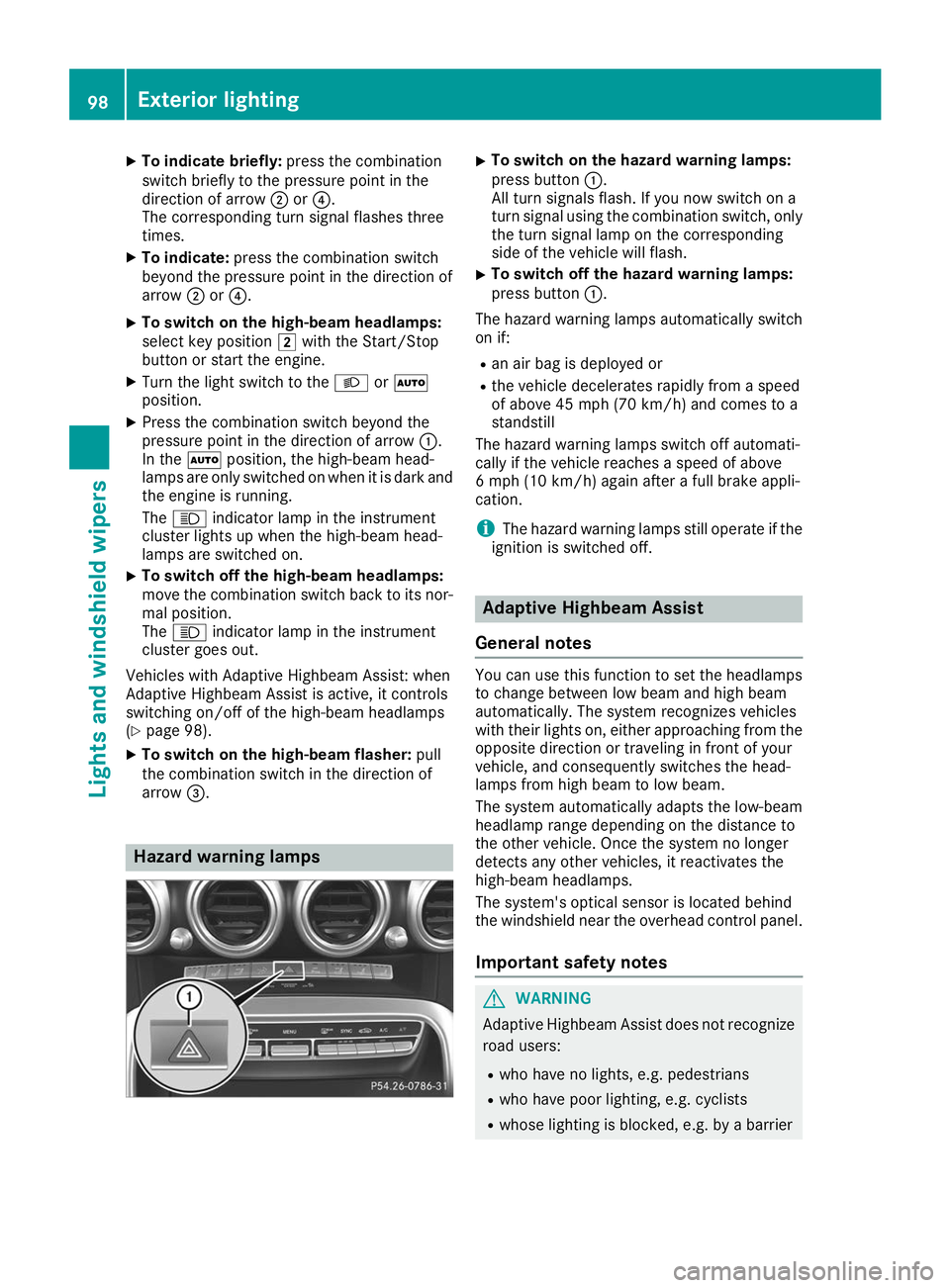
arrow 0087. Hazard warning lamps X
To switch on the hazard warning lamps:
press button 0043.
All turn signals flash. If you now switch on a
turn signal using the combination switch, only the turn signal lamp on the corresponding
side of the vehicle will flash.
X To switch off the hazard warning lamps:
press button
0043.
The hazard warning lamps automatically switch
on if:
R an air bag is deployed or
R the vehicle decelerates rapidly from a speed
of above 45 mph (70 km/h) and comes to a
standstill
The hazard warning lamps switch off automati-
cally if the vehicle reaches a speed of above
6 mph (10 km/h) again after a full brake appli-
cation.
i The hazard warning lamps still operate if the
ignition is switched off. Adaptive Highbeam Assist
General notes You can use this function to set the headlamps
to change between low beam and high beam
automatically. The system recognizes vehicles
with their lights on, either approaching from the opposite direction or traveling in front of your
vehicle, and consequently switches the head-
lamps from high beam to low beam.
The system automatically adapts the low-beam
headlamp range depending on the distance to
the other vehicle. Once the system no longer
detects any other vehicles, it reactivates the
high-beam headlamps.
The system's optical sensor is located behind
the windshield near the overhead control panel.
Important safety notes G
WARNING
Adaptive Highbeam Assist does not recognize road users:
R who have no lights, e.g. pedestrians
R who have poor lighting, e.g. cyclists
R whose lighting is blocked, e.g. by a barrier 98
Exterior lightingLights and
windshield wipers
Page 161 of 298
Important safety notes
G
WARNING
If you operate information systems and com-
munication equipment integrated in the vehi- cle when driving, you may be distracted from
the traffic situation. You could also lose con-
trol of the vehicle. There is a risk of an acci-
dent.
Only operate this equipment when the traffic
situation permits. If you are not sure that this
is possible, park the vehicle paying attention
to traffic conditions and operate the equip-
ment when the vehicle is stationary.
You must observe the legal requirements for the country in which you are currently driving whenoperating the on-board computer. G
WARNING
If the instrument cluster has failed or mal-
functioned, you may not recognize function
restrictions in systems relevant to safety. The operating safety of your vehicle may be
impaired. There is a risk of an accident.
Drive on carefully. Have the vehicle checked
at a qualified specialist workshop immedi-
ately.
The on-board computer only shows messages or
warnings from certain systems in the multifunc- tion display. You should therefore make sure
your vehicle is operating safely at all times.
If the operating safety of your vehicle is
impaired, pull over as soon as it is safe to do so. Contact a qualified specialist workshop.
For an overview, see the instrument panel illus-
tration (Y page 34). Displays and operation
Speedometer with segments
The segments in the speedometer indicate
which speed range is available:
R Cruise control activated (Y page 134):The segments light up from the stored speed
to the type-tested maximum speed.
R Active Distance Assist DISTRONIC activated
(Y page 136):
One or two segments in the set speed range
light up.
R Active Distance Assist DISTRONIC detects a
vehicle in front moving more slowly than the
stored speed:
The segments between the speed of the vehi-
cle in front and the stored speed light up. Tachometer
! Do not drive in the overrevving range, as this
could damage the engine.
The red band in the tachometer indicates the
engine's overrevving range.
The fuel supply is interrupted to protect the
engine when the red band is reached. Outside temperature display
You should pay special attention to road condi-
tions when temperatures are around freezing
point.
Bear in mind that the outside temperature dis-
play indicates the measured air temperature
and not the road surface temperature.
The outside temperature display is in the multi-
function display (Y page 161).
Changes in the outside temperature are dis-
played after a short delay. Coolant temperature gauge
G
WARNING
Opening the hood when the engine is over-
heated or when there is a fire in the engine
compartment could expose you to hot gases
or other service products. There is a risk of
injury.
Let an overheated engine cool down before
opening the hood. If there is a fire in the
engine compartment, keep the hood closed
and contact the fire department. Displays and operation
159On-board computer and displays Z
Page 263 of 298
X
Turn the SmartKey to key position 0092in the
ignition lock and remove it.
X Secure the vehicle. Tow-starting (emergency engine
starting)
! Vehicles with automatic transmission must
not be tow-started. You could otherwise dam- age the automatic transmission.
i You can find information on "Jump-starting"
under (Y page 256). Fuses
Important safety notes
G
WARNING
If you manipulate or bridge a faulty fuse or if
you replace it with a fuse with a higher amper- age, the electric cables could be overloaded.
This could result in a fire. There is a risk of an
accident and injury.
Always replace faulty fuses with the specified
new fuses having the correct amperage.
Blown fuses must be replaced with fuses of the
same rating, which you can recognize by the
color and value. The fuse ratings are listed in the
fuse allocation chart.
The fuse allocation chart is on the fuse box in the trunk (Y page 262).
If a newly inserted fuse also blows, have the
cause traced and rectified at a qualified special-
ist workshop, e.g. an authorized Mercedes-Benz Center.
! Only use fuses that have been approved for
Mercedes-Benz vehicles and which have the
correct fuse rating for the system concerned.
Otherwise, components or systems could be
damaged.
! Make sure that no moisture can enter the
fuse box when the cover is open.
! When closing the cover, make sure that it is
lying correctly on the fuse box. Moisture seep-
ing in or dirt could otherwise impair the oper- ation of the fuses. The fuses in your vehicle serve to close down
faulty circuits. If a fuse blows, all the compo-
nents on the circuit and their functions stop
operating. Before changing a fuse
X Switch off the engine.
X Switch off all electrical consumers.
X Open the driver's door.
The on-board electronics are now in key posi-
tion 0092. This is the same as the key having
been removed.
or, if the SmartKey is inserted in the ignition
lock: X Remove the SmartKey from the ignition lock.
X Secure the vehicle against rolling away
(Y page 127).
All indicator lamps in the instrument cluster
must be off. Fuse box in the front passenger foot-
well
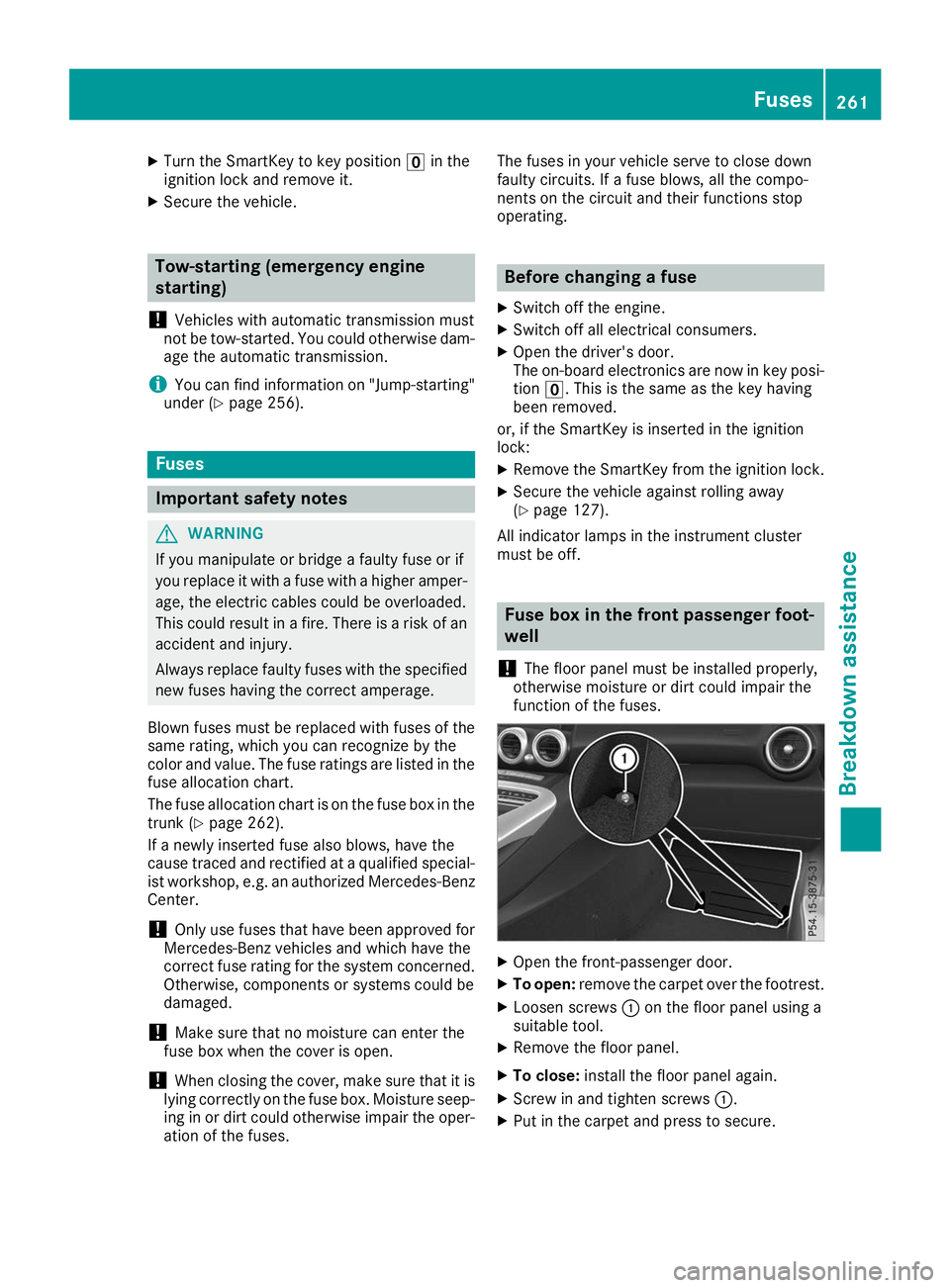
! The floor panel must be installed properly,
otherwise moisture or dirt could impair the
function of the fuses. X
Open the front-passenger door.
X To open: remove the carpet over the footrest.
X Loosen screws 0043on the floor panel using a
suitable tool.
X Remove the floor panel.
X To close: install the floor panel again.
X Screw in and tighten screws 0043.
X Put in the carpet and press to secure. Fuses
261Breakdown assistance Z