2019 MASERATI LEVANTE warning dashboard
[x] Cancel search: warning dashboardPage 306 of 436

vibration to correct the car trajectory.
The system will only show on the TFT
display when the vehicle is passing
the lane.
• "Visual & Haptic": the system will
apply steering torque when lane
departure is detected while showing
at the same time the proper cluster
indication, adding to this steering
vibration when the departure is very
imminent.
When "Visual & Haptic" is selected and
LKA is enabled then the following
menu will be used by the system.
• "LKA Sensitivity": it tunes the
distance to the lane boundary where
the system will start to apply steering
torque.
• "LKA Strength": it tunes the steering
torque value to have a stronger or
weaker trajectory correction/
deviation.
WARNING!
In rare cases, Lane Keeping Assist
(LKA) may make an inappropriate
steering torque application. LKA may
be interrupted at any time counter
steering. Lack of attention may lead to
serious injury or death. System Availability The ADAS systems (LKA, CC, ACC, FCW
and HAS) help the driver while driving.
These systems can be set and
monitored simultaneously on the
display, after opening “Driver Assist”
menu (see paragraph “TFT Display:
Menus and Settings” under
“Instrument Cluster” in section
“Dashboard Instruments and
Controls”).
LKA is designed for an attentive driver;
therefore the system is available only
when his/her hands are on the steering
wheel or with hands off only for a very
limited amount of time. When the
system is enabled it will trigger cluster
warning in case at least one hand is
not detected on the steering wheel.
The torque application as well as the
vibration are suppressed/inhibited in
case of: high driver torque in the
steering wheel, high lateral
acceleration, trailer connected to the
proper control module, hands not on
the steering wheel detected for more
than a certain time.
High dynamic driving behaviors,
driving on the lane boundary or
driving off course will prevent the
function from working. FCW braking
and stability system interventions (ESC, ABS) will also prevent the system from
operating. Changing lane results in
system inhibition for a certain time. In
addition, the driver must respect some
road characteristics such as
minimum-maximum width, lanes
clearly defined by two lane boundaries
and for a limited time, the presence of
at least one lane boundary.
NOTE:
• In case of wet road or raining
conditions the function could be
disabled by the system in order to
minimize the risks.
• With lane boundaries it is mainly
referred to painted lines,
nevertheless the system in good
conditions might properly recognize
as valid lane boundaries also other
types (for example road edges, curbs,
etc..).
Being this function used to prevent
unintentional lane change/lane drift, it
will be temporary suppressed/inhibited
by a turn indicator activation,
therefore, graphic warning, steering
torque application and vibration will
be terminated. In this condition in case
of a vehicle detected by the Blind Spot
Assist (BSA) system in the covered area
on the proper side, there can be theDriving
5
302
Page 312 of 436

(Continued)
• The BSA system is not designed to
detect pedestrians, cyclists, or
animals.
• Even if your vehicle is equipped with
the BSA system, always check your
vehicle’s outside and rearview
mirrors for any vehicles approaching
from behind or overtaking.
• Use your turn signal before changing
lanes.
RCP - Rear Cross Path The Rear Cross Path (RCP) feature is
intended to aid the drivers when gear
in reverse of parking spaces where
their vision of oncoming vehicles may
be blocked.
The RCP system monitors the rear
detection zones on both sides of the
vehicle. Using sensors located on either
side of the rear bumper, it detects any
vehicles or objects that are moving
toward the side of the vehicle with a
minimum speed of approximately 1 to
2 mph (1 km/h to 3 km/h) to a
maximum of approximately 10 mph
(16 km/h), such as in parking lot
situations. NOTE:
In a parking lot situation, oncoming
vehicles can be obscured by vehicles
parked on either side. If the sensors
are blocked by other structures or
vehicles, the system will not be able to
alert the driver.
Proceed slowly and cautiously out of
the parking space until the rear end of
the vehicle is moderately exposed.
The RCP system will then have a clear
view of the cross traffic. If an
oncoming vehicle is detected, the RCP
system will alert the driver using both
the visual and audible alarms. If the
radio is on, it will also reduce the radio
volume.
WARNING!
RCP is not a Back Up Aid system. More specifically, it is intended to be used to
help a driver detect an oncoming
vehicle in a parking lot situation.
Drivers must be careful when backing
up, even when using RCP. Always
check carefully behind your vehicle,
look behind you, and be sure to check
for pedestrians, animals, other
vehicles, obstructions, and blind spots
before backing up. Failure to do so can
result in serious injury or death.
BSA and RCP Setting Setting modes can be selected from
the MTC+ System.
Touch “Controls” soft-key and then
“Blind Spot Assist” soft-key to enter
the setting page.
Refer to chapter “MTC+ “Controls”
Screen” in section “Dashboard
Instruments and Controls” for further
information.Driving
5
308
Page 315 of 436

prevent the function from working.
FCW braking and stability system
interventions (ESC, ABS) will also
prevent the system from operating.
Changing lane results in system
inhibition for a certain time.
In addition the road must respect
some characteristics such as minimum-
maximum width, lane clearly defined
by two lane boundaries and only in
limited case for a limited time at least
one.
NOTE:
• In case of wet road or raining
conditions the function could be
disabled by the system in order to
minimize the risks.
• With lane boundaries it is mainly
referred to painted lines,
nevertheless the system in good
conditions might properly recognise
as valid lane boundaries also other
types (for example road edges,
curbs, etc..). Speed Range of Use Speed mph (km/h)
Minimum 37 (60)
Engaged/activated 37 (60)
Maximum 112 (180)
System Limitation Because of physical limits the system
to properly operate needs good
visibility (it might not work or not
properly operate in case of heavy rain,
snow, wet roads, fog, direct sun on
the camera, dirty windshield, low
illumination etc.)
Sharp turns, slopes and change in
slopes, poor lane boundaries, as well
as construction areas and all the
scenarios described in this paragraph
may challenge the system, therefore
be always ready to prevent any
unexpected behaviour of the car.
Damaged front bumper, windshield
replaced without proper technical
intervention may also lead to system
malfunction or system unavailability.
Other conditions such as faults, but
not explicitly indicated here may also
prevent/interrupt the system
intervention. ABSA Setting ABSA is configurable by the customer
in order to maximize its efficiency
based on the driver driving style and
his/her expectation of the system,
reducing at the same time the possible
invasiveness.
Setting modes can be selected from
the MTC+ System (see "MTC+
"Controls" Screen" in section
"Dashboard Instruments and
Controls" for further information).
Touch "Controls" soft-key to display
the current status of the ABSA system,
if it was in the on state.
To change status, touch the "Active
Blind Spot Assist" soft-key.
To change the system setting, touch
the soft-key on the side.
Driver warnings can be only "Visual",
"Visual & Acoustic" (default mode) or
"Visual & Haptic".Driving
5
311
Page 333 of 436
• Avoid holes in the road, do not drive
over steps or sidewalks and do not
drive on long stretches without
snow. This will prevent damage to
the vehicle and the roadbed.
NOTE:
The Authorized Maserati Dealer can
provide you
with all information
about the Maserati Snow Chains,
available in the "Genuine Accessories"
range.
Pneumatic Suspension Mode
for Wheel Change The pneumatic suspension system is
equipped with a specific mode to be
used when vehicle must be lifted to
change one or several wheels/tires.
This mode temporarily disables
pneumatic suspension automatic
leveling.
To activate this mode, scroll user
settings on MTC+ and select “Wheel
Replacement Mode” in submenu
“Suspension”. The tick next to
selected item will indicate that this
mode is active and system is disabled
(for further details, refer to chapter
“MTC+ Settings” in section
“Dashboard Instruments and
Controls”). After servicing, restore original
conditions and eliminate the tick next
to selected mode: in this way the
pneumatic suspension system will go
back to normal operation.
Compact Spare Tire The limited-use spare tire, or compact
spare tire, is for temporary emergency
use only.
This tire is identified by a label
indicating the driving speed
limitations to comply with when using
the spare tire.
Inflate the spare tire to the cold
inflation pressure listed on the table
“Tire Inflation Pressure” in section
“Features and Specifications”.
Mounting the spare tire affects vehicle
handling. Replace (or repair) as soon
as possible the original equipment tire
and reinstall it on the vehicle. Do not
install more than one compact spare
tire and wheel on the vehicle at a
time.
WARNING!
With these compact spare tires, do not
drive more than 50 mph (80 km/h).
Temporary use spares have limited
tread life.Tire Pressure Monitoring
System (TPMS) The Tire Pressure Monitoring System
(TPMS) will warn the driver of a low
tire pressure according to the vehicle
recommended cold pressure indicated
on the table “Tire Inflation Pressure”
in section “Features and
Specifications” and on the label
applied on the driver's side rear door
pillar.
Tire pressure should always be set
based on cold inflation tire pressure.
The cold tire inflation pressure must
not exceed the maximum inflation
pressure molded into the tire sidewall.
Check “Tires – General Information” in
section “Driving” for information on
how to properly inflate the tires.
The tire pressure will also increase as
the vehicle is driven - this is normal
and there is no adjustment required
when this occurs.
The TPMS will warn the driver of a low
tire pressure if the tire pressure falls
below the low-pressure warning limit
for any reason, including low
temperature effects and natural
pressure loss of the tire.
The TPMS will continue to warn the
driver of low tire pressure as long as
the condition persists and will not turnDriving
5
329
Page 341 of 436
• Insert the fuel nozzle fully into the
filler.
WARNING!
• To avoid the risk of fire, do not
approach the filler with open flames
or cigarettes!
• To avoid the risk of inhaling noxious
fumes, do not breathe close to the
fuel filler door, when opened.
• Never have any smoking materials
lit in or near the vehicle when the
fuel filler door is open or the tank is
being filled.
• Never add fuel when the engine is
running. This violates most
fire-prevention regulations and may
cause the Malfunction Indicator
Light
to turn on (see
“Instrument Cluster” in section
“Dashboard Instruments and
Controls”).
• Fill the vehicle with fuel. Fuel tank
capacity
is indicated in the
“Refillings” table in section
“Features and Specifications”.
When the fuel nozzle “clicks” or
shuts off, the fuel tank is basically
full: it is possible to further ensure
refueling by enabling the fuel nozzle additional fuel supply until two
clicks. After the two additional clicks,
the amount of fuel allowed by the
system is very low, we recommend
therefore not to persist further.
• Wait approximately 10 seconds
before removing the fuel nozzle in
order to ensure completed supply of
residual fuel and restrict the risk of
fouling the fuel filler door area.
• Remove the fuel nozzle.
• Insert the cap on the fuel filler neck.
• Tighten the cap, turning it clockwise
until it stops.
• Close the fuel filler door.
CAUTION!
To avoid fuel spillage and overfilling,
do not “top off” the fuel tank after
filling.
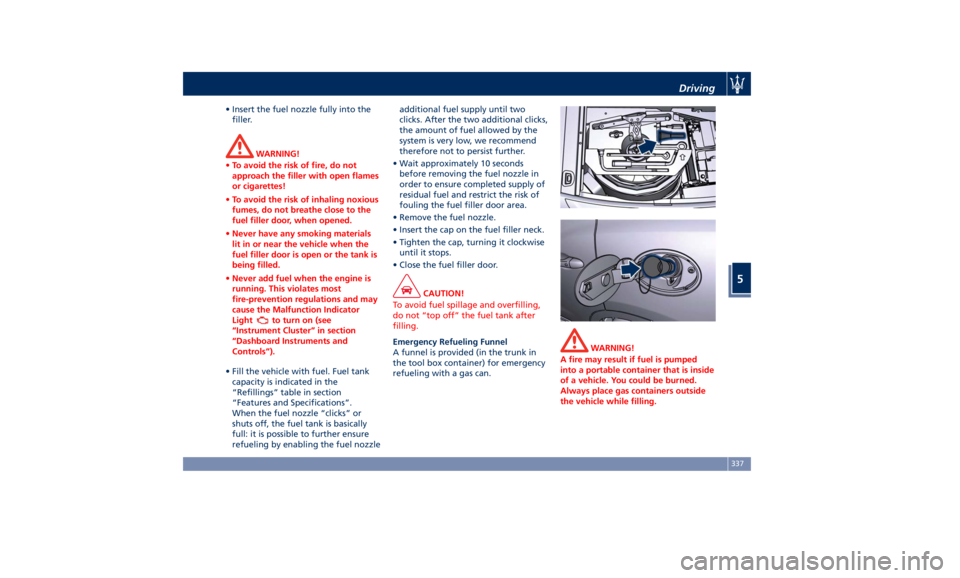
Emergency Refueling Funnel
A
funnel is provided (in the trunk in
the tool box container) for emergency
refueling with a gas can. WARNING!
A fire may result if fuel is pumped
into a portable container that is inside
of a vehicle. You could be burned.
Always place gas containers outside
the vehicle while filling.Driving
5
337
Page 355 of 436
people around you to put their
cigarettes out.
• To extinguish fires, even small ones,
use a fire extinguisher, blankets,
sand or earth. Never use water.
• In multiple accidents occurred on
highways, particularly where
visibility is poor, there is a high risk
of being involved in other collisions.
Leave the vehicle immediately and
move away from the area.
In case of Injured Persons • Never leave the injured person
alone. Persons not directly involved
in the accident are also required to
give assistance.
• Do not crowd around injured
persons.
• Reassure the injured person that
help is on the way.
WARNING!
California Proposition 65
Operating, servicing and maintaining
a passenger vehicle or off-road vehicle
can expose you to chemicals including
such as, engine exhaust, carbon
monoxide, phthalates and lead, that
which are known to the State of
California to cause cancer and birth defects or other reproductive harm. To
minimize exposure, avoid breathing
exhaust, do not idle the engine except
as necessary, service your vehicle in a
well-ventilated area and wear gloves
or wash your hands frequently when
servicing your vehicle. For more
information go to:
www.P65Warnings.ca.gov/passenger-
vehicle
In case of a Punctured Tire The vehicle is equipped with a
compact spare wheel.
Using the Compact Spare
Wheel The automatic leveling of pneumatic
suspensions might create problems
when it is necessary to lift the vehicle
to replace the wheel featuring
punctured tire with the emergency
wheel supplied or with another wheel.
CAUTION!
Before mounting the compact spare
wheel it is necessary to disable the
suspension system by scrolling the user
settings on MTC+ and selecting
“Wheel Replacement Mode” in
“Suspensions” submenu. The tick next
to selected item will indicate that this
mode is active and pneumatic
suspension system is disabled (for
further details, refer to “MTC+
Settings” chapter in section
“Dashboard Instruments and
Controls”). After servicing, restore
original conditions and eliminate the
tick next to selected mode: in this way
the pneumatic suspension system willIn an Emergency
6
351
Page 364 of 436
(Continued)
monoxide, phthalates and lead, that
which are known to the State of
California to cause cancer and birth
defects or other reproductive harm. To
minimize exposure, avoid breathing
exhaust, do not idle the engine except
as necessary, service your vehicle in a
well-ventilated area and wear gloves
or wash your hands frequently when
servicing your vehicle. For more
information go to:
www.P65Warnings.ca.gov/passenger-
vehicle
Towing a Disabled Vehicle Proper towing or lifting equipment is
required to prevent damage to your
vehicle.
CAUTION!
Any improper maneuver and use of
unsuitable equipment for recovering
vehicle in an emergency from off road
location could seriously damage the
vehicle. Contact an Authorized
Maserati Dealer .
Manual Release of Transmission
with Low Battery In order to push or tow the vehicle if
unable to shift the transmission out of
P (Park) (such as a discharged battery),
a manual park release is available. In
this case it is necessary to manually
release the shift lever and release the
parking brake if inserted (see
“Emergency Release of the Parking
Brake” in this section).
Follow the steps as indicated in
“Transmission Manual Release of P
(Park) Position” in this section to
manually disengage the transmission. Vehicle Towing Conditions Maserati only allows vehicle towing
with all four wheels off the ground.
WARNING!
Single axle towing or use of a tow
dolly is not allowed since it will
severely damage vehicle components.
Use the Tow Hook Included in
the Tool Kit CAUTION!
The tow hook should only be used for
towing the car on flat roads. Do not
use the tow hook to remove the car
that is stuck on off road stretches.
The tow hook is also used to tow the
vehicle
on the platform of a tow truck.
Before carrying out this operation, if
the battery of the vehicle still works,
set "Transport Mode" on MTC+ in
"Suspensions" submenu (see "MTC+
Settings" chapter in section
“Dashboard Instruments and
Controls”). With this mode activated,
the ride height will be lowered to the
minimum value and the pneumatic
suspension system will be disabled to
help vehicle loading on the tow truck.In an Emergency
6
360
Page 369 of 436

the next scheduled maintenance is
due or has already overdue.
When the scheduled maintenance has
overdue, the indicator light
and
message will be displayed on the
instrument cluster.
The service indicator and message will
illuminate approximately from 620 mi
(1000 km) or 30 days to the next
scheduled maintenance.
Have your vehicle serviced as soon as
possible. NOTE:
The service indicator will not monitor
the time elapsed from the last
scheduled maintenance.
To check the mi/km and the days that
remain at the inspiration of the next
scheduled maintenance, consult the
“Maintenance” submenu of “VEHICLE
INFO” main menu (see paragraph ”TFT
Dispaly : Warning/Indicator Lights of
the Set Modes/ Functions” in chapter
“Instrument Cluster” of section
“Dashboard Instruments and
Controls” for more details).
An Authorized Maserati Dealer will
reset the service indicator message
after completing the scheduled
maintenance operations.Scheduled Service Plan The Scheduled Maintenance services
listed in this manual must be done
within the times or mileages specified
to protect your vehicle warranty and
ensure the best vehicle performance
and reliability.
More frequent maintenance may be
needed for vehicles in operating
conditions, such as dusty areas,
extremely hot or cold ambient
temperatures and very short trip
driving.
Inspection and service should also be
done anytime a malfunction is
suspected.
Maserati recommends that these
maintenance intervals be performed
at an Authorized Maserati Dealer . The
technicians at your dealership know
your vehicle best, and have access to
factory-approved information,
genuine Maserati parts, and specially
designed electronic and mechanical
tools that can help prevent future
costly repairs.Maintenance and Care
7
365