2019 MASERATI LEVANTE warning dashboard
[x] Cancel search: warning dashboardPage 266 of 436

“NORMAL”, “SPORT ”, “
(Suspension)“ or “I.C.E.” After
selecting this height, once the vehicle
speed goes below 15 mph (24 km/h),
the vehicle height will begin to
lower. To exit “Entry/Exit” mode,
move selector to another position or
drive the vehicle over 15 mph (24
km/h). Automatic lowering of the
vehicle into “Entry/Exit” mode can be
enabled through the MTC+ (refer to
“MTC+ Settings” in section
“Dashboard Instruments and
Controls”). If this feature is enabled,
the vehicle will only lower if the
gearshift lever is in P (Park), the
engine is running, doors and liftgate
are closed and the Pneumatic
Suspension System should be either
in “NORMAL” or “Aero”. The Vehicle
will not automatically lower if the
pneumatic suspension system is in
“Off Road 2” or “Off Road 1” mode.
The lowering will be suppressed
when the ignition is switched off and
a door is opened to prevent setting
the alarm off.
Lowering Vehicle Height for Inactivity
Lowering of vehicle ground clearance
after a long period of inactivity should
be considered normal since it is due to a drop of pressure in the pneumatic
suspension system.
Approximately, after one week of
inactivity, vehicle ground clearance will
lower by 0.4 in (10 mm). To set off the
drop of pressure due to inactivity, it is
necessary to start the engine and allow
some time until system reaches
operating pressure and lifts the vehicle
to set ride height. A message on
instrument cluster display will warn
driver when set ride height is reached.
Driving vehicle before the set riding
height is reached is not safe and could
damage suspension components.
WARNING!
After a long period of vehicle
inactivity, drive only when vehicle
reaches set ride height to prevent any
problems of the pneumatic suspension system from limiting occupants'
safety.
"Launch Control" Mode
(TROFEO version only) "Launch Control" mode is a
performance start procedure.
By activating this procedure you get
the best possible acceleration from
standstill of the car.
This mode allows you to ground the
torque necessary to prevent the
wheels from slipping during
acceleration performance.
To make a performance start in
"Launch Control" mode, the following
conditions must be met:
• Water and transmission temperature
in proper range.
• No engine, AWD and on board
systems faults.
• The vehicle must be traveled at least
440 mi (700 km).
• "CORSA" drive mode on.
• Shift lever in "D" or"M +/-" position.
• The vehicle must be stationary on a
level road surface.
• The driver door closed and the safety
belt fastened.Driving
5
262
Page 272 of 436
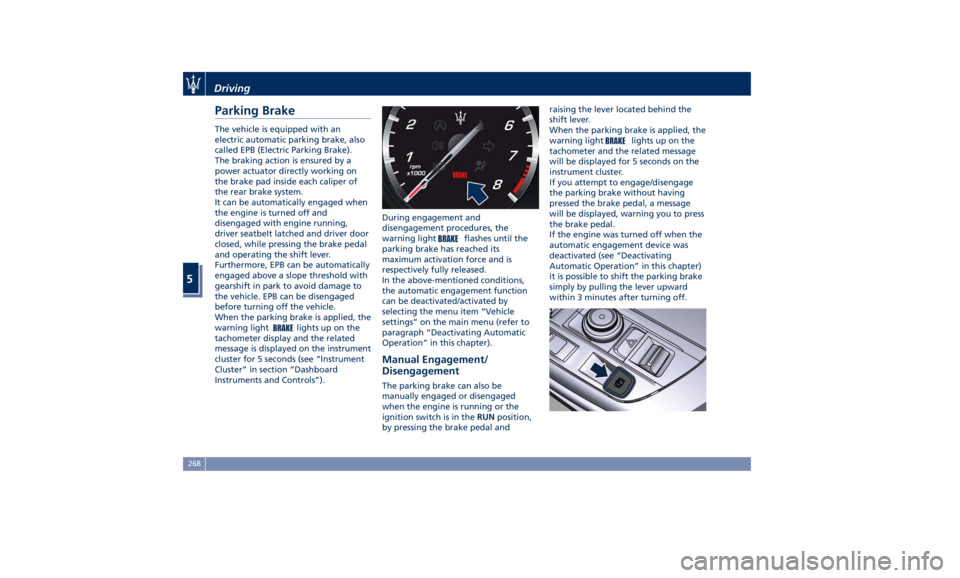
Parking Brake The vehicle is equipped with an
electric automatic parking brake, also
called EPB (Electric Parking Brake).
The braking action is ensured by a
power actuator directly working on
the brake pad inside each caliper of
the rear brake system.
It can be automatically engaged when
the engine is turned off and
disengaged with engine running,
driver seatbelt latched and driver door
closed, while pressing the brake pedal
and operating the shift lever.
Furthermore, EPB can be automatically
engaged above a slope threshold with
gearshift in park to avoid damage to
the vehicle. EPB can be disengaged
before turning off the vehicle.
When the parking brake is applied, the
warning light
lights up on the
tachometer display and the related
message is displayed on the instrument
cluster for 5 seconds (see “Instrument
Cluster” in section “Dashboard
Instruments and Controls”). During engagement and
disengagement procedures, the
warning light
flashes until the
parking brake has reached its
maximum activation force and is
respectively fully released.
In the above-mentioned conditions,
the automatic engagement function
can be deactivated/activated by
selecting the menu item “Vehicle
settings” on the main menu (refer to
paragraph “Deactivating Automatic
Operation” in this chapter).
Manual Engagement/
Disengagement The parking brake can also be
manually engaged or disengaged
when the engine is running or the
ignition switch is in the RUN position,
by pressing the brake pedal and raising the lever located behind the
shift lever.
When the parking brake is applied, the
warning light
lights up on the
tachometer and the related message
will be displayed for 5 seconds on the
instrument cluster.
If you attempt to engage/disengage
the parking brake without having
pressed the brake pedal, a message
will be displayed, warning you to press
the brake pedal.
If the engine was turned off when the
automatic engagement device was
deactivated (see “Deactivating
Automatic Operation” in this chapter)
it is possible to shift the parking brake
simply by pulling the lever upward
within 3 minutes after turning off.Driving
5
268
Page 273 of 436
CAUTION!
The main function of the EPB is to
allow safe parking of the vehicle,
therefore it must only be applied
when the vehicle is already stationary.
If the EPB is used while the vehicle is
moving and decelerating until a speed
lower of 3 mph (5 km/h) and, in
particular, until complete stop
(typically in a sudden brake), it is
necessary to have the EPB system
checked by an Authorized Maserati
Dealer .
WARNING!
• Always hold the brake pedal pressed
during engagement or
disengagement of the parking
brake.
• The EPB command activation while
running generates a deceleration of
the vehicle with strong deceleration
(Dynamic Braking). It is therefore
recommended to use this feature
only in case of emergency. The
stability of the car is guaranteed by
the action of the activated ESC
system. • It is advisable to keep the "Auto
Apply" function always active (On)
so that the vehicle is properly
secured with electric parking brake.
Deactivating Automatic
Operation The automatic engagement function
can be deactivated/reactivated by
selecting the menu item “Vehicle
settings” through the switch on the
right side of the steering wheel (refer
to “Instrument Cluster” in section
“Dashboard Instruments and
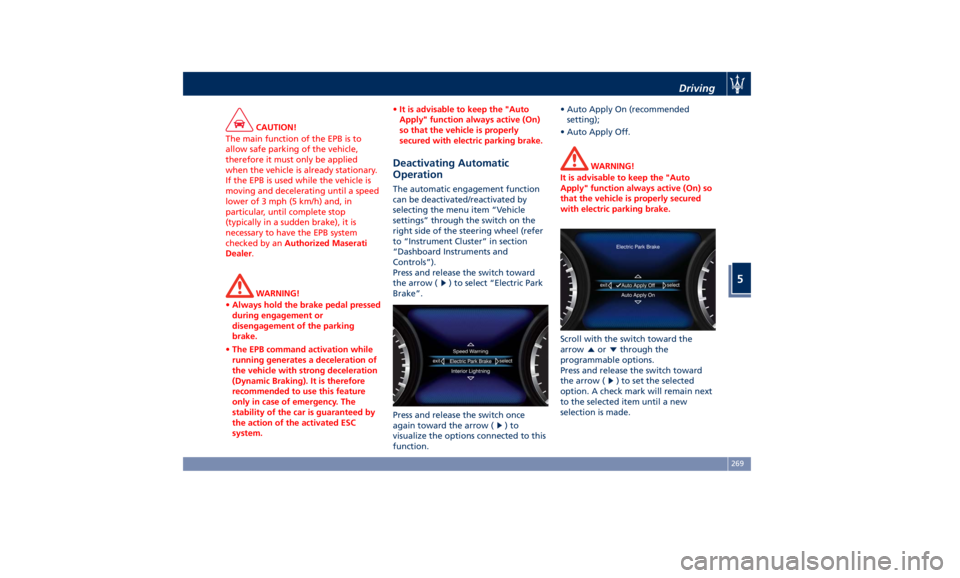
Controls”).
Press and release the switch toward
the arrow (
) to select “Electric Park
Brake”.
Press and release the switch once
again toward the arrow (
)to
visualize the options connected to this
function. • Auto Apply On (recommended
setting);
• Auto Apply Off.
WARNING!
It is advisable to keep the "Auto
Apply" function always active (On) so
that the vehicle is properly secured
with electric parking brake.
Scroll with the switch toward the
arrow
or through the
programmable options.
Press and release the switch toward
the arrow (
) to set the selected
option. A check mark will remain next
to the selected item until a new
selection is made.Driving
5
269
Page 280 of 436

exits from this strategy when the
accelerator pedal is completely
unstuck.
Hill Start Assist (HSA) The HSA system is designed to assist
the driver when starting a vehicle
uphill. HSA will maintain the level of
brake pressure applied for a short
period of time also after releasing the
brake pedal.
If the driver does not apply the
throttle during this short period of
time, the system will release brake
pressure and the vehicle will start
sloping down. The system will release
brake pressure proportionally to the
amount of throttle/torque applied as
the vehicle starts to move in the
chosen direction.
HSA Activation Criteria
The following criteria must be met in
order for HSA to activate:
• vehicle is stationary;
• gear selection matches vehicle uphill
direction (i.e., vehicle facing uphill is
in forward gear; vehicle backing
uphill is in reverse gear).
HSA will work in R (Reverse) and all
forward gears when the activation
criteria have been met. The system will not activate if the
transmission is placed in N (Neutral) or
P (Park).
Roll-Over Mitigation (ROM) This system anticipates the potential
for wheel lift by monitoring the
driver's steering wheel input and the
speed of the vehicle. When ROM
determines that the rate of change of
the steering wheel angle and vehicle's
speed are sufficient to potentially
cause wheel lift, it then applies the
appropriate brake and may also
reduce engine power to lessen the
chance that wheel lift will occur.
ROM will only intervene during very
severe or evasive driving maneuvers.
ROM can only reduce the chance of
wheel lift occurring during severe or
evasive driving maneuvers. It cannot
prevent wheel lift due to other factors,
such as road and off-road conditions,
leaving the roadway, or striking
objects or other vehicles.
WARNING!
Many factors, such as vehicle loading,
road and off-road conditions, and
driving conditions, influence the
chance that wheel lift or rollover may occur. ROM cannot prevent all wheel
lift or roll-overs, especially those that
involve leaving the roadway or
striking objects or other vehicles. The
capabilities of a ROM-equipped
vehicle must never be exploited in a
reckless or dangerous manner, which
could jeopardize the user’s safety or
the safety of others.
Trailer Sway Mitigation (TSM) TSM uses sensors in the vehicle to
recognize an excessively swaying
trailer and will take the appropriate
actions to attempt to stop the sway.
The system may reduce engine power
and apply the brake of the
appropriate wheel(s) to counteract the
sway of the trailer. TSM will become
active automatically once an
excessively swaying trailer is
recognized.
TSM cannot stop all trailers from
swaying. Always use caution when
towing a trailer and follow the trailer
tongue weight recommendations.
Refer to “Trailer Towing” in this
section for further information. When
TSM is functioning, the “ESC
Activation/Malfunction Indicator
Light” will flash (see “Instrument
Cluster” in section “DashboardDriving
5
276
Page 285 of 436
Use of the Engine Breaking-In Today's most modern production
methods are designed to provide
extremely precise construction and
assembly of components. However,
moving parts do undergo a settling
process, basically in the first hours of
vehicle operation.
Do not drive keeping at a constant
high speed rate for a prolonged time.
While cruising, brief full-throttle
acceleration within the limits of local
traffic laws contributes to a good
break-in. Wide-open throttle
acceleration in low gear can be
detrimental and should be avoided.
The engine oil installed in the engine
at the factory is a high-quality energy
conserving type lubricant. Oil changes
should be consistent with anticipated
climate conditions under which vehicle
operations will occur. For the
recommended viscosity and quality
grades, see “Refillings” in section
“Features and Specifications”.
A new engine may consume some oil
during its first few thousand
miles/kilometers of operation. This
should be considered as a normal part of the break-in and not interpreted as
an indication of malfunction.
Specific Requirements
Avoid exceeding 5000 rpm for the first
620 mi trip (1000 km).
After starting the vehicle, do not
exceed 4000 rpm until the engine has
warmed up sufficiently (coolant
temperature: 149-158°F /65 70°).
Trailer Towing
During the first 620 mi (1000 km) of a
new vehicle it is advisable not to tow a
trailer. This allows to limit the load on
the engine and on the other parts of
the vehicle.
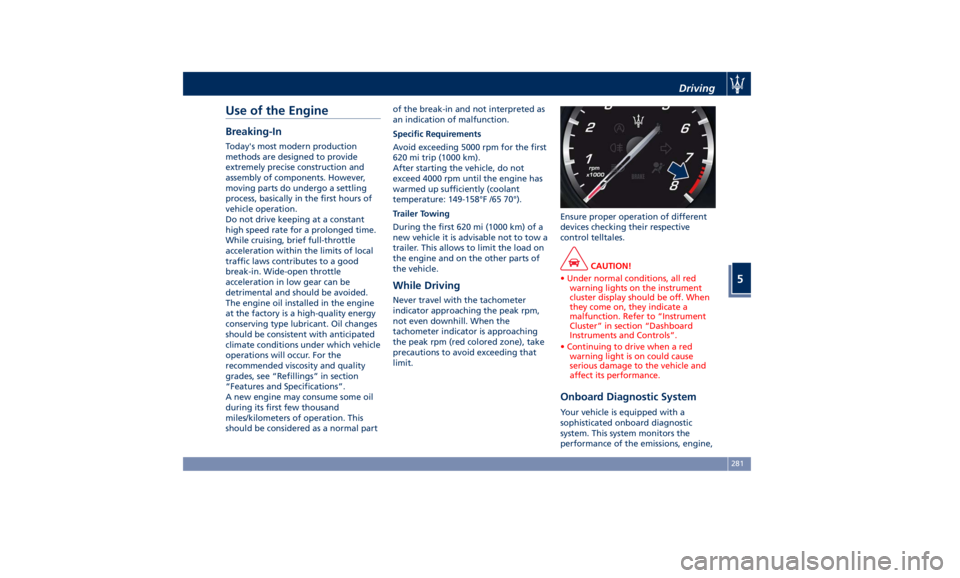
While Driving Never travel with the tachometer
indicator approaching the peak rpm,
not even downhill. When the
tachometer indicator is approaching
the peak rpm (red colored zone), take
precautions to avoid exceeding that
limit. Ensure proper operation of different
devices checking their respective
control telltales.
CAUTION!
• Under normal conditions, all red
warning lights on the instrument
cluster display should be off. When
they come on, they indicate a
malfunction. Refer to “Instrument
Cluster” in section “Dashboard
Instruments and Controls”.
• Continuing to drive when a red
warning light is on could cause
serious damage to the vehicle and
affect its performance.
Onboard Diagnostic System Your vehicle is equipped with a
sophisticated onboard diagnostic
system. This system monitors the
performance of the emissions, engine,Driving
5
281
Page 288 of 436
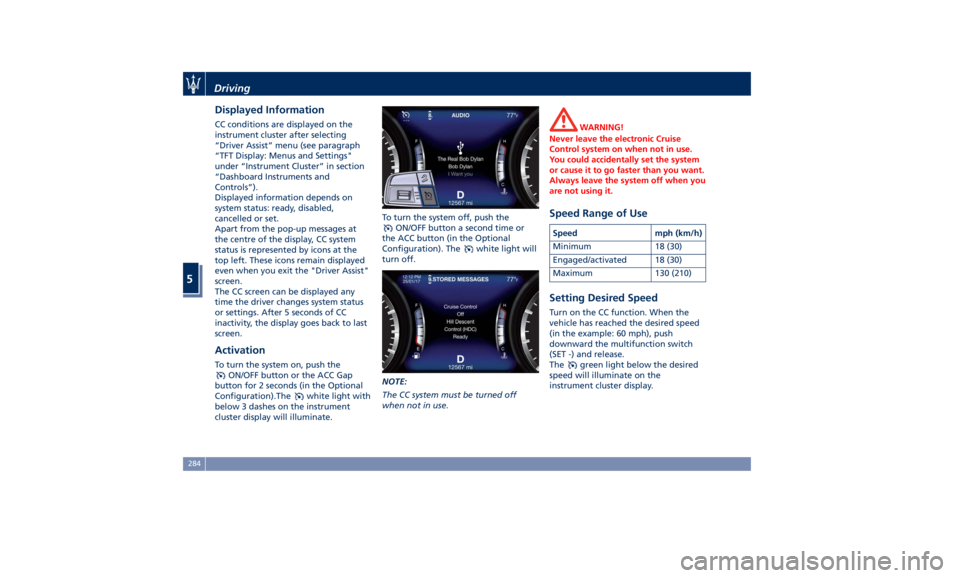
Displayed Information CC conditions are displayed on the
instrument cluster after selecting
“Driver Assist” menu (see paragraph
“TFT Display: Menus and Settings"
under “Instrument Cluster” in section
“Dashboard Instruments and
Controls”).
Displayed information depends on
system status: ready, disabled,
cancelled or set.
Apart from the pop-up messages at
the centre of the display, CC system
status is represented by icons at the
top left. These icons remain displayed
even when you exit the "Driver Assist"
screen.
The CC screen can be displayed any
time the driver changes system status
or settings. After 5 seconds of CC
inactivity, the display goes back to last
screen.
Activation To turn the system on, push the
ON/OFF button or the ACC Gap
button for 2 seconds (in the Optional
Configuration).The
white light with
below 3 dashes on the instrument
cluster display will illuminate. To turn the system off, push the
ON/OFF button a second time or
the ACC button (in the Optional
Configuration). The
white light will
turn off.
NOTE:
The CC system must be turned off
when not in use. WARNING!
Never leave the electronic Cruise
Control system on when not in use.
You could accidentally set the system
or cause it to go faster than you want.
Always leave the system off when you
are not using it.
Speed Range of Use Speed mph (km/h)
Minimum 18 (30)
Engaged/activated 18 (30)
Maximum 130 (210)
Setting Desired Speed Turn on the CC function. When the
vehicle has reached the desired speed
(in the example: 60 mph), push
downward the multifunction switch
(SET -) and release.
The
green light below the desired
speed will illuminate on the
instrument cluster display.Driving
5
284
Page 291 of 436
ahead, the ACC system automatically
kicks in by slightly accelerating or
braking (to avoid exceeding the
initially set speed) so that the vehicle
keeps present distance, trying to
adapt to the speed of the detected
vehicle ahead.
WARNING!
• The Adaptive Cruise Control (ACC) is
designed to increase vehicle driving
comfort. It must not be considered
as a means of replacing the required
attention of the driver. The driver is
always required to drive carefully.
The driver is always required to pay
utmost attention to driving
conditions (road, traffic, weather)
and style (speed, distance from
sensed vehicle ahead, brake use).
Driver has the full responsibility of
the vehicle therefore his attention is
crucial to keeping vehicle control, in
particular when approaching curves
and situations with heavy traffic.
Failure to follow these warnings can
result in a collision and death or
serious personal injury
• In some driving scenarios, the ACC
could have detection problems. In
such cases, the ACC could kick in late or unexpectedly. The driver must be
careful since his/her intervention
could be necessary.
• It is always the driver’s responsibility
to obey speed limits and to keep
minimum legal distance to the
preceding vehicle.
• ACC system can decelerate only with
limited braking, it cannot execute
emergency braking.
The ACC system:
•
Does not activate/react in the
presence of pedestrians, bicycles,
incoming traffic from opposite
direction and steady objects such as
a vehicle stuck in a traffic jam.
• Is meant for the use on highways
and well-built roads, not for city
traffic or mountain roads.
• May not have enough time to react
and/or decelerate sufficiently on
vehicles when lane is changed too
quickly or the relative speed is too
high. In such cases the driver has to
react appropriately and without any
acoustic/visual warning.
• Cannot consider road, traffic and
weather conditions and might prove
limited when visibility is poor.
• Does not always fully recognize
complex driving conditions and this could cause an incorrect assessment
of the required safety distance.
It is recommended to disable the ACC
system in the following instances:
• When driving in the fog, heavy rain,
heavy snow, slush, heavy traffic and
similar complex situations such as
highway construction zones.
• When entering a junction lane or a
slip road to leave the highway; when
driving on narrow, icy, snowy,
slippery roads, or on uphill and
downhill roads.
• The system is designed and calibrate
for car with no trailer.
• When circumstances do not allow to
drive safely at constant speed.
Displayed information Adaptive Cruise Control (ACC)
condition, as well as the LKA and HAS
status, is displayed on instrument
cluster after selecting “Driver Assist”
menu (see paragraph “TFT Display:
Menus and Settings” under
“Instrument Cluster” in section
“Dashboard Instruments and
Controls”).
Displayed information depends on
system status: ready, set, temporarily
cancelled or override.Driving
5
287
Page 305 of 436
Lane Keeping Assist - LKA
(optional, with ACC only) This system was designed especially
for highway or freeway driving, to
reduce the risk that the vehicle, under
particular circumstances, accidentally
departs from the lane in use. When
this happens, graphic instructions on
instrument cluster display together
with steering torque application and
steering wheel vibration (depending
on the distance to the line) warn the
driver that the vehicle is going out of
the lane and initiate a steering
maneuver to try to prevent the lane
exit.
To detect lane lines, the system uses
the forward-facing camera behind of
the rear-view mirror, which is the same
one used also by the lighting system
to manage the automatic high beams.
The logic core is in the front radar.
LKA system remembers the condition
it was in before turning off the
vehicle.
Refer to “MTC+ "Controls" Screen” in
section “Dashboard Instruments and
Controls” for further information. NOTE:
In case of wet road or raining
conditions the function could be
disabled by the system in order to
minimize the risks.
Speed Range of Use Speed mph (km/h)
Minimum 37 (60)
Engaged/activated 37 (60)
Maximum 112 (180)
Customized Settings LKA is configurable by the driver in
order to maximize its efficiency based
on the driver driving style and the
expectation of the system, reducing at
the same time the possible
invasiveness.
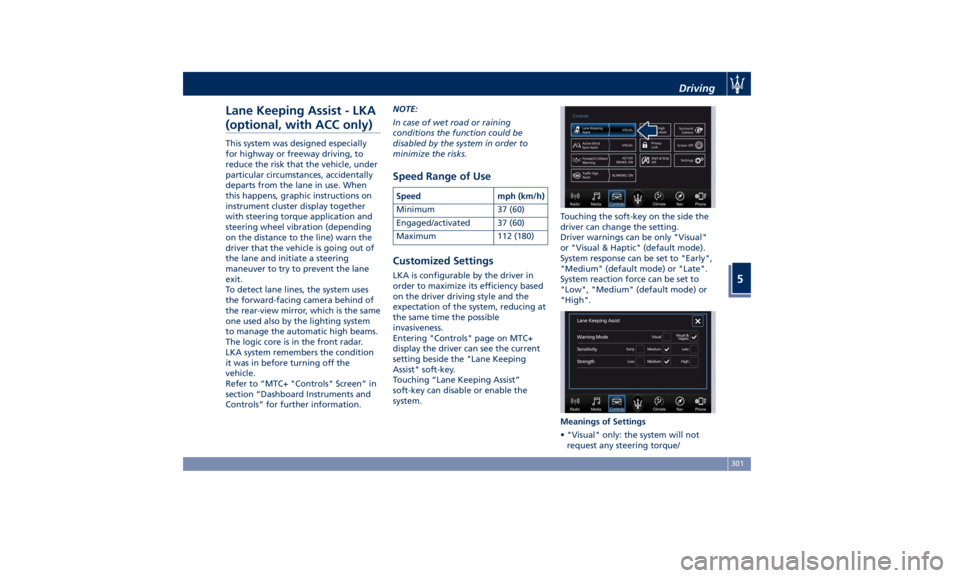
Entering "Controls" page on MTC+
display the driver can see the current
setting beside the "Lane Keeping
Assist" soft-key.
Touching “Lane Keeping Assist”
soft-key can disable or enable the
system. Touching the soft-key on the side the
driver can change the setting.
Driver warnings can be only "Visual"
or "Visual & Haptic" (default mode).
System response can be set to "Early",
"Medium" (default mode) or "Late".
System reaction force can be set to
"Low", "Medium" (default mode) or
"High".
Meanings of Settings
• "Visual" only: the system will not
request any steering torque/Driving
5
301