Page 111 of 384

Adjustable Pedals (if
equipped) The adjustable pedals system is
designed to allow greater range of
pedals positions enabling driver
comfort with regard to the steering
wheel tilt and the seat position.
This feature allows the brake and
accelerator pedals to move toward or
away from the driver’s feet.
The switch is located on the front side
of the driver's seat cushion shield.
Press the switch downward to move
the pedals forward (toward the front
of the vehicle).
Lift the switch upward to move the
pedals rearward (toward the driver).
WARNING!
Do not adjust the pedals position while the vehicle is moving. You could
lose control and have an accident.
Always adjust the pedals position
while the vehicle is parked.
The following messages will be
displayed if the
driver is attempting to
adjust the pedals when the system is
locked out:
• “Adjustable Pedals Unavailable
While Reversing”;
• or “Adjustable Pedals Unavailable
While Cruise Engaged”.
NOTE:
For vehicles equipped with driver
memory seat, use your key fob (RKE)
transmitter or the memory buttons on
the driver's door trim panel to return
the adjustable pedals to programmed
positions. See “Driver Memory Seat”
in section “Understanding the
Vehicle” for further information.
CAUTION!
Do not place any object under the
adjustable pedals or obstruct their
movements as it may cause damage to
the pedal controls. Pedal movement
may become limited if there is an
obstruction in the adjustable pedal's
path.Rearview Mirrors External Mirrors External mirrors can be adjusted
electrically and are equipped with
anti-mist resistors operated by the air
conditioning system (see “Air
Conditioning Controls” in section
“Dashboard Instruments and
Controls”).
The mirrors can be closed electrically
and will yield in both directions in case
of a collision.
The external mirrors are
electrochromic, which means, they
automatically operate an anti-glare
function by gradually shading as the
light hitting the mirrors increases.
The external rear-view electrochromic
mirrors work in conjunction with the
internal rear-view electrochromic
mirror.
NOTE:
• The mirrors can be adjusted
electrically only with the ignition
device in ACC and RUN position.
• When the vehicle is started, the
indicator light shown in the picture
will momentarily illuminate in both
outside rear-view mirrors to let the
driver know that the BSA system is
(Continued)Understanding the Vehicle
3
107
Page 132 of 384
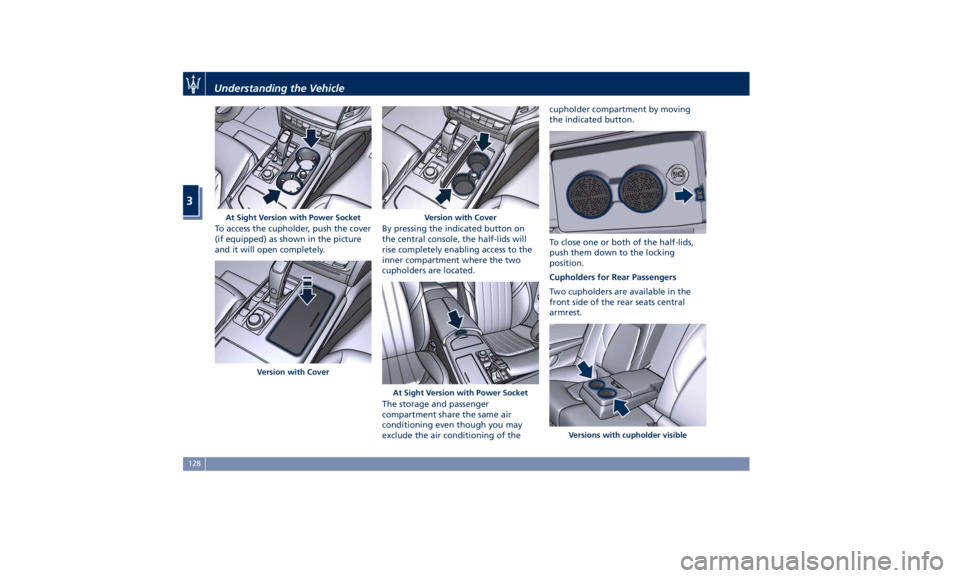
To access the cupholder, push the cover
(if equipped) as shown in the picture
and it will open completely. By pressing the indicated button on
the central console, the half-lids will
rise completely enabling access to the
inner compartment where the two
cupholders are located.
The storage and passenger
compartment share the same air
conditioning even though you may
exclude the air conditioning of the cupholder compartment by moving
the indicated button.
To close one or both of the half-lids,
push them down to the locking
position.
Cupholders for Rear Passengers
Two cupholders are available in the
front side of the rear seats central
armrest.At Sight Version with Power Socket
Version with Cover Version with Cover
At Sight Version with Power Socket
Versions with cupholder visibleUnderstanding the Vehicle
3
128
Page 146 of 384
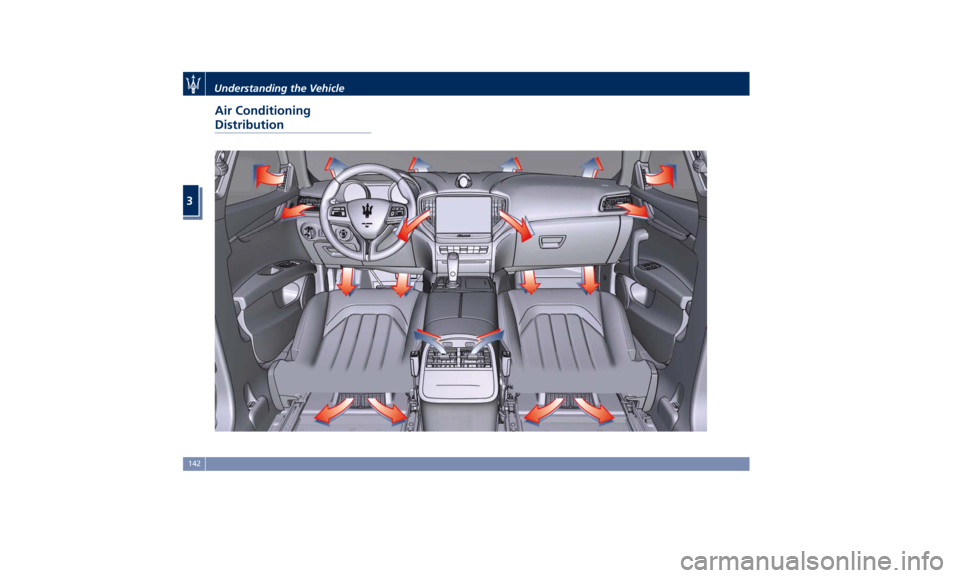
Air Conditioning
Distribution Understanding the Vehicle
3
142
Page 148 of 384
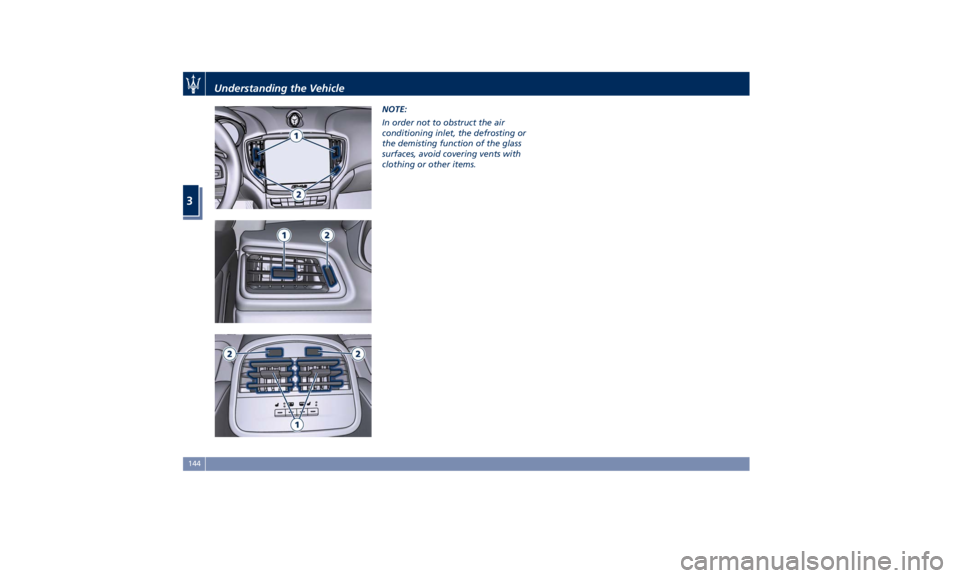
NOTE:
In order not to obstruct the air
conditioning inlet, the defrosting or
the demisting function of the glass
surfaces, avoid covering vents with
clothing or other items.
Understanding the Vehicle
3
144
Page 149 of 384
4 – Dashboard Instruments and Controls Instrument Cluster ...................................... 146
Infotainment System .................................... 169
Audio Controls ......................................... 176
Audio System .......................................... 177
MTC+ “Controls” Screen ................................. 179
MTC+ Settings ......................................... 183
Dashboard Compartment ................................ 194
Analog Clock .......................................... 197
Air Conditioning Controls ................................ 197
Phone and Voice Controls on Steering Wheel ................. 204
145
Page 173 of 384

Adaptive Cruise Control (ACC) Fault (if
equipped)
This warning light turns on
when ACC is not operating or
needs servicing, For further
details, refer to “Adaptive
Cruise Control - ACC” in section
“Driving”.
Blind Spot Assist (BSA) Failure
Warning Light
This warning light and related
message light on to report a
failure of the BSA system.
As consequence, on vehicles
equipped with ABSA also this latter
will be not working or
malfunctioning.
Contact an Authorized Maserati
Dealer as soon as possible avoiding to
use this system.
Headlight On Indicator
This indicator will illuminate
when the position lights or
headlights are turned on.
For further details, see
“Lights” in section “Understanding
the Vehicle”.
Automatic High Beam On Indicator
This indicator turns on when
the “Auto High Beam Assist”
feature is set on MTC+ (see “MTC+ Settings” in this section).
Gear Shift Indicator Light
This indicator lights up to
indicate gear shift change in
order to optimize fuel
consumption.
See “Drive Mode” in section
“Driving” for further
information.
Service AWD System Message (AWD
version only)
The message and the warning light on
the TFT display will illuminate when
all-wheel drive feature requires
service. For further information refer
to “All-Wheel Drive” in section
“Driving”.Infotainment System The vehicle is equipped with the
infotainment Maserati Touch Control
Plus (MTC+) System, an advanced user
interface which combines innovative
and exclusive technical features
integrating entertainment, user
settings, air conditioning, navigation,
communication and information
features within a single system.
The MTC+ System features an audio
system which is acoustically optimized
for this specific vehicle.
WARNING!
The navigation system assists the
driver while driving, providing advice
and suggestions, by voice guidance
and graphic information, for the best
route to reach the set destination. The
suggestions provided by the
navigation system do not relieve the
driver from full responsibility for the
maneuvers made through traffic while
driving, or from compliance with road
regulations and other provisions
regarding road traffic. The person
driving the vehicle is always and in
any case responsible for safe driving
on the road.Dashboard Instruments and Controls
4
169
Page 176 of 384

3. “Controls ” softkey
Touch this soft-key to access the
features of some driver assistance
system (ADAS) that can be set up (if
equipped). Features can be selected
and adjusted or turned on/off by
touching the related soft-key (see
"MTC+ "Controls" Screen" in this
section).
4.
softkey
Touch this softkey to access
Applications / settings screen.
5. “Climate ” softkey
Touch this soft-key to access the air
conditioning settings. In this screen
the following controls are also
available: Heated Seats, Heated
Steering Wheel and Ventilated
Seats. See “Air Conditioning
Controls” in this section for further
details.
6. “Nav ” softkey
Touch this softkey to access the
Navigation feature. Refer to the
MTC+ instruction manual for further
details.
7. “Phone ” softkey
Touch one of these softkey to access
the MTC+ Phone feature that can be
set or monitored via MTC+. Touch one of these soft-key to access
the list of functions that users can set.
Touchscreen Display Warnings
CAUTION!
• Do NOT attach any object to the
touchscreen, doing so can result in
damage to the touchscreen.
• Do not press the screen with any
hard or sharp objects (pen, USB stick,
jewelry, etc.) which could scratch the
touchscreen surface.
• Do not spray any liquid or caustic
chemicals directly on the screen. Use
a clean and dry micro fiber lens
cleaning cloth in order to clean the
touchscreen.
• If necessary, use a lint-free cloth
dampened with a cleaning solution,
such as isopropyl alcohol, or an
isopropyl alcohol and water solution
ratio of 50:50. Be sure to follow the
solvent manufacturer’s precautions
and directions.
Switch OFF Touchscreen Backlight
If
the screen backlight becomes
annoying when driving, it is possible to
switch it off. Switch off the screen backlight by
touching “Screen OFF” softkey in the
“Controls” screen of MTC+ display.
Customizing the Main Menu
Bar The softkeys for the main functions of
the MTC+ system, indicated at the
bottom of the MTC+ display, can be Without ADAS
With ADASDashboard Instruments and Controls
4
172
Page 201 of 384

Analog Clock To adjust the analog clock located on
the center of the dashboard above the
MTC+ display, use the MTC+ System
(see “MTC+ Settings” in this section).
The time can be displayed also on the
MTC+ status bar and on the
instrument cluster display (see “MTC+
Settings” in this section).
Clock lighting works in the same way
as instrument and controls
backlighting (refer to “Lights” in
section “Understanding the Vehicle”). Air Conditioning Controls The vehicle is equipped with an
automatic dual-zone air conditioning
system that allows to adjust separately
the temperature and the airflow
distribution in the left and in the right
zone of the passenger compartment,
according to the requests of the driver
and the front passenger.
A humidity sensor, positioned on the
inner surface of the windshield, over
the rear view mirror, allows the A/C
system to prevent/eliminate fogging
of the windshield and side windows.
The best efficacy in preventing
fogging is obtained by selecting the
“AUTO” function, described later.
A dual zone solar sensor helps to
achieve the best comfort in presence
of solar radiation.
Dual Zone Climate Controls This system can be operated by using
the controls of the automatic climate
control panel on the dashboard, or
the softkeys on the MTC+ display
when “Climate” mode is selected.
In the "Climate" screen of the MTC+,
the front seats and steering wheel
comfort setting soft-keys may be
present (optional equipments). The “OFF” state of the front seats
comfort setting is shown on their
soft-key.
Front seats and steering wheel
comfort setting soft-keys are present
even when the A/C is off (see "Front
Seats" and/or "Steering Wheel
Adjustment" in section
"Understanding the Vehicle" for
further details).
When the MTC+ System is in any mode
other than “Climate” (“Radio”,Dashboard Instruments and Controls
4
197