Page 126 of 645
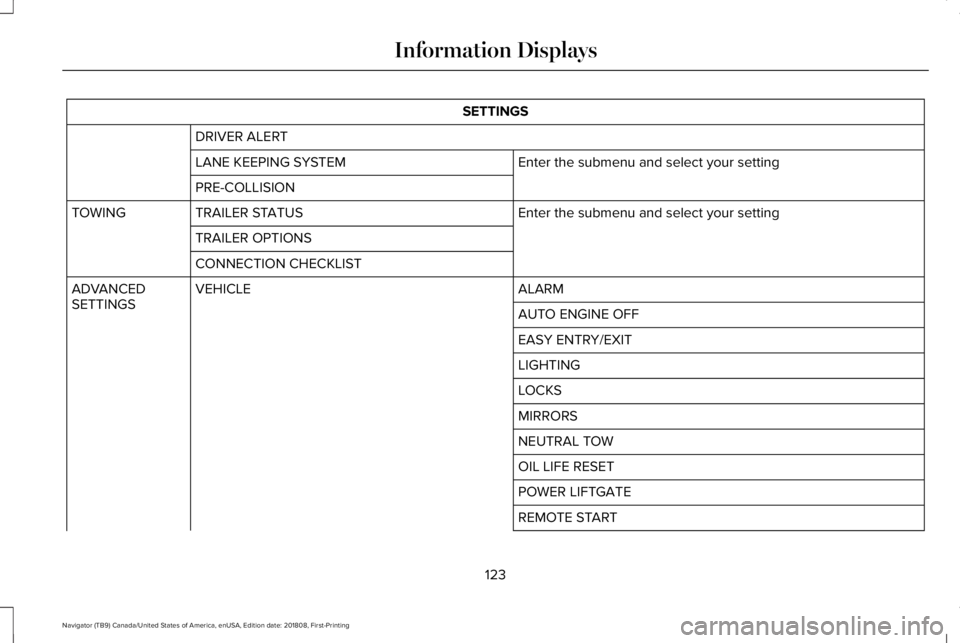
SETTINGS
DRIVER ALERT
Enter the submenu and select your settingLANE KEEPING SYSTEM
PRE-COLLISION
Enter the submenu and select your settingTRAILER STATUSTOWING
TRAILER OPTIONS
CONNECTION CHECKLIST
ALARMVEHICLEADVANCEDSETTINGSAUTO ENGINE OFF
EASY ENTRY/EXIT
LIGHTING
LOCKS
MIRRORS
NEUTRAL TOW
OIL LIFE RESET
POWER LIFTGATE
REMOTE START
123
Navigator (TB9) Canada/United States of America, enUSA, Edition date: 201808, First-Printing
Information Displays
Page 128 of 645

INFO/TRIP/FUEL
TIRE PRESSURE
TRAILER INFORMATION
•NO CONTENT - Displays a blank area.
•TRIP 1 - Displays distance traveled,average fuel economy, and time spentfor trip. Press and hold OK to reset.
•TRIP 2 information is the same asTRIP 1.
•FUEL ECONOMY - Displays yourvehicle's average fuel economy. Pressand hold OK to reset.
•SEATBELTS - Displays a graphic of theconnection status of the rear seatbelts.
•TIRE PRESSURE - Displays a graphic ofcurrent vehicle tire pressures.
•TRAILER INFORMATION - Displays thetransmission temperature and trailer gain.
Head Up Display (If Equipped)
See Head Up Display (page 148).
Phone
See General Information (page 441).
Audio
See General Information (page 441).
Navigation (If Equipped)
See General Information (page 441).
INFORMATION MESSAGES
Note: Depending on your vehicle optionsand instrument cluster type, not all of themessages will display or be available. Certain messages may be abbreviated orshortened depending upon which clustertype you have.
Press the OK button to acknowledge andremove some messages from the informationdisplay. Other messages will be removedautomatically after a short time.
Certain messages need to be confirmedbefore you can access the menus.
125
Navigator (TB9) Canada/United States of America, enUSA, Edition date: 201808, First-Printing
Information DisplaysE222314
Page 133 of 645
Doors and Locks
ActionMessage
The door listed is not completely closed.X Door Ajar
The luggage compartment is not completely closed.Trunk Ajar
The driver’s door is opened, your vehicle is in park and the engine is on.Engine ON
Displays when the hood is not completely closed.Hood Ajar
Displays when the door switches have been disabled.Switches Inhibited Security Mode
There is a system malfunction with the child locks. Contact an authorized dealer as soon aspossible.Child Lock Malfunction Service Required
Displays the factory keypad code after the keypad has been reset. See Keyless Entry (page76).Factory Keypad Code {X X X X X}
Driver Alert
ActionMessage
Stop and rest as soon as it is safe to do so.Driver Alert Warning Rest Now
Take a rest soon.Driver Alert Warning Rest Suggested
130
Navigator (TB9) Canada/United States of America, enUSA, Edition date: 201808, First-Printing
Information Displays
Page 153 of 645
Head-Up Display (HUD)
Turns the HUD on and off.HUD On
Follow onscreen directions to confirm or modify your settings.Brightness
Follow onscreen directions to confirm ormodify your settings.Vertical PositionHUD Adjustments
Image Rotation
Turns the distance to empty, time and temperature on and off.HUD Content
Select Your SettingCruise and Lane Control
Note:When you save a memory preset position, your current HUD settings are also saved to that memory preset position. See MemoryFunction (page 167).
150
Navigator (TB9) Canada/United States of America, enUSA, Edition date: 201808, First-Printing
Information Displays
Page 170 of 645

You can also adjust this feature through thetouchscreen.
Press the Menu Settings icon, thenVehicle. Choose Multi-ContourSeats.
When switched on, the system displaysdirections for you to adjust the lumbarsettings in your seat or to set the massagefunction.
To access and make adjustments to thelumbar setting:
1.Choose the seat you would like to adjust.
2. Press the + or - to adjust the lumbarintensity.
To access and make adjustments to themassage setting:
1. Press the Menu Settings icon, thenVehicle. Choose Multi-Contour Seats.
2.Choose the seat you would like to adjust.
3. Press OFF, Low or High.
MEMORY FUNCTION
WARNING: Before activating thememory seat, make sure that the areaimmediately surrounding the seat is clearof obstructions and that all occupants areclear of moving parts.
WARNING: Do not use the memoryfunction when your vehicle is moving.
Driver Seat Memory
This feature automatically recalls the positionof the following:
•Driver seat.
•Power mirrors.
•Power adjustable foot pedals.
•Power steering column.
The memory control is on the driver door.
Saving a PreSet Position
1. Switch the ignition on.
2. Adjust the memory features to yourdesired position.
3.Press and hold the desired preset buttonuntil you hear a single tone.
167
Navigator (TB9) Canada/United States of America, enUSA, Edition date: 201808, First-Printing
SeatsE142607 E222235
Page 171 of 645

You can save up to three preset memorypositions. You can save a memory preset atany time.
Recalling a PreSet Position
Press and release the preset buttonassociated with your desired driving position.The memory features move to the positionstored for that preset.
Note:You can only recall a driver seat presetmemory position when the ignition is off, orwhen the transmission is in park (P) orneutral (N) (and your vehicle is not moving)if the ignition is on.
You can also recall a preset memory positionby:
•Pressing the unlock button on yourintelligent access key fob if it is linked toa preset position.
•Unlocking the intelligent driver doorhandle if a linked key fob is present.
•Recalling a personal profile in your SYNC3 menu.
Note:Using a linked keyfob to recall yourmemory position when the ignition is offmoves the seat to the Easy Entry position.
Note:Pressing any active memory featureadjustment control (or any memory button)during a memory recall cancels theoperation.
Easy Entry and Exit Feature
If you enable the easy entry and exit feature,it automatically moves the driver seatposition rearward up to 2 in (5 cm) when youswitch the ignition off.
The driver seat returns to its previousposition when you switch the ignition on.
You can switch this feature on or off in theinformation display. See InformationDisplays (page 120).
Passenger Seat Memory
This feature automatically recalls the positionof the passenger seat. The memory controlis on the passenger door.
Saving a PreSet Position
1. Adjust the passenger seat to yourdesired position.
2.Press and hold the desired preset buttonuntil you hear a single tone.
You can save up to three preset memorypositions. You can save a memory preset atany time.
Recalling a PreSet Position
Press and release the preset buttonassociated with your desired position. Thepassenger seat features move to the positionstored for that preset. You can recall apassenger seat preset memory at any time.
168
Navigator (TB9) Canada/United States of America, enUSA, Edition date: 201808, First-Printing
Seats
Page 172 of 645

Personal Profiles
This feature allows you to create multiplepersonal profiles enabling users topersonalize vehicle’s settings. You cancreate one profile for each preset memoryseat button along with a guest profile. Youcan recall a profile using SYNC 3 or thepreset button you selected when you createdyour profile. You can also link a keyfob toyour profile, which is used to recall it.
Creating a Personal Profile
Use the SYNC display to create a personalprofile.
1. Switch the ignition on and leave thevehicle in park (P).
2.Select the Personal Profiles button underSettings.
3. Follow the instructions on the display.
Linking a Personal Profile to your RemoteControl or Intelligent Access Keyfob
You can save preset memory positions forup to three remote controls or intelligentaccess (IA) keys, by assigning a keyfob to apersonal profile in your SYNC 3.
Use the SYNC display to link a keyfob to apersonal profile.
1. Switch the ignition on and leave thevehicle in park (P).
2.Select the Personal Profiles button underSettings.
3. Touch the arrow for the profile you wishto link a keyfob to.
4. Select the Link Keyfob button.
5. Follow the instructions on the display.
Note:If more than one linked remote controlor intelligent access key is in range, thememory function moves to the settings ofthe first key to initiate a memory recall.
Note:The guest profile consists of existingsettings when there is no driver profilecreated. After you create a driver profile, theguest profile serves as an additional driverprofile.
Note:You cannot link a personalized name,a memory seat button or a keyfob to a guestprofile.
Personal Settings
Personal profiles allow you to personalizepositional settings such as seats and mirrors,as well as non-positional settings such asradio, navigation, driver assist and systemsettings. See SYNC™ 3 (page 441). Youcannot change the menu locations andsettings of those personalized features withpersonal profiles.
Note:Non-positional settings are saved tothe active driver profile whenever youchange a setting.
Note:You can save positional settings if youpress and hold a memory seat button. SeeSettings (page 504).
169
Navigator (TB9) Canada/United States of America, enUSA, Edition date: 201808, First-Printing
Seats
Page 173 of 645

Recalling and Changing a Profile
You can recall a profile by:
•Using a keyfob that has been linked to adriver profile to access the remote startfeature, press an unlock button or openthe door with the exterior door handle.
•Pressing a memory seat button that hasbeen linked to a driver profile.
•Using the Personal Profiles menu on theSYNC touchscreen.
Note:The recalled profile replaces thepreviously active profile. If the active profileis not your desired profile, you can changeit using any of the three methods listed.
When you switch on the personal profilesfeature:
•Unlocking a door with a keyfob that isnot linked to a driver profile recallsnon-positional settings from the guestprofile. It will not change the positionalsettings.
•Pressing a memory seat button that isnot linked to a driver profile or has notbeen saved to a preset setting recallsnon-positional settings from the guestprofile. It will not change the positionalsettings.
•Pressing a memory seat button that isnot linked to a driver profile but has beensaved to a preset setting recallsnon-positional settings from the guestprofile. It recalls the positional settingsthat you saved to that memory seatbutton.
See SYNC™ 3 Troubleshooting (page 524).
When you switch off the personal profilesfeature:
•Unlocking a door with a keyfob recallsnon-positional settings from the guestprofile and still recalls positional settingsfrom the driver profile which the keyfobhad been linked to.
•Pressing a memory seat button that hasnot been linked to a driver profile or hasnot been saved to a preset setting recallsnon-positional settings from the guestprofile. It will not change the positionalsettings.
•Pressing a memory seat button that hasbeen linked to a driver profile or hassaved to a preset setting recallsnon-positional settings from the guestprofile. It recalls the positional settingsthat you saved to that memory seatbutton.
170
Navigator (TB9) Canada/United States of America, enUSA, Edition date: 201808, First-Printing
Seats