Page 437 of 476
4378-2. Customization
8
Vehicle specifications
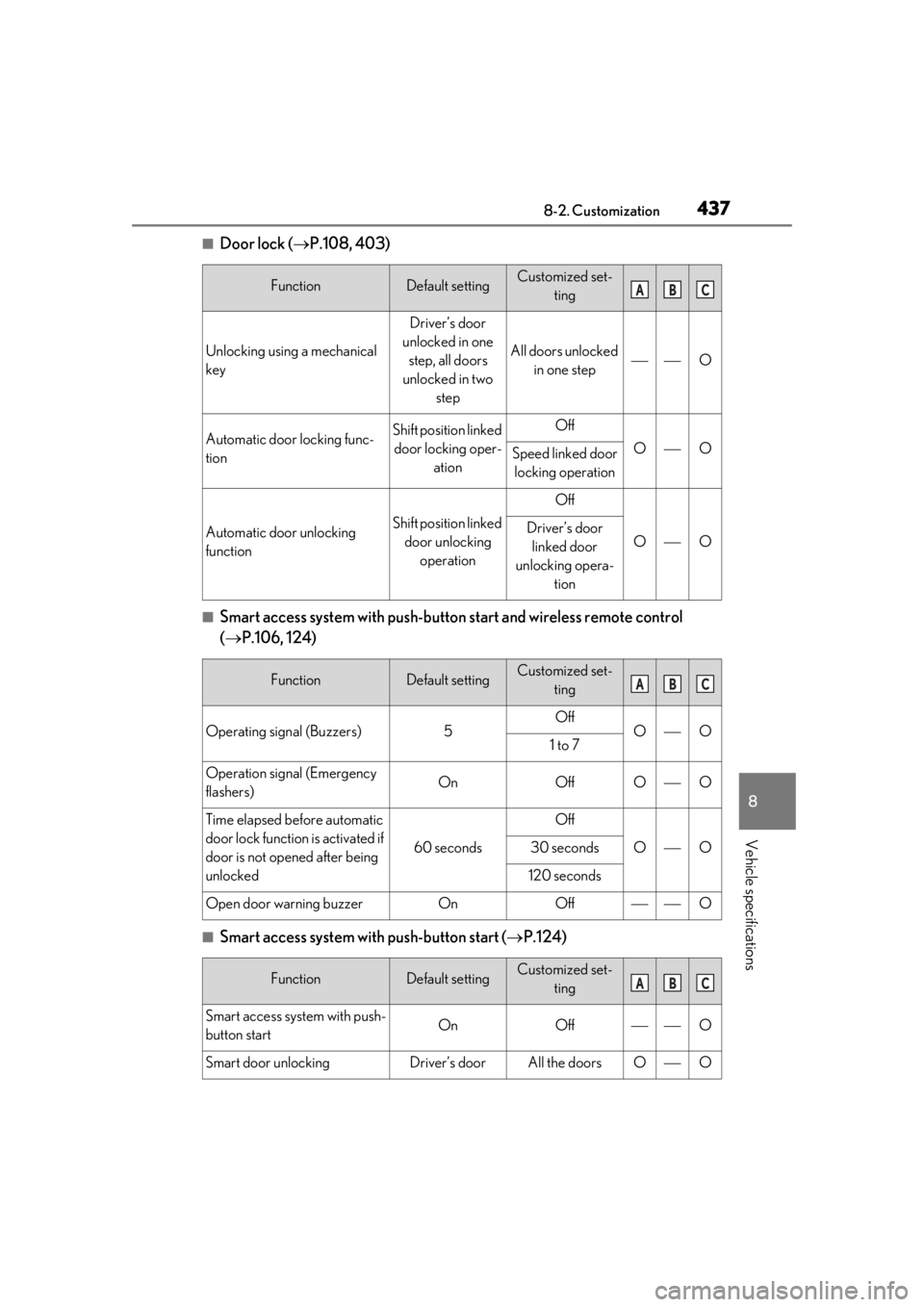
■Door lock (P.108, 403)
■Smart access system with push-butto n start and wireless remote control
( P.106, 124)
■Smart access system with push-button start ( P.124)
FunctionDefault settingCustomized set-
ting
Unlocking using a mechanical
key
Driver’s door
unlocked in one step, all doors
unlocked in two step
All doors unlocked in one stepO
Automatic door locking func-
tionShift position linked door locking oper- ationOff
OOSpeed linked door locking operation
Automatic door unlocking
functionShift position linked door unlocking operation
Off
OODriver’s door linked door
unlocking opera- tion
FunctionDefault settingCustomized set-ting
Operating signal (Buzzers)5OffOO1 to 7
Operation signal (Emergency
flashers)OnOffOO
Time elapsed before automatic
door lock function is activated if
door is not opened after being
unlocked
60 seconds
Off
OO30 seconds
120 seconds
Open door warning buzzerOnOffO
FunctionDefault settingCustomized set-ting
Smart access system with push-
button startOnOffO
Smart door unlockingDriver’s doorAll the doorsOO
ABC
ABC
ABC
Page 438 of 476
4388-2. Customization
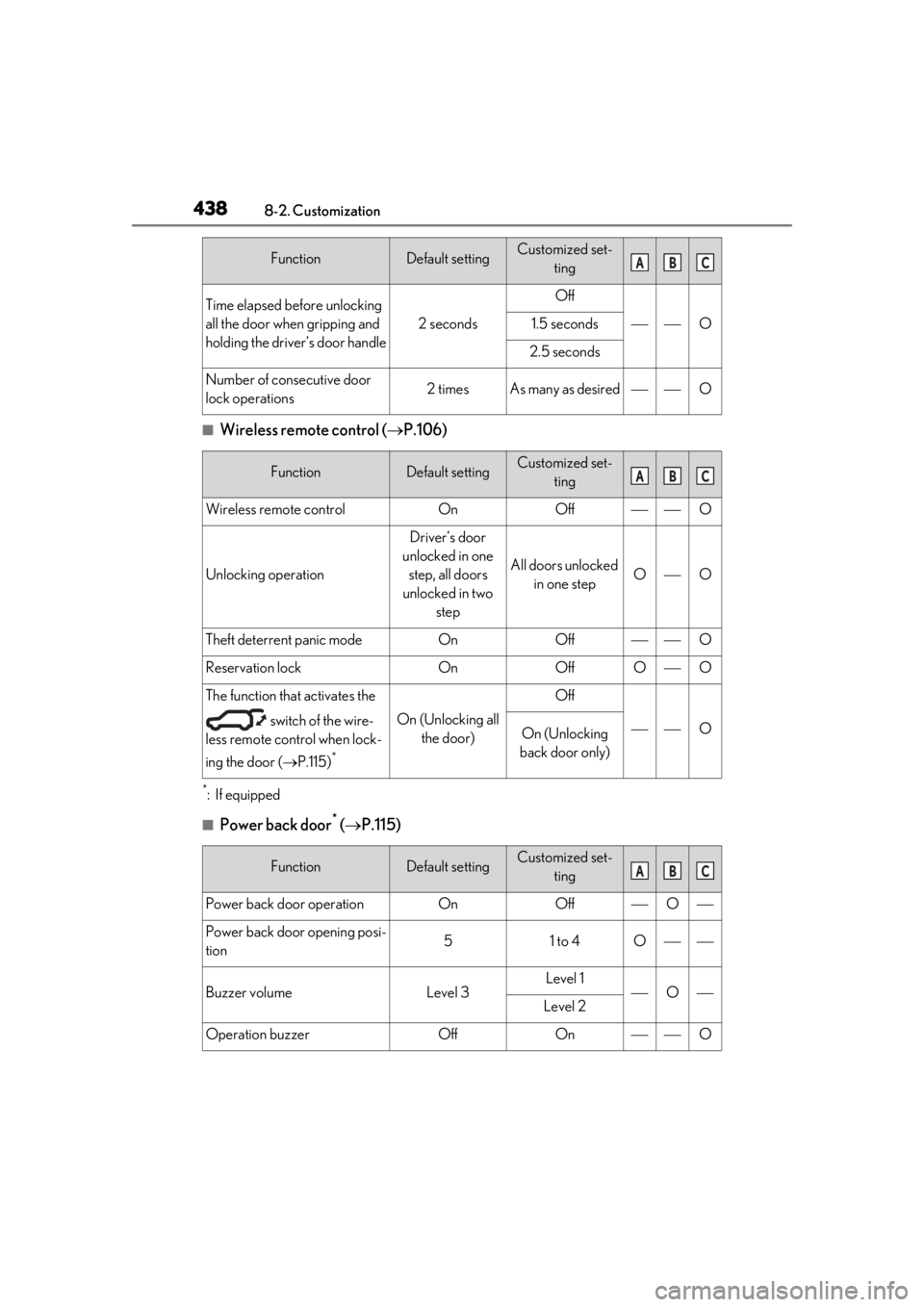
■Wireless remote control (P.106)
*:If equipped
■Power back door* ( P.115)
Time elapsed before unlocking
all the door when gripping and
holding the driver’s door handle
2 seconds
Off
O1.5 seconds
2.5 seconds
Number of consecutive door
lock operations2 timesAs many as desiredO
FunctionDefault settingCustomized set-
ting
Wireless remote controlOnOffO
Unlocking operation
Driver’s door
unlocked in one step, all doors
unlocked in two step
All doors unlocked in one stepOO
Theft deterrent panic modeOnOffO
Reservation lockOnOffOO
The function that activates the
switch of the wire-
less remote control when lock-
ing the door ( P.115)
*
On (Unlocking all
the door)
Off
OOn (Unlocking
back door only)
FunctionDefault settingCustomized set- ting
Power back door operationOnOffO
Power back door opening posi-
tion51 to 4O
Buzzer volumeLevel 3Level 1OLevel 2
Operation buzzerOffOnO
FunctionDefault settingCustomized set-tingABC
ABC
ABC
Page 440 of 476
4408-2. Customization
■Power windows and moon roof* ( P.145, 147)
*:If equipped
■Automatic light control system ( P.177)
■Lights ( P.177)
*1:Except for Canada
*2: If equipped
FunctionDefault settingCustomized set-
ting
Mechanical key linked opera-
tionOffOnO
Wireless remote control linked
operationOffOn (open only)O
Wireless remote control linked
operation signal (buzzer)OnOffO
FunctionDefault settingCustomized set-ting
Light sensor sensitivityStandard-2 to 2OO
Time elapsed before headlights
automatically turn off after
doors are closed
30 seconds
Off
OO60 seconds
90 seconds
Windshield wiper linked head-
light illuminationOnOffO
FunctionDefault settingCustomized set-ting
Daytime running lightsOnOff*1OO
Welcome lightingOnOffO
AFS (Adaptive Front-Lighting
System)
*2OnOffO
ABC
ABC
ABC
Page 441 of 476
4418-2. Customization
8
Vehicle specifications
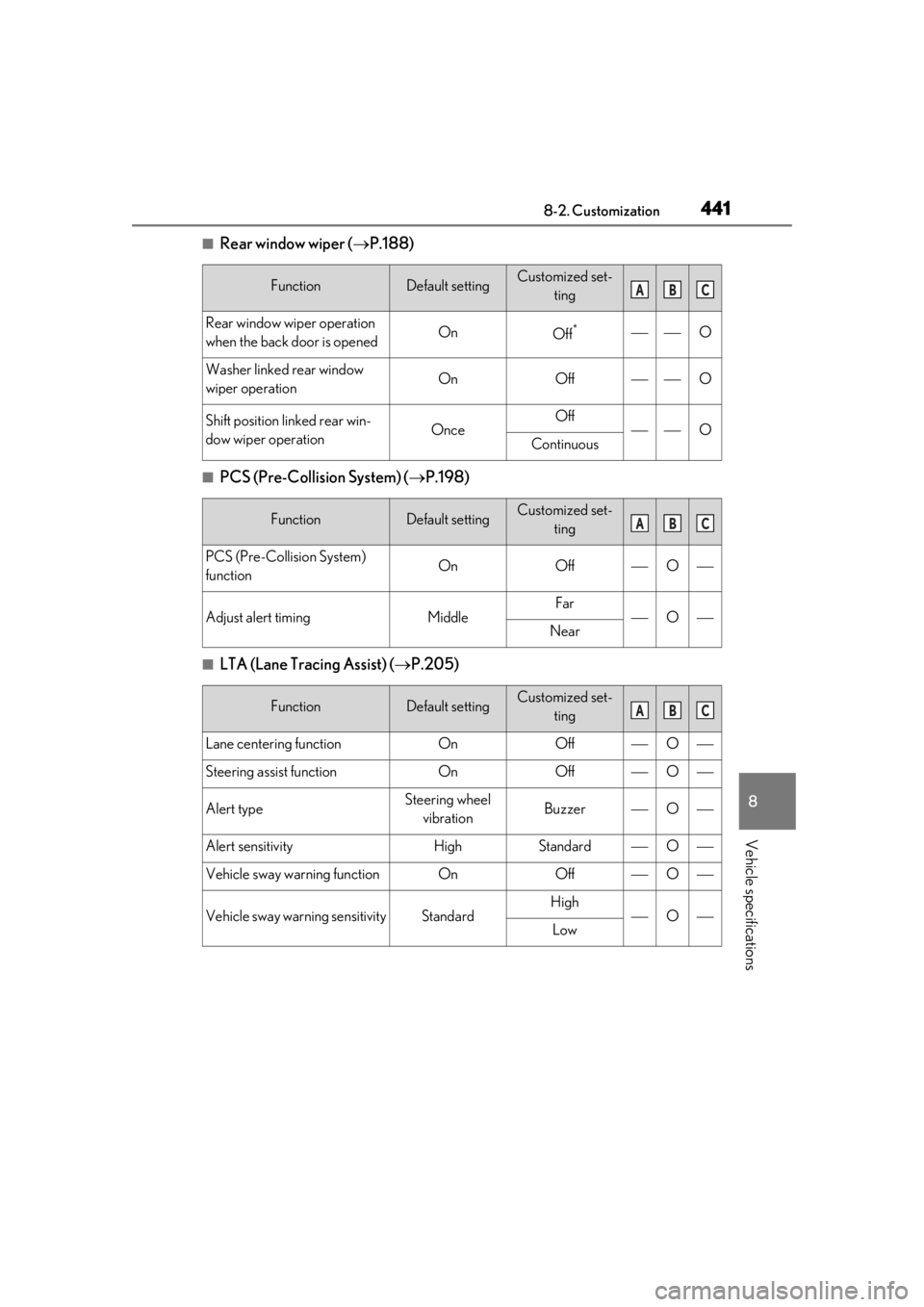
■Rear window wiper (P.188)
■PCS (Pre-Collision System) ( P.198)
■LTA (Lane Tracing Assist) ( P.205)
FunctionDefault settingCustomized set-
ting
Rear window wiper operation
when the back door is openedOnOff*O
Washer linked rear window
wiper operationOnOffO
Shift position linked rear win-
dow wiper operationOnceOffOContinuous
FunctionDefault settingCustomized set-ting
PCS (Pre-Collision System)
functionOnOffO
Adjust alert timingMiddleFarONear
FunctionDefault settingCustomized set-ting
Lane centering functionOnOffO
Steering assist functionOnOffO
Alert typeSteering wheel vibrationBuzzerO
Alert sensitivityHighStandardO
Vehicle sway warning functionOnOffO
Vehicle sway warning sensitivityStandardHighOLow
ABC
ABC
ABC
Page 445 of 476

4458-2. Customization
8
Vehicle specifications
■Vehicle customization
●When the smart access system with
push-button start is off, the entry unlock
function cannot be customized.
●When the doors remain closed after
unlocking the doors and the timer acti-
vated automatic door lock function acti-
vates, signals will be generated in
accordance with the operation buzzer
volume and operational signal (Emer-
gency flashers) function settings.
●Some settings can be changed using a
switch or the Center Display. If a setting is
changed using a switch, the changed set-
ting will not be reflected on the Center
Display. until the power switch is turned
off and then to ON.
■Clock settings screen
If the clock adjustment screen is displayed
continuously when attempting to change
the clock settings, the system may be mal-
functioning. Have the vehicle inspected by
your Lexus dealer.
Operation of the outside door
handle lights when the doors
are unlocked
OnOffO
Operation of the outside door
handle lights when a door is
opened
OnOffO
Rear interior light and footwell
lightsOnOffO
Fading out of the outside door
handle lights when they turn offLongShortO
FunctionDefault settingCustomized set-
tingABC
Page 448 of 476
4489-1. For owners
9-1.For owners
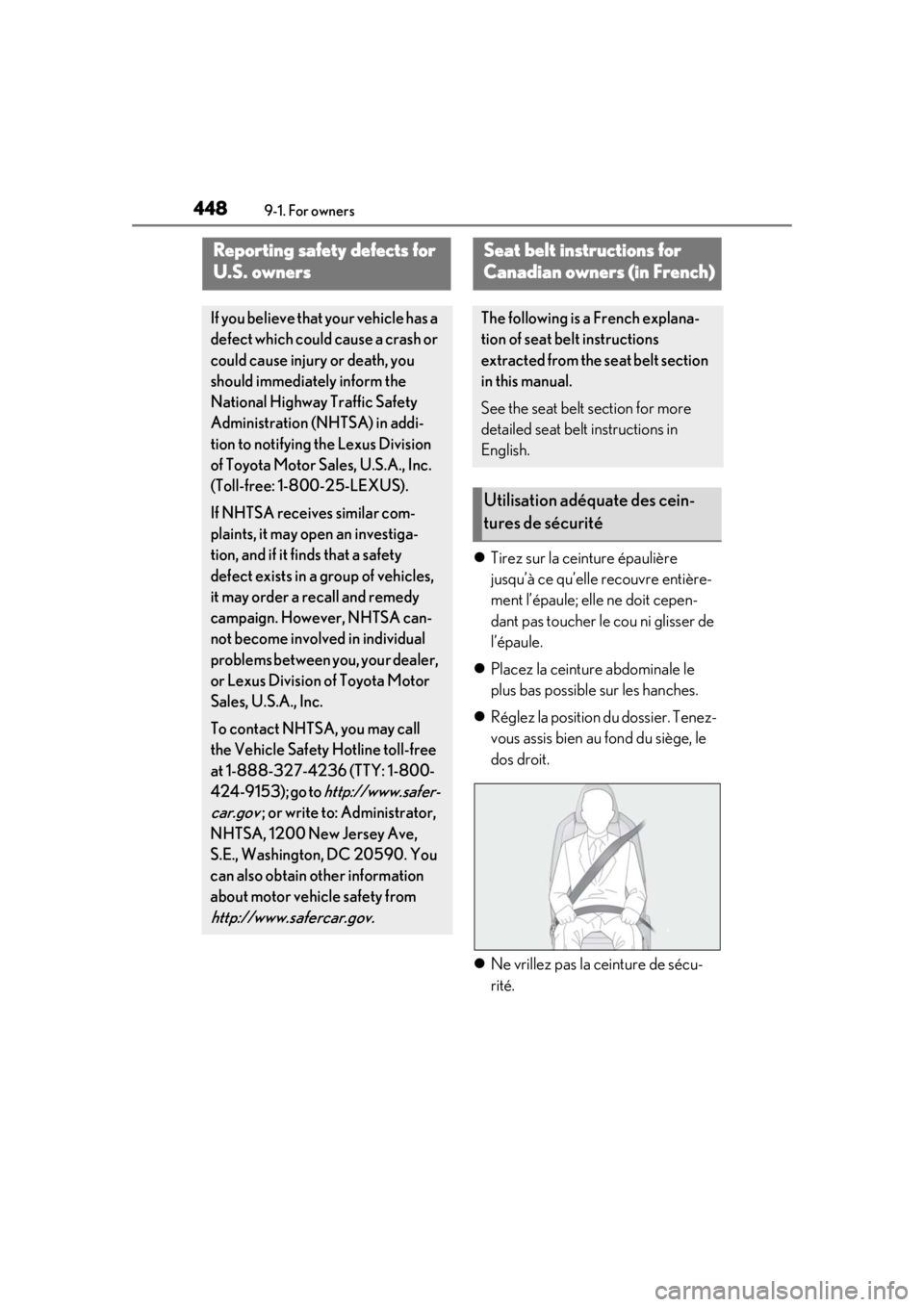
Tirez sur la ceinture épaulière
jusqu’à ce qu’elle recouvre entière-
ment l’épaule; elle ne doit cepen-
dant pas toucher le cou ni glisser de
l’épaule.
Placez la ceinture abdominale le
plus bas possible sur les hanches.
Réglez la position du dossier. Tenez-
vous assis bien au fond du siège, le
dos droit.
Ne vrillez pas la ceinture de sécu-
rité.
Reporting safety defects for
U.S. owners
If you believe that your vehicle has a
defect which could cause a crash or
could cause injury or death, you
should immediately inform the
National Highway Traffic Safety
Administration (NHTSA) in addi-
tion to notifying the Lexus Division
of Toyota Motor Sa les, U.S.A., Inc.
(Toll-free: 1-800-25-LEXUS).
If NHTSA receives similar com-
plaints, it may open an investiga-
tion, and if it finds that a safety
defect exists in a group of vehicles,
it may order a recall and remedy
campaign. However, NHTSA can-
not become involved in individual
problems between you, your dealer,
or Lexus Division of Toyota Motor
Sales, U.S.A., Inc.
To contact NHTS A, you may call
the Vehicle Safety Hotline toll-free
at 1-888-327-4236 (TTY: 1-800-
424-9153); go to
http://www.safer-
car.gov
; or write to: Administrator,
NHTSA, 1200 New Jersey Ave,
S.E., Washington, DC 20590. You
can also obtain other information
about motor vehicle safety from
http://www.safercar.gov.
Seat belt instructions for
Canadian owners (in French)
The following is a French explana-
tion of seat belt instructions
extracted from the seat belt section
in this manual.
See the seat belt section for more
detailed seat belt instructions in
English.
Utilisation adéquate des cein-
tures de sécurité
Page 460 of 476
460What to do if... (Troubleshooting)
1-1.What to do if... (Troubleshooting)What to do if... (Troubleshooting)
If you lose your mechanical keys,
new genuine mechanical keys can
be made by your Lexus dealer.
( P.402)
If you lose your electronic keys, the
risk of vehicle theft increases signifi-
cantly. Contact your Lexus dealer
immediately. ( P.402)
Is the electronic key battery weak or
depleted? ( P.368)
Is the power switch in ON?
When locking the doors, turn the
power switch off. ( P.162)
Is the electronic key left inside the
vehicle?
When locking the doors, make sure
that you have the electronic key on
your person.
The function may not operate prop-
erly due to the condition of the radio
wave. ( P.125)
Is the child-protector lock set?
The rear door cannot be opened
from inside the vehicle when the
lock is set. Open the rear door from
outside and then unlock the child-
protector lock. ( P.111)
Did you press the power switch
while firmly depressing the brake
pedal? ( P.162)
Is the shift lever in P? ( P.167)
Is the electronic key anywhere
detectable inside the vehicle?
( P.124)
Is the steering wheel unlocked?
( P.163)
Is the electronic key battery weak or
depleted?
In this case, the hybrid system can
be started in a temporary way.
( P.404)
Is the 12-volt battery discharged?
( P.405)
Is the power switch in ON?
If you have a problem, check the
following before contacting your
Lexus dealer.
The doors cannot be locked,
unlocked, opened or closed
You lose your keys
The doors cannot be locked or
unlocked
The rear door cannot be opened
If you think something is wrong
The hybrid system does not start
The shift lever cannot be shifted
from P even if you depress the
brake pedal
Page 461 of 476

461What to do if... (Troubleshooting)
If you cannot release the shift lever
by depressing the brake pedal with
the power switch in ON (P.168)
It is locked automatically to prevent
theft of the vehicle. ( P.163)
Is the window lock switch pressed?
The power window except for the
one at the driver’s seat cannot be
operated if the window lock switch
is pressed. ( P.146)
The auto power off function will be
operated if the vehicle is left in ACC
or ON (the hybrid system is not
operating) for a period of time.
( P.164)
The seat belt reminder light is flash-
ing
Are the driver and the front passen-
ger wearing the seat belts?
( P.390)
The parking brake indicator is on
Is the parking brake released?
( P.172) Depending on the situation, other
types of warning buzzer may also
sound. (
P.386, 395)
Did anyone inside the vehicle open
a door during setting the alarm?
The sensor detects it and the alarm
sounds. ( P.71)
To stop the alarm, turn the power
switch to ON or start the hybrid sys-
tem.
Is the message displayed on the
multi-information display?
Check the message on the multi-
information display. ( P.395)
When a warning light turns on or a
warning message is displayed, refer
to P.386, 395.
Slow down the vehicle, drive with
extra caution, and take your vehicle
to the nearest Lexus dealer or
authorized tire dealer as soon as
The steering wheel cannot be
turned after the hybrid system is
stopped
The windows do not open or
close by operating the power
window switches
The power switch is turned off
automatically
A warning buzzer sounds during
drivingAn alarm is activated and the
horn sounds
A warning buzzer sounds when
leaving the vehicle
A warning light turns on or a
warning message is displayed
When a problem has occurred
If you have a flat tire