2019 LEXUS UX250H display
[x] Cancel search: displayPage 235 of 476

2354-5. Using the driving support systems
4
Driving
●The following situations may occur
during use.
• Depending on the shape of the object
and other factors, the detection distance
may shorten, or detection may be impos-
sible.
• There will be a short delay between object detection and display. Even at low
speeds, there is a possibility that the
object will come within the sensor’s
detection areas before the display is
shown and the warning beep sounds.
• It might be difficult to hear the buzzer due to the volume of the audio system or air
flow noise of the air conditioning system.
■Conditions under which the function
may not function correctly
Certain vehicle conditions and the sur-
rounding environment may affect the ability
of a sensor to correctly detect objects. Par-
ticular instances where this may occur are
listed below.
●There is dirt, snow or ice on a sensor.
(Cleaning the sensors will resolve this
problem.)
●A sensor is frozen. (Thawing the area will
resolve this problem.)
In especially cold weather, if a sensor is
frozen the sensor display may be dis-
played abnormally, or objects, such as a
wall, may not be detected.
●A sensor is covered in any way.
●When a sensor or the area around a sen-
sor is extremely hot or cold.
●On an extremely bumpy road, on an incline, on gravel, or on grass.
●The vicinity of the vehicle is noisy due to
vehicle horns, motorcycle engines, air
brakes of large vehicles, or other loud
noises producing ultrasonic waves.
●There is another vehicle equipped with
parking assist sensors in the vicinity.
●A sensor is coated with a sheet of spray
or heavy rain.
●If a sensor is hit by a large amount of
water, such as when driving on a flooded
road.
●If the vehicle is significantly tilted.
●The vehicle is approaching a tall or
curved curb.
●If objects draw too close to the sensor.
■Objects which may not be properly
detected
The shape of the object may prevent the
sensor from detectin g it. Pay particular
attention to the following objects:
●Wires, fences, ropes, etc.
●Cotton, snow and other materials that
absorb sound waves
●Sharply-angled objects
●Low objects
●Tall objects with upper sections project-
ing outwards in the direction of your vehi-
cle
People may not be de tected if they are
wearing certain types of clothing.
■Certification
Page 236 of 476

2364-5. Using the driving support systems
■Detection range of the sensorsApproximately 3.3 ft. (100 cm)
Approximately 4.9 ft. (150 cm)
Approximately 2.0 ft. (60 cm)
The diagram shows the detection range of
the sensors. Note that the sensors cannot
detect objects that are extremely close to
the vehicle.
The range of the sensors may change
depending on the shape of the object, etc.
■Multi-information display, head-up display (if equipped) and Center Display
(vehicles with 10.3-inch display model)
When an object is detected by a sensor, the approximate distance to the object will
be displayed on the multi-information disp lay, Center Display (vehicles with 10.3-
inch display model), and head-up display (if equipped). (As the distance to the
object becomes short, the distance segments may blink.)
Approximate distance to object: 4. 9 ft. (150 cm) to 2.0 ft. (60 cm)
* (Rear center
sensor)
*: Automatic buzzer mute function is enabled. ( P.238)
Approximate distance to object: 3. 3 ft. (100 cm) to 2.0 ft. (60 cm)* (Front cen-
ter sensor)
Sensor detection display, object
distanceA
B
C
Multi-information displayCenter DisplayHead-up display
Page 237 of 476
2374-5. Using the driving support systems
4
Driving
*: Automatic buzzer mute function is enabled. (P.238)
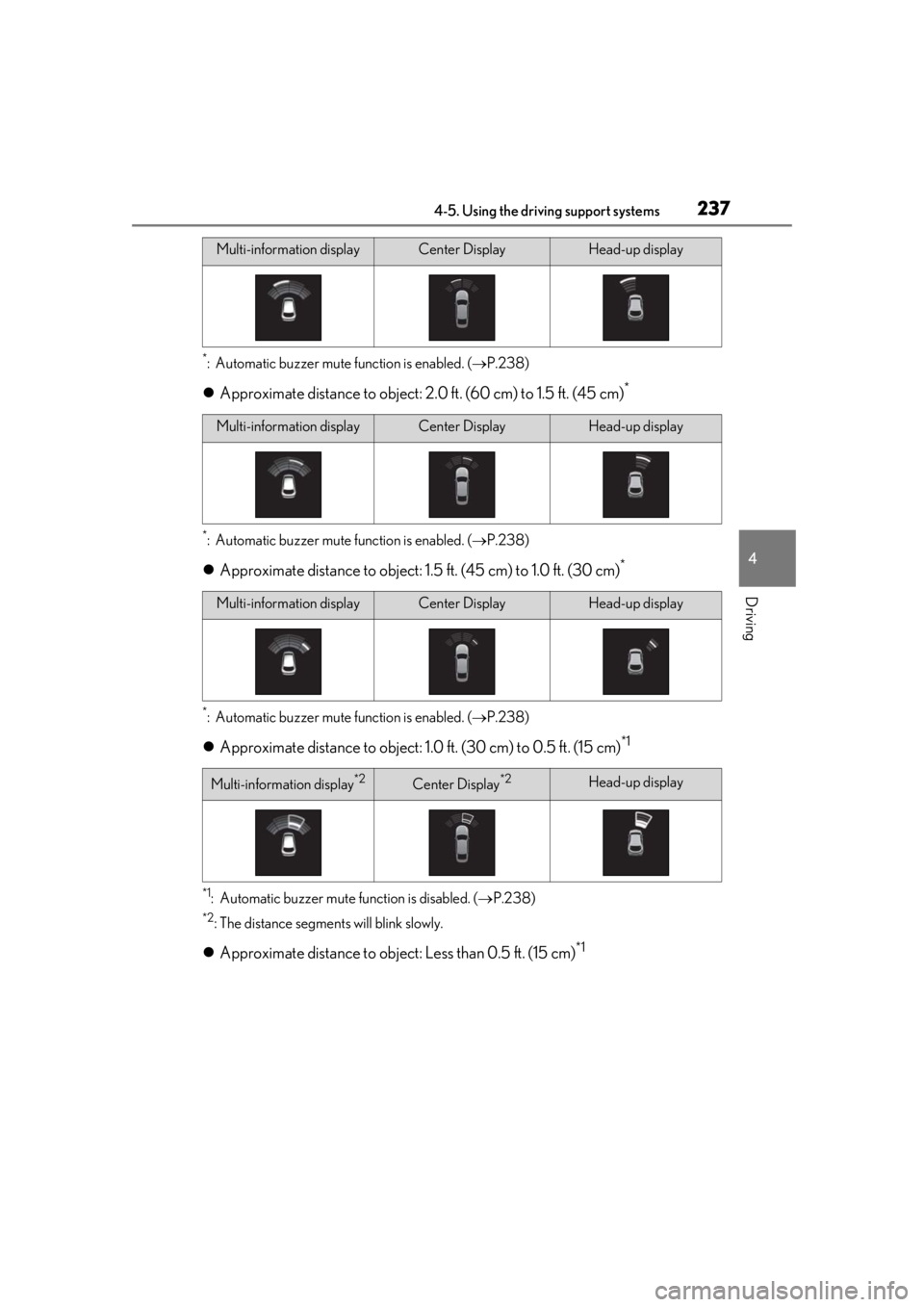
Approximate distance to object: 2. 0 ft. (60 cm) to 1.5 ft. (45 cm)*
*: Automatic buzzer mute function is enabled. ( P.238)
Approximate distance to object: 1. 5 ft. (45 cm) to 1.0 ft. (30 cm)*
*: Automatic buzzer mute function is enabled. ( P.238)
Approximate distance to object: 1. 0 ft. (30 cm) to 0.5 ft. (15 cm)*1
*1: Automatic buzzer mute function is disabled. ( P.238)
*2: The distance segments will blink slowly.
Approximate distance to object: Less than 0.5 ft. (15 cm)*1
Multi-information displayCenter DisplayHead-up display
Multi-information displayCenter DisplayHead-up display
Multi-information displayCenter DisplayHead-up display
Multi-information display*2Center Display*2Head-up display
Page 238 of 476

2384-5. Using the driving support systems
*1: Automatic buzzer mute function is disabled. (P.238)
*2: The distance segmen ts will blink rapidly.
■Buzzer operation and distance to
an object
A buzzer sounds when the sensors are
operating.
The buzzer beeps faster as the vehi-
cle approaches an object. When the
vehicle comes within the following
distance of the object, the buzzer
sounds continuously:
Approximately 1.0 ft. (30 cm)
When 2 or more objects are
detected simultaneously, the buzzer
sounds for the nearest object. If one
or more objects come within
approximately 1.0 ft. (30 cm) of the
vehicle, the buzzer will repeat a long
tone, followed by fast beeps.
Automatic buzzer mute function:
After a buzzer begins sounding, if
the distance between the vehicle
and the detected object does not
become shorter, the buzzer will be
muted automatically. (However, if
the distance between the vehicle
and object is 1.0 ft. (30 cm) or less,
this function will not operate.)
The buzzer sounds volume can be
adjusted. ( P.231)
Multi-information display*2Center Display*2Head-up display
Page 239 of 476

2394-5. Using the driving support systems
4
Driving
*:If equipped
Multi-information display
The RCTA function can be turned on/off.
When the RCTA function is disabled, the
RCTA OFF indicator illuminates.
Outside rear view mirror indicators
When a vehicle approaching from the right
or left at the rear of the vehicle is detected,
both outside rear view mirror indicators
will flash.
Center Display
If a vehicle approaching from the right or
left at the rear of the vehicle is detected,
the RCTA icon ( P.240) for th e detected
side will be displayed on the Center Dis-
play. This illustration shows an example of a
vehicle approaching from both sides of the
vehicle.
RCTA buzzer
If a vehicle approaching from the right or
left at the rear of th e vehicle is detected, a
buzzer will sound. The buzzer also sounds
for approximately 1 second immediately
after the RCTA function is turned on.
Use the meter control switches to
enable/disable the RCTA function.
( P.87)
1 Press or to select .
2 Press or to select “PKSA”
and then press “OK”.
3 Press or to select “RCTA”
and then press “OK”.
Each time the power switch is turned off
then changed to ON, the RCTA function
will be enabled automatically.
RCTA (Rear Cross Traffic
Alert) function*
The RCTA function uses the BSM
rear side radar sensors installed on
the inner side of the rear bumper.
This function is intended to assist
the driver in checking areas that
are not easily visible when backing
up.
System components
A
B
Turning the RCTA function
on/off
C
D
Page 240 of 476
2404-5. Using the driving support systems
■Outside rear view mirror indicator visi-
bility
In strong sunlight, the outside rear view mir-
ror indicator may be difficult to see.
■Hearing the RCTA buzzer
The RCTA buzzer may be difficult to hear
over loud noises, such as if the audio system
volume is high.
■When “Rear Cross Traffic Alert
Unavailable” is shown on the multi-
information display
Ice, water, snow, mud, etc., may be attached
to the rear bumper around the sensors.
( P.228) Remove the ice, snow, mud, etc.,
attached to the rear bumper around the
sensors to return the function to normal.
Additionally, the function may not operate
normally when used in extremely hot or
cold environments.
■Rear side radar sensors
P.228
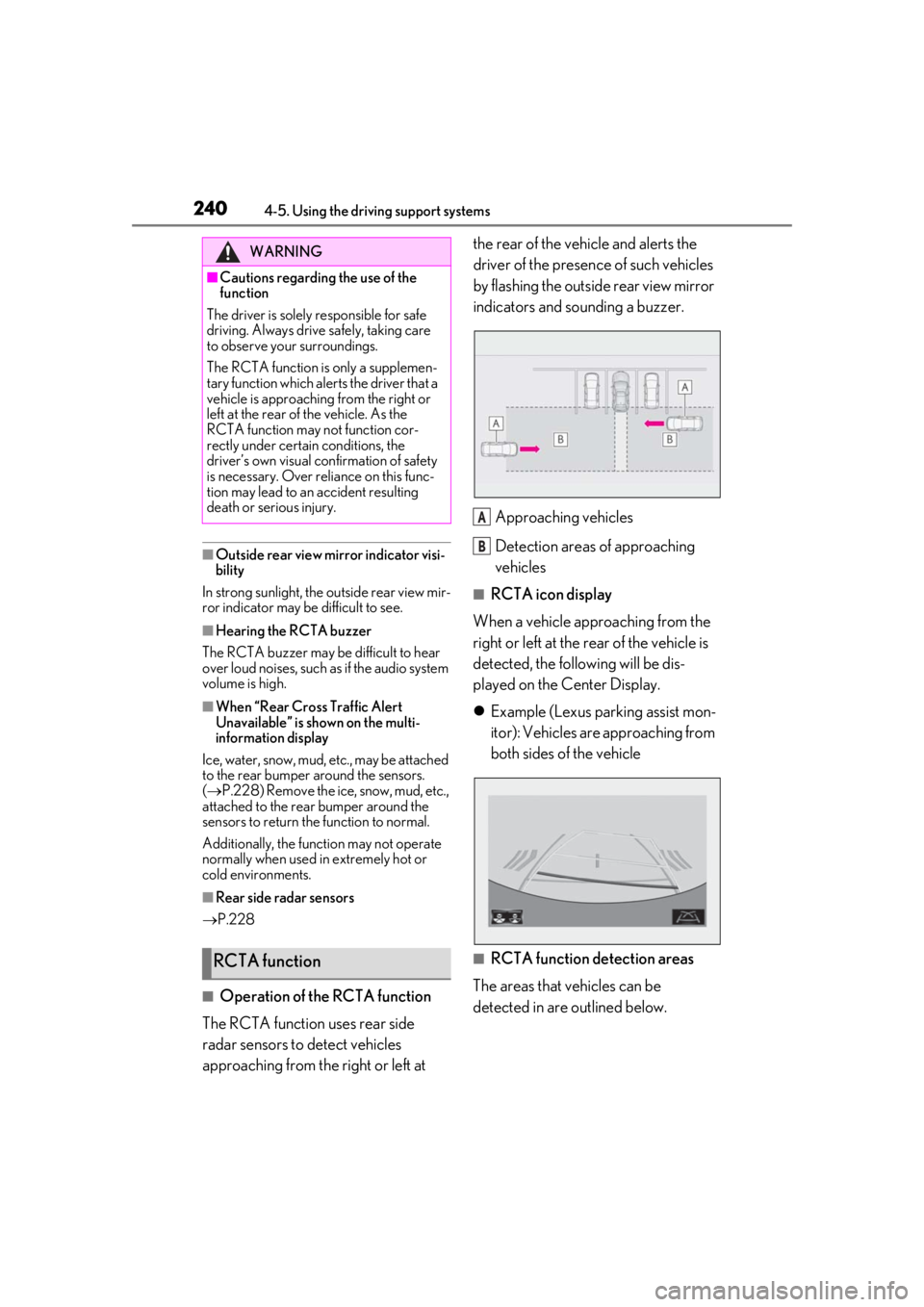
■Operation of the RCTA function
The RCTA function uses rear side
radar sensors to detect vehicles
approaching from the right or left at the rear of the vehicle and alerts the
driver of the presence of such vehicles
by flashing the outside rear view mirror
indicators and sounding a buzzer.
Approaching vehicles
Detection areas of approaching
vehicles
■RCTA icon display
When a vehicle approaching from the
right or left at the rear of the vehicle is
detected, the following will be dis-
played on the Center Display.
Example (Lexus parking assist mon-
itor): Vehicles are approaching from
both sides of the vehicle
■RCTA function detection areas
The areas that vehicles can be
detected in are outlined below.
WARNING
■Cautions regarding the use of the
function
The driver is solely responsible for safe
driving. Always driv e safely, taking care
to observe your surroundings.
The RCTA function is only a supplemen-
tary function which alerts the driver that a
vehicle is approaching from the right or
left at the rear of the vehicle. As the
RCTA function may not function cor-
rectly under certain conditions, the
driver’s own visual confirmation of safety
is necessary. Over reli ance on this func-
tion may lead to an accident resulting
death or serious injury.
RCTA function
A
B
Page 241 of 476

2414-5. Using the driving support systems
4
Driving
The buzzer can alert the driver of
faster vehicles approaching from far-
ther away.
Example:
■The RCTA function is operational when
The RCTA function operates when all of the
following conditions are met:
●The power switch is in ON.
●The RCTA function is on.
●The shift lever is in R.
●The vehicle speed is less than approxi-
mately 5 mph (8 km/h).
●The approaching vehicle speed is
between approximately 5 mph (8 km/h)
and 18 mph (28 km/h).
■Setting the buzzer volume
The buzzer volume can be adjusted on the
multi-information display. ( P.231)
■Conditions under which the RCTA func-
tion will not detect a vehicle
The RCTA function is not designed to
detect the following types of vehicles and/or
objects:
●Vehicles approaching from directly
behind
●Vehicles backing up in a parking space
next to your vehicle
●Vehicles that the sensors cannot detect
due to obstructions
●Guardrails, walls, signs, parked vehicles
and similar stationary objects*
●Small motorcycles, bicycles, pedestrians,
etc.*
●Vehicles moving away from your vehicle
●Vehicles approaching from the parking
spaces next to your vehicle*
*
: Depending on the conditions, detection of a vehicle and/or object may occur.
■Conditions under which the RCTA func-
tion may not function correctly
●The RCTA function may not detect vehi-
cles correctly in the following situations:
• When a sensor is misaligned due to a
strong impact to the sensor or its sur-
rounding area
• When mud, snow, ice, a sticker, etc. is
covering a sensor or its surrounding area
on the rear bumper
• When driving on a road surface that is
wet with standing water during bad
weather, such as heavy rain, snow, or fog
• When multiple vehicles are approaching
with only a small gap between each vehi-
cle
• If a vehicle is approaching the rear of
your vehicle rapidly
• When a towing eyelet is installed to the rear of the vehicle.
• When backing up on a slope with a sharp
change in grade
Approaching vehi-
cle speed Approximate
alert distance
18 mph (28 km/h) (fast)65 ft. (20 m)
5 mph (8 km/h) (slow)18 ft. (5.5 m)
A
Page 244 of 476

2444-5. Using the driving support systems
The Parking Support Brake can be
enabled/disabled on the multi-informa-
tion display. All of the Parking Support
Brake functions (static objects and rear
crossing vehicles) are enabled/dis-
abled simultaneously.
Use the meter control switches to
enable/disable the parking support
brake. (P.87)
1
Press or to select .
2
Press or to select and
then press “OK”.
When the Parking Support Brake is dis- abled, the PKSB OFF indicator (
P.76)
illuminates on the multi-information dis-
play.
When the Parking Support Brake is turned
on or off, operation of the Parking Support
Brake continues in the same condition the
next time the hybrid system is started.
If the hybrid system output restriction con-
trol or brake control operates, a buzzer will
sound and a message wi ll be displayed on
the Center Display and multi-information
display, to alert the driver. On vehicles with
head-up display, the head-up display will
display the same message as the multi-
information display.
Depending on the situat ion, hybrid system
output restriction control will operate to
either limit acceleration or restrict output
as much as possible.
Hybrid system output restriction
control is operating (acceleration
restriction)
Acceleration greater than a certain
amount is restricted by the system.
Multi-information display: “Object
Detected Acceleration Reduced”
PKSB OFF indicator: Not illuminated
Buzzer: Does not sound
Hybrid system output restriction
control is operating (output
restricted as much as possible)
The system has determined that stronger-
than-normal brake operation is necessary.
Multi-information display: “BRAKE!”
PKSB OFF indicator: Not illuminated
Buzzer: Short beep
WARNING
●The driver is solely responsible for safe
driving. Always drive carefully, taking
care to observe your surroundings.
The Parking Support Brake system is
designed to provide support to lessen
the severity of collisions. However, it
may not operate in some situations.
●The Parking Support Brake system is
not designed to stop the vehicle com-
pletely. Additionally, even if the system
has stopped the vehicl e, it is necessary
to depress the brake pedal immedi-
ately as brake control will be canceled
after approximately 2 seconds.
NOTICE
■If “Parking Support Brake Unavail-
able” is displayed on the multi-infor-
mation display and the PKSB OFF
indicator is flashing
If this message is displayed immediately
after the power switch is changed to ON,
operate the vehicle carefully, paying
attention to your surroundings.
Enabling/Disabling the Parking
Support Brake
Displays and buzzers for hybrid
system output restriction con-
trol and brake control