Page 271 of 476
2715-1. Remote Touch
5
Interior features
Double tap
Tap the touchpad twice, quickly. Select the
button on the screen.
Flick
Quick and long movement along the
touchpad with your finger. Move the list
screen.
Pinch in/Pinch out
Slide fingers toward each other or apart on
the touchpad. Change the scale of the
map.
■Menu screen
Press the “MENU” button on the
Remote Touch to display the menu
screen.
The display may differ depending on
the type of the system.
NOTICE
■To prevent damage to the Remote
Touch
Observe the following precautions. Fail-
ure to do so may cause damage to the
Remote Touch.
●Do not allow the Remote Touch to
come into contact with food, liquid,
stickers or lit cigarettes.
●Do not subject the Remote Touch to
excessive pressure or strong impact.
●Do not push the touchpad with a
strong force or use a sharp pointed
object to operate the pad.
Center Display overview
Page 272 of 476
2725-1. Remote Touch
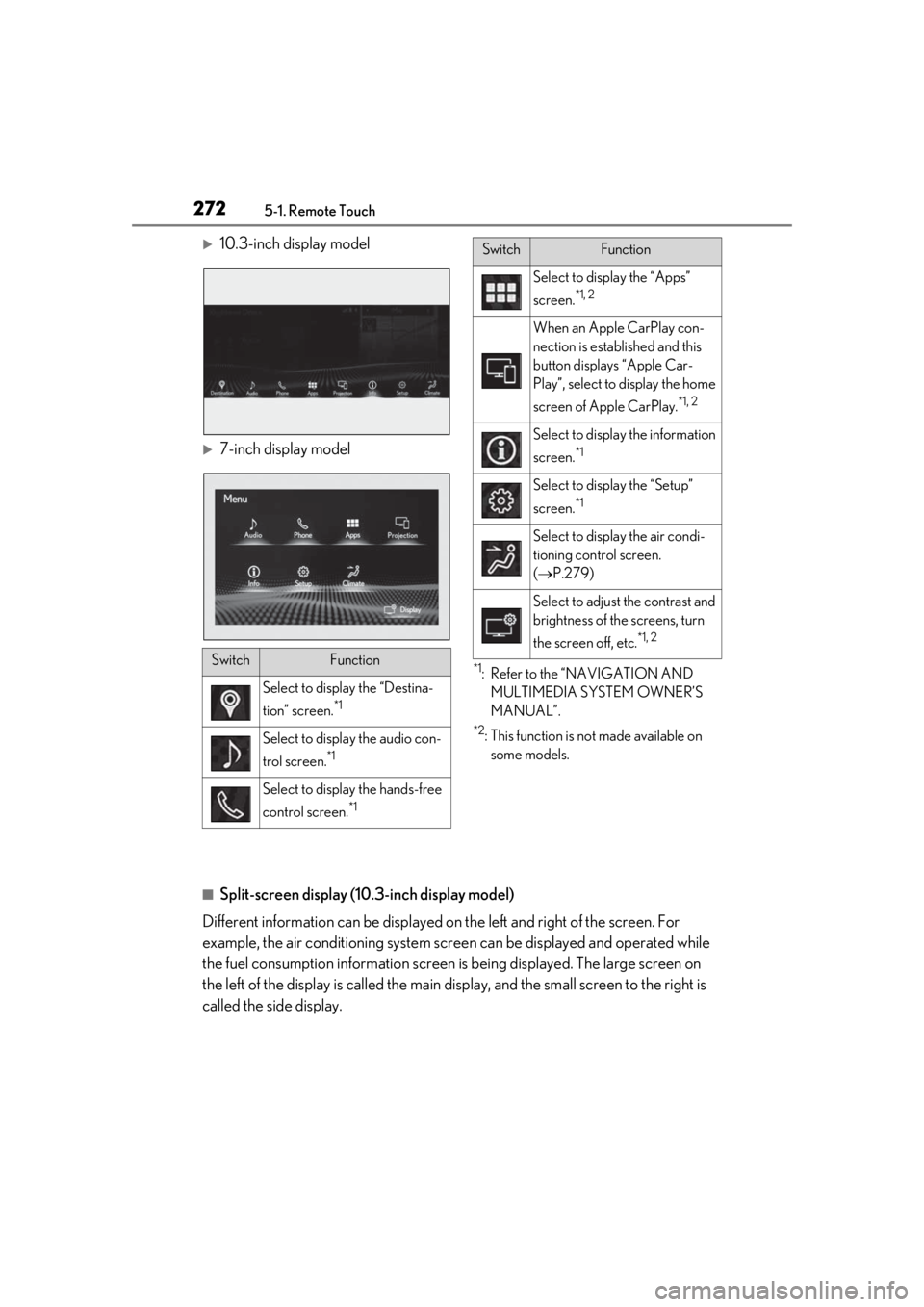
10.3-inch display model
7-inch display model
*1: Refer to the “NAVIGATION AND MULTIMEDIA SYSTEM OWNER’S
MANUAL”.
*2: This function is not made available on some models.
■Split-screen display (10.3-inch display model)
Different information can be displayed on the left and right of the screen. For
example, the air conditioning system scre en can be displayed and operated while
the fuel consumption informat ion screen is being displayed. The large screen on
the left of the display is called the main display, and the small screen to the right is
called the side display.
SwitchFunction
Select to displa y the “Destina-
tion” screen.
*1
Select to display the audio con-
trol screen.
*1
Select to display the hands-free
control screen.
*1
Select to display the “Apps”
screen.
*1, 2
When an Apple CarPlay con-
nection is established and this
button displays “Apple Car-
Play”, select to display the home
screen of Apple CarPlay.
*1, 2
Select to display the information
screen.
*1
Select to display the “Setup”
screen.
*1
Select to display the air condi-
tioning control screen.
( P.279)
Select to adjust the contrast and
brightness of the screens, turn
the screen off, etc.
*1, 2
SwitchFunction
Page 273 of 476
2735-1. Remote Touch
5
Interior features
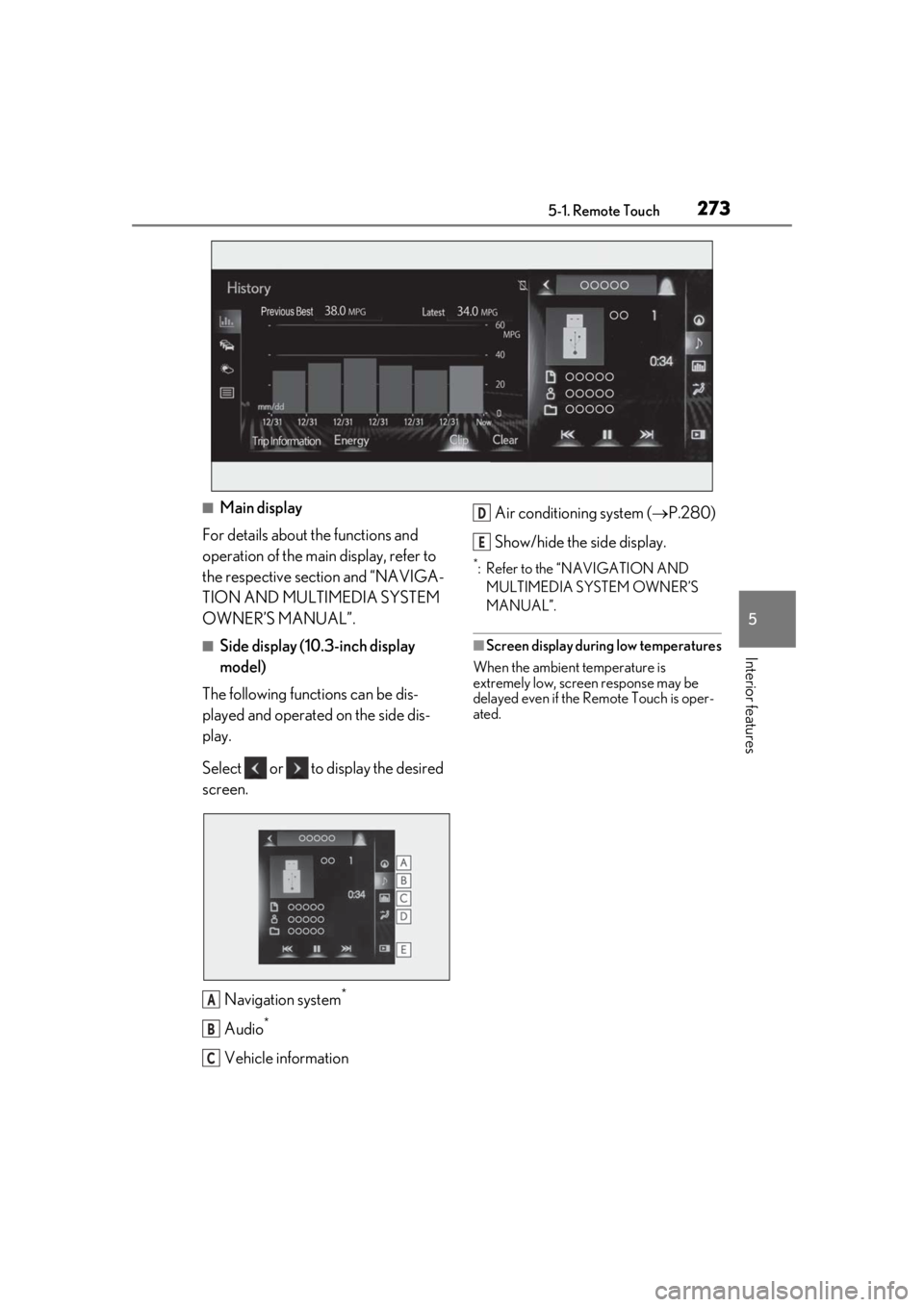
■Main display
For details about the functions and
operation of the main display, refer to
the respective section and “NAVIGA-
TION AND MULTIMEDIA SYSTEM
OWNER’S MANUAL”.
■Side display (10.3-inch display
model)
The following functions can be dis-
played and operated on the side dis-
play.
Select or to display the desired
screen.
Navigation system
*
Audio*
Vehicle information Air conditioning system (
P.280)
Show/hide the side display.
*: Refer to the “NAVIGATION AND MULTIMEDIA SYSTEM OWNER’S
MANUAL”.
■Screen display during low temperatures
When the ambient temperature is
extremely low, screen response may be
delayed even if the Remote Touch is oper-
ated.
A
B
C
D
E
Page 274 of 476

2745-2. Lexus Climate Concierge
5-2.Lexus Climate Concierge
Select
The indicator on the Lexus Climate Con-
cierge control screen illuminates, and the
automatic air conditioning system, seat
heaters and ventilators (if equipped), and
heated steering wheel (if equipped) oper-
ate in automatic mode.
If any of the system is operated manually,
the indicator turns off. However, all other
functions continue to operate in automatic
mode.
■When using the Lexus Climate Con-
cierge
Lexus Climate Concierge can be operated
on the sub function menu or option control
screen. ( P.279)
■Automatic air conditioning system
( P.276)
The temperature can be adjusted inde-
pendently for the driver seat and pas-
senger seat.
■Seat heaters and ventilators (if
equipped) ( P.286)
Heating or ventilation is automatically
selected according to the set tempera-
ture of the air conditioning system, the
outside temperature, etc.
The seat heater and ventilator of the
front passenger seat operate in auto-
matic mode if a passenger is detected.
■Heated steering wheel (if
equipped) ( P.286)
Heated steering wheel operates auto-
matically according to the set tempera-
ture of the air conditioning system, the
outside temperature, etc.
Lexus Climate Concierge
The seat heaters (if equipped), seat
ventilators (if equipped) and heated
steering wheel (if equipped) are
each automatically controlled
according to the set temperature of
the air conditioning system, the out-
side and cabin temperature, etc.
Lexus Climate Concierge allows a
comfortable condition to be main-
tained without adjusting each sys-
tem.
Press the “MENU” button on the
Remote Touch and select “Climate”
to display the air conditioning con-
trol screen. Then, select to dis-
play the Lexus Climate Concierge
control screen.
Turning on Lexus Climate Con-
cierge
Operation of each system
Page 276 of 476
2765-3. Using the air conditioning system and defogger
5-3.Using the air conditioning system and defogger
Left-hand side temperature control switch
Fan speed control switch
Automatic mode switch
Off switch
Windshield defogger switch
Rear window and outside rear view mirror defoggers switch
Outside/recirculated air mode switch
Airflow mode control switch
Automatic air conditioning system
Air outlets and fan speed are automati cally adjusted according to the tem-
perature setting.
Press the “MENU” button on the Remote Touch, then select “Climate” to dis-
play the air conditioning control screen.( P.271)
10.3-inch display model: The air cond itioning system can be displayed and
operated on the side display.
Air conditioning controls
A
B
C
D
E
F
G
H
Page 279 of 476

2795-3. Using the air conditioning system and defogger
5
Interior features
diately after the air conditioning system is
started in automatic mode.
■Air conditioning filter
P.364
■Customization
Settings (e.g. A/C automatic mode switch
operation) can be changed.
(Customizable features: P.443)
■Main control screen
Using the touchpad of the Remote
Touch, select the button on the screen.
to can be adjusted by perform-
ing the following operations.
Flick operation: Move the pointer to
the desired item and flick the touchpad
up or down.
The item can be adjusted by one level.
Trace operation: After selecting the
desired item, slide your finger up or
down.
The item can be adjusted by the amount
that you trace.
Trace operation cannot be used while driv-
ing.
Sub menu
Selecting the sub menu item to switch the
main screen.
: Display the air conditioning control
screen
: Display the heated steering
wheel/seat heater/sea t ventilator control
screen (if equipped)
: Display the Lexus Climate Con-
cierge control screen
: Display the option control screen
Adjust the left-hand side tempera-
ture setting
Adjust the fan speed setting
Select the air flow mode
: Air flows to the upper body
: Air flows to the upper body and feet
WARNING
■To prevent the windshield from fog-
ging up
Do not use the windshield defogger
switch during cool air operation in
extremely humid weather. The difference
between the temperature of the outside
air and that of the windshield can cause
the outer surface of the windshield to fog
up, blocking your vision.
■When the outside rear view mirror
defoggers are operating
Do not touch the outside rear view mir-
ror surfaces, as they can become very
hot and burn you.
NOTICE
■To prevent 12-volt battery discharge
Do not leave the air conditioning system
on longer than necessary when the
hybrid system is off.
Air conditioning control screen
BE
A
B
C
D
Page 280 of 476

2805-3. Using the air conditioning system and defogger
: Air flows to the feet
: Air flows to the feet and the wind-
shield defogger operates
Adjust the right-hand side tem-
perature setting
Function on/off indicators
When the function is on, the indicator illu-
minates on the control screen.
Sub function menu
When the sub function button on the
Remote Touch is pressed, the following
functions can be switched on and off.
: Set Lexus Climate Concierge
( P.274)
“AUTO”: Set automatic mode on/off
( P.281)
“OFF”: Turn the fan off
“A/C”: Set cooling and dehumidification
function
“DUAL”: Adjust the temperature for driver
and front passenger seats separately
(“DUAL” mode) ( P.283)
: Set eco air conditioning mode
■Option control screen
Select on the sub menu to display
the option control screen.
The functions can be switched on and off.
When the function is on, the indicator illu-
minates on the screen.
Set Lexus Climate Concierge
( P.274)
Adjusting the temperature for
driver and front passenger seats
separately (“DUAL” mode)
( P.283)
Set eco air conditioning mode
Air conditioning and heater output is lim-
ited to prioritize fuel economy.
Cooling and dehumidification func-
tion
Prevent ice from building up on the
windshield and wiper blades
(Windshield wiper de-icer) (if
equipped)
Select S-FLOW mode ( P.282)
■Side display (10.3-inch display
model)
Display the heated steering
wheel/seat heaters/seat ventilators
E
F
G
A
B
C
D
E
F
A
Page 282 of 476

2825-3. Using the air conditioning system and defogger
In S-FLOW mode, priority for the air-
flow is given to the front seats, reducing
the airflow and air conditioning effect
on the rear seats.
The following S-FLOW modes are
available:
Automatic S-FLOW mode
When a rear passenger is determined
to be in the vehicle, S-FLOW mode will
be automatically disabled.
The indicator will illuminate on the air con-
ditioning control screen when S-FLOW
mode is enabled.
To enable/disable S-FLOW mode and
enter manual S-FLOW mode, select the S-
FLOW mode switch ( P.280).
Manual S-FLOW mode
When the S-FLOW mode switch is
selected, S-FLOW mode will be manu-
ally enabled/disabled.
The indicator will illuminate on the air con-
ditioning control screen when S-FLOW
mode is enabled.
The system does not determine whether a
passenger is in the rear seats by the open-
ing and closing of a rear door, so S-FLOW mode cannot be automatically disabled.
To automatically disable S-FLOW mode by
opening and closing a rear door, switch to
automatic S-FLOW mode.
■S-FLOW air conditioning control
Operation of S-FLOW mode changes
according to the following conditions.
However, depending on the set tem-
perature and air conditioning load is
high, the operation may not change.
Driver seat priority:
• When the system determines there is no
passenger in the front passenger seat in
manual S-FLOW mode
• When the system determines there are no passengers in the front passenger
seat and rear seats in automatic S-
FLOW mode
The airflow to the front passenger seat and
rear seat stops and the front passenger
temperature display turns off.
Front seat priority:
When the system determines there are no
passengers in the rear seats
S-FLOW disabled:
When the system determines there is a
passenger in the rear seats
■Passenger presence determination in S-
FLOW mode
The system determines that there is a pas-
senger in any of the following situations.
If a passenger is judged to be in the vehicle,
the system will retain the judgment for a
certain amount of time after the power
switch is turned off.
NOTICE
●Do not stick anything on the sensor
S-FLOW mode