2019 LEXUS UX200 door
[x] Cancel search: doorPage 161 of 452

1614-2. Driving procedures
4
Driving
ing brake
• Operate the parking brake switch while depressing the brake pedal.
• Using the parking brake automatic release function, the parking brake can
be released by depressing the accelera-
tor pedal. When using this function,
slowly depress the accelerator pedal.
Make sure that the pa rking brake indicator
light turn off.
■Turning the automatic mode on
While the vehicle is stopped, press and
hold the parking brake switch until a
message is shown on the multi-infor-
mation display
When the automatic mode is turned
on, the parking brake operates as fol-
lows.
When the shift lever is shifted from
P, the parking brake will be released,
and the parking brake indicator light
will turn off.
When the shift lever is shifted to P,
the parking brake will be set, and the
parking brake indicator light will
turn on.
Operate the shift lever with the vehicle
stopped and the brake pedal
depressed.
■Turning the automatic mode off
While the vehicle is stopped, pull and
hold the parking brake switch until a
message is shown on the multi-infor-
mation display
■Parking brake operation
●When the engine switch is not in ON, the
parking brake cannot be released using
the parking brake switch.
●When the engine switch is not in ON,
automatic mode (automatic brake setting
and releasing) is not available.
■Parking brake automatic release func-
tion
●When the shift lever is shifted from P, the
parking brake will be released in auto-
matic mode.
●When all of the follo wing conditions are
met in manual mode, the parking brake
can be released by depressing the accel-
erator pedal.
• The driver’s door is closed
• The driver is wearing the seat belt
• The shift lever is in D, M or R
■If “Parking Brake Temporarily Unavail-
able” is displayed on the multi-informa-
tion display
If the parking brake is operated repeatedly
over a short period of time, the system may
restrict operation to prevent overheating. If
this happens, refrain from operating the
parking brake. Normal operation will return
after about 1 minute.
Page 163 of 452

1634-2. Driving procedures
4
Driving
Turns the brake hold system on
The brake hold standby indicator
comes on. While the system is holding the
brake, the brake hold operated indicator comes on.
■Brake hold system operating conditions
The brake hold system cannot be turned on
in the following conditions:
●The driver’s door is not closed.
●The driver is not wearing the seat belt.
●“Parking Brake Unavailable” or “EPB
Malfunction Visit Your Dealer” is dis-
played on the multi- information display.
If any of the conditions above are detected
when the brake hold system is enabled, the
system will turn off and the brake hold
standby indicator light will go off. In addi- tion, if any of the co
nditions are detected
while the system is holding the brake, a
warning buzzer will sound and a message
will be shown on the multi-information dis-
play. The parking brake will then be set
automatically.
■Brake hold function
●If the brake pedal is left released for a
period of about 3 mi nutes after the sys-
tem has started holding the brake, the
parking brake will be set automatically. In
this case, a warning buzzer sounds and a
message is shown on the multi-informa-
tion display.
●To turn the system off while the system is
holding the brake, firmly depress the
brake pedal and press the button again.
●The brake hold function may not hold the
vehicle when the vehicle is on a steep
incline. In this situation, it may be neces-
sary for the driver to apply the brakes. A
warning buzzer will sound and the multi-
information display will inform the driver
of this situation. If a warning message is
shown on the multi-information display,
read the message and follow the instruc-
tions.
■When the parking brake is set automati-
cally while the system is holding the
brakes
Perform any of the following operations to
release the parking brake.
●Depress the accelerator pedal. (The
parking brake will not be released auto-
matically if the seat belt is not fastened.)
●Operate the parking brake switch with
the brake pedal depressed.
Make sure that the pa rking brake indicator
light goes off. ( P.160)
■When an inspection at your Lexus
dealer is necessary
When the brake hold standby indicator
(green) does not illuminate even when the
brake hold switch is pressed with the brake
hold system operating conditions met, the
system may be malfun ctioning. Have the
vehicle inspected at your Lexus dealer.
Brake Hold
The brake hold system keeps the
brake applied when the shift lever is
in D, M or N with the system on and
the brake pedal has been
depressed to stop the vehicle. The
system releases the brake when the
accelerator pedal is depressed with
the shift lever in D or M to allow
smooth start off.
Enabling the system
A
B
Page 166 of 452
1664-3. Operating the lights and wipers
■Automatic light off system
●When the headlights come on: The head-
lights and tail lights turn off 30 seconds
after a driver’s door is opened and closed
if the engine switch is turned to ACC or
OFF. (The lights turn off immediately if on the key is pressed after all the
doors are locked.)
●When only the tail lights come on: The tail
lights turn off automatically if the engine
switch is turned to ACC or OFF and the
driver’s door is opened.
To turn the lights on again, turn the engine
switch to ON, or turn the light switch off
once and then back to or .
■Automatic headlight leveling system (if
equipped)
The level of the headlights is automatically
adjusted according to the number of pas-
sengers and the loading condition of the
vehicle to ensure that the headlights do not
interfere with other road users.
■Windshield wiper linked headlight illu-
mination
When driving during daytime with the
headlight switch turned to position, if
the windshield wipers are used, the head-
lights will turn on auto matically after several
seconds to help enha nce the visibility of
your vehicle.
■Battery-saving function
In order to prevent the battery of the vehicle
from discharging, if the headlights and/or
tail lights are on when the engine switch is
turned off the battery saving function will
operate and automatically turn off all the
lights after approximately 20 minutes. When the engine switch is turned to ON,
the battery-saving function will be disabled.
When any of the following are performed,
the battery-saving function is canceled
once and then reactivated. All the lights will
turn off automatically 20 minutes after the
battery-saving function has been reacti-
vated:
●When the headlight switch is operated
●When a door is opened or closed
■Welcome light illumination control
The parking and tail lights automatically
turn on at night when the doors are
unlocked using the entry function or wire-
less remote control if the light switch is in
the position.
■Customization
Settings (e.g. light sensor sensitivity) can be
changed. (Customizable features: P.413,
414)
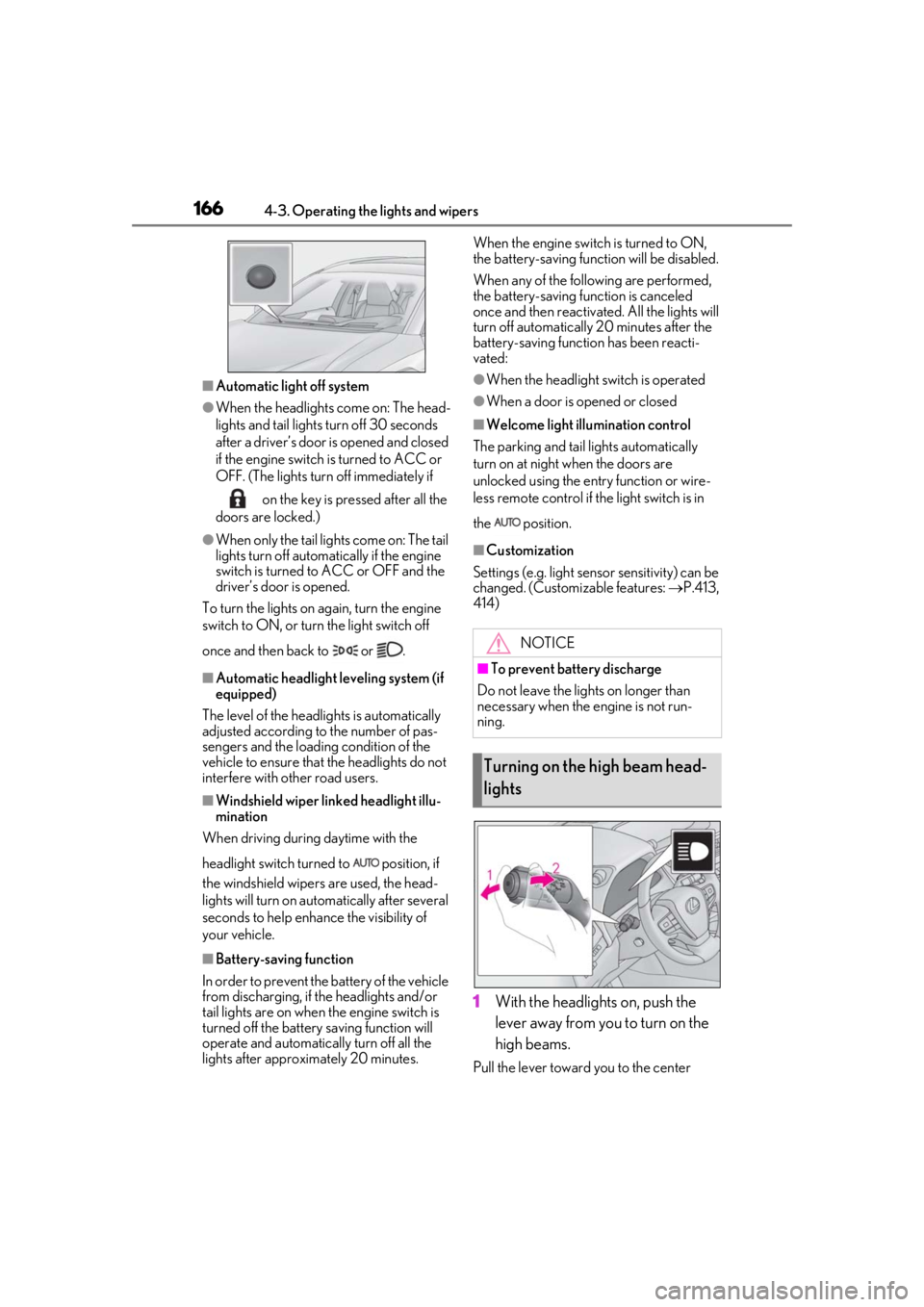
1With the headlights on, push the
lever away from you to turn on the
high beams.
Pull the lever toward you to the center
NOTICE
■To prevent battery discharge
Do not leave the lights on longer than
necessary when the engine is not run-
ning.
Turning on the high beam head-
lights
Page 176 of 452

1764-3. Operating the lights and wipers
Operating the switch operates
the rear wiper as follows:
1
or Off
2
or Intermittent opera-
tion
3
or Normal operation 4
Washer/wiper dual opera-
tion
Pushing the lever oper ates the wiper and
washer.
The wipers will automatically operate a
couple of times after the washer squirts.
■The rear window wiper and washer can
be operated when
The engine switch is in ON.
■If no windshield washer fluid sprays
Check that the washer nozzles are not
blocked, if there is washer fluid in the
washer fluid tank.
■Reverse-linked rear window wiper func-
tion
When the shift lever is shifted to R when the
front wipers are operating, the rear window
wiper will operate once.
■Back door opening linked rear window
wiper stop function
When the rear window wi per is operating, if
the back door is opened while the vehicle is
stopped, operation of the rear window
wiper will be stopped to prevent anyone
near the vehicle from being sprayed by
water from the wiper. When the back door
is closed, wiper operation will resume.
*
*
: The setting must be customized at your Lexus dealer.
■Customization
Setting of the reverse-linked function can
be changed. (Customizable fea-
tures: P.414)
Rear window wiper and
w
asher
The rear window wiper and washer
can be used by operating the lever.
NOTICE
■When the rear window is dry
Do not use the wiper, as it may damage
the rear window.
Operating the wiper lever
Page 178 of 452

1784-4. Refueling
4-4.Refueling
Turn the engine switch off and
ensure that all the doors and win-
dows are closed.
Confirm the type of fuel.
■Fuel types
P.397
■Fuel tank opening for unleaded gasoline
To help prevent incorrect fueling, your vehi-
cle has a fuel tank opening that only accom-
modates the special nozzle on unleaded
fuel pumps.
1Press the opener switch.
Opening the fuel tank cap
Before refueling the vehicle
WARNING
■When refueling the vehicle
Observe the following precautions while
refueling the vehicle. Failure to do so may
result in death or serious injury.
●After exiting the vehicle and before
opening the fuel door, touch an
unpainted metal surface to discharge
any static electricity. It is important to
discharge static electricity before refu-
eling because sparks resulting from
static electricity can cause fuel vapors
to ignite while refueling.
●Always hold the grips on the fuel tank
cap and turn it slowly to remove it.
A whooshing sound may be heard
when the fuel tank cap is loosened.
Wait until the sound cannot be heard
before fully removing the cap. In hot
weather, pressurized fuel may spray
out of the filler neck and cause injury.
●Do not allow anyone that has not dis-
charged static electricity from their
body to come close to an open fuel
tank.
●Do not inhale vaporized fuel.
Fuel contains substances that are
harmful if inhaled.
●Do not smoke while refueling the vehi-
cle.
Doing so may cause the fuel to ignite
and cause a fire.
●Do not return to the vehicle or touch
any person or object that is statically
charged. This may cause static elec-
tricity to build up, re sulting in a possible
ignition hazard.
■When refueling
Observe the following precautions to
prevent fuel overflowing from the fuel
tank:
●Securely insert the fuel nozzle into the
fuel filler neck.
●Stop filling the tank after the fuel noz-
zle automatically clicks off.
●Do not top off the fuel tank.
NOTICE
■Refueling
Do not spill fuel during refueling.
Doing so may damage the vehicle, such
as causing the emission control system to
operate abnormally, damaging fuel sys-
tem components or the vehicle’s painted
surface.
Opening the fuel tank cap
Page 179 of 452
1794-4. Refueling
4
Driving
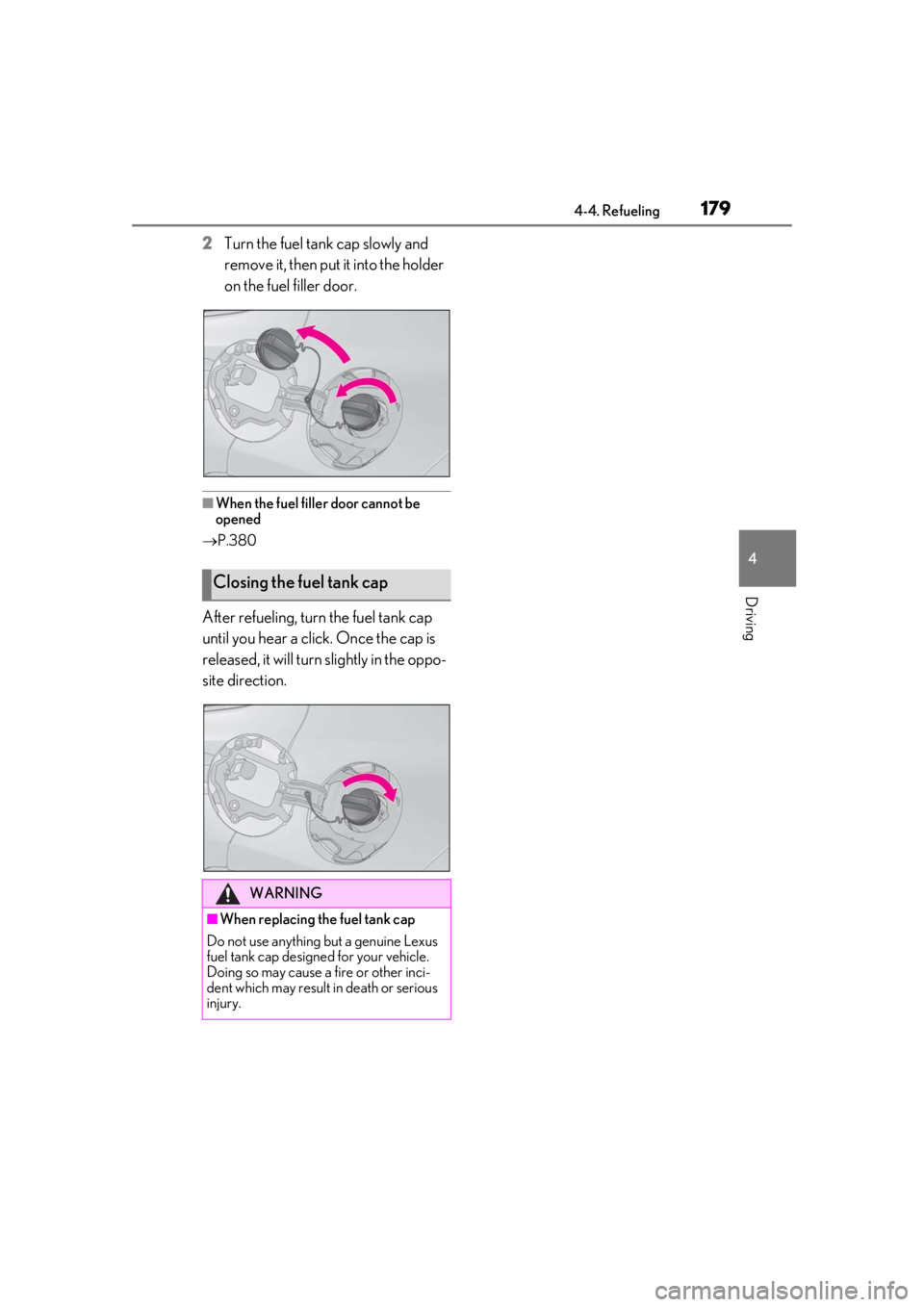
2Turn the fuel tank cap slowly and
remove it, then put it into the holder
on the fuel filler door.
■When the fuel filler door cannot be
opened
P.380
After refueling, turn the fuel tank cap
until you hear a click. Once the cap is
released, it will turn slightly in the oppo-
site direction.
Closing the fuel tank cap
WARNING
■When replacing the fuel tank cap
Do not use anything but a genuine Lexus
fuel tank cap designed for your vehicle.
Doing so may cause a fire or other inci-
dent which may result in death or serious
injury.
Page 212 of 452
![LEXUS UX200 2019 Owners Manual 2124-5. Using the driving support systems
below approximately 20 mph [30 km/h],
the set speed will be set to approximately
20 mph [30 km/h].)
■Accelerating after setting the vehicle
speed
The veh](/manual-img/36/58038/w960_58038-211.png "LEXUS UX200 2019 Owners Manual 2124-5. Using the driving support systems
below approximately 20 mph [30 km/h],
the set speed will be set to approximately
20 mph [30 km/h].)
■Accelerating after setting the vehicle
speed
The veh")
2124-5. Using the driving support systems
below approximately 20 mph [30 km/h],
the set speed will be set to approximately
20 mph [30 km/h].)
■Accelerating after setting the vehicle
speed
The vehicle can accelerate by operating the
accelerator pedal. After accelerating, the
set speed resumes. However, during vehi-
cle-to-vehicle distance control mode, the
vehicle speed may decrease below the set
speed in order to maintain the distance to
the preceding vehicle.
■When the vehicle stops while follow-up
cruising
●Pressing the “+RES” switch while the
vehicle ahead stops w ill resume follow-up
cruising if the vehicle ahead starts off
within approximately 3 seconds after the
switch is pressed.
●If the vehicle ahead starts off within 3 sec-
onds after your vehicle stops, follow-up
cruising will be resumed.
■Automatic cancelation of vehicle-to-
vehicle distance control mode
Vehicle-to-vehicle dist ance control mode is
automatically canceled in the following situ-
ations.
●VSC is activated.
●TRAC is activated for a period of time.
●When the VSC or TRAC system is
turned off.
●The sensor cannot detect correctly
because it is covered in some way.
●Pre-collision braking is activated.
●The parking brake is operated.
●The vehicle is stopped by system control
on a steep incline.
●The following are detected when the
vehicle has been stopped by system con-
trol:
• The driver is not wearing a seat belt.
• The driver’s door is opened.
• The vehicle has been stopped for about 3 minutes
If vehicle-to-vehicle distance control mode
is automatically canceled for any reasons
other than the above, there may be a mal- function in the system. Contact your Lexus
dealer.
■Automatic cancelation of constant
speed control mode
Constant speed control mode is automati-
cally canceled in the following situations:
●Actual vehicle speed is more than
approximately 10 mph (16 km/h) below
the set vehicle speed.
●Actual vehicle speed falls below approxi-
mately 20 mph (30 km/h).
●VSC is activated.
●TRAC is activated for a period of time.
●When the VSC or TRAC system is
turned off.
●Pre-collision braking is activated.
If constant speed control mode is automati-
cally canceled for any reasons other than
the above, there may be a malfunction in the
system. Contact your Lexus dealer.
■Brake operation
A brake operation sound may be heard and
the brake pedal response may change, but
these are not malfunctions.
■Warning messages and buzzers for
dynamic radar cruise control with full-
speed range
Warning messages and buzzers are used to
indicate a system malfunction or to inform
the driver of the need for caution while driv-
ing. If a warning messa ge is shown on the
multi-information displa y, read the message
and follow the instructions. ( P.184, 367)
■When the sensor may not be correctly
detecting the vehicle ahead
In the case of the fo llowing and depending
on the conditions, operate the brake pedal
when deceleration of the system is insuffi-
cient or operate the accelerator pedal
when acceleration is required.
As the sensor may not be able to correctly
detect these types of vehicles, the approach
warning ( P.210) may not be activated.
●Vehicles that cut in suddenly
●Vehicles traveling at low speeds
●Vehicles that are not moving in the same
Page 255 of 452
255
5
5
Interior features
Interior features
5-1. Remote TouchRemote Touch ............................ 256
5-2. Lexus Climate Concierge Lexus Climate Concierge ..... 260
5-3. Using the air conditioning system and defogger
Automatic air conditioning system ........................................................ 262
Heated steering wheel/seat heat- ers/seat ventilators ................. 271
5-4. Using the interior lights Interior lights list......................... 274
5-5. Using the storage features List of storage features............ 277
Luggage compartment features ........................................................ 280
5-6. Using the other interior features Other interior features ........... 285
Garage door opener............... 295
Compass........................................ 301