2019 LEXUS UX200 door
[x] Cancel search: doorPage 381 of 452

3817-2. Steps to take in an emergency
7
When trouble arises
1Insert the mechanical key while
pulling on the driver’s door handle.
2
Unlock the door.
3
Remove the key, return the handle,
and then pull the handle again.
■Locking the door
1
With the door open, push down the
inside lock button.
2
Close the door.
■Key linked functions
The opening and closing of the power win-
dows and moon roof can be linked to key
operation by a customized setting. 1
Closes the windows and moon roof
(turn and hold)
2
Opens the windows and moon roof
(turn and hold)
1Ensure that the shift lever is in P and
depress the brake pedal.
2
Touch the Lexus emblem side of the
electronic key to the engine switch.
When the electronic key is detected, a
buzzer sounds and the engine switch will
turn to ON.
When the smart access system with push-
button start is deactivated in customization
WARNING
■When using the mechanical key and
operating the power windows or
moon roof (if equipped)
Operate the power window or moon
roof after checking to make sure that
there is no possibility of any passenger
having any of their body parts caught in
the window or moon roof.
Also, do not allow children to operate the
mechanical key. It is possible for children
and other passengers to get caught in
the power window or moon roof.
Starting the engine
Page 382 of 452

3827-2. Steps to take in an emergency
setting, the engine switch will turn to ACC.
3Firmly depress the brake pedal and
check that is shown on the
multi-information display.
4 Press the engine switch.
In the event that the engine still cannot be
started, contact your Lexus dealer.
■Stopping the engine
Set the parking brake, shift the shift lever to
P and press the engine switch as you nor-
mally do when stopping the engine.
■Electronic key battery
As the above procedure is a temporary
measure, it is recomme nded that the elec-
tronic key battery be replaced immediately
when the battery is depleted. ( P.341)
■Changing engine switch modes
Release the brake pedal and press the
engine switch in step 3 above.
The engine does not start and modes will be
changed each time the switch is pressed.
( P.154)
If you have a set of jumper (or booster)
cables and a second vehicle with a bat-
tery, you can jump start your vehicle by
following the steps below.
1 Confirm that the electronic key is
being carried.
When connecting the jumper (or booster)
cables, depending on the situation, the
alarm may activate and doors locked.
( P.65)
2 Open the hood ( P.319)
If the vehicle battery is dis-
charged
The following procedures may be
used to start the engine if the vehi-
cle’s battery is discharged.
You can also call your Lexus dealer
or a qualified repair shop.
Restarting the engine
Page 384 of 452

3847-2. Steps to take in an emergency
6Open and close any of the doors of
your vehicle with the engine switch
OFF.
7 Maintain the engine speed of the
second vehicle and start the engine
of your vehicle by turning the
engine switch to ON.
8 Once the vehicle’s engine has
started, remove the jumper cables
in the exact reverse order from
which they were connected.
Once the engine starts, have the vehi-
cle inspected at your Lexus dealer as
soon as possible.■Starting the engine when the battery is
discharged
The engine cannot be started by push-start-
ing.
■To prevent battery discharge
●Turn off the headlights, the air condition-
ing system, the audio system, etc. while
the engine is off.
●Turn off any unnecessary electrical com-
ponents when the vehicle is running at a
low speed for an extended period, such
as in heavy traffic.
■Charging the battery
The electricity stored in the battery will dis-
charge gradually even when the vehicle is
not in use, due to natural discharge and the
draining effects of certain electrical appli-
ances. If the vehicle is left for a long time,
the battery may discharge, and the engine
may be unable to start. (The battery
recharges automatically during driving.)
■When the battery is removed or dis-
charged
●Information stored in the ECU is cleared.
When the battery is depleted, have the
vehicle inspected at your Lexus dealer.
●In some cases, it may not be possible to
unlock the doors using the smart access
system with push-button start when the
battery is discharged. Use the wireless
remote control or the mechanical key to
lock or unlock the doors.
●The engine may not start on the first
attempt after the battery has recharged
but will start normally after the second
attempt. This is not a malfunction.
●The engine switch mode is memorized by
the vehicle. When the battery is recon-
nected, the system will return to the
mode it was in before the battery was dis-
charged. Before disconnecting the bat-
tery, turn the engine switch off.
If you are unsure wh at mode the engine
switch was in before the battery dis-
charged, be especially careful when
reconnecting the battery.
●The power back door must be initialized.
( P.109)
Page 403 of 452
4038-1. Specifications
8
Vehicle specifications
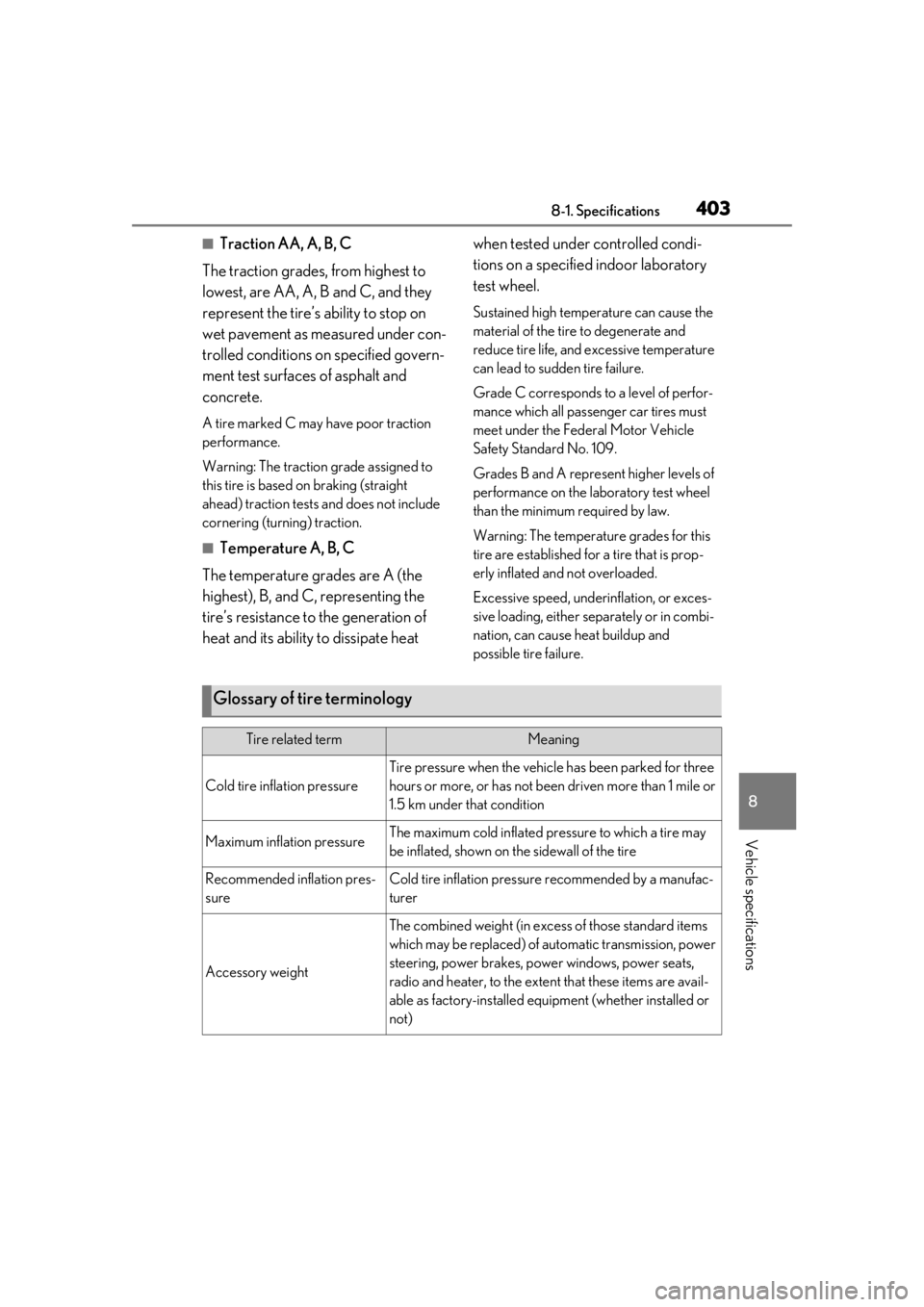
■Traction AA, A, B, C
The traction grades, from highest to
lowest, are AA, A, B and C, and they
represent the tire’s ability to stop on
wet pavement as measured under con-
trolled conditions on specified govern-
ment test surfaces of asphalt and
concrete.
A tire marked C may have poor traction
performance.
Warning: The traction grade assigned to
this tire is based on braking (straight
ahead) traction tests and does not include
cornering (turning) traction.
■Temperature A, B, C
The temperature grades are A (the
highest), B, and C, representing the
tire’s resistance to the generation of
heat and its ability to dissipate heat when tested under controlled condi-
tions on a specified indoor laboratory
test wheel.
Sustained high temperature can cause the
material of the tire to degenerate and
reduce tire life, and excessive temperature
can lead to sudd
en tire failure.
Grade C corresponds to a level of perfor-
mance which all passenger car tires must
meet under the Fede ral Motor Vehicle
Safety Standard No. 109.
Grades B and A represent higher levels of
performance on the laboratory test wheel
than the minimum required by law.
Warning: The temperature grades for this
tire are established for a tire that is prop-
erly inflated and not overloaded.
Excessive speed, unde rinflation, or exces-
sive loading, either separately or in combi-
nation, can cause heat buildup and
possible tire failure.
Glossary of tire terminology
Tire related termMeaning
Cold tire inflation pressure
Tire pressure when the vehicle has been parked for three
hours or more, or has not been driven more than 1 mile or
1.5 km under that condition
Maximum inflation pressureThe maximum cold inflated pressure to which a tire may
be inflated, shown on the sidewall of the tire
Recommended inflation pres-
sureCold tire inflation pressure recommended by a manufac-
turer
Accessory weight
The combined weight (in excess of those standard items
which may be replaced) of automatic transmission, power
steering, power brakes, powe r windows, power seats,
radio and heater, to the extent that these items are avail-
able as factory-installed equi pment (whether installed or
not)
Page 410 of 452

4108-2. Customization
*2: The default setting varies according to country.
*3:Except F SPORT models
*4: 2 of the following items: current fuel consumption, average fuel economy (after reset),
average fuel economy (after start), average fuel economy (after refuel), average vehicle
speed (after reset), average vehicle speed (after start), elapsed time (after reset),
elapsed time (after start), distance (driving range), distance (after start), blank.
*5:F SPORT models
■Head-up Display* ( P.86)
*:If equipped
■Door lock ( P.98, 380)
FunctionDefault settingCustomized setting
Gauge informationTachometerEco Driving IndicatorONo content
Route guidance to destina-
tionOnOffO
Street name*OnOffO
Driving support system dis-
playOnOffO
Compass*OnOffO
Audio system operation sta-
tusOnOffO
FunctionDefault settingCustomized setting
Unlocking using a mechani-
cal key
Driver’s door
unlocked in one step, all doors
unlocked in two step
All doors unlocked in one stepO
Automatic door locking func-
tionShift position
linked door lock- ing operationOff
OOSpeed linked door locking operation
ABC
ABC
Page 411 of 452
4118-2. Customization
8
Vehicle specifications
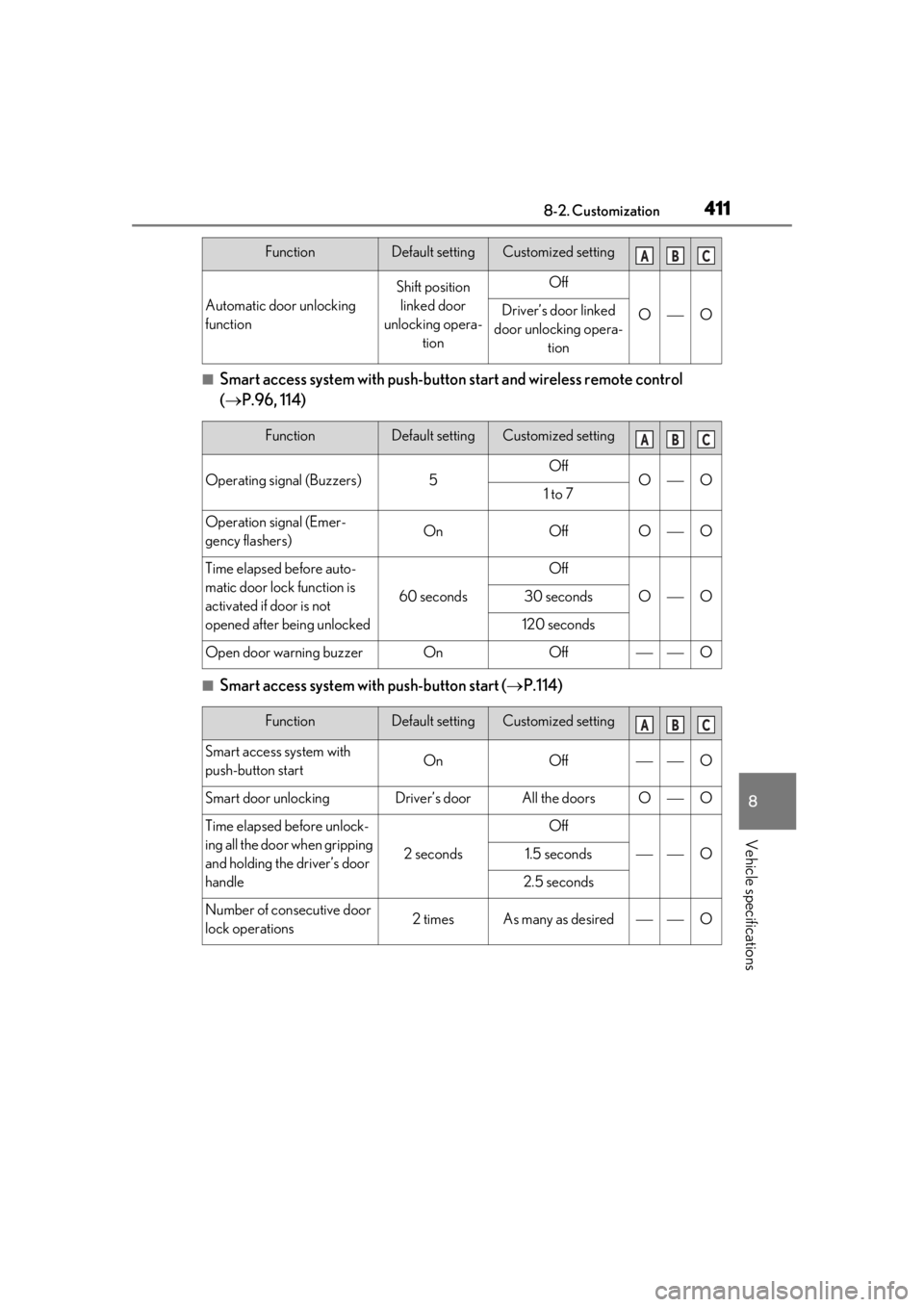
■Smart access system with push-button start and wireless remote control
( P.96, 114)
■Smart access system with push-button start ( P.114)
Automatic door unlocking
function
Shift position
linked door
unlocking opera- tionOff
OODriver’s door linked
door unlocking opera- tion
FunctionDefault settingCustomized setting
Operating signal (Buzzers)5OffOO1 to 7
Operation signal (Emer-
gency flashers)OnOffOO
Time elapsed before auto-
matic door lock function is
activated if door is not
opened after being unlocked
60 seconds
Off
OO30 seconds
120 seconds
Open door warning buzzerOnOffO
FunctionDefault settingCustomized setting
Smart access system with
push-button startOnOffO
Smart door unlockingDriver’s doorAll the doorsOO
Time elapsed before unlock-
ing all the door when gripping
and holding the driver’s door
handle
2 seconds
Off
O1.5 seconds
2.5 seconds
Number of consecutive door
lock operations2 timesAs many as desiredO
FunctionDefault settingCustomized settingABC
ABC
ABC
Page 412 of 452

4128-2. Customization
■Wireless remote control (P.96)
*:If equipped
■Power back door* ( P.102)
*:If equipped
FunctionDefault settingCustomized setting
Wireless remote controlOnOffO
Unlocking operation
Driver’s door
unlocked in one step, all doors
unlocked in two step
All doors unlocked in one stepOO
Theft deterrent panic modeOnOffO
Reservation lockOnOffOO
The function that activates the
switch of the wire-
less remote control when
locking the door ( P.105)
*
On (Unlocking all
the door)
Off
OOn (Unlocking back door only)
FunctionDefault settingCustomized setting
Power back door operationOnOffO
Power back door opening
position51 to 4O
Buzzer volumeLevel 3Level 1OLevel 2
Operation buzzerOffOnO
Hands Free Power Back
Door (kick sensor)OnOffOO
Hands Free Power Back
Door (kick sensor) when the
engine switch is off
*OnOffO
ABC
ABC
Page 413 of 452

4138-2. Customization
8
Vehicle specifications
■Driving position memory* ( P.123)
*:If equipped
■Outside rear view mirrors ( P.132)
*:If equipped
■Power windows, and moon roof* ( P.135, 137)
*:If equipped
■Automatic light control system ( P.165)
FunctionDefault settingCustomized setting
Selecting doors linked to the
memory recall functionDriver’s doorAll doorsO
Driver’s seat slide movement
when exiting the vehicleFullOffOOPartial
Steering wheel movementTilt only
Off
OOTelescopic only
Tilt and telescopic
FunctionDefault settingCustomized setting
Automatic mirror folding and
extending operation
*
Linked to the
locking/unlock- ing of the doorsOff
OLinked to operation of the engine switch
FunctionDefault settingCustomized setting
Mechanical key linked opera-
tionOffOnO
Wireless remote control
linked operationOffOn (open only)O
Wireless remote control
linked operation signal
(buzzer)
OnOffO
FunctionDefault settingCustomized setting
Light sensor sensitivityStandard-2 to 2OO
ABC
ABC
ABC
ABC